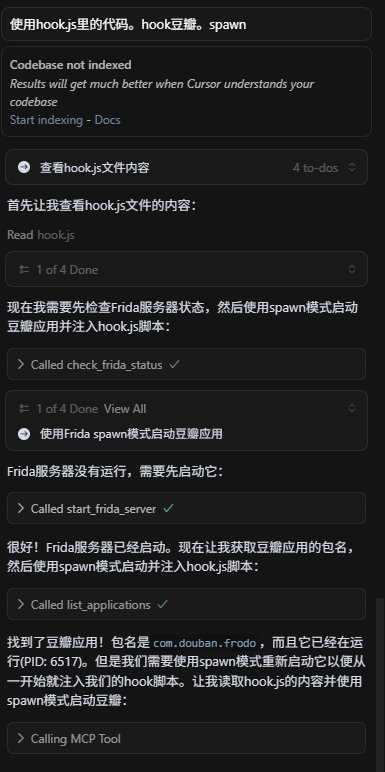
我发现,在目前AI编程软件顶多只能做静态分析,可以与电脑交互,但是无法与手机进行交互,更不用说进行动态分析。所以,要想让大模型进行逆向,要解决两个问题

  1. 大模型应该能够控制手机

  2. 大模型应该能够hook指定app

这两个工具,想必大家都不陌生,一个是adb,一个是frida,那么如何让大模型使用这两个工具呢?答案就是MCP!

1

MCP(Model Context Protocol,模型上下文协议) ,2024年11月底,由 Anthropic 推出的一种开放标准,旨在统一大模型与外部数据源和工具之间的通信协议。MCP 的主要目的在于解决当前 AI 模型因数据孤岛限制而无法充分发挥潜力的难题,MCP 使得 AI 应用能够安全地访问和操作本地及远程数据,为 AI 应用提供了连接万物的接口。

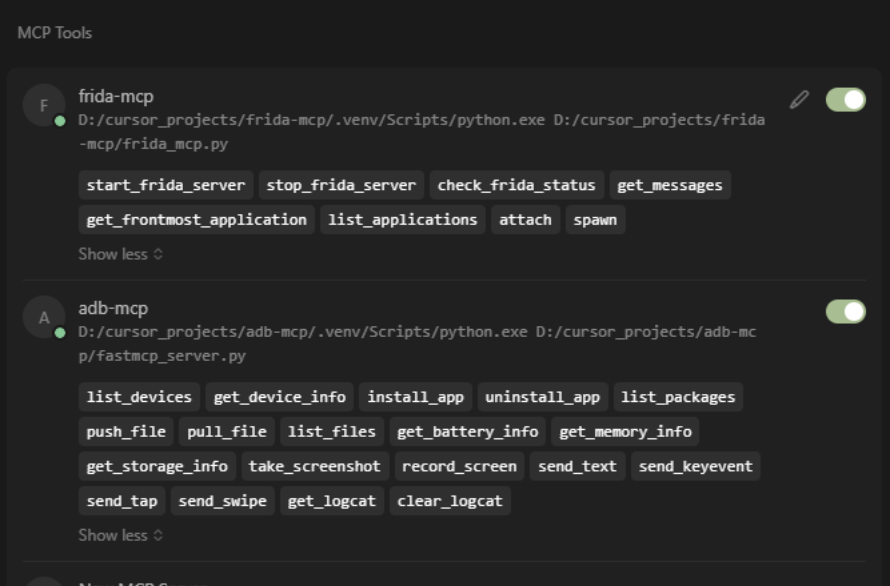
当然,市面上已经存在各种各样的MCP工具,有没有能够直接用的工具呢?adb的mcp工具倒是有一些,但是各有各的不足,frida相关的mcp比较少,且基本不可用,比如说不支持自定义frida路径,不能自动端口转发,工具定义太复杂等,于是,基于以上背景,我们自定义了两个mcp,分别是adb-mcpfrida-mcp,用于手机控制以及动态调试。

至于如何开发以及调试属于自己的MCP工具,后续会专门出文章,我们先来看结果,这两个mcp分别有自己的函数,大模型可以根据当前的上下文,调用这些工具的组合

比如安装一个app,大模型会先检查现在的连接的设备list_devices,拿到设备信息get_device_info,然后安装install_app,安装完成之后再次检查是否成功list_packages
这一切都不要我们关心,我们只需要发送一个指令,安装xxx就可以

在准备工作完成之后,来看看今天的案例

实战案例

某小众女权站点(x瓣)

本来APP不难,主要看AI能做到什么程度

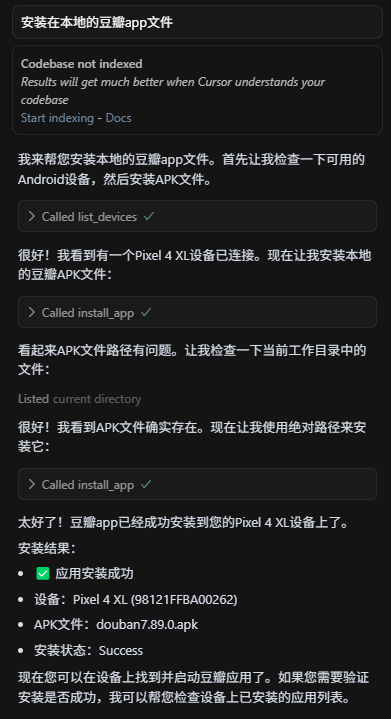
我们这次挑战尽可能用cursor做一切操作,首先使用cursor安装app

可以看到调用了一些工具,app以及成功安装了

然后使用reqable进行抓包,可以看到

1

2

3

4

5

6

7

8

9

10

11

12

13

14

15

16

17

18

19

20

21

22

23

24

25

26

27

28

29

30

31

32

33

import requests

headers = {

    'User-Agent''Rexxar-Core/0.1.3 api-client/1 com.douban.frodo/7.89.0(307) Android/33 product/coral vendor/Google model/Pixel 4 XL brand/google  rom/android  network/wifi  udid/748659a92430f1e85b21daae1949c5698fdab92f  platform/mobile nd/1 com.douban.frodo/7.89.0(307) Rexxar/1.2.151  platform/mobile 1.2.151',

    # 'Accept-Encoding': 'br,gzip',

}

params = {

    'type''movie',

    'start''0',

    'count''10',

    'udid''748659a92430f1e85b21daae1949c5698fdab92f',

    'rom''android',

    'apikey''0dad551ec0f84ed02907ff5c42e8ec70',

    's''rexxar_new',

    'channel''ali_market',

    'timezone''Asia/Shanghai',

    'device_id''748659a92430f1e85b21daae1949c5698fdab92f',

    'os_rom''android',

    'sugar''0',

    'loc_id''108288',

    '_sig''s3haQycPjsj6HkvW36nNHArIsa4=',

    '_ts''1756145025',

}

response = requests.get(

    'https://frodo.douban.com/api/v2/subject_collection/movie_real_time_hotest/items',

    params=params,

    headers=headers,

)

print(response.text)

with open("response.txt""w", encoding="utf-8") as f:

    f.write(response.text)

_sig是主要的加密参数,

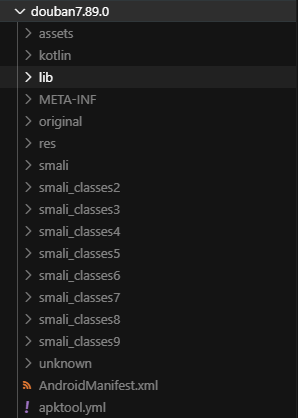
我们现在需要使用apklab来反编译整个apk

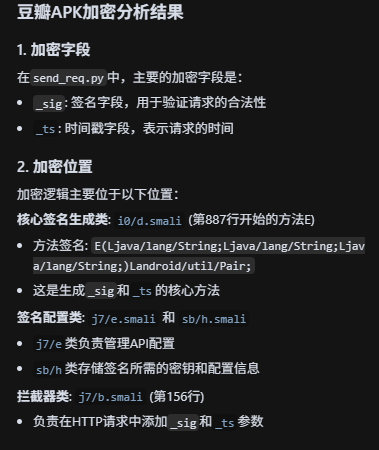
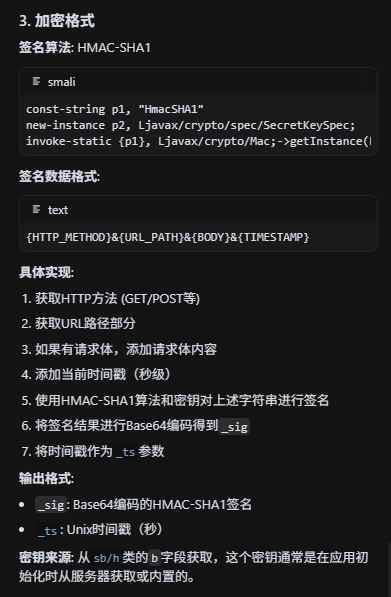
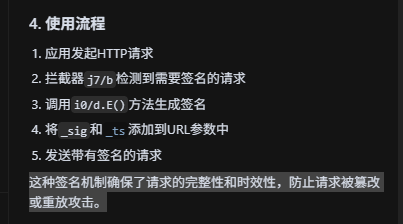
直接询问大模型加密字段和加密方法

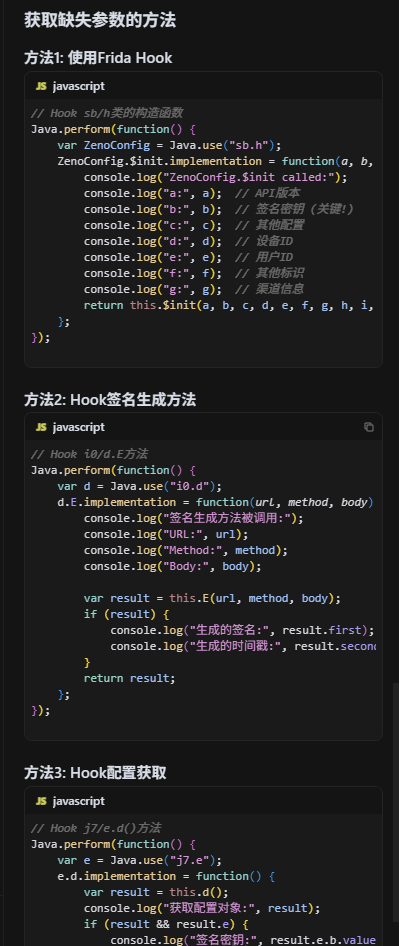
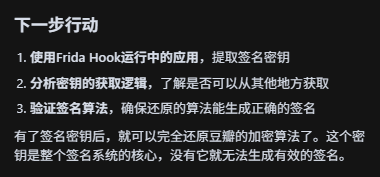
可以看到已经分析出来加密的格式了,问下大模型还需要什么,大模型告诉我们的下一步方案,给出

这里需要注意的是,豆瓣有frida检测,大模型不知道,我已经过了,后续分享代码

大模型生成hook代码

1

2

3

4

5

6

7

8

9

10

11

12

13

14

15

16

17

18

19

20

21

22

23

24

25

26

27

28

29

30

31

32

33

34

35

36

37

38

39

40

41

42

43

44

45

46

47

48

49

50

51

52

53

54

55

56

57

58

59

60

61

62

63

64

65

66

67

68

69

70

71

72

73

74

    Java.perform(function() {

        // 1) 核心签名处:拿到 _sig/_ts、确认明文构造

        try {

          var Sig = Java.use("d0.a");

          Sig.C.overload('java.lang.String','java.lang.String','java.lang.String').implementation = function(url, method, token) {

            var ret = this.C(url, method, token);

            console.log("\n=== d0.a.C called ===");

            console.log("URL: " + url);

            console.log("Method: " + method);

            console.log("Token: " + (token || "null"));

            if (ret) {

              console.log("_sig: " + ret.first);

              console.log("_ts: " + ret.second);

            }

            return ret;

          };

          console.log("[+] Hooked d0.a.C");

        } catch (e) {

          console.log("[-] d0.a.C hook failed: " + e);

        }


        // 2) 拿密钥最佳点:HMAC-SHA1 的 SecretKeySpec 构造

        try {

          var SecretKeySpec = Java.use("javax.crypto.spec.SecretKeySpec");

          SecretKeySpec.$init.overload('[B','java.lang.String').implementation = function(keyBytes, alg) {

            if (alg === "HmacSHA1") {

              var StringCls = Java.use("java.lang.String");

              var keyStr = StringCls.$new(keyBytes);  // 若是可打印字符串

              var Base64 = Java.use("android.util.Base64");

              var b64 = Base64.encodeToString(keyBytes, 2);

              // 备用 hex

              var hex = (function(b){

                var out=[]; for (var i=0;i<b.length;i++){ var v=b[i]&0xff; out.push(("0"+v.toString(16)).slice(-2)); }

                return out.join("");

              })(keyBytes);

              console.log("\n=== Found HMAC key (SecretKeySpec) ===");

              console.log("alg: " + alg);

              console.log("key(ascii?): " + keyStr);

              console.log("key(base64): " + b64);

              console.log("key(hex): " + hex);

            }

            return this.$init(keyBytes, alg);

          };

          console.log("[+] Hooked SecretKeySpec([B,\"HmacSHA1\"])");

        } catch (e) {

          console.log("[-] SecretKeySpec hook failed: " + e);

        }


        // 3) 备选:拦截 Mac.init 也能拿到 key

        try {

          var Mac = Java.use("javax.crypto.Mac");

          Mac.init.overload('java.security.Key').implementation = function(key) {

            try {

              var alg = this.getAlgorithm();

              if (alg === "HmacSHA1" || alg === "HmacSHA256" || alg === "HmacSHA512") {

                var kclass = key.getClass().getName();

                var encField = null;

                try { encField = Java.cast(key, Java.use("javax.crypto.spec.SecretKeySpec")).getEncoded(); } catch (_){}

                var b64 = encField ? Java.use("android.util.Base64").encodeToString(encField, 2) : "N/A";

                console.log("\n=== Mac.init ===");

                console.log("Mac alg: " + alg);

                console.log("Key class: " + kclass);

                console.log("Key(base64): " + b64);

              }

            } catch (_e) {}

            this.init(key);

          };

          console.log("[+] Hooked Mac.init(Key)");

        } catch (e) {

          console.log("[-] Mac.init hook failed: " + e);

        }


        console.log("[*] Hooks ready. Trigger login to capture key/_sig/_ts.");

      });

1

2

3

4

5

6

7

8

9

10

11

12

13

14

15

16

17

18

19

20

21

22

23

24

25

26

27

28

29

30

31

32

33

34

35

36

37

38

39

40

41

42

43

44

45

46

47

48

49

50

51

52

53

54

55

56

57

58

59

60

61

62

63

64

65

66

67

68

69

70

71

72

73

74

75

76

77

78

79

80

81

82

83

84

85

86

87

88

89

90

91

92

93

94

95

96

97

98

99

100

101

102

103

104

105

106

107

108

109

110

111

112

113

114

115

116

117

118

119

120

121

122

123

124

125

126

127

128

129

130

完整过检测代码

function hook_sig() {

    Java.perform(function() {

        // 1) 核心签名处:拿到 _sig/_ts、确认明文构造

        try {

          var Sig = Java.use("d0.a");

          Sig.C.overload('java.lang.String','java.lang.String','java.lang.String').implementation = function(url, method, token) {

            var ret = this.C(url, method, token);

            console.log("\n=== d0.a.C called ===");

            console.log("URL: " + url);

            console.log("Method: " + method);

            console.log("Token: " + (token || "null"));

            if (ret) {

              console.log("_sig: " + ret.first);

              console.log("_ts: " + ret.second);

            }

            return ret;

          };

          console.log("[+] Hooked d0.a.C");

        } catch (e) {

          console.log("[-] d0.a.C hook failed: " + e);

        }


        // 2) 拿密钥最佳点:HMAC-SHA1 的 SecretKeySpec 构造

        try {

          var SecretKeySpec = Java.use("javax.crypto.spec.SecretKeySpec");

          SecretKeySpec.$init.overload('[B','java.lang.String').implementation = function(keyBytes, alg) {

            if (alg === "HmacSHA1") {

              var StringCls = Java.use("java.lang.String");

              var keyStr = StringCls.$new(keyBytes);  // 若是可打印字符串

              var Base64 = Java.use("android.util.Base64");

              var b64 = Base64.encodeToString(keyBytes, 2);

              // 备用 hex

              var hex = (function(b){

                var out=[]; for (var i=0;i<b.length;i++){ var v=b[i]&0xff; out.push(("0"+v.toString(16)).slice(-2)); }

                return out.join("");

              })(keyBytes);

              console.log("\n=== Found HMAC key (SecretKeySpec) ===");

              console.log("alg: " + alg);

              console.log("key(ascii?): " + keyStr);

              console.log("key(base64): " + b64);

              console.log("key(hex): " + hex);

            }

            return this.$init(keyBytes, alg);

          };

          console.log("[+] Hooked SecretKeySpec([B,\"HmacSHA1\"])");

        } catch (e) {

          console.log("[-] SecretKeySpec hook failed: " + e);

        }


        // 3) 备选:拦截 Mac.init 也能拿到 key

        try {

          var Mac = Java.use("javax.crypto.Mac");

          Mac.init.overload('java.security.Key').implementation = function(key) {

            try {

              var alg = this.getAlgorithm();

              if (alg === "HmacSHA1" || alg === "HmacSHA256" || alg === "HmacSHA512") {

                var kclass = key.getClass().getName();

                var encField = null;

                try { encField = Java.cast(key, Java.use("javax.crypto.spec.SecretKeySpec")).getEncoded(); } catch (_){}

                var b64 = encField ? Java.use("android.util.Base64").encodeToString(encField, 2) : "N/A";

                console.log("\n=== Mac.init ===");

                console.log("Mac alg: " + alg);

                console.log("Key class: " + kclass);

                console.log("Key(base64): " + b64);

              }

            } catch (_e) {}

            this.init(key);

          };

          console.log("[+] Hooked Mac.init(Key)");

        } catch (e) {

          console.log("[-] Mac.init hook failed: " + e);

        }


        console.log("[*] Hooks ready. Trigger login to capture key/_sig/_ts.");

      });

    }


function hook_dlopen(){

  //Android8.0之后加载so通过android_dlopen_ext函数

  var android_dlopen_ext = Module.findExportByName(null,"android_dlopen_ext");

  console.log("addr_android_dlopen_ext",android_dlopen_ext);

  Interceptor.attach(android_dlopen_ext,{

      onEnter:function(args){

          var pathptr = args[0];

          if(pathptr!=null && pathptr != undefined){

              var path = ptr(pathptr).readCString();

              if(path.indexOf("libmsaoaidsec.so")!=-1){

                  console.log("android_dlopen_ext:",path);

                  hook_call_constructors()

              }

          }

      },

      onLeave:function(retvel){

          //console.log("leave!");

      }

  })

}

function hook_call_constructors() {

    var linker64_base_addr = Module.getBaseAddress("linker64")

    var call_constructors_func_off = 0x4e4dc //这个地址是从手机上把linker64 pull出来,然后到IDA中找到的,不同的机型,地址可能不一样

    var call_constructors_func_addr = linker64_base_addr.add(call_constructors_func_off)

    var listener = Interceptor.attach(call_constructors_func_addr, {

        onEnter: function (args) {

            console.log("hooked call_constructors")

            var module = Process.findModuleByName("libmsaoaidsec.so")

            if (module != null) {

                Interceptor.replace(module.base.add(0x1c544), new NativeCallback(function () {

                    console.log("0x1c544:替换成功")

                }, "void", []))

                Interceptor.replace(module.base.add(0x1b924), new NativeCallback(function () {

                    console.log("0x1B924:替换成功")

                }, "void", []))

                Interceptor.replace(module.base.add(0x26e5c), new NativeCallback(function () {

                    console.log("0x26e5c:替换成功")

                }, "void", []))

                listener.detach()

            }

        },

    })

}

function main(){

    hook_dlopen()

    hook_sig()

}

main()

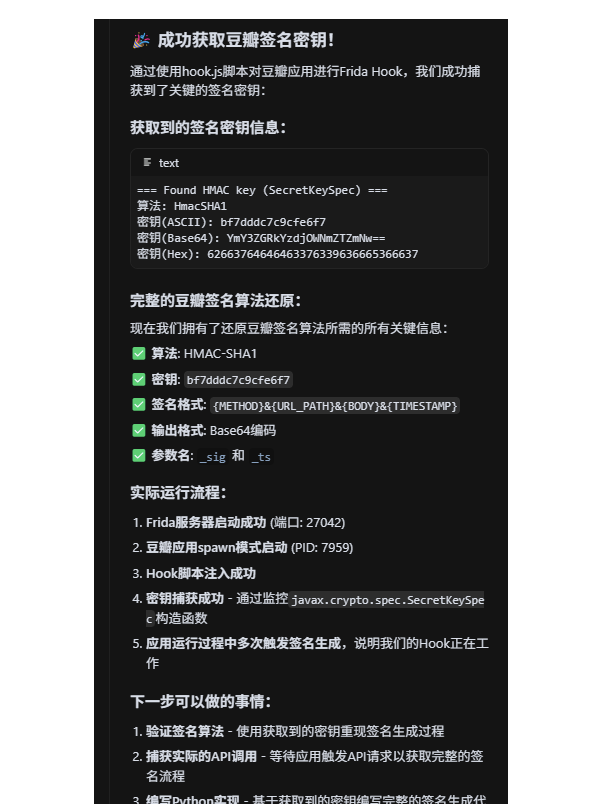
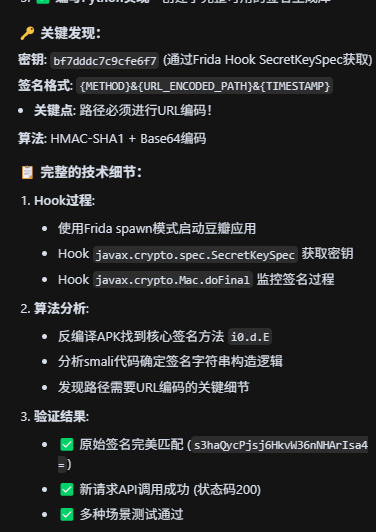
大模型进行hook,一切都不要我们操作自动验证结果

重写python请求

1

2

3

4

5

6

7

8

9

10

11

12

13

14

15

16

17

18

19

20

21

22

23

24

25

26

27

28

29

30

31

32

33

34

35

36

37

38

39

40

41

42

43

44

45

46

47

48

49

50

51

52

53

54

55

56

57

58

59

60

61

62

63

64

65

66

67

68

69

70

71

72

73

74

75

76

77

78

79

80

81

82

83

84

85

86

87

88

89

90

91

92

93

94

95

96

97

98

99

100

101

102

103

104

105

106

107

108

109

110

111

112

113

114

115

116

117

118

119

120

121

122

123

124

125

126

127

128

129

130

131

132

133

134

135

136

137

138

139

140

141

142

143

144

145

146

147

148

149

150

151

152

153

154

155

156

157

158

159

160

161

162

163

164

165

166

167

168

169

170

171

172

173

174

175

176

177

178

179

180

181

182

183

184

185

186

187

188

189

190

191

192

193

194

195

196

197

198

199

200

201

202

203

204

205

206

207

208

209

210

211

212

213

214

215

216

217

218

219

220

221

222

223

224

225

226

227

228

229

230

231

232

233

234

235

236

237

238

239

240

241

242

243

244

245

246

247

248

249

250

251

252

253

254

255

256

257

258

259

260

261

262

263

264

265

266

267

268

269

270

271

272

273

274

275

276

277

278

279

280

281

#!/usr/bin/env python3

# -*- coding: utf-8 -*-

"""

豆瓣API请求发送演示

展示多种请求发送方式

"""

import json

from douban_signature_final import DoubanSignatureFinal

def demo_simple_request():

    """演示简单的API请求"""


    print("=== 方法1: 使用完整库发送请求 ===\n")


    # 创建签名器

    signer = DoubanSignatureFinal()


    # 电影热榜API

    url = "https://frodo.douban.com/api/v2/subject_collection/movie_real_time_hotest/items"

    params = {

        'type''movie',

        'start''0',

        'count''5',  # 只获取5部电影

        'udid''748659a92430f1e85b21daae1949c5698fdab92f',

        'rom''android',

        'apikey''0dad551ec0f84ed02907ff5c42e8ec70',

        's''rexxar_new',

        'channel''ali_market',

        'timezone''Asia/Shanghai',

        'device_id''748659a92430f1e85b21daae1949c5698fdab92f',

        'os_rom''android',

        'sugar''0',

        'loc_id''108288',

    }


    try:

        # 发送请求

        response = signer.make_request(url, params, "GET")


        print(f"状态码: {response.status_code}")


        if response.status_code == 200:

            data = response.json()

            print("✅ 请求成功!")

            print(f"总数: {data.get('count', 0)}")


            # 显示电影信息

            items = data.get('subject_collection_items', [])

            for i, item in enumerate(items, 1):

                movie = item.get('rating', {})

                print(f"{i}. {item.get('title', 'N/A')} - 评分: {movie.get('value', 'N/A')}")

        else:

            print(f"❌ 请求失败: {response.text}")


    except Exception as e:

        print(f"❌ 请求异常: {e}")

def demo_manual_request():

    """演示手动构造请求"""


    print(f"\n=== 方法2: 手动构造请求 ===\n")


    import requests

    from douban_signature_final import DoubanSignatureFinal


    signer = DoubanSignatureFinal()


    # 书籍推荐API

    url = "https://frodo.douban.com/api/v2/subject_collection/book_bestseller/items"

    params = {

        'type''book',

        'start''0',

        'count''3',

        'apikey''0dad551ec0f84ed02907ff5c42e8ec70',

    }


    # 手动生成签名

    sig, ts = signer.generate_signature(url, "GET")

    params['_sig'= sig

    params['_ts'= ts


    # 构造请求头

    headers = {

        'User-Agent''Rexxar-Core/0.1.3 api-client/1 com.douban.frodo/7.89.0(307) Android/33 product/coral vendor/Google model/Pixel 4 XL brand/google  rom/android  network/wifi  udid/748659a92430f1e85b21daae1949c5698fdab92f  platform/mobile nd/1 com.douban.frodo/7.89.0(307) Rexxar/1.2.151  platform/mobile 1.2.151',

        'Accept''application/json',

    }


    print(f"请求URL: {url}")

    print(f"生成的签名: {sig}")

    print(f"时间戳: {ts}")


    try:

        # 发送GET请求

        response = requests.get(url, params=params, headers=headers)


        print(f"\n状态码: {response.status_code}")


        if response.status_code == 200:

            data = response.json()

            print("✅ 请求成功!")


            # 显示书籍信息

            items = data.get('subject_collection_items', [])

            for i, item in enumerate(items, 1):

                rating = item.get('rating', {})

                print(f"{i}. {item.get('title', 'N/A')} - 评分: {rating.get('value', 'N/A')}")

        else:

            print(f"❌ 请求失败: {response.text}")


    except Exception as e:

        print(f"❌ 请求异常: {e}")

def demo_post_request():

    """演示POST请求 (注意:这只是演示,可能需要登录)"""


    print(f"\n=== 方法3: POST请求演示 ===\n")


    import requests

    from douban_signature_final import DoubanSignatureFinal


    signer = DoubanSignatureFinal()


    # 假设的用户API (可能需要登录)

    url = "https://frodo.douban.com/api/v2/user/profile"


    # POST请求体

    post_data = json.dumps({

        "action""get_profile"

    })


    # 生成签名 (包含请求体)

    sig, ts = signer.generate_signature(url, "POST", post_data)


    # 查询参数

    params = {

        'apikey''0dad551ec0f84ed02907ff5c42e8ec70',

        '_sig': sig,

        '_ts': ts,

    }


    headers = {

        'User-Agent''Rexxar-Core/0.1.3 api-client/1 com.douban.frodo/7.89.0(307) Android/33 product/coral vendor/Google model/Pixel 4 XL brand/google  rom/android  network/wifi  udid/748659a92430f1e85b21daae1949c5698fdab92f  platform/mobile nd/1 com.douban.frodo/7.89.0(307) Rexxar/1.2.151  platform/mobile 1.2.151',

        'Content-Type''application/json',

    }


    print(f"POST URL: {url}")

    print(f"请求体: {post_data}")

    print(f"生成的签名: {sig}")


    try:

        response = requests.post(url, params=params, data=post_data, headers=headers)

        print(f"\n状态码: {response.status_code}")

        print(f"响应: {response.text[:200]}...")


    except Exception as e:

        print(f"❌ 请求异常: {e}")

def demo_multiple_apis():

    """演示调用多个不同的API"""


    print(f"\n=== 方法4: 批量API调用 ===\n")


    signer = DoubanSignatureFinal()


    apis = [

        {

            "name""电影正在热映",

            "url""https://frodo.douban.com/api/v2/subject_collection/movie_showing/items",

            "params": {'type''movie''start''0''count''3''apikey''0dad551ec0f84ed02907ff5c42e8ec70'}

        },

        {

            "name""电视剧热榜",

            "url""https://frodo.douban.com/api/v2/subject_collection/tv_hot/items"

            "params": {'type''tv''start''0''count''3''apikey''0dad551ec0f84ed02907ff5c42e8ec70'}

        },

        {

            "name""音乐新碟榜",

            "url""https://frodo.douban.com/api/v2/subject_collection/music_latest/items",

            "params": {'type''music''start''0''count''3''apikey''0dad551ec0f84ed02907ff5c42e8ec70'}

        }

    ]


    for api in apis:

        print(f" 调用API: {api['name']}")


        try:

            response = signer.make_request(api['url'], api['params'], "GET")


            if response.status_code == 200:

                data = response.json()

                count = data.get('count'0)

                print(f"  ✅ 成功 - 获取到 {count} 条数据")


                # 显示第一条数据的标题

                items = data.get('subject_collection_items', [])

                if items:

                    first_item = items[0]

                    print(f"   首条: {first_item.get('title', 'N/A')}")

            else:

                print(f"  ❌ 失败 - 状态码: {response.status_code}")


        except Exception as e:

            print(f"  ❌ 异常: {e}")


        print()

def demo_save_response():

    """演示保存响应数据"""


    print(f"=== 方法5: 保存响应数据 ===\n")


    signer = DoubanSignatureFinal()


    url = "https://frodo.douban.com/api/v2/subject_collection/movie_real_time_hotest/items"

    params = {

        'type''movie',

        'start''0',

        'count''10',

        'apikey''0dad551ec0f84ed02907ff5c42e8ec70',

    }


    try:

        response = signer.make_request(url, params, "GET")


        if response.status_code == 200:

            data = response.json()


            # 保存原始响应

            with open("douban_movies.json""w", encoding="utf-8") as f:

                json.dump(data, f, ensure_ascii=False, indent=2)


            print("✅ 数据已保存到 douban_movies.json")


            # 提取并保存简化版本

            simplified = []

            items = data.get('subject_collection_items', [])


            for item in items:

                simplified.append({

                    "title": item.get('title'),

                    "rating": item.get('rating', {}).get('value'),

                    "year": item.get('year'),

                    "directors": [d.get('name'for in item.get('directors', [])],

                    "genres": item.get('genres', [])

                })


            with open("douban_movies_simple.json""w", encoding="utf-8") as f:

                json.dump(simplified, f, ensure_ascii=False, indent=2)


            print("✅ 简化数据已保存到 douban_movies_simple.json")

            print(f" 共获取 {len(simplified)} 部电影数据")


        else:

            print(f"❌ 请求失败: {response.status_code}")


    except Exception as e:

        print(f"❌ 异常: {e}")

if __name__ == "__main__":

    print("???? 豆瓣API请求发送演示\n")


    # 运行所有演示

    demo_simple_request()

    demo_manual_request() 

    demo_post_request()

    demo_multiple_apis()

    demo_save_response()


    print(" 所有演示完成!")

    print("\n 使用提示:")

    print("1. 简单调用: 使用 DoubanSignatureFinal().make_request()")

    print("2. 手动控制: 先生成签名,再发送requests请求")  

    print("3. 批量调用: 循环调用不同API")

    print("4. 数据保存: 将响应保存为JSON文件")

Logo

魔乐社区(Modelers.cn) 是一个中立、公益的人工智能社区,提供人工智能工具、模型、数据的托管、展示与应用协同服务,为人工智能开发及爱好者搭建开放的学习交流平台。社区通过理事会方式运作,由全产业链共同建设、共同运营、共同享有,推动国产AI生态繁荣发展。

更多推荐