html仿手机界面,javascript新手实例3-仿手机聊天界面(if else运用)
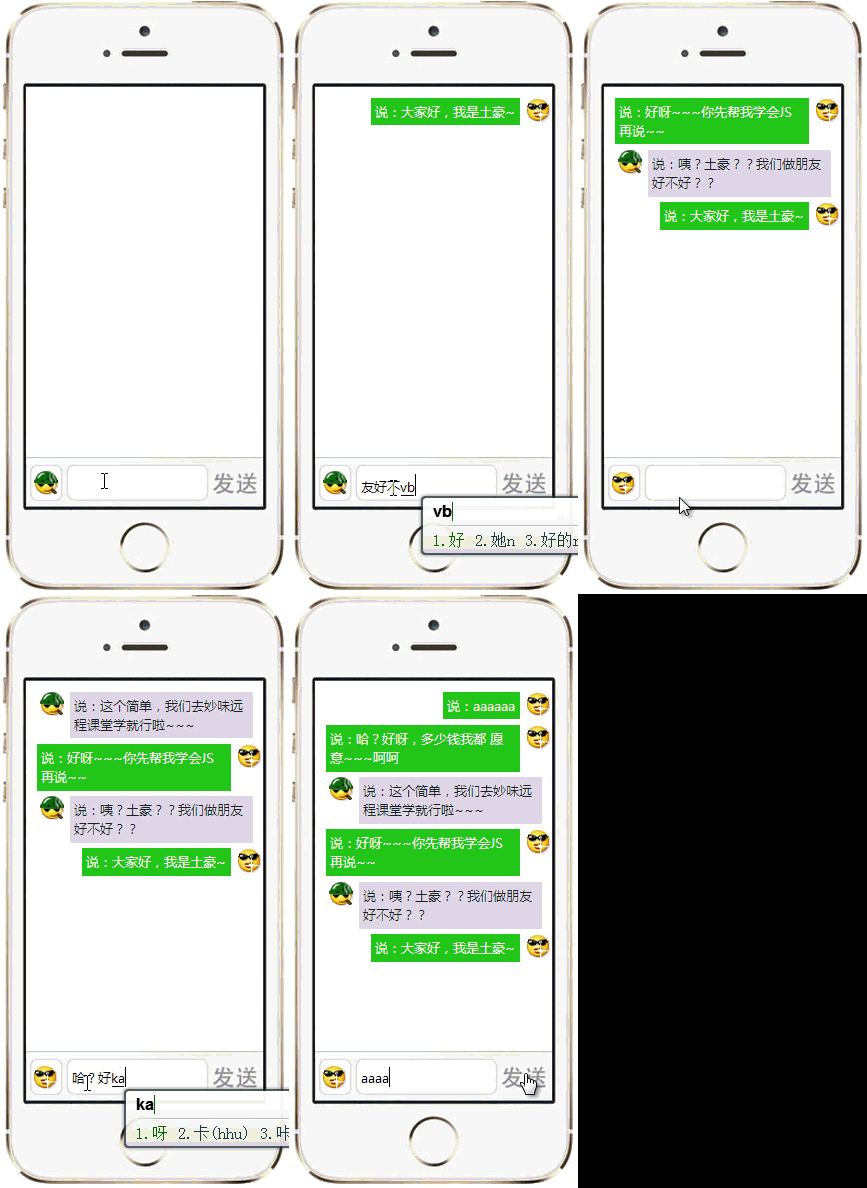
今天给大家一个if else的Javascript小示例,其中我在js文件里写了很多注释,有兴趣的同学自己看注释,另外对于聊天界面的显示方式,我写了两种,大家也可以分别试试:
老规矩,先上图:
html代码
模拟手机短信发送css代码
body {
background: #000;
}
.phoneBox {
background: url(phoneBg.jpg) no-repeat;
width: 289px;
height: 594px;
margin: 50px auto;
}
.phoneContent {
width: 237px;
height: 370px;
float: left;
overflow-x: hidden;
margin: 87px 0 0 26px;
}
#phoneContrl {
float: left;
margin: 7px 0 0 30px;
}
.emo, #textInput {
height: 32px;
border: 1px solid #ded5e6;
border-radius: 5px;
float: left;
margin-right: 3px;
}
.emo {
width: 31px;
cursor: pointer;
background: url(em1.jpg) no-repeat center;
}
#textInput {
width: 135px;
padding: 0 0 0 5px;
}
#textSet {
height: 32px;
cursor: pointer;
width: 47px;
border: none;
background: #f7f7f7;
font-size: 16px;
line-height: 32px;
text-align: center;
}
.user1, .user2 {
width: 100%;
float: left;
margin: 10px 0;
font-size: 15px;
}
.user1 .userLogo,.user1 .userText,.user2 .userLogo,.user2 .userText {
float: left;
width: 30px;
margin: 0 2px;
}
.user1 .userText, .user2 .userText {
width: auto;
max-width: 165px;
background: #ded6e7;
color: #333;
border-bottom: 2px solid #b4b0b9;
padding: 5px;
border-radius: 5px;
}
.user2 .userLogo,.user2 .userText {
float: right;
}
.user2 .userText {
background: #21c616;
color:#fff;
border-bottom: 2px solid #0c7506;
}
Javascript代码
window.onload = function () {
function luka(element) {
//if (/#/.test(element) == true) 正则也可以匹配,不过正则的效率没有函数高,貌似任何语言都是
if (element.indexOf('#') > -1) {
return document.getElementById(element.replace(/#/,''));
};
if (element.indexOf('.') > -1) {
return document.getElementsByClassName(element.replace(/\./g,''));
};
if (/^[a-zA-Z]+&/.element = true) {
return document.getElementsByTagName(element);
};
};
luka(".emo")[0].onclick = function() {
var _logo = luka(".emo")[0].getAttribute("_logo")
if ( _logo == 1 ){
luka(".emo")[0].setAttribute("style","background:url(em2.jpg) no-repeat center");
luka(".emo")[0].setAttribute("_logo","2");
};
if ( _logo == 2 ){
luka(".emo")[0].setAttribute("style","background:url(em1.jpg) no-repeat center");
luka(".emo")[0].setAttribute("_logo","1");
};
};
luka("#textSet").onclick = function() {
if ( luka("#textInput").value == '') {
alert("还没有输入任何内容");
}
else {
var creatDiv = document.createElement("div")
//这种方式是完全参考gif的效果,但是用户体验不好
if(luka(".emo")[0].getAttribute("_logo") == 1) {
creatDiv.className = "user1"; //id title className 可以用这种方式设置,style能设置,但是无法赋值
luka(".phoneContent")[0].insertBefore(creatDiv,luka(".phoneContent")[0].childNodes[0]);
luka(".user1")[0].innerHTML = '

luka(".user1")[0].innerHTML += '
};
if(luka(".emo")[0].getAttribute("_logo") == 2) {
creatDiv.className = "user2"; //id title className 可以用这种方式设置,style能设置,但是无法赋值
luka(".phoneContent")[0].insertBefore(creatDiv,luka(".phoneContent")[0].childNodes[0]);
luka(".user2")[0].innerHTML = '

luka(".user2")[0].innerHTML += '
};
/*
这种写法,实现的就是每次都在上一条消息的下面来显示最新消息,这种体验才是正确的
代码应该可以再优化一下,效果还可以做一下实现内容多的时候,滚动条跟着滚动
_childOneDivNmu,_childTwoDivNmu是为了知道第几个元素,不然每一次都在更新第一个元素
if(luka(".emo")[0].getAttribute("_logo") == 1) {
creatDiv.className = "user1"; //id title className 可以用这种方式设置,style能设置,但是无法赋值
luka(".phoneContent")[0].appendChild(creatDiv);
var childNum = parseInt(luka(".phoneContent")[0].getAttribute("_childOneDivNmu"));
//console.log(childNum);
luka(".phoneContent")[0].setAttribute("_childOneDivNmu",childNum+1);
//var childNum = luka("#");
luka(".user1")[childNum].innerHTML = '
luka(".user1")[childNum].innerHTML += '
};
if(luka(".emo")[0].getAttribute("_logo") == 2) {
creatDiv.className = "user2"; //id title className 可以用这种方式设置,style能设置,但是无法赋值
luka(".phoneContent")[0].appendChild(creatDiv);
var childNum = parseInt(luka(".phoneContent")[0].getAttribute("_childTwoDivNmu"));
//console.log(childNum);
luka(".phoneContent")[0].setAttribute("_childTwoDivNmu",childNum+1);
//var childNum = luka("#");
luka(".user2")[childNum].innerHTML = '
luka(".user2")[childNum].innerHTML += '
};*/
};
};
}
知识点
if else的运用,初学在js中使用正则表达式
使用insertBefore把元素插入到某个元素之前

魔乐社区(Modelers.cn) 是一个中立、公益的人工智能社区,提供人工智能工具、模型、数据的托管、展示与应用协同服务,为人工智能开发及爱好者搭建开放的学习交流平台。社区通过理事会方式运作,由全产业链共同建设、共同运营、共同享有,推动国产AI生态繁荣发展。
更多推荐


 0
0 0
0- 0


 已为社区贡献5条内容

所有评论(0)