简单十行,python快速绘制动态条形/排名图
文章目录前言快速开始简单例子复杂例子前言动态排名变化的图一直受到欢迎,不过很多事js的方法,少有用python完成的。即便有用python完成的,分享的文章也过于复杂,不利于快速上手。快速开始我就给出一个简单的例子,帮助大家快速上手import pandas as pdimport matplotlib.pyplot as pltimport matplotlib.animation as ani
·
前言
动态排名变化的图一直受到欢迎,不过很多事js的方法,少有用python完成的。即便有用python完成的,分享的文章也过于复杂,不利于快速上手。
快速开始
我就给出一个简单的例子,帮助大家快速上手
import pandas as pd
import matplotlib.pyplot as plt
import matplotlib.animation as animation
df = pd.DataFrame([["A", 1, 2019], ["B", 2, 2019], ["A", 2, 2020], ["B", 3, 2020]], columns=["name", "value", "year"]) # 构造测试数据
fig, ax = plt.subplots() # 准备画板
def draw_one_year(year): # 绘制单帧
    cur_df = df[df["year"]==year].sort_values(by="value")
    ax.barh(cur_df["name"], cur_df["value"], color=["r", "g"])
animator = animation.FuncAnimation(fig, draw_one_year, frames=range(2019, 2021)) # 动态绘制
animator.save("./test.gif") # 保存数据
没错就这么几行,就能实现一个动态的条形图。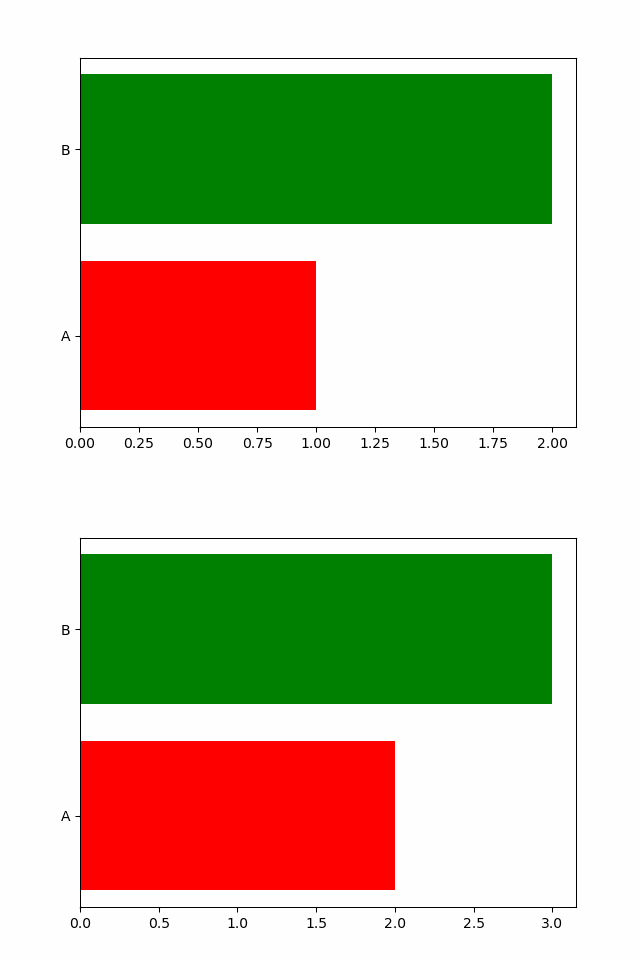
但是图中没有体现出年份的内容、条形右侧有没有具体的值,可以进一步完善一下。
import pandas as pd
import matplotlib.pyplot as plt
import matplotlib.animation as animation
df = pd.DataFrame([["A", 1, 2019], ["B", 2, 2019], ["A", 2, 2020], ["B", 3, 2020]], columns=["name", "value", "year"]) # 构造测试数据
fig, ax = plt.subplots() # 准备画板
def draw_one_year(year): # 绘制单帧
    cur_df = df[df["year"]==year].sort_values(by="value")
    ax.clear() # 需要清除上一帧
    ax.barh(cur_df["name"], cur_df["value"], color=["r", "g"])
    for i, (name,value) in enumerate(zip(cur_df["name"], cur_df["value"])): # 设置右侧的值
        ax.text(value, i, name, ha="right")
        ax.text(value, i-0.25, value, ha="right")
    ax.text(1, 0.5, year, transform=ax.transAxes,  ha="right") # 设置年份
animator = animation.FuncAnimation(fig, draw_one_year, frames=range(2019, 2021)) # 动态绘制
animator.save("./test.gif") # 保存数据
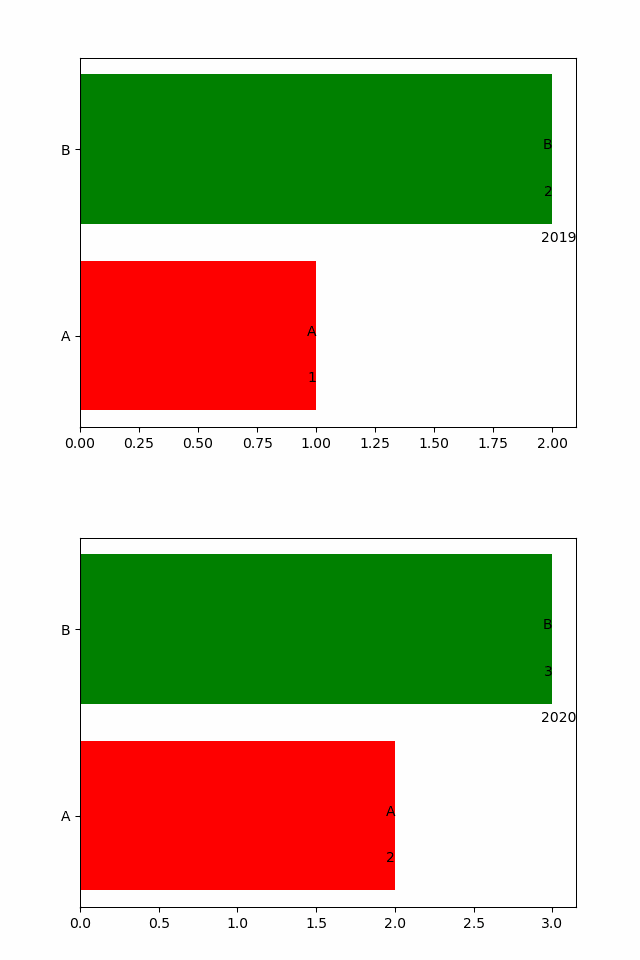
简单例子
基本的操作大概这些,具体来看一个简单的例子吧
import pandas as pd
import matplotlib.pyplot as plt
import matplotlib.animation as animation
####这里是数据,为了降低难度,并未放在文件中####
df = pd.DataFrame([["man", 71527, 2019],
["man", 71351, 2018],
["man", 71137, 2017],
["man", 70815, 2016],
["man", 70414, 2015],
["man", 70079, 2014],
["man", 69728, 2013],
["man", 69395, 2012],
["man", 69068, 2011],
["man", 68748, 2010],
["woman", 65343, 2010],
["woman", 65667, 2011],
["woman", 66009, 2012],
["woman", 66344, 2013],
["woman", 66703, 2014],
["woman", 67048, 2015],
["woman", 67456, 2016],
["woman", 67871, 2017],
["woman", 68187, 2018],
["woman", 68478, 2019]], columns=["name", "value", "year"])
####这里是数据,为了降低难度,并未放在文件中####
fig, ax = plt.subplots() # 准备画板
def draw_one_year(year): # 绘制单帧
    cur_df = df[df["year"]==year].sort_values(by="value")
    ax.clear() # 需要清除上一帧
    ax.barh(cur_df["name"], cur_df["value"], color=["r", "g"])
    for i, (name,value) in enumerate(zip(cur_df["name"], cur_df["value"])): # 设置右侧的值
        ax.text(value, i, name, ha="right")
        ax.text(value, i-0.25, value, ha="right")
    ax.text(1, 0.5, year, transform=ax.transAxes,  ha="right")
animator = animation.FuncAnimation(fig, draw_one_year, frames=range(2010, 2020), interval=200) # 动态绘制, interval为时间间隔
animator.save("./中国人口变化.gif") # 保存数据
这样看来有点动态排名的意思了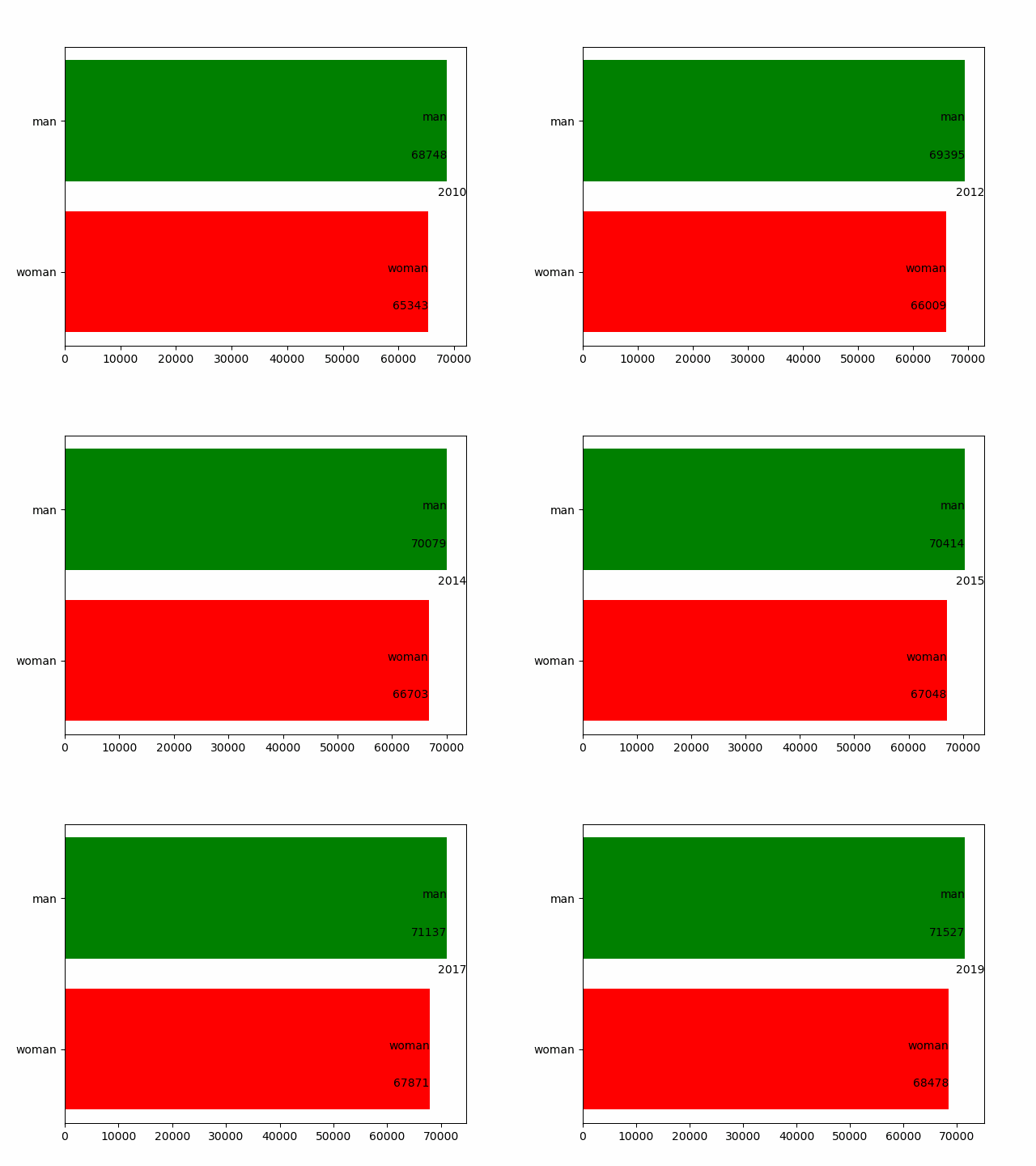
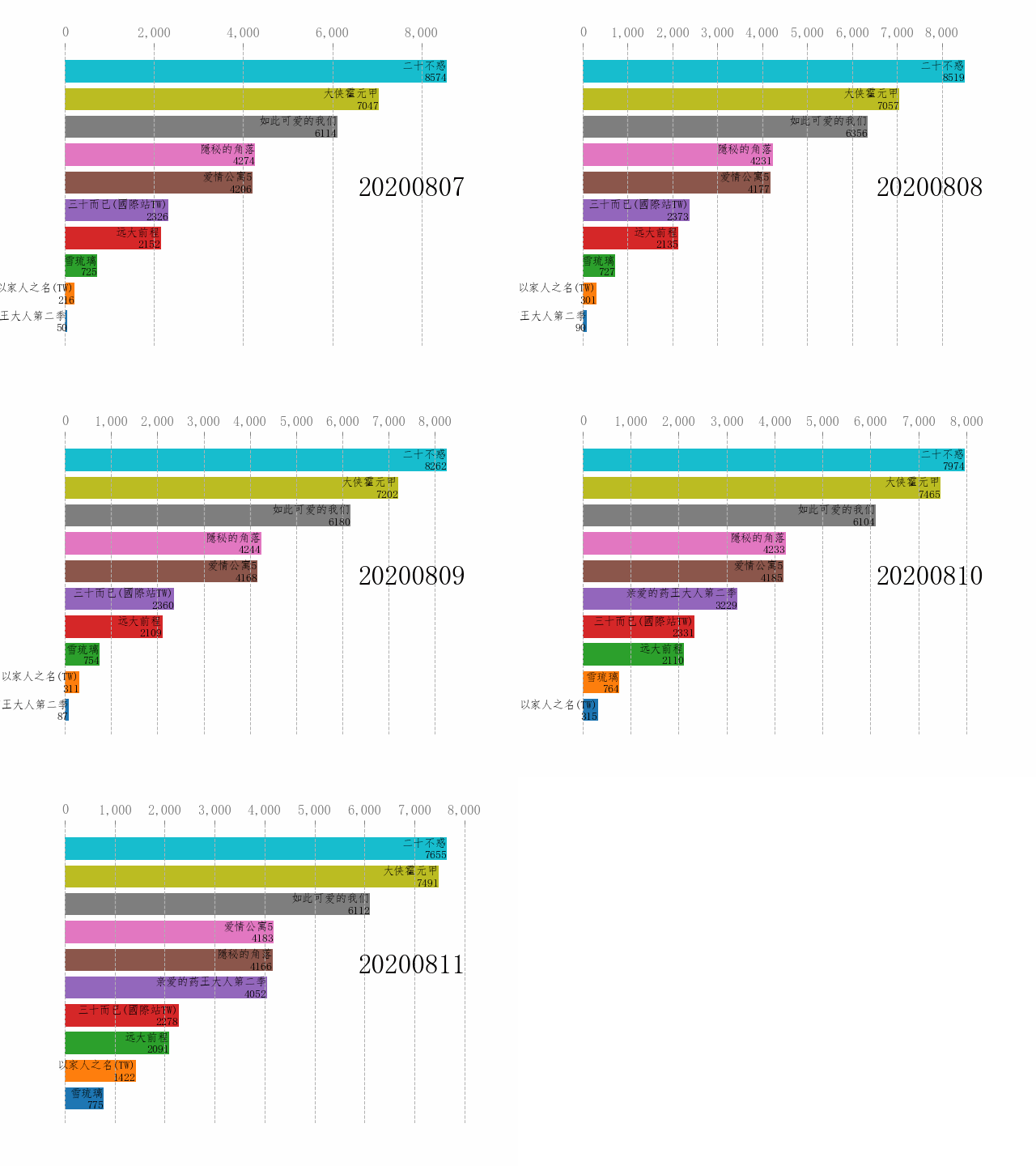
复杂例子
首先附上这个图数据获取的代码
import json
import requests
import pandas as pd
id2name = {"8777800059299301": "以家人之名(TW)",  "9000000001179501": "三十而已(國際站TW)", "248797401": "二十不惑",
           "9000000001242801": "如此可爱的我们", "252449101": "隱秘的角落", "212447801": "爱情公寓5",
           "210631201": "大侠霍元甲", "207100801": "雪琉璃", "7722951969573801": "亲爱的药王大人第二季", "204905101": "远大前程"}
tables = []
for id, name in id2name.items():
    response = requests.get("https://uaa.if.iqiyi.com/video_index/v2/get_index_trend?album_id="+id+"&time_window=7")
    data = json.loads(response.text)
    for i in range(6):
        row = [name, data["details"][0]["data"][i], data["playtime"][i]]
        tables.append(row)
df = pd.DataFrame(tables, columns=["name", "value", "day"])
df.to_csv("./datas.csv", index=None)
再来看这个复杂的例子
import pandas as pd
import matplotlib.pyplot as plt
import matplotlib.animation as animation
from pylab import mpl
mpl.rcParams['font.sans-serif'] = ['FangSong'] # 指定默认字体
df = pd.read_csv("./datas.csv")
fig, ax = plt.subplots() # 准备画板
def draw_one_year(dt): # 绘制单帧
    cur_df = df[df["dt"]==dt].sort_values(by="value")
    ax.clear() # 需要清除上一帧
    ax.barh(cur_df["name"], cur_df["value"], color=["C0", "C1", "C2", "C3", "C4", "C5", "C6", "C7", "C8", "C9"])
    for i, (name,value) in enumerate(zip(cur_df["name"], cur_df["value"])): # 设置右侧的值
        ax.text(value, i, name, fontsize=10, ha="right")
        ax.text(value, i-0.25, value,fontsize=10,  ha="right")
    ax.text(1, 0.5, dt, fontsize=24,  transform=ax.transAxes,  ha="right")
animator = animation.FuncAnimation(fig, draw_one_year, frames=range(20200807, 20200812), interval=200) # 动态绘制, interval为时间间隔
animator.save("./近期电视剧爱奇艺指数排名.gif") # 保存数据
颜色我采用通配了,如果想更美观,可以自己挑选颜色;并调整一下字体、刻度这些细节。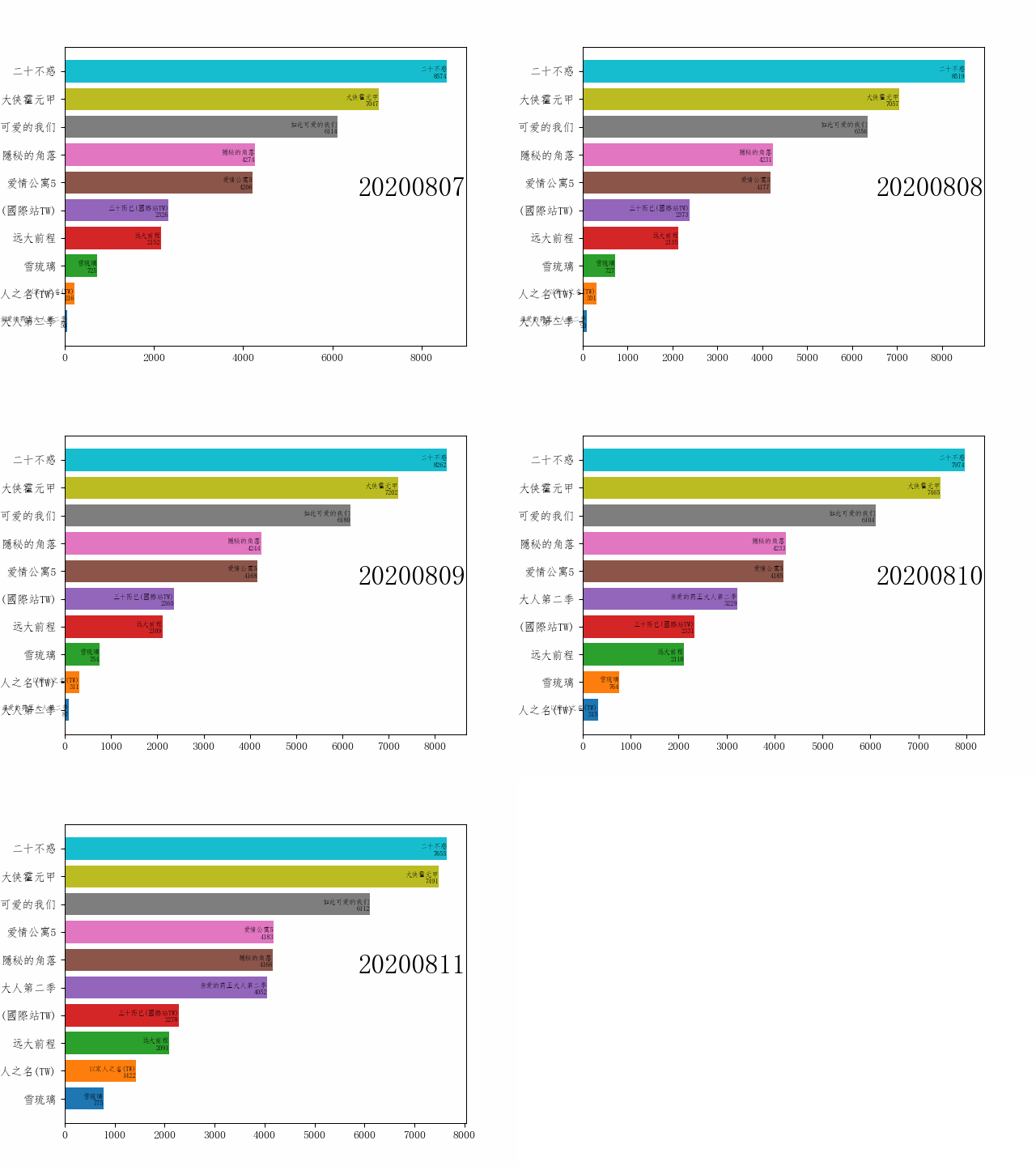
完善细节
具体可以参考这篇文章。
import pandas as pd
import matplotlib.pyplot as plt
import matplotlib.animation as animation
from matplotlib import ticker
from pylab import mpl
import datetime
mpl.rcParams['font.sans-serif'] = ['FangSong'] # 指定默认字体
df = pd.read_csv("./iqiyi_datas.csv")
fig, ax = plt.subplots() # 准备画板
def draw_one_year(dt): # 绘制单帧
    cur_df = df[df["dt"]==dt].sort_values(by="value").head(10)
    ax.clear() # 需要清除上一帧
    ax.barh(cur_df["name"], cur_df["value"], color=["C0", "C1", "C2", "C3", "C4", "C5", "C6", "C7", "C8", "C9"])
    for i, (name,value) in enumerate(zip(cur_df["name"], cur_df["value"])): # 设置右侧的值
        ax.text(value, i, name, fontsize=10, ha="right", va="bottom")
        ax.text(value, i-0.25, value,fontsize=10,  ha="right", va="center")
    ax.text(1, 0.5, dt, fontsize=24,  transform=ax.transAxes,  ha="right")
    # 设置顶部value刻度
    ax.xaxis.set_major_formatter(ticker.StrMethodFormatter('{x:,.0f}'))
    ax.xaxis.set_ticks_position('top')
    ax.tick_params(axis='x', colors='#777777', labelsize=12)
    # 取消底部value刻度
    ax.set_yticks([])
    # 添加竖直的刻度线
    ax.grid(which='major', axis='x', linestyle='--')
    # 取消外边框
    plt.box(False)
dt_list = [int((datetime.datetime.strptime("20200813", "%Y%m%d") - datetime.timedelta(days =i)).strftime("%Y%m%d"))  for i in range(6,1,-1)]
animator = animation.FuncAnimation(fig, draw_one_year, frames=dt_list, interval=200) # 动态绘制, interval为时间间隔
animator.save("./近期电视剧爱奇艺指数变化.gif") # 保存数据

魔乐社区(Modelers.cn) 是一个中立、公益的人工智能社区,提供人工智能工具、模型、数据的托管、展示与应用协同服务,为人工智能开发及爱好者搭建开放的学习交流平台。社区通过理事会方式运作,由全产业链共同建设、共同运营、共同享有,推动国产AI生态繁荣发展。
更多推荐


 9
9 0
0- 0


 已为社区贡献2条内容

所有评论(0)