facebook数据采集——利用BigPipe技术和xpath解析数据
前言
上一篇博文是我写的第一篇博文,存在了各种各样的小bug:换行不规范、出现莫名其妙的html标签等等。在以后会慢慢改正。
这篇文章主要是介绍两个技术,一个是网页前端加速BigPipe技术,另一个是html数据解析需要用到的xpath技术。
为什么我在数据解析的时候没有用比较成熟的BeautifulSoup?因为facebook的网页源码过于庞大,或多或少存在和标准不一样的地方(这不影响浏览器的解析),使得BeautifulSoup无法正确加载分析,所以采取了xpath的方法。如果大家有什么好方法能够使BS加载facebook的html请留言和我探讨哈!
BigPipe技术
为什么要介绍BigPipe?
BigPipe简介
BigPipe技术是facebook在2010年前提出的一种前端加速技术,效果极其明显,facebook个人主页的加载时间从原来的5s缩短到了2.5s。这是一个很了不起的成就,因为有研究显示,当用户打开一个网页的时间超过3s还收不到任何反应,那么差评就少不了了。2,5s刚好小于3s,但是在实际使用中,用户的真实体验远远小于2.5s,为什么呢?请继续往后看。
在传统的页面加载方法中,整个web页面在服务器端组合好后再通过网络传输至用户端,最后由浏览器解析数据并展示给用户。而BigPipe技术借鉴了CPU的流水线技术,将网页切割成不同的模块,如下图,每个黑框代表了一个模块,在BigPipe中,模块的学名叫做PageLet。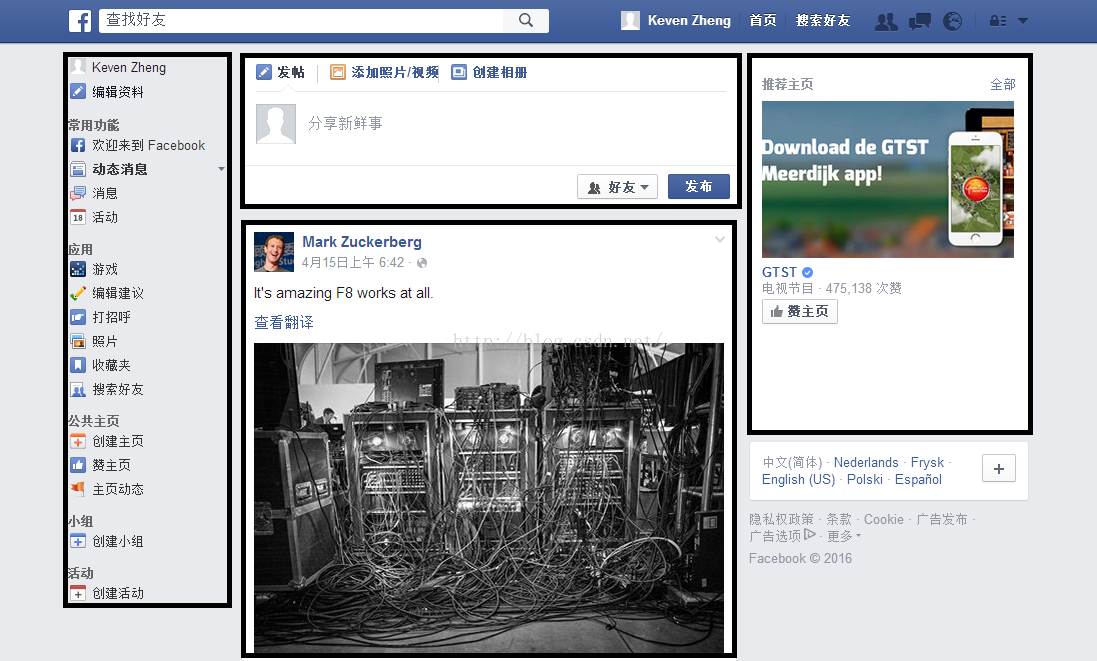
在服务器端,网页的生成不再以页面为单位,而是以PageLet为单位。每生成好一个PageLet,就将该模块发送至用户端。多个PageLet并行发送,大大提高了页面的整体加载速度。一图读懂传统方法与BigPipe技术的不同:
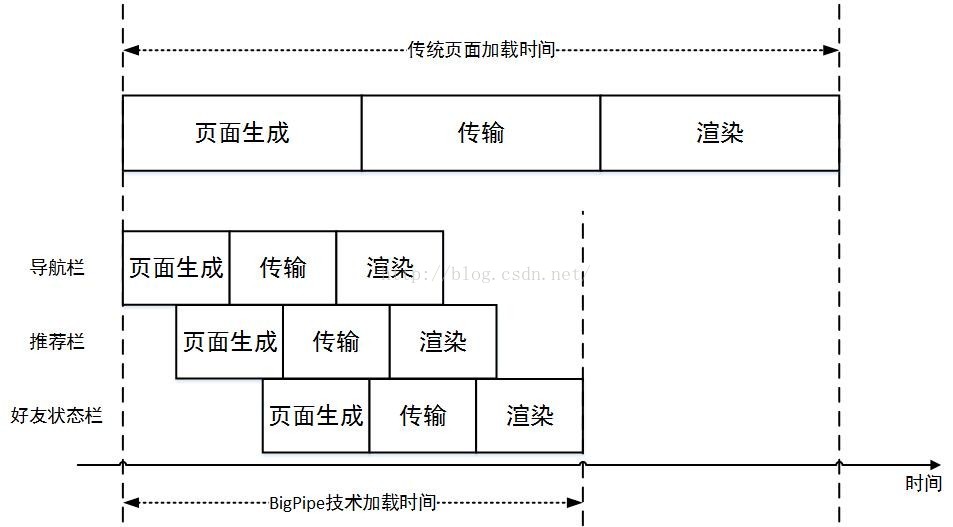
每个PageLet都包含了数据——完整Dom树,以及必要的基本信息,例如编号、放置位置。JavaScript解析脚本会读取PageLet的基本信息,根据其中的分类信息,选择相应的container,将数据放置其中。加载示意图如下:
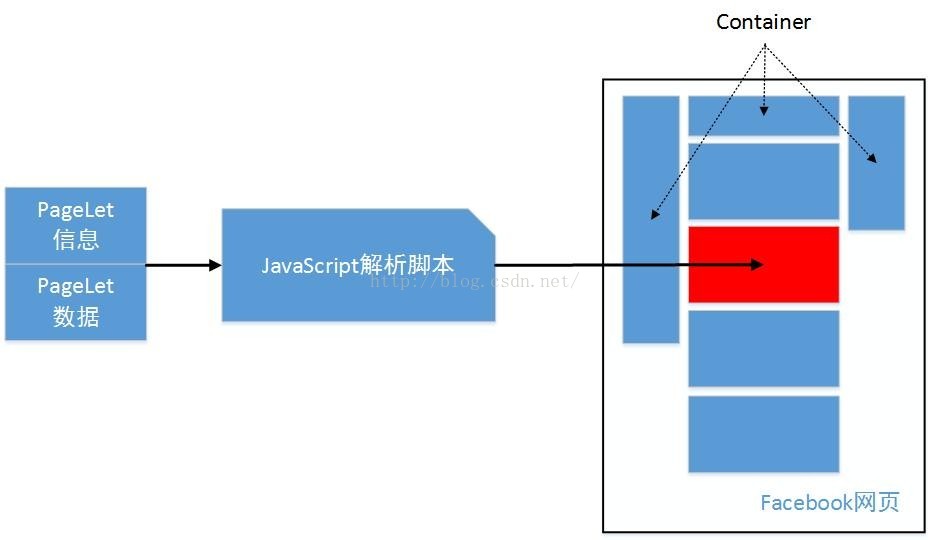
代码编写
啰嗦了这么多,终于把问题交代清楚了。。。
首先,我们要看一看html,找一找它们的规律。
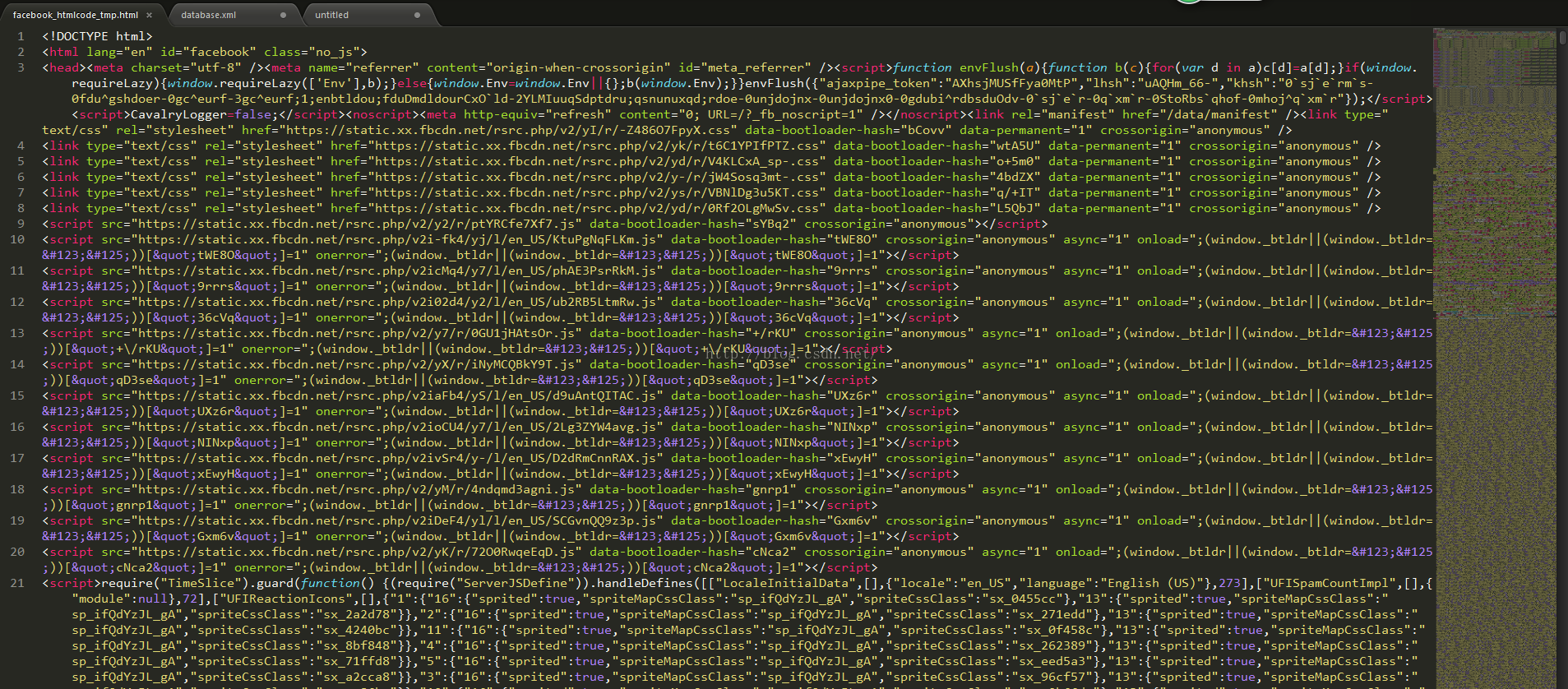
前面十几行代码,主要是下载css样式表和js脚本。接着十几行是初始化BigPipe。然后就进入了正轨。
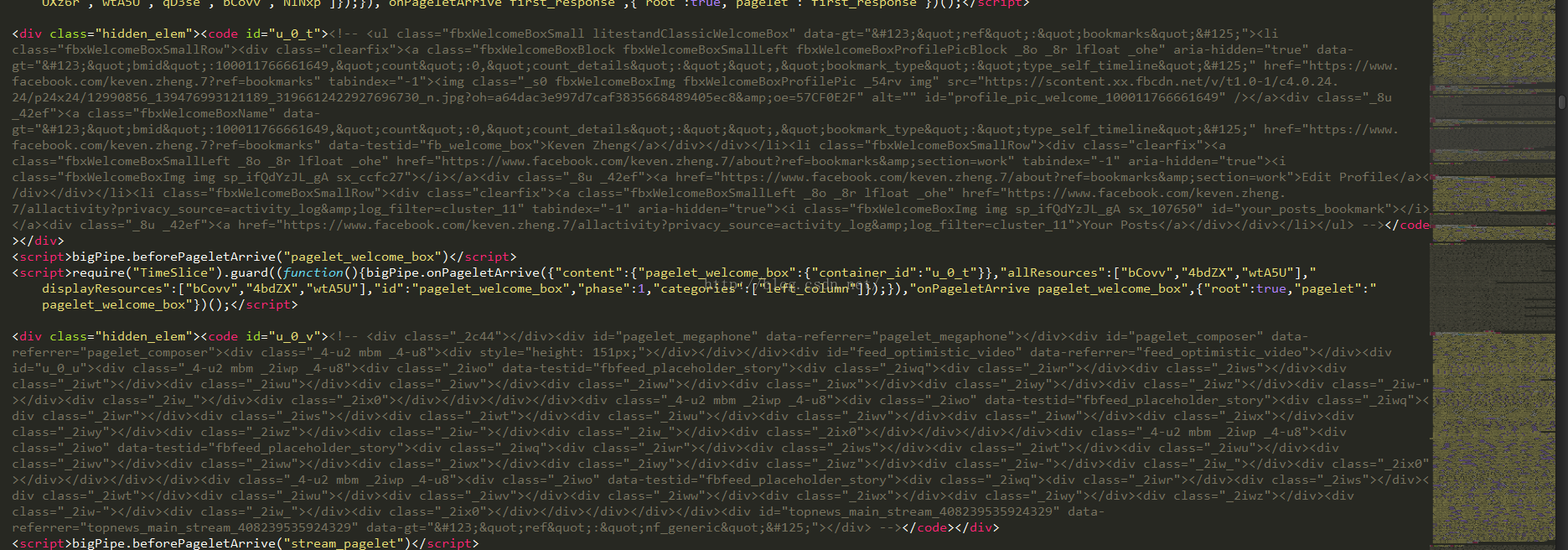
来看看PageLet基本信息:
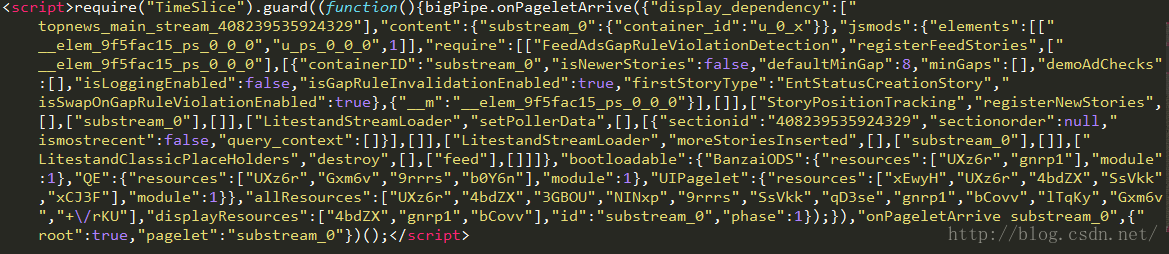
这么长一段其实只有一句代码,主要的意思是执行了bigPipe.onPageletArrive()这个函数,从名字就能看出来这个函数是干嘛的,至于后面的一大堆,就是PageLet的基本信息了。在里面能找到一些有用的东西:
"display_dependency":["topnews_main_stream_408239535924329"] 这条数据表示显示在哪个模块上吧。topnews这个关键词告诉我们这是置顶新闻,不是我们需要采集的信息。
"content":{"substream_0":{"container_id":"u_0_x"}指示出来container的id号。
后面还有jsmods,requires之类的参数,没啥意义。
定位到用户发布的消息,发现一个模式:"display_dependency":["substream_X"],其中X(大)是数字,或者"display_dependency":["substream_X_xxxxxxxxx"],其中x(小)是数字或字母。经过观察,符合这个模式的PageLet都是我们需要采集的数据——用户发布的“朋友圈”。这个结论不一定靠谱,因为没有任何理论依据,也没有任何文档可供查看。但是在我所遇见的情况中,这种方法完美的避开了所有广告和推广。
PageLet的数据信息,就在这条代码的上面。不要忘记,DOM树代码是被注释起来的,注释内可能存在换行,这是因为有人发“朋友圈”时,发了好几段话,造成了空格的产生。我们只需要一直往上找,找到注释的起始位置即可。实现起来也比较简单:def get_newdom_from_html(file_path):
# 把html存在了文件中,便于调试
file = open(file_path)
html = file.readlines()
data = []
for i in range(len(html)):
# 找到正确的PageLet
if html[i].find('display_dependency":["substream_') > 0:
newdom = ''
j = i - 2
# 提取出全部数据
while html[j].find('<div class="hidden_elem">') < 0:
newdom = html[j] + newdom
j = j - 1
# 使用正则匹配,去掉多余的空行和注释
newdom = html[j] + newdom
re_comment = re.compile('\n')
newdom = re_comment.sub('', newdom)
re_comment = re.compile('<!--.*-->')
match = re_comment.search(newdom)
newdom = match.group()
re_comment = re.compile('<!-- ')
newdom = re_comment.sub('', newdom)
re_comment = re.compile('-->')
newdom = re_comment.sub('', newdom)
data.append(newdom)
print 'Get', len(data), 'informations container from html.'
return data这时候,我们已经获取了目标数据所在的Dom树,下面就该使用xpath对数据进行精确定位了。
XPath的使用
XPath是一种表达式语言,被用来处理xml类型的语言,使用起来很方便。尤其是它的“相对路径”,应该是处理复杂多变的html的唯一办法。
举个小例子,比如下面这个html:
<?xml version="1.0" encoding="ISO-8859-1"?>
<bookstore>
<book>
<title lang="eng">Harry Potter</title>
<price>29.99</price>
</book>
<book>
<title lang="chn">Learning XML</title>
<price>39.95</price>
</book>
</bookstore># 用绝对路径方法表示:
/boolstore/book[1]
# 用相对路径方法表示:
//book[1]/boolstore/book[@lang=”eng”]
# 如果根据价格来选:
/bookstore/book[price>30.00]
以上这些小方法足够我们处理facebook的数据了。

<div class="_4-u2 mbm _5v3q _4-u8" id="u_ps_0_0_1">
<div class="_3ccb" data-gt="{"type":"click2canvas","fbsource":703,"ref":"nf_generic"}" id="u_ps_0_0_2">
<div></div>
<div class="userContentWrapper _5pcr" role="article" aria-label="Story">
<div class="_1dwg _1w_m">
<div class="_4r_y">
<div class="_6a uiPopover _5pbi _cmw _5v56 _b1e" id="u_ps_0_0_3" data-ft="{"tn":"V"}">
<a class="_4xev _p" aria-label="Story options" href="#" aria-haspopup="true" aria-expanded="false" rel="toggle" role="button" id="u_ps_0_0_4"></a>
</div>
</div>
<div class="_4gns accessible_elem"></div>
<div class="_5x46">
<div class="clearfix _5va3">
<a class="_5pb8 _8o _8s lfloat _ohe" href="https://www.facebook.com/NBCBlacklist/?ref=nf" aria-hidden="true" tabindex="-1" target="" data-ft="{"tn":"\u003C"}" data-hovercard="/ajax/hovercard/page.php?id=315791511882046">
<div class="_38vo"><img class="_s0 _5xib _5sq7 _44ma _rw img" src="https://fbcdn-profile-a.akamaihd.net/hprofile-ak-xlf1/v/t1.0-1/p50x50/11891029_731263597001500_5132239452791988839_n.png?oh=3b747b33e8a76fd06c73fa4a75a0ee94&oe=58098655&__gda__=1475421439_ae7e8523072625710162c2ee000b4c18" alt=""></div>
</a>
<div class="clearfix _42ef">
<div class="rfloat _ohf"></div>
<div class="_5va4">
<div>
<div class="_6a _5u5j">
<div class="_6a _6b" style="height:40px"></div>
<div class="_6a _5u5j _6b">
<h5 class="_5pbw" data-ft="{"tn":"C"}"><span class="fwn fcg"><span class="fwb fcg" data-ft="{"tn":"k"}"><a href="https://www.facebook.com/NBCBlacklist/?fref=nf" data-hovercard="/ajax/hovercard/page.php?id=315791511882046&extragetparams=%7B%22fref%22%3A%22nf%22%7D">The Blacklist</a></span></span></h5>
<div class="_5pcp"><span><span class="fsm fwn fcg"><a class="_5pcq" href="/NBCBlacklist/photos/a.330790057048858.1073741828.315791511882046/889778107816714/?type=3" rel="theater" ajaxify="/NBCBlacklist/photos/a.330790057048858.1073741828.315791511882046/889778107816714/?type=3&size=600%2C400&fbid=889778107816714&source=12&player_origin=unknown" target=""><abbr title="Friday, July 1, 2016 at 11:42pm" data-utime="1467387720" data-shorten="1" class="_5ptz timestamp livetimestamp"><span class="timestampContent">11 hrs</span></abbr>
</a>
</span>
</span><span role="presentation" aria-hidden="true"> • </span><a data-hover="tooltip" data-tooltip-content="Public" class="uiStreamPrivacy inlineBlock fbStreamPrivacy fbPrivacyAudienceIndicator _5pcq" aria-label="Public" href="#" role="button"><i class="lock img sp_LNqePrqmloc sx_35b578"></i></a></div>
</div>
</div>
</div>
</div>
</div>
</div>
</div>
<div class="_5pbx userContent" data-ft="{"tn":"K"}">
<p>Tom has mastered the art of two truths and a lie.</p>
<div class="_5wpt"></div>
</div>
<div class="_3x-2">
<div data-ft="{"tn":"H"}">
<div class="mtm">
<div class="_5cq3" data-ft="{"tn":"E"}">
<a class="_4-eo _2t9n" href="/NBCBlacklist/photos/a.330790057048858.1073741828.315791511882046/889778107816714/?type=3" rel="theater" ajaxify="/NBCBlacklist/photos/a.330790057048858.1073741828.315791511882046/889778107816714/?type=3&size=600%2C400&fbid=889778107816714&player_origin=unknown" data-render-location="newsstand" style="width:476px;" data-testid="theater_link">
<div class="uiScaledImageContainer _4-ep" style="width:476px;height:317px;" id="u_ps_0_0_5"><img class="scaledImageFitWidth img" src="https://fbcdn-photos-b-a.akamaihd.net/hphotos-ak-xfp1/v/t1.0-0/p320x320/13413785_889778107816714_5168115831313224460_n.jpg?oh=67aefb5b75d827228cdad41e758a7c09&oe=58044C1E&__gda__=1475004462_88b45f79750b4f918dadf06943b5cc3f" alt="The Blacklist's photo." width="476" height="318"></div>
</a>
</div>
</div>
</div>
</div>
</div>
<div>
<form rel="async" class="commentable_item collapsed_comments" method="post" data-ft="{"tn":"]"}" action="/ajax/ufi/modify.php" onsubmit="return window.Event && Event.__inlineSubmit && Event.__inlineSubmit(this,event)" id="u_ps_0_0_8">
<input type="hidden" name="charset_test" value="€,´,€,´,水,Д,Є">
<input type="hidden" name="fb_dtsg" value="AQHS2YZ9HT3a:AQEr2NnPYVLY" autocomplete="off">
<input type="hidden" autocomplete="off" name="ft_ent_identifier" value="889778107816714">
<input type="hidden" autocomplete="off" name="data_only_response" value="1">
<div class="_sa_ _5vsi _ca7 _192z">
<div class="_37uu">
<div data-reactroot="">
<div class="_3399 _1f6t _4_dr">
<div class="_524d">
<div class="_ipn">
<div class="_ipo">
<a aria-live="polite" class="_ipm" data-comment-prelude-ref="action_link_bling" data-ft="{"tn":"O"}" data-hover="tooltip" data-tooltip-uri="/ufi/comment/tooltip/?ft_ent_identifier=889778107816714&av=100011766661649" href="/NBCBlacklist/photos/a.330790057048858.1073741828.315791511882046/889778107816714/?type=3&comment_tracking=%7B%22tn%22%3A%22O%22%7D" role="button">
<!-- react-text: 7 -->361 Comments
<!-- /react-text -->
</a><a aria-live="polite" class="_ipm" data-hover="tooltip" data-tooltip-uri="/ufi/share/tooltip/?ft_ent_identifier=889778107816714&av=100011766661649" href="https://www.facebook.com/shares/view?id=889778107816714&av=100011766661649" role="button">408 Shares</a></div>
<div class="_ipp">
<div class="_3t53 _4ar- _ipn"><span aria-label="See who reacted to this" class="_3t54" role="toolbar" tabindex="0"><a aria-label="18K Like" class="_27jf _3emk" href="/ufi/reaction/profile/browser/?ft_ent_identifier=889778107816714&av=100011766661649" rel="ignore" role="button" tabindex="-1"><span class="_9zc _2p7a _4-op"><i class="_3j7l _2p78 _9--"></i></span><span class="_3chu">18K</span></a><a aria-label="1.4K Love" class="_27jf _3emk" href="/ufi/reaction/profile/browser/?ft_ent_identifier=889778107816714&av=100011766661649" rel="ignore" role="button" tabindex="-1"><span class="_9zc _2p7a _4-op"><i class="_3j7m _2p78 _9--"></i></span><span class="_3chu">1.4K</span></a><a aria-label="61 Angry" class="_27jf _3emk" href="/ufi/reaction/profile/browser/?ft_ent_identifier=889778107816714&av=100011766661649" rel="ignore" role="button" tabindex="-1"><span class="_9zc _2p7a _4-op"><i class="_3j7q _2p78 _9--"></i></span><span class="_3chu">61</span></a></span><a class="_2x4v" href="/ufi/reaction/profile/browser/?ft_ent_identifier=889778107816714&av=100011766661649" rel="ignore"><span aria-hidden="[object Object]" class="_1g5v"><span data-hover="tooltip" data-tooltip-uri="/ufi/reaction/tooltip/?ft_ent_identifier=889778107816714&av=100011766661649">20K</span></span><span class="_4arz"><span data-hover="tooltip" data-tooltip-uri="/ufi/reaction/tooltip/?ft_ent_identifier=889778107816714&av=100011766661649">20K</span></span></a></div>
</div>
</div>
</div>
</div>
<div class="_3399 _a7s clearfix">
<div class="_524d">
<div class="_42nr"><span><div class="_khz"><a aria-pressed="false" class="UFILikeLink _4x9- _4x9_ _48-k" data-testid="fb-ufi-likelink" href="#" role="button" tabindex="0"><!-- react-text: 35 -->Like<!-- /react-text --></a><span role="button" class="accessible_elem" tabindex="-1">Show more reactions</span></div>
</span><span><a class="comment_link _5yxe" role="button" href="#" title="Leave a comment" data-ft="{ "tn": "S", "type": 24 }">Comment</a></span><span><a href="#" class="share_action_link _5f9b" data-ft="{ "tn": "J", "type": 25 }" title="Send this to friends or post it on your timeline."><!-- react-text: 41 -->Share<!-- /react-text --><span class="UFIShareLinkSpinner _1wfk img _55ym _55yn _55yo _5tqs" aria-label="Loading..." aria-busy="true"></span></a>
</span>
</div>
</div>
</div>
</div>
</div>
</div>
<div class="uiUfi UFIContainer _5pc9 _5vsj _5v9k" id="u_ps_0_0_7"></div>
</form>
</div>
</div>
</div>
</div>
可以ctrl+F搜索下作者The Blacklist,一部美剧。可一看到,“The Blacklist"在<h5>标签下的一个<a>标签中,这两个标签中间还隔着好几层,不过没关系,我们可以利用相对位置进行定位。
div/div/div/div[3]//h5/span//a[0] # 一条“朋友圈”作者的相对位置def get_writer(tree):
r = tree.xpath('div/div/div/div[3]//h5/span//a')
try:
return r[0].text
except:
return 'wrong'# -*- coding:gb2312 -*-
__author__ = 'HYDT'
import re
from lxml import etree
def get_newdom_from_html(file_path):
    # 把html存在了文件中,便于调试
    file = open(file_path)
    html = file.readlines()
    data = []
    for i in range(len(html)):
        # 找到正确的PageLet
        if html[i].find('display_dependency":["substream_') > 0:
            newdom = ''
            j = i - 2
            # 提取出全部数据
            while html[j].find('<div class="hidden_elem">') < 0:
                newdom = html[j] + newdom
                j = j - 1
            # 使用正则匹配,去掉多余的空行和注释
            newdom = html[j] + newdom
            re_comment = re.compile('\n')
            newdom = re_comment.sub('', newdom)
            re_comment = re.compile('<!--.*-->')
            match = re_comment.search(newdom)
            newdom = match.group()
            re_comment = re.compile('<!-- ')
            newdom = re_comment.sub('', newdom)
            re_comment = re.compile('-->')
            newdom = re_comment.sub('', newdom)
            data.append(newdom)

    print 'Get', len(data), 'informations container from html.'
    return data
def analysis_html(file_path):
tree = etree.parse(file_path)
if judge_liked(tree):
return 'liked'
dict = {'writer': '',
'time': '',
'content': '',
'img': [],
'video': []}
dict['writer'] = get_writer(tree)
dict['time'] = get_time(tree)
dict['content'] = get_content(tree)
dict['img'] = get_img(tree)
dict['video'] = get_video(tree)
for key in dict:
if dict[key] == 'wrong':
return 'wrong'
return dict
def get_writer(tree):
    r = tree.xpath('div/div/div/div[3]//h5/span//a')
    try:
        return r[0].text
    except:
        return 'wrong'
def get_time(tree):
r = tree.xpath('div/div/div/div[3]//abbr')
try:
return r[0].attrib['title']
except:
return 'wrong'
def get_content(tree):
try:
r = tree.xpath('div/div/div/div[4]//text()')
content = ''
for sentence in r:
if sentence != 'See More' and sentence != '...' and sentence != '\n':
content = content + sentence
return content
except:
return 'wrong'
def get_img(tree):
try:
r = tree.xpath('div/div/div/div[5]//img')
img_list = []
for img in r:
img_list.append(img.attrib['src'])
return img_list
except:
return 'wrong'
def get_video(tree):
try:
r = tree.xpath('div/div/div/div[5]//video')
video_list = []
for video in r:
video_list.append(video.attrib['src'])
except:
return 'video wrong'
def judge_liked(tree):
r = tree.xpath('div/div/div/div[3]//h5//text()')
if ' liked this.' in r:
return True
return False
def pre_analysis(newdom, file_save_path):
re_comment = re.compile('<form .*</form>')
newdom = re.sub(re_comment, '', newdom)
re_comment = re.compile('><')
newdom = re.sub(re_comment, '>\n<', newdom)
re_comment = re.compile('<div>\n</div>')
newdom = re.sub(re_comment, '', newdom)
outfile = open(file_save_path, 'w')
outfile.write(newdom)
outfile.close()
总结

可以很清楚的看出来,当一个PageLet到达后,会调用onPageletArrive函数,然后调用后面几个函数处理数据。其中有三个比较重要,appendNodes、addedElements、addedImages。这三个函数把PageLet中的数据进行了分割,然后做上了标记,然后再做了什么就没跟住了。。。

魔乐社区(Modelers.cn) 是一个中立、公益的人工智能社区,提供人工智能工具、模型、数据的托管、展示与应用协同服务,为人工智能开发及爱好者搭建开放的学习交流平台。社区通过理事会方式运作,由全产业链共同建设、共同运营、共同享有,推动国产AI生态繁荣发展。
更多推荐


 3
3 0
0- 0


 已为社区贡献1条内容

所有评论(0)