springboot+vue前后端分离 新闻管理系统
声明:此项目为本人学生作品,作者本人水平有限,难免在代码中留下错误,难免出现bug!!!!!请自行百度,有问题可以在评论区留言,博主学业繁忙,随缘回复,代码经过测试后上传,已经是完整版,仅供参考,
项目二:新闻中心管理系统
1、项目来源及背景
为了能够更加迅速地向客户传递有关企业的新闻以及相关行业中最新的发展现状,以便于引导客户选择企业的相关产品和服务,一般在商务系统的开发中,都会设置相应的新闻中心模块。该新闻中心应该能够及时提供最新的资讯,并且应该在显示某条新闻的同时,列出所有的相关新闻,以便于客户在最短的时间内获得最新最全的信息。
此外,考虑到新闻的时效性,新闻中心管理系统中一般都需要提供良好的维护页面,即中心管理人员可以借助后台维护管理的页面实现对新闻内容实时的更新维护。
2、系统需求分析
2.1 需求描述
新闻中心管理系统主要是为了实现商务网站动态新闻实时显示的系统。一个典型的新闻中心管理系统一般都会提供新闻标题分类显示、新闻详细内容显示等功能。同时也要为新闻中心后台管理的管理员提供对应的新闻信息维护及管理的功能,包括添加新的新闻、编辑修改新闻、删除新闻等功能。
根据企业商务新闻的基本要求,本系统需要完成如下的主要任务:
(1)新闻标题信息分类显示:在进入新闻中心主页时,应该能够根据数据库中存放的信息分类显示最新的新闻标题。例如可以显示所有最新的标题信息。每个新闻标题都应该提供对应的超链接,单击后,就可以跳转到有关该新闻详细内容的页面上,以便用户对这条新闻有更详细的了解。
(2)新闻详细内容及相关新闻列表显示:当单击某个新闻标题后,可以查看该新闻的详细内容。同时提供与该新闻相关的新闻标题信息的显示,以便于查询与该新闻相关的其他信息(扩展)。
(3)新闻中心后台管理功能:新闻中心的管理员可以根据企业的服务需要随时向数据库中添加最新的新闻标题及相关内容。还可以删除不再需要的新闻标题及内容,以及对原有新闻做必要的修改。
2.2 系统用况图
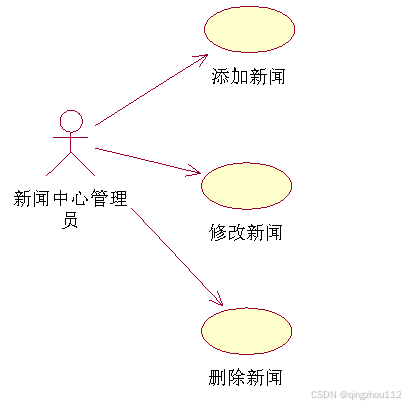
图1 管理员用例
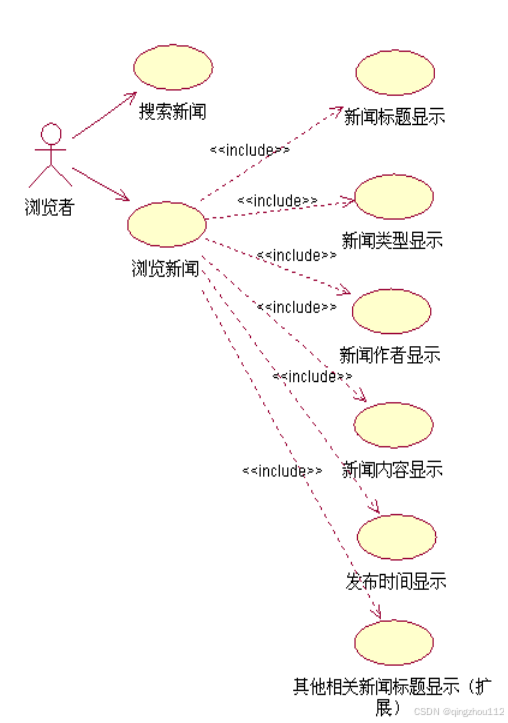
图2 浏览者用例图
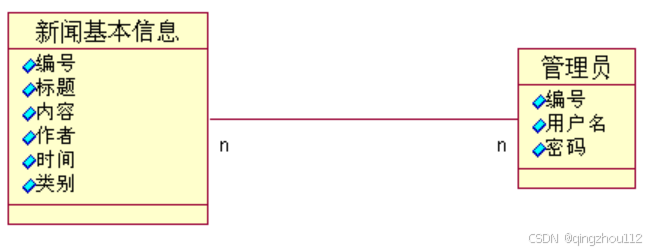
图3 系统类图
3、系统总体设计
3.1 系统总体功能结构
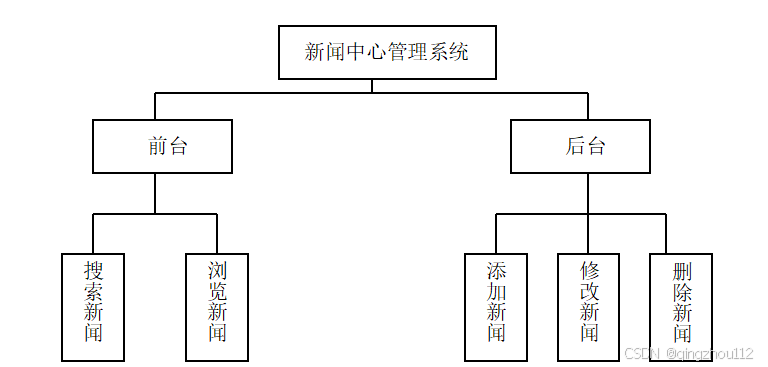
图4 系统层次结构图
3.2 功能描述
浏览者可以看到所有新闻的标题,点击新闻标题超链接,可以在页面中显示新闻标题、新闻类型、新闻作者、新闻内容、新闻发布时间、及相关新闻的标题,通过点击相关新闻标题超链接,就可以查看该相关新闻的详细信息。
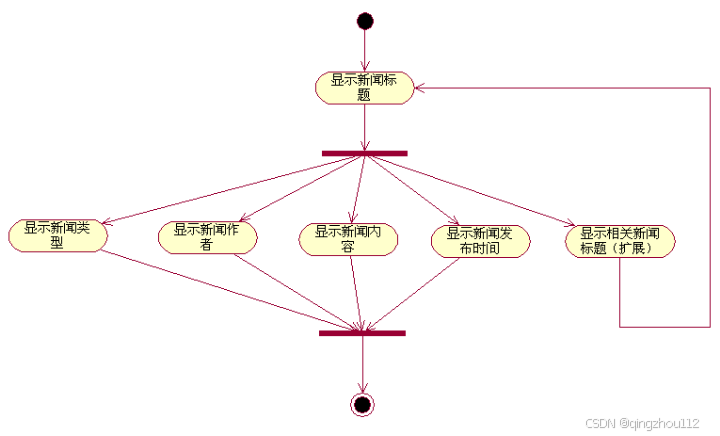
图5 新闻中心管理系统前台活动图
只有合法身份的管理员才可以进行后台管理,系统的3个子模块(添加新闻、修改新闻、删除新闻)在操作上是平行的,其内在关系通过后续数据库的设计和程序流程来控制。
4、系统详细设计
4.1 系统数据设计
新闻基本信息表(newsdetail)用来保存和新闻相关的基本信息,是显示和维护新闻数据的依据。表1所示列出了该表中所包含的字段的描述信息。
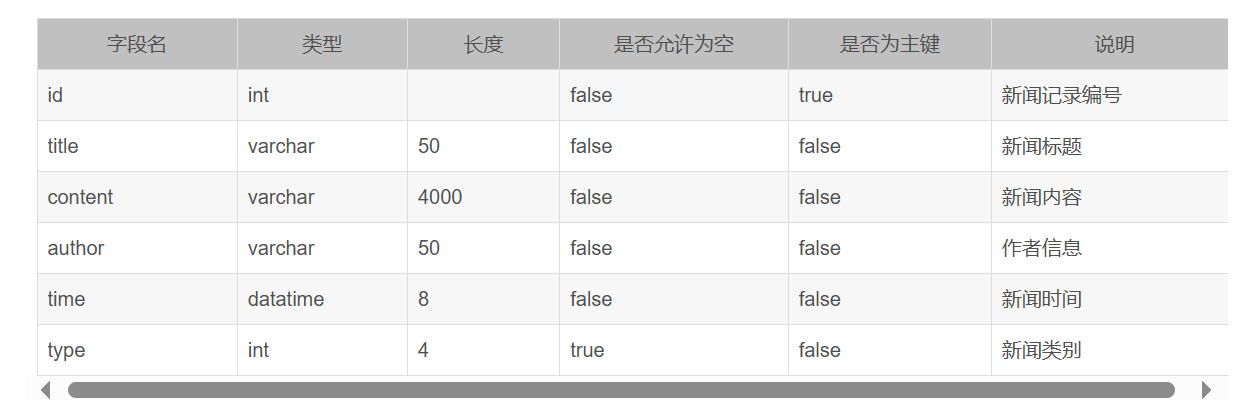
表1 新闻基本信息表
后台管理员信息表(admin)记录了新闻中心管理员的相关信息,主要是登录系统后台时验证的依据。
表2 后台管理员信息表

4.3 系统流程设计
以登录功能为例,文字描述、组件图描述
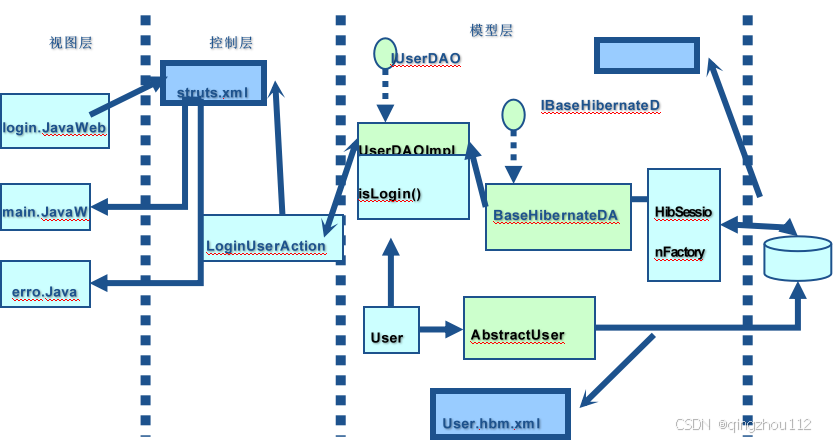
5、系统实现预览
5.1 前台
在地址栏中输入地址进入新闻中心首页,在该页面中显示了所有的新闻,并给出了各个新闻的标题,且针对标题文字提供了相应的超链接,以便用户查看新闻的具体内容。
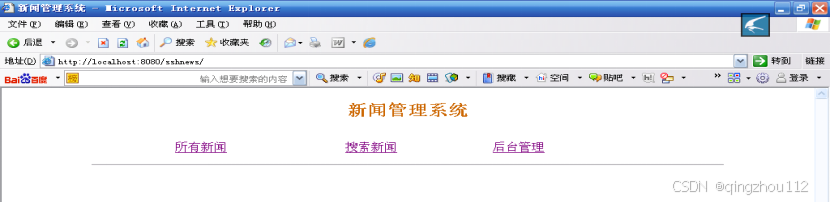
图9 新闻中心首页
News_Center_Homepage
在图中单击“所有新闻”链接后,会显示系统中的新闻,如图所示。
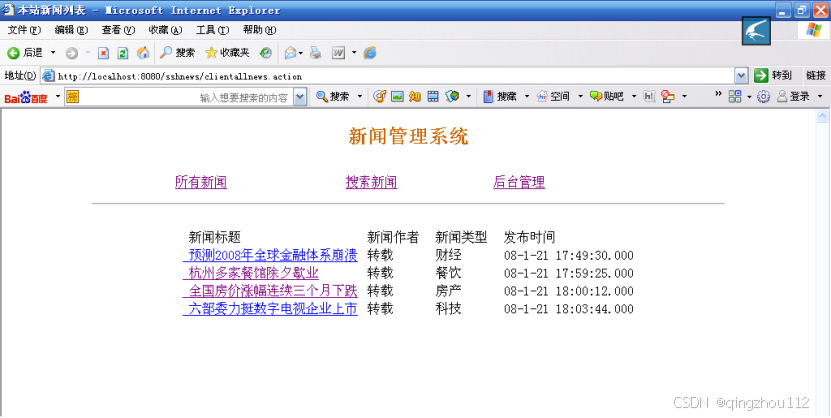
图10 新闻中心文件列表
News_Center File_List
单击文件标题可以查看新闻的具体内容,如图所示。
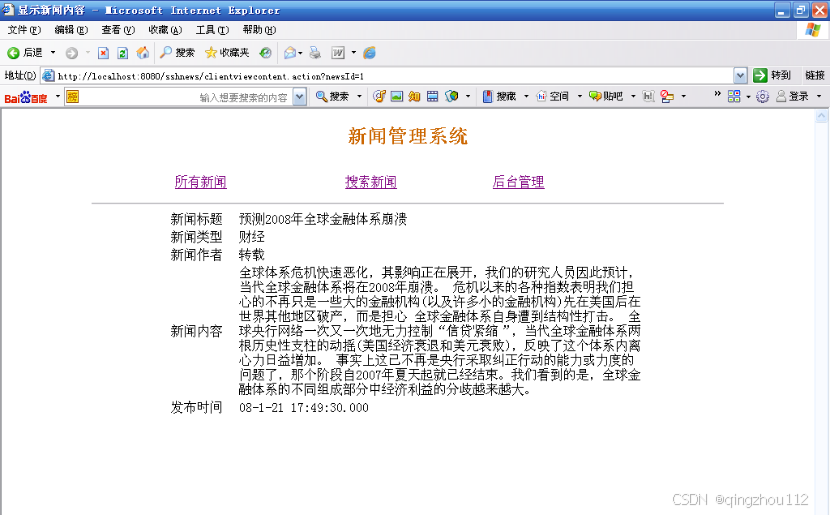
图11 查看新闻详细信息
News_Details
单击“搜索新闻”可以进行新闻的搜索,如图所示。
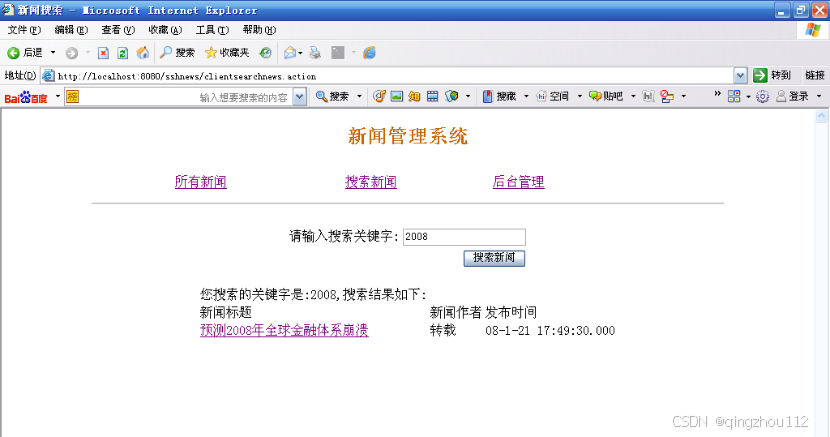 图12 新闻搜索
News_Serach
输入要查询的关键字后单击“搜索新闻”即可列出新闻列表,单击新闻标题可以查看新闻内容。
图11 查看新闻详细信息
5.2 后台
点击“后台管理”超链接进入后台管理界面。在进入新闻管理主页后,首先要管理员输入账号密码后,就可以查看新闻、添加新闻、编辑新闻以及删除新闻。
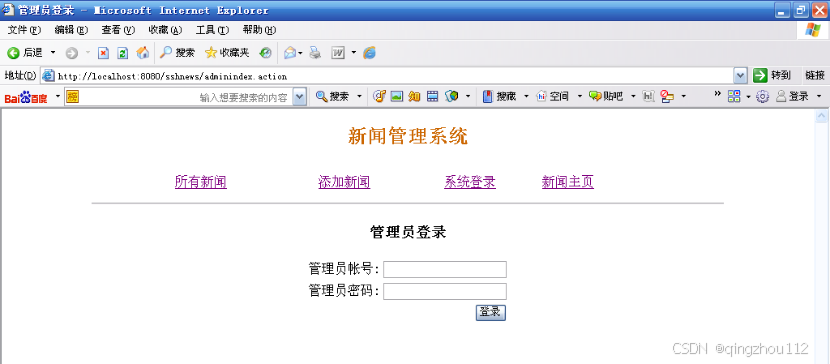
图13 管理员登录界面
login
登录成功后,单击“所有新闻”链接可以查看所有新闻,如图所示。
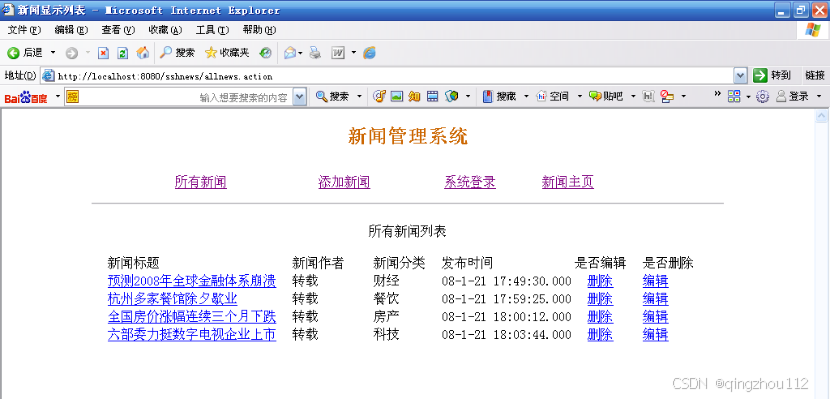
图15 编辑新闻界面
Edit_News
新闻编辑完毕后,单击“编辑提交”即可完成新闻编辑。
点击“删除”链接,可以删除该新闻。
点击“添加新闻”链接,可以添加新闻,如图所示。
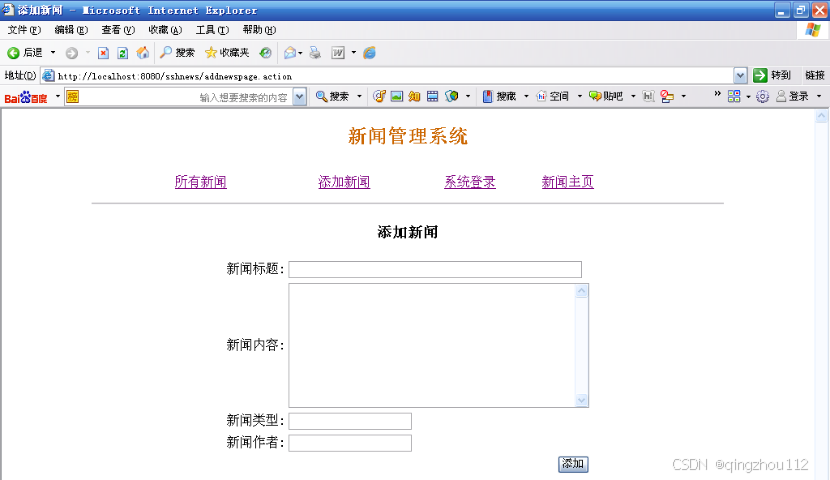
图16 添加新闻界面
Add_News
接下来将按照后端到前端介绍
jdbc.sql
/*
Navicat MySQL Data Transfer

Source Server         : T
Source Server Version : 80031
Source Host           : localhost:3306
Source Database       : jdbc

Target Server Type    : MYSQL
Target Server Version : 80031
File Encoding         : 65001

Date: 2025-04-27 15:19:18
*/

SET FOREIGN_KEY_CHECKS=0;

-- ----------------------------
-- Table structure for `admin`
-- ----------------------------
DROP TABLE IF EXISTS `admin`;
CREATE TABLE `admin` (
  `adminid` int NOT NULL AUTO_INCREMENT,
  `adminname` varchar(50) NOT NULL,
  `adminpass` varchar(50) CHARACTER SET utf8mb3 COLLATE utf8mb3_general_ci NOT NULL,
  PRIMARY KEY (`adminid`)
) ENGINE=InnoDB AUTO_INCREMENT=2 DEFAULT CHARSET=utf8mb3;

-- ----------------------------
-- Records of admin
-- ----------------------------
INSERT INTO `admin` VALUES ('1', 'we', '123456');

-- ----------------------------
-- Table structure for `newsdetail`
-- ----------------------------
DROP TABLE IF EXISTS `newsdetail`;
CREATE TABLE `newsdetail` (
  `id` int NOT NULL AUTO_INCREMENT,
  `title` varchar(50) NOT NULL,
  `content` varchar(4000) NOT NULL,
  `author` varchar(50) NOT NULL,
  `time` datetime(6) DEFAULT NULL,
  `type` int DEFAULT NULL,
  PRIMARY KEY (`id`)
) ENGINE=InnoDB AUTO_INCREMENT=11 DEFAULT CHARSET=utf8mb3;

-- ----------------------------
-- Records of newsdetail
-- ----------------------------
INSERT INTO `newsdetail` VALUES ('1', '2008年金融危机', '你好1', '转载', '2024-12-03 16:30:52.000000', '1');
INSERT INTO `newsdetail` VALUES ('2', '2024年暴雪', '2222', '转载', '2024-12-02 22:29:56.000000', '2');
INSERT INTO `newsdetail` VALUES ('3', '2025月亮', '3', '转载', '2024-12-08 22:30:13.000000', '333');
INSERT INTO `newsdetail` VALUES ('4', '1936双十二', '月亮很远', '转载', '2024-11-06 03:34:50.000000', '1');

-- ----------------------------
-- Table structure for `stu`
-- ----------------------------
DROP TABLE IF EXISTS `stu`;
CREATE TABLE `stu` (
  `id` varchar(255) NOT NULL,
  `name` varchar(255) DEFAULT NULL,
  `age` varchar(255) DEFAULT NULL,
  `sex` varchar(255) DEFAULT NULL,
  `class` varchar(255) DEFAULT NULL,
  `tel` varchar(255) DEFAULT NULL,
  PRIMARY KEY (`id`)
) ENGINE=InnoDB DEFAULT CHARSET=utf8mb3;

-- ----------------------------
-- Records of stu
-- ----------------------------
entity层
package Refactoring_project.demo.entity;

import lombok.Data;

@Data
public class Admin {
    private int adminid;
    private String adminname;
    private String adminpass;
}


package Refactoring_project.demo.entity;
public class ApiResult<T> {
    /*** 错误码,表示一种错误类型* 请求成功,状态码为200*/
    private int code;
    /*** 对错误代码的详细解释*/
    private String message;
    /*** 返回的结果包装在value中,value可以是单个对象*/
    private T data;
    public ApiResult() {}
    public ApiResult(int code, String message, T data) {this.code = code;this.message = message;this.data = data;}
    public int getCode() {return code;}
    public void setCode(int code) {this.code = code;}
    public String getMessage() {return message;}
    public void setMessage(String message) {this.message = message;}
    public T getData() {return data;}
    public void setData(T data) {this.data = data;}
}

package Refactoring_project.demo.entity;


import lombok.Data;

@Data
public class NewsDetail {
    private int id;
    private String title;
    private String content;
    private String author;
    private String time;
    private int type;
}
util
package Refactoring_project.demo.util;
import Refactoring_project.demo.entity.ApiResult;
public class ApiResultHandler {
    public static ApiResult success(Object object) {ApiResult apiResult = new ApiResult();apiResult.setData(object);apiResult.setCode(200);apiResult.setMessage("请求成功");return apiResult;}
    public static ApiResult success() {return success(null);}
    public static <T> ApiResult buildApiResult(Integer code, String message, T data) {ApiResult apiResult = new ApiResult();
        apiResult.setCode(code);apiResult.setMessage(message);apiResult.setData(data);return apiResult;}
}
mapper
package Refactoring_project.demo.mapper;

import Refactoring_project.demo.entity.NewsDetail;
import org.apache.ibatis.annotations.*;

import java.util.List;
@Mapper
public interface AllDaoMapper {
    //搜索全部 将其内部结果集合成一个列表 显示内容
    //News_Center File_List.vue
    @Select("SELECT id,title,content,author,time,type FROM newsdetail")
    public List<NewsDetail> getAllArticles();
    //模糊搜索  News_Serach.vue
    @Select("SELECT * FROM newsdetail WHERE title LIKE CONCAT('%', #{title}, '%')")
    public List<NewsDetail> searchArticlesByTitle(@Param("title") String title);
    // Add_News.vue 新增的插入文章数据到newsdetail表的方法
    @Insert("INSERT INTO newsdetail (title, content,author, time,type ) VALUES (#{title}, #{content}, #{author},#{time},#{type})")
    public int insertArticle(@Param("title") String title, @Param("content") String content, @Param("author") String author,@Param("time") String time, @Param("type") int type);
    //View_All_News.jsp用于列出所有 不显示内容
    @Select("SELECT id,title,type,author,time FROM newsdetail")
    public List<NewsDetail> getAllView();
    // 新增的删除方法,根据新闻标题删除对应记录
    //vuye
    @Delete("DELETE FROM newsdetail WHERE title = #{title}")
    public int deleteByTitle(@Param("title") String title);
    // 新增的查询方法,根据新闻标题查询对应记录

    @Select("SELECT title, author, type, time, content FROM newsdetail WHERE title = #{title}")
    public List<NewsDetail> getNewsDetailByTitle(@Param("title")String title);
    // 新增的更新方法,用于更新新闻记录
    // 使用 id 作为更新条件 Edit_News.vue
    @Update("UPDATE newsdetail SET title=#{title}, author=#{author}, type=#{type}, time=#{time}, content=#{content} WHERE id=#{id}")
    int updateNewsDetail(NewsDetail nd);
    //detail.vue
    @Select("SELECT id,title, content, author, time, type FROM newsdetail WHERE title = #{title}")
    public List<NewsDetail> detail(@Param("title")String title);
}


package Refactoring_project.demo.mapper;

import Refactoring_project.demo.entity.Admin;
import org.apache.ibatis.annotations.Mapper;
import org.apache.ibatis.annotations.Param;
import org.apache.ibatis.annotations.Select;
@Mapper
public interface AdminMapper {
    @Select("select * from admin where adminname = #{adminname} and adminpass = #{adminpass}")
    public Admin checkLogin( @Param("adminname") String adminname,
                             @Param("adminpass") String adminpass);
}
service
package Refactoring_project.demo.mapper;

import Refactoring_project.demo.entity.Admin;
import org.apache.ibatis.annotations.Mapper;
import org.apache.ibatis.annotations.Param;
import org.apache.ibatis.annotations.Select;
@Mapper
public interface AdminMapper {
    @Select("select * from admin where adminname = #{adminname} and adminpass = #{adminpass}")
    public Admin checkLogin( @Param("adminname") String adminname,
                             @Param("adminpass") String adminpass);
}

package Refactoring_project.demo.service;
import Refactoring_project.demo.entity.Admin;
public interface AdminService {
    // SQL查询语句,用于根据用户名、密码和角色查询用户信息
    public Admin checkLogin(String adminname, String adminpass);
}

package Refactoring_project.demo.service.impl;

import Refactoring_project.demo.entity.NewsDetail;
import Refactoring_project.demo.mapper.AllDaoMapper;
import Refactoring_project.demo.service.AllDaoService;
import jakarta.annotation.Resource;
import org.springframework.stereotype.Service;

import java.util.List;
@Service
public class AllDaoServiceimpl implements AllDaoService {

    @Resource
    private AllDaoMapper allDaoMapper;

    @Override
    public List<NewsDetail> getAllView() {
        return allDaoMapper.getAllView();
    }

    @Override
    public List<NewsDetail> detail(String title) {
        return allDaoMapper.detail(title);
    }

    @Override
    public List<NewsDetail> searchArticlesByTitle(String title) {
        return allDaoMapper.searchArticlesByTitle(title);
    }

    @Override
    public int insertArticle(String title, String content, String author, String time, int type) {
        return allDaoMapper.insertArticle(title,content,author,time,type);
    }

    @Override
    public int deleteByTitle(String title) {
        return allDaoMapper.deleteByTitle(title);
    }

    @Override
    public int updateNewsDetail(NewsDetail nd) {
        return allDaoMapper.updateNewsDetail(nd);
    }
}


package Refactoring_project.demo.service.impl;

import Refactoring_project.demo.entity.Admin;
import Refactoring_project.demo.mapper.AdminMapper;
import Refactoring_project.demo.service.AdminService;
import jakarta.annotation.Resource;
import org.springframework.beans.factory.annotation.Autowired;
import org.springframework.stereotype.Service;
@Service
public class AdminServiceimpl implements AdminService {
    @Resource
    private AdminMapper adminMapper;
    @Override
    public Admin checkLogin(String adminname, String adminpass) {
        return adminMapper.checkLogin(adminname,adminpass);
    }
}
controller
package Refactoring_project.demo.controller;

import Refactoring_project.demo.entity.Admin;
import Refactoring_project.demo.entity.ApiResult;
import Refactoring_project.demo.mapper.AdminMapper;
import Refactoring_project.demo.service.AdminService;
import Refactoring_project.demo.service.impl.AdminServiceimpl;
import Refactoring_project.demo.util.ApiResultHandler;
import org.springframework.beans.factory.annotation.Autowired;
import org.springframework.stereotype.Controller;
import org.springframework.web.bind.annotation.*;

@RestController
public class AdminController {
    @Autowired
    private AdminService adminService;
    @PostMapping("/login")
    public ApiResult checkLogin(@RequestParam("adminname") String adminname,
                                @RequestParam("adminpass") String adminpass) {


        // 1. 调用服务层验证登录
        Admin admin = adminService.checkLogin(adminname, adminpass);
        if (admin != null) {
            System.out.println("登录成功");
            String message="登录成功";
            return ApiResultHandler.buildApiResult(201,"登录成功",message);
        } else {
            System.out.println("账号或密码错误");
            String message="账号或密码错误";
            return ApiResultHandler.buildApiResult(301,"查询失败",message);
        }
    }
}
package Refactoring_project.demo.controller;

import Refactoring_project.demo.entity.ApiResult;
import Refactoring_project.demo.entity.NewsDetail;
import Refactoring_project.demo.service.AllDaoService;
import Refactoring_project.demo.service.impl.AllDaoServiceimpl;
import Refactoring_project.demo.util.ApiResultHandler;
import org.apache.ibatis.annotations.Param;
import org.springframework.beans.factory.annotation.Autowired;
import org.springframework.stereotype.Controller;
import org.springframework.ui.Model;
import org.springframework.web.bind.annotation.*;

import java.util.List;

@RestController
public class AllDaoController {
    @Autowired
    private AllDaoService allDaoService;
//==================================================================
//    跳转到首页
//    @GetMapping("/Homepage")
//    public String homr(){
//        return "News_Center_Homepage";
//    }
//    ================================================================
//    在图中单击“所有新闻”链接后,会显示系统中的新闻
    //News_Center_File_List
    @RequestMapping("/List")
    public ApiResult getAllArticles() {
        System.out.println("查询全部");
    return ApiResultHandler.success(allDaoService.getAllView());
    }
//详细页面,给标题添加了A标签,根据标题查找新闻//=========================================================================
//@RequestMapping("/detail")
//public String detail(@RequestParam("title") String title,
//                     Model model) {
//    List<NewsDetail> detail =allService.detail(title);
//    System.out.println("查询结果: " + detail); // 检查日志输出
//    model.addAttribute("temp3",detail);
//    return "News_Details";
//}
    //News_Details
    @RequestMapping("/Details/{title}")
    public ApiResult detail(@PathVariable("title") String title){
        List<NewsDetail> detail =allDaoService.detail(title);
        System.out.println(detail);
    return ApiResultHandler.buildApiResult(203,"查找成功",allDaoService.detail(title));
    }
//=====================================================================================
//new_search模块
@GetMapping("/news_serach/{title}")
    public ApiResult searchArticlesByTitle(@PathVariable("title") String title){
// 1. 调用服务层验证
    List<NewsDetail> serachtitle =allDaoService.searchArticlesByTitle(title);
    System.out.println(serachtitle);//日志输出
    return ApiResultHandler.buildApiResult(206,"查询成功",serachtitle);
    }


//    ==================================================
///View_All_News
@RequestMapping("/News")
public ApiResult getAllArticles1() {
    System.out.println("查询全部");
    return ApiResultHandler.success(allDaoService.getAllView());
}
//更新
@RequestMapping("/Add")
public ApiResult insertArticl1(@RequestParam("title") String title,
                               @RequestParam("content") String content,
                               @RequestParam("author")  String author,
                               @RequestParam("time") String time,
                               @RequestParam("type") int type
                               ) {
    //验证传递的成功与否
// 1. 调用服务层验证
    int result =allDaoService.insertArticle(title,content,author,time,type);
    System.out.println(result);
    if (result > 0) {
        System.out.println("添加成功");
        return ApiResultHandler.buildApiResult(210,"添加成功",result);
    } else {
        String message="更新失败";
        return ApiResultHandler.buildApiResult(306,"添加失败",message);
    }

        }
        //删除
    @DeleteMapping("/delete")
        public ApiResult deleteByTitle1(@RequestParam("title") String title) {
// 1. 调用服务层验证
        int result =allDaoService.deleteByTitle(title);
        System.out.println(result);
        if (result > 0) {
            System.out.println("删除成功");
            return ApiResultHandler.buildApiResult(211,"删除成功",result);
        } else {
            String message="更新失败";
            return ApiResultHandler.buildApiResult(307,"添加失败",message);
        }

    }
//

    @GetMapping("/Edit/{title}")
    public ApiResult detail1(@PathVariable String title) {
// 1. 调用服务层验证
        List<NewsDetail> detail = allDaoService.detail(title);
        System.out.println("查询结果: " + detail); // 检查日志输出
        return ApiResultHandler.buildApiResult(212,"查询成功",detail);
    }
    //========================
    @PutMapping("/Updata")
    public ApiResult updateNewsDetail(@RequestBody NewsDetail news) {
        // 调用 Service 更新
        int result = allDaoService.updateNewsDetail(news);
        System.out.println(result);
        if (result > 0) {
            System.out.println("更新成功");
            return ApiResultHandler.buildApiResult(213, "更新成功", result);
        } else {
            String message = "更新失败";
            return ApiResultHandler.buildApiResult(308, "更新失败", message);
        }
    }
}
注:代码风格借鉴一位github博主
News_Center_Homepage.vue
<template>
    <h1>新闻管理系统</h1>
 <div class="nav-container">
        <div><router-link to="/List">所有新闻</router-link></div>
        <div><router-link to="/Search">搜索新闻</router-link></div>
        <div><router-link to="/login">后台管理</router-link></div>
    </div>
</template>

<script>
export default {//export default是ES6的语法,意思是将这个东西导出,你要import 引入东西,导出//了才能引用,data是一个函数是因为data是被很多组件共享的

}
</script>

<style scoped>
/* 这里可以引入 CSS 文件或者直接写样式 */
@import '../css/News_Center_Homepage.css';
</style>


/*h1
{text-align:center;
color:orange}
.nav-container {
    display: flex;
              启用 Flex 布局
    gap: 2px;
             设置子元素间距为 10px
    align-items: center;
      垂直居中(可选)
}*/

.header {
    text-align: center;  /* 整个头部内容居中 */
  }

  .nav-container {
    display: flex;
    justify-content: center; /* 水平居中 */
    margin: 20px 0;
  }

  .nav-item {
    margin-right: 20px;  /* 右边距20px */
    padding: 10px;       /* 可选:增加点击区域 */
  }

  /* 移除最后一个元素的右边距 */
  .nav-item:last-child {
    margin-right: 0;
  }

  /* 可选:链接样式美化 */
  .nav-item a {
    text-decoration: none;
    color: #333;
    padding: 8px 16px;
    border-radius: 4px;
    transition: background-color 0.3s;
  }

  .nav-item a:hover {
    background-color: #f0f0f0;
  }

  .nav-item a.router-link-exact-active {
    color: #fff;
    background-color: #1890ff;
  }
News_Center_File_List.vue
<template>
  <div>
    <table border="1" class="news-table">
      <thead>
        <tr>
          <th>ID</th>
          <th>Title</th>
          <th>Author</th>
          <th>Time</th>
          <th>Type</th>
        </tr>
      </thead>
      <tbody>
        <tr v-for="item in newsList" :key="item.id">
          <td>{{ item.id }}</td>
          <td>
            <router-link :to="`/Details/${item.title}`">
            {{ item.title }}
           </router-link>
          </td>
          <td>{{ item.author }}</td>
          <td>{{ item.time }}</td>
          <td>{{ item.type }}</td>
        </tr>
      </tbody>
    </table>
  </div>
</template>


<script>
import axios from 'axios';

export default {
  data() {
    return {
      newsList: [] // 初始化空数组用于存储新闻数据
    };
  },
//=====================
  created() {
    this.fetchNewsData();
  },
//=================
  methods: {
    async fetchNewsData() {
      try {
        // 发送 GET 请求到 Spring Boot 后端
        const response = await axios.get('api/List');
          console.log('后端响应数据:', response.data);
        // 检查响应状态码
        if (response.data.code === 200) {
          this.newsList = response.data.data;
          console.log('newsList 数据:', this.newsList);
        } else {
          console.error('API 返回错误:', response.data.message);
        }
      } catch (error) {
        console.error('获取数据失败:', error);
        // 可以在这里添加错误提示(如 Toast、Alert 等)
      }
    }

  }

};
</script>

<style scoped>
/* 这里可以引入 CSS 文件或者直接写样式 */
@import '../css/News_Center_File_List.css';
</style>

table {
    margin: 0 auto; /* 这行代码可以让块级元素(表格在这里属于块级元素)在水平方向上居中,即左右外边距自动分配,从而实现表格在页面中水平居中 */
}
News_Details.vue
<template>
  <div>
    <NewsCenterHomepage />
    <table style="text-align: center">
      <!-- 表头区域 -->
      <thead>
        <tr>
          <th>字段</th>
          <th>内容</th>
        </tr>
      </thead>

      <!-- 数据区域 -->
      <tbody>
        <tr>
          <td>新闻标题</td>
          <td>{{ newsDetail.title }}</td>
        </tr>
        <tr>
          <td>新闻类型</td>
          <td>{{ newsDetail.type }}</td>
        </tr>
        <tr>
          <td>新闻作者</td>
          <td>{{ newsDetail.author }}</td>
        </tr>
        <tr>
          <td>新闻内容</td>
          <td>{{ newsDetail.content }}</td>
        </tr>
        <tr>
          <td>发布时间</td>
          <td>{{ newsDetail.time }}</td>
        </tr>
      </tbody>
    </table>
  </div>
</template>

<script>
import axios from 'axios';

export default {
  name: 'NewsDetails',
  data() {
    return {
      loading: true,
      errorMessage: '',
      newsDetail: {} // 存储新闻详情数据
    };
  },
//==========================================
  created() {
    this.fetchNewsDetail();
  },
//==========================================
  methods: {
    async fetchNewsDetail() {
      try {
        // 获取路由参数并解码中文
        const title = decodeURIComponent(this.$route.params.title);

        const response = await axios.get(`/api/Details/${encodeURIComponent(title)}`);

        if (response.data.code === 203 && response.data.data.length > 0) {
          this.newsDetail = response.data.data[0]; // 取数组第一条数据
        } else {
          this.errorMessage = '未找到相关新闻';
        }
      } catch (error) {
        console.error('获取数据失败:', error);
        // 可以在这里添加错误提示(如 Toast、Alert 等)
      }
    },


  }
};
</script>

<style scoped>
/* 引入 CSS 文件 */
@import '../css/News_Details.css';
</style>


table {
    margin: 0 auto; /* 这行代码可以让块级元素(表格在这里属于块级元素)在水平方向上居中,即左右外边距自动分配,从而实现表格在页面中水平居中 */
}变量声明语句:由于对象属性之间用逗号分隔,最后一个属性后的分号应省略
表达式语句:在 fetchNewsDetail 方法里,像变量赋值、函数调用等表达式语句结尾通常要加分号
最后一个花括号要加分号
News_Search.vue
<template>
<div>
<br>
<div style="text-align: center">
<form @submit.prevent="handleSubmit">
欢迎
关键字:
<input
type="text"
v-model="searchKeyword"
placeholder="请输入搜索关键词"
>
<input type="submit" value="提交">
</form>
<p>您搜索的关键字是: {{ searchKeyword }}</p>
<br>
<p>搜索结果如下:</p>
<table border="1" style="text-align: center">
<thead>
<tr>
<th>Title</th>
<th>Author</th>
<th>Time</th>
</tr>
</thead>
<tr v-for="news in searchResults" :key="news.title">
<td>
<router-link :to="`/Details/${news.title}`">{{news.title}}
</router-link>
</td>
<td>{{ news.author }}</td>
<td>{{ news.time }}</td>
</tr>
</table>
</div>
</div>
</template>
<script>
import axios from 'axios';
export default {
data() {
return {
searchKeyword: "", // 初始化搜索关键词
searchResults: [] // 初始化搜索结果
};
},
methods: {
async handleSubmit() {
try {
const encodedTitle = encodeURIComponent(this.searchKeyword);
const response = await axios.get(`api/news_serach/${encodedTitle}`);
if (response.data.code === 206) {
this.searchResults = response.data.data;
} else {
console.error("API 返回错误:", response.data.message);
}
} catch (error) {
console.error("搜索出错:", error);
this.searchResults = []; // 清空搜索结果
}
}
}
};
</script>
<style scoped>
/* 引入 CSS 文件 */
@import '../css/News_Serach.css';
</style>
table {
margin: 0 auto; /* 这行代码可以让块级元素(表格在这里属于块级元素)在水平方向上居中,即左右外边距自动分配,从而实现表格在页面中水平居中 */
}
login.vue
<template>
<div>
<news-center-homepage />
<form @submit.prevent="login">
<div class="box">
<h2>登录</h2>
<div class="ch1">
<label>账号</label>
<input type="text" class="text" v-model="adminname" required>
</div>
<div class="ch2">
<label>密码</label>
<input type="password" class="password" v-model="adminpass" required>
<span class="error-msg">{{ errerMsg }}</span>
</div>
<div class="ch">
<input type="submit" value="提交">
<input type="reset" value="重置">
</div>
</div>
</form>
</div>
</template>
<script>
import axios from 'axios';
export default {
data() {
return {
adminname: '',
adminpass: '',
errerMsg: ''
};
},
methods: {
async login() {
if (!this.adminname || !this.adminpass) {
this.errorMsg = '账号和密码不能为空';
return;
}
try {
const formData = new FormData(); // 使用表单数据格式
formData.append('adminname', this.adminname);
formData.append('adminpass', this.adminpass);
const response = await axios.post('/api/login', formData, {
headers: {
'Content-Type': 'multipart/form-data' // 明确指定表单类型
}
});
if (response.data.code === 201) {
this.$router.push('/Success');
} else {
this.$router.push('/login');
this.errerMsg='用户名或密码错误';
}
} catch (error) {
this.errorMsg = '登录失败,请检查网络或服务器';
console.error('登录错误:', error);
}
}
}
};
</script>
<style scoped>@import '../css/login.css'</style>
.box {
text-align: center;
}Success.vue
<template>
  <div>
    <h1>新闻管理系统</h1>
    <div class="menu">
      <router-link to="News">所有新闻</router-link>
      <router-link to="Add">添加新闻</router-link>
      <router-link to="login">系统登录</router-link>
      <router-link to="Success">新闻主页</router-link>
    </div>
    <p style="text-align: center;">{{ message }}</p>
  </div>
</template>

<script>
export default {

};
</script>

<style scoped>
/* 引入 CSS 文件 */
@import '../css/Success.css';
</style>


h1
{text-align:center;
color:orange}
div{
margin:0 auto;
text-align:center;
}
View_All_News.vue
<template>
  <div>
    <table class="res-table" style="margin: auto">
      <caption>所有新闻列表</caption>
       <tbody>
      <tr class="res-tr">
        <td>新闻标题</td>
        <td>新闻作者</td>
        <td>新闻分类</td>
        <td>发布时间</td>
        <td>是否编辑</td>
        <td>是否移除</td>
      </tr>
      <tr v-for="news in newsList" :key="news.title">
      <router-link :to="`/Details/${news.title}`">
        <td>{{ news.title }}</td>
        </router-link>
        <td>{{ news.author }}</td>
        <td>{{ news.type }}</td>
        <td>{{ news.time }}</td>
        <td>
          <button @click="editNews(news.title)">编辑</button>
        </td>
        <td>
          <button @click="confirmDelete(news.title)">删除</button>
        </td>
      </tr>
      </tbody>
    </table>
  </div>
</template>

<script>
import axios from 'axios';

export default {
 data() {
    return {
      newsList: [] // 初始化空数组用于存储新闻数据
    };
  },
   created() {
    this.fetchNewsData();
  },

   methods: {
    async fetchNewsData() {
      try {
        // 发送 GET 请求到 Spring Boot 后端
        const response = await axios.get('/api/News');
          console.log('后端响应数据:', response.data);
        // 检查响应状态码
        if (response.data.code === 200) {
          this.newsList = response.data.data;
          console.log('newsList 数据:', this.newsList);
        } else {
          console.error('API 返回错误:', response.data.message);
        }
      } catch (error) {
        console.error('获取数据失败:', error);
        // 可以在这里添加错误提示(如 Toast、Alert 等)
      }
    },
    async editNews(title){
      // 对标题进行URL编码处理中文和特殊字符
      const encodedTitle = encodeURIComponent(title)
      console.log(encodedTitle)
      // 跳转到编辑页面并携带参数
      this.$router.push(`/Edit/${encodedTitle}`)
    },
    async confirmDelete(title) {
      if (!confirm(`确定要删除【${title}】吗?`)) return;
      try {
        const response = await axios.delete('/api/delete', {
          params: { title: encodeURIComponent(title) }
        });

        if (response.data.code === 211) {
          alert('删除成功');
          this.$router.push('/Success');
          this.fetchNewsData(); // 刷新数据
        } else {
          alert(`删除失败: ${response.data.message}`);
        }
      } catch (error) {
        console.error('删除失败:', error);
        alert('删除操作异常');
      }
    }
  }
};
</script>

<style scoped>
/* 引入 CSS 文件 */
@import '../css/View_All_News.css';
</style>


/* 使表格水平居中 */
.res-table {
    margin: 0 auto;
    border-collapse: collapse; /* 合并表格边框 */
}

/* 表格单元格内文字水平和垂直居中 */
.res-table td {
    text-align: center;
    vertical-align: middle;
    padding: 8px 12px; /* 可选:设置单元格内边距,使内容看起来更舒适 */
}

/* 表头文字加粗(可选) */
.res-tr td {
    font-weight: bold;
}
Add_News.vue
<template>

<form @submit.prevent="Add">
    <table align="center">
          <!-- 表头区域 -->
      <thead>
        <tr>
          <th>字段</th>
          <th>内容</th>
        </tr>
      </thead>
    <tbody>
        <tr>
            <!-- 文本输入框 -->
            <td>新闻标题</td>
            <td><input type="text" v-model="title"></td>
        </tr>
        <tr>
            <!-- 文本输入框 -->
            <td>新闻内容</td>
            <td><textarea name="type" cols="35" rows="15" v-model="content"></textarea></td>
        </tr>
        <tr>
            <!-- 文本输入框 -->
            <td>新闻类型</td>
            <td><input type="text" v-model="type"></td>
        </tr>

        <tr>
            <!-- 文本输入框 -->
            <td>新闻作者</td>
            <td><input type="text" v-model="author"></td>
        </tr>
        <tr>
            <!-- 文本输入框 -->
            <td>更新时间</td>
            <td><input type="text" v-model="time"></td>
        </tr>
        <tr>
            <td>操作</td>
            <td><input type="submit" value="添加">
                <!-- 重置按钮 -->
                <input type="reset" value="取消">
            </td></tr>
    </tbody>
    </table>
    <span class="error-msg">{{ errerMsg }}</span>
</form>
</template>
<script>
import axios from 'axios';

export default {
  data() {
    return {
      title:'',
      content:'',
      type:'',
      author:'',
      time:'',
    };
  },
  methods:{
      async Add(){
          if (!this.title || !this.content || !this.type || !this.author || !this.time) {
        this.errorMsg = '内容不能为空';
        return;
      }

             try {
        const formData = new FormData(); // 使用表单数据格式
        formData.append('title', this.title);
        formData.append('content', this.content);
        formData.append('type', this.type);
        formData.append('author', this.author);
        formData.append('time', this.time);
        const response = await axios.post('/api/Add', formData, {
          headers: {
            'Content-Type': 'multipart/form-data' // 明确指定表单类型
          }
        });
         if (response.data.code === 210) {
          this.$router.push('/Success');
        } else {
          this.$router.push('/Add');
        }
      } catch (error) {
        this.errorMsg = '添加失败';
        console.error('添加失败:', error);
      }
    }
  }
};
</script>
<style>

</style>
Edit_News.vue
<template>
  <div>
    <form @submit.prevent="submitUpdate">
      <table class="res-table" style="margin: auto">
        <thead>
          <tr>
            <th>字段</th>
            <th>内容</th>
          </tr>
        </thead>
        <tbody>
          <tr>
            <td>新闻ID</td>
            <td><textarea type="text" v-model="formData.id" readonly></textarea></td>
          </tr>
          <tr>
            <td>新闻标题</td>
            <td><textarea type="text" v-model="formData.title"></textarea></td>
          </tr>
          <tr>
            <td>新闻作者</td>
            <td><textarea type="text" v-model="formData.author"></textarea></td>
          </tr>
          <tr>
            <td>新闻分类</td>
            <td>
                <textarea type="text" v-model="formData.type"></textarea></td>
          </tr>
          <tr>
            <td>发布时间</td>
            <td><textarea type="text" v-model="formData.time"></textarea></td>
          </tr>
          <tr>
            <td>新闻内容</td>
            <td><textarea cols="35" rows="15" v-model="formData.content"></textarea></td>
          </tr>
          <tr>
            <td>操作</td>
            <td>
              <button type="submit">更新</button>
            </td>
          </tr>
        </tbody>
      </table>
    </form>
  </div>
</template>

<script>
import axios from 'axios';

export default {
  data() {
    return {
      formData: {
        id: '',
        title: '',
        author: '',
        type: '',
        time: '',
        content: ''
      },
       newsDetail: {} // 存储新闻详情数据
    };
  },
  created() {
    this.fetchNewsDetail();
  },
  methods: {
    async fetchNewsDetail() {
      try {
        const encodedTitle = encodeURIComponent(this.$route.params.title);
        const response = await axios.get(`/api/Edit/${encodedTitle}`);
        if (response.data.code === 212) {
          this.formData = response.data.data[0];
        }
      } catch (error) {
        console.error('获取详情失败:', error);
        alert('数据加载失败');
      }
    },

    async submitUpdate() {
      try {
        const response = await axios.put('/api/Updata', {
          id: parseInt(this.formData.id),
          title: this.formData.title,
          author: this.formData.author,
          type: parseInt(this.formData.type),
          time: this.formData.time,
          content: this.formData.content
        });

        if (response.data.code === 213) {
          alert('更新成功');
          this.$router.push('/Success');
        } else {
          alert(`更新失败: ${response.data.message}`);
        }
      } catch (error) {
        console.error('更新失败:', error);
        alert('更新操作异常');
      }
    }
  }
};
</script>

<style scoped>
.res-table {
  width: 80%;
  margin: 20px auto;
  border-collapse: collapse;
}

.res-table th, .res-table td {
  padding: 10px;
  border: 1px solid #ddd;
}

input, textarea, select {
  width: 100%;
  padding: 8px;
  border: 1px solid #ddd;
}

button {
  padding: 8px 16px;
  background: #1890ff;
  color: white;
  border: none;
  border-radius: 4px;
  cursor: pointer;
}

button:hover {
  background: #40a9ff;
}
</style>
跨域
vue.config.js
// const { defineConfig } = require('@vue/cli-service')
// module.exports = defineConfig({
//   transpileDependencies: true
// })
module.exports = {
  lintOnSave:false,
  devServer:{
  proxy: {
  '/api': {
    target: 'http://localhost:8082/',
    changeOrigin: true,
    pathRewrite: { '^/api': '' },
    // 添加日志输出,验证代理行为
    onProxyReq: (proxyReq, req, res) => {
      console.log('原始请求路径:', req.url);
      console.log('代理后路径:', proxyReq.path);
      console.log('目标服务器:', proxyReq.getHeader('host'));
    }
      }
    }
  }
}
预告 :下一篇细说跨域问题
需要源码私聊,云盘限文件数,留下邮箱,有空会发

魔乐社区(Modelers.cn) 是一个中立、公益的人工智能社区,提供人工智能工具、模型、数据的托管、展示与应用协同服务,为人工智能开发及爱好者搭建开放的学习交流平台。社区通过理事会方式运作,由全产业链共同建设、共同运营、共同享有,推动国产AI生态繁荣发展。
更多推荐


 7
7 0
0- 0


 已为社区贡献1条内容

所有评论(0)