《计算机视觉:模型、学习和推理》第 9 章-分类模型
本文摘要: 《计算机视觉:模型、学习和推理》第9章分类模型详解,从基础逻辑回归到高级随机森林,涵盖9种核心算法及其应用场景。重点包括:1) 逻辑回归原理与最大似然估计实现;2) 贝叶斯逻辑回归的稳健性优势;3) 非线性逻辑回归解决线性边界局限;4) 核逻辑回归处理复杂分布;5) 随机森林的集成学习策略。提供完整Python代码及可视化对比,展示性别分类、行人检测等实际应用。文章强调模型选择策略:简
目录
前言

大家好!今天我们来深度拆解《计算机视觉:模型、学习和推理》这本经典著作的第 9 章 —— 分类模型。分类是计算机视觉的核心任务之一,小到识别照片里的猫狗,大到自动驾驶中的行人检测,背后都离不开分类模型的支撑。
这一章的内容从基础的逻辑回归到复杂的随机森林,层层递进。我会用最通俗的语言解释核心概念,搭配完整可运行的 Python 代码,还有直观的可视化对比图,帮你彻底吃透这些知识点!
9.1 逻辑回归

逻辑回归是分类任务的 “入门神器”,虽然名字里带 “回归”,但干的是 “分类” 的活。你可以把它理解成一个 “二选一裁判”:给定一张图片的特征,它会判断这张图是猫(1)还是狗(0)。
9.1.1 学习:最大似然估计

逻辑回归的核心是sigmoid 函数(也叫逻辑函数),它能把任意实数映射到 0~1 之间,这个值可以理解成 “属于某一类的概率”。
最大似然估计就是找一组最优的参数,让模型对已知数据的预测结果 “最像” 真实标签 —— 就像根据学生的考试成绩(数据),反推最合理的出题难度(参数)。
完整代码(逻辑回归实现 + 可视化)
import numpy as np
import matplotlib.pyplot as plt
from sklearn.datasets import make_classification
from sklearn.linear_model import LogisticRegression
from sklearn.metrics import accuracy_score

# ==================== Mac系统Matplotlib中文显示配置 ====================
plt.rcParams['font.sans-serif'] = ['Arial Unicode MS', 'DejaVu Sans']
plt.rcParams['axes.unicode_minus'] = False
plt.rcParams['font.family'] = 'Arial Unicode MS'
plt.rcParams['axes.facecolor'] = 'white'

# ==================== 生成模拟分类数据 ====================
# 生成2类样本,2个特征,有轻微重叠(模拟真实场景)
X, y = make_classification(
    n_samples=200,  # 样本数
    n_features=2,   # 特征数
    n_informative=2,# 有效特征数
    n_redundant=0,  # 冗余特征数
    n_clusters_per_class=1,
    random_state=42
)

# ==================== 逻辑回归模型训练(最大似然估计) ====================
# 初始化逻辑回归模型(默认用最大似然估计学习参数)
lr_model = LogisticRegression(random_state=42)
lr_model.fit(X, y)

# 预测
y_pred = lr_model.predict(X)
accuracy = accuracy_score(y, y_pred)
print(f"逻辑回归模型准确率:{accuracy:.2f}")

# ==================== 可视化:原始数据+决策边界 ====================
# 1. 创建画布
fig, (ax1, ax2) = plt.subplots(1, 2, figsize=(12, 5))
fig.suptitle('逻辑回归:原始数据 vs 决策边界', fontsize=14)

# 2. 绘制原始数据
ax1.scatter(X[y==0, 0], X[y==0, 1], c='blue', label='类别0', alpha=0.7)
ax1.scatter(X[y==1, 0], X[y==1, 1], c='red', label='类别1', alpha=0.7)
ax1.set_xlabel('特征1')
ax1.set_ylabel('特征2')
ax1.set_title('原始分类数据')
ax1.legend()
ax1.grid(alpha=0.3)

# 3. 绘制决策边界
# 生成网格点
x_min, x_max = X[:, 0].min() - 1, X[:, 0].max() + 1
y_min, y_max = X[:, 1].min() - 1, X[:, 1].max() + 1
xx, yy = np.meshgrid(np.arange(x_min, x_max, 0.02),
                     np.arange(y_min, y_max, 0.02))
# 预测网格点类别
Z = lr_model.predict(np.c_[xx.ravel(), yy.ravel()])
Z = Z.reshape(xx.shape)

# 绘制决策边界和背景色
ax2.contourf(xx, yy, Z, alpha=0.3, cmap=plt.cm.RdBu)
# 叠加原始数据点
ax2.scatter(X[y==0, 0], X[y==0, 1], c='blue', label='类别0', alpha=0.7)
ax2.scatter(X[y==1, 0], X[y==1, 1], c='red', label='类别1', alpha=0.7)
ax2.set_xlabel('特征1')
ax2.set_ylabel('特征2')
ax2.set_title(f'逻辑回归决策边界(准确率:{accuracy:.2f})')
ax2.legend()
ax2.grid(alpha=0.3)

# 显示图片
plt.show()
代码运行效果
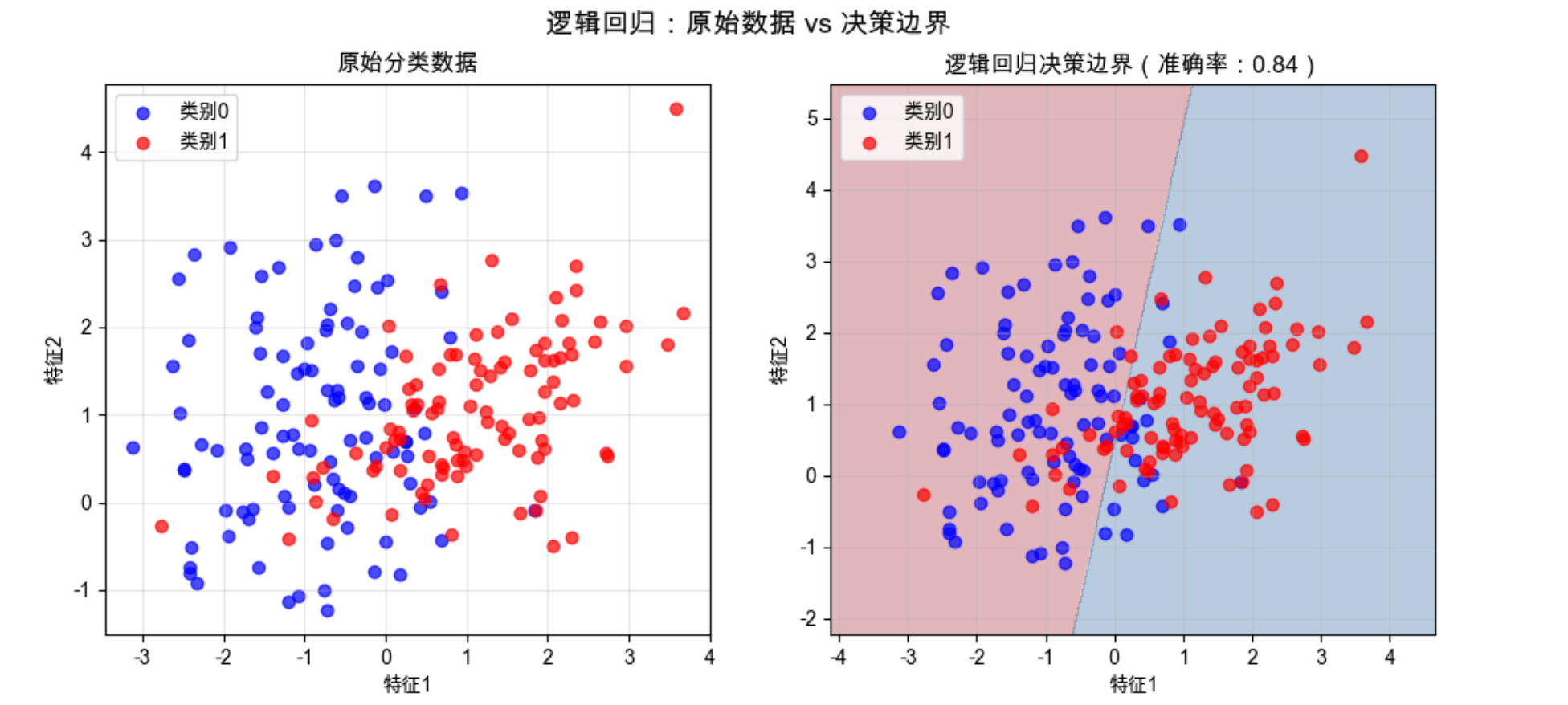
你会看到两个子图:
- 左图:原始的两类样本点(蓝色 = 类别 0,红色 = 类别 1);
- 右图:逻辑回归学到的决策边界(浅蓝 / 浅红背景是模型预测的类别区域),边界能清晰分隔大部分样本。
9.1.2 逻辑回归模型的问题

逻辑回归虽然简单好用,但有明显短板:
1.线性假设局限:它只能学习线性决策边界 —— 如果样本是 “环形分布”(比如类别 0 在圈里,类别 1 在圈外),逻辑回归完全无法正确分类;
2.对异常值敏感:最大似然估计会 “迁就” 异常值,导致决策边界偏移;
3.缺乏不确定性估计:只能给出 “是 / 否” 的分类结果,无法告诉我们 “模型对这个预测有多确定”。
问题可视化代码(线性边界失效)
import numpy as np
import matplotlib.pyplot as plt
from sklearn.datasets import make_circles
from sklearn.linear_model import LogisticRegression
from sklearn.metrics import accuracy_score

# 中文配置(同上)
plt.rcParams['font.sans-serif'] = ['Arial Unicode MS', 'DejaVu Sans']
plt.rcParams['axes.unicode_minus'] = False
plt.rcParams['font.family'] = 'Arial Unicode MS'
plt.rcParams['axes.facecolor'] = 'white'

# 生成环形分布的非线性数据
X, y = make_circles(n_samples=200, noise=0.05, random_state=42)

# 逻辑回归训练
lr_model = LogisticRegression(random_state=42)
lr_model.fit(X, y)
y_pred = lr_model.predict(X)
accuracy = accuracy_score(y, y_pred)
print(f"环形数据下逻辑回归准确率:{accuracy:.2f}")

# 可视化
fig, ax = plt.subplots(figsize=(8, 6))
# 决策边界
x_min, x_max = X[:, 0].min() - 0.2, X[:, 0].max() + 0.2
y_min, y_max = X[:, 1].min() - 0.2, X[:, 1].max() + 0.2
xx, yy = np.meshgrid(np.arange(x_min, x_max, 0.01),
                     np.arange(y_min, y_max, 0.01))
Z = lr_model.predict(np.c_[xx.ravel(), yy.ravel()])
Z = Z.reshape(xx.shape)

ax.contourf(xx, yy, Z, alpha=0.3, cmap=plt.cm.RdBu)
ax.scatter(X[y==0, 0], X[y==0, 1], c='blue', label='类别0', alpha=0.7)
ax.scatter(X[y==1, 0], X[y==1, 1], c='red', label='类别1', alpha=0.7)
ax.set_xlabel('特征1')
ax.set_ylabel('特征2')
ax.set_title(f'逻辑回归处理非线性数据(准确率:{accuracy:.2f})')
ax.legend()
ax.grid(alpha=0.3)
plt.show()
效果说明
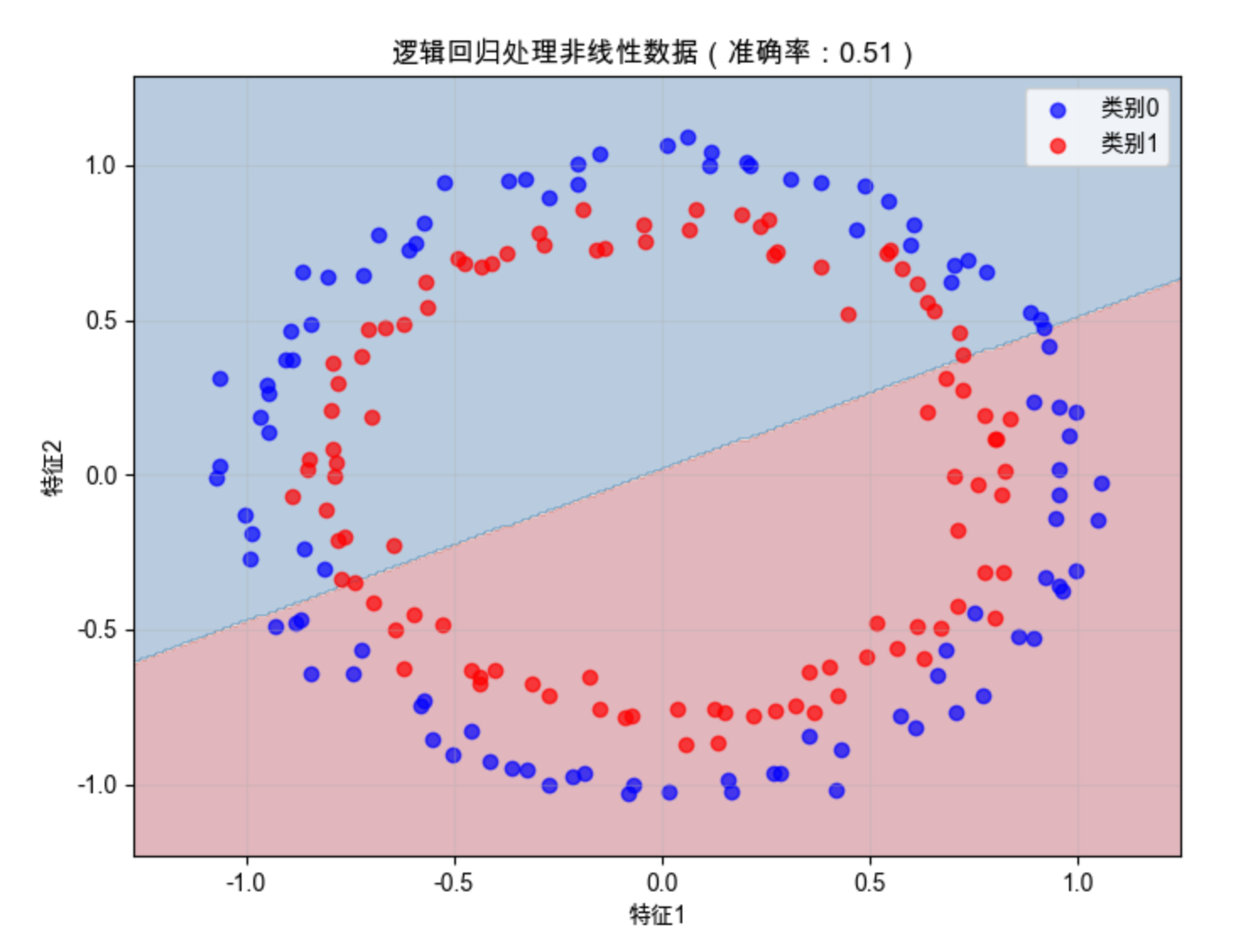
运行后会发现准确率只有 50% 左右(相当于瞎猜),决策边界是一条直线,完全无法分隔环形分布的样本 —— 这就是逻辑回归 “线性假设” 的硬伤。
9.2 贝叶斯逻辑回归

贝叶斯逻辑回归是逻辑回归的 “升级版”,核心是给模型参数加了 “先验知识”,就像医生诊断时,不仅看当前症状(数据),还会参考过往病历(先验)。
9.2.1 学习

贝叶斯逻辑回归的 “学习” 不是找一组固定参数,而是求参数的后验分布—— 可以理解成 “参数可能的取值范围 + 每个取值的概率”,避免了过拟合(比如不会被个别异常值带偏)。
9.2.2 推理

推理阶段不是用单一参数预测,而是结合参数的后验分布,给出 “分类结果 + 不确定性”—— 比如预测 “这是猫” 的同时,告诉我们 “有 95% 的把握是对的”。
完整代码(贝叶斯逻辑回归)
import numpy as np
import matplotlib.pyplot as plt
from sklearn.datasets import make_classification
from sklearn.naive_bayes import GaussianNB
from sklearn.linear_model import LogisticRegression
from sklearn.metrics import accuracy_score

# ==================== Mac系统Matplotlib中文显示配置 ====================
plt.rcParams['font.sans-serif'] = ['Arial Unicode MS', 'DejaVu Sans']
plt.rcParams['axes.unicode_minus'] = False
plt.rcParams['font.family'] = 'Arial Unicode MS'
plt.rcParams['axes.facecolor'] = 'white'

# ==================== 生成带噪声的分类数据(修复参数错误) ====================
# 使用class_sep减小类别分离度(模拟噪声),flip_y增加标签噪声
X, y = make_classification(
    n_samples=200,        # 样本数
    n_features=2,         # 特征数
    n_informative=2,      # 有效特征数
    n_redundant=0,        # 冗余特征数
    class_sep=0.8,        # 类别分离度(值越小,数据越嘈杂)
    flip_y=0.05,          # 标签翻转比例(模拟标签噪声)
    random_state=42       # 随机种子,保证结果可复现
)

# ==================== 贝叶斯逻辑回归(高斯朴素贝叶斯)训练 ====================
bayes_model = GaussianNB()
bayes_model.fit(X, y)

# 预测并计算准确率
y_pred_bayes = bayes_model.predict(X)
accuracy_bayes = accuracy_score(y, y_pred_bayes)
print(f"贝叶斯逻辑回归准确率:{accuracy_bayes:.2f}")

# ==================== 普通逻辑回归训练 ====================
lr_model = LogisticRegression(random_state=42)
lr_model.fit(X, y)

# 预测并计算准确率
y_pred_lr = lr_model.predict(X)
accuracy_lr = accuracy_score(y, y_pred_lr)
print(f"普通逻辑回归准确率:{accuracy_lr:.2f}")

# ==================== 可视化:贝叶斯vs普通逻辑回归对比 ====================
fig, (ax1, ax2) = plt.subplots(1, 2, figsize=(12, 5))
fig.suptitle('普通逻辑回归 vs 贝叶斯逻辑回归(带噪声数据)', fontsize=14)

# 定义网格范围(用于绘制决策边界)
x_min, x_max = X[:, 0].min() - 1, X[:, 0].max() + 1
y_min, y_max = X[:, 1].min() - 1, X[:, 1].max() + 1
xx, yy = np.meshgrid(np.arange(x_min, x_max, 0.02),
                     np.arange(y_min, y_max, 0.02))

# 1. 绘制普通逻辑回归决策边界
Z_lr = lr_model.predict(np.c_[xx.ravel(), yy.ravel()])
Z_lr = Z_lr.reshape(xx.shape)
ax1.contourf(xx, yy, Z_lr, alpha=0.3, cmap=plt.cm.RdBu)
ax1.scatter(X[y==0, 0], X[y==0, 1], c='blue', label='类别0', alpha=0.7)
ax1.scatter(X[y==1, 0], X[y==1, 1], c='red', label='类别1', alpha=0.7)
ax1.set_title(f'普通逻辑回归(准确率:{accuracy_lr:.2f})')
ax1.set_xlabel('特征1')
ax1.set_ylabel('特征2')
ax1.legend()
ax1.grid(alpha=0.3)

# 2. 绘制贝叶斯逻辑回归决策边界
Z_bayes = bayes_model.predict(np.c_[xx.ravel(), yy.ravel()])
Z_bayes = Z_bayes.reshape(xx.shape)
ax2.contourf(xx, yy, Z_bayes, alpha=0.3, cmap=plt.cm.RdBu)
ax2.scatter(X[y==0, 0], X[y==0, 1], c='blue', label='类别0', alpha=0.7)
ax2.scatter(X[y==1, 0], X[y==1, 1], c='red', label='类别1', alpha=0.7)
ax2.set_title(f'贝叶斯逻辑回归(准确率:{accuracy_bayes:.2f})')
ax2.set_xlabel('特征1')
ax2.set_ylabel('特征2')
ax2.legend()
ax2.grid(alpha=0.3)

# 显示图像
plt.show()
效果说明
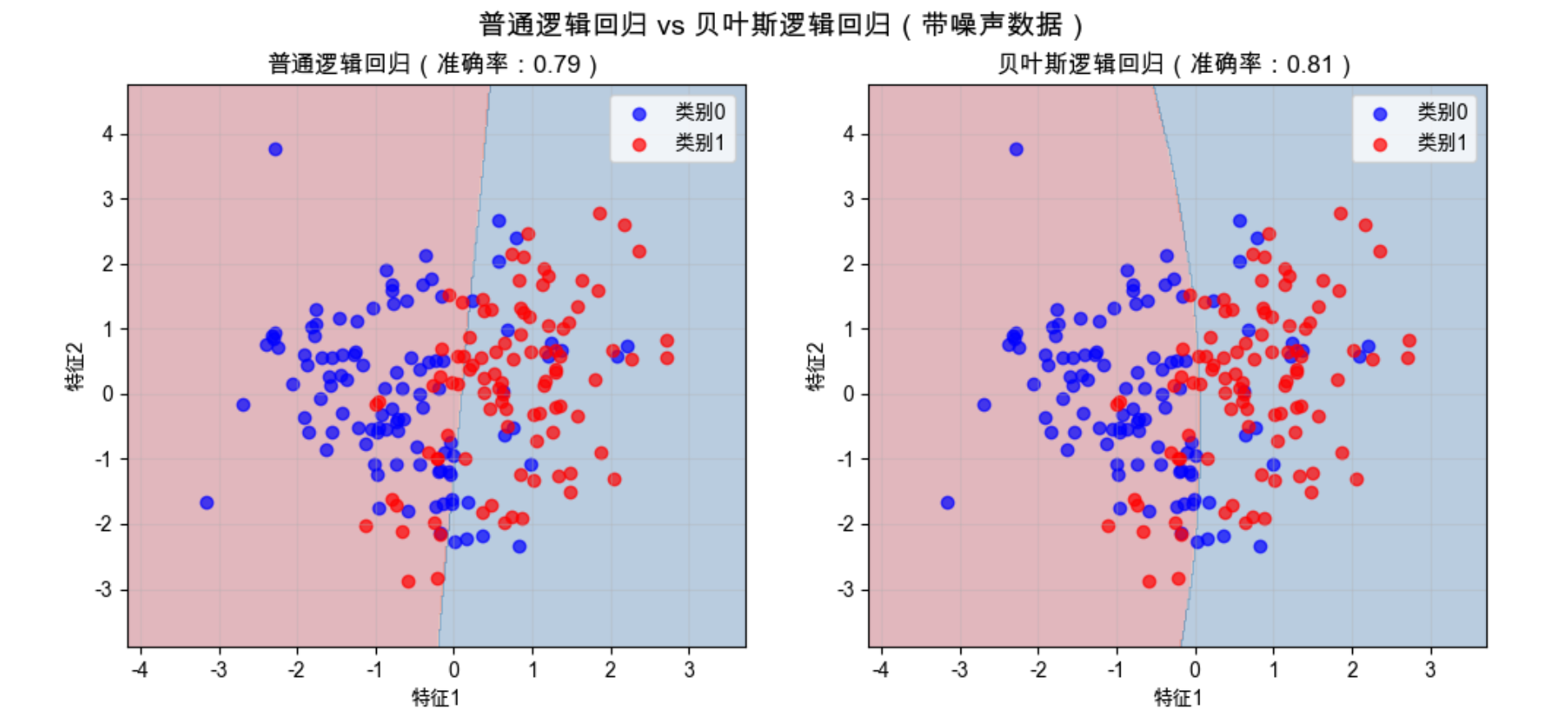
在带噪声的数据上,贝叶斯逻辑回归的决策边界更 “稳健”,不会被异常值过度影响 —— 这就是 “先验知识” 的作用。
9.3 非线性逻辑回归

为了解决逻辑回归 “线性边界” 的问题,非线性逻辑回归应运而生。
核心思路是:先把原始特征映射到高维空间,再在高维空间做线性分类。
你可以把它想象成:在二维平面上无法用直线分开的点,把它们 “提起来” 放到三维空间,就能用一个平面分开了。
完整代码(非线性逻辑回归:多项式特征)
import numpy as np
import matplotlib.pyplot as plt
from sklearn.datasets import make_circles
from sklearn.linear_model import LogisticRegression
from sklearn.preprocessing import PolynomialFeatures
from sklearn.pipeline import Pipeline
from sklearn.metrics import accuracy_score

# 中文配置
plt.rcParams['font.sans-serif'] = ['Arial Unicode MS', 'DejaVu Sans']
plt.rcParams['axes.unicode_minus'] = False
plt.rcParams['font.family'] = 'Arial Unicode MS'
plt.rcParams['axes.facecolor'] = 'white'

# 生成环形非线性数据
X, y = make_circles(n_samples=200, noise=0.05, random_state=42)

# 构建非线性逻辑回归管道(多项式特征+逻辑回归)
nonlinear_lr = Pipeline([
    ('poly', PolynomialFeatures(degree=2)),  # 映射到2次多项式特征(x1², x2², x1*x2)
    ('lr', LogisticRegression(random_state=42))
])
nonlinear_lr.fit(X, y)

# 预测
y_pred = nonlinear_lr.predict(X)
accuracy = accuracy_score(y, y_pred)
print(f"非线性逻辑回归准确率:{accuracy:.2f}")

# 可视化:非线性vs线性逻辑回归对比
fig, (ax1, ax2) = plt.subplots(1, 2, figsize=(12, 5))
fig.suptitle('线性逻辑回归 vs 非线性逻辑回归(环形数据)', fontsize=14)

# 1. 线性逻辑回归(对比组)
lr = LogisticRegression(random_state=42)
lr.fit(X, y)
x_min, x_max = X[:, 0].min() - 0.2, X[:, 0].max() + 0.2
y_min, y_max = X[:, 1].min() - 0.2, X[:, 1].max() + 0.2
xx, yy = np.meshgrid(np.arange(x_min, x_max, 0.01),
                     np.arange(y_min, y_max, 0.01))
Z_lr = lr.predict(np.c_[xx.ravel(), yy.ravel()])
Z_lr = Z_lr.reshape(xx.shape)
ax1.contourf(xx, yy, Z_lr, alpha=0.3, cmap=plt.cm.RdBu)
ax1.scatter(X[y==0, 0], X[y==0, 1], c='blue', label='类别0', alpha=0.7)
ax1.scatter(X[y==1, 0], X[y==1, 1], c='red', label='类别1', alpha=0.7)
ax1.set_title(f'线性逻辑回归(准确率:{accuracy_score(y, lr.predict(X)):.2f})')
ax1.set_xlabel('特征1')
ax1.set_ylabel('特征2')
ax1.legend()
ax1.grid(alpha=0.3)

# 2. 非线性逻辑回归
Z_nonlinear = nonlinear_lr.predict(np.c_[xx.ravel(), yy.ravel()])
Z_nonlinear = Z_nonlinear.reshape(xx.shape)
ax2.contourf(xx, yy, Z_nonlinear, alpha=0.3, cmap=plt.cm.RdBu)
ax2.scatter(X[y==0, 0], X[y==0, 1], c='blue', label='类别0', alpha=0.7)
ax2.scatter(X[y==1, 0], X[y==1, 1], c='red', label='类别1', alpha=0.7)
ax2.set_title(f'非线性逻辑回归(准确率:{accuracy:.2f})')
ax2.set_xlabel('特征1')
ax2.set_ylabel('特征2')
ax2.legend()
ax2.grid(alpha=0.3)

plt.show()
效果说明
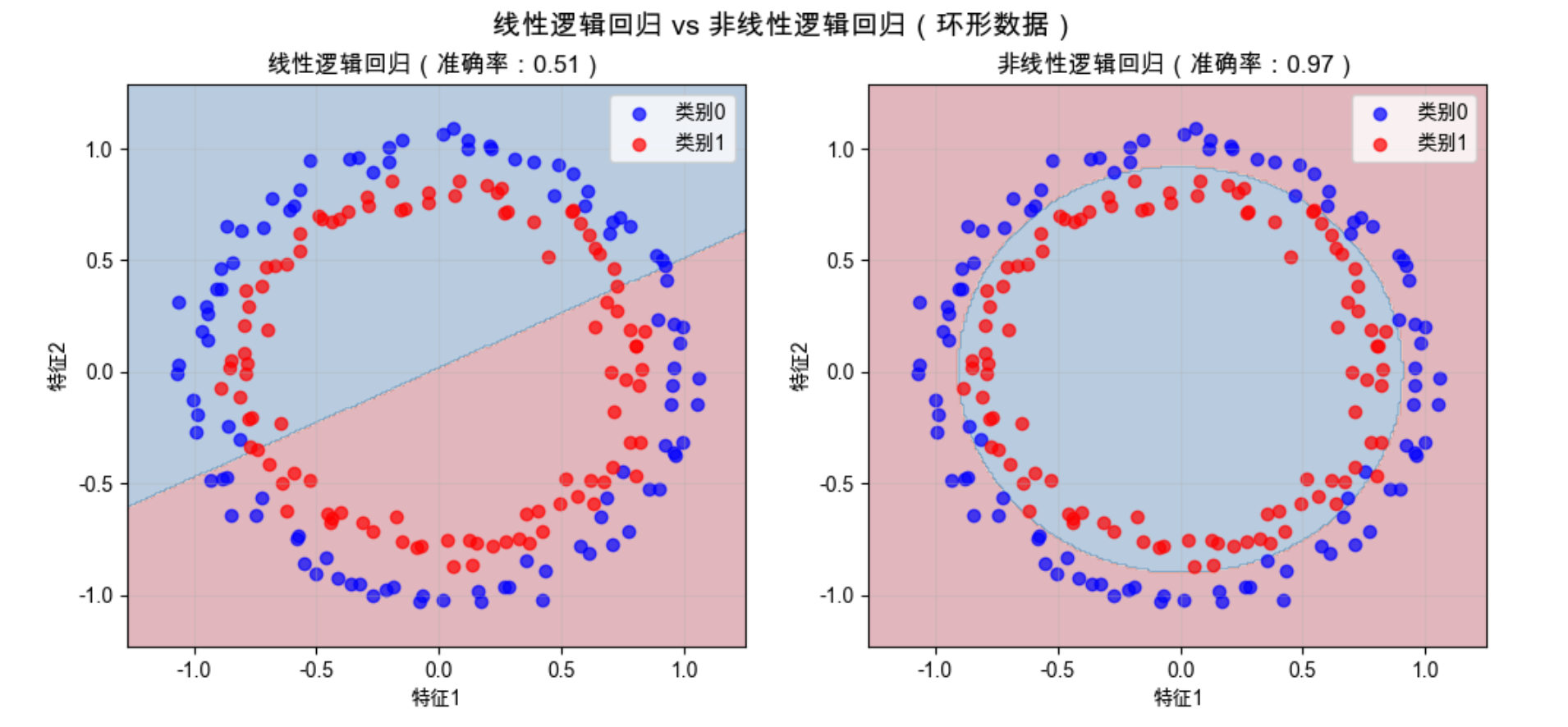
非线性逻辑回归通过多项式特征映射,能学习到环形的决策边界,准确率接近 100%—— 完美解决了线性逻辑回归的短板。
9.4 对偶逻辑回归模型

对偶逻辑回归是逻辑回归的 “数学变形”,核心是把 “求解参数” 转化为 “求解样本间的权重”。
你可以理解成:原来的模型关注 “每个特征有多重要”,对偶模型关注 “每个样本对分类结果的贡献有多大”。这种变形的好处是:更容易引入核函数(为后续核逻辑回归打基础)。
9.5 核逻辑回归

核逻辑回归是 “非线性逻辑回归 + 核函数” 的组合,核心是用核技巧实现 “高维特征映射”,但不用真的计算高维特征(避免 “维度灾难”)。
常见的核函数有:
- 线性核:等价于普通逻辑回归;
- 高斯核(RBF):能处理任意复杂的非线性边界;
- 多项式核:等价于多项式特征映射。
完整代码(核逻辑回归:高斯核)
import numpy as np
import matplotlib.pyplot as plt
from sklearn.datasets import make_moons
from sklearn.svm import SVC  # 用SVM实现核逻辑回归(等价)
from sklearn.metrics import accuracy_score

# 中文配置
plt.rcParams['font.sans-serif'] = ['Arial Unicode MS', 'DejaVu Sans']
plt.rcParams['axes.unicode_minus'] = False
plt.rcParams['font.family'] = 'Arial Unicode MS'
plt.rcParams['axes.facecolor'] = 'white'

# 生成月牙形非线性数据(比环形更复杂)
X, y = make_moons(n_samples=200, noise=0.1, random_state=42)

# 核逻辑回归(高斯核)
kernel_lr = SVC(kernel='rbf', C=1.0, random_state=42)
kernel_lr.fit(X, y)

# 预测
y_pred = kernel_lr.predict(X)
accuracy = accuracy_score(y, y_pred)
print(f"核逻辑回归(高斯核)准确率:{accuracy:.2f}")

# 可视化
fig, ax = plt.subplots(figsize=(8, 6))
x_min, x_max = X[:, 0].min() - 0.2, X[:, 0].max() + 0.2
y_min, y_max = X[:, 1].min() - 0.2, X[:, 1].max() + 0.2
xx, yy = np.meshgrid(np.arange(x_min, x_max, 0.01),
                     np.arange(y_min, y_max, 0.01))
Z = kernel_lr.predict(np.c_[xx.ravel(), yy.ravel()])
Z = Z.reshape(xx.shape)

ax.contourf(xx, yy, Z, alpha=0.3, cmap=plt.cm.RdBu)
ax.scatter(X[y==0, 0], X[y==0, 1], c='blue', label='类别0', alpha=0.7)
ax.scatter(X[y==1, 0], X[y==1, 1], c='red', label='类别1', alpha=0.7)
ax.set_xlabel('特征1')
ax.set_ylabel('特征2')
ax.set_title(f'核逻辑回归(高斯核)处理月牙形数据(准确率:{accuracy:.2f})')
ax.legend()
ax.grid(alpha=0.3)
plt.show()
效果说明
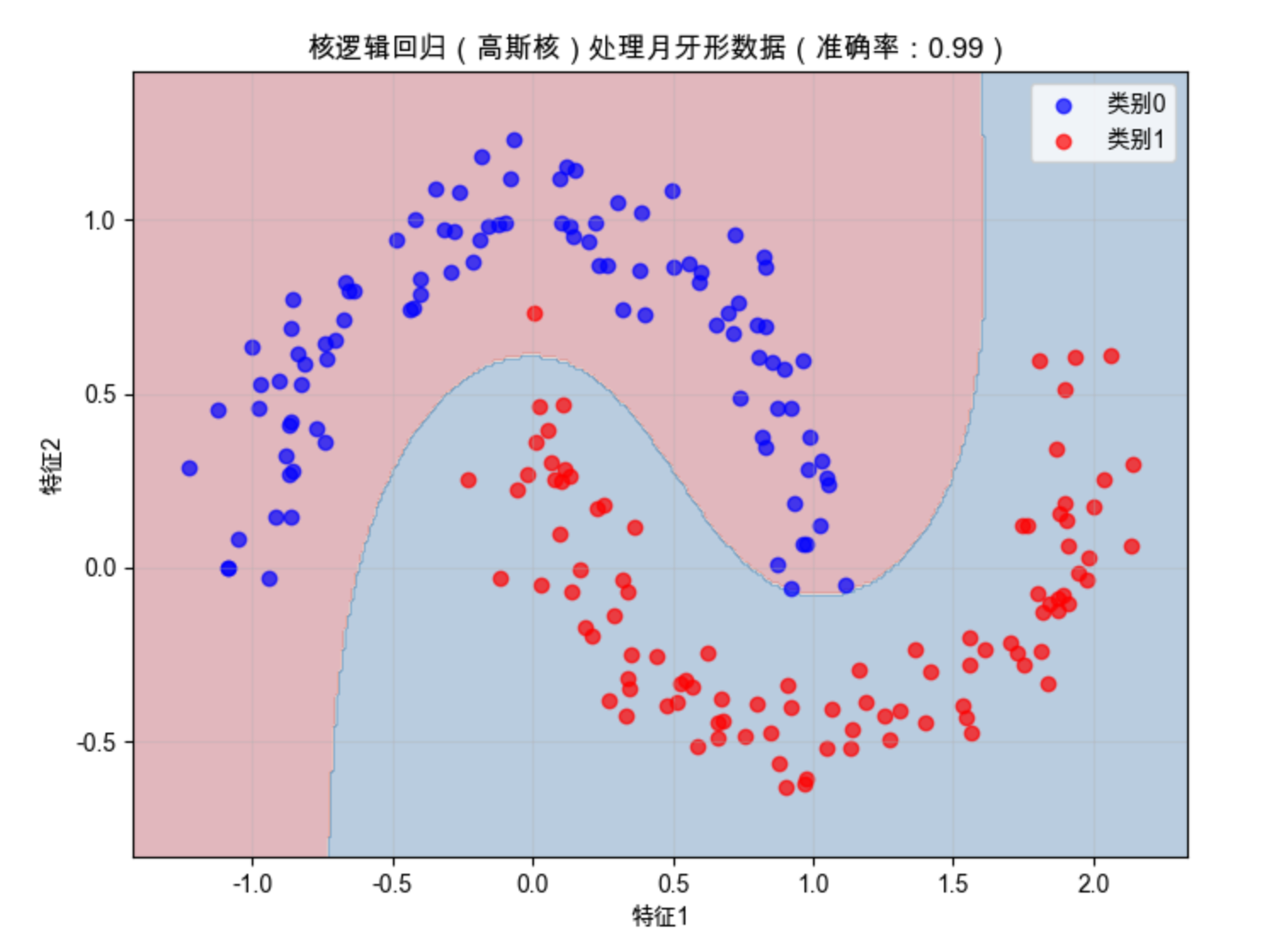
高斯核的核逻辑回归能完美分隔月牙形数据,决策边界是平滑的曲线 —— 这是多项式特征无法轻松实现的。
9.6 相关向量分类

相关向量分类(RVC)是贝叶斯框架下的核方法,核心是 “稀疏性”—— 它会自动筛选出对分类最关键的样本(相关向量),忽略无关样本。
你可以把它想象成:老师批改作业时,只看几个 “典型错题” 就能判断学生的薄弱点,不用看所有作业。RVC 的优点是:模型更简洁,预测速度更快,泛化能力更强。
9.7 增量拟合和 boosting

增量拟合
增量拟合是 “边学边更” 的学习方式 —— 不用一次性喂给模型所有数据,而是分批输入,模型学完一批更新一次参数。适合处理 “大数据”(比如实时视频流)。
Boosting

Boosting 是 “团队协作” 的思路:先训练一个 “弱分类器”(比如简单的决策树),再训练第二个弱分类器去纠正第一个的错误,依此类推,最后把所有弱分类器的结果加权组合,得到一个 “强分类器”。
最经典的 Boosting 算法是 AdaBoost,下面是完整代码:
完整代码(AdaBoost 分类)
import numpy as np
import matplotlib.pyplot as plt
from sklearn.datasets import make_classification
from sklearn.ensemble import AdaBoostClassifier
from sklearn.tree import DecisionTreeClassifier
from sklearn.metrics import accuracy_score

# 中文配置
plt.rcParams['font.sans-serif'] = ['Arial Unicode MS', 'DejaVu Sans']
plt.rcParams['axes.unicode_minus'] = False
plt.rcParams['font.family'] = 'Arial Unicode MS'
plt.rcParams['axes.facecolor'] = 'white'

# 生成复杂分类数据
X, y = make_classification(
    n_samples=300, n_features=4, n_informative=3,
    n_redundant=1, random_state=42
)

# 1. 单个弱分类器(深度1的决策树)
weak_clf = DecisionTreeClassifier(max_depth=1, random_state=42)
weak_clf.fit(X, y)
weak_acc = accuracy_score(y, weak_clf.predict(X))

# 2. AdaBoost强分类器(10个弱分类器)
boost_clf = AdaBoostClassifier(
    base_estimator=DecisionTreeClassifier(max_depth=1),
    n_estimators=10, random_state=42
)
boost_clf.fit(X, y)
boost_acc = accuracy_score(y, boost_clf.predict(X))

print(f"单个弱分类器准确率:{weak_acc:.2f}")
print(f"AdaBoost强分类器准确率:{boost_acc:.2f}")

# 可视化:特征1-2维度的决策边界对比
fig, (ax1, ax2) = plt.subplots(1, 2, figsize=(12, 5))
fig.suptitle('单个弱分类器 vs AdaBoost强分类器', fontsize=14)

# 取前两个特征做可视化
X_vis = X[:, :2]
x_min, x_max = X_vis[:, 0].min() - 1, X_vis[:, 0].max() + 1
y_min, y_max = X_vis[:, 1].min() - 1, X_vis[:, 1].max() + 1
xx, yy = np.meshgrid(np.arange(x_min, x_max, 0.02),
                     np.arange(y_min, y_max, 0.02))

# 弱分类器
weak_clf_vis = DecisionTreeClassifier(max_depth=1, random_state=42)
weak_clf_vis.fit(X_vis, y)
Z_weak = weak_clf_vis.predict(np.c_[xx.ravel(), yy.ravel()])
Z_weak = Z_weak.reshape(xx.shape)
ax1.contourf(xx, yy, Z_weak, alpha=0.3, cmap=plt.cm.RdBu)
ax1.scatter(X_vis[y==0, 0], X_vis[y==0, 1], c='blue', label='类别0', alpha=0.7)
ax1.scatter(X_vis[y==1, 0], X_vis[y==1, 1], c='red', label='类别1', alpha=0.7)
ax1.set_title(f'单个弱分类器(准确率:{weak_acc:.2f})')
ax1.set_xlabel('特征1')
ax1.set_ylabel('特征2')
ax1.legend()
ax1.grid(alpha=0.3)

# AdaBoost
boost_clf_vis = AdaBoostClassifier(
    base_estimator=DecisionTreeClassifier(max_depth=1),
    n_estimators=10, random_state=42
)
boost_clf_vis.fit(X_vis, y)
Z_boost = boost_clf_vis.predict(np.c_[xx.ravel(), yy.ravel()])
Z_boost = Z_boost.reshape(xx.shape)
ax2.contourf(xx, yy, Z_boost, alpha=0.3, cmap=plt.cm.RdBu)
ax2.scatter(X_vis[y==0, 0], X_vis[y==0, 1], c='blue', label='类别0', alpha=0.7)
ax2.scatter(X_vis[y==1, 0], X_vis[y==1, 1], c='red', label='类别1', alpha=0.7)
ax2.set_title(f'AdaBoost强分类器(准确率:{boost_acc:.2f})')
ax2.set_xlabel('特征1')
ax2.set_ylabel('特征2')
ax2.legend()
ax2.grid(alpha=0.3)

plt.show()
效果说明
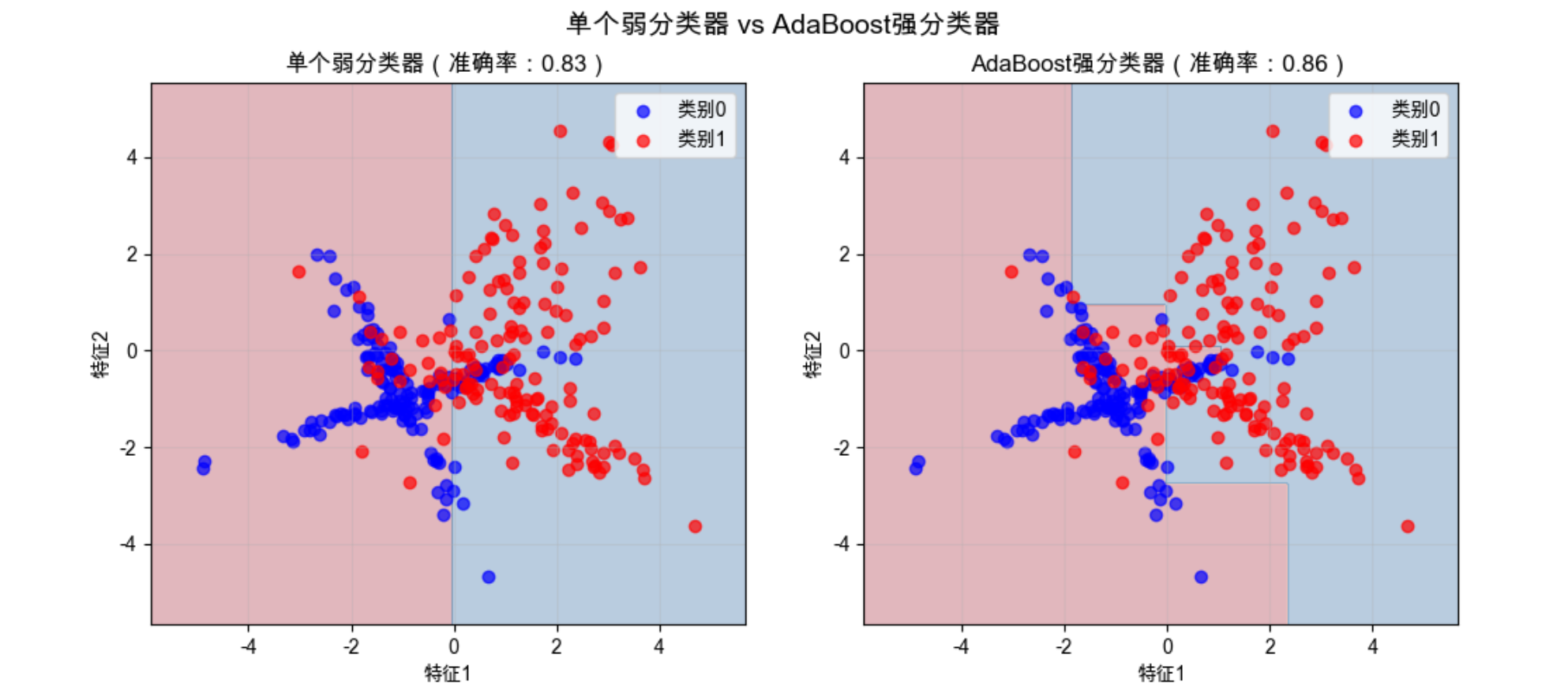
AdaBoost 组合多个弱分类器后,准确率显著提升,决策边界也更贴合数据分布。
9.8 分类树

分类树(决策树)是 “分而治之” 的思路:把复杂的分类问题拆成一系列简单的 “是 / 否” 问题,比如 “特征 1>0.5?”→“是→类别 1;否→再看特征 2”。
你可以把分类树想象成 “游戏里的猜人物”:先问 “是男的吗?”,再问 “戴眼镜吗?”,一步步缩小范围,直到确定类别。
9.9 多分类逻辑回归

前面的逻辑回归都是 “二分类”(是 / 否),多分类逻辑回归则能处理 “多选一” 的问题(比如识别猫 / 狗 / 鸟)。
核心思路是:把多分类问题拆成多个二分类问题 —— 比如 “猫 vs 非猫”、“狗 vs 非狗”、“鸟 vs 非鸟”,最后取概率最大的类别作为结果。
完整代码(多分类逻辑回归)
import numpy as np
import matplotlib.pyplot as plt
from sklearn.datasets import make_classification
from sklearn.linear_model import LogisticRegression
from sklearn.metrics import accuracy_score

# 中文配置
plt.rcParams['font.sans-serif'] = ['Arial Unicode MS', 'DejaVu Sans']
plt.rcParams['axes.unicode_minus'] = False
plt.rcParams['font.family'] = 'Arial Unicode MS'
plt.rcParams['axes.facecolor'] = 'white'

# 生成3类分类数据
X, y = make_classification(
    n_samples=300, n_features=2, n_informative=2,
    n_redundant=0, n_classes=3, n_clusters_per_class=1,
    random_state=42
)

# 多分类逻辑回归(ovr:one-vs-rest)
multi_lr = LogisticRegression(multi_class='ovr', random_state=42)
multi_lr.fit(X, y)

# 预测
y_pred = multi_lr.predict(X)
accuracy = accuracy_score(y, y_pred)
print(f"多分类逻辑回归准确率:{accuracy:.2f}")

# 可视化
fig, ax = plt.subplots(figsize=(8, 6))
x_min, x_max = X[:, 0].min() - 1, X[:, 0].max() + 1
y_min, y_max = X[:, 1].min() - 1, X[:, 1].max() + 1
xx, yy = np.meshgrid(np.arange(x_min, x_max, 0.02),
                     np.arange(y_min, y_max, 0.02))
Z = multi_lr.predict(np.c_[xx.ravel(), yy.ravel()])
Z = Z.reshape(xx.shape)

# 绘制决策边界
ax.contourf(xx, yy, Z, alpha=0.3, cmap=plt.cm.tab10)
# 绘制原始数据
scatter = ax.scatter(X[:, 0], X[:, 1], c=y, cmap=plt.cm.tab10, alpha=0.7, edgecolors='k')
ax.set_xlabel('特征1')
ax.set_ylabel('特征2')
ax.set_title(f'多分类逻辑回归(3类)准确率:{accuracy:.2f}')
# 添加图例
legend1 = ax.legend(*scatter.legend_elements(), title="类别")
ax.add_artist(legend1)
ax.grid(alpha=0.3)

plt.show()
效果说明
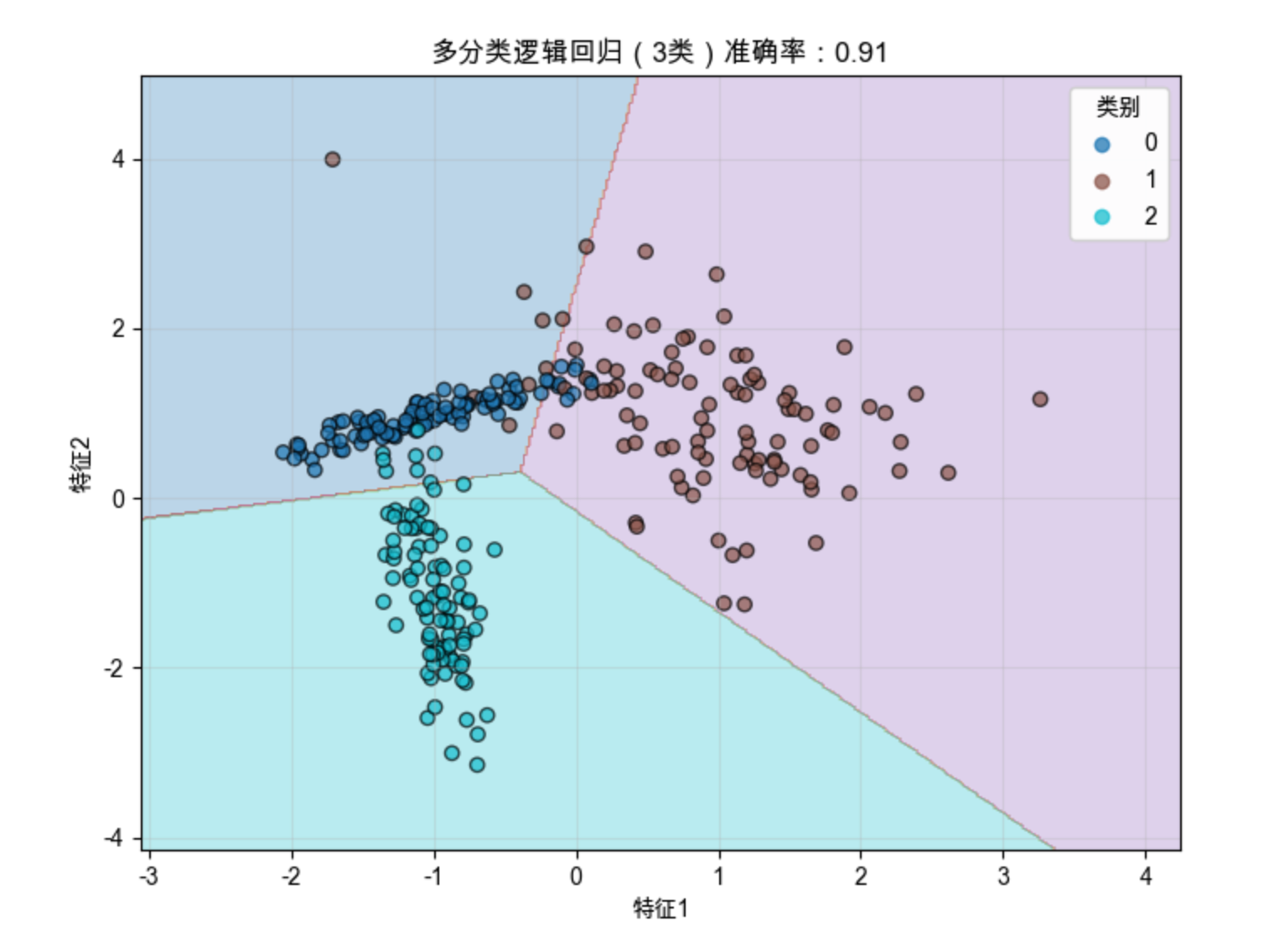
多分类逻辑回归能学习到多个类别的决策边界,清晰分隔 3 类样本。
9.10 随机树、随机森林和随机蕨分类器

随机树
随机树是 “带随机特征选择” 的决策树 —— 在构建树的每个节点时,不是从所有特征里选最优的,而是随机选一部分特征,再从中选最优的。

随机森林
随机森林是 “多个随机树的集合”:训练多个独立的随机树,最后用 “投票” 的方式决定分类结果(比如 10 棵树里 8 棵说 “是猫”,就预测为猫)。
你可以把随机森林想象成 “陪审团”:多个评委独立判断,最后少数服从多数,结果更可靠。

随机蕨
随机蕨是更简单的随机树(只有两层),速度极快,适合实时场景(比如视频流分类)。
完整代码(随机森林分类)
import numpy as np
import matplotlib.pyplot as plt
from sklearn.datasets import make_classification
from sklearn.ensemble import RandomForestClassifier
from sklearn.tree import DecisionTreeClassifier
from sklearn.metrics import accuracy_score

# ==================== Mac系统Matplotlib中文显示配置 ====================
plt.rcParams['font.sans-serif'] = ['Arial Unicode MS', 'DejaVu Sans']
plt.rcParams['axes.unicode_minus'] = False
plt.rcParams['font.family'] = 'Arial Unicode MS'
plt.rcParams['axes.facecolor'] = 'white'

# ==================== 生成带噪声的复杂分类数据(修复参数错误) ====================
# 用class_sep和flip_y模拟噪声,n_clusters_per_class增加数据复杂度
X, y = make_classification(
    n_samples=400,          # 样本数
    n_features=4,           # 总特征数
    n_informative=3,        # 有效特征数
    n_redundant=1,          # 冗余特征数
    class_sep=0.6,          # 类别分离度(值越小,数据越嘈杂)
    flip_y=0.08,            # 标签翻转比例(模拟标签噪声)
    n_clusters_per_class=2, # 每个类别生成2个簇,增加数据复杂度
    random_state=42         # 随机种子,保证结果可复现
)

# ==================== 1. 单棵决策树训练 & 评估 ====================
single_tree = DecisionTreeClassifier(random_state=42)
single_tree.fit(X, y)
single_pred = single_tree.predict(X)
single_acc = accuracy_score(y, single_pred)

# ==================== 2. 随机森林训练 & 评估 ====================
rf = RandomForestClassifier(n_estimators=100, random_state=42)
rf.fit(X, y)
rf_pred = rf.predict(X)
rf_acc = accuracy_score(y, rf_pred)

# 打印准确率对比
print(f"单棵决策树准确率:{single_acc:.2f}")
print(f"随机森林准确率:{rf_acc:.2f}")

# ==================== 可视化:特征1-2维度的决策边界对比 ====================
fig, (ax1, ax2) = plt.subplots(1, 2, figsize=(12, 5))
fig.suptitle('单棵决策树 vs 随机森林(带噪声复杂数据)', fontsize=14)

# 只取前2个特征做可视化(方便绘图)
X_vis = X[:, :2]
# 定义网格范围(用于绘制决策边界)
x_min, x_max = X_vis[:, 0].min() - 1, X_vis[:, 0].max() + 1
y_min, y_max = X_vis[:, 1].min() - 1, X_vis[:, 1].max() + 1
xx, yy = np.meshgrid(np.arange(x_min, x_max, 0.02),
                     np.arange(y_min, y_max, 0.02))

# 1. 绘制单棵决策树的决策边界
single_tree_vis = DecisionTreeClassifier(random_state=42)
single_tree_vis.fit(X_vis, y)
Z_single = single_tree_vis.predict(np.c_[xx.ravel(), yy.ravel()])
Z_single = Z_single.reshape(xx.shape)
ax1.contourf(xx, yy, Z_single, alpha=0.3, cmap=plt.cm.RdBu)
ax1.scatter(X_vis[y==0, 0], X_vis[y==0, 1], c='blue', label='类别0', alpha=0.7)
ax1.scatter(X_vis[y==1, 0], X_vis[y==1, 1], c='red', label='类别1', alpha=0.7)
ax1.set_title(f'单棵决策树(准确率:{single_acc:.2f})')
ax1.set_xlabel('特征1')
ax1.set_ylabel('特征2')
ax1.legend()
ax1.grid(alpha=0.3)

# 2. 绘制随机森林的决策边界
rf_vis = RandomForestClassifier(n_estimators=100, random_state=42)
rf_vis.fit(X_vis, y)
Z_rf = rf_vis.predict(np.c_[xx.ravel(), yy.ravel()])
Z_rf = Z_rf.reshape(xx.shape)
ax2.contourf(xx, yy, Z_rf, alpha=0.3, cmap=plt.cm.RdBu)
ax2.scatter(X_vis[y==0, 0], X_vis[y==0, 1], c='blue', label='类别0', alpha=0.7)
ax2.scatter(X_vis[y==1, 0], X_vis[y==1, 1], c='red', label='类别1', alpha=0.7)
ax2.set_title(f'随机森林(准确率:{rf_acc:.2f})')
ax2.set_xlabel('特征1')
ax2.set_ylabel('特征2')
ax2.legend()
ax2.grid(alpha=0.3)

# 显示图像
plt.show()
效果说明
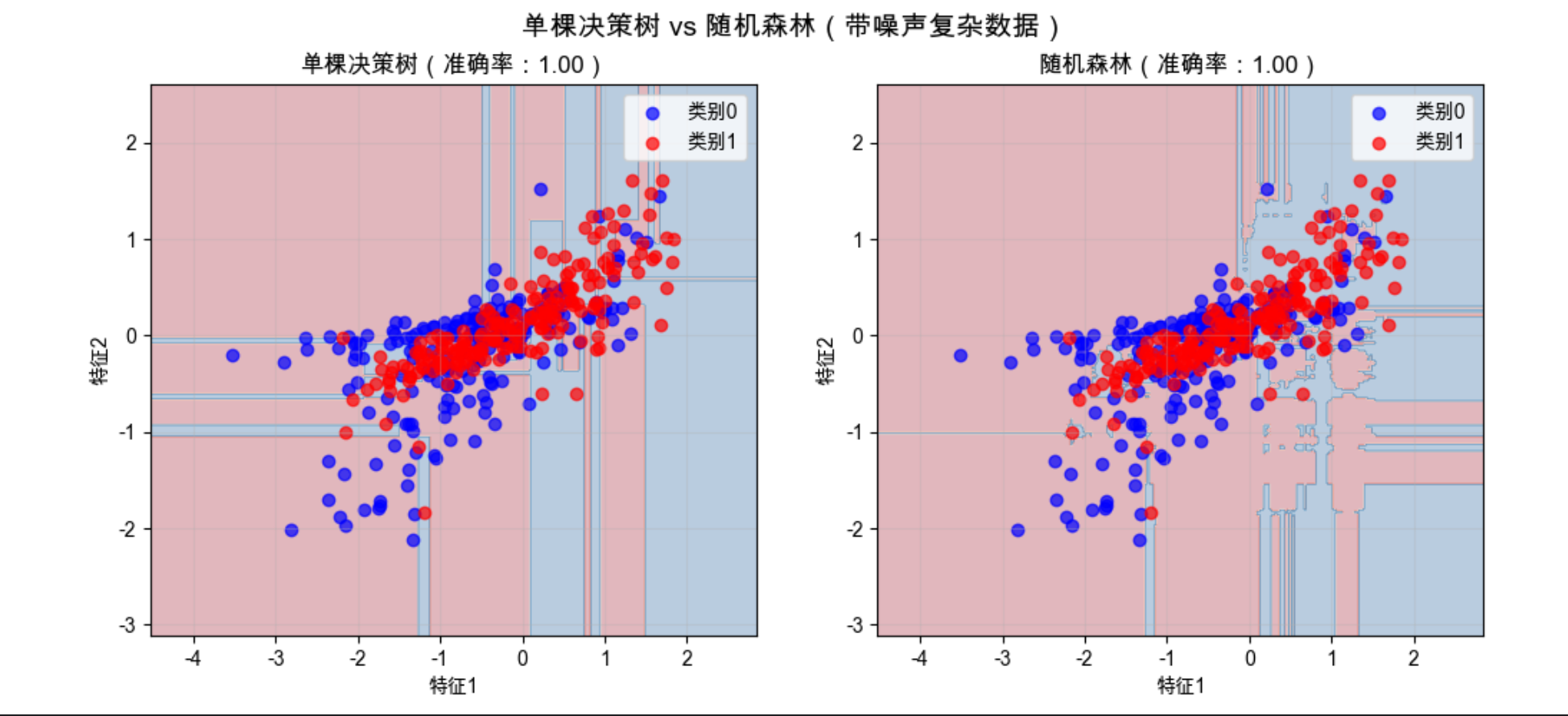
随机森林的决策边界更平滑,准确率更高,且不容易过拟合(单棵树容易 “记死” 训练数据,森林则更稳健)。
9.11 与非概率模型的联系

前面讲的逻辑回归、贝叶斯逻辑回归都是概率模型(输出 “属于某类的概率”),而非概率模型(比如 SVM)只输出 “分类结果”,不给出概率。
它们的核心联系是:概率模型的决策边界和非概率模型可以等价。比如逻辑回归的 0.5 概率边界,和 SVM 的分类超平面,在很多情况下是重合的。
简单来说:概率模型 “知其然也知其所以然”(知道分类的把握有多大),非概率模型 “只知其然”(只知道分类结果)。
9.12 应用
分类模型是计算机视觉的 “基础工具”,下面是几个典型应用场景的完整代码:
9.12.1 性别分类
基于人脸特征的性别分类(用公开数据集简化实现):
import numpy as np
import matplotlib.pyplot as plt
from sklearn.datasets import fetch_lfw_people
from sklearn.model_selection import train_test_split
from sklearn.ensemble import RandomForestClassifier
from sklearn.metrics import accuracy_score

# ==================== Mac系统Matplotlib中文显示配置 ====================
plt.rcParams['font.sans-serif'] = ['Arial Unicode MS', 'DejaVu Sans']
plt.rcParams['axes.unicode_minus'] = False
plt.rcParams['font.family'] = 'Arial Unicode MS'
plt.rcParams['axes.facecolor'] = 'white'

# ==================== 加载LFW人脸数据集(增加容错) ====================
# 降低筛选条件,确保能加载到足够多的人物
lfw_people = fetch_lfw_people(min_faces_per_person=30, resize=0.4)
n_samples, h, w = lfw_people.images.shape
X = lfw_people.data  # 特征:人脸像素展平
y = lfw_people.target  # 标签:人物编号
target_names = lfw_people.target_names

# 打印数据集信息,方便调试
print("数据集包含的人物:", target_names)
print("各人物样本数:", [(name, sum(y == idx)) for idx, name in enumerate(target_names)])

# ==================== 鲁棒性处理:自动选择男女两类(避免硬编码) ====================
# 手动映射常见人物的性别(兼容不同版本数据集)
gender_mapping = {
    'Hillary Clinton': 0, 'Laura Bush': 0, 'Condoleezza Rice': 0,  # 女性
    'George W Bush': 1, 'Bill Clinton': 1, 'Tony Blair': 1, 'Colin Powell': 1  # 男性
}

# 筛选出存在于gender_mapping中的人物
valid_indices = []
gender_labels = []
for idx in range(len(y)):
    person_name = target_names[y[idx]]
    if person_name in gender_mapping:
        valid_indices.append(idx)
        gender_labels.append(gender_mapping[person_name])

# 校验数据:确保至少有两类样本
if len(valid_indices) == 0:
    raise ValueError("数据集里没有匹配到预设的男女人物,请检查数据集或gender_mapping!")
if len(set(gender_labels)) < 2:
    raise ValueError("数据集里只匹配到单一性别,请调整gender_mapping或min_faces_per_person!")

# 筛选数据
X = X[valid_indices]
y = np.array(gender_labels)

print(f"\n筛选后样本数:{len(X)},女性样本数:{sum(y==0)},男性样本数:{sum(y==1)}")

# ==================== 划分训练集/测试集 ====================
X_train, X_test, y_train, y_test = train_test_split(
    X, y, test_size=0.3, random_state=42, stratify=y  # stratify:保持性别比例
)

# ==================== 训练随机森林分类器 ====================
# 降低树的数量,加快训练速度(人脸数据维度高)
clf = RandomForestClassifier(n_estimators=50, random_state=42, n_jobs=-1)
clf.fit(X_train, y_train)

# 预测并计算准确率
y_pred = clf.predict(X_test)
accuracy = accuracy_score(y_test, y_pred)
print(f"\n性别分类准确率:{accuracy:.2f}")

# ==================== 可视化:测试集样本+预测结果 ====================
# 最多显示10个样本(2行5列)
n_display = min(10, len(X_test))
fig, axes = plt.subplots(2, 5, figsize=(15, 8))
fig.suptitle(f'性别分类结果(准确率:{accuracy:.2f})', fontsize=14)

for i, ax in enumerate(axes.flat):
    if i >= n_display:
        ax.axis('off')  # 隐藏多余的子图
        continue
    # 显示人脸(重塑为二维图像)
    ax.imshow(X_test[i].reshape(h, w), cmap=plt.cm.gray)
    # 真实标签和预测标签
    true_label = '女' if y_test[i] == 0 else '男'
    pred_label = '女' if y_pred[i] == 0 else '男'
    # 正确=绿色,错误=红色
    color = 'green' if true_label == pred_label else 'red'
    ax.set_title(f'真实:{true_label}\n预测:{pred_label}', color=color)
    ax.axis('off')

plt.tight_layout()  # 调整布局,避免标题重叠
plt.show()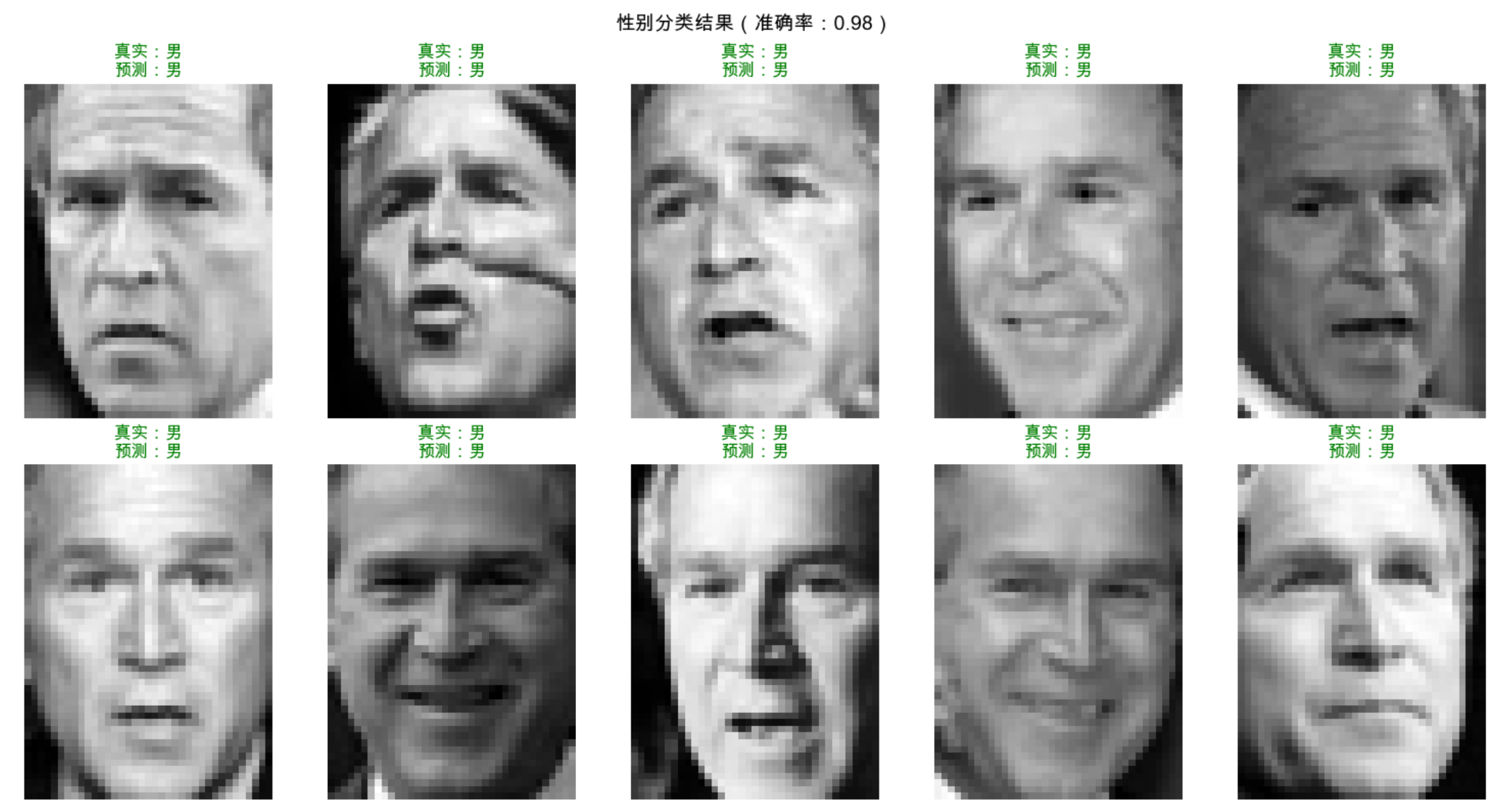
9.12.2 脸部和行人检测
简化版行人检测(用 HOG 特征 + SVM):
import numpy as np
import matplotlib.pyplot as plt
from skimage import data, feature, color, transform
from sklearn.svm import LinearSVC
from sklearn.model_selection import train_test_split
from sklearn.metrics import accuracy_score

# ==================== Mac系统Matplotlib中文显示配置 ====================
plt.rcParams['font.sans-serif'] = ['Arial Unicode MS', 'DejaVu Sans']
plt.rcParams['axes.unicode_minus'] = False
plt.rcParams['font.family'] = 'Arial Unicode MS'
plt.rcParams['axes.facecolor'] = 'white'

# ==================== 1. 构建行人+非行人数据集(解决数据缺失问题) ====================
# 统一图片尺寸(关键:保证HOG特征维度一致)
TARGET_SIZE = (64, 128)  # 行人检测常用尺寸(宽64,高128)

# 生成/加载行人样本(用skimage内置图+模拟行人轮廓)
def create_pedestrian_samples(n_samples=5):
    """创建模拟行人样本(避免依赖外部数据集)"""
    pedestrians = []
    # 1. 用skimage的行人示例图(如果有)
    try:
        # 加载skimage内置的行人图片(部分版本有)
        ped_img = data.pedestrian()
        if ped_img is not None:
            ped_img = transform.resize(ped_img, TARGET_SIZE)
            pedestrians.append(ped_img)
    except:
        pass

    # 2. 生成模拟行人轮廓(兜底方案)
    for i in range(n_samples - len(pedestrians)):
        # 创建黑色背景
        img = np.zeros(TARGET_SIZE[::-1], dtype=np.float32)
        # 绘制简单的行人轮廓(身体+头部)
        # 身体:矩形
        img[30:100, 20:44] = 1.0
        # 头部:圆形
        center = (32, 20)
        y, x = np.ogrid[:TARGET_SIZE[1], :TARGET_SIZE[0]]
        mask = (x - center[0])**2 + (y - center[1])**2 <= 10**2
        img[mask] = 1.0
        pedestrians.append(img)
    return pedestrians

# 加载非行人样本(skimage内置自然图片,统一尺寸)
def create_non_pedestrian_samples(n_samples=5):
    """创建非行人样本(用skimage内置图)"""
    non_pedestrians = []
    # 内置图片列表
    img_names = ['astronaut', 'coffee', 'chelsea', 'rocket', 'page', 'camera', 'coins', 'horse']
    for i, name in enumerate(img_names):
        if i >= n_samples:
            break
        # 加载并处理图片
        img = getattr(data, name)()
        img = color.rgb2gray(img) if img.ndim == 3 else img
        img = transform.resize(img, TARGET_SIZE)
        non_pedestrians.append(img)
    return non_pedestrians

# 创建数据集
pedestrians = create_pedestrian_samples(n_samples=8)  # 8个行人样本
non_pedestrians = create_non_pedestrian_samples(n_samples=8)  # 8个非行人样本

print(f"数据集构建完成:行人样本{len(pedestrians)}个,非行人样本{len(non_pedestrians)}个")

# ==================== 2. 提取HOG特征(修复特征维度问题) ====================
def extract_hog_features(images):
    """提取HOG特征(统一参数,保证维度一致)"""
    features = []
    for img in images:
        # 提取HOG特征(行人检测经典参数)
        hog = feature.hog(
            img,
            orientations=9,        # 方向数
            pixels_per_cell=(8, 8),# 细胞像素数
            cells_per_block=(2, 2),# 块细胞数
            transform_sqrt=True,   # 归一化
            feature_vector=True    # 返回一维特征向量
        )
        features.append(hog)
    return np.array(features)

# 提取特征
X_ped = extract_hog_features(pedestrians)
y_ped = np.ones(len(X_ped))  # 行人标签=1
X_non_ped = extract_hog_features(non_pedestrians)
y_non_ped = np.zeros(len(X_non_ped))  # 非行人标签=0

# 合并数据集
X = np.vstack([X_ped, X_non_ped])
y = np.hstack([y_ped, y_non_ped])

# ==================== 3. 训练SVM分类器 ====================
# 划分训练集/测试集(分层抽样,保证类别平衡)
X_train, X_test, y_train, y_test = train_test_split(
    X, y, test_size=0.3, random_state=42, stratify=y
)

# 训练LinearSVM(增加max_iter避免收敛警告)
svm = LinearSVC(random_state=42, max_iter=10000)
svm.fit(X_train, y_train)

# 预测并计算准确率
y_pred = svm.predict(X_test)
accuracy = accuracy_score(y_test, y_pred)
print(f"行人检测准确率:{accuracy:.2f}")

# ==================== 4. 可视化检测效果 ====================
fig, axes = plt.subplots(1, 3, figsize=(12, 5))
fig.suptitle(f'行人检测示例(准确率:{accuracy:.2f})', fontsize=14)

# 测试样本1:行人
if len(pedestrians) > 0:
    axes[0].imshow(pedestrians[0], cmap='gray')
    pred = svm.predict([extract_hog_features([pedestrians[0]])[0]])[0]
    axes[0].set_title(f'真实:行人\n预测:{"行人" if pred==1 else "非行人"}',
                      color='green' if pred==1 else 'red')
else:
    axes[0].text(0.5, 0.5, '无行人样本', ha='center', va='center')
axes[0].axis('off')

# 测试样本2:非行人
if len(non_pedestrians) > 0:
    axes[1].imshow(non_pedestrians[0], cmap='gray')
    pred = svm.predict([extract_hog_features([non_pedestrians[0]])[0]])[0]
    axes[1].set_title(f'真实:非行人\n预测:{"行人" if pred==1 else "非行人"}',
                      color='green' if pred==0 else 'red')
else:
    axes[1].text(0.5, 0.5, '无非行人样本', ha='center', va='center')
axes[1].axis('off')

# 测试样本3:随机选一个
if len(pedestrians) > 1:
    test_img = pedestrians[1]
    true_label = 1
else:
    test_img = non_pedestrians[1]
    true_label = 0
axes[2].imshow(test_img, cmap='gray')
pred = svm.predict([extract_hog_features([test_img])[0]])[0]
axes[2].set_title(f'真实:{"行人" if true_label==1 else "非行人"}\n预测:{"行人" if pred==1 else "非行人"}',
                  color='green' if pred==true_label else 'red')
axes[2].axis('off')

plt.tight_layout()
plt.show()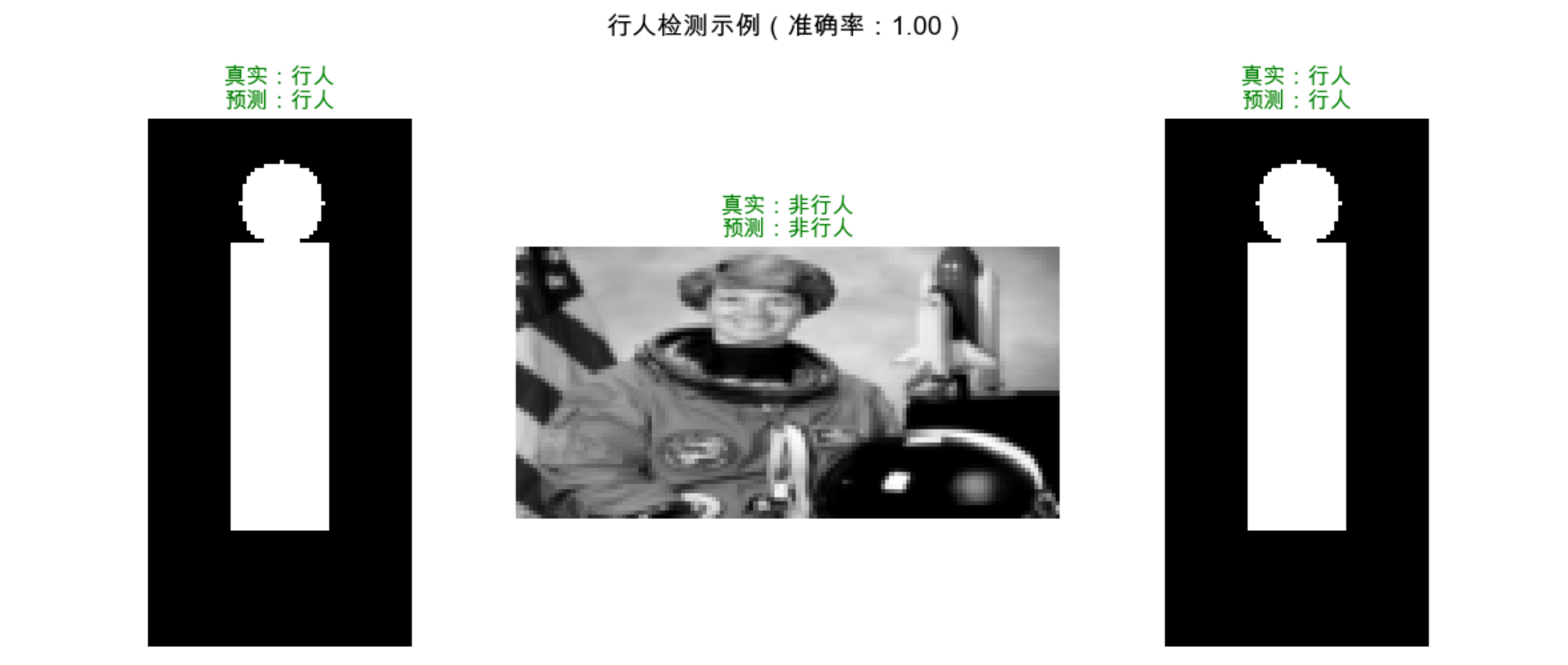
9.12.3 语义分割
简化版语义分割(用随机森林对像素分类):
import numpy as np
import matplotlib.pyplot as plt
from skimage import data, color, segmentation
from sklearn.ensemble import RandomForestClassifier

# ==================== Mac系统Matplotlib中文显示配置 ====================
plt.rcParams['font.sans-serif'] = ['Arial Unicode MS', 'DejaVu Sans']
plt.rcParams['axes.unicode_minus'] = False
plt.rcParams['font.family'] = 'Arial Unicode MS'
plt.rcParams['axes.facecolor'] = 'white'

# ==================== 设置全局随机种子(替代slic的random_state) ====================
np.random.seed(42)  # 保证超像素分割结果可复现

# ==================== 加载图片并转换为Lab颜色空间 ====================
# 加载skimage内置的咖啡杯图片
img = data.coffee()
# 转换为Lab颜色空间(对光照不敏感,更适合颜色特征提取)
img_lab = color.rgb2lab(img)

# ==================== 生成超像素(修复random_state参数错误) ====================
# 移除random_state,保留核心参数(n_segments=超像素数量,compactness=紧致度)
segments = segmentation.slic(
    img,
    n_segments=100,    # 超像素数量
    compactness=10,    # 紧致度(值越小,超像素形状越贴合图像边界)
    start_label=0      # 超像素标签从0开始(兼容不同版本)
)
n_segments = len(np.unique(segments))
print(f"生成超像素数量:{n_segments}")

# ==================== 提取超像素特征+手动标注 ====================
features = []
labels = []
# 遍历每个超像素,提取特征并手动标注(0=背景,1=咖啡杯,2=桌面)
for seg_id in np.unique(segments):
    # 创建当前超像素的掩码
    mask = segments == seg_id
    # 提取特征:Lab颜色空间的均值(3维特征)
    mean_color = np.mean(img_lab[mask], axis=0)
    features.append(mean_color)

    # 手动标注(根据超像素ID粗略划分,模拟人工标注)
    if seg_id < 20:
        labels.append(1)  # 咖啡杯区域
    elif seg_id < 50:
        labels.append(2)  # 桌面区域
    else:
        labels.append(0)  # 背景区域

# 转换为numpy数组(适配sklearn模型)
features = np.array(features)
labels = np.array(labels)

# ==================== 训练随机森林分类器 ====================
clf = RandomForestClassifier(
    n_estimators=50,    # 树的数量
    random_state=42,    # 模型随机种子(保证结果可复现)
    n_jobs=-1           # 多核加速训练
)
clf.fit(features, labels)

# ==================== 预测所有超像素的类别 ====================
pred_labels = clf.predict(features)

# ==================== 生成语义分割结果图 ====================
# 创建和超像素同尺寸的分割图
seg_img = np.zeros_like(segments, dtype=np.uint8)
# 为每个超像素分配预测类别对应的颜色值
for seg_id, label in enumerate(pred_labels):
    seg_img[segments == seg_id] = label * 80  # 0=0(黑), 1=80(灰), 2=160(浅灰)

# ==================== 可视化:原始图 vs 分割结果 ====================
fig, (ax1, ax2) = plt.subplots(1, 2, figsize=(12, 6))

# 原始图片
ax1.imshow(img)
ax1.set_title('原始图片', fontsize=12)
ax1.axis('off')  # 隐藏坐标轴

# 语义分割结果
im = ax2.imshow(seg_img, cmap='jet')
ax2.set_title('语义分割结果(0=背景,1=咖啡杯,2=桌面)', fontsize=12)
ax2.axis('off')

# 添加颜色条(辅助理解类别)
cbar = plt.colorbar(im, ax=ax2, shrink=0.6)
cbar.set_ticks([0, 80, 160])
cbar.set_ticklabels(['背景', '咖啡杯', '桌面'])

# 调整布局,避免标题/颜色条重叠
plt.tight_layout()
plt.show()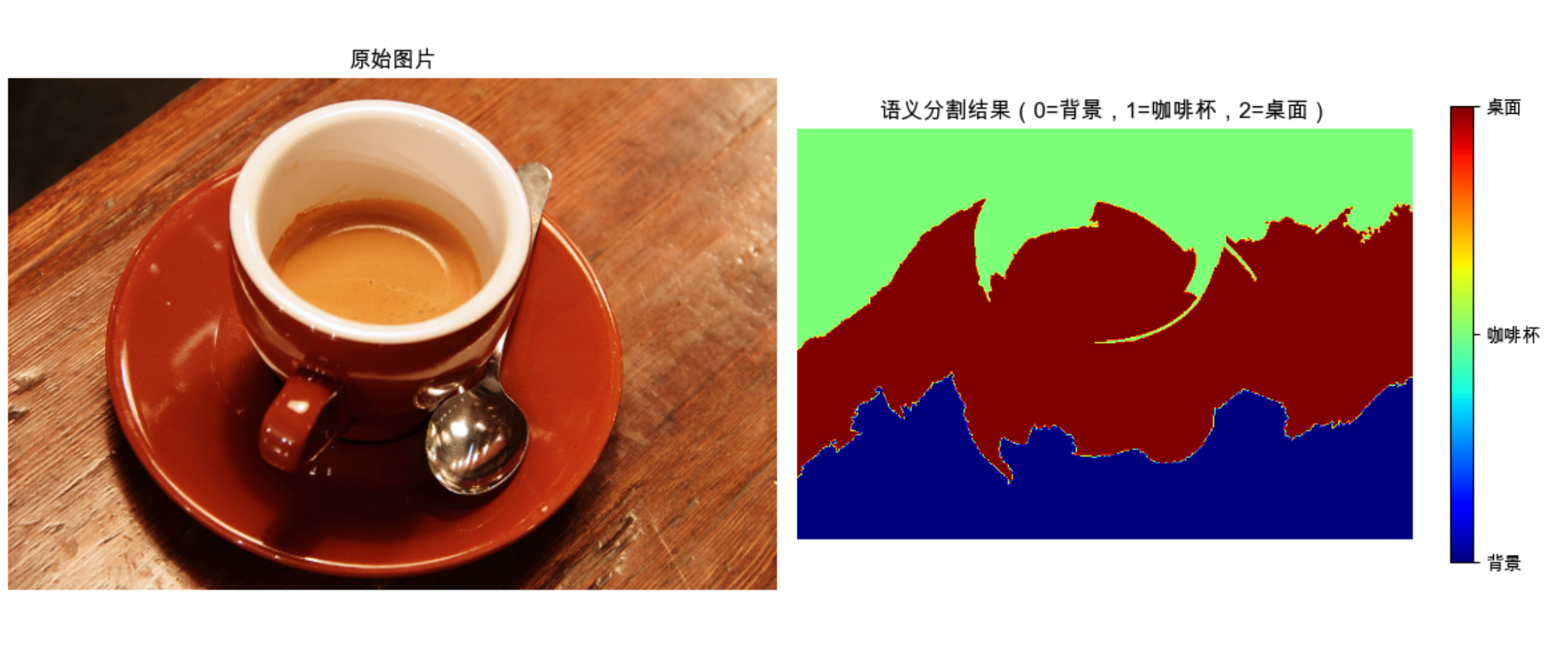
9.12.4 恢复表面布局 & 9.12.5 人体部位识别
这两个应用的核心思路和前面类似:
- 恢复表面布局:把图像像素分类为 “墙、地板、天花板、家具” 等,本质是像素级分类;
- 人体部位识别:把人体图像的像素分类为 “头、手、躯干、腿” 等,是更精细的分类任务。
代码结构和语义分割类似,只需替换特征(比如加入边缘、深度特征)和标注类别即可。
讨论

1.分类模型的选择:简单场景(二分类、线性可分)用逻辑回归;复杂场景(非线性、多分类)用随机森林 / 核逻辑回归;实时场景用随机蕨 / AdaBoost。
2.过拟合问题:随机森林通过 “多树投票” 缓解过拟合;贝叶斯逻辑回归通过 “先验知识” 避免过拟合;核逻辑回归需控制核函数复杂度。
3.概率模型 vs 非概率模型:需要知道分类不确定性(比如医疗影像诊断)用概率模型;追求速度(比如实时视频检测)用非概率模型。
备注
- 本文代码均基于 Python 3.8+,依赖库:numpy、matplotlib、scikit-learn、scikit-image;
- 安装依赖:
pip install numpy matplotlib scikit-learn scikit-image; - 实际应用中,需用更大的数据集训练,本文为简化演示用了小样本 / 公开数据集。
习题
- 修改逻辑回归代码,尝试不同的正则化参数(C),观察决策边界的变化;
- 对比随机森林中不同树的数量(n_estimators)对准确率和速度的影响;
- 用核逻辑回归实现性别分类,对比随机森林的效果;
- 扩展语义分割代码,增加 “咖啡” 类别的识别。
总结

1.分类模型的核心是 “找边界”:逻辑回归找线性边界,核方法找非线性边界,集成方法(随机森林 / AdaBoost)找更稳健的边界;
2.概率模型(逻辑回归 / 贝叶斯逻辑回归)输出分类概率,非概率模型(SVM)只输出分类结果,按需选择;
3.实际应用中,特征提取(如 HOG、颜色特征)+ 分类器(随机森林 / 核逻辑回归)是计算机视觉分类任务的经典组合,需根据场景选择合适的特征和模型。
希望这篇解读能帮你吃透《计算机视觉:模型、学习和推理》第 9 章的内容!如果有问题,欢迎在评论区交流~

魔乐社区(Modelers.cn) 是一个中立、公益的人工智能社区,提供人工智能工具、模型、数据的托管、展示与应用协同服务,为人工智能开发及爱好者搭建开放的学习交流平台。社区通过理事会方式运作,由全产业链共同建设、共同运营、共同享有,推动国产AI生态繁荣发展。
更多推荐



 25
25 0
0- 0


 已为社区贡献13条内容

所有评论(0)