playwright+python 定位Ant Design下拉框的虚拟滚动容器 实现滚动下拉列表至目标元素,并选中
·
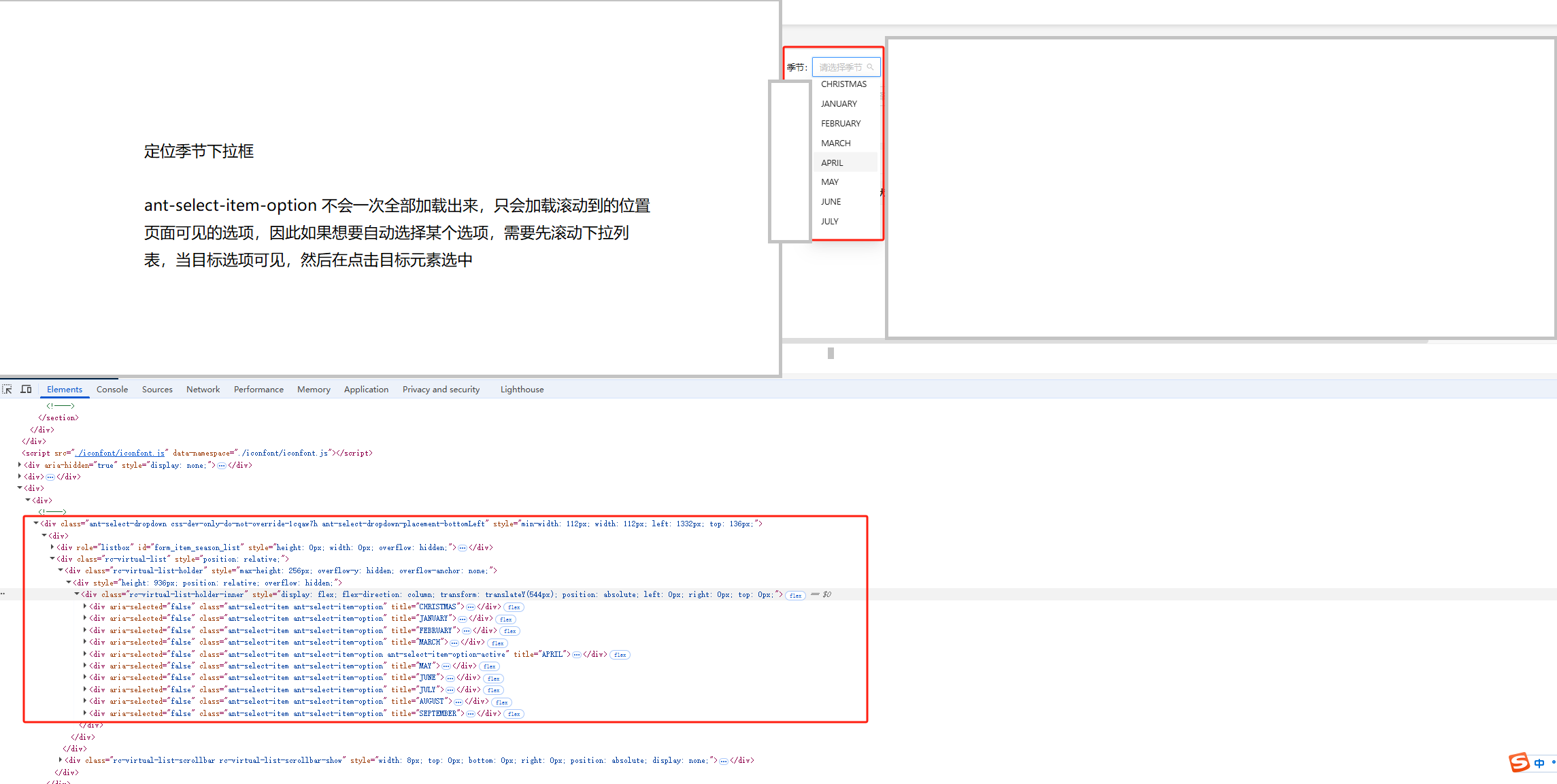
1、定位、滚动并选中的实现方法,common.py
    def scroll_to_option(self, option_text):
        # 定位Ant Design下拉框的虚拟滚动容器(虚拟滚动仅渲染可视区域内的元素,需显式操作滚动容器才能加载隐藏选项)
        dropdown = self.page.locator(".ant-select-dropdown .rc-virtual-list-holder")

        max_attempts = 20  # 最大滚动尝试次数(防止无限循环)
        scroll_step = 200  # 每次滚动的像素数(如200px),控制滚动步长
        for _ in range(max_attempts):
            # 检查目标选项是否可见
            target = dropdown.get_by_text(option_text, exact=True)
            if target.is_visible():
                # 选中目标选项
                target.click()
                return
            # 滚动虚拟列表容器
            # 通过JavaScript修改滚动容器的scrollTop属性,模拟滚动操作。
            # scrollTop表示滚动条距离顶部的偏移量,增加scroll_step实现向下滚动
            dropdown.evaluate(f"node => node.scrollTop += {scroll_step}")
            # 等待500毫秒,确保滚动后新选项加载完成(虚拟滚动可能异步渲染内容)
            self.page.wait_for_timeout(500)
        raise Exception(f"未找到选项: {option_text}")
2、调用该方法
# dev是季节所在页面的page对象,season_search是季节下拉框元素对象,点击打开季节下拉框
dev.season_search.click()
# 定位到下拉列表中的指定选项,并选中
common.scroll_to_option('SPRING')
实现完成啦~

魔乐社区(Modelers.cn) 是一个中立、公益的人工智能社区,提供人工智能工具、模型、数据的托管、展示与应用协同服务,为人工智能开发及爱好者搭建开放的学习交流平台。社区通过理事会方式运作,由全产业链共同建设、共同运营、共同享有,推动国产AI生态繁荣发展。
更多推荐


 3
3 0
0- 0


 已为社区贡献1条内容

所有评论(0)