5个开源MCP服务器让你的AI代理无所不能
目录
本文使用 ClinePRO 自动翻译。
原文作者:Code Pulse
原文链接:
https://medium.com/coding-nexus/5-open-source-mcp-servers-thatll-make-your-ai-agents-unstoppable-89498fcada16
最近我一直在折腾AI,主要是Claude,但觉得它只会回答问题有点无聊。
我想要它能真正做事,懂吗?
比如从网站抓数据或者查看我的GitHub。
这时我发现了MCP服务器这种东西。它们就像是小助手,让你的AI能与各种工具和应用交互。开源、免费,玩起来还挺有意思的。
5个让我惊艳的MCP服务器分享给你。
什么是MCP服务器
MCP代表模型上下文协议(Model Context Protocol)。它让Claude这样的AI能突破自身限制,与网站或代码笔记本等外部资源交互。没有它,你的AI只能靠猜测。
-
有了它,你可以说"嘿Claude,获取我的GitHub issues",它真的能做到。我第一次成功运行时就兴奋不已-感觉像解锁了作弊码。
以下是我深入研究的5个MCP服务器。
1. Stagehand:能上网冲浪的AI
Stagehand是Browserbase开发的酷炫工具。它让你的AI像拥有浏览器一样-点击链接、抓取文字,无所不能。我用它从一个美食博客抓取了一堆食谱标题来做项目,比自己写脚本简单多了。
git clone https://github.com/browserbase/stagehand-mcp
cd stagehand-mcp
npm install
npm start
它在localhost:3000运行。然后我告诉Claude(使用Claude Desktop效果很好):
Go to a news site and get the top headlines.Stagehand zipped over, snatched the titles, and Claude spit them back out. So handy for stuff like checking prices or pulling data without coding.-
它免费开源,而且不像其他网页工具那样容易崩溃。

2. Jupyter:轻松玩转数据
它适合喜欢捣鼓数字的人。Jupyter MCP服务器让你的AI可以操作Jupyter笔记本-就是那些用于数据的编程应用。虽然我不是数据科学家,但我让Claude分析了我咖啡店消费的CSV文件(说实话有点尴尬),并告诉我消费情况。
我是这样设置的:
git clone https://github.com/jjsantos01/jupyter-notebook-mcp
cd jupyter-notebook-mcp
pip install -r requirements.txt
python server.py
它在localhost:8000运行。我告诉Claude:
Open coffee.csv and tell me how much I spent on lattes.Claude创建了一个笔记本,运行了一些Python代码,然后说:
You dropped $87.50 on lattes this month. Ouch.-
我自己一行代码都不用写。就像有个书呆子朋友帮你做数学题。
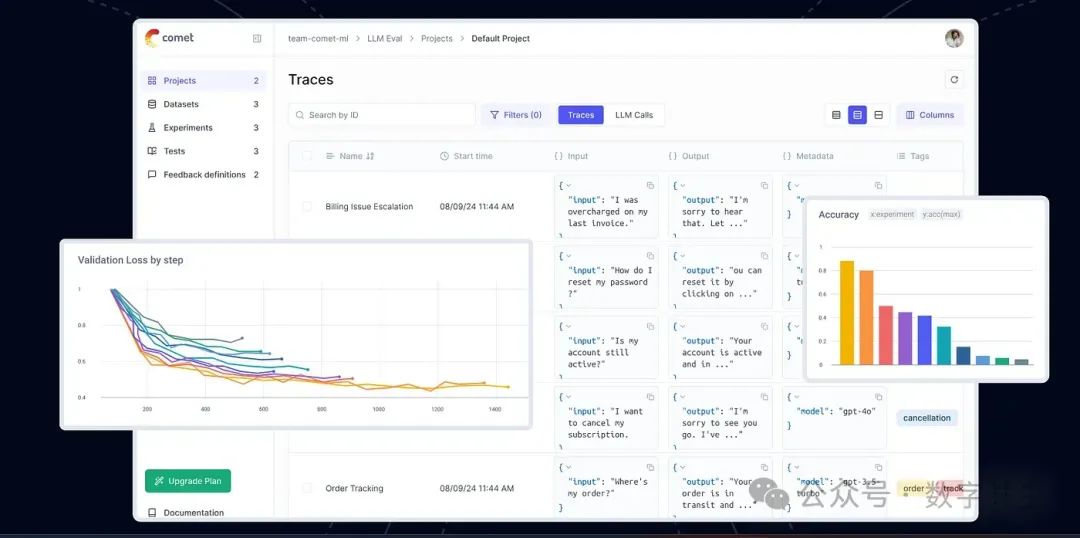
3. Opik:监控AI行为
Opik来自Comet,专门用来监控你的AI。如果AI开始表现异常,Opik能帮你找出原因。我有次遇到一个AI机器人总给出愚蠢回答,Opik帮我发现是某个API达到了调用限制。
我是这样启动的:
git clone https://github.com/comet-ml/opik
cd opik
./opik.sh然后我把它添加到代码中:
import opik
opik.configure(use_local=True)
@opik.track
def ask_something(question):
    return "You asked: " + question
ask_something("What’s for dinner?")I asked Claude to check the logs:
Show me what my AI’s been up to.它显示了每次调用、耗时等所有细节。
-
它就像是AI的间谍,帮你快速发现问题。
4. GitHub:与你并肩编程的AI
这个服务器直接来自GitHub,让你的AI能深入你的代码仓库。当项目太多忙不过来时,我用它来查看项目状态而不用打开无数标签页。Claude直接给了我未解决问题的概览-超级有用。
设置如下:
git clone https://github.com/github/github-mcp-server
cd github-mcp-server
npm install
export GITHUB_TOKEN=your_token
npm start
它在localhost:4000运行。我说:
Claude, what’s up with my repo ‘side-hustle’?Claude返回:
Two issues open: one’s a bug in the login, another’s about adding a share button.-
让我免于被GitHub通知淹没。
5. FastAPI-MCP:让AI调用你的API
FastAPI-MCP是个巧妙工具,能把FastAPI应用变成AI可用的资源。我做了个简单的待办清单API,这让Claude能直接查看而无需我额外操作。
我是这样做的:
git clone https://github.com/jlowin/fastmcp
cd fastmcp
pip install fastapi-mcpThen I tweaked my FastAPI app:
from fastapi import FastAPI
from fastmcp import mcp
app = FastAPI()
@app.get("/todo/{item_id}")
async def get_todo(item_id: int):
return {"id": item_id, "task": f"Task {item_id}"}
@mcp.tool()
async def get_todo_tool(item_id: int):
return await get_todo(item_id)用uvicorn main:app --reload运行,连接到localhost:8000,然后告诉Claude:
What’s task 5 on my to-do list?Got back:Task 5 is “Call mom.”-
轻松为Claude创建自定义工具。
为什么值得一试
这些服务器让我玩得不亦乐乎。Stagehand擅长网页操作,Jupyter精于数据处理,Opik保持透明,GitHub是程序员福音,FastAPI-MCP让我能自由构建。它们都免费开源,如果你有兴趣还可以自己修改。
我学到的几点经验:
-
从最感兴趣的开始。我首选GitHub因为我总泡在代码仓库里
-
Claude Desktop是我测试这些工具的首选
-
查看每个服务器的GitHub readme-里面有干货
-
先在本地玩玩看再投入正式使用

魔乐社区(Modelers.cn) 是一个中立、公益的人工智能社区,提供人工智能工具、模型、数据的托管、展示与应用协同服务,为人工智能开发及爱好者搭建开放的学习交流平台。社区通过理事会方式运作,由全产业链共同建设、共同运营、共同享有,推动国产AI生态繁荣发展。
更多推荐


 0
0 0
0- 0


 已为社区贡献91条内容

所有评论(0)