spring boot admin 搭建(非常简单)
Spring Boot Admin配置简单,功能强大,提供了健康检查、指标监控、访问日志、线程转储、堆转储和环境信息等等。一、服务端搭建基于一个最简单的springboot项目即可1. 添加pom依赖<!-- SpringBootAdmin service --><dependency><groupId>de.codecentric</groupId>
·
Spring Boot Admin配置简单,功能强大,提供了健康检查、指标监控、jvm监控、实时日志监控、线程转储(线程dump下载)、堆转储(堆dump下载)和环境信息等等。
 https://blog.csdn.net/Muscleheng/article/details/121489744
一、服务端搭建
基于一个最简单的springboot项目即可
1. 添加pom依赖
		<!-- SpringBootAdmin service 尽量和和springBoot版本对应 -->
        <dependency>
            <groupId>de.codecentric</groupId>
            <artifactId>spring-boot-admin-starter-server</artifactId>
            <version>2.5.0</version>
        </dependency>
PS: 注意 springBoot 和 SpringBootAdmin 版本对应关系,否则可能不兼容然后报错,版本不一致时可以选择降springBootAdmin的版本
| Spring Boot Version | Spring Boot Admin Version |
|---|---|
| 2.7.x | 2.7.x |
| 2.6.x | 2.6.x |
| 2.5.x | 2.5.x |
2. 启动类里面添加注解 @EnableAdminServer
@EnableAdminServer // 开启监控
@SpringBootApplication
public class DdAdminApplication {
	public static void main(String[] args) {
		SpringApplication.run(DtAdminApplication.class, args);
	}
}
配置文件里面只需要配置端口号即可
server.port = 5889
spring.application.name=dd_admin
启动项目,直接访问:127.0.0.1:5889

二、客户端(client端)搭建
PS:如果客户端有权限校验,需要放开路径( /**/actuator/** 或 /actuator/**)的权限校验,否则服务端拉取不到客户端的监控数据
1. 添加pom依赖
        <!-- spring-boot-admin 客户端 -->
        <dependency>
            <groupId>de.codecentric</groupId>
            <artifactId>spring-boot-admin-starter-client</artifactId>
            <version>2.5.0</version>
        </dependency>
2. 配置文件配置
# 配置端口
server:
  port: 5888

spring:
  profiles:
    active: dev
  application:
    name: dd_client #当前服务的名称

  #这里配置admin server 的地址
  boot:
    admin:
      client:
        url: http://127.0.0.1:5889  #要注册的server端的url地址
        instance:
          prefer-ip: true #必须设置为true,否则可能注册失败,true:server才能端拿到本机IP
        register-once: false # false:如果有多个server端,都会就行注册,true:只在一个server端注册

#开放端点用于SpringBoot Admin的监控
management:
  endpoint:
    health:
      show-details: always  # 是否展示健康检查详情
  endpoints:
    web:
      exposure:
        include: '*' # 暴露所有端点
  health:
    ldap:
      enabled: false #关闭对ldap的健康检查

# 配置日志文件路径,springAdmin服务端可实时查看
logging:
  file:
    name: /opt/logs/info.log
启动项目查看是否注册到服务端
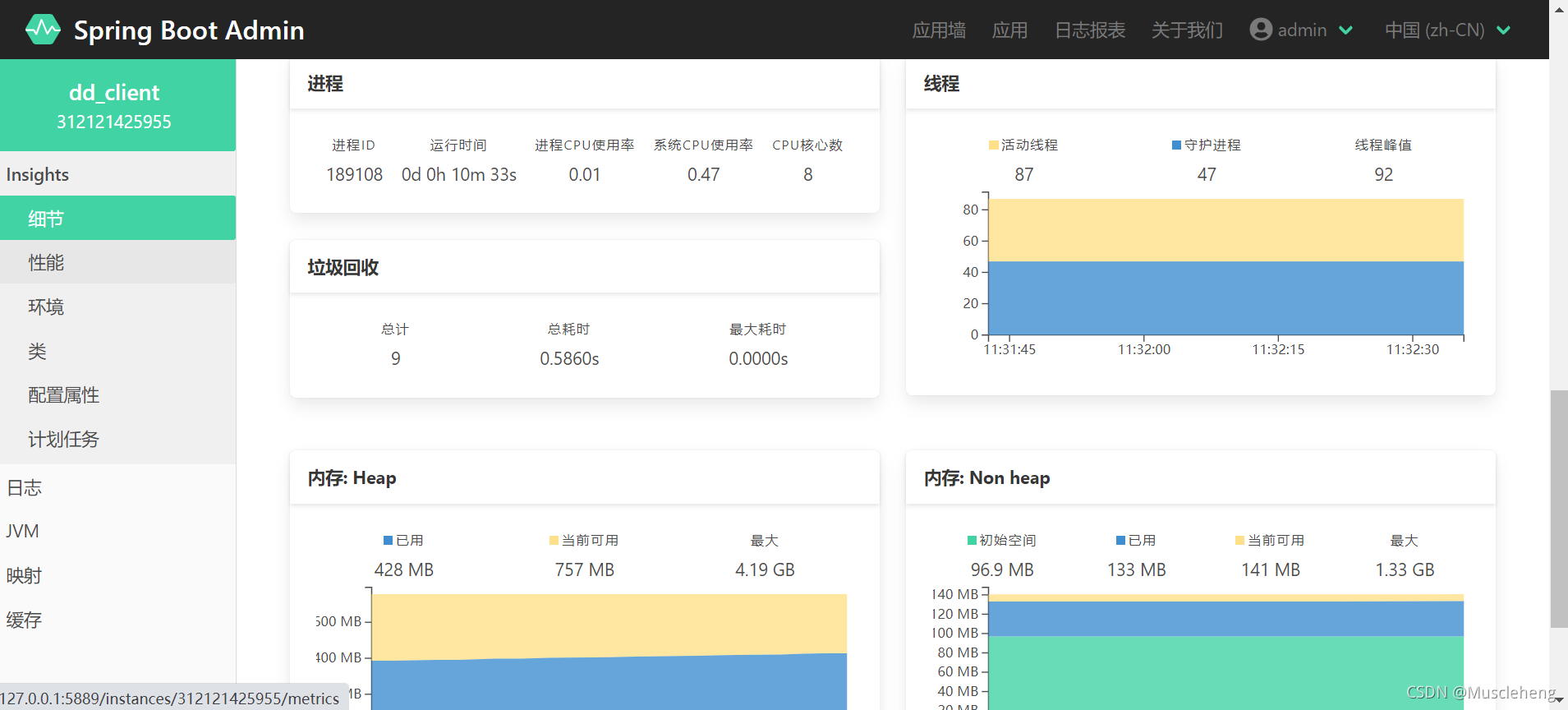
只需简单几步操作:添加几个依赖和配置就集成了springBootAdmin,还是非常方便吧!

魔乐社区(Modelers.cn) 是一个中立、公益的人工智能社区,提供人工智能工具、模型、数据的托管、展示与应用协同服务,为人工智能开发及爱好者搭建开放的学习交流平台。社区通过理事会方式运作,由全产业链共同建设、共同运营、共同享有,推动国产AI生态繁荣发展。
更多推荐



 2
2 0
0- 0


 已为社区贡献6条内容

所有评论(0)