一招教你解决Swagger文档,Spring Boot 2.7+ 与Springfox3.0.0 版本报错或者Spring Boot接入springfox-swagger2遇到的问题
·
一、遇到的问题
我是想弄成Swagger文档但是遇到了以下的版本不兼容的问题,我的springboot版本是2.7.3,然后用的依赖如下:
      <!--接口文档依赖-->
        <dependency>
            <groupId>com.github.xiaoymin</groupId>
            <artifactId>knife4j-spring-boot-starter</artifactId>
            <version>3.0.2</version>
        </dependency>

        <dependency>
            <groupId>io.springfox</groupId>
            <artifactId>springfox-swagger2</artifactId>
            <version>3.0.0</version>
        </dependency>
        <dependency>
            <groupId>io.springfox</groupId>
            <artifactId>springfox-swagger-ui</artifactId>
            <version>3.0.0</version>
        </dependency>

        <!--接口文档依赖-->
然后启动Application不成功遇到了以下的bug:
 WARN 18088 --- [  restartedMain] ConfigServletWebServerApplicationContext :
Exception encountered during context initialization - cancelling refresh attempt: org.springframework.context.ApplicationContextException: Failed to start bean 'documentationPluginsBootstrapper';
nested exception is java.lang.NullPointerException: Cannot invoke "org.springframework.web.servlet.mvc.condition.
PatternsRequestCondition.getPatterns()" because "this.condition" is null
核心的bug如下所示:
Exception encountered during context initialization - cancelling refresh attempt: org.springframework.context.
ApplicationContextException: Failed to start bean 'documentationPluginsBootstrapper'; nested exception is java.lang.NullPointerException:
Cannot invoke "org.springframework.web.servlet.mvc.condition.
PatternsRequestCondition.getPatterns()" because "this.condition" is null
二、解决方案
首先确保添加依赖:(直接复制就可以了绝对有用)
      <!--接口文档依赖-->
        <dependency>
            <groupId>com.github.xiaoymin</groupId>
            <artifactId>knife4j-spring-boot-starter</artifactId>
            <version>3.0.2</version>
        </dependency>

        <dependency>
            <groupId>io.springfox</groupId>
            <artifactId>springfox-swagger2</artifactId>
            <version>3.0.0</version>
        </dependency>
        <dependency>
            <groupId>io.springfox</groupId>
            <artifactId>springfox-swagger-ui</artifactId>
            <version>3.0.0</version>
        </dependency>

<!--接口文档依赖-->然后SpringBoot配置文件添加配置(我的是application.yml):
注意这一步一定要!!!!
spring:
  mvc:
    pathmatch:
      matching-strategy: ant_path_matcher
然后就可以运行成功了
三、完整例子
首先是application.yml配置
spring:
  mvc:
    pathmatch:
      matching-strategy: ant_path_matcher
  datasource:
    driver-class-name: com.mysql.cj.jdbc.Driver
    url: jdbc:mysql://localhost:3306/mybatis_plus?characterEncoding=UTF-8&useSSL=false
    username: root
    password: 123456


mybatis-plus:
  mapper-locations: classpath*:mapper/*.xml


server:
  port: 8083
然后是配置swagger文件
package com.heima.demo4.config;

import lombok.extern.slf4j.Slf4j;
import org.springframework.context.annotation.Bean;
import org.springframework.context.annotation.Configuration;
import org.springframework.web.servlet.config.annotation.ResourceHandlerRegistry;
import org.springframework.web.servlet.config.annotation.WebMvcConfigurationSupport;
import springfox.documentation.builders.ApiInfoBuilder;
import springfox.documentation.builders.PathSelectors;
import springfox.documentation.builders.RequestHandlerSelectors;
import springfox.documentation.service.ApiInfo;
import springfox.documentation.spi.DocumentationType;
import springfox.documentation.spring.web.plugins.Docket;
import springfox.documentation.swagger2.annotations.EnableSwagger2;

/**
 * 配置类,注册web层相关组件
 */
@Configuration
@Slf4j
@EnableSwagger2
public class WebMvcConfiguration extends WebMvcConfigurationSupport {

    /**
     * 通过knife4j生成接口文档 - 用户管理分组
     * @return
     */
    @Bean
    public Docket userDocket() {
        ApiInfo apiInfo = new ApiInfoBuilder()
                .title("后台管理系统 - 用户管理API")
                .version("2.0")
                .description("用户管理相关API")
                .build();
        return new Docket(DocumentationType.SWAGGER_2)
                .apiInfo(apiInfo)
                .groupName("用户管理")
                .select()
                .apis(RequestHandlerSelectors.basePackage("com.heima.demo4.controller")) // 假设用户管理相关接口放在这个包
                .paths(PathSelectors.any())
                .build();
    }

    /**
     * 通过knife4j生成接口文档 - 权限管理分组
     * @return
     */
    @Bean
    public Docket authDocket() {
        ApiInfo apiInfo = new ApiInfoBuilder()
                .title("后台管理系统 - 权限管理API")
                .version("2.0")
                .description("权限管理相关API")
                .build();
        return new Docket(DocumentationType.SWAGGER_2)
                .apiInfo(apiInfo)
                .groupName("权限管理")
                .select()
                .apis(RequestHandlerSelectors.basePackage("com.heima.demo4.controller.auth")) // 假设权限管理相关接口放在这个包
                .paths(PathSelectors.any())
                .build();
    }

    /**
     * 设置静态资源映射
     * @param registry
     */
    @Override
    protected void addResourceHandlers(ResourceHandlerRegistry registry) {
        registry.addResourceHandler("/doc.html").addResourceLocations("classpath:/META-INF/resources/");
        registry.addResourceHandler("/webjars/**").addResourceLocations("classpath:/META-INF/resources/webjars/");
    }
}
上面的文件就是一个Demo然后以此拓展需求
然后是Controller
package com.heima.demo4.controller;

import com.heima.demo4.entity.User;
import com.heima.demo4.mapper.UserMapper;
import io.swagger.annotations.Api;
import io.swagger.annotations.ApiOperation;
import io.swagger.annotations.ApiParam;
import lombok.extern.slf4j.Slf4j;
import org.springframework.beans.factory.annotation.Autowired;
import org.springframework.web.bind.annotation.*;

@RestController
@Api(tags = "用户信息管理")  // 为该控制器提供分组和描述
@Slf4j
public class UserController {

    @Autowired
    private UserMapper userMapper;


    /**
     * 根据ID查询用户信息
     * @param id 用户ID
     * @return 用户实体
     */
    @ApiOperation(value = "根据ID查询用户信息", notes = "传入用户ID,查询该用户的详细信息")
    @GetMapping("/user/{id}")
    public User getUserById(
            @ApiParam(value = "用户ID", required = true) @PathVariable("id") Long id) {
        log.info("查询用户ID: {}", id);
        return userMapper.selectById(id);
    }

}
最后运行文件
点开网址:我的端口设置是:8083
所以点开:
http://localhost:8083/doc.html#/home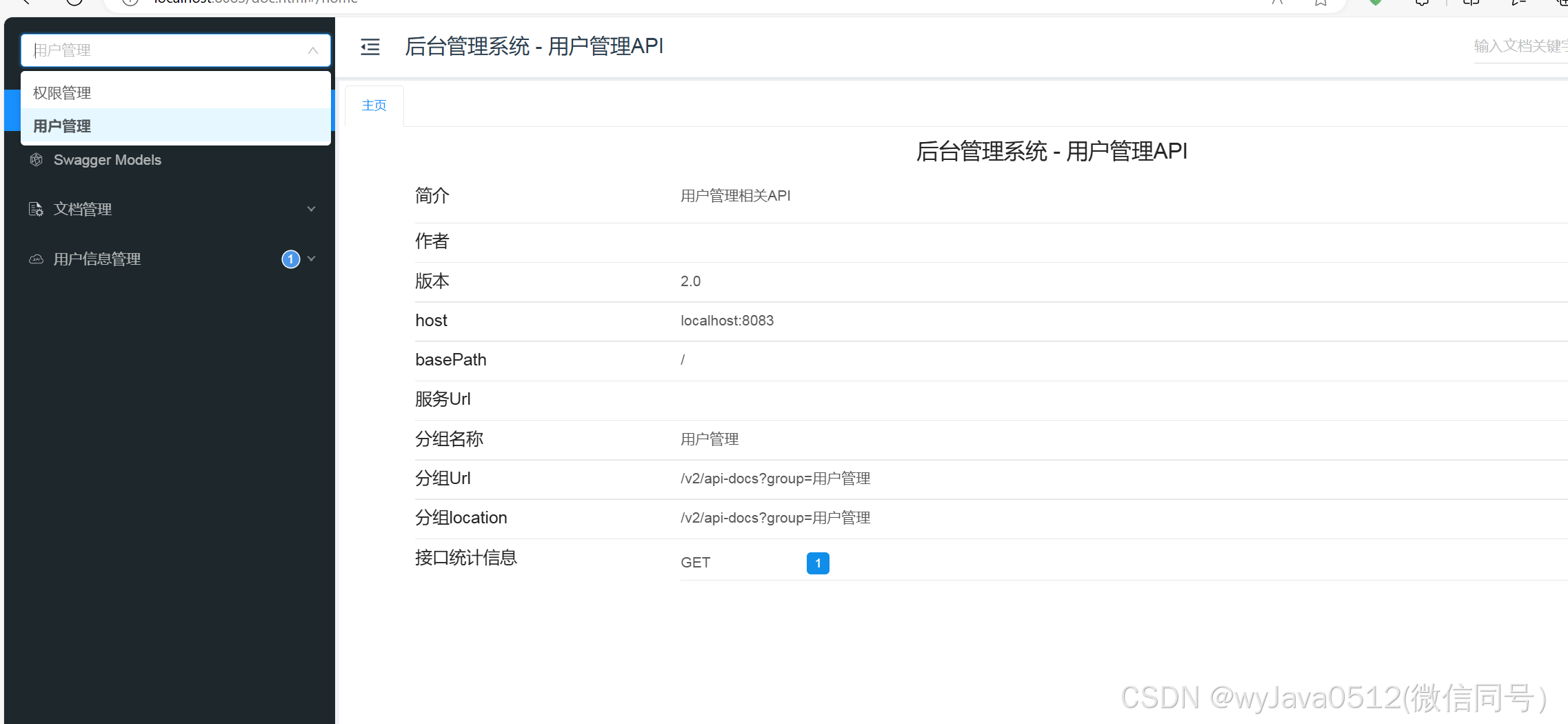

魔乐社区(Modelers.cn) 是一个中立、公益的人工智能社区,提供人工智能工具、模型、数据的托管、展示与应用协同服务,为人工智能开发及爱好者搭建开放的学习交流平台。社区通过理事会方式运作,由全产业链共同建设、共同运营、共同享有,推动国产AI生态繁荣发展。
更多推荐


 5
5 0
0- 0


 已为社区贡献2条内容

所有评论(0)