Open WebUI 本地部署支持 RAG(检索增强生成)、联网搜索、多模态模型、MCP 工具调用
📚 Open WebUI 本地部署与增强功能配置教程
适用场景:在本地服务器(如 Ubuntu)上搭建支持 RAG(检索增强生成)、联网搜索、多模态模型、MCP 工具调用的私有 AI 助手平台。
配置增强:Open WebUI + Ollama + SearXNG + MCPo
https://docs.openwebui.com/
https://github.com/open-webui
🧰 前提准备
- 操作系统:Linux(推荐 Ubuntu 22.04+)
- 已安装:Docker、Docker Compose、Python3、pip
- 磁盘路径:
/TGAI/ollama/作为统一数据目录 - 用户权限:确保当前用户(如
user03)对/TGAI/ollama/有读写权限
sudo chown -R user03:user03 /TGAI/ollama/
🔁 第一步:清理旧容器(如有)
docker stop open-webui 2>/dev/null && docker rm open-webui
📦 第二步:下载嵌入模型(Embedding Model)
使用
sentence-transformers/all-MiniLM-L6-v2作为离线 RAG 的嵌入模型。
1. 安装 Hugging Face CLI
pip install huggingface_hub
2. 下载模型到指定目录(不使用符号链接)
huggingface-cli download \
  sentence-transformers/all-MiniLM-L6-v2 \
  --local-dir /TGAI/ollama/ollama_web_ui/cache/embedding/models/sentence-transformers/all-MiniLM-L6-v2 \
  --local-dir-use-symlinks False
3. 验证下载成功
ls /TGAI/ollama/ollama_web_ui/cache/embedding/models/sentence-transformers/all-MiniLM-L6-v2
应看到 config.json、pytorch_model.bin 等文件。
🐳 第三步:启动 Open WebUI 容器
docker run -d \
  --name open-webui \
  --restart always \
  -p 0.0.0.0:3000:8080 \
  -e OLLAMA_BASE_URL=http://host.docker.internal:11434 \
  -e ENABLE_RAG=true \
  -e RAG_WEB_SEARCH_ENGINE="searxng" \
  -e SEARXNG_QUERY_URL="http://<你的IP>:4000/search?q=<query>&format=json" \
  -e HF_HUB_OFFLINE=1 \
  -e RAG_EMBEDDING_MODEL="/app/backend/data/cache/embedding/models/sentence-transformers/all-MiniLM-L6-v2" \
  -e RAG_EMBEDDING_MODEL_AUTO_UPDATE=false \
  --add-host=host.docker.internal:host-gateway \
  -v /TGAI/ollama/ollama_web_ui:/app/backend/data \
  ghcr.io/open-webui/open-webui:main
✅ 关键说明:
HF_HUB_OFFLINE=1:强制使用本地模型,禁止联网下载。RAG_EMBEDDING_MODEL路径需与容器内挂载路径一致。--add-host=host.docker.internal:host-gateway用于容器访问宿主机服务(如 Ollama)。
🧠 第四步:Ollama 模型管理
下载文本嵌入模型RAG可以设置(用于兼容性)
ollama pull nomic-embed-text
下载多模态模型RAG可以设置(如 DeepSeek-Janus)
ollama pull erwan2/DeepSeek-Janus-Pro-7B
💡 注意:Ollama 需已在宿主机运行,监听
11434端口。
设置用户可使用的模型
1.工作空间
- 路径:创建模型
- ✅ 选择基础模型
- 可见性设置:公共
- 其他填写看需求
🔍 第五步:部署 SearXNG 联网搜索引擎
1. 清理旧容器
docker stop searxng && docker rm searxng
2. 创建配置目录
mkdir -p /TGAI/ollama/searxng/config
3. 启动 SearXNG 容器(指定用户避免权限问题)
docker run -d \
  --name searxng \
  -p 4000:8080 \
  -v /TGAI/ollama/searxng/config:/etc/searxng:ro \
  ghcr.io/searxng/searxng:latest
4. 配置 settings.yml
编辑宿主机文件:
vim /TGAI/ollama/searxng/config/settings.yml
下面是我的配置文件
general:
  debug: false
  instance_name: "SearXNG"
  privacypolicy_url: false
  donation_url: false
  contact_url: false
  enable_metrics: true
  open_metrics: ''

brand:
  new_issue_url: https://github.com/searxng/searxng/issues/new
  docs_url: https://docs.searxng.org/
  public_instances: https://searx.space
  wiki_url: https://github.com/searxng/searxng/wiki
  issue_url: https://github.com/searxng/searxng/issues

search:
  safe_search: 0
  autocomplete: ""
  autocomplete_min: 4
  favicon_resolver: ""

  default_lang: "auto"
  ban_time_on_fail: 5
  max_ban_time_on_fail: 120
  suspended_times:
    SearxEngineAccessDenied: 86400
    SearxEngineCaptcha: 86400
    SearxEngineTooManyRequests: 3600
    cf_SearxEngineCaptcha: 1296000
    cf_SearxEngineAccessDenied: 86400
    recaptcha_SearxEngineCaptcha: 604800

  # formats: [html, csv, json, rss]
  formats:
    - html
    - csv
    - json
    - rss

server:
  port: 8888
  bind_address: "127.0.0.1"

  base_url: false  # "http://example.com/location"

  limiter: false
  public_instance: false

  secret_key: "jPoytif6zP8Eohq2oJHdZY2vOOo46PWB"
  image_proxy: false
  http_protocol_version: "1.0"
  method: "POST"
  default_http_headers:
    X-Content-Type-Options: nosniff
    X-Download-Options: noopen
    X-Robots-Tag: noindex, nofollow
    Referrer-Policy: no-referrer

valkey:
  url: false

ui:
  static_path: ""
  templates_path: ""
  query_in_title: false
  infinite_scroll: false
  default_theme: simple
  center_alignment: false
  default_locale: ""
  theme_args:
    simple_style: auto
  search_on_category_select: true
  hotkeys: default
  url_formatting: pretty
outgoing:
  request_timeout: 3.0
  useragent_suffix: ""
  pool_connections: 100
  pool_maxsize: 20
  enable_http2: true

plugins:

  searx.plugins.calculator.SXNGPlugin:
    active: true

  searx.plugins.hash_plugin.SXNGPlugin:
    active: true

  searx.plugins.self_info.SXNGPlugin:
    active: true

  searx.plugins.unit_converter.SXNGPlugin:
    active: true

  searx.plugins.ahmia_filter.SXNGPlugin:
    active: true

  searx.plugins.hostnames.SXNGPlugin:
    active: true

  searx.plugins.time_zone.SXNGPlugin:
    active: true

  searx.plugins.oa_doi_rewrite.SXNGPlugin:
    active: false

  searx.plugins.tor_check.SXNGPlugin:
    active: false

  searx.plugins.tracker_url_remover.SXNGPlugin:
    active: true


checker:
  off_when_debug: true


  additional_tests:
    rosebud: &test_rosebud
      matrix:
        query: rosebud
        lang: en
      result_container:
        - not_empty
        - ['one_title_contains', 'citizen kane']
      test:
        - unique_results

    android: &test_android
      matrix:
        query: ['android']
        lang: ['en', 'de', 'fr', 'zh-CN']
      result_container:
        - not_empty
        - ['one_title_contains', 'google']
      test:
        - unique_results

  tests:
    infobox: &tests_infobox
      infobox:
        matrix:
          query: ["linux", "new york", "bbc"]
        result_container:
          - has_infobox

categories_as_tabs:
  general:
  images:
  videos:
  news:
  map:
  music:
  it:
  science:
  files:
  social media:

engines:
  # ✅ 百度(保留,你已验证可用)
  - name: baidu
    baidu_category: general
    categories: [general]
    engine: baidu
    shortcut: bd
    disabled: false

  # ✅ Bing(国际版,中文支持较好)
  - name: bing
    engine: bing
    shortcut: bi
    disabled: false
    categories: [general]

  # ⚠️ 维基百科(可选,不稳定)
  - name: wikipedia
    engine: wikipedia
    shortcut: wp
    disabled: false
    categories: [general]

  # ❌ 禁用所有其他引擎(避免 timeout 拖慢响应)
  - name: 360search
    shortcut: 360so
    disabled: true


doi_resolvers:
  oadoi.org: 'https://oadoi.org/'
  doi.org: 'https://doi.org/'
  sci-hub.se: 'https://sci-hub.se/'
  sci-hub.st: 'https://sci-hub.st/'
  sci-hub.ru: 'https://sci-hub.ru/'

default_doi_resolver: 'oadoi.org'
修改输出格式(启用 JSON 支持)
找到 formats 部分(约第 80 行),修改为:
formats:
  - html
  - csv
  - json
  - rss
启用所需搜索引擎(禁用其他)
修改Settings.yml
engines:
  # 百度(中文友好)
  - name: baidu
    engine: baidu
    shortcut: bd
    disabled: false
    categories: [general]

  # Bing(国际版)
  - name: bing
    engine: bing
    shortcut: bi
    disabled: false
    categories: [general]

  # 维基百科(可选)
  - name: wikipedia
    engine: wikipedia
    shortcut: wp
    disabled: false
    categories: [general]

  # 禁用其他引擎(提升速度)
  - name: 360search
    shortcut: 360so
    disabled: true
UI界面设置
输入http://<你的IP>:4000/
点击首选项设置开启哪些搜索引擎

5. 重启 SearXNG 生效
docker restart searxng
⚙️ 第六步:Open WebUI 后台配置
访问 http://<你的IP>:3000,登录管理员账号。
1. 启用联网搜索
-
路径:管理员面板 → 设置 → 联网搜索
-
✅ 勾选“启用联网搜索”
-
搜索引擎选择:
searxng -
查询 URL 填写:
http://<你的IP>:4000/search?q=<query>&format=json -
结果数量:
10 -
并发数:
50
📌 注意:IP
<你的IP>替换为你的服务器实际 IP。
2. 配置默认用户与权限
- 路径:管理员面板 → 权限组 → 创建权限组(如 “普通用户”)
- 路径:设置 → 通用
- 默认用户角色:
user - 默认权限组:选择刚创建的组
- ✅ 允许新用户注册(按需)
- 默认用户角色:
3. 关闭 OpenAI 接口(提升加载速度国内无法访问)
- 路径:设置 → 外部链接
- ❌ 关闭 “OpenAI API 兼容接口”
🧩 第七步:集成 MCP 工具(Smithery)
MCP(Model Context Protocol)允许 AI 调用外部工具。
1. 创建 MCP 配置文件
mkdir -p /TGAI/ollama/mcpo
vim /TGAI/ollama/mcpo/setting.json

{
  "mcpServers": {
    "time-mcp": {
      "command": "npx",
      "args": ["-y", "time-mcp", "--defaultFormat", "iso"]
    },
    "ddg-search": {
      "command": "uvx",
      "args": ["duckduckgo-mcp-server"]
    }
  }
}
可以根据参考文档设置需要兼容哪些mcp
内容参考 Smithery 文档:Smithery - Turn scattered context into skills for AI
2. 启动 MCPo 代理服务
docker stop mcpo && docker rm mcpo

docker run -d \
  -p 5746:8000 \
  -v /TGAI/ollama/mcpo/setting.json:/setting.json \
  --name mcpo \
  ghcr.io/spectre-pro/mcpo-docker
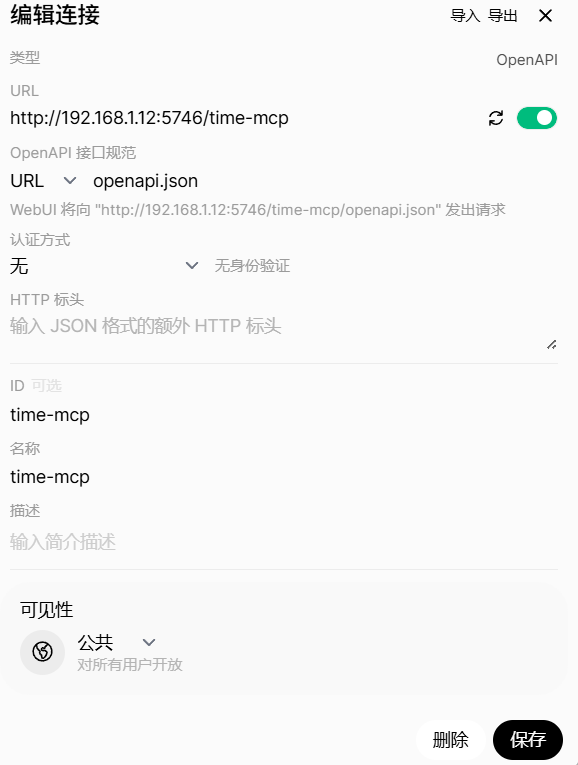
3. 在 Open WebUI 中添加 MCP 工具
-
路径:管理员面板 → 设置 → 外部工具 → 添加链接
-
类型:
OpenAI 接口规范 -
URL 填写:
http://<你的IP>:5746 -
可通过 Swagger UI 测试是否连通
✅ 最终验证清单
| 功能 | 验证方式 |
|---|---|
| Open WebUI | 访问 http://IP:3000,能正常聊天 |
| RAG 嵌入 | 上传文档后能检索相关内容 |
| 联网搜索 | 输入“最新新闻”等,返回 SearXNG 结果 |
| MCP 工具 | 在聊天中调用工具(如查天气、执行命令) |
| 多模态模型 | 选择 DeepSeek-Janus 模型,上传图片测试 |
📝 附录:常用命令速查
# 重启所有服务
docker restart open-webui searxng mcpo

# 查看日志
docker logs -f open-webui

# 删除模型(Ollama)
ollama rm <model_name>

# 清理无用容器/镜像
docker system prune -a
🎉 至此,已成功部署一个功能完整的本地 AI 助手平台!
如需进一步定制(如 HTTPS、用户认证、GPU 加速),可参考官方文档。

魔乐社区(Modelers.cn) 是一个中立、公益的人工智能社区,提供人工智能工具、模型、数据的托管、展示与应用协同服务,为人工智能开发及爱好者搭建开放的学习交流平台。社区通过理事会方式运作,由全产业链共同建设、共同运营、共同享有,推动国产AI生态繁荣发展。
更多推荐


 31
31 0
0- 0


 已为社区贡献1条内容

所有评论(0)