从仿真到实践:无人机GPS引导的视觉识别ArUco码精准降落的软件在环仿真Demo(二)
从仿真到实践:无人机GPS引导的视觉识别ArUco码精准降落的软件在环仿真Demo(二)
PX4-ROS2通信中间件
1. PX4飞行模式切换1
详细的PX4飞行模式介绍请参考PX4官方文档1,在此处只说明如何在offboard mode下利用程序进行飞行模式切换。
void OffboardControl::publish_vehicle_command(uint16_t command, double param1, double param2, double param3)
{
	VehicleCommand msg{};
	msg.param1 = param1;
	msg.param2 = param2;
	msg.param3 = param3;
	msg.command = command;
	msg.target_system = 1;
	msg.target_component = 1;
	msg.source_system = 1;
	msg.source_component = 1;
	msg.from_external = true;
	msg.timestamp = this->get_clock()->now().nanoseconds() / 1000;
	vehicle_command_publisher_->publish(msg);
}
// Change to Offboard mode after 10 setpoints
this->publish_vehicle_command(VehicleCommand::VEHICLE_CMD_DO_SET_MODE, 1, 6, 0);

// Land the vehicle
 this->publish_vehicle_command(VehicleCommand::VEHICLE_CMD_NAV_LAND, 0, 0, 0);

// Exit offboard mode (e.g., switch to manual mode)
this->publish_vehicle_command(VehicleCommand::VEHICLE_CMD_DO_SET_MODE, 1, 0, 0);

 // Disarm the vehicle
this->publish_vehicle_command(VehicleCommand::VEHICLE_CMD_COMPONENT_ARM_DISARM, 0, 0);

// Exit offboard mode (switch to position mode)
this->publish_vehicle_command(VehicleCommand::VEHICLE_CMD_DO_SET_MODE, 1, 4, 4);

// Exit offboard mode (switch to altitude mode)
this->publish_vehicle_command(VehicleCommand::VEHICLE_CMD_DO_SET_MODE, 1, 4, 2);

// Exit offboard mode (switch to land mode)
this->publish_vehicle_command(VehicleCommand::VEHICLE_CMD_DO_SET_MODE, 1, 4, 5);

// Exit position mode (switch to offboard mode)
this->publish_vehicle_command(VehicleCommand::VEHICLE_CMD_DO_SET_MODE, 1, 6, 0);
以this->publish_vehicle_command(VehicleCommand::VEHICLE_CMD_DO_SET_MODE, 1, 4, 5);为例,
command is VehicleCommand::VEHICLE_CMD_DO_SET_MODE, which sets the vehicle mode. For more details about VehicleCommand, 请参考 mav_commands。
- param1 is
1, indicating the base mode.1:使用PX4自定义主模式。在此处会发现 MAV_MODE中并没有关于枚举1的信息,因为PX4中使用部分自定义MAVLink协议。事实上,param1 = 奇数数字都代表着使用PX4自定义主模式。PX4固件中部分自定义MAVLink关于飞行模式的文件位于PX4-Autopilot/src/modules/commander/Commander.cpp和PX4-Autopilot/src/modules/commander/Commander.hpp路径下。此处将部分Commander.cpp代码摘出:
77 typedef enum VEHICLE_MODE_FLAG {
	VEHICLE_MODE_FLAG_CUSTOM_MODE_ENABLED  = 1,   /* 0b00000001 Reserved for future use. | */
	VEHICLE_MODE_FLAG_TEST_ENABLED         = 2,   /* 0b00000010 system has a test mode enabled. This flag 		is intended for temporary system tests and should not be used for stable implementations. | */
	VEHICLE_MODE_FLAG_AUTO_ENABLED         = 4,   /* 0b00000100 autonomous mode enabled, system finds its own goal positions. Guided flag can be set or not, depends on the actual implementation. | */
	VEHICLE_MODE_FLAG_GUIDED_ENABLED       = 8,   /* 0b00001000 guided mode enabled, system flies MISSIONs / mission items. | */
	VEHICLE_MODE_FLAG_STABILIZE_ENABLED    = 16,  /* 0b00010000 system stabilizes electronically its attitude (and optionally position). It needs however further control inputs to move around. | */
	VEHICLE_MODE_FLAG_HIL_ENABLED          = 32,  /* 0b00100000 hardware in the loop simulation. All motors / actuators are blocked, but internal software is full operational. | */
	VEHICLE_MODE_FLAG_MANUAL_INPUT_ENABLED = 64,  /* 0b01000000 remote control input is enabled. | */
	VEHICLE_MODE_FLAG_SAFETY_ARMED         = 128, /* 0b10000000 MAV safety set to armed. Motors are enabled / running / can start. Ready to fly. Additional note: this flag is to be ignore when sent in the command MAV_CMD_DO_SET_MODE and MAV_CMD_COMPONENT_ARM_DISARM shall be used instead. The flag can still be used to report the armed state. | */
	VEHICLE_MODE_FLAG_ENUM_END             = 129, /*  | */
} VEHICLE_MODE_FLAG;

785	case vehicle_command_s::VEHICLE_CMD_DO_SET_MODE: {
786			uint8_t base_mode = (uint8_t)cmd.param1;
787			uint8_t custom_main_mode = (uint8_t)cmd.param2;
788			uint8_t custom_sub_mode = (uint8_t)cmd.param3;
789
790			uint8_t desired_nav_state = vehicle_status_s::NAVIGATION_STATE_MAX;
791			transition_result_t main_ret = TRANSITION_NOT_CHANGED;
792
793			if (base_mode & VEHICLE_MODE_FLAG_CUSTOM_MODE_ENABLED) {
794				/* use autopilot-specific mode */
795				if (custom_main_mode == PX4_CUSTOM_MAIN_MODE_MANUAL) {
796					desired_nav_state = vehicle_status_s::NAVIGATION_STATE_MANUAL;
- param2 is
4, indicating the custom main mode (Position Control Mode). - param3 is
5, indicating the custom sub mode (Land).
关于命令VEHICLE_CMD_DO_SET_MODE相应的7个参数介绍如下:
| Param (Label) | Description | Values |
|---|---|---|
| 1 (Mode) | Mode | MAV_MODE |
| 2 (Custom Mode) | Custom mode - this is system specific, please refer to the individual autopilot specifications for details. | |
| 3 (Custom Submode) | Custom sub mode - this is system specific, please refer to the individual autopilot specifications for details. | |
| 4 | Empty | |
| 5 | Empty | |
| 6 | Empty | |
| 7 | Empty |
Additional Information
The px4_custom_mode struct and its related enums define the possible main and sub-modes for the PX4 autopilot:
Main Modes
PX4_CUSTOM_MAIN_MODE_MANUALPX4_CUSTOM_MAIN_MODE_ALTCTLPX4_CUSTOM_MAIN_MODE_POSCTLPX4_CUSTOM_MAIN_MODE_AUTOPX4_CUSTOM_MAIN_MODE_ACROPX4_CUSTOM_MAIN_MODE_OFFBOARDPX4_CUSTOM_MAIN_MODE_STABILIZEDPX4_CUSTOM_MAIN_MODE_RATTITUDE_LEGACYPX4_CUSTOM_MAIN_MODE_SIMPLEPX4_CUSTOM_MAIN_MODE_TERMINATION
Sub-Modes for AUTO
PX4_CUSTOM_SUB_MODE_AUTO_READYPX4_CUSTOM_SUB_MODE_AUTO_TAKEOFFPX4_CUSTOM_SUB_MODE_AUTO_LOITERPX4_CUSTOM_SUB_MODE_AUTO_MISSIONPX4_CUSTOM_SUB_MODE_AUTO_RTLPX4_CUSTOM_SUB_MODE_AUTO_LANDPX4_CUSTOM_SUB_MODE_AUTO_FOLLOW_TARGETPX4_CUSTOM_SUB_MODE_AUTO_PRECLANDPX4_CUSTOM_SUB_MODE_AUTO_VTOL_TAKEOFFPX4_CUSTOM_SUB_MODE_EXTERNAL1toPX4_CUSTOM_SUB_MODE_EXTERNAL8
Refer to the px4_custom_mode.h file for more details.
2. 传感器数据获取
Micro-XRCE-DDS-Agent启动后,会有如下话题:
/fmu/in/actuator_motors
/fmu/in/actuator_servos
/fmu/in/arming_check_reply
/fmu/in/aux_global_position
/fmu/in/config_control_setpoints
/fmu/in/config_overrides_request
/fmu/in/goto_setpoint
/fmu/in/manual_control_input
/fmu/in/message_format_request
/fmu/in/mode_completed
/fmu/in/obstacle_distance
/fmu/in/offboard_control_mode
/fmu/in/onboard_computer_status
/fmu/in/register_ext_component_request
/fmu/in/sensor_optical_flow
/fmu/in/telemetry_status
/fmu/in/trajectory_setpoint
/fmu/in/unregister_ext_component
/fmu/in/vehicle_attitude_setpoint
/fmu/in/vehicle_command
/fmu/in/vehicle_command_mode_executor
/fmu/in/vehicle_mocap_odometry
/fmu/in/vehicle_rates_setpoint
/fmu/in/vehicle_thrust_setpoint
/fmu/in/vehicle_torque_setpoint
/fmu/in/vehicle_trajectory_bezier
/fmu/in/vehicle_trajectory_waypoint
/fmu/in/vehicle_visual_odometry
/fmu/out/battery_status
/fmu/out/estimator_status_flags
/fmu/out/failsafe_flags
/fmu/out/manual_control_setpoint
/fmu/out/position_setpoint_triplet
/fmu/out/sensor_combined
/fmu/out/timesync_status
/fmu/out/vehicle_attitude
/fmu/out/vehicle_control_mode
/fmu/out/vehicle_global_position
/fmu/out/vehicle_gps_position
/fmu/out/vehicle_land_detected
/fmu/out/vehicle_local_position
/fmu/out/vehicle_odometry
/fmu/out/vehicle_status
在PX4 ROS 2通信中,/fmu/out/和/fmu/in/是用于与飞行控制单元(Flight Management Unit, FMU)进行数据交换的主题(topics)前缀。
/fmu/out/前缀表示从飞行控制单元(FMU)发布的消息。这些消息通常包含飞行器的状态、传感器数据和其他实时信息。以下是一些常见的/fmu/out/主题:
/fmu/out/vehicle_status: 发布飞行器的状态信息,包括飞行模式、上锁状态等。/fmu/out/vehicle_odometry: 发布飞行器的里程计信息,包括位置、速度和姿态。/fmu/out/manual_control_setpoint: 发布手动控制设定点信息,包括摇杆输入值。
这些主题用于从飞行控制单元获取实时数据,以便在地面站或其他ROS 2节点中进行处理和显示。
/fmu/in/前缀表示发送到飞行控制单元(FMU)的消息。这些消息通常包含控制命令和设定点,用于控制飞行器的行为。以下是一些常见的/fmu/in/主题:/fmu/in/vehicle_command: 发送飞行器命令,例如起飞、降落、切换飞行模式等。/fmu/in/offboard_control_mode: 发送离板控制模式设定,用于启用或禁用离板控制。/fmu/in/trajectory_setpoint: 发送轨迹设定点,用于指定飞行器的目标位置、速度和姿态。
这些主题用于向飞行控制单元发送控制指令,以便实现飞行器的自动化控制和任务执行。
/fmu/out/和/fmu/in/主题前缀在PX4 ROS 2通信中起着关键作用,分别用于从飞行控制单元获取数据和向飞行控制单元发送控制命令。通过这些主题,可以实现飞行器的实时监控和自动化控制。
我们常用的话题是/fmu/out/vehicle_odometry,其消息格式如下:
# Vehicle odometry data. Fits ROS REP 147 for aerial vehicles
uint64 timestamp		# time since system start (microseconds)
uint64 timestamp_sample

uint8 POSE_FRAME_UNKNOWN = 0
uint8 POSE_FRAME_NED     = 1 # NED earth-fixed frame
uint8 POSE_FRAME_FRD     = 2 # FRD world-fixed frame, arbitrary heading reference
uint8 pose_frame            # Position and orientation frame of reference

float32[3] position         # Position in meters. Frame of reference defined by local_frame. NaN if invalid/unknown
float32[4] q                # Quaternion rotation from FRD body frame to reference frame. First value NaN if invalid/unknown

uint8 VELOCITY_FRAME_UNKNOWN  = 0
uint8 VELOCITY_FRAME_NED      = 1 # NED earth-fixed frame
uint8 VELOCITY_FRAME_FRD      = 2 # FRD world-fixed frame, arbitrary heading reference
uint8 VELOCITY_FRAME_BODY_FRD = 3 # FRD body-fixed frame
uint8 velocity_frame        # Reference frame of the velocity data

float32[3] velocity         # Velocity in meters/sec. Frame of reference defined by velocity_frame variable. NaN if invalid/unknown

float32[3] angular_velocity # Angular velocity in body-fixed frame (rad/s). NaN if invalid/unknown

float32[3] position_variance
float32[3] orientation_variance
float32[3] velocity_variance

uint8 reset_counter
int8 quality

# TOPICS vehicle_odometry vehicle_mocap_odometry vehicle_visual_odometry
# TOPICS estimator_odometry
VehicleOdometry消息提供了飞行器的详细里程计数据,包括位置、姿态、速度和角速度等信息。这些数据对于飞行器的导航和控制至关重要。
uint8 POSE_FRAME_NED = 1: NED(北东地)地球固定框架。uint8 POSE_FRAME_FRD = 2: FRD(前右下)世界固定框架,任意航向参考。uint8 pose_frame: 位置和姿态的参考框架。float32[3] position: 位置(米)。参考框架由pose_frame定义。如果无效或未知,则为NaN。float32[4] q: 从FRD机体框架到参考框架的四元数旋转。如果无效或未知,第一个值为NaN。
以上是VehicleOdometry比较关注的内容,首要关注的是,坐标系框架基于NED和FRD。其次可以获得当前无人机在NED-当地坐标系下的位置和从FRD-机体坐标系到NED-当地坐标系的坐标旋转信息。
3. 飞行轨迹发布
Trajectory Setpoint 消息介绍
TrajectorySetpoint消息用于描述飞行器在NED(北东地)框架中的轨迹设定点,包括位置、速度、加速度、加加速度、偏航角和偏航速度等信息。该消息是PID位置控制器的输入,需要在运动学上保持一致并且可行,以实现平滑飞行。将某个值设置为NaN表示该状态不受控制。
字段说明
-
uint64 timestamp: 系统启动以来的时间戳(微秒)。 -
float32[3] position: 在NED本地世界框架中的位置(米)。- 该字段表示飞行器在NED框架中的目标位置。
- 如果某个值设置为NaN,则表示该位置状态不受控制。
-
float32[3] velocity: 在NED本地世界框架中的速度(米/秒)。- 该字段表示飞行器在NED框架中的目标速度。
- 如果某个值设置为NaN,则表示该速度状态不受控制。
-
float32[3] acceleration: 在NED本地世界框架中的加速度(米/秒²)。- 该字段表示飞行器在NED框架中的目标加速度。
- 如果某个值设置为NaN,则表示该加速度状态不受控制。
-
float32[3] jerk: 在NED本地世界框架中的加加速度(米/秒³)。- 该字段用于记录飞行器在NED框架中的加加速度(用于日志记录)。
- 如果某个值设置为NaN,则表示该加加速度状态不受控制。
-
float32 yaw: 期望姿态的欧拉角(弧度),范围为-PI到+PI。- 该字段表示飞行器的目标偏航角。
- 如果设置为NaN,则表示该偏航角状态不受控制。
-
float32 yawspeed: 围绕NED框架z轴的角速度(弧度/秒)。- 该字段表示飞行器的目标偏航速度。
- 如果设置为NaN,则表示该偏航速度状态不受控制。
使用实例
注意该发布者发布的无人机轨迹信息都是在NED-当地坐标系下,而不是在FRD-机体坐标系下。
void OffboardControl::publish_trajectory_setpoint()
{
	TrajectorySetpoint msg{};
	msg.position = {0.0, 0.0, -5.0};
	msg.yaw = -3.14; // [-PI:PI]
	msg.timestamp = this->get_clock()->now().nanoseconds() / 1000;
	trajectory_setpoint_publisher_->publish(msg);
}
Trajectory Setpoint消息
# Trajectory setpoint in NED frame
# Input to PID position controller.
# Needs to be kinematically consistent and feasible for smooth flight.
# setting a value to NaN means the state should not be controlled

uint64 timestamp # time since system start (microseconds)

# NED local world frame
float32[3] position # in meters
float32[3] velocity # in meters/second
float32[3] acceleration # in meters/second^2
float32[3] jerk # in meters/second^3 (for logging only)

float32 yaw # euler angle of desired attitude in radians -PI..+PI
float32 yawspeed # angular velocity around NED frame z-axis in radians/second
PX4-ROS2相关坐标系转换
1. 相机坐标系2与机体坐标系转换
		aruco_position_frd.point.x = -msg->pose.position.y;		//此处又涉及相机坐标系到机体坐标系的转换
		aruco_position_frd.point.y = msg->pose.position.x;
		aruco_position_frd.point.z = msg->pose.position.z;
这里相机坐标系的原点与机体坐标系的原点重合,相机坐标系相当于FRD-机体坐标系绕着Z轴方向顺时针旋转90°。一般我们认为相机的拍摄方向是z轴正方向,右手边是x轴正方向,下边是y轴正方向。而FRD-机体坐标系下,无人机前方是x轴正方向,右手边是y轴正方向,向下是无人机z轴正方向。
| 坐标系 | 原点 | X 轴 | Y 轴 | Z 轴 |
|---|---|---|---|---|
| 相机坐标系 | 相机的光心 | 右侧 | 下方 | 前方 |
| FRD-机体坐标系 | 无人机的重心 | 无人机前方 | 无人机右侧 | 无人机下方 |


2. 当地坐标系与机体坐标系转换3
| 坐标系 | 原点 | X 轴 | Y 轴 | Z 轴 | 应用场景 |
|---|---|---|---|---|---|
| NED-当地坐标系 | 无人机起飞点 | 正北方向 | 正东方向 | 向下 | 用于导航和控制算法,提供局部笛卡尔框架 |
| FRD-机体坐标系 | 无人机重心 | 无人机前方 | 无人机右侧 | 向下 | 用于描述无人机的姿态和运动 |
NED-当地坐标系,通常用于无人机的导航和控制,提供一个固定的参考框架。在实际飞行中,X轴方向指向地球正北方向,但由于IMU或者GPS受到干扰,罗盘指向正北方向会发生变化,也就意味着PX4飞控每次重启的NED-当地坐标系都会发生改变。
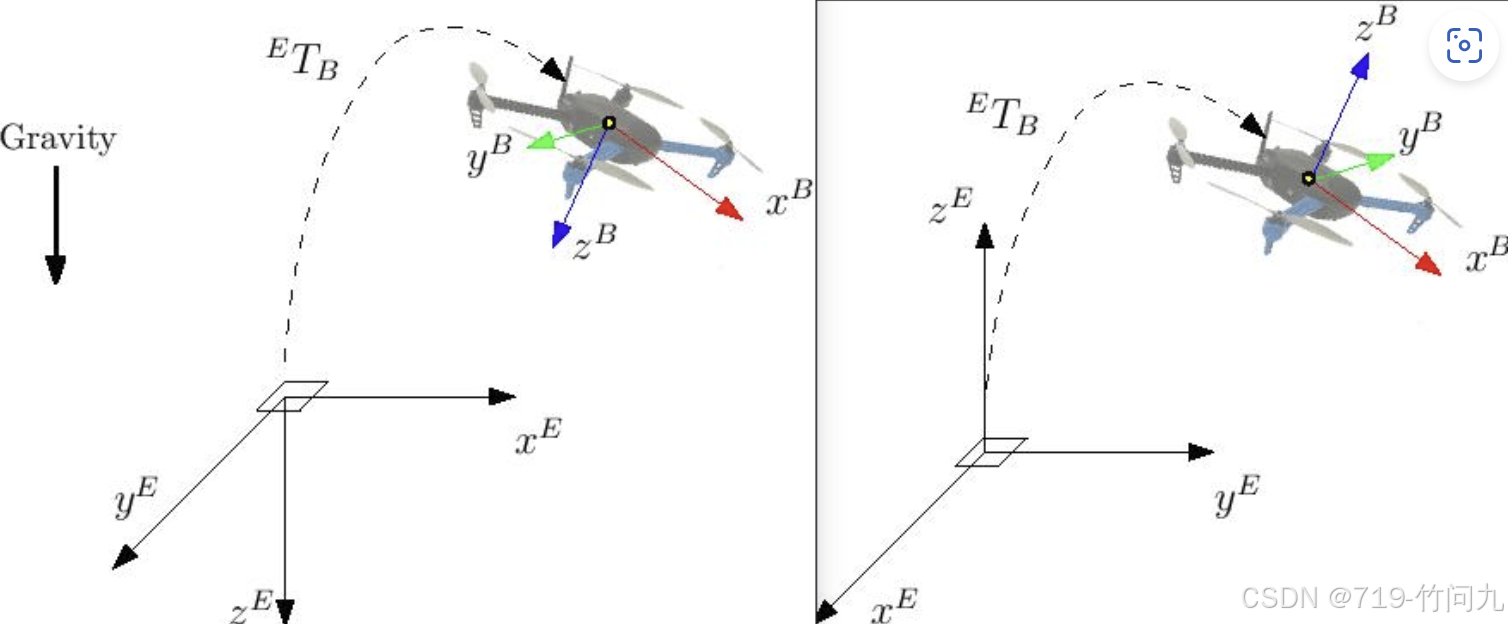
目前PX4飞控一种控制方式,通过发布TrajectorySetpoint message给飞控飞行轨迹,飞控会按照飞行轨迹进行飞行。但是飞行轨迹是在NED-当地坐标系下,如果我们想控制无人机一个向前飞行的速度,则必须将FRD-机体坐标系下无人机的速度转换到NED-当地坐标系下无人机的速度。以下是转换代码:
geometry_msgs::msg::PointStamped Position_Transform_From_FRD_To_NED(geometry_msgs::msg::PointStamped point_frd)
{
    // Transform a point from FRD (body frame) to NED (local frame)
    geometry_msgs::msg::PointStamped point_ned;

    // Perform the transformation using the provided transform_stamped
    tf2::doTransform(point_frd, point_ned, transform_stamped);

    return point_ned;
}

geometry_msgs::msg::PointStamped Velosity_Transform_From_FRD_To_NED(geometry_msgs::msg::PointStamped point_frd)
{
    // Transform a point from FRD (body frame) to NED (local frame)
    geometry_msgs::msg::PointStamped point_ned;

    // Perform the transformation using the provided transform_velosity_stamped
    tf2::doTransform(point_frd, point_ned, transform_velosity_stamped);

    return point_ned;
}

void vehicle_odometry_callback(const px4_msgs::msg::VehicleOdometry::SharedPtr msg)
{
    // Extract quaternion from the message
    tf2::Quaternion q(
        msg->q[1],
        msg->q[2],
        msg->q[3],
        msg->q[0]);

    // Set up the transform for position
    transform_stamped.header.frame_id = "NED earth-fixed frame"; // NED frame
    transform_stamped.child_frame_id = "FRD body frame";
    transform_stamped.transform.translation.x = msg->position[0];
    transform_stamped.transform.translation.y = msg->position[1];
    transform_stamped.transform.translation.z = msg->position[2];
    transform_stamped.transform.rotation.x = q[0];
    transform_stamped.transform.rotation.y = q[1];
    transform_stamped.transform.rotation.z = q[2];
    transform_stamped.transform.rotation.w = q[3];

    // Set up the transform for velocity
    transform_velosity_stamped.header.frame_id = "NED earth-fixed frame"; // NED frame
    transform_velosity_stamped.child_frame_id = "FRD body frame";
    transform_velosity_stamped.transform.translation.x = 0;
    transform_velosity_stamped.transform.translation.y = 0;
    transform_velosity_stamped.transform.translation.z = 0;
    transform_velosity_stamped.transform.rotation.x = q[0];
    transform_velosity_stamped.transform.rotation.y = q[1];
    transform_velosity_stamped.transform.rotation.z = q[2];
    transform_velosity_stamped.transform.rotation.w = q[3];
}
在代码中,transform_stamped 和 transform_velosity_stamped 是两个 tf2::TransformStamped 对象,用于存储坐标变换信息:
transform_stamped:用于位置变换,包含从 FRD(机体坐标系)到 NED(当地坐标系)的位置和姿态信息。transform_velosity_stamped:用于速度变换,通常位置部分为零,仅包含姿态信息,用于将 FRD 坐标系下的速度转换到 NED 坐标系。
这两个对象是 tf2 库中的核心数据结构,用于在不同坐标系之间进行变换。
我们订阅话题/fmu/in/vehicle_odometry而不订阅/fmu/in/vehicle_local_position,是因为后者必须要在户外具有GPS信息。
3. NED-当地坐标系与ENU-当地坐标系转换3
FRD(NED)约定:除非在相关消息定义中明确指定,否则所有 PX4 主题都采用 FRD(NED)约定。因此,想要与 PX4 交互的 ROS 2 节点必须注意坐标系约定。
ROS中约定的坐标系与PX4约定的坐标系并不相同,需要坐标系转换。
| 框架 | ROS | ROS |
|---|---|---|
| 机体 | FRD (X Forward, Y Right, Z Down) | FLU (X Forward, Y Left, Z Up) |
| 世界坐标系 | FRD or NED (X North, Y East, Z Down) | FLU or ENU (X East, Y North, Z Up) |
// 定义坐标系转换函数
Eigen::Vector3d ned_to_enu(const Eigen::Vector3d& ned_position) {
    // NED to ENU transformation
    // 1. Rotate pi/2 around Z-axis (up)
    // 2. Rotate pi around X-axis (old East/new North)
    Eigen::Vector3d enu_position;
    enu_position << ned_position.y(), -ned_position.x(), ned_position.z();
    return enu_position;
}

Eigen::Vector3d enu_to_ned(const Eigen::Vector3d& enu_position) {
    // ENU to NED transformation
    // 1. Rotate pi around X-axis (old North/new East)
    // 2. Rotate -pi/2 around Z-axis (down)
    Eigen::Vector3d ned_position;
    ned_position << -enu_position.y(), enu_position.x(), enu_position.z();
    return ned_position;
}

魔乐社区(Modelers.cn) 是一个中立、公益的人工智能社区,提供人工智能工具、模型、数据的托管、展示与应用协同服务,为人工智能开发及爱好者搭建开放的学习交流平台。社区通过理事会方式运作,由全产业链共同建设、共同运营、共同享有,推动国产AI生态繁荣发展。
更多推荐


 31
 0
- 0


 已为社区贡献1条内容

所有评论(0)