llama-factory微调Qwen2.5-7B-instruct实战,看这一篇就够了!!!(含windows和linux)
llama-factory微调Qwen2.5-7B-instruct实战,看这一篇就够了!!!(含windows和linux)
一.安装llama-factory
llama-factort的网站:https://github.com/hiyouga/LLaMA-Factory
安装llama-factory很简单,打开github后滑到安装 LLaMA Factory跟着步骤走即可。
安装 LLaMA Factory
git clone --depth 1 https://github.com/hiyouga/LLaMA-Factory.git
cd LLaMA-Factory
pip install -e “.[torch,metrics]”
安装后到根目录执行
llamafactory-cli webui
可进行可视化,如下图所示:
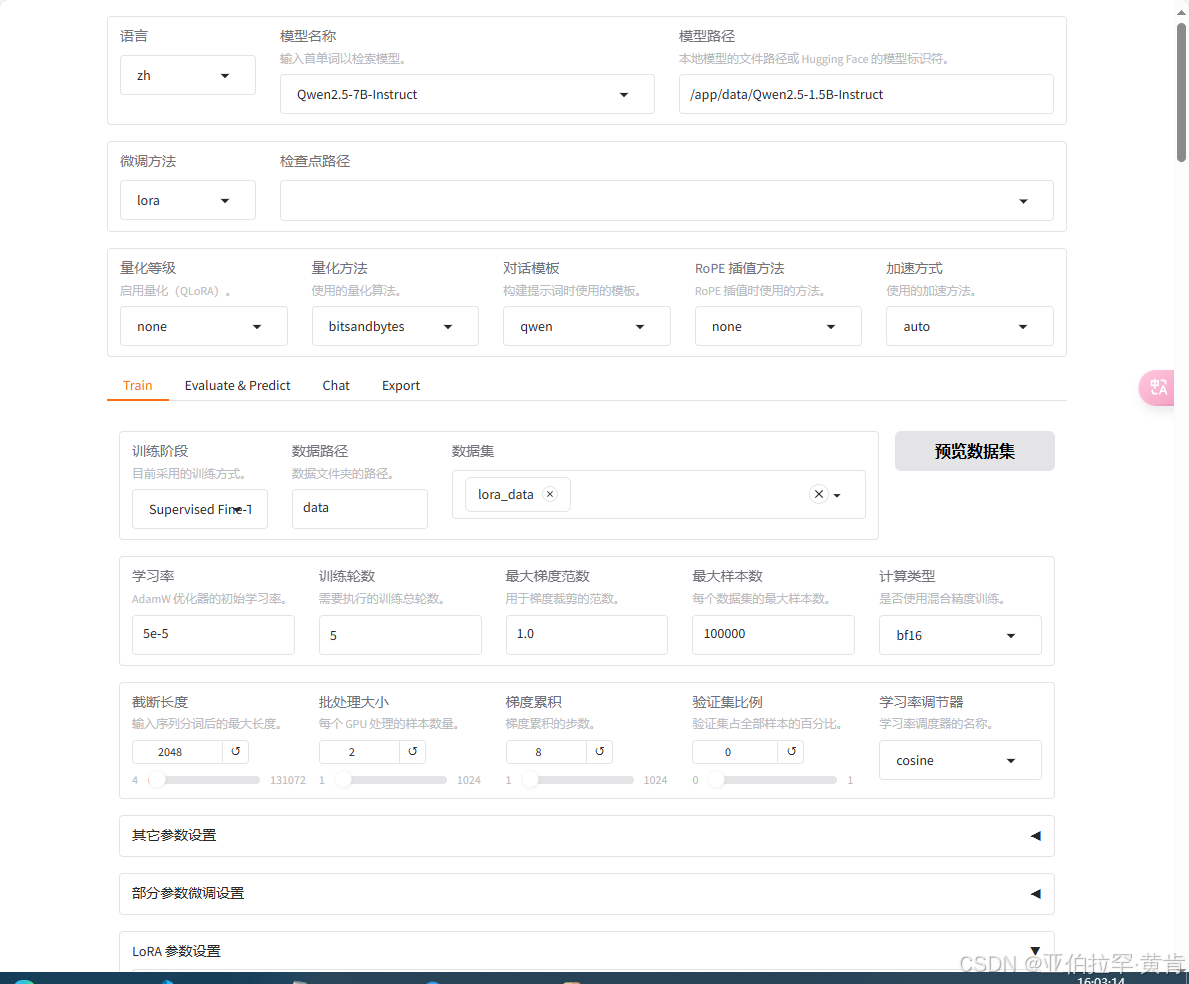
即安装完成,接着进行微调。
二.开始微调。
1.数据准备:
需要将数据调整到Alpaca格式。
- Alpaca格式:alpaca 格式最初与Stanford大学的一个研究项目相关联,该项目旨在通过少量高质量的数据来微调大型语言模型。它受到了Alpaca模型(一种基于LLaMA的指令跟随模型)的影响,该模型是在Meta AI的LLaMA基础上进行改进而来的。
格式如下:{ "instruction": "Summarize the following text.", "input": "Artificial intelligence (AI) is a rapidly growing field...", "output": "AI is an evolving technology that is growing quickly in various fields...", "system": "system prompt (optional)", "history": [ ["user instruction in the first round (optional)", "model response in the first round (optional)"], ["user instruction in the second round (optional)", "model response in the second round (optional)"] ] }
例子:处理后格式如下图所示:
注意:
-
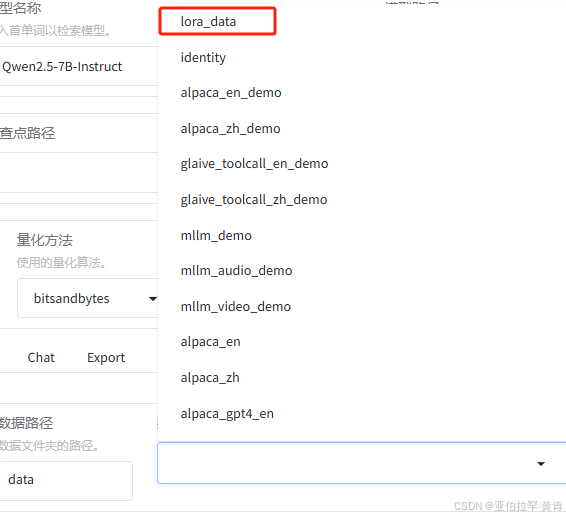
数据准备完成后,在llama-factory下的data/dataset_info.json 需要添加以下字段:
"dataset_name": { "file_name": "dataset_name.json", "columns": { "prompt": "instruction", "query": "input", "response": "output", "system": "system", "history": "history" } } -
如果是我上述的数据格式,即:
"lora_data": { "file_name": "lora_data.json", "columns": { "prompt": "instruction", "query": "input", "response": "output" } -
必须添加字段,这样子才可以在gui界面找到你的数据
2.下载模型:
方式一:自动下载(不推荐)
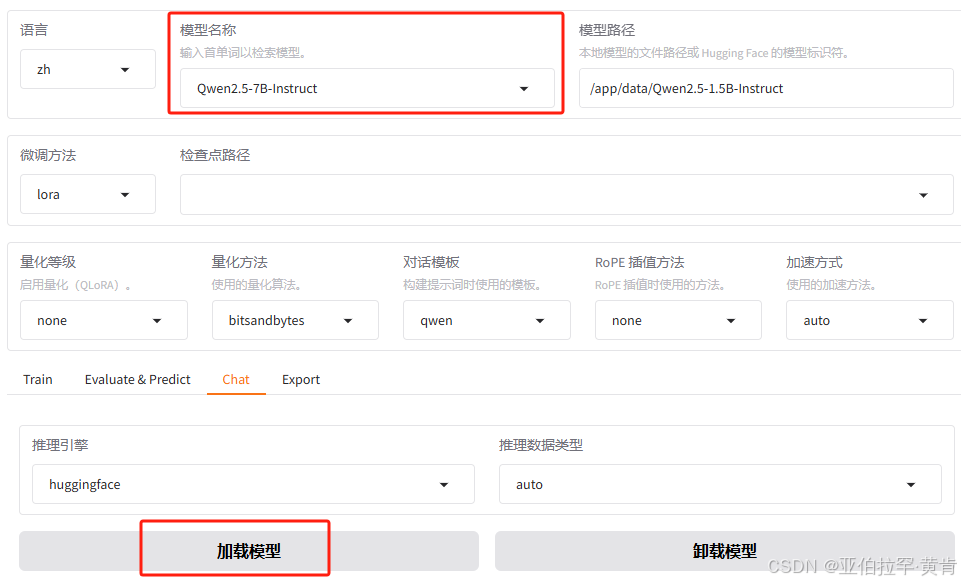
选择好模型之后点击加载模型就会自动连接hugging face下载模型,需要科学上网并且下载速度慢,所以不推荐
方式二:本地部署
进入国内镜像网站:https://hf-mirror.com/
搜索Qwen2.5-7B-Instruct:https://hf-mirror.com/Qwen/Qwen2.5-7B-Instruct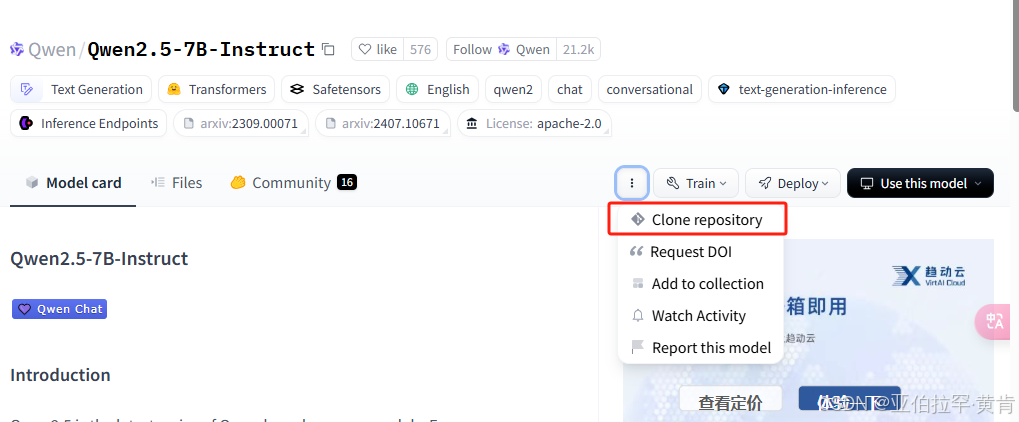
直接git到本地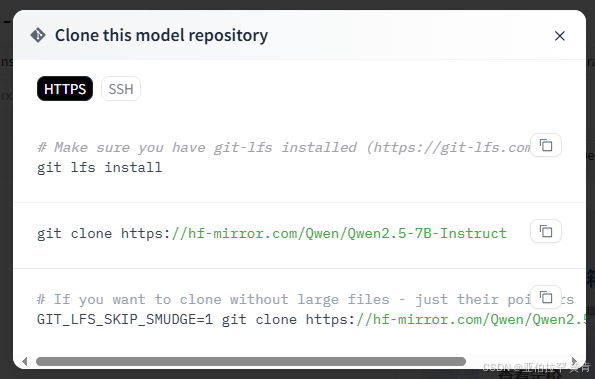
到时候填写在模型路径即可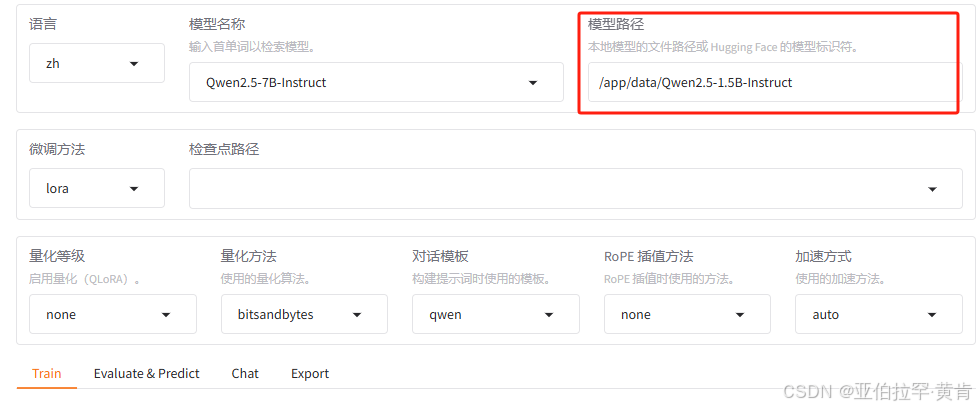
2.开始训练
Linux下部署docker进行微调:
a.运行装有llama-factory以及cuda的容器:sudo docker run --runtime=nvidia --gpus all --net host --shm-size=2g -d -it -v $(pwd)/:/workspace docker-cuda-llamafactory
b.将数据以及模型转移到容器内:
先sudo docker ps获取容器id:
接着将数据转移到容器内(容器与宿主的数据不共享)sudo docker cp file_name docker_id:docker_path
docker_id:上述步骤查询到的容器id
docker_path:数据存放在容器内的位置
c.进入容器启动llamafactory:sudo docker exec -it docker_id /bin/bash
运行llamafactory-cli webui启动
d.训练:
- 如果出现报错:

报错内容:RuntimeError : CUDA Setup failed despite Gpu being available. Please run the following command to get more information: python -m bitsandbytes Inspect the output of the command and see if you can locate CUDA libraries. You might need to add thel to your LD LIBRARY PATH. If you suspect a bug, please take the information from python -m bitsandbytes and open an issue at: https://github.com/TimDettmers/bitsandbytes/issues
已经解决点击查看
设置好路径等各种参数后直接点击开始即可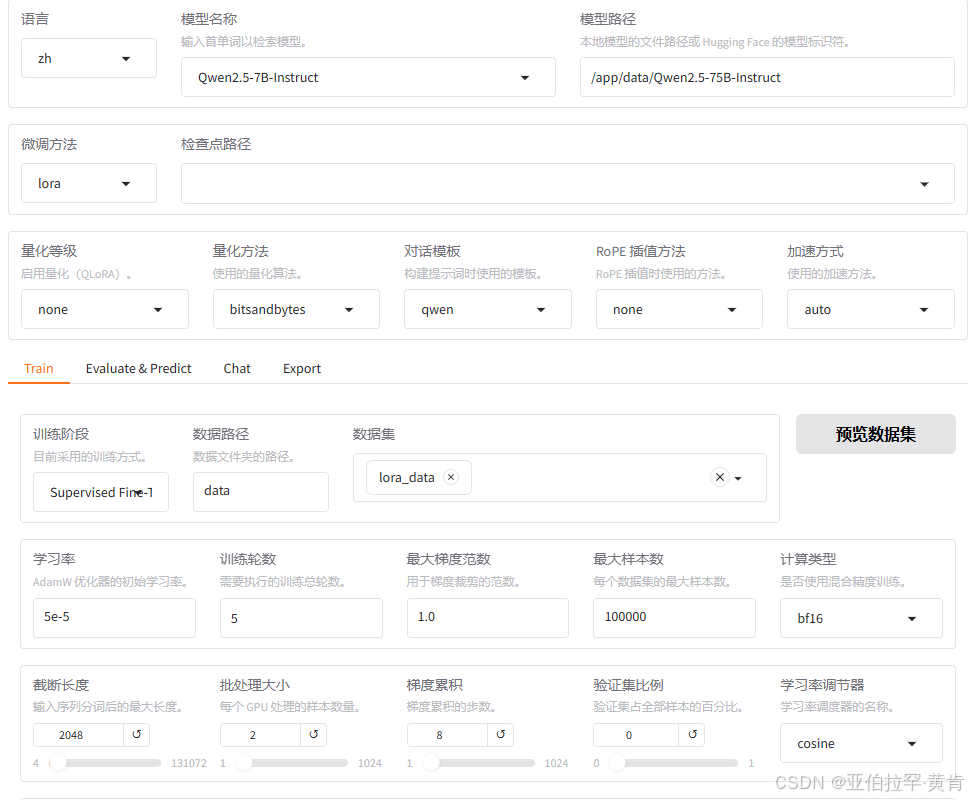
e.测试
点击检查点路径选择刚才训练后的结果,点击chat,加载模型后就可以测试微调后的结果了。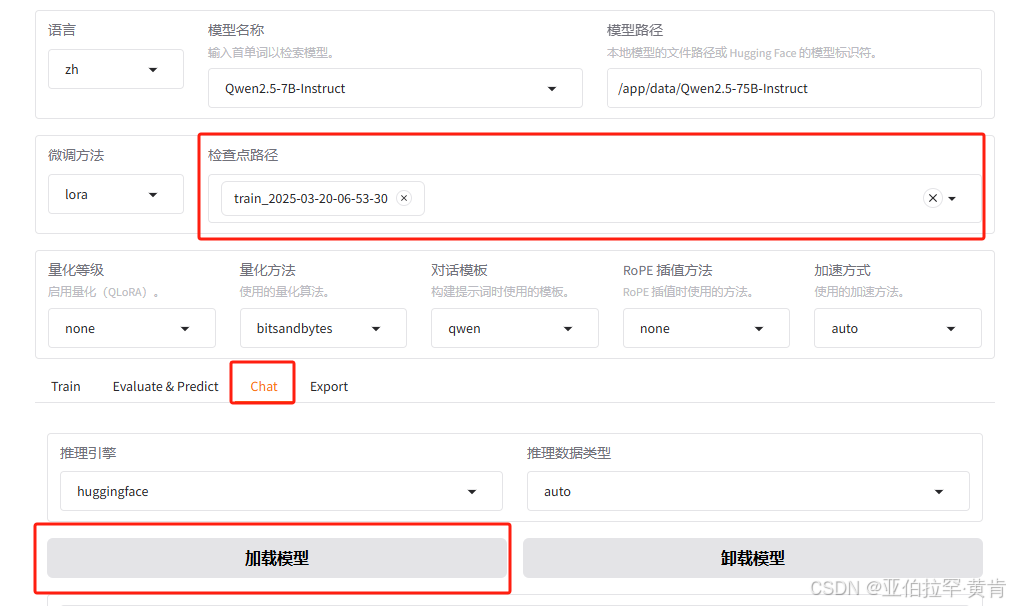
f.导出
填写检查点路径,目录后即可导出为自己的模型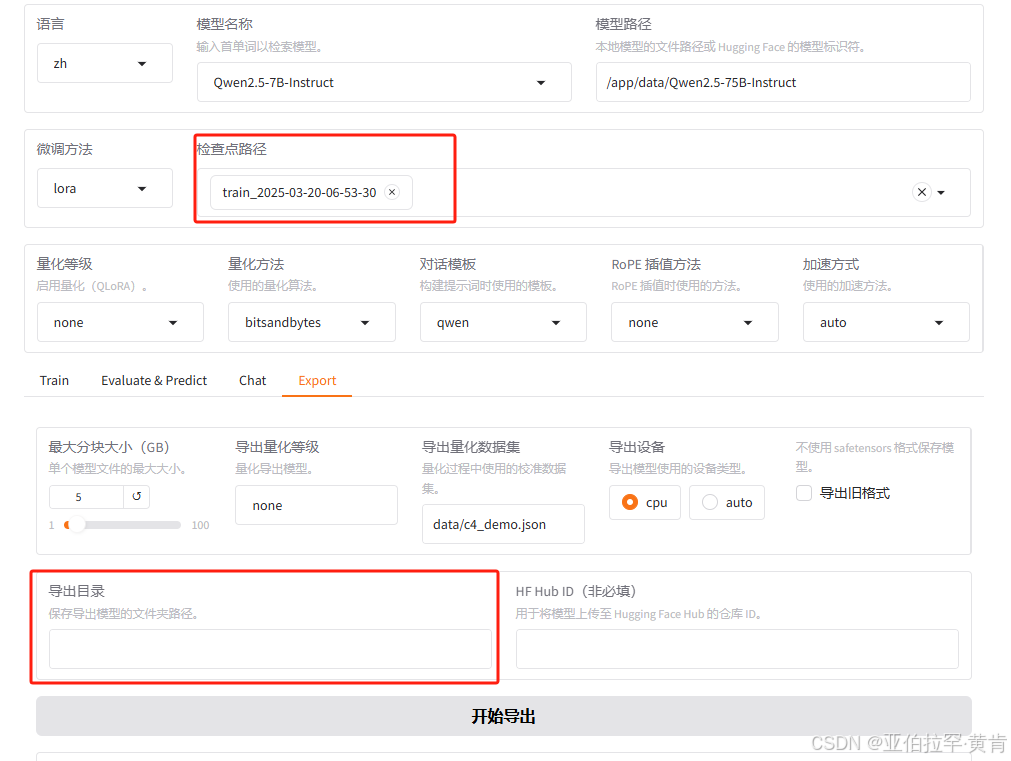
Win系统参考linux即可,Win系统设置路径什么的非常方便,感觉没必要出图文教程了。如果出现bitsandbytes报错,可尝试pip install bitsandbytes-windows

魔乐社区(Modelers.cn) 是一个中立、公益的人工智能社区,提供人工智能工具、模型、数据的托管、展示与应用协同服务,为人工智能开发及爱好者搭建开放的学习交流平台。社区通过理事会方式运作,由全产业链共同建设、共同运营、共同享有,推动国产AI生态繁荣发展。
更多推荐


 20
20 0
0- 0


 已为社区贡献1条内容

所有评论(0)