修改vscode extension 位置
起因
在使用vscode过程中c盘越来越大,所以需要修改插件的安装位置,通过阅读vscode官方文档可知
vscode extension的安装位置有以下:
Extensions are installed in a per user extensions folder. Depending on your platform, the location is in the following folder:扩展安装在每个用户的扩展文件夹中。根据您的平台,该位置位于以下文件夹中:
- Windows 视窗
%USERPROFILE%\.vscode\extensions - macOS 苹果系统
~/.vscode/extensions - Linux Linux
~/.vscode/extensions
You can change the location by launching VS Code with the--extensions-dir <dir> command-line您可以通过使用命令行option 选项.启动 VS Code 来更改位置。
所以我们通过官方给的方法来尝试吧
打开cmd 输入code -h
看这里:
Extensions Management
--extensions-dir <dir> Set the root path for extensions.
--list-extensions List the installed extensions.
--show-versions Show versions of installed extensions,
when using --list-extensions.
--category <category> Filters installed extensions by provided
category, when using --list-extensions.
C:\Users\linyin>code --list-extensions
ecmel.vscode-html-css
在输入--extensions-dir 你所需要的目录即可
我们再将已经安装的vscode-html-css 插件删除卸载重新安装
看看新的目录有没有出现新的插件
我们再安装css peek 插件
出现了
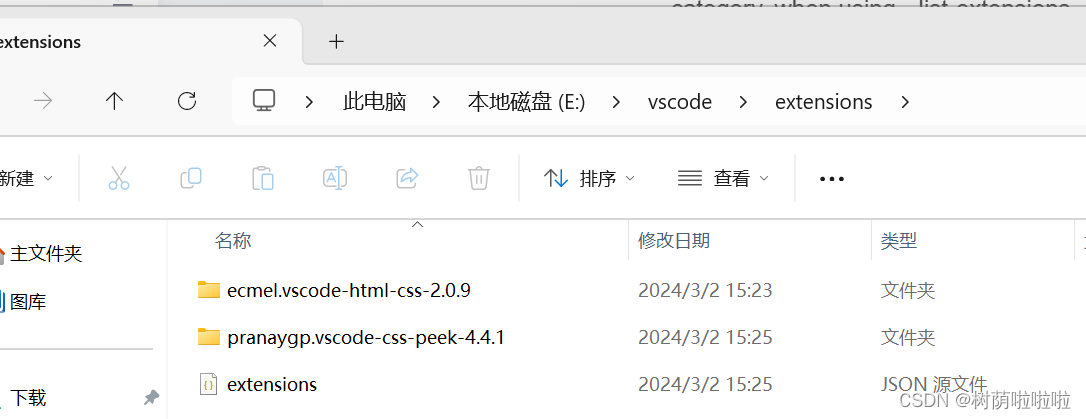
所以解决方案 是进入命令行 输入--extensions-dir 加你希望的拓展的目录
波折
但是当我们重新打开VS时 发现拓展不在,我们总不能每一次打开vscode都从这串代码进入
最后网络搜索找到一下文章,可以解决这个问题,就不在多做赘述
修改VSCode插件位置 - 知乎 (zhihu.com) https://zhuanlan.zhihu.com/p/469586657

魔乐社区(Modelers.cn) 是一个中立、公益的人工智能社区,提供人工智能工具、模型、数据的托管、展示与应用协同服务,为人工智能开发及爱好者搭建开放的学习交流平台。社区通过理事会方式运作,由全产业链共同建设、共同运营、共同享有,推动国产AI生态繁荣发展。
更多推荐


 28
28 0
0- 0


 已为社区贡献1条内容

所有评论(0)