

chrome 抓取图片
So you have a website you want to scrape? But don’t necessarily know what package to use or how to go about the process. This is common when first starting out web scraping. Understanding how to efficiently get what you want from a website takes time and multiple scripts.
因此,您有一个要抓取的网站? 但是不一定知道要使用哪个程序包或如何执行该过程。 第一次开始刮网时,这很常见。 了解如何有效地从网站获取所需内容需要花费时间和多个脚本。
In this article, we will go through the process of planning a web scraping script.
在本文中,我们将完成计划Web抓取脚本的过程。
在本文中,您将学习 (In this article, you will learn)
- To understand the workflow of web scraping 了解网络抓取的工作流程
- How to quickly analyse a website for data extraction 如何快速分析网站以进行数据提取
- How to leverage Chrome Tools for web scraping 如何利用Chrome工具进行网页抓取
了解Web搜寻的工作流程 (Understanding the workflow of Web Scraping)
There are three key areas to consider when looking to do web scraping
进行网页抓取时需要考虑三个关键领域
-
Inspecting the website
检查网站
- Planning the data you require and their selectors/attributes from the page 在页面上规划所需的数据及其选择器/属性
- Writing the code 编写代码
In this article, we will focus on inspecting the website. This is the first and most important part of web scraping. It is also the least talked about, which is why you’re here reading this!
在本文中,我们将重点检查网站。 这是网页抓取的第一个也是最重要的部分。 它也是谈论最少的,这就是为什么您在这里阅读本文!
1.数据是在一页,几页还是在页面的多次点击中? (1. Is the data on one page, several pages or through multiple click-throughs of pages?)
When you first think of a website to extract data from, you will have some idea of the data you are wanting.
当您第一次想到要从中提取数据的网站时,就会对所需的数据有所了解。
You can imagine that information on one page is the easiest and the code will inevitably be more simple whereas nested pages of information will make many more HTTP requests and the code will be more complex as a result. Knowing this helps plan out what types of functions will be needed to do the scrape.
您可以想象一页上的信息是最简单的,并且代码将不可避免地变得更简单,而嵌套的信息页面将发出更多的HTTP请求,结果代码将更加复杂。 知道这一点有助于计划进行爬取所需的功能类型。
2.网站如何建设? Java语言使用了多少? (2. How is the website built? How heavily is Javascript used?)
Knowing how the website is built is a vital part to know early on in the process. This often dictates how easy or difficult the scrape will be. Almost all pages on the internet will be using HTML and CSS and there are good frameworks within python that deal with that easily. However, knowing if there is any javascript being implemented to manipulating the website. To load new information which may or may not be accessible is important.
知道网站的构建方式是在此过程中尽早了解的至关重要的部分。 这通常指示刮擦将是多么容易或困难。 互联网上几乎所有页面都将使用HTML和CSS,而python中有很好的框架可以轻松地处理这些问题。 但是,知道是否有任何JavaScript正在实施以操纵网站。 加载可能无法访问的新信息很重要。
3.页面需要登录吗? (3. Does the page require a login?)
Logging in presents a specific challenge in web scraping, if a login is required this slows down the efficiency of the scrape, but also makes it far easy for your scraper to be blocked.
登录是Web抓取中的一个特定挑战,如果需要登录,这会减慢抓取的效率,但是也很容易使您的抓取器被阻塞。
4.是否有动态生成的内容? (4. Is there dynamically generated content?)
By this we mean is there enough at a quick glance to know that the functionality of the website is interactive and most likely generated by javascript? The more interactivity on the website the more challenge the scrape.
通过这种方式,我们是否有足够的快速浏览能力就可以知道该网站的功能是交互式的,并且很可能是由javascript生成的? 网站上的互动越多,刮刮乐就越具有挑战性。
5.是否启用了无限滚动? (5. Is there infinite scrolling enabled?)
Infinite scrolling is a javascript orientated feature where new requests are made to a server and based on these either generic or very specific requests either the DOM is manipulated or data from the server is made available. Now infinite scrolling requires HTTP requests to be made and new information to be displayed on the page. This is important to understand because we often either need to simulate this behaviour or we use browser activity to simulate that behaviour for us.
无限滚动是一种面向javascript的功能,其中向服务器发出新请求,并基于这些通用请求或非常特定的请求来操作DOM或使来自服务器的数据可用。 现在,无限滚动要求发出HTTP请求,并且新信息要显示在页面上。 了解这一点很重要,因为我们经常需要模拟此行为,或者使用浏览器活动为我们模拟该行为。
6.是否有下拉菜单? (6. Are there drop-down menus?)
Any sort of drop-down menus can present a particular challenge in web scraping. This is because more often than not you are needing to simulate browser activity to get to the data.
任何类型的下拉菜单都可能在Web抓取中提出特定的挑战。 这是因为您经常需要模拟浏览器活动来获取数据。
7.有表格吗? (7. Are there forms?)
Forms are often used in many websites, either for data you have to search for or to login into part of the website. HTML Form usually invokes javascript to post data to a server that will authenticate and respond with the information you want. Javascript has the ability to invoke HTTP requests and is often a source of changing the information on a page without rendering the page. So you need to understand how the website does this, is there an API that responds to HTTP requests invoked by javascript? Can this be used to gain the information you want or will it need to be automated?
表单经常在许多网站中使用,用于存储您必须搜索的数据或登录到网站的一部分。 HTML表单通常调用javascript将数据发布到服务器,该服务器将进行身份验证并使用所需信息进行响应。 Javascript具有调用HTTP请求的能力,通常是在不渲染页面的情况下更改页面信息的来源。 因此,您需要了解网站是如何做到的,是否有一个API可以响应javascript调用的HTTP请求? 可以使用它来获取所需的信息,还是需要将其自动化?
8.是否有包含可用信息的表 (8. Are there tables that have the available information)
Let's face it, tables are a pain! Pain to create in HTML and also painful to scrape. Be wary of table data, you might be in for a headache. Fortunately, there are frameworks that can grab table data quickly but just be prepared it’s not a 100% certainty you’ll be able to use these frameworks and may have to manually loop around rows to gain the data you want
面对现实吧,桌子很痛苦! 用HTML进行创建很痛苦,而且很难抓取。 注意表数据,您可能会头疼。 幸运的是,有一些框架可以快速获取表数据,但是只是准备好了,并不是100%可以使用这些框架,并且可能必须手动在行周围循环以获取所需的数据
9.是否隐藏了API或其他? (9. Is there an API hidden or otherwise?)
This is key in scraping websites that have dynamic content. Often an API endpoint is used to serve responses that carry data the website has displayed on modern pages. This is often not displayed explicitly by the website but looking at the requests made to render the website we can gain knowledge of whether there is an API the website uses. This is how javascript orientated websites work, they make HTTP requests to a server and the displayed data appears on the website. If we can mimic those HTTP requests we have a shot at getting the same data. This is called re-engineering the HTTP requests.
这是抓取具有动态内容的网站的关键。 通常,API端点用于提供响应,这些响应携带网站在现代页面上显示的数据。 网站通常不会明确显示该信息,但是查看呈现网站的请求,我们可以了解该网站是否存在API。 这是面向JavaScript的网站的工作方式,它们向服务器发出HTTP请求,并且所显示的数据出现在网站上。 如果我们可以模仿这些HTTP请求,那么我们就有机会获得相同的数据。 这称为重新设计HTTP请求。
10.我们是否需要浏览器活动来抓取数据? (10. Do we require browser activity to scrape the data?)
It’s worth thinking about this carefully. Automating browser activity should be a last resort if the scrape is anything but small. Intermediate to larger scrapes that require browser activity will take a long time and are brittle to changes in the website structure. Sometimes it is the only way to gain access to the data you require so if there’s an alternative then we should use that.
值得仔细考虑一下。 如果抓取内容很小,那么自动执行浏览器活动应该是最后的选择。 中级到需要浏览器活动的较大碎片将花费很长时间,并且对网站结构的更改很脆弱。 有时,这是获得所需数据的唯一途径,因此,如果有其他选择,我们应该使用它。
网页抓取示例 (Web Scraping Example)
So after having considered these questions lets now dig into an example that exemplifies some of these principles.
因此,在考虑了这些问题之后,现在让我们举一个例子来说明其中一些原则。
挑战: (Challenge:)
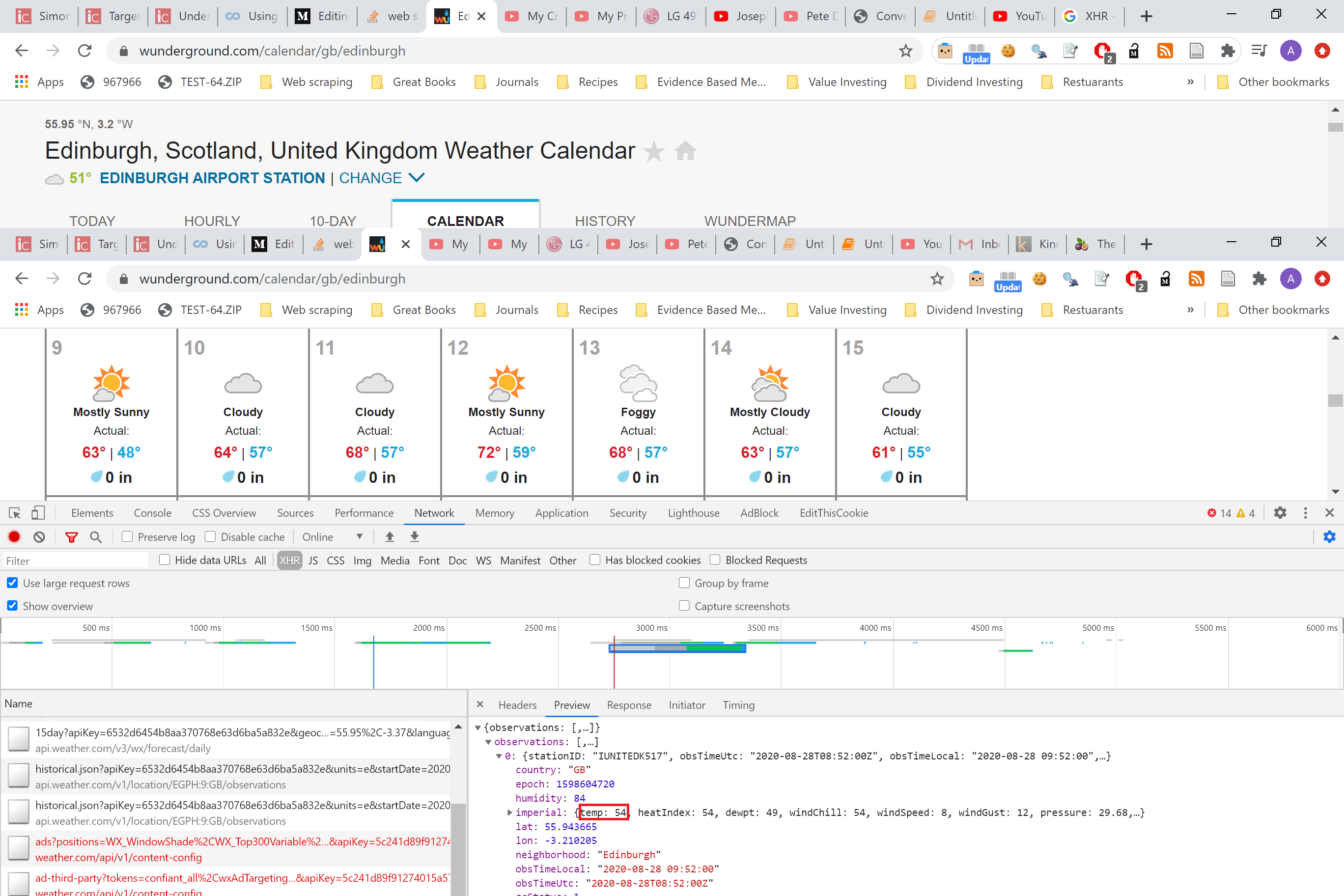
To scrape the current temperature from the WeatherUnderground site here
从此处的WeatherUnderground站点刮取当前温度
So how do we analyse this page up close? The answer is Chrome’s Dev Tools! The Chrome browser gives you a huge array of ways to analyse any website and should be part of any web scraping project you have.
那么,我们如何近距离分析此页面? 答案是Chrome的开发工具! Chrome浏览器为您提供了多种分析任何网站的方法,并且应属于您所拥有的任何网络抓取项目。
在5分钟内分析网页 (Analysing the webpage in 5 minutes)
If you look at the google page for Dev Tools you can see there is a lot of detail for web developers. There are a few areas within the toolset that are very useful for Web Scrapers.
如果您查看开发工具的Google页面,则可以看到针对Web开发人员的大量详细信息。 工具集中的一些区域对于Web爬网程序非常有用。

Let's go through the questions one at a time.
让我们一次解决一个问题。
-
Is the data on one page or more?
数据是否在一页以上?
The information is on one page! Great, this makes life much easier
信息在一页上! 太好了,这使生活更加轻松
- How is the website built? 网站是如何建立的?
Looking at the information, there are multiple tabs you can click through, it is most likely invoking some javascript to display the data you want. Most modern websites will display data from a server onto the website and from visual inspection, this would be the case here.
查看信息,您可以单击多个选项卡,很可能是调用一些JavaScript来显示所需的数据。 大多数现代网站都会将数据从服务器显示到网站上并通过目视检查显示出来,在这种情况下就是这种情况。
Top tip: Disabling javascript is a sure way of knowing how much javascript is involved in the website layout and information.
最重要的提示:禁用javascript是确定网站布局和信息中涉及多少javascript的肯定方法。
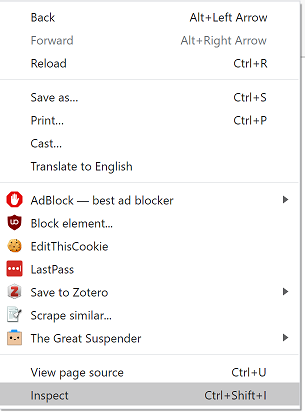
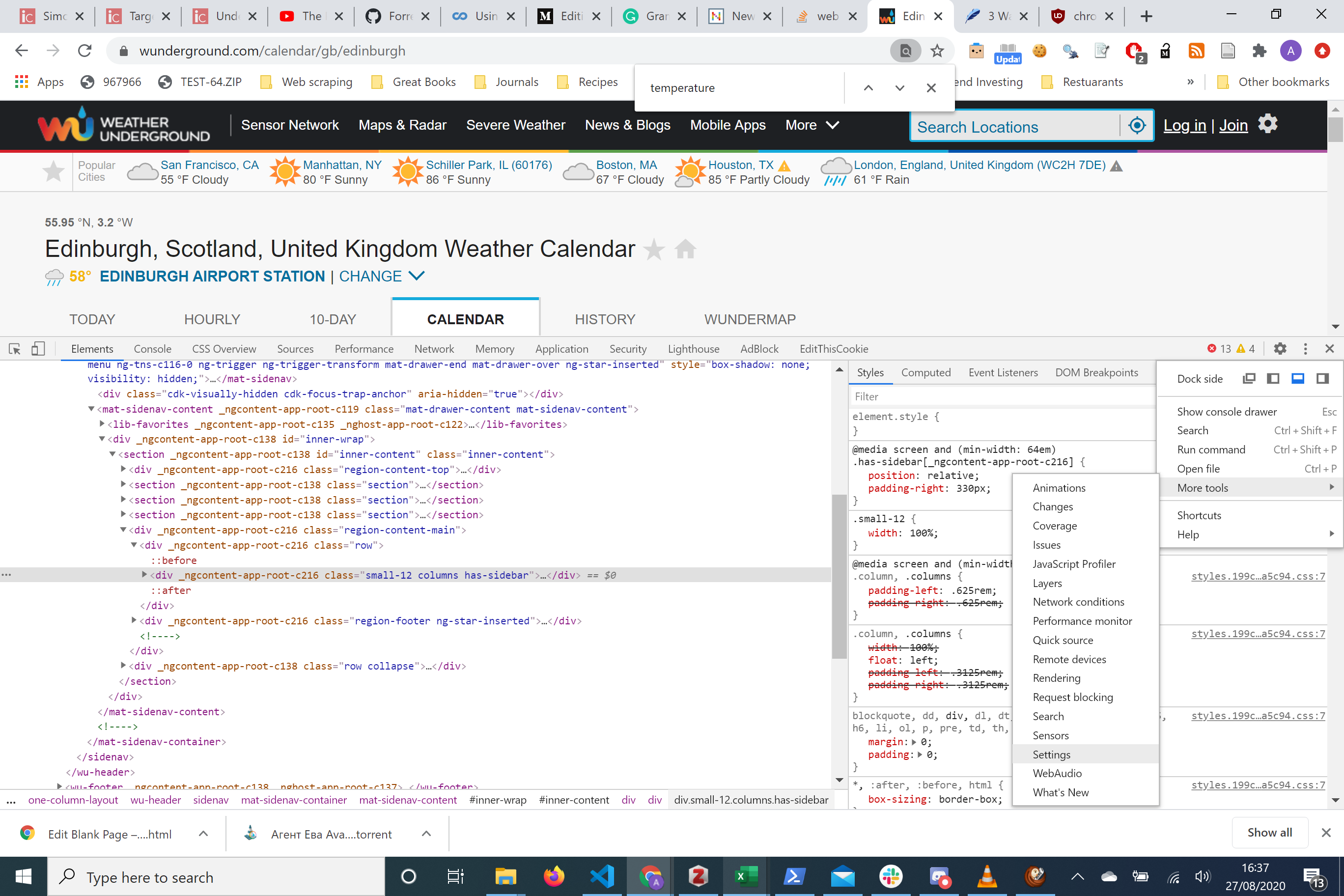
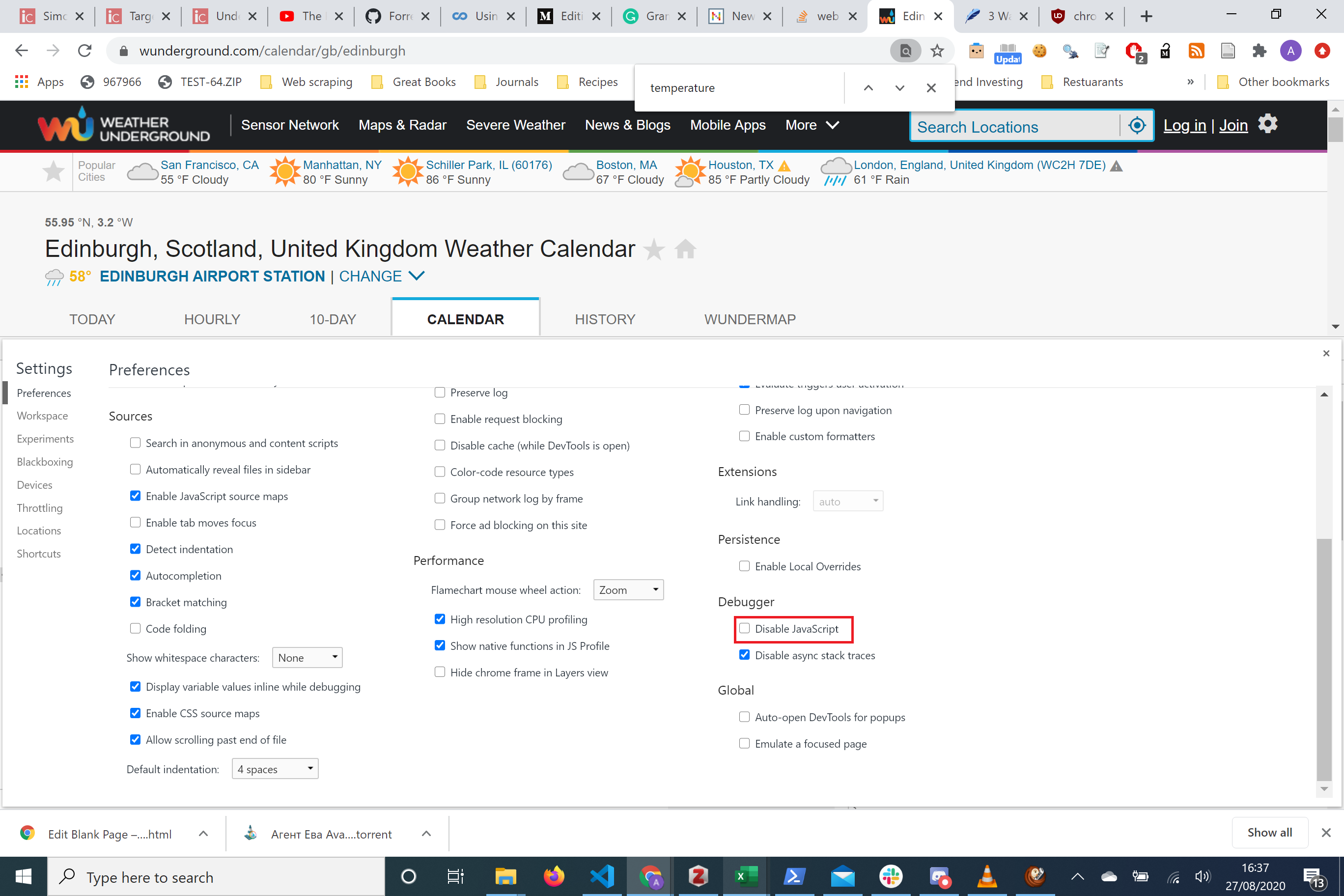
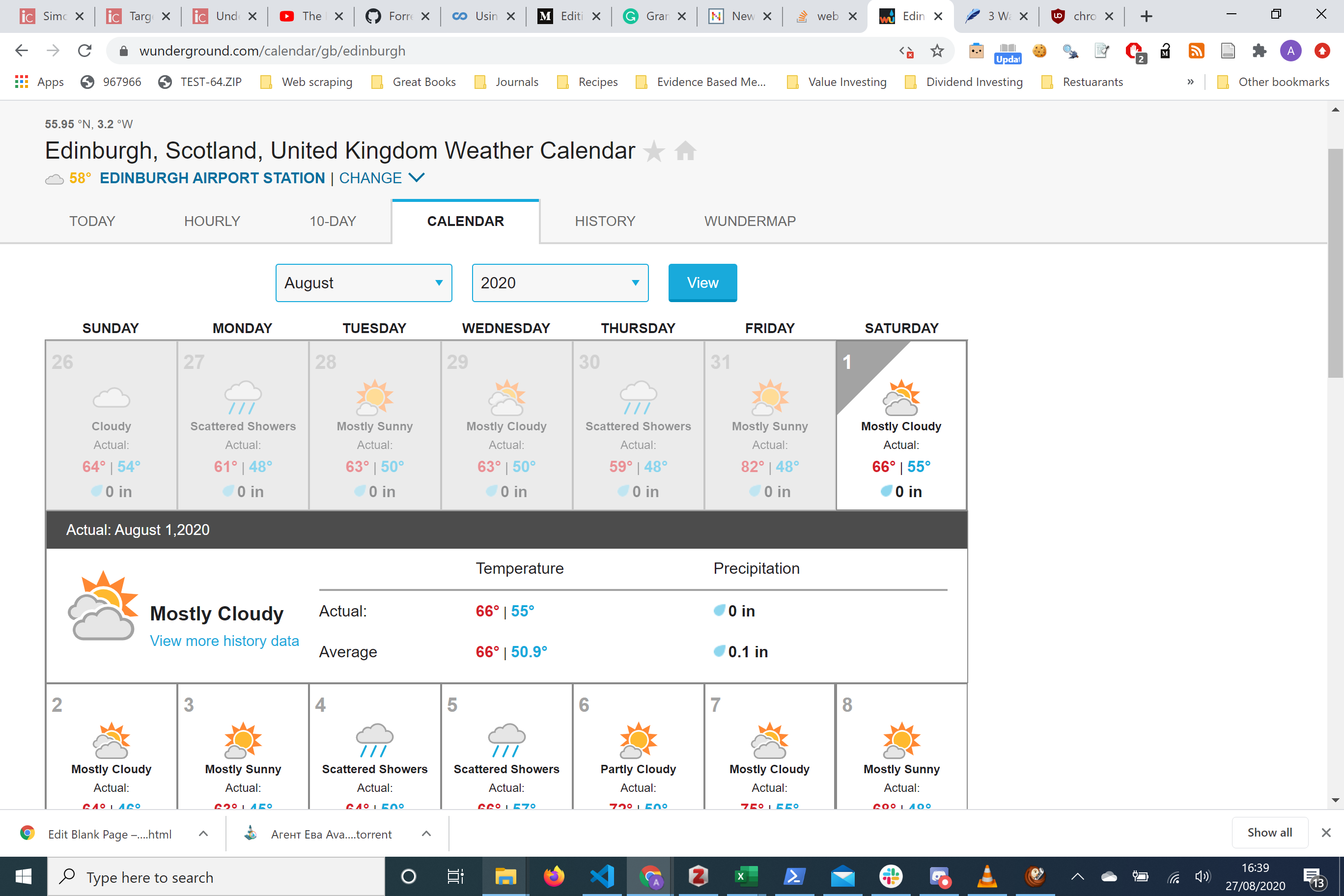
We have disabled javascript and looks like we’re still able to access all the data you want! This makes our lives easier!
我们已禁用了javascript,看起来我们仍然可以访问所需的所有数据! 这使我们的生活更轻松!
3. Does the website require a login? No!
3.网站是否需要登录? 没有!
4. Is the content dynamically created? In a word, probably! The temperature data could change and most likely those changes are reflected at a server level which then can be displayed without constantly updating the website. It appears disabling javascript doesn’t change the temperature data but this is only one snapshot at a time.
4.内容是动态创建的吗? 一句话,大概吧! 温度数据可能会发生变化,很可能这些变化会反映在服务器级别,然后无需不断更新网站即可显示出来。 似乎禁用javascript不会更改温度数据,但这一次只是一个快照。
5. Is there any infinite scrolling? No!
5.是否有无限滚动? 没有!
6. Are there any drop-down menus? No!
6.是否有任何下拉菜单? 没有!
7. Are there any forms? No!
7.有什么形式吗? 没有!
8. Are there any tables? Yes, but we will be looking at how we can navigate this!
8.有桌子吗? 是的,但是我们将研究如何进行导航!
Before we move on let's summarise so far.
在继续之前,让我们总结一下。
We know that this page has data within a table, on one page, that doesn’t require any login and doesn’t appear to change when javascript is disabled. We are in a much better position to access this data now.
我们知道,此页面的数据位于一个表中的一页上,该数据不需要任何登录,并且在禁用javascript时似乎不会更改。 我们现在可以更好地访问此数据。
Now we are ready to see if we can grab the information easily.
现在,我们准备看看是否可以轻松获取信息。
9. Is there an API?
9.是否有API?
To know whether this is the case we have to know a bit more about Chrome Dev Tools. Under each page that is inspected, there is a tab called ‘Network’ . Here is where we can record any incoming requests and response that the browser makes and receives by refreshing the page whilst the network tab is open or doing a specific piece of functionality on the website. Remember to have the network tab on, otherwise, the activity will not be recorded!
要知道是否是这种情况,我们必须对Chrome开发工具有更多的了解。 在每个要检查的页面下,都有一个名为“网络”的选项卡。 在这里,我们可以记录网络浏览器打开时刷新页面或在网站上执行的特定功能,从而记录浏览器发出的所有传入请求和响应。 请记住打开“网络”选项卡,否则将不会记录该活动!
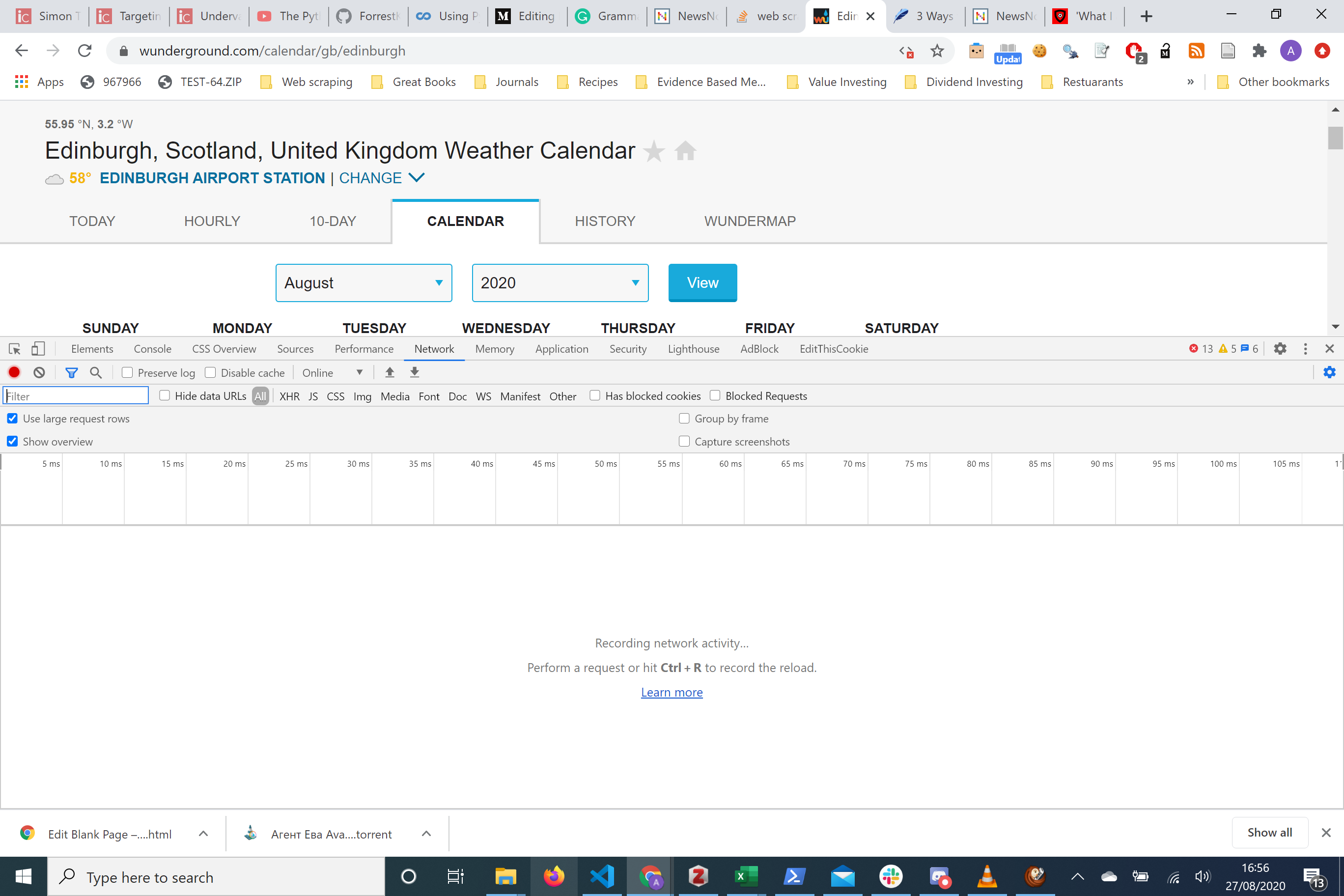
We can see from the screen we haven’t recorded anything. Refreshing the page gives us the picture below
从屏幕上我们可以看到我们还没有录制任何东西。 刷新页面可以看到下面的图片
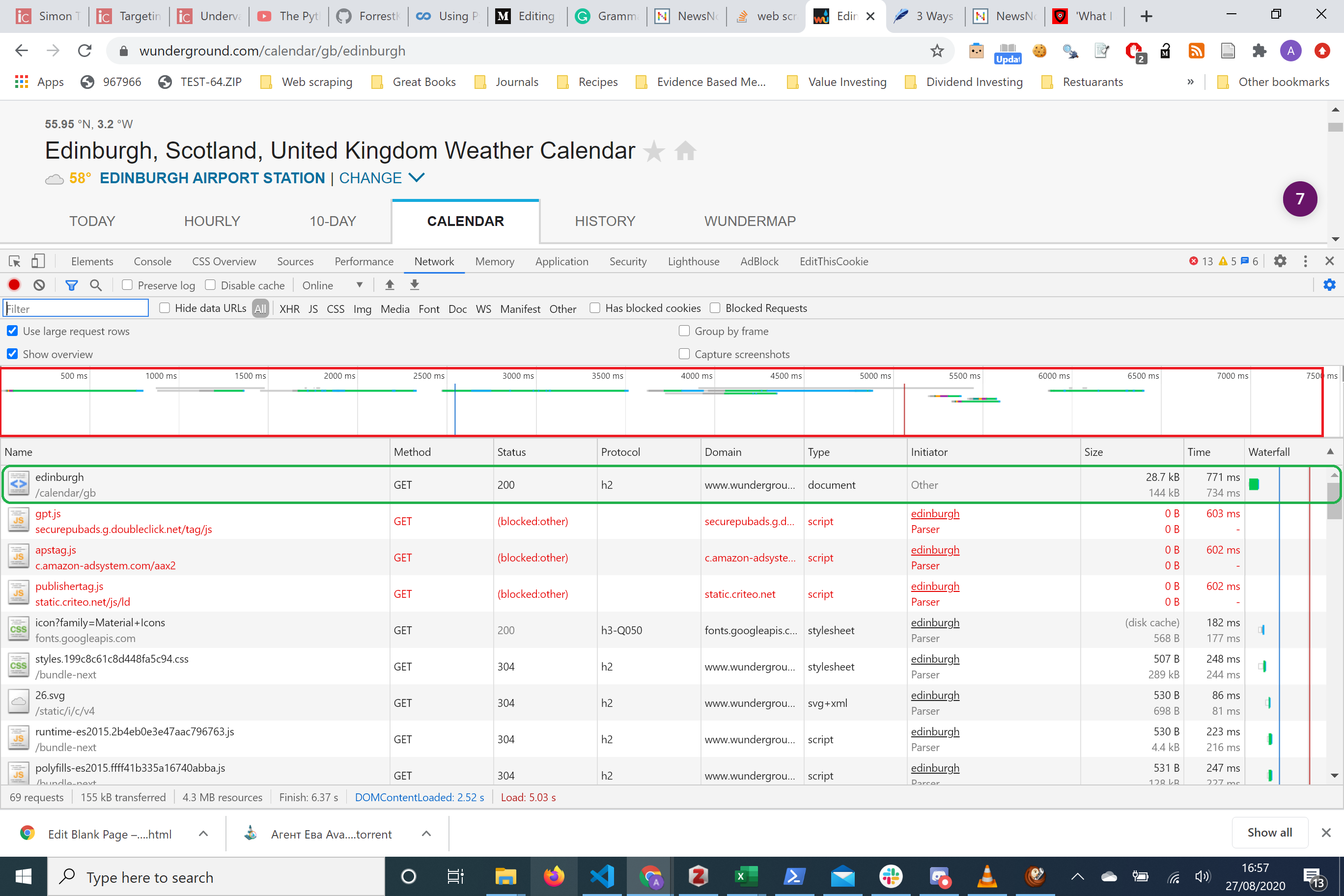
Redbox: This is the Overview All the lines are measures of server activity Green box: This is a single request make of the server. Here it shows us the name, the HTTP method used and the size of the response!
红框:这是概述所有行都是服务器活动的量度绿框:这是服务器的单个请求。 它在这里向我们显示名称,使用的HTTP方法和响应的大小!
There’s a tab called ‘XHR’ on the dev tools. This stands for XML HTTP request, this anything that interacts with a server will be filtered from all the requests made with the browser. The most likely place an API will be is here as all APIs interact with servers.
开发工具上有一个名为“ XHR”的标签。 这代表XML HTTP请求,与服务器交互的所有内容都将从浏览器发出的所有请求中过滤掉。 当所有API与服务器交互时,API最有可能出现在这里。
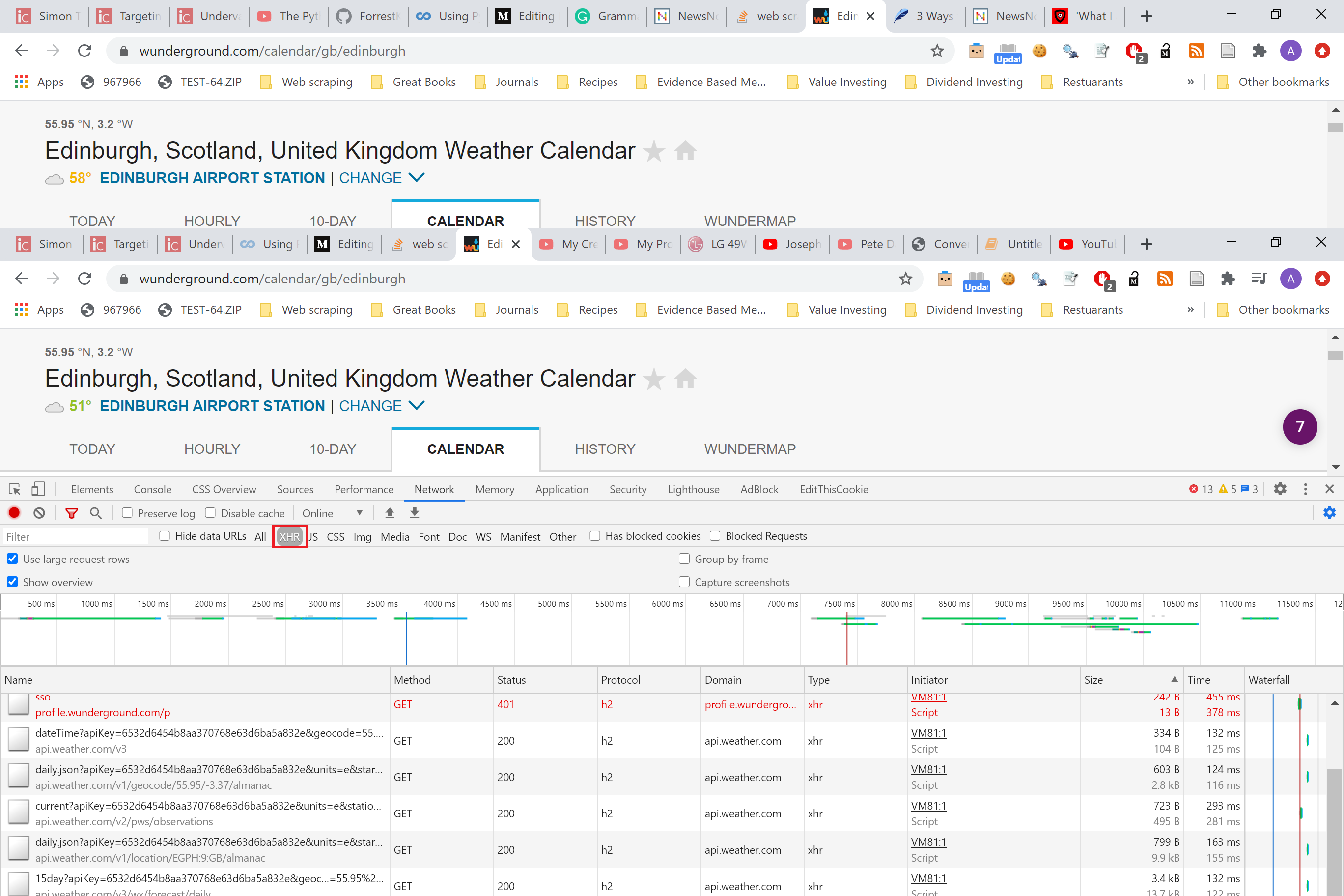
It is good practice to sort the requests by size. The data you’re after is often the responses that are the biggest size.
优良作法是按大小对请求进行排序。 您所追求的数据通常是最大的响应。
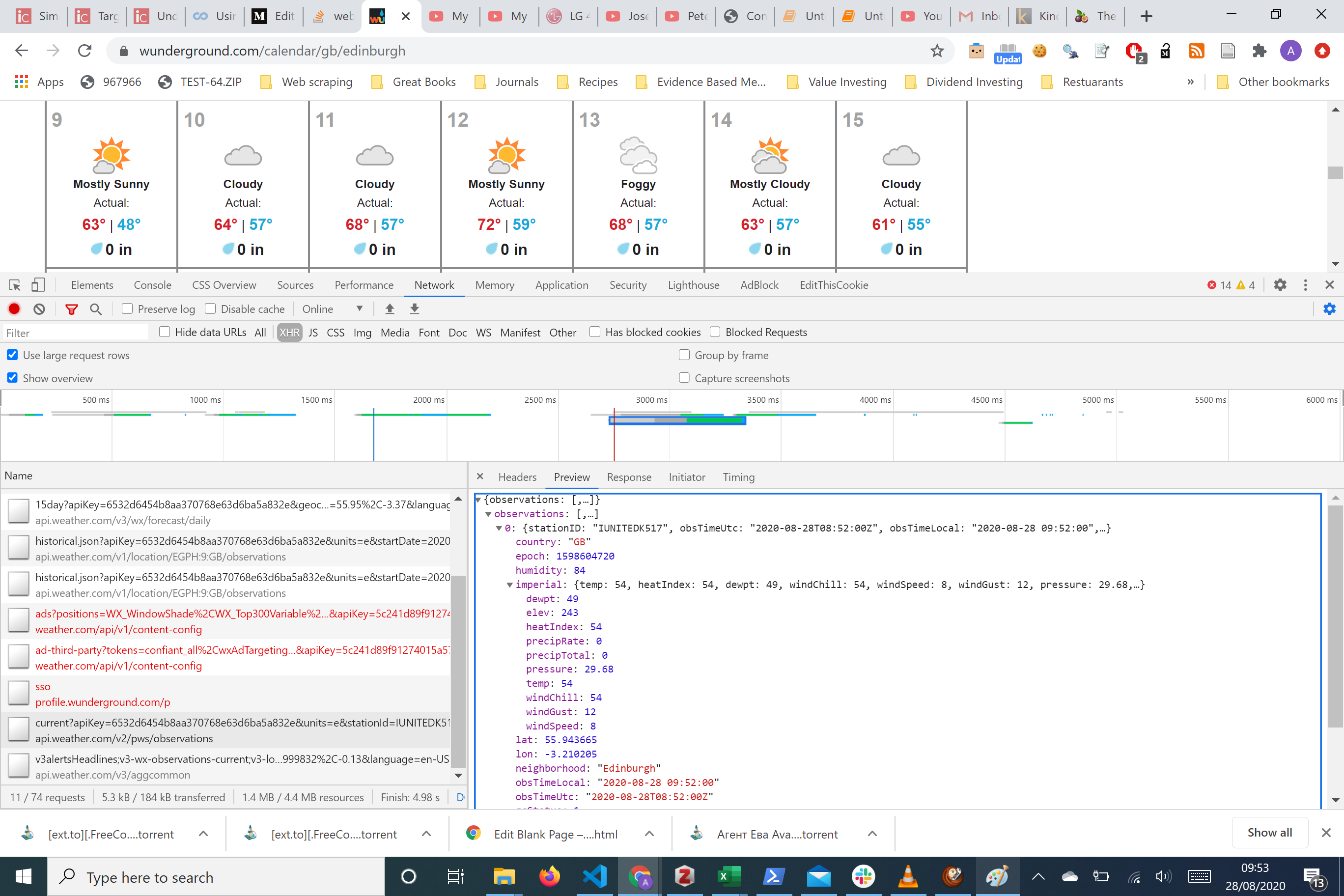
Here we’ve sorted the requests by the size of the response. Clicking one single request brings us a right-hand side panel with the headers information of the HTTP request and response as well as any data that needs to be passed to the server in the HTTP request.
在这里,我们根据响应的大小对请求进行了排序。 单击一个单个请求将为我们提供一个右侧面板,其中包含HTTP请求和响应的标题信息以及需要在HTTP请求中传递给服务器的所有数据。
There’s a really helpful preview tab where you can see a snapshot of the data. We can see instantly that there’s a chance the data we want is from there.
有一个非常有用的预览选项卡,您可以在其中查看数据快照。 我们可以立即看到,我们想要的数据有可能来自那里。
Let's take a look at the headers tab of this
让我们来看看这个的标题标签
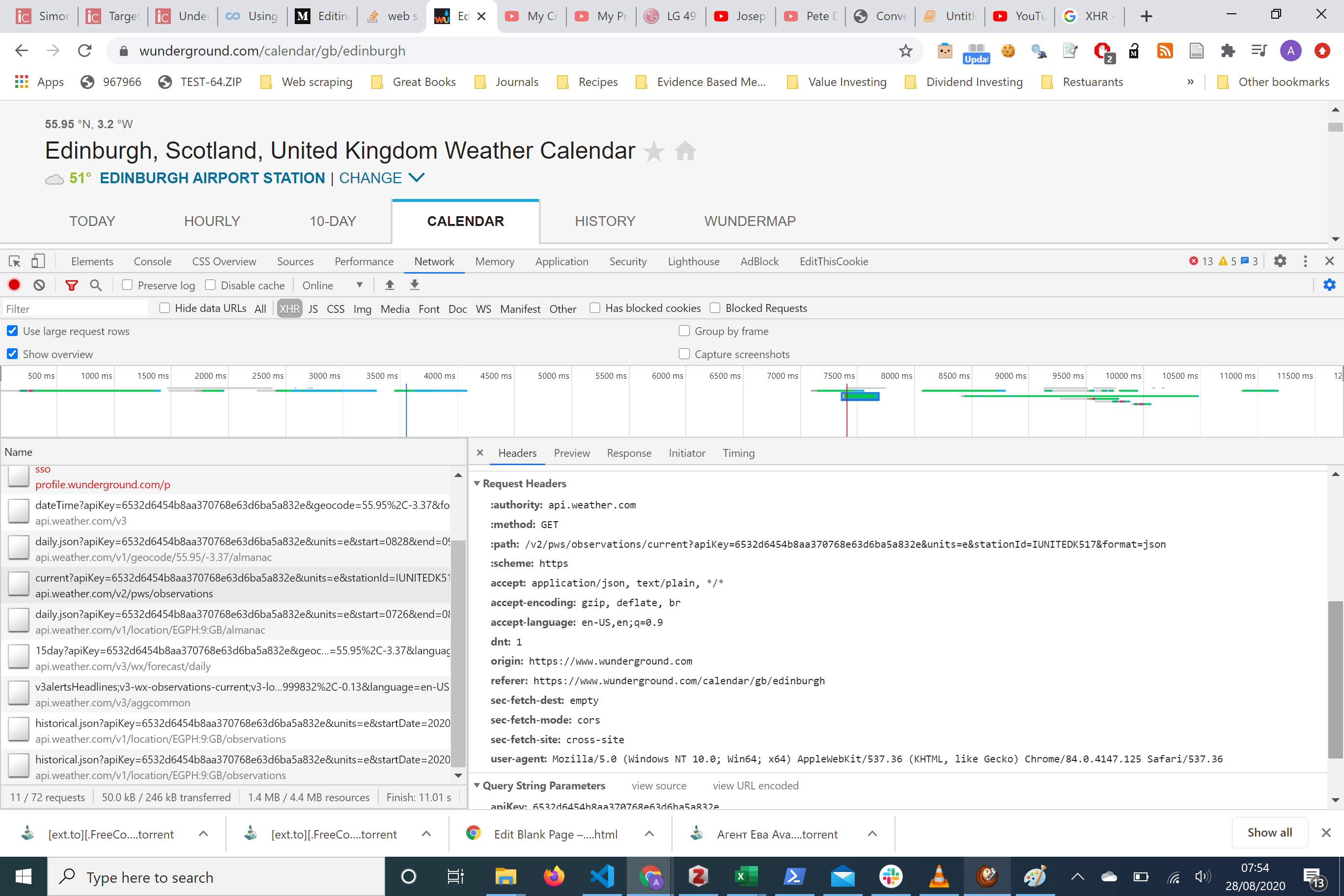
In the right-hand side panel we can see the request URL we can see that it’s an API api.weather.com/v2/pws/obeservations/.....
在右侧面板中,我们可以看到请求URL,我们可以看到它是一个API api.weather.com/v2/pws/obeservations/.....
There are a couple of parameters that are passed along with the URL including an apiKey, units, stationid,format Take note we will be using this later.
随URL传递了几个参数,包括apiKey, units, stationid,format请注意,我们稍后将使用它。
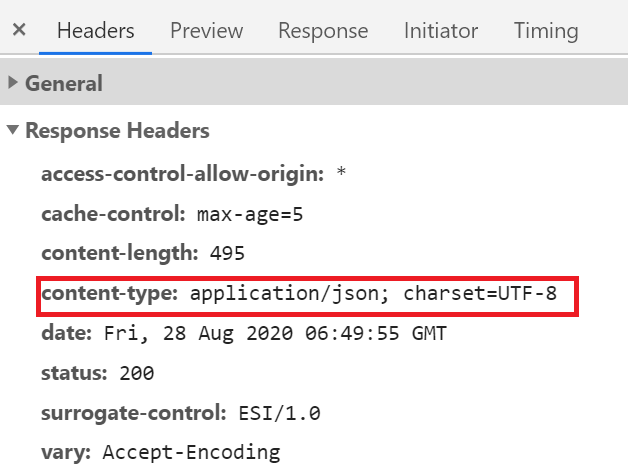
Also notice importantly from the response headers we can see content-type: application/json; charset=UTF-8 . This tells us that the response is in a JSON object! Highly structured data! That’s awesome.
同样重要的是,从响应标头中我们可以看到content-type: application/json; charset=UTF-8 content-type: application/json; charset=UTF-8 。 这告诉我们响应是在JSON对象中! 高度结构化的数据! 棒极了。
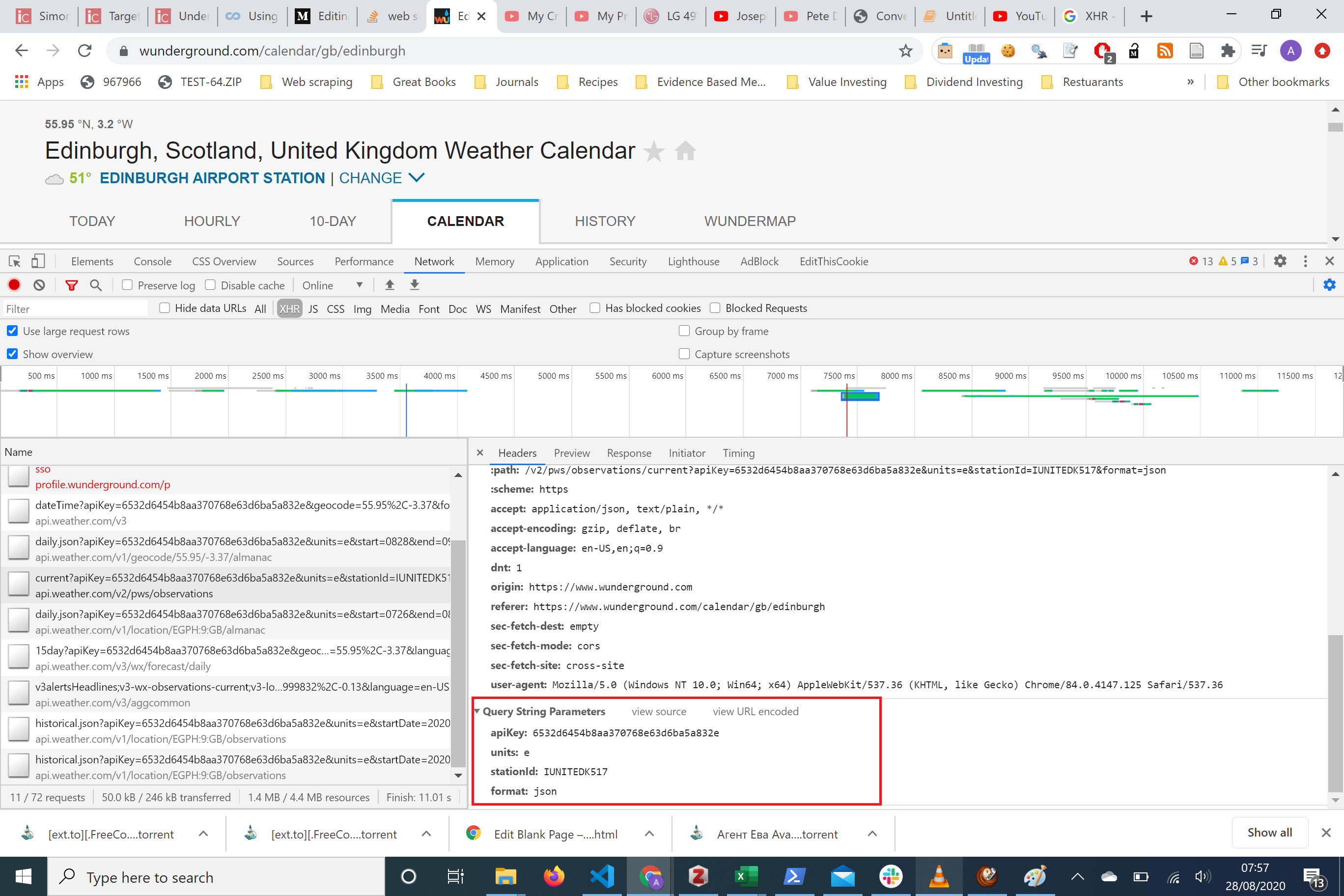
Here is where data will get passed with the request. Notice there’s an apiKey along with units, stationID and format. This is the data we saw in the Requests URL, but it’s clearly formatted here!
这是数据将随请求传递的地方。 请注意,这里有一个apiKey以及单位,stationID和格式。 这是我们在“请求网址”中看到的数据,但此处格式明确!
获取数据 (Obtaining the Data)
Now we could hard code the request using the parameters and gain access to the data potentially. But there’s a handy website that cuts out this, by converting a cURL command of the request and converts it into a python request. To do this see the picture below
现在,我们可以使用参数对请求进行硬编码,并有可能访问数据。 但是,有一个方便的网站通过转换请求的cURL命令并将其转换为python请求来实现这一目标。 为此,请参见下图
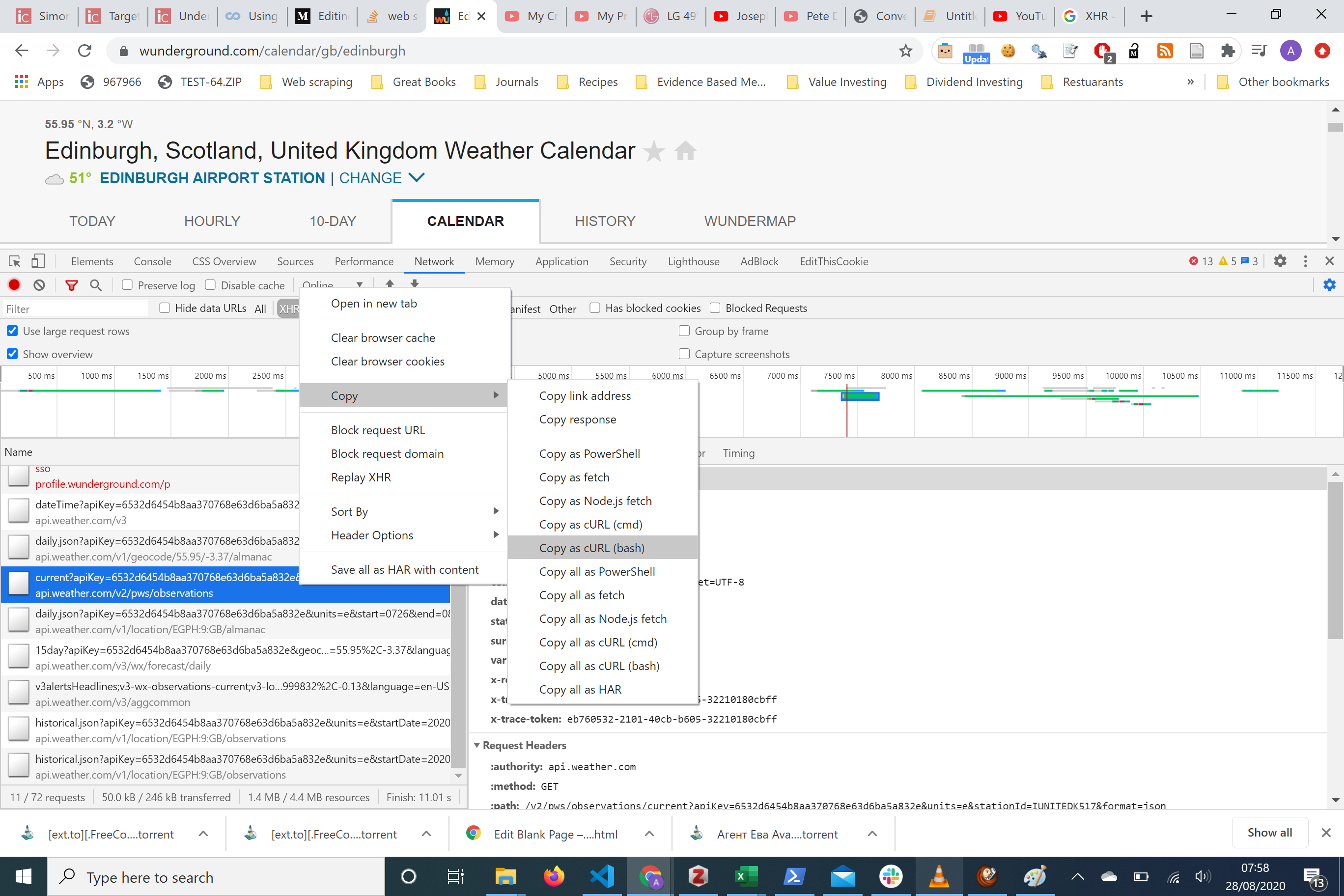
We copy the ‘Copy as cURL (bash) and we pasted this into a website curl.trillworks.com
我们复制“复制为cURL(bash)并将其粘贴到网站curl.trillworks.com
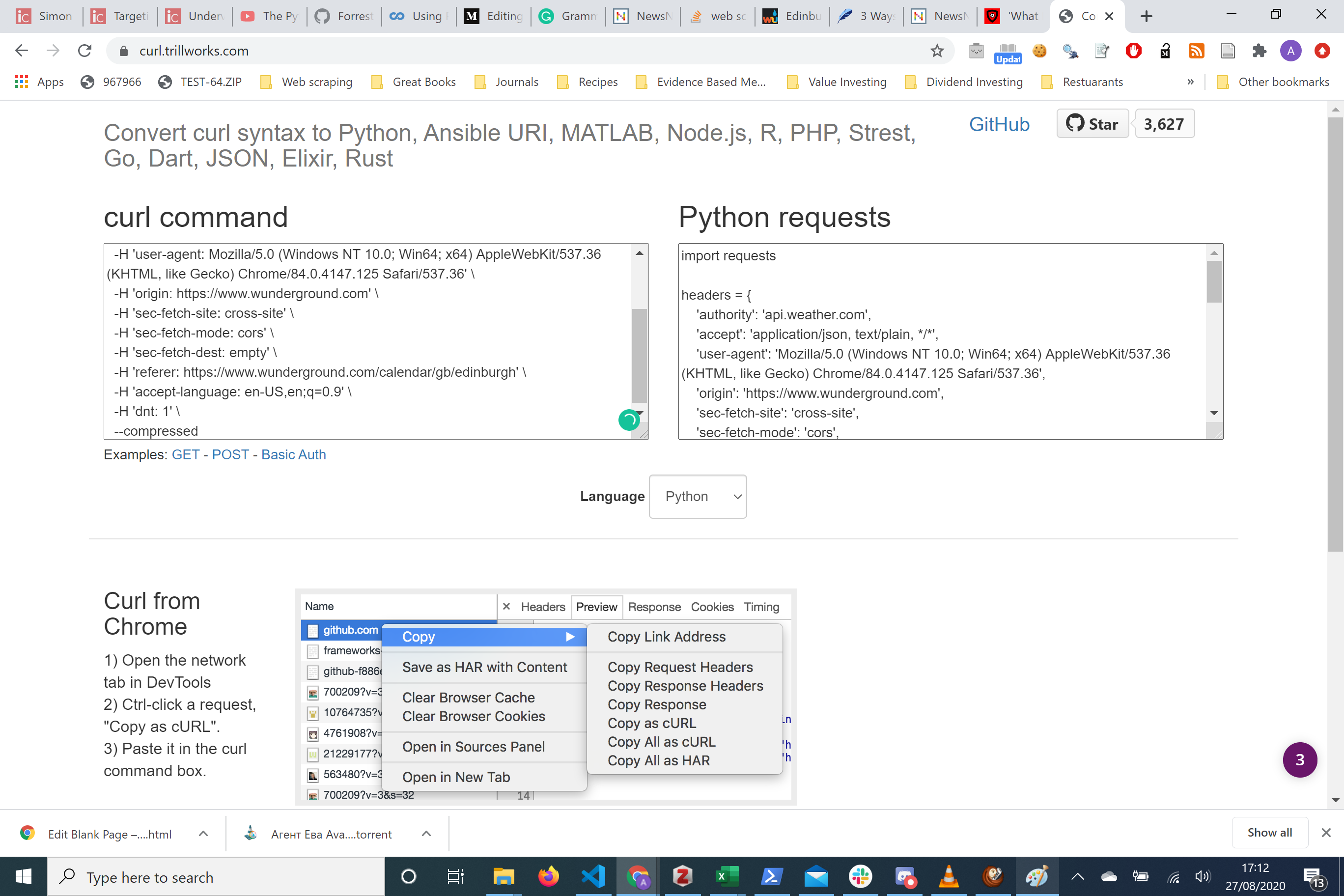
Now we have a nice formatted HTTP request ready to use we can copy into any editor we want. See below for the example of this.
现在,我们可以使用一个格式化好的HTTP请求,可以将其复制到所需的任何编辑器中。 请参阅以下示例。
代码示例 (Code Example)
import requestsheaders = {
    'authority': 'api.weather.com',
    'accept': 'application/json, text/plain, */*',
    'user-agent': 'Mozilla/5.0 (Windows NT 10.0; Win64; x64) AppleWebKit/537.36 (KHTML, like Gecko) Chrome/84.0.4147.125 Safari/537.36',
    'origin': 'https://www.wunderground.com',
    'sec-fetch-site': 'cross-site',
    'sec-fetch-mode': 'cors',
    'sec-fetch-dest': 'empty',
    'referer': 'https://www.wunderground.com/calendar/gb/edinburgh',
    'accept-language': 'en-US,en;q=0.9',
    'dnt': '1',
}params = (
    ('apiKey', '6532d6454b8aa370768e63d6ba5a832e'),
    ('units', 'e'),
    ('stationId', 'IUNITEDK517'),
    ('format', 'json'),
)response = requests.get('https://api.weather.com/v2/pws/observations/current', headers=headers, params=params)
Notice it includes not just the parameters we were talking about, but the requests headers. This is an important concept to bring up. We are trying to mimic the HTTP request to grab data from the website. Now sometimes the API endpoint requires just a simple HTTP Get request. But other times it requires much more, sometimes it requires headers, including a user-agent or cookies. Sometimes it requires parameters, such as the case here.
请注意,它不仅包括我们正在讨论的参数,还包括请求标头。 这是一个重要的概念。 我们正在尝试模仿HTTP请求以从网站获取数据。 现在,有时API端点仅需要一个简单的HTTP Get请求。 但是有时它需要更多,有时还需要标头,包括用户代理或cookie。 有时它需要参数,例如这里的情况。
It is useful to try out the HTTP request in python without headers and with to see if they require this information to get the data you want. After a play around, you will see that actually all that is required is the parameters.
尝试在不带标头的python中尝试HTTP请求,并查看它们是否需要此信息来获取所需数据,这很有用。 播放之后,您将看到实际上所需的只是参数。
import requests
params = (
    ('apiKey', '6532d6454b8aa370768e63d6ba5a832e'),
    ('units', 'e'),
    ('stationId', 'IUNITEDK517'),
    ('format', 'json'),
)response = requests.get('https://api.weather.com/v2/pws/observations/current', params=params)
response.json()
Notes
笔记
-
Using the
requests.get()the method we make an HTTP get request使用
requests.get()方法,我们发出一个HTTP get请求 -
Within the
get()the method allows for passing parameters along with the request body. In this case, we want to specify the apiKey and the rest of the query parameters specifically.在
get()该方法允许将参数与请求主体一起传递。 在这种情况下,我们要专门指定apiKey和其余的查询参数。 - This allows for authentication with the server and to give us the correct output 这样可以通过服务器进行身份验证,并为我们提供正确的输出
-
response.json()converts the JSON object into a python dictionaryresponse.json()将JSON对象转换为python字典
输出量 (Output)
{'observations': [{'stationID': 'IUNITEDK517',
   'obsTimeUtc': '2020-08-28T08:54:16Z',
   'obsTimeLocal': '2020-08-28 09:54:16',
   'neighborhood': 'Edinburgh',
   'softwareType': 'N23DQ V2.2.2',
   'country': 'GB',
   'solarRadiation': 123.3,
   'lon': -3.210205,
   'realtimeFrequency': None,
   'epoch': 1598604856,
   'lat': 55.943665,
   'uv': 1.0,
   'winddir': 79,
   'humidity': 84,
   'qcStatus': 1,
   'imperial': {'temp': 54,
    'heatIndex': 54,
    'dewpt': 49,
    'windChill': 54,
    'windSpeed': 7,
    'windGust': 12,
    'pressure': 29.68,
    'precipRate': 0.0,
    'precipTotal': 0.0,
    'elev': 243}}]}
Now looking at the python dictionary we just created, we can see that actually the data we require is behind a key called observations . The value of observation is a list with one item and so to get the values from the dictionary we need to select that item observations[0]
现在看一下我们刚刚创建的python字典,我们可以看到实际上所需的数据在名为observations的键后面。 观测值是一个包含一个项目的列表,因此要从字典中获取值,我们需要选择该项目observations[0]
With this list, item is a key called imperialwhich has also nested inside it a key called temp . Lots of nesting but this is the nature of JSON objects!
在此列表中,item是一个称为imperial的钥匙,该钥匙内还嵌套了一个名为temp的钥匙。 很多嵌套,但这是JSON对象的本质!
To access the data we want, we iterate down to the key we need.
要访问所需的数据,我们迭代到所需的密钥。
response.json()['observations'][0]['imperial']['temp']输出量 (Output)
54Navigating this dictionary we can now publish the final piece of code
浏览此词典,我们现在可以发布最后的代码
import requests
params = (
 ('apiKey', '6532d6454b8aa370768e63d6ba5a832e'),
 ('geocode', '55.95,-3.37'),
 ('language', 'en-US'),
 ('units', 'e'),
 ('format', 'json'),
)
response = requests.get('https://api.weather.com/v3/wx/forecast/daily/15day', params=params)
response = requests.get('https://api.weather.com/v3/wx/forecast/daily/15day', params=params)
temp = response.json()['observations'][0]['imperial']['temp']
print('Temperature: ', temp)
输出量 (Output)
Temperature: 52摘要 (Summary)
In this tutorial we have learned about the workflow of web scraping effectively, the questions we should ask about every web scraping project. We have also gone through how to get data that is dynamic through the means of an API endpoint. These APIs are often not made explicit and require leveraging chrome Dev Tools to understand how to mimic the requests Javascript is invoking. The Network in Chrome Dev Tools is well suited to giving us all the information we need to make the correct HTTP request.
在本教程中,我们有效地了解了Web抓取的工作流程,以及我们应该对每个Web抓取项目提出的问题。 我们还介绍了如何通过API端点获取动态数据。 这些API通常未明确显示,需要使用chrome Dev Tools来了解如何模仿Javascript调用的请求。 Chrome开发工具中的网络非常适合向我们提供提出正确HTTP请求所需的所有信息。
This is called re-engineering the HTTP requests and is the most efficient way to scrape dynamic content. There are of course other ways but they often involve browser activity and as explained above this often is not suited for large data set scrapes due to the inefficiency and potential to be quite brittle to changes in website demand.
这称为重新设计HTTP请求,这是抓取动态内容的最有效方法。 当然还有其他方法,但是它们通常涉及浏览器活动,并且如上所述,由于效率低下并且可能难以适应网站需求的变化,因此这通常不适合大数据集抓取。
关于作者 (About the Author)
I’m a practising medical physician and educationalist as well as being a web developer.
我是一名执业医学医师和教育家,也是一名Web开发人员。
Please see here for further details about what I’m up to project-wise on my blog and other posts. For more tech/coding related content please sign up to my newsletter here
请在此处查看有关我在博客和其他帖子上的最新计划的详细信息。 有关更多与技术/编码相关的内容,请在此处注册我的时事通讯
I’d be grateful for any comments or if you want to collaborate or need help with python please do get in touch. If you want to get in contact with me, please do so here asmith53@ed.ac.uk or on twitter.
如果有任何意见,我将不胜感激;如果您想与python合作或需要帮助,请与我们取得联系。 如果您想与我联系,请在这里asmith53@ed.ac.uk或在twitter上进行联系 。
相关文章 (Related Articles)
翻译自: https://towardsdatascience.com/leverage-chrome-dev-tools-for-dynamic-web-scraping-2d3f7703ea4a
chrome 抓取图片




 已为社区贡献6条内容

所有评论(0)