python中elasticsearch_dsl模块用法详解
elasticsearch-dsl是基于elasticsearch-py封装实现的,提供了更简便的操作elasticsearch的方法。
安装:
install elasticsearch_ds

连接elasticsearch
from elasticsearch_dsl import connections, Search

es = connections.create_connection(hosts=["127.0.0.1:9200"], timeout=20)
print(es)
还可以通过alias给连接设置别名,后续可以通过别名来引用该连接,默认别名为default。
from elasticsearch_dsl import connections, Search

# 方式一:连接es
es = connections.create_connection(hosts=["127.0.0.1:9200"], timeout=20)
print(es)

# 方式二:连接es
connections.create_connection(alias="my_new_connection", hosts=["127.0.0.1:9200"], timeout=20)
elasticsearch_dsl.Search
search对象代表整个搜索请求,包括:queries、filters、aggregations、sort、pagination、additional parameters、associated client。
API被设置为可链接的即和用.连续操作。search对象是不可变的,除了聚合,对对象的所有更改都将导致创建包含该更改的浅表副本。
当初始化Search对象时,传递elasticsearch客户端作为using的参数
示例代码1:
from elasticsearch_dsl import connections, Search

# 方式一:连接es
es = connections.create_connection(hosts=["127.0.0.1:9200"], timeout=20)
# print(es)

# 方式二:连接es
connections.create_connection(alias="my_new_connection", hosts=["127.0.0.1:9200"], timeout=20)

# 不使用别名使用
res = Search(using=es).index("test_index").query()
# print(res)
for data in res:
    print(data.to_dict())

print("*" * 100)

# 使用别名后这样使用
res2 = Search(using="my_new_connection").index('test_index').query()
# print(e)
for data in res2:
    print(data.to_dict())
运行结果

示例代码2:
from elasticsearch_dsl import connections, Search

# 方式一:连接es
es = connections.create_connection(hosts=["127.0.0.1:9200"], timeout=20)
# print(es)

# 不使用别名使用
res = Search(using=es).index("test_index").query()
# print(res)
for data in res:
    print(data.to_dict())

print("*" * 100)

# 书写方式一:按条件查询数据
res2 = Search(using=es).index("test_index").query("match", name="张三")  # 查询时注意分词器的使用
for data in res2:
    print(data.to_dict())

print("*" * 100)

# 书写方式二:按条件查询数据
res3 = Search(using=es).index("test_index").query({"match": {"name": "张三"}})
for data in res3:
    print(data.to_dict())
运行结果:

在上述执行execute方法将请求发送给elasticsearch:
response = res.execute()
不需要执行execute()方法,迭代后可以通过to_dict()方法将Search对象序列化为一个dict对象,这样可以方便调试。
query方法
查询,参数可以是Q对象,也可以是query模块中的一些类,还可以是自已写上如何查询。
示例代码1:
from elasticsearch_dsl import connections, Search, Q
import time

# 方式一:连接es
es = connections.create_connection(hosts=["127.0.0.1:9200"], timeout=20)
# print(es)

res = Search(using=es, index="test_index").query().query()  # 当调用.query()方法多次时,内部会使用&操作符
print(res.to_dict())
运行结果:

filter方法
在过滤上下文中添加查询,可以使用filter()函数来使之变的简单。
示例代码1:
from elasticsearch_dsl import connections, Search, Q

# 方式一:连接es
es = connections.create_connection(hosts=["127.0.0.1:9200"], timeout=20)
# print(es)

# res = Search(using=es).index("test_index").filter({"match": {"name": "北"}})
# res = Search(using=es).index("test_index").filter("terms", tags=["name", "id"])
res = Search(using=es).index("test_index").query("bool", filter=[
    Q("terms", tags=["name", "id"])])  # 上面代码在背后会产生一个bool查询,并将指定的条件查询放入到filter分支
print(res)
for data in res:
    print(data.to_dict())
示例代码2:
from elasticsearch_dsl import connections, Search, Q
import time

# 方式一:连接es
es = connections.create_connection(hosts=["127.0.0.1:9200"], timeout=20)
# print(es)

# 范围查询
# res = Search(using=es, index="test_index").filter("range", timestamp={"gte": 0, "lt": time.time()}).query({"match": {"name": "北"}})
res = Search(using=es, index="test_index").filter("range", id={"gte": 1, "lte": 4}).query({"match": {"name": "北"}})
print(res)
for data in res:
    print(data.to_dict())

# 普通过滤
res2 = Search(using=es, index="test_index").filter("terms", id=["2", "4"]).execute()
print(res2)
for data in res2:
    print(data.to_dict())
运行结果:

index方法
指定索引
usring方法
指定哪个elasticsearch
elasticsearch_dsl.query
该库为所有的Elasticsearch查询类型都提供了类。以关键字参数传递所有的参数,最终会把参数序列化后传递给Elasticsearch,这意味着在原始查询和它对应的dsl之间有这一个清理的一对一的映射。
示例代码:
from elasticsearch_dsl import connections, Search, Q
from elasticsearch_dsl.query import MultiMatch, Match

# 方式一:连接es
es = connections.create_connection(hosts=["127.0.0.1:9200"], timeout=20)
# print(es)

# 相对与{"multi_match": {"query": "ha", "fields": ["firstname", "lastname"]}}
m1 = MultiMatch(query="Ha", fields=["firstname", "lastname"])
res = Search(using=es, index="test_index").query(m1)
print(res)
for data in res:
    print(data.to_dict())

# 相当于{"match": {"firstname": {"query": "Hughes"}}}
m2 = Match(firstname={"query": "Hughes"})
res = Search(using=es, index="test_index").query(m2)
print(res)
for data in res:
    print(data.to_dict())
elasticsearch_dsl.Q
使用快捷方式Q通过命名参数或者原始dict类型数据来构建一个查询实例。Q的格式一般是Q("查询类型", 字段="xxx")或Q("查询类型", query="xxx", fields=["字段1", "字段2"])
示例代码:
from elasticsearch_dsl import connections, Search, Q
from elasticsearch_dsl.query import MultiMatch, Match

# 方式一:连接es
es = connections.create_connection(hosts=["127.0.0.1:9200"], timeout=20)
# print(es)

# q = Q("match", city="Summerfield")
q = Q("multi_match", query="Summerfield", fields=["city", "firstname"])
res = Search(using=es, index="test_index").query(q)
print(res)
for data in res:
    print(data.to_dict())
查询对象可以通过逻辑运算符组合起来:
Q("match", title="python") | Q("match", title="django")
# {"bool": {"should": [...]}}

Q("match", title="python") & Q("match", title="django")
# {"bool": {"must": [...]}}

~Q("match", title="python")
# {"bool": {"must_not": [...]}}
示例代码:
from elasticsearch_dsl import connections, Search, Q

# 方式一:连接es
es = connections.create_connection(hosts=["127.0.0.1:9200"], timeout=20)
# print(es)

# q = Q("multi_match", query="123.244.101.255", fields=["clientip", "timestamp"])
q = Q('match', name='张') | Q("match", name="北")
res = Search(using=es, index="test_index").query(q)
# print(res)
for data in res:
    print(data.to_dict(), data.name)

print("*" * 100)

q = Q('match', name='张') & Q("match", name="北")
res = Search(using=es, index="test_index").query(q)
# print(res)
for data in res:
    print(data.to_dict(), data.name)

print("*" * 100)

q = ~Q('match', name='张')
res = Search(using=es, index="test_index").query(q)
# print(res)
for data in res:
    print(data.to_dict(), data.name)
运行结果:
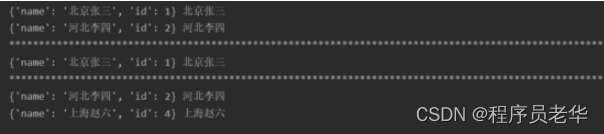
嵌套类型
有时候需要引用一个在其他字段中的字段,例如多字段(title.keyword)或者在一个json文档中的address.city。为了方便,Q允许你使用双下划线‘__’代替关键词参数中的‘.’
示例代码:
from elasticsearch_dsl import connections, Search, Q

# 方式一:连接es
es = connections.create_connection(hosts=["127.0.0.1:9200"], timeout=20)
# print(es)

# res = Search(using=es, index="test_index").query("match", address__city="北京")
res = Search(using=es, index="test_index").filter("term", address__city="北京")
# print(res)
for data in res:
    print(data.to_dict(), data.name)
查询
示例代码:
from elasticsearch_dsl import Search
from elasticsearch import Elasticsearch

# 连接es
es = Elasticsearch(hosts=["127.0.0.1:9200"], sniffer_timeout=60, timeout=30)

# 获取es中所有的索引
# 返回类型为字典,只返回索引名
index_name = es.cat.indices(format="json", h="index")
print(index_name)

# 查询多个索引
es_multi_index = Search(using=es, index=["personal_info_5000000", "grade", "test_index"])
print(es_multi_index.execute())

# 查询一个索引
es_one_index = Search(using=es, index="test_index")
print(es_one_index.execute())

print("*" * 100)

# 条件查询1
es_search1 = es_one_index.filter("range", id={"gte": 1, "lt": 5})
print(es_search1.execute())

# 条件查询2
es_search2 = es_one_index.filter("term", name="张")
print(es_search2.execute())

print("*" * 100)

# 结果转换为字典
es_search3 = es_search2.to_dict()
print(es_search3)
es_search4 = es_search2.execute().to_dict()
print(es_search4)
运行结果:
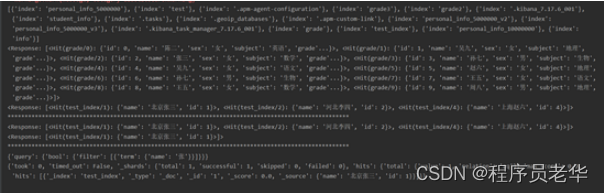
案例分析
创建索引:
from elasticsearch_dsl import Search
from elasticsearch import Elasticsearch

# 连接es
es = Elasticsearch(hosts=["127.0.0.1:9200"], sniffer_timeout=60, timeout=30)

body = {
    "mappings": {
        "properties": {
            "account_number": {
                "type": "integer"
            },
            "balance": {
                "type": "integer"
            },
            "firstname": {
                "type": "text"
            },
            "lastname": {
                "type": "text"
            },
            "age": {
                "type": "integer"
            },
            "gender": {
                "type": "keyword"
            },
            "address": {
                "type": "text"
            },
            "employer": {
                "type": "text"
            },
            "email": {
                "type": "text"
            },
            "province": {
                "type": "text"
            },
            "state": {
                "type": "text"
            }
        }
    }
}

# 创建 index
es.indices.create(index="account_info", body=body)
查看索引:
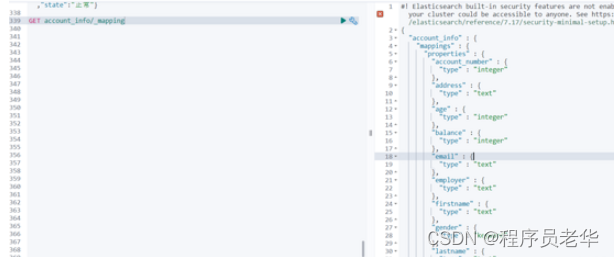
使用kibana批量生成数据:
POST account_info/_bulk
{"index": {"_index":"account_info"}}
{"account_number":1,"balance":20,"firstname":"三","lastname":"张","age":25,"gender":"男","address":"北京朝阳","employer":"AAA","email":"123@qq.com","province":"北京","state":"正常"}
{"index": {"_index":"account_info"}}
{"account_number":2,"balance":70,"firstname":"二","lastname":"张","age":26,"gender":"男","address":"北京海淀","employer":"AAA","email":"123@qq.com","province":"北京","state":"正常"}
{"index": {"_index":"account_info"}}
{"account_number":3,"balance":80,"firstname":"四","lastname":"张","age":27,"gender":"女","address":"辽宁朝阳","employer":"BBB","email":"123@qq.com","province":"辽宁","state":"正常"}
{"index": {"_index":"account_info"}}
{"account_number":4,"balance":60,"firstname":"五","lastname":"张","age":28,"gender":"男","address":"山东青岛","employer":"AAA","email":"123@qq.com","province":"山东","state":"正常"}
{"index": {"_index":"account_info"}}
{"account_number":5,"balance":40,"firstname":"六","lastname":"张","age":29,"gender":"女","address":"山东济南","employer":"AAA","email":"123@qq.com","province":"山东","state":"正常"}
{"index": {"_index":"account_info"}}
{"account_number":6,"balance":50,"firstname":"七","lastname":"张","age":30,"gender":"男","address":"河北唐山","employer":"BBB","email":"123@qq.com","province":"河北","state":"正常"}
{"index": {"_index":"account_info"}}
{"account_number":7,"balance":30,"firstname":"一","lastname":"张","age":31,"gender":"女","address":"河北石家庄","employer":"AAA","email":"123@qq.com","province":"河北","state":"正常"}
查看生成的数据:
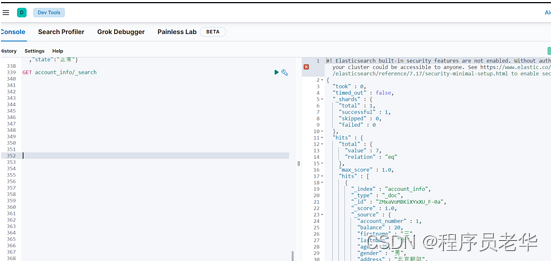

根据条件查询:
1.查询balance在40~70的信息
from elasticsearch_dsl import connections, Search, Q

# 连接es
es = connections.create_connection(hosts=["127.0.0.1:9200"], timeout=20)
# print(es)

s = Search(using=es, index="account_info")

# 查询balance在40~70的信息
q = Q("range", balance={"gte": 40, "lte": 70})

res = s.query(q)
for data in res:
    print(data.to_dict())

print("共查到%d条数据" % res.count())
2.查询balance在40~70的男性信息
from elasticsearch_dsl import connections, Search, Q

# 连接es
es = connections.create_connection(hosts=["127.0.0.1:9200"], timeout=20)
# print(es)

s = Search(using=es, index="account_info")

# 查询balance在40~70的信息
q1 = Q("range", balance={"gte": 40, "lte": 70})
# 男性
q2 = Q("term", gender="男")

# and
q = q1 & q2

res = s.query(q)
for data in res:
    print(data.to_dict())

print("共查到%d条数据" % res.count())

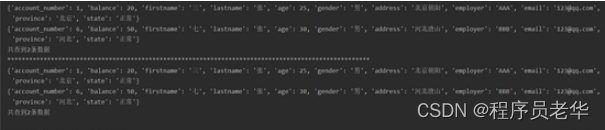
3.省份为北京、25或30岁的男性信息
from elasticsearch_dsl import connections, Search, Q

# 连接es
es = connections.create_connection(hosts=["127.0.0.1:9200"], timeout=20)
# print(es)

s = Search(using=es, index="account_info")

# 方式一:
# 省份为北京
q1 = Q("match", province="北京")
# 25或30岁的男性信息
q2 = Q("bool", must=[Q("terms", age=[25, 30]), Q("term", gender="男")])

# and
q = q1 & q2

res = s.query(q)
for data in res:
    print(data.to_dict())

print("共查到%d条数据" % res.count())

print("*" * 100)

# 方式二
# 省份为北京
q1 = Q("match", province="北京")
# 25或30岁的信息
# q2 = Q("bool", must=[Q("terms", age=[25, 30]), Q("term", gender="男")])
q2 = Q("term", age=25) | Q("term", age=30)
# 男性
q3 = Q("term", gender="男")

res = s.query(q1).query(q2).query(q3)  # 多次query就是& ==> and 操作
for data in res:
    print(data.to_dict())

print("共查到%d条数据" % res.count())
4.地址中有“山”字,年龄不在25~28岁的女性信息
from elasticsearch_dsl import connections, Search, Q

# 连接es
es = connections.create_connection(hosts=["127.0.0.1:9200"], timeout=20)
# print(es)

s = Search(using=es, index="account_info")

# 地址中有“山”字且为女性
q1 = Q("match", address="山") & Q("match", gender="女")
# 年龄在25~28岁
q2 = ~Q("range", age={"gte": 25, "lte": 28})

# 使用filter过滤
# query和filter的前后关系都行
res = s.filter(q2).query(q1)
for data in res:
    print(data.to_dict())

print("共查到%d条数据" % res.count())
谢谢支持~

魔乐社区(Modelers.cn) 是一个中立、公益的人工智能社区,提供人工智能工具、模型、数据的托管、展示与应用协同服务,为人工智能开发及爱好者搭建开放的学习交流平台。社区通过理事会方式运作,由全产业链共同建设、共同运营、共同享有,推动国产AI生态繁荣发展。
更多推荐


 2
2 0
0- 0


 已为社区贡献2条内容

所有评论(0)