【springboot+vue3的前后端分离项目实现支付宝的沙箱支付】
·
【springboot+vue3的前后端分离项目实现支付宝的沙箱支付】
以下是基于SpringBoot + Vue前后端分离项目实现支付宝沙箱支付的完整解决方案,包含关键代码和调试技巧
一、项目架构设计
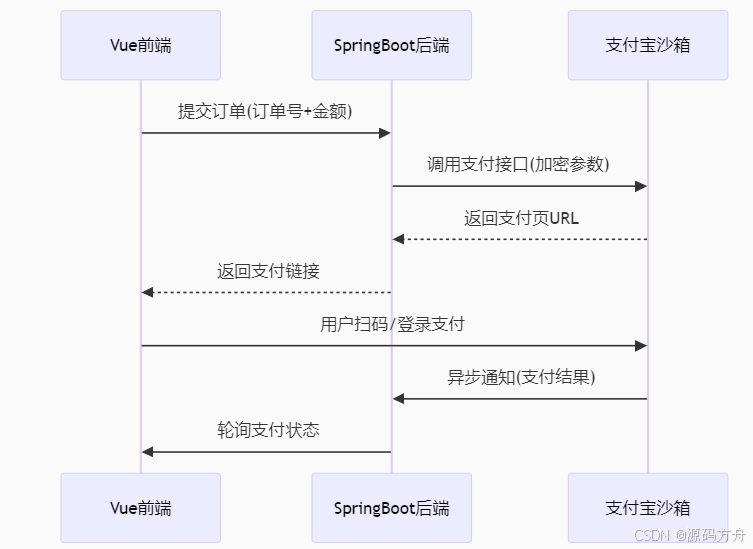
二、后端实现(SpringBoot)
1. 添加依赖
<!-- pom.xml -->
<dependency>
    <groupId>com.alipay.sdk</groupId>
    <artifactId>alipay-easysdk</artifactId>
    <version>2.3.0</version>
</dependency>
2. 配置参数类
@Data
@Configuration
@ConfigurationProperties(prefix = "alipay")
public class AlipayConfig {
    private String appId;          // 沙箱APPID
    private String appPrivateKey;  // 应用私钥
    private String alipayPublicKey;// 支付宝公钥
    private String notifyUrl;      // 异步通知地址
    private String returnUrl;      // 同步跳转地址
    private String gatewayUrl;     // 沙箱环境网关
}
3. 支付服务核心代码
@Service
public class AlipayService {

    @Autowired
    private AlipayConfig config;

    public String createOrder(String orderNo, BigDecimal amount, String subject) {
        try {
            Config options = getOptions();
            Factory factory = new Factory(options);

            AlipayTradePagePayResponse response = factory
                .Payment()
                .Page()
                .pay(subject, orderNo, amount.toString(), config.getReturnUrl(), config.getNotifyUrl());

            return response.getBody();
        } catch (Exception e) {
            throw new RuntimeException("支付宝下单失败", e);
        }
    }

    private Config getOptions() {
        Config options = new Config();
        options.protocol = "https";
        options.gatewayHost = "openapi.alipaydev.com"; // 沙箱环境
        options.signType = "RSA2";
        options.appId = config.getAppId();
        options.merchantPrivateKey = config.getAppPrivateKey();
        options.alipayPublicKey = config.getAlipayPublicKey();
        return options;
    }
}
4.支付控制器
@RestController
@RequestMapping("/api/pay")
public class PaymentController {

    @Autowired
    private AlipayService alipayService;

    @PostMapping("/alipay")
    public String createPayment(@RequestBody PaymentRequest request) {
        // 生成商户订单号(需保证唯一性)
        String orderNo = "T" + System.currentTimeMillis() + UUID.randomUUID().toString().substring(0, 8);
        return alipayService.createOrder(orderNo, request.getAmount(), request.getSubject());
    }

    @PostMapping("/notify") // 支付宝异步通知
    public String paymentNotify(HttpServletRequest request) {
        Map<String, String> params = convertParams(request);
        try {
            // 验签和业务处理
            boolean signVerified = Factory.Payment.Common().verifyNotify(params);
            if(signVerified) {
                // 处理订单逻辑
                String tradeStatus = params.get("trade_status");
                if("TRADE_SUCCESS".equals(tradeStatus)) {
                    orderService.handlePaymentSuccess(params.get("out_trade_no"));
                    return "success";
                }
            }
        } catch (Exception e) {
            log.error("支付宝回调处理异常", e);
        }
        return "failure";
    }
}
三、前端实现(Vue3)
1. 支付页面组件
<template>
  <div>
    <button @click="handlePay">立即支付</button>
    <div v-html="paymentForm" v-if="paymentForm"></div>
  </div>
</template>

<script setup>
import { ref } from 'vue';
import axios from 'axios';

const paymentForm = ref('');

const handlePay = async () => {
  if(this.goodsData.goodNumber< 1){
        this.$message.error("商品库存不足")
      }else {
        this.$request.get('/aliPay/pay?subject='+this.goodsData.name+'&totalAmount='+this.goodsData.price).then(res =>{
          const divForm = document.getElementsByTagName('div')
          if(divForm.length){
            document.body.removeChild(divForm[0])
          }
          const div = document.createElement("div");
          div.innerHTML = res.data
          document.body.appendChild(div)
          document.forms[0].submit()
        })
      }
};
</script>
2. 支付结果轮询
// 在支付后页面增加轮询
const checkPayment = (orderNo) => {
  const timer = setInterval(async () => {
    const res = await axios.get(`/api/orders/${orderNo}/status`);
    if(res.data.paid) {
      clearInterval(timer);
      alert('支付成功');
    }
  }, 3000);
}
四、沙箱环境配置
1. 测试账号准备
登录支付宝开放平台沙箱
获取:
沙箱APPID(如:20210031234)
获取应用私钥和支付宝公钥
卖家账号(沙箱版支付宝账号)
下载支付宝沙箱钱包APP,模拟扫码支付使用
2. 配置文件
#支付宝
alipay:
  # 沙箱中的应用id
  appId: 2021000148685142
  # 应用私钥
  appPrivateKey: 自己的私钥
  # 支付宝公钥
  alipayPublicKey: 自己的公钥
  # TODO 调用支付宝支付接口后产生的回调,需要内网穿透
  notifyUrl: http://localhost:9090/aliPay/notify
  # 支付成功后的页面跳转,设置成你项目中的成功支付界面(可不填)
  returnUrl: http://localhost:8080/
  # 支付宝网关地址
  GATEWAY_URL: https://openapi-sandbox.dl.alipaydev.com/gateway.do
  # 格式
  FORMAT: JSON
  # 编码字符格式
  CHARSET: utf-8
  # 签名方式
  SIGN_TYPE: RSA2
五.支付中断处理
// 增加交易查询接口
@GetMapping("/orders/{orderNo}/status")
public PaymentStatus checkPayment(@PathVariable String orderNo) {
    AlipayTradeQueryResponse response = factory
        .Payment()
        .Common()
        .query(orderNo);
    return new PaymentStatus(response.getTradeStatus());
}
通过以上实现,可完成从沙箱测试到生产上线的全流程。测试时建议使用沙箱提供的各种异常场景验证系统健壮性。
标签:支付宝、沙箱支付

魔乐社区(Modelers.cn) 是一个中立、公益的人工智能社区,提供人工智能工具、模型、数据的托管、展示与应用协同服务,为人工智能开发及爱好者搭建开放的学习交流平台。社区通过理事会方式运作,由全产业链共同建设、共同运营、共同享有,推动国产AI生态繁荣发展。
更多推荐


 4
4 0
0- 0


 已为社区贡献2条内容

所有评论(0)