vector容器基本使用
【代码】vector容器基本使用。
·
一、vector的使用
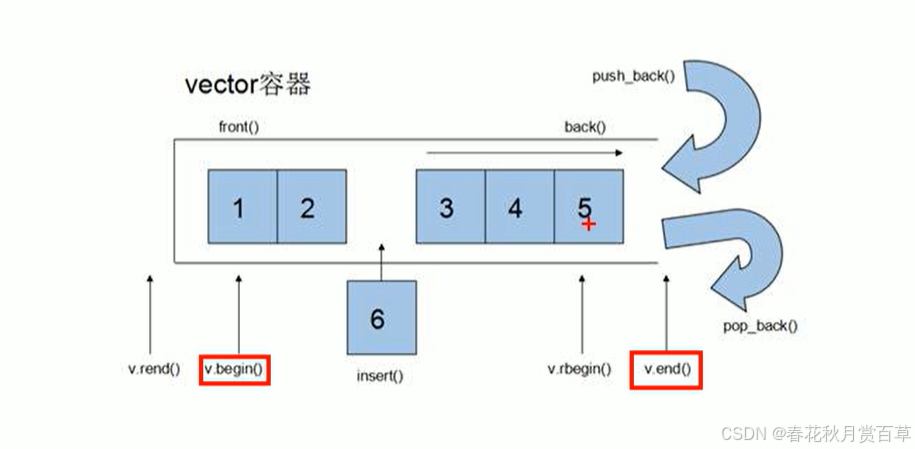
1.基本使用
#include<iostream>
#include<vector>
#include<algorithm>
#include<string>
using namespace std;


class person
{
public:
	person(string name,int age)
	{
		this->_name = name;
		this->_age = age;
	}
	string _name;
	int _age;
};

void showperson( person& p) //不加const可修改数据
{
	cout << "Name: " << p._name << ", Age: " << p._age << endl;
}


int main()
{
	vector<person> v;
	person p1("aaa", 1);
	person p2("bbb", 2);
	person p3("ccc", 3);
	person p4("ddd", 4);
	person p5("fff", 5);

	v.push_back(p1);
	v.push_back(p2);
	v.push_back(p3);
	v.push_back(p4);
	v.push_back(p5);

	/*vector<person>::iterator begin = v.begin();
	vector<person>::iterator end = v.end();
	for_each(begin, end, showperson);*/

	for_each(v.begin(), v.end(), showperson);
	return 0;
}
2.初始化
#include<iostream>
#include<vector>
#include<algorithm>

using namespace std;

void prints(int a)
{
	cout << a << endl;
}

int main()
{
	vector<int> v;

	v.push_back(10);
	v.push_back(20);
	v.push_back(30);
	v.push_back(40);


	vector<int>::iterator begin = v.begin();
	vector<int>::iterator end = v.end();

	//for_each(begin, end, prints);
	//迭代器提供了对容器中元素的访问和操作的方法,类似于指针的功能。迭代器可以加减
	while (begin != end)
	{
		cout << *begin << endl;
		begin++;
	}

	return 0;

}
3,函数使用
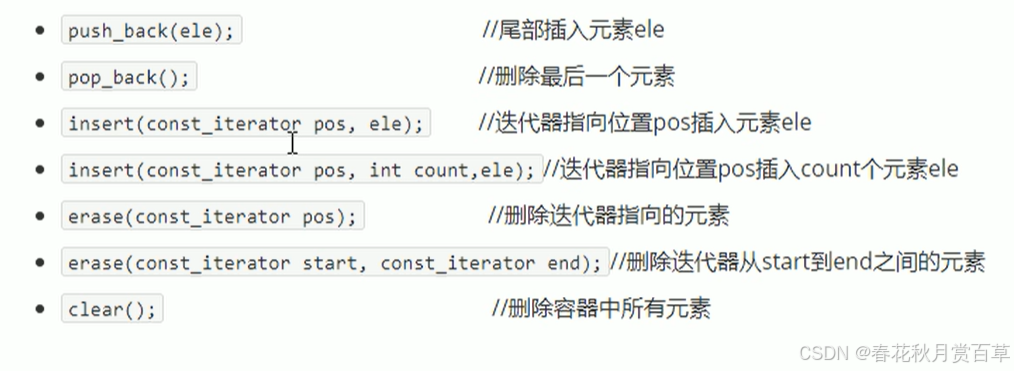
#include<iostream>
#include<vector>
#include<algorithm>
#include<string>
using namespace std;


class person
{
public:
	person(string name,int age)
	{
		this->_name = name;
		this->_age = age;
	}
	string _name;
	int _age;
};

void showperson( person& p) //不加const可修改数据
{
	cout << "Name: " << p._name << ", Age: " << p._age << endl;
}


int main()
{
	vector<person> v;
	person p1("aaa", 1);
	person p2("bbb", 2);
	person p3("ccc", 3);
	person p4("ddd", 4);
	person p5("fff", 5);

	v.push_back(p1);
	v.push_back(p2);
	v.push_back(p3);
	v.push_back(p4);
	v.push_back(p5);

	/*vector<person>::iterator begin = v.begin();
	vector<person>::iterator end = v.end();
	for_each(begin, end, showperson);*/

	for_each(v.begin(), v.end(), showperson);
	return 0;
}
插入和删除
#include<iostream>
#include<vector>


using namespace std;

void text1(vector<int> &v)
{
	for (auto it = v.begin(); it != v.end(); it++)
	{
		cout << *it << " ";
	}
	cout << endl;
}

int main()
{
	//初始化
	vector<int> v(10,100);
	text1(v);//100 100 100 100 100 100 100 100 100 100

	//插入

	v.insert(v.begin(), 1);
	text1(v);//1 100 100 100 100 100 100 100 100 100 100

	//尾插
	v.insert(v.end(), 1);
	text1(v);//1 100 100 100 100 100 100 100 100 100 100 1

	//尾删
	v.pop_back();
	text1(v);//1 100 100 100 100 100 100 100 100 100 100
	//区间删除

	v.erase(v.begin());
	text1(v);//100 100 100 100 100 100 100 100 100 100

	/*v.erase(v.begin(), v.end());
	text1(v);*/
	v.clear();
	text1(v);
	return 0;
}
4.构造
#include<iostream>
#include<vector>
using namespace std;

//这个版本接受一个 vector<int>::iterator 类型的参数,这意味着传入的参数是一个指向
// vector<int> 元素的迭代器,而不是整个容器。你传递的是一个迭代器,而不是 vector 本身,
// 因此没有发生拷贝。
void showV(vector<int> &v)
{
	/*for (auto i = v.begin(); i != v.end(); i++)
	{
		cout << *i << " ";
	}
	cout << endl;*/
	//编译器自动为你完成了元素的访问。没有必要再进行解引用,因为 a 直接就是 v 中的元素。
	for (auto& a : v)
	{
		cout << a << " ";
	}
}
int main()
{
	vector<int> v;
	for (int i = 0; i < 10; i++)
	{
		v.push_back(i);
	}
	//showV(v);

	//区间拷贝
	vector<int>v1(v.begin(),v.end());
	showV(v1);
	//拷贝构造
	vector<int>v2(v);
	showV(v2);
	//多个elm
	vector<int>v3(10, 100);//10个100
	showV(v3);
	return 0;
}
5.大小和容量
#include<iostream>
#include<vector>

using namespace std;

int main()
{
	vector<int> v;
	for (int i = 1; i < 10; i++)
	{
		v.push_back(i);
	}
	for (auto u = v.begin(); u != v.end(); u++)
	{
		cout << *u << " ";//1 2 3 4 5 6 7 8 9
	}
	if (v.empty())
	{
		cout << endl << "empty" << endl;
	}
	else {
		cout << "no empty" << endl;
	}
	cout << "v的容量" << v.capacity() << endl;//9
	cout << "v的大小" << v.size() << endl;//9

	//重新制定大小
	v.resize(13);
	for (auto u : v)
	{
		cout << u << " ";
	}//1 2 3 4 5 6 7 8 9 0 0 0 0
	v.resize(5);
	for (auto u : v)
	{
		cout << u << " ";
	}//1 2 3 4 5


	return 0;
}
6.打印
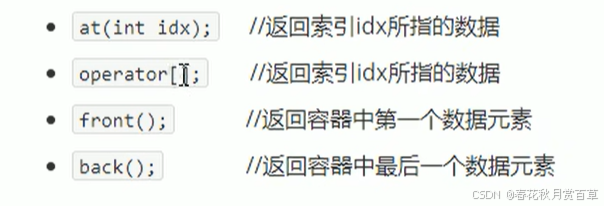
#include<iostream>
#include<vector>


using namespace std;

int main()
{
	//初始化
	vector<int> v(10,10);

	//使用【】方式访问数组中的元素

	for (int i = 0; i < v.size(); i++)
	{
		cout << v[i] << " ";
	}//10 10 10 10 10 10 10 10 10 10
	cout << endl;

	//使用at打印
	for (int i = 0; i < v.size(); i++)
	{
		cout << v.at(i) << " ";
	}//10 10 10 10 10 10 10 10 10 10
	cout << endl;
	//插入第一个数

	v.insert(v.begin(), 9);
	//获取第一个数
	cout << v.front() << endl;//9
	//获取最后一个数
	cout << v.back() << endl;//10

	return 0;
}
7.容器互换
#include<iostream>
#include<vector>


using namespace std;

void showswap(vector<int>& v)
{
	for (int i = 0; i < v.size(); i++)
	{
		cout << v[i] << " ";
	}
	cout << endl;
}

int main()
{
	vector<int> v(10,1000);

	vector<int> v1(10, 1);

	cout << "交换前" << endl;
	showswap(v);
	showswap(v1);
	//交换容器
	v.swap(v1);
	cout << "交换后" << endl;
	showswap(v);
	showswap(v1);

	//实践

	vector<int>v2(1000, 1000);

	cout << "交换前"<< v2.capacity() << endl;//1000
	cout << "交换前" << v2.size() << endl;//1000

	v2.resize(3);
	cout << "交换前" << v2.capacity() << endl;//1000
	cout << "交换前" << v2.size() << endl;//3

	//vector<int>(v2)匿名对象 交换后被回收
	vector<int>(v2).swap(v2);
	cout << "交换后" << v2.capacity() << endl;//3
	cout << "交换后" << v2.size() << endl;//3

	return 0;
}
魔乐社区(Modelers.cn) 是一个中立、公益的人工智能社区,提供人工智能工具、模型、数据的托管、展示与应用协同服务,为人工智能开发及爱好者搭建开放的学习交流平台。社区通过理事会方式运作,由全产业链共同建设、共同运营、共同享有,推动国产AI生态繁荣发展。
更多推荐


 2
2 0
0- 0


 已为社区贡献1条内容

所有评论(0)