springboot配置文件放到jar外_SpringBoot外部配置、优先级及配置详解
一、外部配置及优先级
SpringBoot的外部配置属性值官方给出了很多种方式,以便可以在不同的环境中使用相同的代码。
其使用了非常特别的PropertySource命令,旨在允许合理的覆盖值。当然,如果属性值不同,则这些配置方式中的属性值都会被加载;按照从高到低的排序如下:
(1)、在您的HOME目录设置的Devtools全局属性(~/.spring-boot-devtools.properties)。
(2)、单元测试中的 @TestPropertySource 注解。
(3)、单元测试中的 @SpringBootTest#properties 注解属性
(4)、命令行参数。
SPRING_APPLICATION_JSON=‘{"foo":{"bar":"spam"}}‘ java -jar myapp.jar
(6)、ServletConfig 初始化参数。
(7)、ServletContext 初始化参数。
(8)、来自 java:comp/env 的JNDI属性。
(9)、Java系统属性(System.getProperties())。
(10)、操作系统环境变量。
(11)、RandomValuePropertySource,只有随机的属性 random.* 中。
(12)、jar包外面的 Profile-specific application properties (application- {profile} .properties和YAML)
(13)、jar包内的 Profile-specific application properties (application-{profile}.properties和YAML)
(14)、jar包外的应用属性文件(application.properties和YAML)。
(15)、jar包内的应用属性文件(application.properties和YAML)。
(16)、在@Configuration上的@PropertySource注解。
(17)、默认属性(使用SpringApplication.setDefaultProperties设置)。
在具体的讲解这些配置的时候我们先来做一些准备工作,
(1)、书写一个Controller
@RestController
@Slf4j
public class MyController {
 @Value("${name}")
 private String name;
 @GetMapping("/getDefaultProperties")
 public String getDefaultProperties() {
 return name;
 }
1、使用SpringApplication.setDefaultProperties设置默认属性
在应用程序主类main方法中在调用run方法之前,设置默认值
@SpringBootApplication
public class Application {
 public static void main(String[] args) {
 //SpringApplication.run(Application.class, args);
 Properties properties = new Properties();
 properties.setProperty("name", "(17)、默认属性(使用SpringApplication.setDefaultProperties设置)");
 SpringApplication application = new SpringApplication(Application.class);
 application.setDefaultProperties(properties);
 application.run(args);
 //new SpringApplicationBuilder()
 // .sources(Application.class)
 // .bannerMode(Banner.Mode.OFF)
 // .properties(properties)
 // .run(args);
 }
}
此时你访问http://localhost:8080/getDefaultProperties在页面上输出的内容为

备注:如果你想把你项目中的所有的配置放到配置中心Apollo的话,这种方式也是可以很方法的实现的。2、在@Configuration上的@PropertySource注解
@SpringBootApplication
@PropertySource(value = {"classpath:test/propertySource.properties"}, encoding = "UTF-8")
public class Application {
 public static void main(String[] args) {
 Properties properties = new Properties();
 properties.setProperty("name", "(17)、默认属性(使用SpringApplication.setDefaultProperties设置)");
 SpringApplication application = new SpringApplication(Application.class);
 application.setDefaultProperties(properties);
 application.run(args);
 }
}

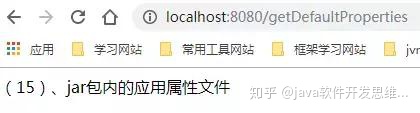
3、jar包内的应用属性文件(即默认的配置文件)
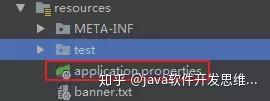
name=(15)、jar包内的应用属性文件
4、jar包外的应用属性文件
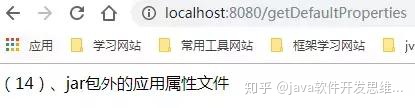
(1)、将你的应用程序打包成可运行的jar,在jar包的同级目录中放置一个application.properties文件,里面的内容如下:
name=(14)、jar包外的应用属性文件
5、jar包内的 Profile-specific application properties
新建application-test.properties文件,里面的内容如下
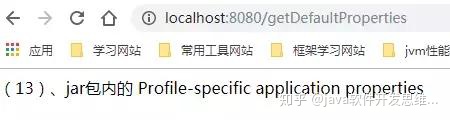
name=(13)、jar包内的 Profile-specific application properties
设置启动参数
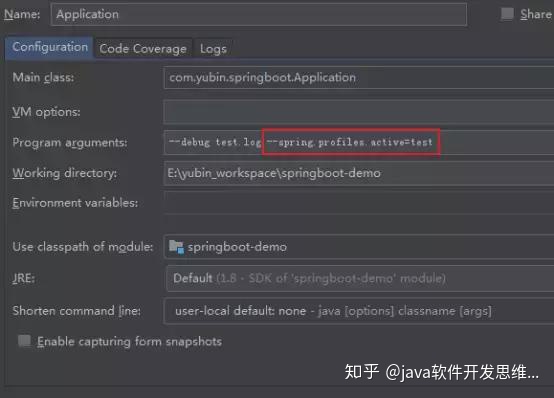
访问链接得到下图结果
6、jar包外面的 Profile-specific application properties
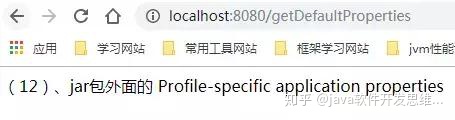
(1)、将你的应用程序打包成可运行的jar,在jar包的同级目录中放置一个application-test.properties文件,里面的内容如下:
name=(14)、jar包外的应用属性文件
(2)、java -jar -Dspring.profiles.active=test ***.jar
springboot读取外部和内部配置文件的方法,如下优先级:
第一种是在执行命令的目录下建config文件夹。(在jar包的同一目录下建config文件夹,执行命令需要在jar包目录下才行),然后把配置文件放到这个文件夹下。
第二种是直接把配置文件放到jar包的同级目录。
第三种在classpath下建一个config文件夹,然后把配置文件放进去。
第四种是在classpath下直接放配置文件。
springboot默认是优先读取它本身同级目录下的一个config/application.properties 文件的。
在src/main/resources 文件夹下创建的application.properties 文件的优先级是最低的
7、命令行属性
默认情况下,SpringApplication将任何命令行选项参数(以'-- '开头,例如--server.port=9000)转换为属性,并将其添加到Spring环境中。 如上所述,命令行属性始终优先于其他属性来源。

如果不希望将命令行属性添加到环境中,可以使用SpringApplication.setAddCommandLineProperties(false)禁用它们。
二、properties文件中的占位符
application.properties中的值在使用时通过已有的环境进行过滤,以便可以引用之前已经定义好的值
app.name=MyApp
app.description=${app.name} is a Spring Boot application
三、使用YAML替代 Properties
YAML是JSON的超集,因此这是分层配置数据一种非常方便的格式,。 每当您的类路径中都有SnakeYAML库时,SpringApplication类将自动支持YAML作为 properties 的替代方法。
如果您使用“Starters”,SnakeYAML将通过spring-boot-starter自动提供。
1、加载yaml
Spring Framework提供了两个方便的类,可用于加载YAML文档。 YamlPropertiesFactoryBean将YAML作为Properties加载,YamlMapFactoryBean将YAML作为Map加载。
例如下面这个YAML文档
environments:
 dev:
 url: http://dev.bar.com
 name: Developer Setup
 prod:
 url: http://foo.bar.com
 name: My Cool App
将转换为属性
environments.dev.url=http://dev.bar.com
environments.dev.name=Developer Setup
environments.prod.url=http://foo.bar.com
environments.prod.name=My Cool App
YAML列表表示为具有[index] dereferencers的属性键,例如YAML:
my:
 servers:
 - dev.bar.com
 - foo.bar.com
将转化为属性:
my.servers[0]=dev.bar.com
my.servers[1]=foo.bar.com
2、通过@ConfigurationProperties将配置绑定到Bean
(1)、配置bean的书写
@Getter
@Setter
@Component
@ConfigurationProperties(prefix = "my")
public class MyServerProperties {
 private String name;
 private List<String> servers = new ArrayList<>();
}
(2)、application.yaml文件书写
my:
 servers:
 - dev.bar.com
 - foo.bar.com
 name: myName
3、YAML的缺点
YAML文件无法通过@PropertySource注解加载。 因此,在需要以这种方式加载值的情况下,需要使用properties文件。
四、类型安全的配置属性
使用@Value(“${property}”)注释来注入配置属性有时可能很麻烦(类型常规配置),特别是如果您正在使用多个层次结构的属性或数据时。 Spring Boot提供了一种处理属性的替代方法,允许强类型Bean管理并验证应用程序的配置。
(1)、Bean的定义
/**
 * 类型安全的配置属性
 *
 * @Author YUBIN
 * @create 2019-06-16
 */
@ConfigurationProperties("foo")
public class FooProperties {
 private boolean enabled;
 private InetAddress remoteAddress;
 private final Security security = new Security();
 public boolean isEnabled() {
 return enabled;
 }
 public void setEnabled(boolean enabled) {
 this.enabled = enabled;
 }
 public InetAddress getRemoteAddress() {
 return remoteAddress;
 }
 public void setRemoteAddress(InetAddress remoteAddress) {
 this.remoteAddress = remoteAddress;
 }
 public Security getSecurity() {
 return security;
 }
 public static class Security {
 private String username;
 private String password;
 private List<String> roles = new ArrayList<>(Collections.singleton("USER"));
 public String getUsername() {
 return username;
 }
 public void setUsername(String username) {
 this.username = username;
 }
 public String getPassword() {
 return password;
 }
 public void setPassword(String password) {
 this.password = password;
 }
 public List<String> getRoles() {
 return roles;
 }
 public void setRoles(List<String> roles) {
 this.roles = roles;
 }
 }
}
(2)、YAML文件中的配置
foo:
 remote-address: 192.168.1.1
 security:
 username: foo
 roles:
 - USER
 - ADMIN
(3)、应用程序主类上加上必要的注解
@EnableConfigurationProperties({FooProperties.class})
public class Application {
这样在程序中就可以使用@Autowired的形式注入配置类了
@RestController
@Slf4j
public class MyController {
 @Autowired
 private FooProperties fooProperties;
 @GetMapping("/getFooProperties")
 public String getFooProperties() {
 return JSON.toJSONString(fooProperties);
 }
五、第三方配置
现在我们在构建一个名为"yubin-common",类型为jar的maven项目
1、书写一个配置类
@ConfigurationProperties(prefix = "bar")
public class BarComponent {
 private String name;
 public String getName() {
 return name;
 }
 public void setName(String name) {
 this.name = name;
 }
}
在之前的项目中引入此项目的依赖;这时如果在之前的项目中需要使用BarComponent这个属性类的话,则需要通过@EnableConfigurationProperties(BarComponent.class)这个注解来引入类,但是这样做是否合理呢?一个项目这么做,当有其它的项目也需要这个类的话是不是也要这么做呢?
public class BarComponent {
 private String name;
 public String getName() {
 return name;
 }
 public void setName(String name) {
 this.name = name;
 }
}
@Configuration
public class ConfigurationBean {
 @Bean
 @ConfigurationProperties(prefix = "bar")
 public BarComponent barComponent() {
 return new BarComponent();
 }
}
2、小结
@ConfigurationProperties导入外部属性填充到这个Bean的实例,有三种方式:
(1)、@ConfigurationProperties + @Component 注解到bean定义类上
(2)、@ConfigurationProperties + @Bean注解在配置类的bean定义方法上
(3)、@ConfigurationProperties注解到普通类然后通过@EnableConfigurationProperties定义为bean
六、宽松的绑定
Spring Boot使用一些宽松的规则将环境属性绑定到@ConfigurationProperties bean,因此不需要在Environment属性名称和bean属性名称之间进行完全匹配。 常用的例子是这样有用的:虚分离(例如上下文路径绑定到contextPath)和大写(例如PORT绑定到端口)环境属性。
配置bean
/**
 * 属性bean宽松绑定演示
 *
 * @Author YUBIN
 * @create 2019-06-16
 */
@Component
@ConfigurationProperties(prefix = "person")
@Getter
@Setter
public class OwnerProperties {
 private String firstName; //person.firstName 标准骆峰命名法。
 private String secondName; // person.second-name 虚线符号,推荐用于.properties和.yml文件。
 private String thirdName; // person.third_name 下划线符号,用于.properties和.yml文件的替代格式。
 private String fourName; // PERSON_FOUR_NAME 大写格式 推荐使用系统环境变量时。
}
测试类
@RestController
@Slf4j
public class MyController {
 @Autowired
 private OwnerProperties ownerProperties;
 @GetMapping("/getOwnerProperties")
 public String getOwnerProperties() {
 return JSON.toJSONString(ownerProperties);
 }
}

七、@ConfigurationProperties验证
如果你需要验证@ConfigurationProperties类。 您可以直接在配置类上使用JSR-303 javax.validation约束注解 @Validated。 只需确保您的类路径中符合JSR-303实现,然后在您的字段中添加约束注释:
@ConfigurationProperties("foo")
@Validated
public class FooProperties {
 private boolean enabled;
 @NotNull
 private InetAddress remoteAddress;
// ... getters and setters
为了验证嵌套属性的值,您必须将关联字段注释为@Valid以触发其验证。 例如,基于上述FooProperties示例:
@ConfigurationProperties(prefix="connection")
@Validated
public class FooProperties {
 @NotNull
 private InetAddress remoteAddress;
 @Valid
 private final Security security = new Security();
 // ... getters and setters
 public static class Security {
 @NotEmpty
 public String username;
 // ... getters and setters
 }
}
@ConfigurationProperties 对比 @Value
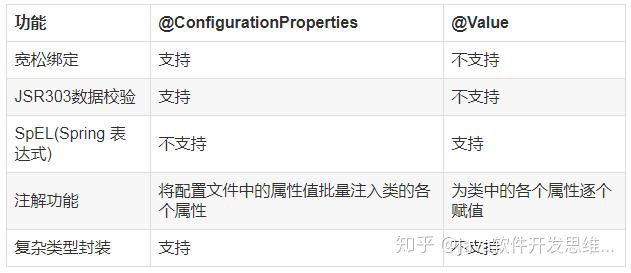
@Value是核心容器功能,它不提供与类型安全配置属性相同的功能。 下表总结了@ConfigurationProperties和@Value支持的功能:
八、配置文件Profiles
1、代码层面区分环境
Spring 配置文件提供了将应用程序配置隔离的方法,使其仅在某些环境中可用。 任何@Component或@Configuration都可以使用@Profile进行标记,以限制其在什么时候加载:
(1)、测试环境
@Service
@Profile({"test"})
public class TestProfileServiceImpl implements ProfileService {
 @Override
 public String getEnvironment() {
 return "test环境";
 }
}
(2)、dev环境
@Service
@Profile({"dev"})
public class DevProfileServiceImpl implements ProfileService {
 @Value("${spring.profiles.active}")
 private String profileActive;
 @Override
 public String getEnvironment() {
 return "dev环境";
 }
}
(3)、测试类
@RestController
@Slf4j
public class MyController {
 @Autowired
 private ProfileService profileService;
 @GetMapping("/getProfileService")
 public String getProfileService() {
 return profileService.getEnvironment();
 }
}
当设置启动参数为 spring.profiles.active=dev时,页面展示效果:

image.png
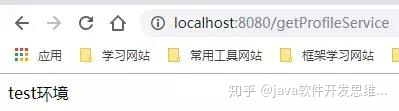
当设置启动参数为 spring.profiles.active=test时,页面展示效果:

魔乐社区(Modelers.cn) 是一个中立、公益的人工智能社区,提供人工智能工具、模型、数据的托管、展示与应用协同服务,为人工智能开发及爱好者搭建开放的学习交流平台。社区通过理事会方式运作,由全产业链共同建设、共同运营、共同享有,推动国产AI生态繁荣发展。
更多推荐


 1
1 0
0- 0


 已为社区贡献7条内容

所有评论(0)