ollama+qdrant+deepseek
本文旨在讲解springboot+ollama+qdrang+deepseek 来实现知识库及大模型问答
·
本文旨在讲解springboot+ollama+qdrang+deepseek 来实现知识库及大模型问答
话不多说直接上手
一、本地安装ollama服务(相信此项安装步骤大家近期已经都有接触就不在过多赘述了)
#我本地安装的是0.5.7版本
ollama version is 0.5.7
安装deepseek-r1:8b 服务
安装nomic-embed-text:latest服务
此服务作用是:支持生成文本向量的模型
在这里插入图片描述
二、安装qdrant服务
登录qdrant官网根据提示进行部署安装
https://qdrant.tech/documentation/guides/installation/
三、本地搭建SpringBoot环境。
pom中引入以下依赖:
<!-- HTTP 客户端ollama+向量数据库使用 -->
		<dependency>
			<groupId>com.squareup.okhttp3</groupId>
			<artifactId>okhttp</artifactId>
			<version>4.8.0</version>
		</dependency>
		<!-- Qdrant 客户端(社区库) -->
		<dependency>
			<groupId>io.qdrant</groupId>
			<artifactId>client</artifactId>
			<version>1.7.0</version>
		</dependency>
		<dependency>
			<groupId>com.fasterxml.jackson.core</groupId>
			<artifactId>jackson-databind</artifactId>
			<version>2.10.0</version>
		</dependency>
在配置文件中添加以下配置: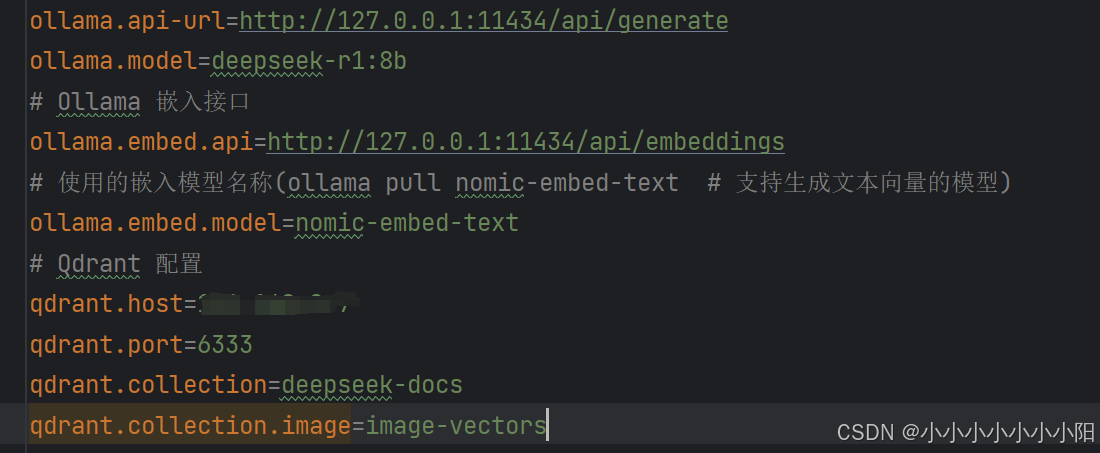
Ollama 客户端
@Service
public class OllamaService {
    private final OkHttpClient client ;
    private final ObjectMapper mapper = new ObjectMapper();
    private final String apiUrl;
    private final String model;

    public OllamaService(
            @Value("${ollama.api-url}") String apiUrl,
            @Value("${ollama.model}") String model
    ) {
        //默认情况下,OkHttp 的连接超时为 10秒,读取超时为 10秒。对于大模型推理场景,需延长超时时间:
        this.client = new OkHttpClient.Builder()
                .connectTimeout(30, TimeUnit.SECONDS)  // 连接超时30S
                .readTimeout(300, TimeUnit.SECONDS)    // 读取超时(根据模型响应时间调整)5分钟
                .build();
        this.apiUrl = apiUrl;
        this.model = model;
    }

    public String generateResponse(String prompt) throws IOException {
        Map<String, Object> requestBody = new HashMap<>();
        requestBody.put("model", model);
        requestBody.put("prompt", prompt);
        requestBody.put("stream", false);

        Request request = new Request.Builder()
                .url(apiUrl)
                .post(RequestBody.create(
                        mapper.writeValueAsString(requestBody),
                        MediaType.parse("application/json")
                ))
                .build();

        try (Response response = client.newCall(request).execute()) {
            if (!response.isSuccessful()) {
                throw new IOException("Ollama API error: " + response.body().string());
            }
            OllamaResponse ollamaResponse = mapper.readValue(
                    response.body().string(), OllamaResponse.class
            );
            return ollamaResponse.getResponse();
        }
    }

    @Data
    @JsonIgnoreProperties(ignoreUnknown = true) // 忽略未知字段
    private static class OllamaResponse {
        @JsonProperty("model")
        private String model;

        @JsonProperty("created_at")
        private String createdAt;

        @JsonProperty("response")
        private String response;
    }
}
Qdrant 客户端(同步 HTTP 调用)
@Service
public class QdrantService {
    private final OkHttpClient client = new OkHttpClient();
    private final ObjectMapper mapper = new ObjectMapper();
    private final String baseUrl;
    private final String collection;

    public QdrantService(
            @Value("${qdrant.host}") String host,
            @Value("${qdrant.port}") int port,
            @Value("${qdrant.collection}") String collection
    ) {
        this.baseUrl = "http://" + host + ":" + port;
        this.collection = collection;
    }

    // 创建集合
    public void createCollection(int vectorSize) throws IOException {
        Map<String, Object> requestBody = new HashMap<>();
        Map<String, Object> vectors = new HashMap<>();
        vectors.put("size", vectorSize);
        vectors.put("distance", "Cosine");
        requestBody.put("vectors", vectors);

        // 检查集合是否存在
        Request checkRequest = new Request.Builder()
                .url(baseUrl + "/collections/" + collection)
                .get()
                .build();

        try (Response response = client.newCall(checkRequest).execute()) {
            if (response.isSuccessful()) {
                // 集合已存在,直接返回
                System.out.println("Collection " + collection + " already exists.");
                return;
            }
        }


        Request request = new Request.Builder()
                .url(baseUrl + "/collections/" + collection)
                .put(RequestBody.create(
                        mapper.writeValueAsString(requestBody),
                        MediaType.parse("application/json")
                ))
                .build();

        try (Response response = client.newCall(request).execute()) {
            if (!response.isSuccessful() && response.code() != 400) {
                throw new IOException("Failed to create collection: " + response.body().string());
            }
        }
    }

    // 存储向量
    public void upsertVector(String id, List<Double> vector, String text) throws IOException {
        Map<String, Object> point = new HashMap<>();
        point.put("id", id);
        point.put("vector", vector);
        point.put("payload", Collections.singletonMap("text", text));

        Map<String, Object> requestBody = new HashMap<>();
        requestBody.put("points", Collections.singletonList(point));

        Request request = new Request.Builder()
                .url(baseUrl + "/collections/" + collection + "/points")
                .put(RequestBody.create(
                        mapper.writeValueAsString(requestBody),
                        MediaType.parse("application/json")
                ))
                .build();

        try (Response response = client.newCall(request).execute()) {
            if (!response.isSuccessful()) {
                throw new IOException("Failed to upsert vector: " + response.body().string());
            }
        }
    }

    // 向量搜索
    public List<String> searchVectors(List<Double> vector, int limit) throws IOException {
        Map<String, Object> requestBody = new HashMap<>();
        requestBody.put("vector", vector);
        requestBody.put("limit", limit);
        requestBody.put("with_payload", true);  // 关键:请求返回 payload

        Request request = new Request.Builder()
                .url(baseUrl + "/collections/" + collection + "/points/search")
                .post(RequestBody.create(
                        mapper.writeValueAsString(requestBody),
                        MediaType.parse("application/json")
                ))
                .build();

        try (Response response = client.newCall(request).execute()) {
//            String rawResponse = response.body().string();
//            System.out.println("Qdrant 原始响应: " + rawResponse); // 打印原始 JSON
            if (!response.isSuccessful()) {
                throw new IOException("Search failed: " + response.body().string());
            }
                QdrantSearchResponse searchResponse = mapper.readValue(
                        response.body().string(), QdrantSearchResponse.class
                );
            List<String> results = new ArrayList<>();
            for (QdrantResult result : searchResponse.getResult()) {
                if (result.getPayload() != null) {
                    results.add(result.getPayload().getText());
                } else {
                    System.err.println("Payload 为空");
                }
            }
            return results;
        }
    }

    // 响应解析类
    @Data
    @JsonIgnoreProperties(ignoreUnknown = true) // 忽略未知字段
    private static class QdrantSearchResponse {
        private List<QdrantResult> result;
    }

    @Data
    @JsonIgnoreProperties(ignoreUnknown = true) // 忽略未知字段
    private static class QdrantResult {
        private String id;          // 新增 id 字段
        private double score;       // 新增 score 字段
        private QdrantPayload payload;
    }

    @Data
    @JsonIgnoreProperties(ignoreUnknown = true)
    private static class QdrantPayload {
        @JsonProperty("text")  // 显式指定 JSON 键名
        private String text;
    }
}
向量生成服务
@Service
public class EmbeddingService {
    private final OkHttpClient client = new OkHttpClient();
    private final ObjectMapper mapper = new ObjectMapper();
    private final String ollamaEmbedApi;
    private final String embeddingModel;
    private static final MediaType JSON = MediaType.parse("application/json");
    public EmbeddingService(
            @Value("${ollama.embed.api}") String ollamaEmbedApi,
            @Value("${ollama.embed.model}") String embeddingModel
    ) {
        this.ollamaEmbedApi = ollamaEmbedApi;
        this.embeddingModel = embeddingModel;
    }

    // 调用 Ollama 生成文本向量
    public List<Double> embed(String text) throws IOException {
        Map<String, Object> requestBodyMap = new HashMap<>();
        requestBodyMap.put("model", embeddingModel);
        requestBodyMap.put("prompt", text);
            String jsonBody = mapper.writeValueAsString(requestBodyMap);

            // 创建 RequestBody
            RequestBody body = RequestBody.create(jsonBody, JSON);

        Request request = new Request.Builder()
                .url(ollamaEmbedApi)
                .post(body)
                .build();

        try (Response response = client.newCall(request).execute()) {
            if (!response.isSuccessful()) {
                throw new IOException("Ollama 嵌入服务调用失败: " + response.body().string());
            }
            OllamaEmbedResponse embedResponse = mapper.readValue(
                    response.body().string(), OllamaEmbedResponse.class
            );
            return embedResponse.getEmbedding();
        }
    }

    // 响应解析类
    @Data
    private static class OllamaEmbedResponse {
        private List<Double> embedding;
    }
}
向量数据初始化
@Component
public class DataInitializer {
    private final QdrantService qdrantService;
    private final EmbeddingService embeddingService;

    @Autowired
    public DataInitializer(QdrantService qdrantService, EmbeddingService embeddingService) {
        this.qdrantService = qdrantService;
        this.embeddingService = embeddingService;
    }

    @EventListener(ApplicationReadyEvent.class)
    public void initData() throws Exception {
        qdrantService.createCollection(768); // 根据嵌入模型维度设置(如 nomic-embed-text 是 768 维)

        // 存储示例数据
        Arrays.asList(
                new Doc("123e4567-e89b-12d3-a456-426614174000", "DeepSeek 是一家中国的人工智能公司"),
                new Doc("123e4567-e89b-12d3-a456-426614174001", "Ollama 支持在本地运行大语言模型"),
        ).forEach(doc -> {
            try {
                List<Double> vector = embeddingService.embed(doc.text);
                qdrantService.upsertVector(doc.id, vector, doc.text);
            } catch (Exception e) {
                e.printStackTrace();
            }
        });
    }
RAG 控制器
/***********用户请求 → Spring Boot (REST API) → Qdrant 向量检索 → Ollama (DeepSeek 模型) → 返回答案***********/
@Slf4j
@RestController
@RequestMapping(value = "/ragController")
public class RagController {
    private final OllamaService ollamaService;
    private final QdrantService qdrantService;
    private final EmbeddingService embeddingService;

    @Autowired
    public RagController(
            OllamaService ollamaService,
            QdrantService qdrantService,
            EmbeddingService embeddingService
    ) {
        this.ollamaService = ollamaService;
        this.qdrantService = qdrantService;
        this.embeddingService = embeddingService;
    }

    @PostMapping("/ask")
    public String askQuestion(@RequestBody String question) {
        try {
            // 1. 生成向量
            List<Double> queryVector = embeddingService.embed(question);

            // 2. 检索上下文
            //limit 表示从向量数据库中返回的 最相似结果数量; limit=3时表示返回相似度最高的前 3 条数据
            List<String> contexts = qdrantService.searchVectors(queryVector, 3);

            // 3. 构造提示
            String context = String.join("\n", contexts);
            String prompt = String.format("基于以下上下文回答问题:\n%s\n问题:%s", context, question);

            // 4. 调用 Ollama
            return ollamaService.generateResponse(prompt);
        } catch (Exception e) {
            log.error("处理请求失败", e);
            return "服务暂时不可用";
        }
    }
}
四、完成以上配置及代码编写后,即可启动springboot服务与deepseek进行聊天了。
服务启动后,会初始化qdrant向量数据,可登录qdrang服务查看
http://IP:6333/dashboard#/collections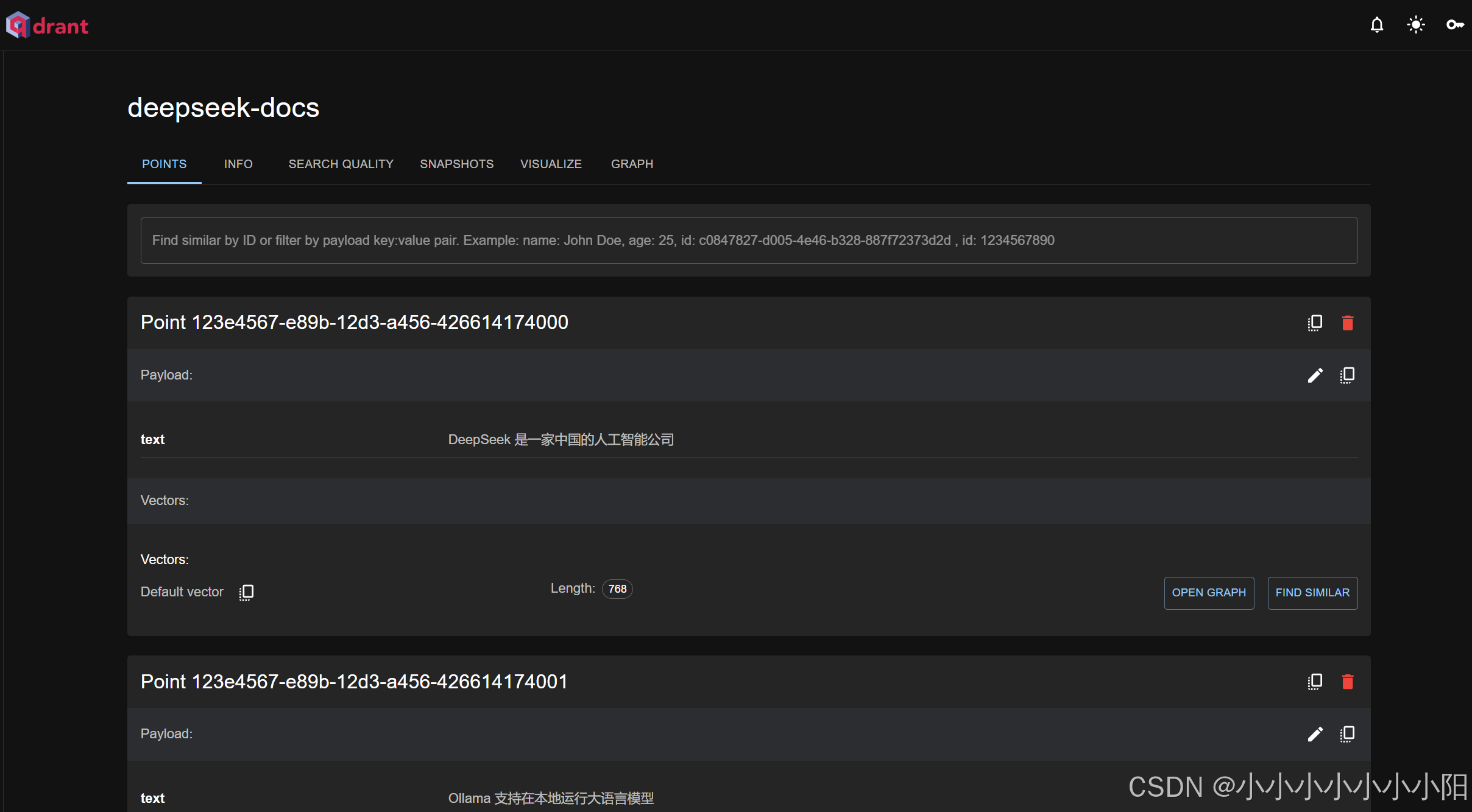
一切就绪通过postman进行访问: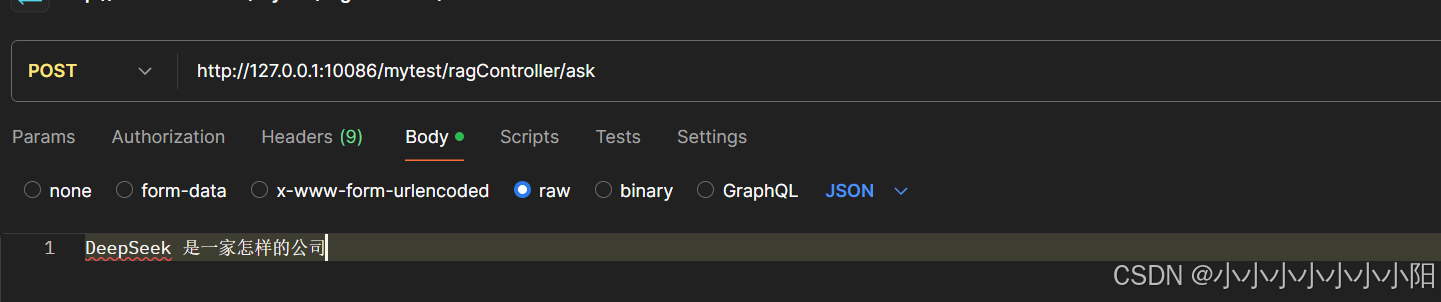
这里可以问你向量数据库中初始化的问题,也可问一些其他问题,大模型来给你回答。如果想让提问的结果更加精确,那就慢慢给qdrant中喂数据慢慢训练吧,祝你早日完成专业知识库的搭建。

魔乐社区(Modelers.cn) 是一个中立、公益的人工智能社区,提供人工智能工具、模型、数据的托管、展示与应用协同服务,为人工智能开发及爱好者搭建开放的学习交流平台。社区通过理事会方式运作,由全产业链共同建设、共同运营、共同享有,推动国产AI生态繁荣发展。
更多推荐


 4
4 0
0- 0


 已为社区贡献1条内容

所有评论(0)