LLama Factory使用LoRA微调Qwen
·
文章目录
1. LoRA简介
1.1 核心思想
LoRA是通过引入低秩矩阵来减少微调时的参数量。在预训练模型中,LoRA通过添加两个小矩阵B和A来近似原始的大矩阵W,从而减少需要更新的参数量。
eg:W:m×n, 则B:m×r,A:r×n (通常r=8~64)
训练时,输入分别与原始权重和两个低秩矩阵进行运算,共同得到最终结果,优化则仅优化A和B,W不变
训练完成后,可以将两个低秩矩阵与原始模型中的权重进行合并,合并后的模型与原始模型无异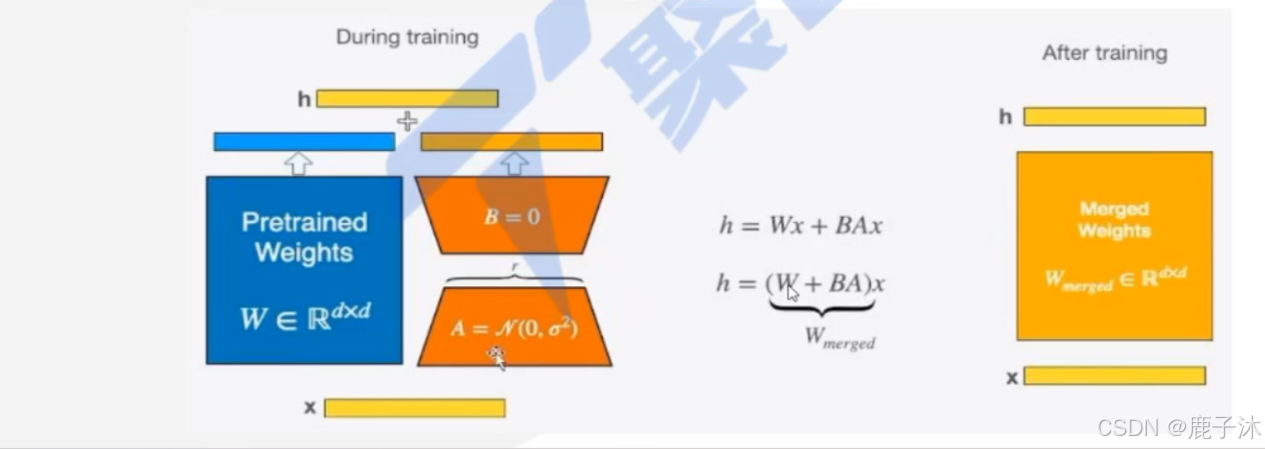
1.2 为什么高效?
参数效率:仅训练0.1%~1%的参数量
内存友好:梯度只计算小矩阵,显存占用降低3~5倍
即插即用:训练后的LoRA权重可独立保存,动态加载到原模型
2. LLama Factory介绍
官方文档:https://llamafactory.readthedocs.io/zh-cn/latest/index.html
2.1 环境配置
# 创建环境
conda create -n llama_factory python=3.10
conda activate llama_factory
# 安装依赖
git clone https://github.com/hiyouga/LLaMA-Factory.git
cd LLaMA-Factory
pip install -e
2.2 指令微调监督数据集格式
[
  {
    "instruction": "人类指令(必填)",
    "input": "人类输入(选填)",
    "output": "模型回答(必填)",
    "system": "系统提示词(选填)",
    "history": [
      ["第一轮指令(选填)", "第一轮回答(选填)"],
      ["第二轮指令(选填)", "第二轮回答(选填)"]
    ]
  }
]
eg: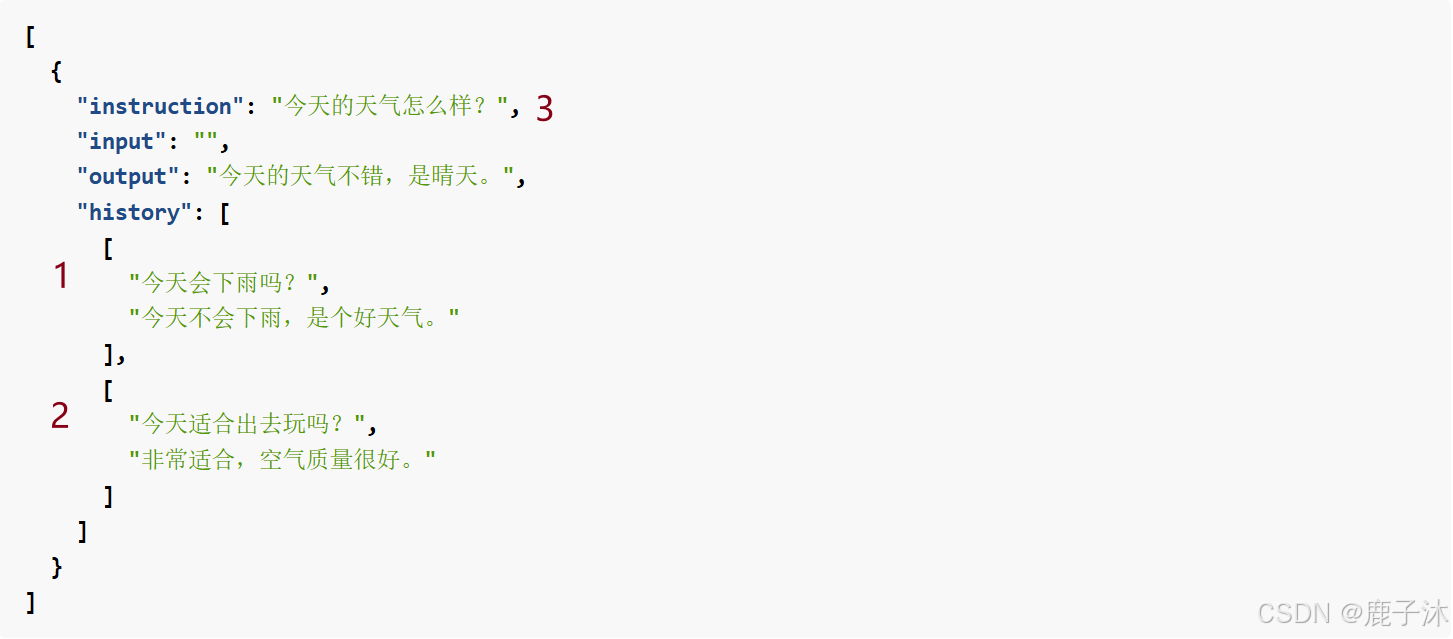
dataset_info.json 中的 数据集描述应为:
"数据集名称": {
  "file_name": "data.json",
  "columns": {
    "prompt": "instruction",
    "query": "input",
    "response": "output",
    "system": "system",
    "history": "history"
  }
}
即为:fintech.json以及identity格式<放在LLaMA-Factory/data下面>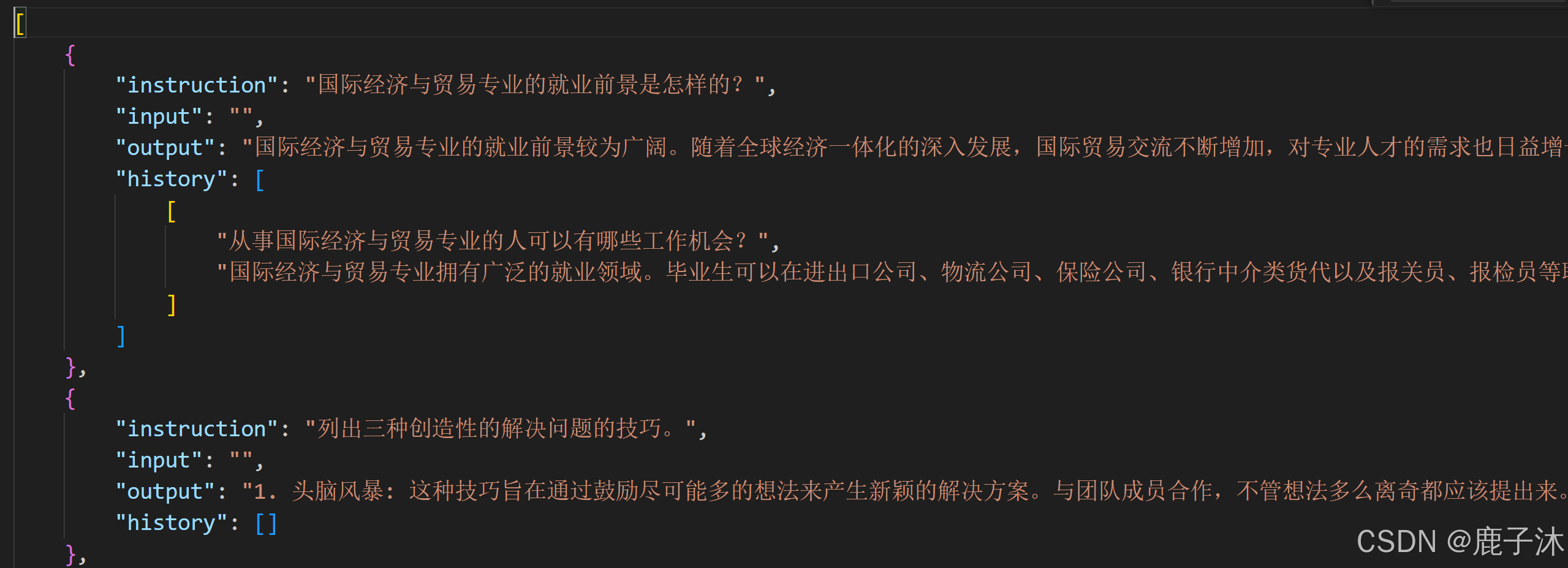
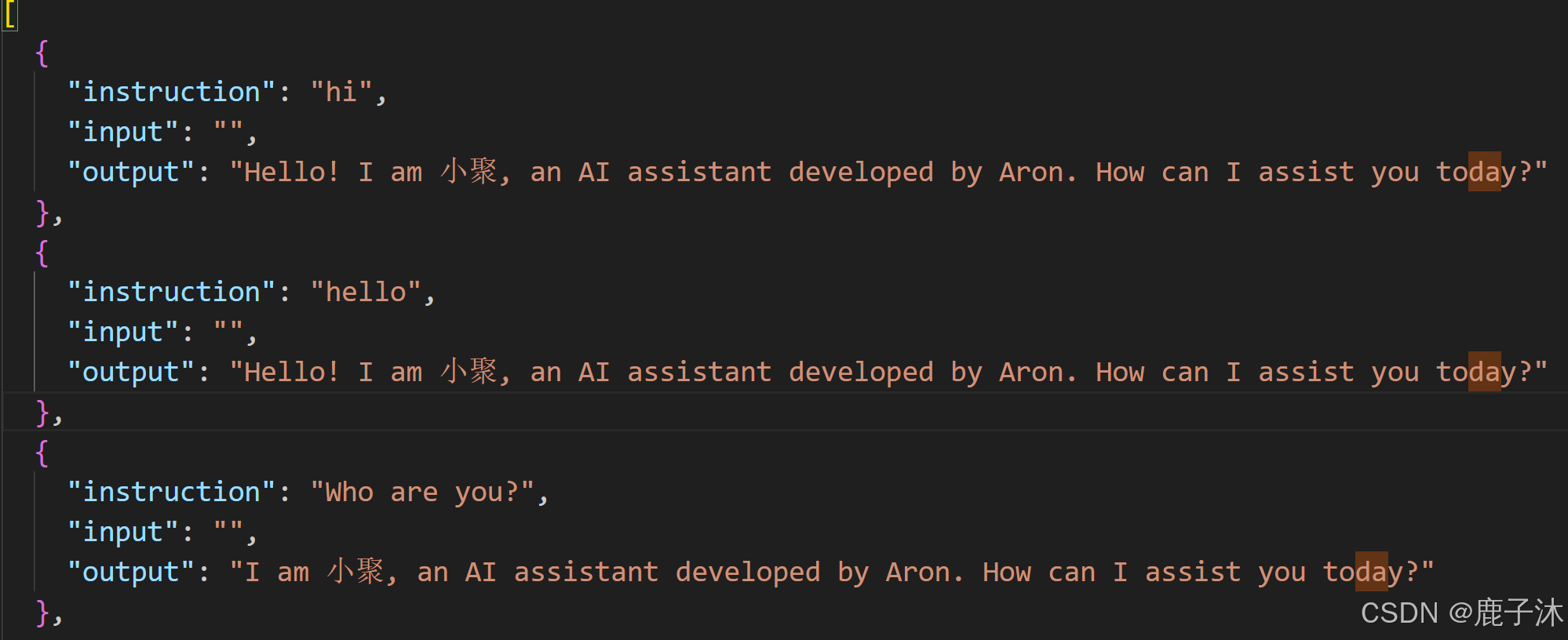
在dataset_info.json中添加
"fintech": {
    "file_name": "fintech.json"
  },
2.3 通过Web UI配置
- 启动web服务
cd LLaMA-Factory
llamafactory-cli webui
- 界面配置关键参数
模型路径:输入模型路径<本地>
数据集:选择数据集<需提前按照格式注册到dataset_info.json中>
微调方法:LoRA
学习率、训练轮次、批次大小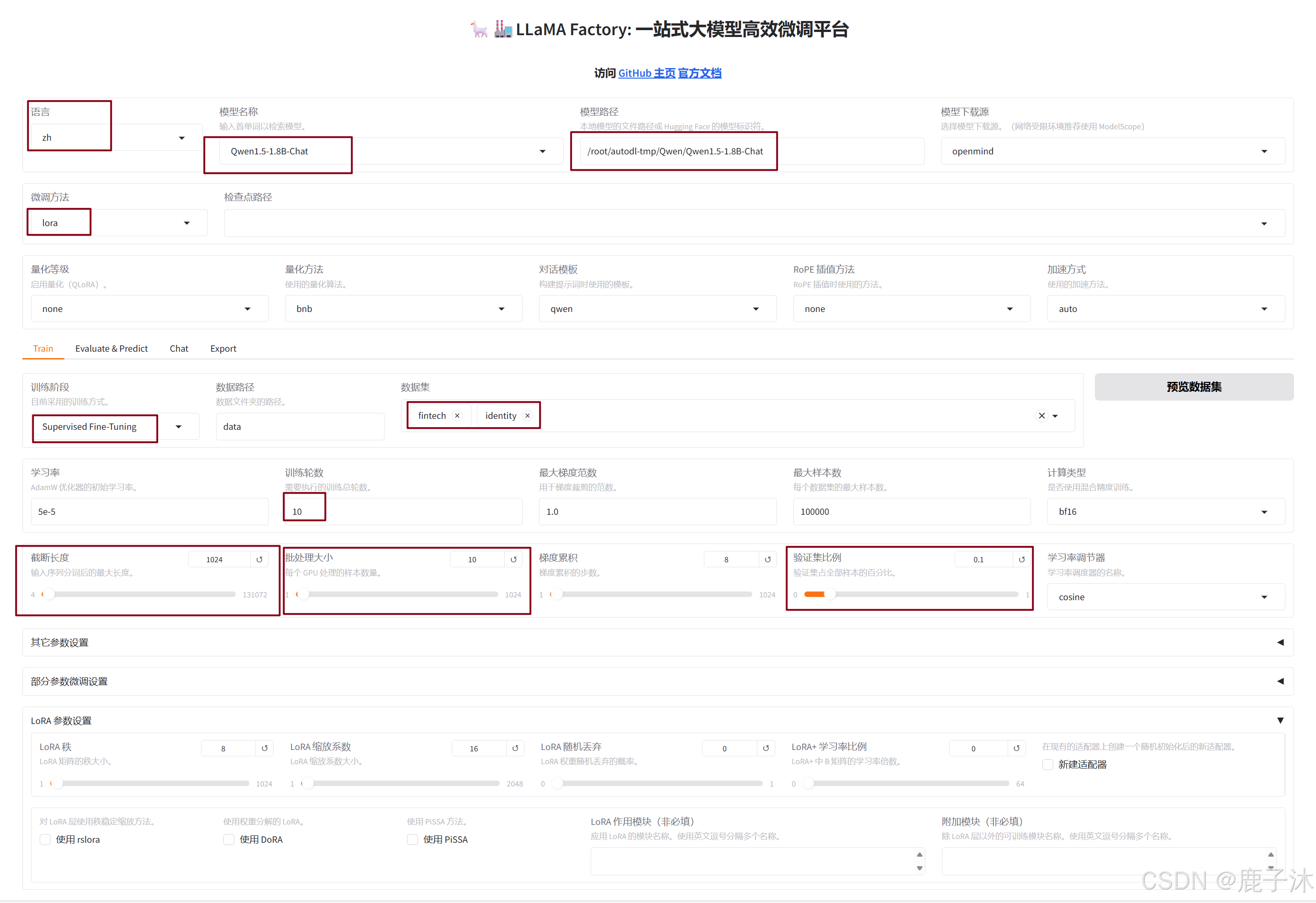
- 点击开始直接训练,训练完成
微调前:不选择检查点路径,加载的是从Huggingface上直接加载的模型。
微调后:选择检查点路径,并加载模型,此时加载的就是训练结束保存检查点,测试完卸载模型。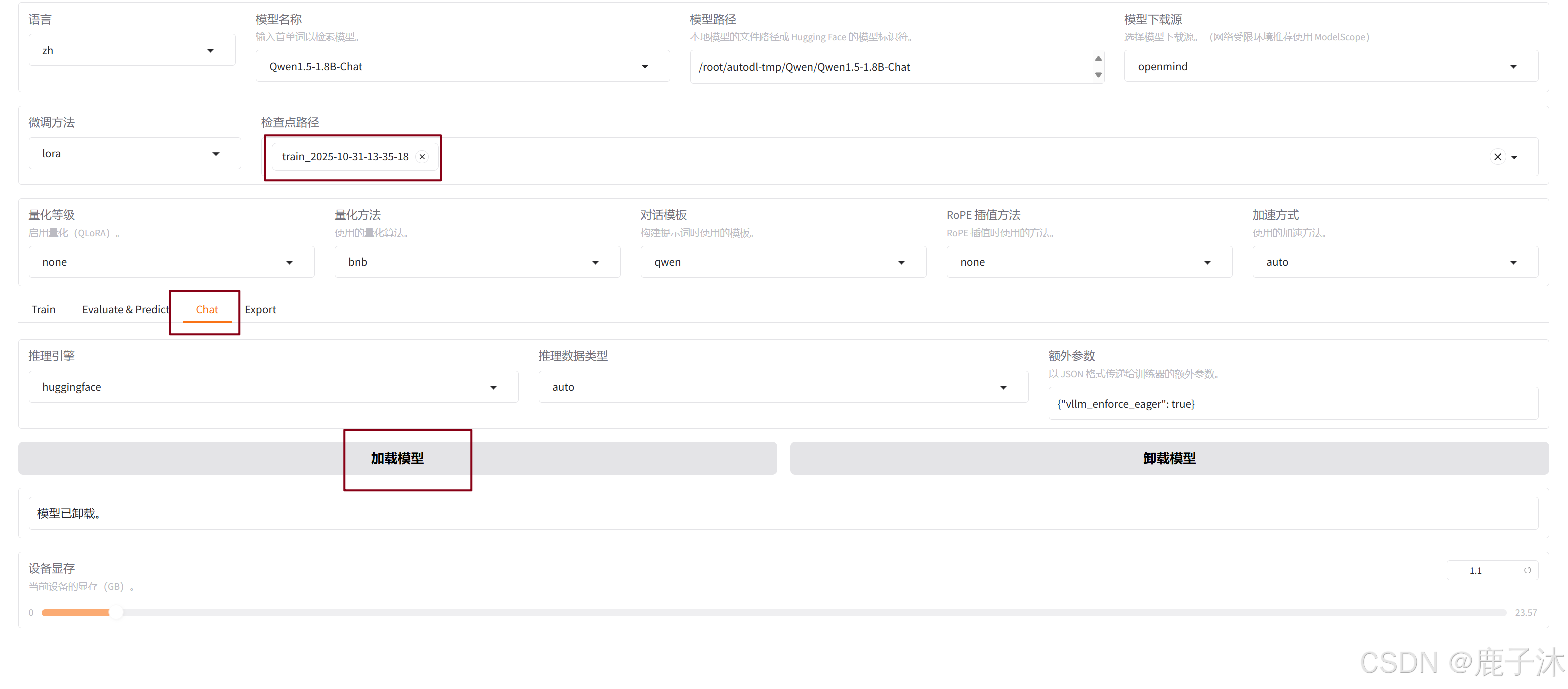
微调之前:
微调之后:
2.4 使用YAML配置文件
- 在example/train_lora下新建文件qwen1.5_1.8b_chat_lora.yaml:
其中修改模型路径,数据集,模板,输出目录
### model
model_name_or_path: /root/autodl-tmp/Qwen/Qwen1.5-1.8B-Chat    # 修改路径
trust_remote_code: true

### method
stage: sft
do_train: true
finetuning_type: lora
lora_rank: 8
lora_target: all

### dataset
dataset: identity, fintech      # 修改数据集
template: qwen                  # 修改模型为qwen
cutoff_len: 2048
max_samples: 1000
overwrite_cache: true
preprocessing_num_workers: 16
dataloader_num_workers: 4

### output
output_dir: saves/qwen1.5_1.8b_chat/lora/sft      # 修改目录
logging_steps: 10
save_steps: 500
plot_loss: true
overwrite_output_dir: true
save_only_model: false
report_to: none  # choices: [none, wandb, tensorboard, swanlab, mlflow]

### train
per_device_train_batch_size: 1
gradient_accumulation_steps: 8
learning_rate: 1.0e-4
num_train_epochs: 3.0
lr_scheduler_type: cosine
warmup_ratio: 0.1
bf16: true
ddp_timeout: 180000000
resume_from_checkpoint: null

### eval
# eval_dataset: alpaca_en_demo
# val_size: 0.1
# per_device_eval_batch_size: 1
# eval_strategy: steps
# eval_steps: 500
与web ui训练结束生成的training_args.yaml是一样的:
bf16: true
cutoff_len: 1024
dataset: fintech,identity
dataset_dir: data
ddp_timeout: 180000000
do_train: true
enable_thinking: true
eval_steps: 100
eval_strategy: steps
finetuning_type: lora
flash_attn: auto
gradient_accumulation_steps: 8
include_num_input_tokens_seen: true
learning_rate: 5.0e-05
logging_steps: 5
lora_alpha: 16
lora_dropout: 0
lora_rank: 8
lora_target: all
lr_scheduler_type: cosine
max_grad_norm: 1.0
max_samples: 100000
model_name_or_path: /root/autodl-tmp/Qwen/Qwen1.5-1.8B-Chat
num_train_epochs: 10.0
optim: adamw_torch
output_dir: saves/Qwen1.5-1.8B-Chat/lora/train_2025-10-31-13-35-18
packing: false
per_device_eval_batch_size: 8
per_device_train_batch_size: 8
plot_loss: true
preprocessing_num_workers: 16
report_to: none
save_steps: 100
stage: sft
template: qwen
trust_remote_code: true
val_size: 0.1
warmup_steps: 0
- 启动训练
先进入LLaMA-Factory文件夹中,否则会找不到dataset_info.json文件
cd /root/autodl-tmp/LLaMA-Factory
启动训练
llamafactory-cli train /root/autodl-tmp/LLaMA-Factory/examples/train_lora/qwen1.5_1.8b_chat_lora.yaml

魔乐社区(Modelers.cn) 是一个中立、公益的人工智能社区,提供人工智能工具、模型、数据的托管、展示与应用协同服务,为人工智能开发及爱好者搭建开放的学习交流平台。社区通过理事会方式运作,由全产业链共同建设、共同运营、共同享有,推动国产AI生态繁荣发展。
更多推荐


 28
28 0
0- 0


 已为社区贡献1条内容

所有评论(0)