anaconda安装时候报错:File or directory already exists
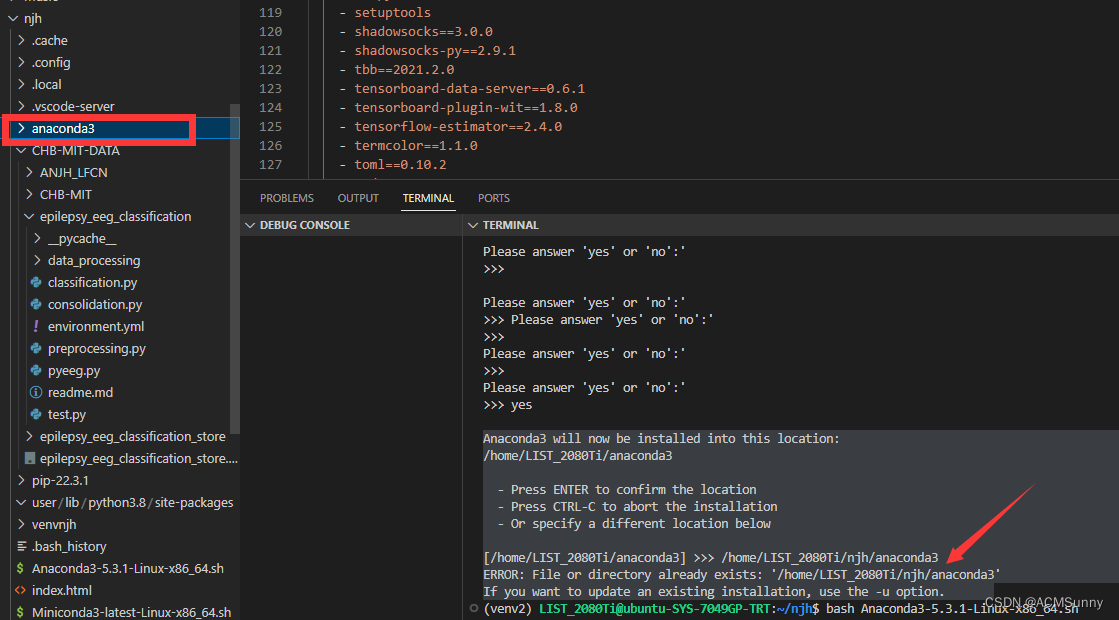
比如你的文件目录是这样的:/home/LIST_2080Ti/njh/anaconda3。删掉你的目录里面的anaconda3文件夹,而在右面的地址设定时候保留即可。因为我想把anaconda3建在自己的文件夹之下。所以需要修改一下路径。/home/LIST_2080Ti/njh/anaconda3即可。其实你只要把你文件夹里的那个anaconda3文件夹删除就行了。而自己设定路径的时候,必须随便
问题描述:
Anaconda3 will now be installed into this location:
/home/LIST_2080Ti/anaconda3- Press ENTER to confirm the location
- Press CTRL-C to abort the installation
- Or specify a different location below[/home/LIST_2080Ti/anaconda3] >>> /home/LIST_2080Ti/njh/anaconda3
ERROR: File or directory already exists: '/home/LIST_2080Ti/njh/anaconda3'
If you want to update an existing installation, use the -u option.
解决方案:
其实你只要把你文件夹里的那个anaconda3文件夹删除就行了。
因为我想把anaconda3建在自己的文件夹之下。所以需要修改一下路径。
而自己设定路径的时候,必须随便设置一个没有的文件夹才行。
比如你的文件目录是这样的:/home/LIST_2080Ti/njh/anaconda3
你需要把你的文件目录中的最后一层删掉,而在设定路径的时候设置为:
/home/LIST_2080Ti/njh/anaconda3即可。
如下图所示,
删掉你的目录里面的anaconda3文件夹,而在右面的地址设定时候保留即可。
参考文章:
anaconda安装出现directory 路径 already exits问题应该这么办_KryHan的博客-CSDN博客

魔乐社区(Modelers.cn) 是一个中立、公益的人工智能社区,提供人工智能工具、模型、数据的托管、展示与应用协同服务,为人工智能开发及爱好者搭建开放的学习交流平台。社区通过理事会方式运作,由全产业链共同建设、共同运营、共同享有,推动国产AI生态繁荣发展。
更多推荐



 4
4 0
0- 0


 已为社区贡献2条内容

所有评论(0)