使用sealos中的devbox时 用cursor编写代码上传gitee的方法
·
1、在gitee中建立仓库
2、在命令行里输入git仓库中提示的代码
git config --global user.name "用户名"
git config --global user.email "邮箱"


git init
touch README.md
git add README.md
git commit -m "first commit"
git remote add origin git@gitee.com:用户名/库名.git
git push -u origin "master"
3、然后上传代码 会遇到报错
git push -u origin "master"
git@gitee.com: Permission denied (publickey).

Please make sure you have the correct access rights
and the repository exist
按照这个教程去解决
https://blog.csdn.net/weixin_50986057/article/details/131700607
- 一
ssh-keygen -t rsa -C "这里是你自己注册Gitee的邮箱@xxx.com"
遇到这三条要输入的地方,全部直接回车
Enter file in which to save the key (/home/devbox/.ssh/id_rsa):
Enter passphrase (empty for no passphrase):
Enter same passphrase again:
- 二
终端执行如下代码,查看public key。
cat ~/.ssh/id_rsa.pub
终端会显示很长公钥
然后把公钥输入gitee例的个人设置的ssh公钥里
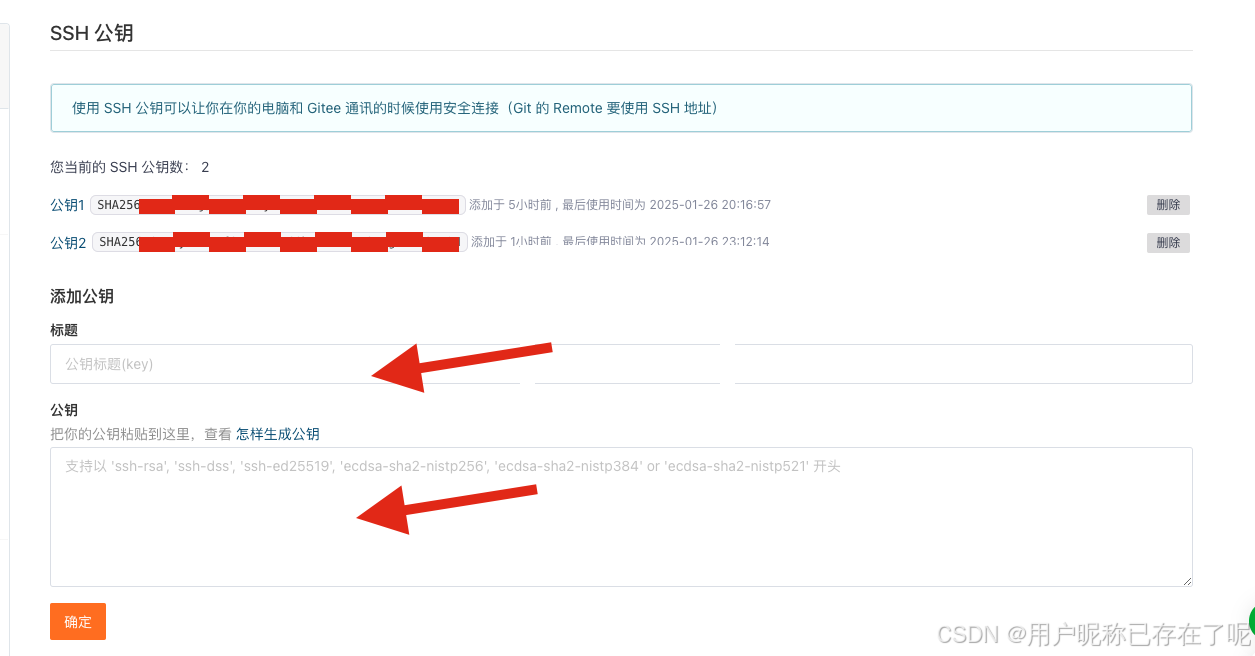
然后回到终端输入
ssh -T git@gitee.com
会显示成功

魔乐社区(Modelers.cn) 是一个中立、公益的人工智能社区,提供人工智能工具、模型、数据的托管、展示与应用协同服务,为人工智能开发及爱好者搭建开放的学习交流平台。社区通过理事会方式运作,由全产业链共同建设、共同运营、共同享有,推动国产AI生态繁荣发展。
更多推荐


 1
1 0
0- 0



 已为社区贡献3条内容

所有评论(0)