微服务 pom 依赖导入
·
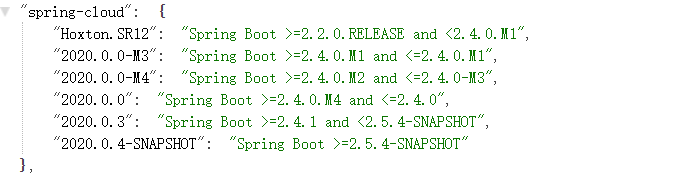
首先将SpringCloud与SpringBoot依赖对应上
提供两种查看版本方法:
1、https://start.spring.io/actuator/info
根据自己的SpringBoo版本找对应的SpringCloud版本
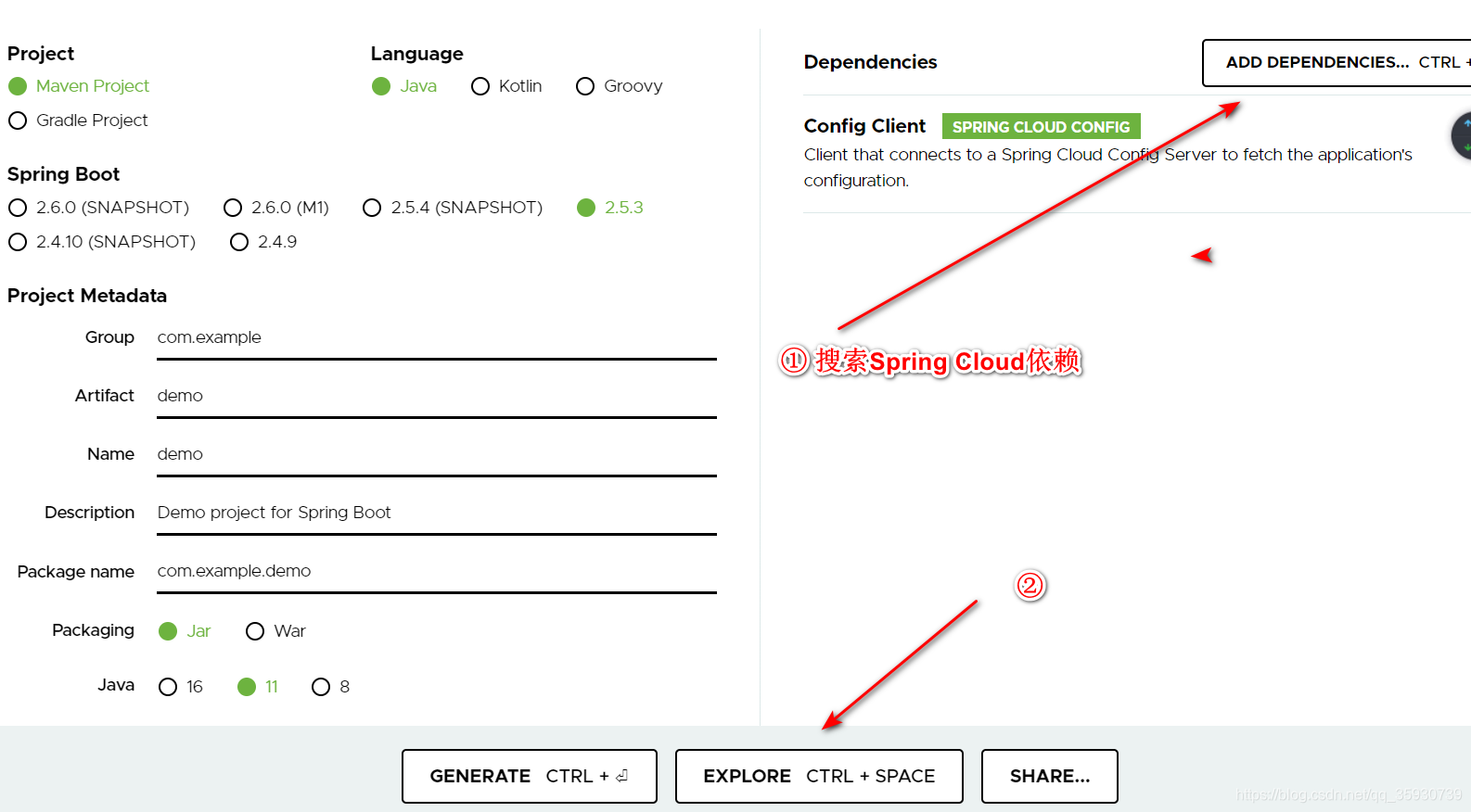
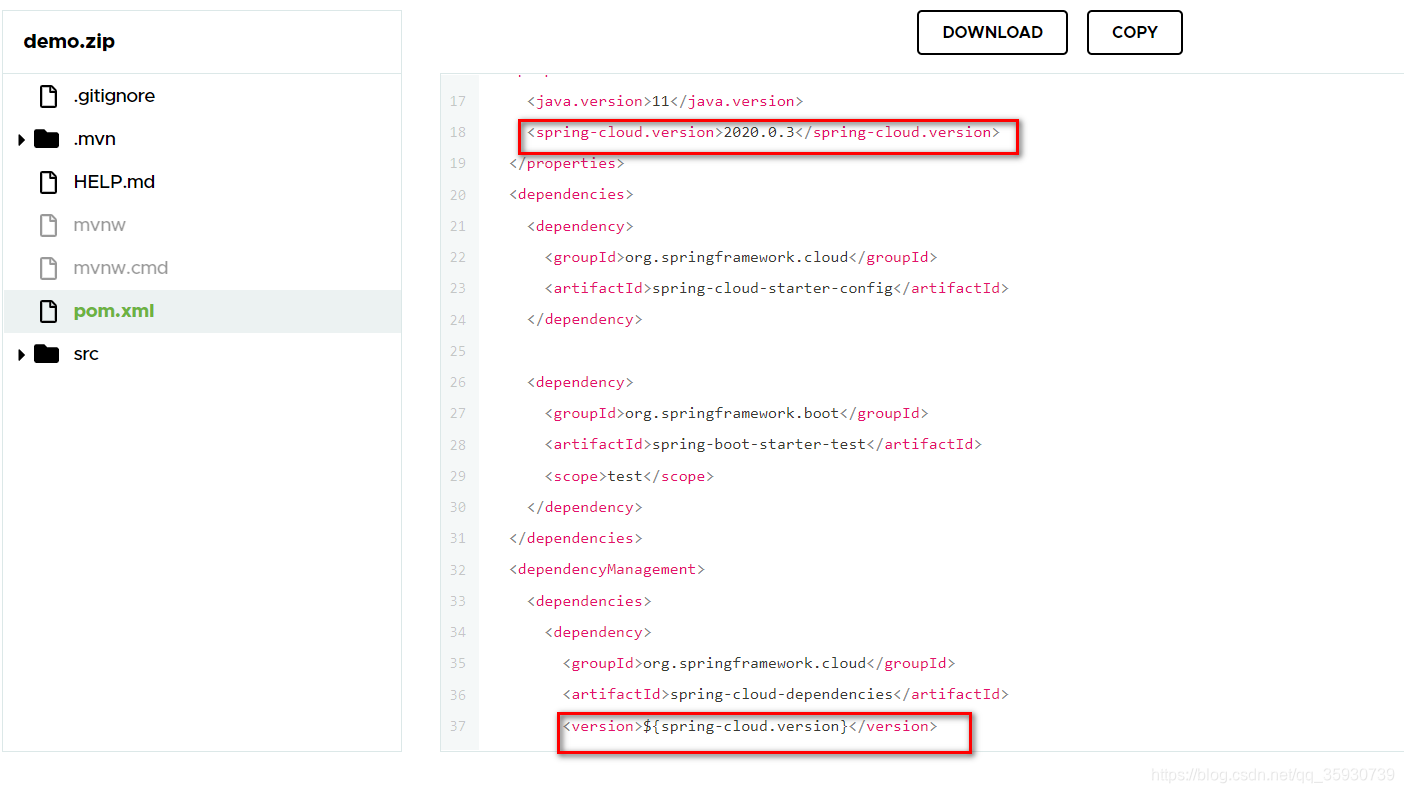
一、导入SpringCloud依赖:
spring-cloud-dependencies
二、导入SpringBoot依赖(两种方式):
① 使用 spring-boot-starter-parent(官方使用)
作用:
- 指定编码格式默认使用utf-8。
- 指定java版本默认使用1.8。
- 提供Dependency Management进行项目依赖的版本管理,如指定实际依赖的版本号(已经做版本兼容性测试)。
- 默认的资源过滤和插件管理。
使用方式:
spring-cloud-dependencies(SpringCloud依赖一块使用时)
注意:这里的依赖放置位置一定要搞清楚 不要服务起不来
Maven项目之间的继承关系通过<parent>表示
这里的spring-cloud-dependencies依赖放在parent标签中
<parent>
    <groupId>org.springframework.boot</groupId>
    <artifactId>spring-boot-starter-parent</artifactId>
    <version>2.5.3</version>
    <relativePath/> <!-- lookup parent from repository -->
  </parent>
 <properties>
    <spring-cloud.version>2020.0.3</spring-cloud.version>
  </properties>
SpringCloud的依赖版本号在 <properties> 标签中
<dependency>
        <groupId>org.springframework.cloud</groupId>
        <artifactId>spring-cloud-dependencies</artifactId>
        <version>${spring-cloud.version}</version>
        <type>pom</type>
        <scope>import</scope>
</dependency>
<?xml version="1.0" encoding="UTF-8"?>
<project xmlns="http://maven.apache.org/POM/4.0.0" xmlns:xsi="http://www.w3.org/2001/XMLSchema-instance"
xsi:schemaLocation="http://maven.apache.org/POM/4.0.0 https://maven.apache.org/xsd/maven-4.0.0.xsd">
<modelVersion>4.0.0</modelVersion>
<parent>
<groupId>org.springframework.boot</groupId>
<artifactId>spring-boot-starter-parent</artifactId>
<version>2.5.3</version>
<relativePath/> <!-- lookup parent from repository -->
</parent>
<groupId>com.example</groupId>
<artifactId>demo</artifactId>
<version>0.0.1-SNAPSHOT</version>
<name>demo</name>
<description>Demo project for Spring Boot</description>
<properties>
<java.version>11</java.version>
<spring-cloud.version>2020.0.3</spring-cloud.version>
</properties>
<dependencies>
<dependency>
<groupId>org.springframework.cloud</groupId>
<artifactId>spring-cloud-starter-config</artifactId>
</dependency>
<dependency>
<groupId>org.springframework.boot</groupId>
<artifactId>spring-boot-starter-test</artifactId>
<scope>test</scope>
</dependency>
</dependencies>
<dependencyManagement>
<dependencies>
<dependency>
<groupId>org.springframework.cloud</groupId>
<artifactId>spring-cloud-dependencies</artifactId>
<version>${spring-cloud.version}</version>
<type>pom</type>
<scope>import</scope>
</dependency>
</dependencies>
</dependencyManagement>
<build>
<plugins>
<plugin>
<groupId>org.springframework.boot</groupId>
<artifactId>spring-boot-maven-plugin</artifactId>
</plugin>
</plugins>
</build>
</project>② 使用 spring-boot-dependencies
作用:
spring-boot-dependencies 用于方便管理项目的依赖,只需在 dependencyManagement 里面配置好 spring-boot-dependencies 的版本,在 dependencies 里面就不用再指定其它版本号
方式方法:
此时两者依赖位置如下:
重点是 两者版本位置都在各自依赖的里面
    <dependencyManagement>
        <dependencies>
            <!--SpringCloud 依赖-->
            <dependency>
                <groupId>org.springframework.cloud</groupId>
                <artifactId>spring-cloud-dependencies</artifactId>
                <version>Finchley.RELEASE</version>
                <type>pom</type>
                <scope>import</scope>
            </dependency>
            <!--SpringBoot 依赖-->
            <dependency>
                <groupId>org.springframework.boot</groupId>
                <artifactId>spring-boot-dependencies</artifactId>
                <version>2.0.3.RELEASE</version>
                <type>pom</type>
                <scope>import</scope>
            </dependency>

        </dependencies>
    </dependencyManagement>
<?xml version="1.0" encoding="UTF-8"?>
<project xmlns="http://maven.apache.org/POM/4.0.0"
xmlns:xsi="http://www.w3.org/2001/XMLSchema-instance"
xsi:schemaLocation="http://maven.apache.org/POM/4.0.0 http://maven.apache.org/xsd/maven-4.0.0.xsd">
<modelVersion>4.0.0</modelVersion>
<groupId>com.one</groupId>
<artifactId>one_cloud</artifactId>
<packaging>pom</packaging>
<version>1.0-SNAPSHOT</version>
<modules>
<module>sys_eureka</module>
</modules>
<properties>
<maven.compiler.source>8</maven.compiler.source>
<maven.compiler.target>8</maven.compiler.target>
</properties>
<dependencyManagement>
<dependencies>
<!--SpringCloud 依赖-->
<dependency>
<groupId>org.springframework.cloud</groupId>
<artifactId>spring-cloud-dependencies</artifactId>
<version>Finchley.RELEASE</version>
<type>pom</type>
<scope>import</scope>
</dependency>
<!--SpringBoot 依赖-->
<dependency>
<groupId>org.springframework.boot</groupId>
<artifactId>spring-boot-dependencies</artifactId>
<version>2.0.3.RELEASE</version>
<type>pom</type>
<scope>import</scope>
</dependency>
</dependencies>
</dependencyManagement>
</project>
魔乐社区(Modelers.cn) 是一个中立、公益的人工智能社区,提供人工智能工具、模型、数据的托管、展示与应用协同服务,为人工智能开发及爱好者搭建开放的学习交流平台。社区通过理事会方式运作,由全产业链共同建设、共同运营、共同享有,推动国产AI生态繁荣发展。
更多推荐


 1
1 0
0- 0


 已为社区贡献1条内容

所有评论(0)