ubuntu、anaconda虚拟环境中安装pycocotools
·
进入虚拟环境后
1、获取源码
git clone https://github.com/pdollar/coco.git
2、编译
cd coco/PythonAPI3、本地安装
# install pycocotools locally
python setup.py build_ext --inplace
然后报错了
running build_ext
building 'pycocotools._mask' extension
creating build
creating build/common
creating build/temp.linux-x86_64-3.7
creating build/temp.linux-x86_64-3.7/pycocotools
gcc -pthread -B /home/sys507/anaconda3/envs/pytorch/compiler_compat -Wl,--sysroot=/ -Wsign-compare -DNDEBUG -g -fwrapv -O3 -Wall -Wstrict-prototypes -fPIC -I/home/sys507/anaconda3/envs/pytorch/lib/python3.7/site-packages/numpy/core/include -I../common -I/home/sys507/anaconda3/envs/pytorch/include/python3.7m -c ../common/maskApi.c -o build/temp.linux-x86_64-3.7/../common/maskApi.o -Wno-cpp -Wno-unused-function -std=c99
../common/maskApi.c: In function ‘rleToBbox’:
../common/maskApi.c:141:31: warning: ‘xp’ may be used uninitialized in this function [-Wmaybe-uninitialized]
       if(j%2==0) xp=x; else if(xp<x) { ys=0; ye=h-1; }
                               ^
gcc -pthread -B /home/sys507/anaconda3/envs/pytorch/compiler_compat -Wl,--sysroot=/ -Wsign-compare -DNDEBUG -g -fwrapv -O3 -Wall -Wstrict-prototypes -fPIC -I/home/sys507/anaconda3/envs/pytorch/lib/python3.7/site-packages/numpy/core/include -I../common -I/home/sys507/anaconda3/envs/pytorch/include/python3.7m -c pycocotools/_mask.c -o build/temp.linux-x86_64-3.7/pycocotools/_mask.o -Wno-cpp -Wno-unused-function -std=c99
gcc: error: pycocotools/_mask.c: 没有那个文件或目录
error: command 'gcc' failed with exit status 1
解决办法:安装cython
pip install cython
然后在执行上面命令就不报错了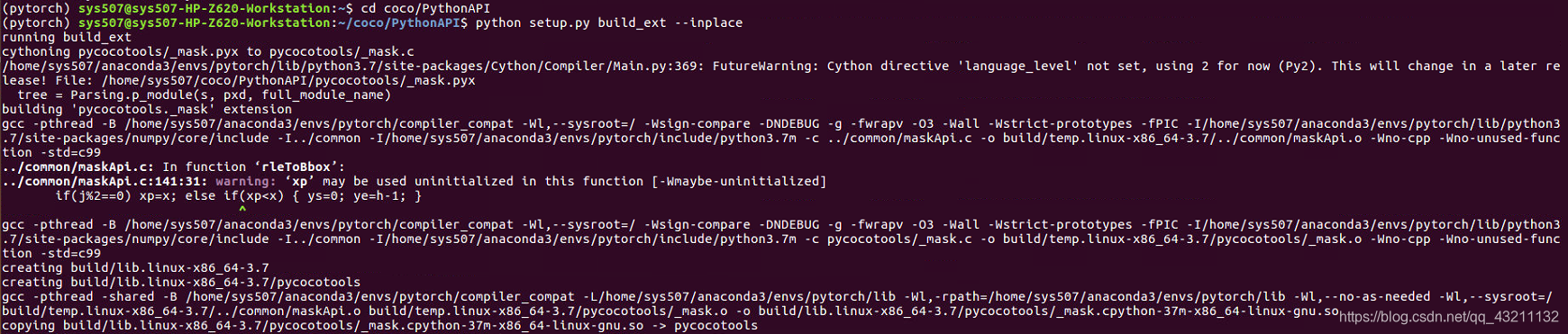
4、安装build_ext
python setup.py build_ext install然后不报错就成功了。

魔乐社区(Modelers.cn) 是一个中立、公益的人工智能社区,提供人工智能工具、模型、数据的托管、展示与应用协同服务,为人工智能开发及爱好者搭建开放的学习交流平台。社区通过理事会方式运作,由全产业链共同建设、共同运营、共同享有,推动国产AI生态繁荣发展。
更多推荐


 1
1 0
0- 0


 已为社区贡献3条内容

所有评论(0)