Anaconda下的pytorch安装与操作(针对12.6版本无Conda下载,无法使用清华镜像源)
1.在pytorch官网下载之前,可以先在pytorch虚拟环境中添加清华镜像的源加快下载速度。
conda config --add channels https://mirrors.tuna.tsinghua.edu.cn/anaconda/pkgs/free/
conda config --add channels https://mirrors.tuna.tsinghua.edu.cn/anaconda/pkgs/main/
conda config --add channels https://mirrors.tuna.tsinghua.edu.cn/anaconda/cloud/pytorch/
conda config --set show_channel_urls yes
注意的是,pytorch给的下载链接如
conda install pytorch torchvision torchaudio pytorch-cuda=11.8 -c pytorch -c nvidia
里面的-c pytorch会导致1.38g的pytorch依然默认从官网下载,依然速度很慢,所以需要删除其中的-c pytorch。同理-c nvidia也会从官网下载。
2.pytorch下载完成后,输入python进入python中
3.输入import torch导入pytorch
4.输入print(torch.cuda.is_available())来检查是否配置完成,返回true即完成
5.输入exit()或者quit()来退出python

2025.7.8
这次安装遇见的问题:
CUDA更新到了12.6,而官网的12.6版本没有conda安装。无法使用镜像源。使用pip3安装奇慢无比。
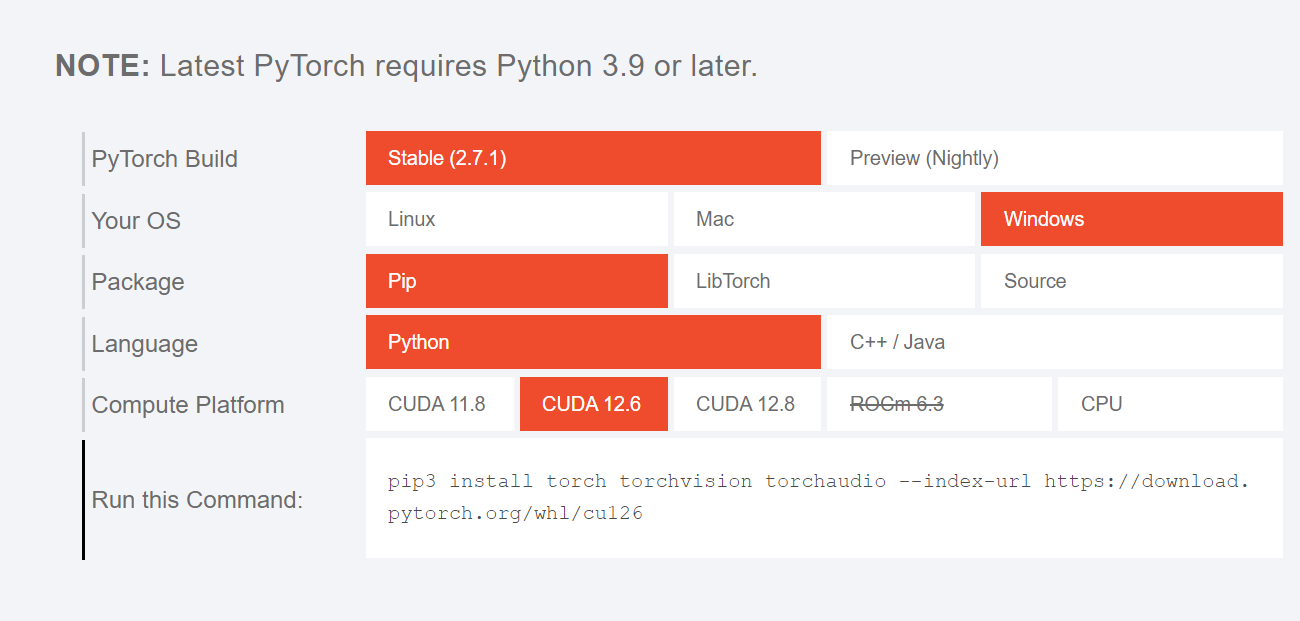
而运行pip install torch torchvision 命令不指定特定版本,自动安装会安装不兼容的版本,导致pytorch安装成功,但是print(torch.cuda.is_available())结果为false。
解决方法:
1.将之前的pytorch卸载干净,使用conda装的,就使用conda uninstall pytorch卸载。
2.找到官网上的对应cuda版本pytorch地址,如我使用的是pip install torch==2.6.0 torchvision==0.21.0 torchaudio==2.6.0 --index-url https://download.pytorch.org/whl/cu126。
下载过程中找到下载最慢的那个2.5G的whl文件,如我的是torch-2.6.0+cu126-cp39-cp39-win_amd64.whl.然后使用迅雷下载,速度很快。下载好后放到桌面。
3.进入要配置的虚拟环境,进入到桌面目录,然后执行
pip install torch-2.6.0+cu126-cp39-cp39-win_amd64.whl
直接进行本地安装。
4.然后再进入官网地址进行剩余包的安装
pip install torch==2.6.0 torchvision==0.21.0 torchaudio==2.6.0 --index-url https://download.pytorch.org/whl/cu126
就可以了,运行print(torch.cuda.is_available())结果为true。
针对安装速度过慢的包,添加清华源镜像。
如pip install torch torchvision -i https://pypi.tuna.tsinghua.edu.cn/simple

魔乐社区(Modelers.cn) 是一个中立、公益的人工智能社区,提供人工智能工具、模型、数据的托管、展示与应用协同服务,为人工智能开发及爱好者搭建开放的学习交流平台。社区通过理事会方式运作,由全产业链共同建设、共同运营、共同享有,推动国产AI生态繁荣发展。
更多推荐


 3
3 0
0- 0


 已为社区贡献1条内容

所有评论(0)