nooxml
从未来的角度,看中docx以及pptx等的发展,研究这些文档格式确实可以有用:
Depending on which version of a Word document that you want to display, you have a few choices.
If your document is indeed a .doc file (meaning, before Word 2007), then you can follow the specification for the .doc Binary File Format (which is an open specification, which allows you to use it freely) to read/write Word documents in that format.
If your document is a .docx file, then as TDJ and CodaFi have pointed out, the docx file format is an open standard.
This means that you can see every detail about how to interpret a .docx file (or any other file in the Office 2007 suite on) and process it to suit your needs.
This is how current iOS applications are able to display a docx file.
Note, this is not an easy task, as there are many, many details to those specifications.
从底层来看,是libopc,从更高层的封装来看
Deliverables
The lowest layer of the NOOXML has been open sourced as a seperate library. Check out libopc.codeplex.com.
Related projects
The NOOXML layout engine is used in the iPad viewer app Naverage Reader HD.
| Distinguished Naverage Reader HD Features |
|---|
|
这个layout是值钱的,分析出内容之后如何呈现,用户有舒适的阅读体验很重要。
Native Office Open XML (NOOXML for short) is a native implementation of the Office Open XML (OOXML) ISO/IEC 29500 standard. OOXML is used e.g. in Microsoft Office as the file format denoted by the .docx extension.
Office Open XML is an extremely feature rich markup language who's implementation is very challenging for existing applications.
NOOXML is a native implementation of the Office Open XML standard. This simply means we read the standard and we are implementing it.
-- --This layout fidelity is made possible by a revolutionary layout engine called Native Open XML (NOOXML) that we developed the last two years. The layout engine is based on theISO/IEC 29500 standard, which is the same standard on that the new Microsoft® formats like .docx are based on.
http://libopc.codeplex.com/SourceControl/latest#sample/opc_properties.c
--
方法一(建议使用)、可以直接从微软官方下载个兼容包补丁程序,安装后重启电脑,就可以用Word2003打开Docx格式的文件的。
下载地址:http://download.microsoft.com/download/6/9/E/69EA942D-4636-4350-A526-0BFD9771A12A/O2007Cnv.exe
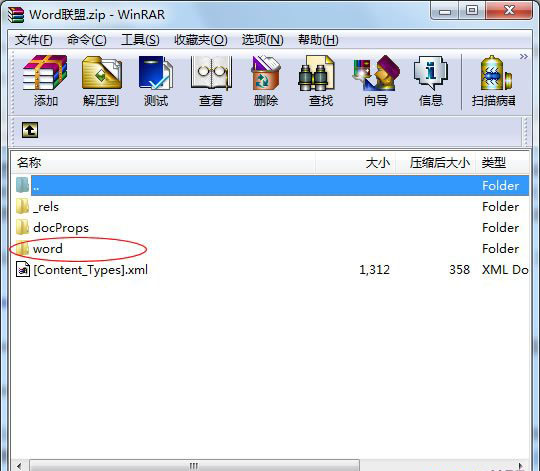
方法二、因为Docx文件本身属于一种ZIP压缩文件,所以我们可以用“winRAR压缩包”来打开。方法如下:
首先将“.docx”文件后缀改成“.zip”,此时,文件就变成了一个压缩包,双击打开我们会看到有几个文件夹,我们打开“word文件夹”,如下图;
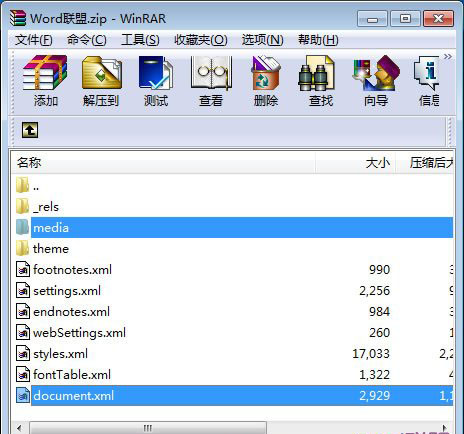
word文件夹中,“document.xml”文件里面就是文本的内容,我们可以直接用记事本打开,但里面还有一些其他的代码;“media”文件夹里面就是文本中的图片了;(如下图)

魔乐社区(Modelers.cn) 是一个中立、公益的人工智能社区,提供人工智能工具、模型、数据的托管、展示与应用协同服务,为人工智能开发及爱好者搭建开放的学习交流平台。社区通过理事会方式运作,由全产业链共同建设、共同运营、共同享有,推动国产AI生态繁荣发展。
更多推荐


 0
0 0
0- 0


 已为社区贡献2条内容

所有评论(0)