Linux下沁恒以太网芯片操作
我司使用了沁恒的几种USB转以太网芯片,比如CH397A,CH339F等,沁恒的以太网芯片有一个特点是免驱动,因为它是支持 CDC-ECM 协议和 CDC-NCM 协议及 RNDIS 协议的,只要内核配置文件中选中相应的配置即可。
一、介绍
我司使用了沁恒的几种USB转以太网芯片,比如CH397A,CH339F等,沁恒的以太网芯片有一个特点是免驱动,因为它是支持 CDC-ECM 协议和 CDC-NCM 协议及 RNDIS 协议的,只要内核配置文件中选中相应的配置即可。
CONFIG_USB_NET_CDC_EEM=m
CONFIG_USB_NET_CDC_NCM=m
CONFIG_USB_NET_CDC_SUBSET=m
识别到了USB转以太网的信息如下:
cdc_ether 1-2.1:2.0 eth2: register 'cdc_ether' at usb-nuvoton-ehci-2.1, CDC Ethernet Device, dc:32:62:67:0c:21
cdc_ether 1-2.5:2.0 eth3: register 'cdc_ether' at usb-nuvoton-ehci-2.5, CDC Ethernet Device, dc:32:62:b5:91:9d
二、MAC地址配置
沁恒的以太网芯片驱动是采用ECM,没有在驱动中进行MAC地址配置的地方,且沁恒芯片自带MAC地址,该MAC地址是以厂家进行申请的。
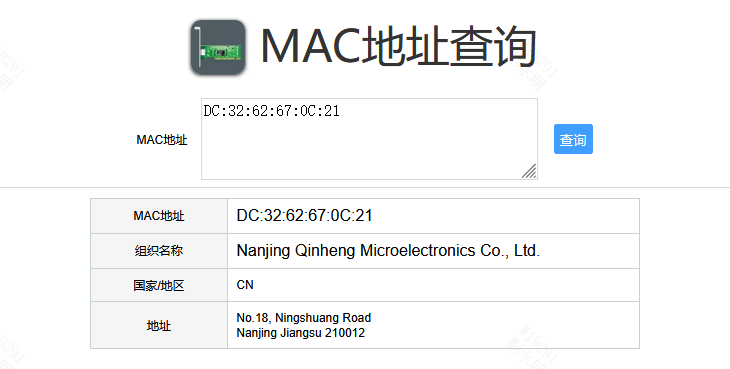
所以我们只能通过ifconfig的方式进行配置,但此处又出现一个新的问题,配置MAC地址后,该路以太网并不通。无法动态获取到IP地址。
[root@/tmp]#ifconfig eth3
[root@/tmp]#ifconfig eth3 hw ether 38:6E:21:9B:2A:32
[root@/tmp]#ifconfig eth3 up
cdc_ether 1-2.5:2.0 eth3: kevent 12 may have been dropped
cdc_ether 1-2.5:2.0 eth3: kevent 11 may have been dropped
[root@/tmp]#
[root@/tmp]#udhcpc -i eth3 -b -q
udhcpc (v1.24.2) started
Sending discover...
Sending discover...
Sending discover...
No lease, forking to background
将MAC地址换回芯片原来的MAC地址是可以正常获取IP,这是啥原因呢,经咨询沁恒得知,芯片内部的MAC地址固定了,通信时将不属于自己的网络包进行了丢弃。如果要使用,有两种方式,一开启混杂模式,二采用沁恒提供的工具重刷芯片的MAC地址。
1、使用混杂模式
混杂模式就是接收所有经过网卡的数据包,包括不是发给本机的包,即不验证MAC地址。普通模式下网卡只接收发给本机的包(包括广播包)传递给上层程序,其它的包一律丢弃。 一般来说,混杂模式不会影响网卡的正常工作,多在网络监听工具上使用。
ifconfig eth3 promisc[root@/tmp]#ifconfig eth3 promisc
device eth3 entered promiscuous mode
cdc_ether 1-2.5:2.0 eth3: kevent 12 may have been dropped
[root@/tmp]#
[root@/tmp]#
[root@/tmp]#udhcpc -i eth3 -b -q
udhcpc (v1.24.2) started
Sending discover...
Sending select for 10.5.16.133...
Lease of 10.5.16.133 obtained, lease time 14400
deleting routers
adding dns 170.15.10.20
[root@/tmp]#2、使用沁恒工具设置MAC地址
该工具由沁恒提供,工具使用如下:
bash-4.4# ./NICUpdateTool -m 366c2150e82e
mac_address: 386e2150e82e
Program begin.
[1] - 1a86:5397 (bus 2, device 3)
Search 1 CH397 devices
Change the mac configuration[386e2150e82e].
Please select the hardware that needs to update the MAC: 1
Device Open succeeded.
IC MAC address: 38 6E 21 50 E8 2C
Modify to: 38 6E 21 50 E8 2E
Serial Number: 3 6 6 c 2 1 5 0 e 8 2 e
Modified flash mac successfully
Modify the mac succeeded.
bash-4.4# [  428.318572] usb 2-1.1: USB disconnect, device number 3
[  428.327038] cdc_ether 2-1.1:2.0 eth1: unregister 'cdc_ether' usb-sunxi-ehci-1.1, CDC Ethernet Device
[  428.578097] usb 2-1.1: new high-speed USB device number 4 using sunxi-ehci
[  428.700068] usb 2-1.1: New USB device found, idVendor=1a86, idProduct=5397
[  428.707869] usb 2-1.1: New USB device strings: Mfr=1, Product=2, SerialNumber=3
[  428.716126] usb 2-1.1: Product: USB 10/100 LAN
[  428.721176] usb 2-1.1: Manufacturer: wch.cn
[  428.725946] usb 2-1.1: SerialNumber: 386e2150e82e
[  428.739898] cdc_ether 2-1.1:2.0 eth1: register 'cdc_ether' at usb-sunxi-ehci-1.1, CDC Ethernet Device, 36:6c:21:50:e8:2e
注意设置的mac地址不带 ‘:’ 号
如此便完成了芯片MAC地址的重新设置。

魔乐社区(Modelers.cn) 是一个中立、公益的人工智能社区,提供人工智能工具、模型、数据的托管、展示与应用协同服务,为人工智能开发及爱好者搭建开放的学习交流平台。社区通过理事会方式运作,由全产业链共同建设、共同运营、共同享有,推动国产AI生态繁荣发展。
更多推荐


 5
5 0
0- 0


 已为社区贡献1条内容

所有评论(0)