用python编写注册登录程序,用python写注册登录界面
这篇文章主要介绍了python登入系统注册登入,注册,退出的编程代码,具有一定借鉴价值,需要的朋友可以参考下。希望大家阅读完这篇文章后大有收获,下面让小编带着大家一起了解一下。设计任务初步设计程序登录界面,详细分析设计步骤。程序详细分析基本框架设计```root = tk.Tk() # 创建应用程序窗口root.title("用户登录界面设计")# --------功能块代码开始---------
这篇文章主要介绍了python登入系统注册登入,注册,退出的编程代码,具有一定借鉴价值,需要的朋友可以参考下。希望大家阅读完这篇文章后大有收获,下面让小编带着大家一起了解一下。

设计任务
初步设计程序登录界面,详细分析设计步骤。
程序详细分析
基本框架设计
```
import tkinter as tk
import tkinter.messagebox
root = tk.Tk() # 创建应用程序窗口
root.title("用户登录界面设计")
root.geometry("230x100")
# --------功能块代码开始-------
--------功能块代码结束------
root.mainloop()
设计标签用于提示用户
labelName = tk.Label(root, text='用户姓名:', justify=tk.RIGHT, width=80)
labelPwd = tk.Label(root, text='用户密码:', justify=tk.RIGHT, width=80)
设计输入框
entryName = tk.Entry(root, width=80, textvariable=varName)
entryPwd = tk.Entry(root, show='*', width=80, textvariable=varPwd)
设计按钮
buttonOk = tk.Button(root, text='登录', relief=tk.RAISED, command=login)
buttonCancel = tk.Button(root, text='重置', relief=tk.RAISED, command=cancel)
buttonquit = tk.Button(root, text='退出', relief=tk.RAISED, command=_quit)
设计功能函数
**关联变量**
varName = tk.StringVar()
varName.set('')
varPwd = tk.StringVar()
varPwd.set('')
**登录按钮处理函数**
def login():
# 获取用户名和密码
name = entryName.get()
pwd = entryPwd.get()
if name == 'admin' and pwd == '123456':
tk.messagebox.showinfo(title='Python tkinter', message='OK')
else:
tk.messagebox.showerror('Python tkinter', message='Error')
**重新输入按钮处理函数**
def cancel():
# 清空用户输入的用户名和密码
varName.set('')
varPwd.set('')
**退出按钮处理函数**
def _quit():
root.quit()
root.destroy()
各个组件排兵布阵
labelName.place(x=10, y=5, width=80, height=20)
labelPwd.place(x=10, y=30, width=80, height=20)
entryName.place(x=100, y=5, width=80, height=20)
entryPwd.place(x=100, y=30, width=80, height=20)
buttonOk.place(x=30, y=70, width=50, height=20)
buttonCancel.place(x=90, y=70, width=50, height=20)
buttonquit.place(x=150, y=70, width=50, height=20)
完整程序组装
import tkinter as tk
import tkinter.messagebox
root = tk.Tk() # 创建应用程序窗口
root.title("用户登录界面设计")
root.geometry("230x100")
--------功能块代码开始-------
功能函数设计
varName = tk.StringVar()
varName.set('')
varPwd = tk.StringVar()
varPwd.set('')
def login():
# 获取用户名和密码
name = entryName.get()
pwd = entryPwd.get()
if name == 'admin' and pwd == '123456':
tk.messagebox.showinfo(title='Python tkinter', message='OK')
else:
tk.messagebox.showerror('Python tkinter', message='Error')
def cancel():
# 清空用户输入的用户名和密码
varName.set('')
varPwd.set('')
def _quit():
root.quit()
root.destroy()
主窗口中的各个组件设计
labelName = tk.Label(root, text='用户姓名:', justify=tk.RIGHT, width=80)
labelPwd = tk.Label(root, text='用户密码:', justify=tk.RIGHT, width=80)
entryName = tk.Entry(root, width=80, textvariable=varName)
entryPwd = tk.Entry(root, show='*', width=80, textvariable=varPwd)
buttonOk = tk.Button(root, text='登录', relief=tk.RAISED, command=login)
buttonCancel = tk.Button(root, text='重置', relief=tk.RAISED, command=cancel)
buttonquit = tk.Button(root, text='退出', relief=tk.RAISED, command=_quit)
主窗口中各个组件的排放位置 = 排兵布阵
labelName.place(x=10, y=5, width=80, height=20)
labelPwd.place(x=10, y=30, width=80, height=20)
entryName.place(x=100, y=5, width=80, height=20)
entryPwd.place(x=100, y=30, width=80, height=20)
buttonOk.place(x=30, y=70, width=50, height=20)
buttonCancel.place(x=90, y=70, width=50, height=20)
buttonquit.place(x=150, y=70, width=50, height=20)
--------功能块代码结束------
root.mainloop() # 窗口运行循环
最终效果
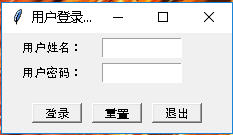
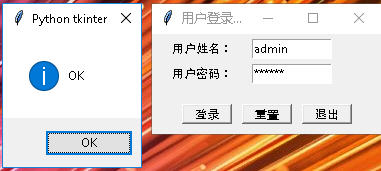
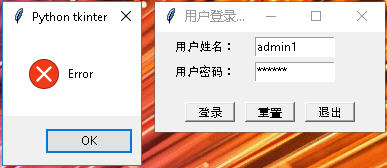

魔乐社区(Modelers.cn) 是一个中立、公益的人工智能社区,提供人工智能工具、模型、数据的托管、展示与应用协同服务,为人工智能开发及爱好者搭建开放的学习交流平台。社区通过理事会方式运作,由全产业链共同建设、共同运营、共同享有,推动国产AI生态繁荣发展。
更多推荐



 0
0 0
0- 0


 已为社区贡献16条内容

所有评论(0)