Centos7 springboot 报 “Too many open files” 问题
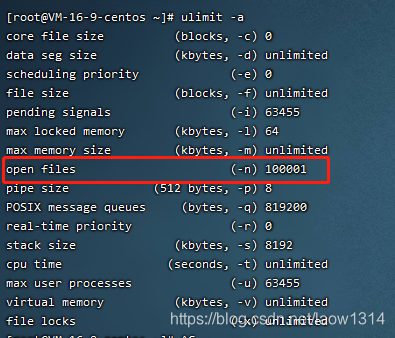
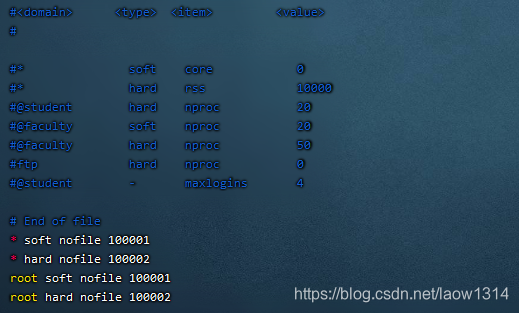
查看用户进程级的能够打开文件句柄的数量运行 ulimit -aCentos7默认是1024[root@VM-16-9-centos ~]# ulimit -a修改限制一个用户的所有shell能打开的最大数命令vim /etc/security/limits.conf[root@VM-16-9-centos ~]# vim /etc/security/limits.conf在末尾添加* soft n
·
查看用户进程级的能够打开文件句柄的数量
运行 ulimit -a
Centos7默认是1024
[root@VM-16-9-centos ~]# ulimit -a
修改限制一个用户的所有shell能打开的最大数
命令vim /etc/security/limits.conf
[root@VM-16-9-centos ~]# vim /etc/security/limits.conf
在末尾添加
* soft nofile 100001
* hard nofile 100002
root soft nofile 100001
root hard nofile 100002
系统重启,问题就解决了

魔乐社区(Modelers.cn) 是一个中立、公益的人工智能社区,提供人工智能工具、模型、数据的托管、展示与应用协同服务,为人工智能开发及爱好者搭建开放的学习交流平台。社区通过理事会方式运作,由全产业链共同建设、共同运营、共同享有,推动国产AI生态繁荣发展。
更多推荐


 0
0 0
0- 0


 已为社区贡献6条内容

所有评论(0)