CityScapes数据集下载,转换为yolo格式进行yolov11-seg实例分割训练
一、CityScapes数据集下载
官网链接:https://www.cityscapes-dataset.com/downloads/
1、注册账号登录
官网下载需要先注册账号--使用学校的edu邮箱注册,注意账号需要激活才可以成功登录,激活从邮件中的链接进入登录就可成功激活账号,输入正确用户名密码即可登录,下载需要的数据集。

2、下载数据集
框出来的就是对应的数据集,训练验证测数据集的图片和对应标签
getFine_trainvaltest.zip [241MB]
leftImg8bit_trainvaltest.zip [11GB]
也可以使用后面用户的网盘链接下载更加方便

其中leftImg8bit_trainvaltest.zip,gtFine_trainvaltest.zip,百度网盘链接: gtFine_trainvaltest.zip_免费高速下载|百度网盘-分享无限制 https://pan.baidu.com/s/1TALhEm2gEOWA1BRekyq4MA?pwd=9i1v#list/path=%2F 提取码: 9i1v

网盘链接的原文链接:https://blog.csdn.net/qq_44228955/article/details/135233242
3、数据集内容以及实例分割标签
数据集图片和验证集都划分为下图中的三个文件夹


grFine中的标签不只有实例分割标签,所有的标签都在一个文件夹中。CityScapes提供的标注信息有彩色语义图、实例id单通道图、语义id单通道图以及所有语义polygon的文本描述.json:
| 文件名 | 用处 |
|---|---|
| bochum_xxxxxx_xxxxxx_gtFine_color.png | 可视化出来的彩色图像,对应第一部分表格最后一列 |
| bochum_xxxxxx_xxxxxx_gtFine_instanceIds.png | 实例分割标签 |
| bochum_xxxxxx_xxxxxx_gtFine_labelIds.png | 对应第一部分id列 |
| bochum_xxxxxx_xxxxxx_gtFine_polygons.png | 手工标注的第一手数据 |
表格原文链接:https://blog.csdn.net/qq_42178122/article/details/116117762
其中类似frankfurt_000000_000294_gtFine_instanceIds.png这个后缀为instanceIds的就是我们需要的标签文件啦

二、CityScapes数据集转换为COCO格式的实例分割数据集
1、COCO的标注信息介绍
首先,COCO的标注信息格式参考博文:https://blog.csdn.net/u012609509/article/details/88680841,COCO的图片文件均放在一个文件夹下,而其标注信息都放在annotation文件夹的不同.json文本中,一个文本中包含了对所有图片以及某一任务的所有图片的标注信息。CityScapes提供的标注信息有彩色语义图、实例id单通道图、语义id单通道图以及所有语义polygon的文本描述.json。相关介绍参考CSDN博主的原创文章,原文链接:https://blog.csdn.net/sinat_36502563/article/details/103788976
2、确定CityScapes能够实例分割的类别
(1)、下载官方脚本地址:GitHub - mcordts/cityscapesScripts: README and scripts for the Cityscapes Dataset
(2)、cityscapesscripts/helpers/labels.py文件,找到需要的实例分割的类别。注意 hasInstances=Ture 的类别才能够用于实例分割,也就是说只有10类。
————————————————
此处参考CSDN博主的原创文章。原文链接:https://blog.csdn.net/qiaogaofei/article/details/138352298
3、训练类别确定以及转换为coco格式的代码
一个COCO标注文件中包含info、lisenses、categories、images以及annotations,代码初始预先设定了前三项,categories可以根据自己的需要进行修改,我保留的类别有8类,car、pedestrian(person)、truck、bus、rider,motorcycle, bicycle以下是cityscapes完整的类别定义:
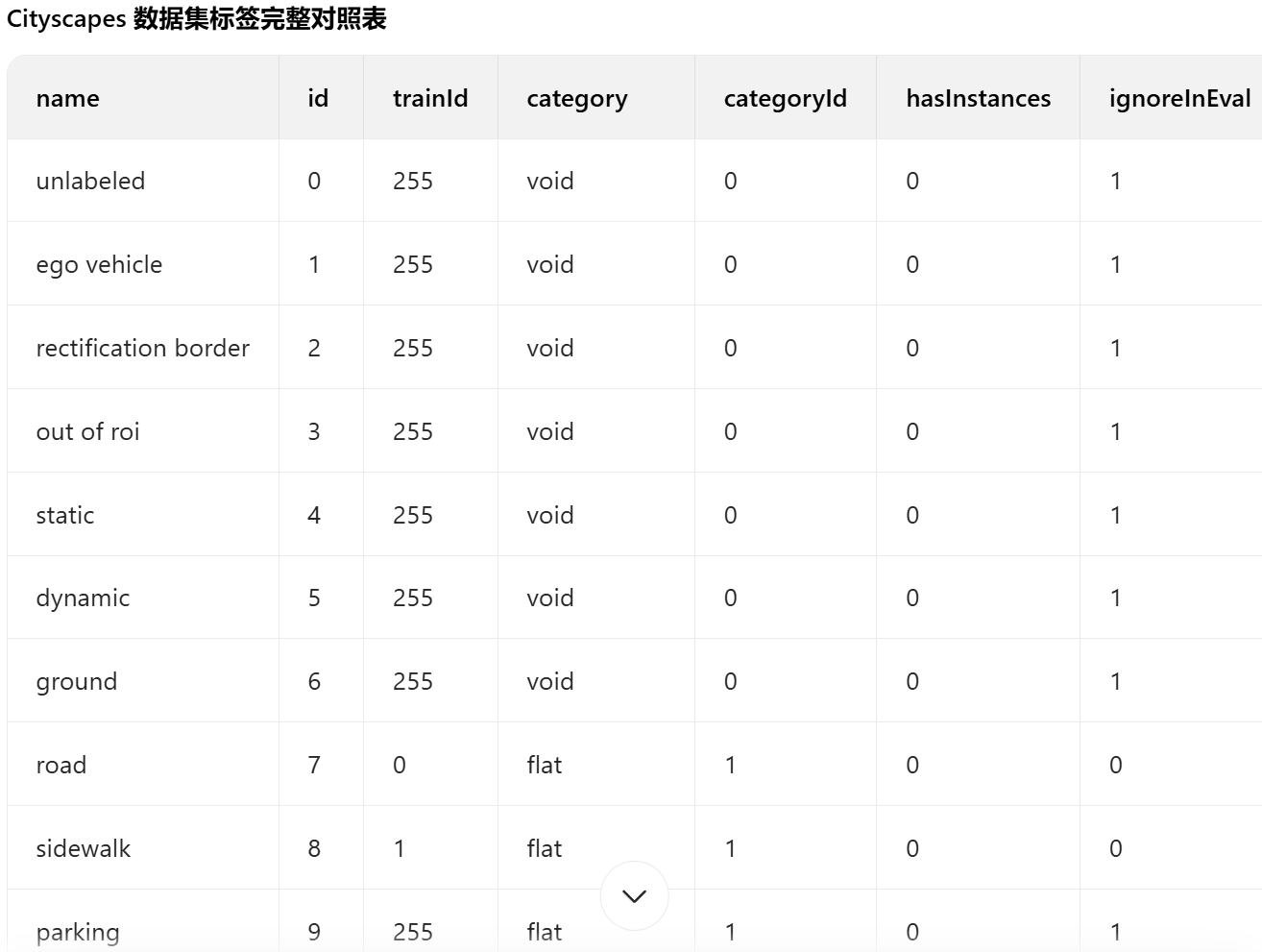
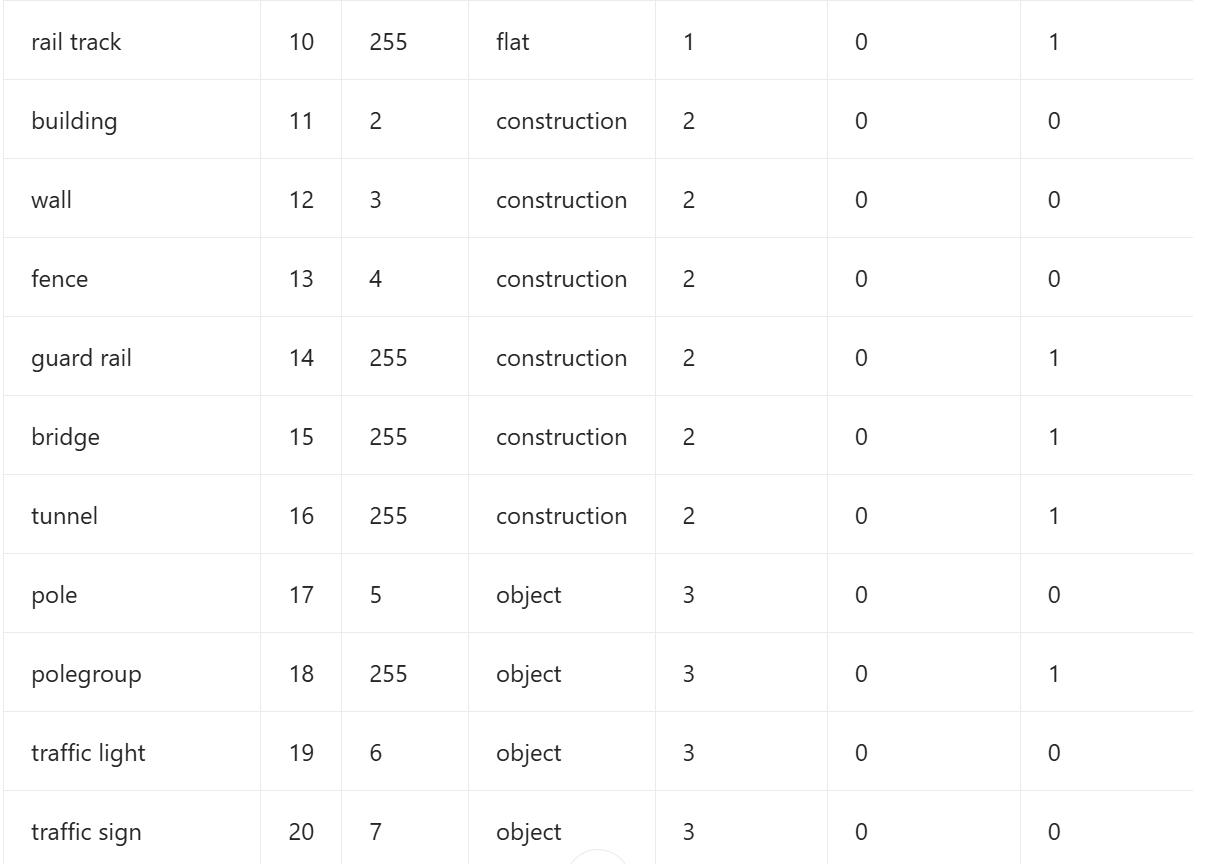

转换为coco格式的代码:参考博文https://blog.csdn.net/sinat_36502563/article/details/103788976, 原创博主也将代码均上传在Github: https://github.com/KevinJia1212/cityscapes2coco和博文https://blog.csdn.net/qiaogaofei/article/details/138352298,这个博主有介绍代码报错如何解决,非常感谢。
代码python文件 transcityscapes2coco.py
import cv2
import numpy as np
import os, glob
from shutil import copyfile
import datetime
import json
import os
import re
import fnmatch
from PIL import Image
import numpy as np
import pycococreatortools
import datetime
import numpy as np
from pycococreatortools import pycococreatortools

# ===================== 粘贴开始 =====================
def create_image_info(image_id, file_name, image_size,
                      date_captured=datetime.datetime.utcnow().isoformat(' '),
                      license_id=1, coco_url="", flickr_url=""):
    image_info = {
        "id": image_id,
        "file_name": file_name,
        "width": image_size[0],
        "height": image_size[1],
        "date_captured": date_captured,
        "license": license_id,
        "coco_url": coco_url,
        "flickr_url": flickr_url
    }
    return image_info

def create_annotation_info(annotation_id, image_id, category_info, binary_mask,
                           image_size=None, tolerance=2, bounding_box=None):
    binary_mask_encoded = pycococreatortools.encode_binary_mask(binary_mask)
    area = pycococreatortools.compute_binary_mask_area(binary_mask_encoded)
    if area < 1:
        return None
    if bounding_box is None:
        bounding_box = pycococreatortools.compute_bounding_box(binary_mask_encoded)
    if image_size is not None:
        binary_mask = pycococreatortools.resize_binary_mask(binary_mask, image_size)
    segmentation = pycococreatortools.binary_mask_to_polygon(binary_mask_encoded, tolerance)
    if not segmentation:
        return None
    annotation_info = {
        "id": annotation_id,
        "image_id": image_id,
        "category_id": category_info["id"],
        "iscrowd": category_info["is_crowd"],
        "area": area,
        "bbox": bounding_box,
        "segmentation": segmentation,
        "width": image_size[0],
        "height": image_size[1],
    }
    return annotation_info


ROOT_DIR = 'D:/BaiduNetdiskDownload/cityscapes/'
IMAGE_DIR = os.path.join(ROOT_DIR, "leftImg8bit/train")
ANNOTATION_DIR = os.path.join(ROOT_DIR, "gtFine/train")
ANNOTATION_SAVE_DIR = os.path.join(ROOT_DIR, "annotations/train")
INSTANCE_DIR = os.path.join(ROOT_DIR, "instances/train")
IMAGE_SAVE_DIR = os.path.join(ROOT_DIR, "images/train_images")

os.makedirs(ANNOTATION_SAVE_DIR,exist_ok=True)
os.makedirs(INSTANCE_DIR,exist_ok=True)
os.makedirs(IMAGE_SAVE_DIR,exist_ok=True)

INFO = {
    "description": "Cityscapes_Instance Dataset",
    "url": "https://github.com/waspinator/pycococreator",
    "version": "0.1.0",
    "year": "2020",
    "contributor": "Kevin_Jia",
    "date_created": "2020-1-23 19:19:19.123456"
}

LICENSES = [
    {
        "id": 1,
        "name": "Attribution-NonCommercial-ShareAlike License",
        "url": "http://creativecommons.org/licenses/by-nc-sa/2.0/"
    }
]

CATEGORIES = [
    {
        'id': 1,
        'name': 'person',
        'supercategory': 'cityscapes',
    },
    {
        'id': 2,
        'name': 'rider',
        'supercategory': 'cityscapes',
    },
    {
        'id': 3,
        'name': 'car',
        'supercategory': 'cityscapes',
    },
    {
        'id': 4,
        'name': 'truck',
        'supercategory': 'cityscapes',
    },
    {
        'id': 5,
        'name': 'bus',
        'supercategory': 'cityscapes',
    },
    {
        'id': 6,
        'name': 'train',
        'supercategory': 'cityscapes',
    },
    {
        'id': 7,
        'name': 'motorcycle',
        'supercategory': 'cityscapes',
    },
    {
        'id': 8,
        'name': 'bicycle',
        'supercategory': 'cityscapes',
    }
]

background_label = list(range(-1, 24, 1)) + list(range(29, 31, 1))
idx = 0
pic_scale = 1.0
h_bias = 1.0


def image_trans():
    img_subfolders = os.listdir(IMAGE_DIR)
    image_count = 0
    for sub in img_subfolders:
        # sub_path = sub + '/' + sub
        image_sub_path = os.path.join(IMAGE_DIR, sub)
        for image in os.listdir(image_sub_path):
            img_path = os.path.join(image_sub_path, image)
            ann_name = image.split('_')[0] + '_' + image.split('_')[1] + '_' + image.split('_')[
                2] + '_gtFine_instanceIds.png'
            ann_sub_path = os.path.join(ANNOTATION_DIR, sub)
            ann_path = os.path.join(ann_sub_path, ann_name)
            if os.path.exists(ann_path):
                pic = cv2.imread(img_path)
                h, w = pic.shape[:2]
                new_w = w * pic_scale
                new_h = new_w / 2
                top = int((h_bias * h - new_h) / 2)
                bottom = int((h_bias * h + new_h) / 2)
                left = int((w - new_w) / 2)
                right = int((w + new_w) / 2)
                roi = pic[top:bottom, left:right]
                img_save_path = os.path.join(IMAGE_SAVE_DIR, image)
                cv2.imwrite(img_save_path, roi)
                annotation = cv2.imread(ann_path, -1)
                ann_roi = annotation[top:bottom, left:right]
                ann_save_path = os.path.join(ANNOTATION_SAVE_DIR, ann_name)
                cv2.imwrite(ann_save_path, ann_roi)
            else:
                print(image + '  do not have instance annotation')
            print(image_count)
            image_count += 1


def data_loader():
    imgs = os.listdir(IMAGE_SAVE_DIR)
    masks_generator(imgs, ANNOTATION_SAVE_DIR)


def masks_generator(imges, ann_path):
    global idx
    pic_count = 0
    for pic_name in imges:
        image_name = pic_name.split('.')[0]
        ann_folder = os.path.join(INSTANCE_DIR, image_name)
        os.mkdir(ann_folder)
        annotation_name = pic_name.split('_')[0] + '_' + pic_name.split('_')[1] + '_' + pic_name.split('_')[
            2] + '_gtFine_instanceIds.png'
        # annotation_name = image_name + '_instanceIds.png'
        print(annotation_name)
        annotation = cv2.imread(os.path.join(ann_path, annotation_name), -1)
        h, w = annotation.shape[:2]
        ids = np.unique(annotation)
        for id in ids:
            if id in background_label:
                continue
            else:
                class_id = id // 1000
                if class_id == 24:
                    instance_class = 'person'
                elif class_id == 25:
                    instance_class = 'rider'
                elif class_id == 26:
                    instance_class = 'car'
                elif class_id == 27:
                    instance_class = 'truck'
                elif class_id == 28:
                    instance_class = 'bus'
                elif class_id == 31:
                    instance_class = 'train'
                elif class_id == 32:
                    instance_class = 'motorcycle'
                elif class_id == 33:
                    instance_class = 'bicycle'
                else:
                    continue
            instance_mask = np.zeros((h, w, 3), dtype=np.uint8)
            mask = annotation == id
            instance_mask[mask] = 255
            mask_name = image_name + '_' + instance_class + '_' + str(idx) + '.png'
            cv2.imwrite(os.path.join(ann_folder, mask_name), instance_mask)
            idx += 1
        pic_count += 1
        print(pic_count)


def json_generate():
    person = 0
    rider = 0
    car = 0
    truck = 0
    bus = 0
    train = 0
    motorcycle = 0
    bicycle = 0
    files = os.listdir(IMAGE_SAVE_DIR)

    coco_output = {
        "info": INFO,
        "licenses": LICENSES,
        "categories": CATEGORIES,
        "images": [],
        "annotations": []
    }

    image_id = 1
    segmentation_id = 1

    # go through each image
    for image_filename in files:
        image_name = image_filename.split('.')[0]
        image_path = os.path.join(IMAGE_SAVE_DIR, image_filename)

        annotation_sub_path = os.path.join(INSTANCE_DIR, image_name)
        ann_files = os.listdir(annotation_sub_path)
        if len(ann_files) == 0:
            print("no avaliable annotation")
            continue
        else:

            image = Image.open(image_path)
            image_info = pycococreatortools.create_image_info(
                image_id, os.path.basename(image_filename), image.size)
            coco_output["images"].append(image_info)
            print(image_filename)

            for annotation_filename in ann_files:
                annotation_path = os.path.join(annotation_sub_path, annotation_filename)
                for x in CATEGORIES:
                    if x['name'] in annotation_filename:
                        class_id = x['id']
                        break
                # class_id = [x['id'] for x in CATEGORIES if x['name'] in annotation_filename][0]
                if class_id == 1:
                    person += 1
                elif class_id == 2:
                    rider += 1
                elif class_id == 3:
                    car += 1
                elif class_id == 4:
                    truck += 1
                elif class_id == 5:
                    bus += 1
                elif class_id == 6:
                    train += 1
                elif class_id == 7:
                    motorcycle += 1
                elif class_id == 8:
                    bicycle += 1
                else:
                    print('illegal class id')
                category_info = {'id': class_id, 'is_crowd': 'crowd' in image_filename}
                binary_mask = np.asarray(Image.open(annotation_path)
                                         .convert('1')).astype(np.uint8)

                annotation_info = pycococreatortools.create_annotation_info(
                    segmentation_id, image_id, category_info, binary_mask,
                    image.size, tolerance=2)

                if annotation_info is not None:
                    coco_output["annotations"].append(annotation_info)

                    segmentation_id = segmentation_id + 1

            image_id = image_id + 1
            print(image_id)

    with open('{}/train_modified.json'.format(ROOT_DIR), 'w') as output_json_file:
        json.dump(coco_output, output_json_file)
    print(person, rider, car, truck, bus, train, motorcycle, bicycle)


if __name__ == "__main__":
    # 依次使用以下三个函数
    image_trans()
    #data_loader()
    #json_generate()
File ".......pycococreator-master\pycococreatortools\pycococreatortools.py", line 99, in create_annotation_info
segmentation = binary_mask_to_polygon(binary_mask, tolerance)
File "........pycococreator-master\pycococreatortools\pycococreatortools.py", line 48, in binary_mask_to_polygon
contours = np.subtract(contours, 1)
ValueError: setting an array element with a sequence. The requested array has an inhomogeneous shape after 1 dimensions. The detected shape was (2,) + inhomogeneous part.找到报错对应的python文件以及对应代码行进行替换代码解决:
#contours = np.subtract(contours, 1)注释该行,使用下面代替
contours = [np.subtract(c, 1) for c in contours]
在transcityscapes2coco.py 中导入列表中按照图示方法找到对应的pycococreatortools.py
在对应行进行代码替换,也可在报错处转到对应文件。

替换完成后如下图

4、运行说明依次修改对应的train以及val目录地址为你自己的,
ROOT_DIR = 'D:/BaiduNetdiskDownload/cityscapes/'
IMAGE_DIR = os.path.join(ROOT_DIR, "leftImg8bit/train")
ANNOTATION_DIR = os.path.join(ROOT_DIR, "gtFine/train")
ANNOTATION_SAVE_DIR = os.path.join(ROOT_DIR, "annotations/train")
INSTANCE_DIR = os.path.join(ROOT_DIR, "instances/train")
IMAGE_SAVE_DIR = os.path.join(ROOT_DIR, "images/train_images")
还有303行对应json文件名也要对应改为train与val保存的json文件名称
with open('{}/train_modified.json'.format(ROOT_DIR), 'w') as output_json_file:注意在train与val运行代码需要依次使用这三个函数,如果运行报错,检查每个文件夹下载的图片是否有问题,下载不成功的某个别图片记得删除图片和对应标签。然后重新依次运行代码,就可以正常生成对应的json文件啦。
    # 依次使用以下三个函数
    image_trans()
    #data_loader()
    #json_generate()
5、转换结果
会生成annotations\instances\image这几个文件以及对应的json标签文件
为了后续使用,我将train与val对应的json文件复制到了文件夹中annotations

6、检查转换结果是否正确
修改对应图片和json文件地址为你自己的。
import os
import sys
if "/opt/ros/kinetic/lib/python2.7/dist-packages" in sys.path:
    sys.path.remove("/opt/ros/kinetic/lib/python2.7/dist-packages")
import cv2
import numpy as np
from skimage import io
from matplotlib import pyplot as plt
from matplotlib import patches, lines
from matplotlib.patches import Polygon, Rectangle
from matplotlib.collections import PatchCollection

from pycocotools.coco import COCO

def showAnns(anns):
    if len(anns) == 0:
        return 0
    ax = plt.gca()
    ax.set_autoscale_on(False)
    captions = []
    polygons = []
    rectangles = []
    color = []
    for ann in anns:
        c = (np.random.random((1, 3))*0.6+0.4).tolist()[0]
        if 'segmentation' in ann:
            if type(ann['segmentation']) == list:
                # polygon
                for seg in ann['segmentation']:
                    captions.append(cat_names[ann['category_id']-1])
                    poly = np.array(seg).reshape((int(len(seg)/2), 2))
                    l_corner, w, h = (ann['bbox'][0], ann['bbox'][1]), ann['bbox'][2], ann['bbox'][3]
                    rectangles.append(Rectangle(l_corner, w, h))
                    polygons.append(Polygon(poly))
                    color.append(c)

    p = PatchCollection(rectangles, facecolor='none', edgecolors=color, alpha=1, linestyle='--', linewidths=2)
    ax.add_collection(p)

    for i in range(len(captions)):
        x = rectangles[i].xy[0]
        y = rectangles[i].xy[1]
        ax.text(x, y, captions[i], size=10, verticalalignment='top', color='w', backgroundcolor="none")

    p = PatchCollection(polygons, facecolor=color, linewidths=0, alpha=0.3)
    ax.add_collection(p)
    p = PatchCollection(polygons, facecolor='none', edgecolors=color, linewidths=2)
    ax.add_collection(p)

annfile = 'D:/BaiduNetdiskDownload/cityscapes/train_modified.json'
imgroot = 'D:/BaiduNetdiskDownload/cityscapes/images/train_images'
coco = COCO(annfile)
cats = coco.loadCats(coco.getCatIds())
cat_names = [cat['name'] for cat in cats]
catids = coco.getCatIds(catNms='truck')
imgids = coco.getImgIds(catIds=catids)
img = coco.loadImgs(imgids[np.random.randint(0, len(imgids))])[0]
I = io.imread(os.path.join(imgroot, img['file_name']))
plt.imshow(I)
annids = coco.getAnnIds(imgIds=img['id'])
anns = coco.loadAnns(annids)
showAnns(anns)
plt.show()
三、COCO格式转换为yolo的txt格式
分别将生成的训练集和测试集的json使用yolo v8自带的转换工具,前面提到的博主的代码如下:
from ultralytics.data.converter import convert_coco

convert_coco(labels_dir='path/to/json/', use_segments=True)
1、使用代码
但因为类别映射相关问题我对代码进行了修改,首先
cityscapes_map = {1: 0, 2: 1, 3: 2, 4: 3, 5: 4, 6: 5, 7: 6, 8: 7},这个映射是因为Cityscapes 的 coco json 里类别 id 是1-8 → YOLO 需要从0开始的0-7,于是自定义映射传入custom_class_map参数,对covert_coco也需要修改对应代码类别映射。
个人使用修改后的代码文件 yolo_own_covert.py
import json
import random
import shutil
from collections import defaultdict
from concurrent.futures import ThreadPoolExecutor, as_completed
from pathlib import Path

import cv2
import numpy as np
from PIL import Image

from ultralytics.data.converter import merge_multi_segment
from ultralytics.utils import DATASETS_DIR, LOGGER, NUM_THREADS, TQDM
from ultralytics.utils.downloads import download
from ultralytics.utils.files import increment_path

# Cityscapes类别映射
cityscapes_map = {1: 0, 2: 1, 3: 2, 4: 3, 5: 4, 6: 5, 7: 6, 8: 7}

def convert_coco(
        labels_dir="../coco/annotations/",
        save_dir="coco_converted/",
        use_segments=False,
        use_keypoints=False,
        cls91to80=True,
        lvis=False,
        custom_class_map=None,
):
    """
    Converts COCO dataset annotations to a YOLO annotation format  suitable for training YOLO models.

    Args:
        labels_dir (str, optional): Path to directory containing COCO dataset annotation files.
        save_dir (str, optional): Path to directory to save results to.
        use_segments (bool, optional): Whether to include segmentation masks in the output.
        use_keypoints (bool, optional): Whether to include keypoint annotations in the output.
        cls91to80 (bool, optional): Whether to map 91 COCO class IDs to the corresponding 80 COCO class IDs.
        lvis (bool, optional): Whether to convert data in lvis dataset way.

    Example:
        ```python
        from ultralytics.data.converter import convert_coco

        convert_coco("../datasets/coco/annotations/", use_segments=True, use_keypoints=False, cls91to80=False)
        convert_coco(
            "../datasets/lvis/annotations/", use_segments=True, use_keypoints=False, cls91to80=False, lvis=True
        )
        ```

    Output:
        Generates output files in the specified output directory.
    """
    # Create dataset directory
    save_dir = increment_path(save_dir)  # increment if save directory already exists
    for p in save_dir / "labels", save_dir / "images":
        p.mkdir(parents=True, exist_ok=True)  # make dir

    # Convert classes
    #coco80 = coco91_to_coco80_class()

    # Import json
    for json_file in sorted(Path(labels_dir).resolve().glob("*.json")):
        lname = "" if lvis else json_file.stem.replace("instances_", "")
        fn = Path(save_dir) / "labels" / lname  # folder name
        fn.mkdir(parents=True, exist_ok=True)
        if lvis:
            # NOTE: create folders for both train and val in advance,
            # since LVIS val set contains images from COCO 2017 train in addition to the COCO 2017 val split.
            (fn / "train2017").mkdir(parents=True, exist_ok=True)
            (fn / "val2017").mkdir(parents=True, exist_ok=True)
        with open(json_file, encoding="utf-8") as f:
            data = json.load(f)

        # Create image dict
        images = {f"{x['id']:d}": x for x in data["images"]}
        # Create image-annotations dict
        imgToAnns = defaultdict(list)
        for ann in data["annotations"]:
            imgToAnns[ann["image_id"]].append(ann)

        image_txt = []
        # Write labels file
        for img_id, anns in TQDM(imgToAnns.items(), desc=f"Annotations {json_file}"):
            img = images[f"{img_id:d}"]
            h, w = img["height"], img["width"]
            f = str(Path(img["coco_url"]).relative_to("http://images.cocodataset.org")) if lvis else img["file_name"]
            if lvis:
                image_txt.append(str(Path("./images") / f))

            bboxes = []
            segments = []
            keypoints = []
            for ann in anns:
                if ann.get("iscrowd", False):
                    continue
                # The COCO box format is [top left x, top left y, width, height]
                box = np.array(ann["bbox"], dtype=np.float64)
                box[:2] += box[2:] / 2  # xy top-left corner to center
                box[[0, 2]] /= w  # normalize x
                box[[1, 3]] /= h  # normalize y
                if box[2] <= 0 or box[3] <= 0:  # if w <= 0 and h <= 0
                    continue

                if custom_class_map:
                    # 使用自定义映射
                    cls = custom_class_map.get(ann["category_id"], ann["category_id"] - 1)
                else:
                    # 简单的减1映射
                    cls = ann["category_id"] - 1

                box = [cls] + box.tolist()
                if box not in bboxes:
                    bboxes.append(box)
                    if use_segments and ann.get("segmentation") is not None:
                        if len(ann["segmentation"]) == 0:
                            segments.append([])
                            continue
                        elif len(ann["segmentation"]) > 1:
                            s = merge_multi_segment(ann["segmentation"])
                            s = (np.concatenate(s, axis=0) / np.array([w, h])).reshape(-1).tolist()
                        else:
                            s = [j for i in ann["segmentation"] for j in i]  # all segments concatenated
                            s = (np.array(s).reshape(-1, 2) / np.array([w, h])).reshape(-1).tolist()
                        s = [cls] + s
                        segments.append(s)
                    if use_keypoints and ann.get("keypoints") is not None:
                        keypoints.append(
                            box + (np.array(ann["keypoints"]).reshape(-1, 3) / np.array([w, h, 1])).reshape(-1).tolist()
                        )

            # Write
            with open((fn / f).with_suffix(".txt"), "a") as file:
                for i in range(len(bboxes)):
                    if use_keypoints:
                        line = (*(keypoints[i]),)  # cls, box, keypoints
                    else:
                        line = (
                            *(segments[i] if use_segments and len(segments[i]) > 0 else bboxes[i]),
                        )  # cls, box or segments
                    file.write(("%g " * len(line)).rstrip() % line + "\n")

        if lvis:
            with open((Path(save_dir) / json_file.name.replace("lvis_v1_", "").replace(".json", ".txt")), "a") as f:
                f.writelines(f"{line}\n" for line in image_txt)

    LOGGER.info(f"{'LVIS' if lvis else 'COCO'} data converted successfully.\nResults saved to {save_dir.resolve()}")


# ===================== 3. 调用函数:修正所有错误参数,传入自定义映射 =====================
if __name__ == "__main__":
    convert_coco(
        labels_dir=r'D:/BaiduNetdiskDownload/cityscapes/annotations/train/',  # 你的json标注文件夹,加r防转义
        use_segments=True,                                                     # ✅ 必须True,生成分割标签
        use_keypoints=False,                                                    # 关键点检测,关闭
        cls91to80=False,                                                       # ✅ 必改False,Cityscapes不需要91→80映射
        custom_class_map=cityscapes_map,                                       # ✅ 必传!传入你的自定义类别映射
    )
2、转换结果
依次将train与val的json文件进行转换,前面提到我将json文件位置进行了移动。转换后代码同级目录会生成下图文件,labels中就是转换后的对应的txt标签,coco_converted


将train与test标签文件都放在labels文件夹下
四、检查txt标签是否转换正确及可视化
1、可视化代码
修改开头图片和txt标签的地址为你自己的
import os
import cv2
import numpy as np

# ===================== 核心配置项 (根据你的数据集修改) =====================
IMG_ROOT = r"D:\BaiduNetdiskDownload\cityscapes\images\val_images"
LABEL_ROOT = r"D:\BaiduNetdiskDownload\cityscapes\labels\val_modified"
IMG_SUFFIX = ".png"
LABEL_SUFFIX = ".txt"
SAVE_VIS_IMG = True
SAVE_DIR = r"D:\BaiduNetdiskDownload\cityscapes\seg_label_check_vis"

# ===================== 新增:类别ID→名称映射表 (对应你的8类) =====================
CLS_ID_TO_NAME = {
    0: "person",
    1: "rider",
    2: "car",
    3: "truck",
    4: "bus",
    5: "train",
    6: "motorcycle",
    7: "bicycle"
}

# ===================== 新增:类别ID→颜色映射表 =====================
# 为每个类别定义不同的颜色 (BGR格式)
CLS_ID_TO_COLOR = {
    0: (255, 0, 0),  # 蓝色 - person
    1: (0, 255, 0),  # 绿色 - rider
    2: (0, 0, 255),  # 红色 - car
    3: (255, 255, 0),  # 青色 - truck
    4: (255, 0, 255),  # 紫色 - bus
    5: (0, 255, 255),  # 黄色 - train
    6: (255, 128, 0),  # 浅蓝色 - motorcycle
    7: (128, 0, 255)  # 粉色 - bicycle
}

# ===================== 新增:默认颜色用于未知类别 =====================
DEFAULT_COLOR = (0, 165, 255)  # 橙色
COLOR_CONTOUR = (0, 0, 0)  # 黑色轮廓线
COLOR_TEXT = (255, 255, 255)  # 白色文字
TEXT_FONT = cv2.FONT_HERSHEY_SIMPLEX
TEXT_SIZE = 0.6
TEXT_THICKNESS = 2


def mkdir(path):
    """创建文件夹,不存在则创建"""
    if not os.path.exists(path):
        os.makedirs(path)


def check_yolo_seg_label(img_path, label_path):
    """
    校验单个YOLO-Seg格式的txt标签是否正确
    返回:is_valid(bool), error_info(str), seg_polygons(list)
    seg_polygons格式: [[cls_id, [x1,y1,x2,y2,...xn,yn]], ...]
    """
    is_valid = True
    error_info = "标签格式正确"
    seg_polygons = []

    # 1. 读取图片,获取宽高
    img = cv2.imread(img_path)
    if img is None:
        return False, f"【错误】图片读取失败: {img_path}", seg_polygons
    img_h, img_w = img.shape[:2]

    # 2. 读取标签文件
    if not os.path.exists(label_path):
        return False, f"【警告】标签文件缺失: {label_path}", seg_polygons

    try:
        with open(label_path, 'r', encoding='utf-8') as f:
            lines = f.readlines()
    except Exception as e:
        return False, f"【错误】标签文件读取失败: {str(e)}", seg_polygons

    # 3. 逐行校验标签格式 (YOLO-Seg 标准格式)
    for line_idx, line in enumerate(lines):
        line = line.strip()
        if not line: continue

        parts = line.split()
        if len(parts) < 7:
            is_valid = False
            error_info += f"\n第{line_idx + 1}行: 字段数量不足,最少需要7个值(类别ID+3个坐标点)"
            continue

        # 提取类别ID
        try:
            cls_id = int(parts[0])
            if cls_id < 0 or cls_id >= len(CLS_ID_TO_NAME):
                is_valid = False
                error_info += f"\n第{line_idx + 1}行: 类别ID无效,当前值: {cls_id}"
        except ValueError:
            is_valid = False
            error_info += f"\n第{line_idx + 1}行: 类别ID必须是整数,当前值: {parts[0]}"
            continue

        # 提取归一化坐标点
        coords = parts[1:]
        if len(coords) % 2 != 0:
            is_valid = False
            error_info += f"\n第{line_idx + 1}行: 坐标点数量必须是偶数,当前值: {len(coords)}"
            continue

        if len(coords) < 6:
            is_valid = False
            error_info += f"\n第{line_idx + 1}行: 分割轮廓至少需要3个坐标点,当前值: {len(coords) // 2}"
            continue

        # 校验坐标值范围 + 还原为原图像素坐标
        pixel_coords = []
        for coord_idx, coord in enumerate(coords):
            try:
                val = float(coord)
                if not (0.0 <= val <= 1.0):
                    is_valid = False
                    error_info += f"\n第{line_idx + 1}行: 坐标值必须在0~1之间,当前值: {val}"
                # 归一化转像素坐标: x*img_w, y*img_h
                if coord_idx % 2 == 0:
                    pixel_x = int(val * img_w)
                    pixel_coords.append(pixel_x)
                else:
                    pixel_y = int(val * img_h)
                    pixel_coords.append(pixel_y)
            except ValueError:
                is_valid = False
                error_info += f"\n第{line_idx + 1}行: 坐标值必须是数字,当前值: {coord}"
                break

        if len(pixel_coords) >= 6 and is_valid:
            seg_polygons.append([cls_id, pixel_coords])

    return is_valid, error_info, seg_polygons


# ===================== 修改:为不同类别使用不同颜色 =====================
def draw_seg_annotation(img, seg_polygons, is_valid):
    """在图片上绘制:不同颜色的半透明掩码 + 黑色轮廓 + 类别名称"""
    # 创建一个透明图层用于绘制掩码
    overlay = img.copy()

    # 遍历每个分割实例
    for cls_id, coords in seg_polygons:
        # 1. 获取类别名称和颜色
        cls_name = CLS_ID_TO_NAME.get(cls_id, f"cls_{cls_id}")
        cls_color = CLS_ID_TO_COLOR.get(cls_id, DEFAULT_COLOR)

        # 2. 转换为OpenCV需要的轮廓格式
        pts = np.array(coords, dtype=np.int32).reshape(-1, 1, 2)

        # 3. 在透明图层上绘制不透明掩码
        cv2.fillPoly(overlay, [pts], color=cls_color)

        # 4. 在原始图片上绘制轮廓线
        cv2.polylines(img, [pts], isClosed=True, color=COLOR_CONTOUR, thickness=2)

        # 5. 绘制类别名称
        if coords:  # 确保有坐标点
            # 文字位置:轮廓左上角点
            text_pos = (coords[0], coords[1] - 10)
            # 获取文字大小
            (text_w, text_h), _ = cv2.getTextSize(cls_name, TEXT_FONT, TEXT_SIZE, TEXT_THICKNESS)
            # 绘制文字背景框
            cv2.rectangle(img,
                          (text_pos[0] - 2, text_pos[1] - text_h - 2),
                          (text_pos[0] + text_w + 2, text_pos[1] + 2),
                          COLOR_CONTOUR, -1)
            # 绘制文字
            cv2.putText(img, cls_name, text_pos,
                        TEXT_FONT, TEXT_SIZE, COLOR_TEXT, TEXT_THICKNESS)

    # 6. 将透明图层与原始图片混合(实现半透明效果)
    alpha = 0.3  # 透明度
    img = cv2.addWeighted(overlay, alpha, img, 1 - alpha, 0)

    # 7. 绘制顶部状态文字
    status_text = "VALID LABEL" if is_valid else "INVALID LABEL"
    status_bg_color = (0, 255, 0) if is_valid else (0, 0, 255)  # 绿色背景表示有效,红色表示无效
    cv2.rectangle(img, (0, 0), (200, 30), status_bg_color, -1)
    cv2.putText(img, status_text, (10, 20), TEXT_FONT, 0.7, COLOR_TEXT, 2)

    return img


def main():
    # 创建保存文件夹
    mkdir(SAVE_DIR)

    # 创建颜色图例图片
    create_color_legend()

    # 统计信息
    total_files = 0
    valid_files = 0
    invalid_files = 0
    missing_label = 0
    error_log = []

    # 获取所有图片文件名
    img_names = [f for f in os.listdir(IMG_ROOT) if f.endswith(IMG_SUFFIX)]
    if not img_names:
        print(f"【错误】图片文件夹 {IMG_ROOT} 中未找到 {IMG_SUFFIX} 格式的图片!")
        return

    print("=" * 80)
    print(f"开始校验 YOLO-Seg 标签,共检测图片数量: {len(img_names)}")
    print("=" * 80)
    print("颜色图例:")
    for cls_id, cls_name in CLS_ID_TO_NAME.items():
        color = CLS_ID_TO_COLOR.get(cls_id, DEFAULT_COLOR)
        print(f"  {cls_name}: BGR{color}")
    print("=" * 80)

    # 遍历每张图片+标签
    for img_name in img_names:
        total_files += 1
        file_base_name = img_name[:-len(IMG_SUFFIX)]
        img_path = os.path.join(IMG_ROOT, img_name)
        label_path = os.path.join(LABEL_ROOT, file_base_name + LABEL_SUFFIX)

        # 核心:校验标签
        is_valid, err_info, seg_polys = check_yolo_seg_label(img_path, label_path)

        # 读取图片用于可视化
        img = cv2.imread(img_path)
        # 绘制标注
        vis_img = draw_seg_annotation(img, seg_polys, is_valid)

        # 统计 + 日志记录
        if "标签文件缺失" in err_info:
            missing_label += 1
            error_log.append(f"【缺失标签】{img_name} -> {err_info}")
        elif not is_valid:
            invalid_files += 1
            error_log.append(f"【标签错误】{img_name} -> {err_info}")
        else:
            valid_files += 1

        # 保存可视化图片
        if SAVE_VIS_IMG:
            save_img_path = os.path.join(SAVE_DIR, img_name)
            cv2.imwrite(save_img_path, vis_img)

        # 打印当前文件校验结果
        print(f"[{total_files}/{len(img_names)}] {img_name} -> {err_info}")

    # 打印最终统计报告
    print("=" * 80)
    print("✅ YOLO-Seg 标签校验完成 | 统计报告")
    print("=" * 80)
    print(f"📊 总文件数        : {total_files}")
    print(f"✅ 标签格式正确    : {valid_files} ({valid_files / total_files * 100:.2f}%)")
    print(f"❌ 标签格式错误    : {invalid_files} ({invalid_files / total_files * 100:.2f}%)")
    print(f"⚠️  缺失标签文件    : {missing_label} ({missing_label / total_files * 100:.2f}%)")
    print("=" * 80)

    # 打印错误详情
    if error_log:
        print("\n❌ 错误详情列表:")
        for log in error_log:
            print(log)

    # 保存错误日志到文件
    with open(os.path.join(SAVE_DIR, "label_check_error_log.txt"), 'w', encoding='utf-8') as f:
        f.write("\n".join(error_log))
    print(f"\n📄 错误日志已保存至: {os.path.join(SAVE_DIR, 'label_check_error_log.txt')}")
    print(f"🖼️  可视化图片已保存至: {SAVE_DIR}")
    print(f"🎨 颜色图例已保存至: {os.path.join(SAVE_DIR, 'color_legend.png')}")


def create_color_legend():
    """创建颜色图例图片"""
    legend_h = 300
    legend_w = 300
    legend = np.ones((legend_h, legend_w, 3), dtype=np.uint8) * 255  # 白色背景

    # 绘制每个类别的颜色块和文字
    y_offset = 40
    for cls_id, cls_name in CLS_ID_TO_NAME.items():
        color = CLS_ID_TO_COLOR.get(cls_id, DEFAULT_COLOR)

        # 绘制颜色块
        cv2.rectangle(legend, (20, y_offset - 25), (50, y_offset - 5), color, -1)
        cv2.rectangle(legend, (20, y_offset - 25), (50, y_offset - 5), (0, 0, 0), 1)

        # 绘制文字
        cv2.putText(legend, f"{cls_id}: {cls_name}", (60, y_offset - 10),
                    TEXT_FONT, 0.5, (0, 0, 0), 1)

        y_offset += 30

    # 绘制标题
    cv2.putText(legend, "CLASS COLOR LEGEND", (60, 30),
                TEXT_FONT, 0.7, (0, 0, 0), 2)

    # 保存图例
    cv2.imwrite(os.path.join(SAVE_DIR, "color_legend.png"), legend)


if __name__ == "__main__":
    main()
2、可视化结果
检查正确类别以及目标,说明转换正确


五、yolo分割数据集构建
1、新建一个训练数据集文件夹
images图片和标签txt格式labels拖入进来,注意labels的train和val需要和图片文件夹名称保持一致,都设置为train、val


2、生成训练和测试数据集的txt文件

记录图片绝对路径,代码参考博主在项目文件下下新建了一个make_label.py文件,
原文链接:https://blog.csdn.net/chrnhao/article/details/142748426
依次修改目录为train与val,运行代码,就能生成对应文件
import os


folder_path = r"D:\BaiduNetdiskDownload\cityscapes\cityscapes_yolo11_seg_train\images\train"  # 替换为你的文件夹路径
output_file = r"D:\BaiduNetdiskDownload\cityscapes\cityscapes_yolo11_seg_train\train.txt"  # 存储结果的txt文件


# folder_path = r"D:\BaiduNetdiskDownload\cityscapes\cityscapes_yolo11_seg_train\images\val"  # 替换为你的文件夹路径
# output_file = r"D:\BaiduNetdiskDownload\cityscapes\cityscapes_yolo11_seg_train\val.txt"  # 存储结果的txt文件

# 创建输出文件的目录(不是创建文件本身)
output_dir = os.path.dirname(output_file)

os.makedirs(output_dir, exist_ok=True)  # 这里创建的是目录,不是文件
# 获取文件夹中所有文件的绝对路径
file_paths = [os.path.join(folder_path, f) for f in os.listdir(folder_path) if os.path.isfile(os.path.join(folder_path, f))]

# 将文件路径按行写入txt文件
with open(output_file, "w") as f:
    for file_path in file_paths:
        f.write(file_path + "\n")

print(f"文件路径已存储在 {output_file} 中。")
3、检查数据集图片以及标签是否配对,都足够check.py.
# 检查哪些图片没有对应的标签 val_modified也就是labels下的val文件夹
import os
from pathlib import Path

images_dir = Path(r"D:\BaiduNetdiskDownload\cityscapes\cityscapes_yolo11_seg_train\images\val_images")
labels_dir = Path(r"D:\BaiduNetdiskDownload\cityscapes\cityscapes_yolo11_seg_train\labels\val_modified")

image_files = {f.stem for f in images_dir.glob("*.*") if f.suffix.lower() in ['.jpg', '.jpeg', '.png']}
label_files = {f.stem for f in labels_dir.glob("*.txt")}

# 找出缺少标注的图片
missing_labels = image_files - label_files
print(f"缺少标注的图片: {len(missing_labels)} 张")
for img in missing_labels:
    print(f"  - {img}")

# 找出多余的标注文件
extra_labels = label_files - image_files
print(f"多余的标注: {len(extra_labels)} 个")
for lbl in extra_labels:
    print(f"  - {lbl}")
将没有标签对应图片删除,训练和验证都检查一下。不然训练会报错
现在,数据集构建完成,开始训练部分
六、进行yolov11-seg分割训练
1、CityScapes.yaml文件编写
下载yolov11对应代码,此处不进行介绍,可参考其他博主代码下载以及环境配置,在ultralytics-main同级创建CityScapes.yaml文件,修改path数据集目录地址
# YOLO11-Seg Cityscapes 数据集配置文件
# 路径结构:
# D:\BaiduNetdiskDownload\cityscapes\cityscapes_yolo11_seg_train\
# ├── images/
# ├── labels/
# ├── train/
# └── val/

# 数据集根路径
path: D:/BaiduNetdiskDownload/cityscapes/cityscapes_yolo11_seg_train
train: train.txt  # 训练集列表文件
val: val.txt   # 验证集列表文件
# test: test.txt  # 如果没有测试集,可以注释掉或删除这一行

# 类别数量
nc: 8

# 类别名称 (根据您的8个类别)
names:
  0: person
  1: rider
  2: car
  3: truck
  4: bus
  5: train
  6: motorcycle
  7: bicycle

# 可选配置
# download: https://github.com/ultralytics/assets/releases/download/v0.0.0/coco8-seg.zip
2、检查yaml与数据集txt文件对应
没有错误,都匹配成功即可
import yaml
from pathlib import Path

# ===================== 核心配置 (你的路径,无需修改,保持原样即可) =====================
dataset_path = Path(r"D:\BaiduNetdiskDownload\cityscapes\cityscapes_yolo11_seg_train")
yaml_path = Path(r"D:\yolov8_psmnet_deepsort_seg\yolo11\ultralytics-main\cityscapes.yaml")

# 初始化统计信息
error_list = []  # 存储所有错误信息,最后汇总

def check_file_empty(file_path):
    """检查文件是否为空"""
    if not file_path.exists():
        return True
    return file_path.stat().st_size == 0

def check_img_and_label(img_abs_path, dataset_root, subset_type):
    """
    核心校验:根据【图片绝对路径】+【数据集子集】匹配【对应标签文件】
    img_abs_path: 图片的绝对路径(str/Path)
    dataset_root: 数据集根目录(你的labels文件夹所在路径)
    subset_type: train/val  区分训练集/验证集标签文件夹
    return: (是否有效, 错误信息, 标签路径)
    """
    img_abs_path = Path(img_abs_path).absolute()
    # 检查图片是否存在
    if not img_abs_path.exists():
        return False, f"图片不存在", None
    # 提取图片的纯文件名
    img_stem = img_abs_path.stem

    # ===== 核心修复:完美匹配你的标签路径结构 =====
    # 训练集标签 → labels/train_modified/xxx.txt
    # 验证集标签 → labels/val_modified/xxx.txt
    label_folder = "train" if subset_type == "train" else "val"
    label_path = (dataset_root / "labels" / label_folder / img_stem).with_suffix(".txt")

    # 校验标签
    if not label_path.exists():
        return False, f"标签缺失", label_path
    if check_file_empty(label_path):
        return False, f"标签文件为空", label_path
    # 校验标签内容非空
    with open(label_path, 'r', encoding='utf-8') as f:
        lines = [l.strip() for l in f.readlines() if l.strip()]
    if len(lines) == 0:
        return False, f"标签无有效内容", label_path

    return True, "有效", label_path

# ===================== 加载并校验YAML配置 =====================
print("=" * 80)
print("📌 加载并校验 YAML 配置文件 (适配txt清单格式)")
print("=" * 80)
if not yaml_path.exists():
    print(f"❌ 错误:YAML配置文件不存在 → {yaml_path}")
else:
    with open(yaml_path, 'r', encoding='utf-8') as f:
        config = yaml.safe_load(f)

    # 打印YAML核心配置
    print(f"✅ YAML路径: {yaml_path}")
    print(f"📁 数据集根路径(yaml): {config['path']}")
    print(f"📁 数据集根路径(代码): {dataset_path}")
    print(f"🔍 训练集清单: {config['train']} → 该文件存储图片绝对路径")
    print(f"🔍 验证集清单: {config['val']} → 该文件存储图片绝对路径")
    print(f"📊 类别数: {config['nc']}")
    print(f"📋 类别名: {config['names']}")

    # 校验yaml路径和代码路径是否一致
    if Path(config['path']) != dataset_path:
        error_list.append(f"⚠️  警告:YAML中的path和代码中dataset_path不一致,训练时会以YAML的path为准!")
        print(f"⚠️  警告:YAML中的path和代码中dataset_path不一致!")

# ===================== 检查训练集 (train.txt 存储图片绝对路径) =====================
print("\n" + "=" * 80)
print("📌 检查 训练集 数据有效性 (train.txt → 绝对路径格式)")
print("=" * 80)
train_txt_path = dataset_path / config['train']  # 正确路径: xxx/train.txt

if train_txt_path.exists() and train_txt_path.is_file():
    # 读取txt里的所有图片绝对路径
    with open(train_txt_path, 'r', encoding='utf-8') as f:
        train_img_lines = [line.strip() for line in f.readlines() if line.strip()]

    print(f"✅ 训练集清单文件存在: {train_txt_path}")
    print(f"📊 train.txt中图片总数: {len(train_img_lines)}")

    if len(train_img_lines) == 0:
        error_list.append("❌ 严重错误:train.txt文件内容为空!")
        print("❌ 严重错误:train.txt文件内容为空!")
    else:
        # 统计有效数据
        train_valid = 0
        train_no_img = 0
        train_no_label = 0
        train_empty_label = 0

        # 遍历所有图片路径检查 - 传入subset_type='train'
        for img_abs in train_img_lines:
            is_valid, err_msg, label_path = check_img_and_label(img_abs, dataset_path, "train")
            if is_valid:
                train_valid += 1
            elif "图片不存在" in err_msg:
                train_no_img += 1
            elif "标签缺失" in err_msg:
                train_no_label += 1
            elif "标签为空" in err_msg or "无有效内容" in err_msg:
                train_empty_label += 1

        # 打印训练集详细统计
        print(f"✅ 有效样本(图+标签都正常): {train_valid}/{len(train_img_lines)}")
        print(f"❌ 图片不存在的样本: {train_no_img}")
        print(f"❌ 图片存在但标签缺失: {train_no_label}")
        print(f"❌ 标签存在但内容为空: {train_empty_label}")

        # 展示第一个样本的详细信息
        first_img_abs = train_img_lines[0]
        first_is_valid, first_err, first_label = check_img_and_label(first_img_abs, dataset_path, "train")
        print(f"\n📌 第一个训练样本详情:")
        print(f"图片绝对路径: {first_img_abs}")
        print(f"样本状态: {first_err}")
        if first_label:
            print(f"对应标签路径: {first_label}")
        if first_is_valid and first_label:
            with open(first_label, 'r', encoding='utf-8') as f:
                print(f"标签内容(前3行):")
                for i, line in enumerate(f.readlines()[:3]):
                    print(f"  {i + 1}. {line.strip()}")
else:
    error_list.append(f"❌ 严重错误:训练集清单文件不存在 → {train_txt_path}")
    print(f"❌ 严重错误:训练集清单文件不存在 → {train_txt_path}")

# ===================== 检查验证集 (val.txt 存储图片绝对路径) =====================
print("\n" + "=" * 80)
print("📌 检查 验证集 数据有效性 (val.txt → 绝对路径格式)【重点排查no labels found】")
print("=" * 80)
val_txt_path = dataset_path / config['val']  # 正确路径: xxx/val.txt

if val_txt_path.exists() and val_txt_path.is_file():
    # 读取txt里的所有图片绝对路径
    with open(val_txt_path, 'r', encoding='utf-8') as f:
        val_img_lines = [line.strip() for line in f.readlines() if line.strip()]

    print(f"✅ 验证集清单文件存在: {val_txt_path}")
    print(f"📊 val.txt中图片总数: {len(val_img_lines)}")

    if len(val_img_lines) == 0:
        error_list.append("❌ 致命错误:val.txt文件内容为空!这是训练报no labels found的核心原因!")
        print("❌ 致命错误:val.txt文件内容为空!这是训练报no labels found的核心原因!")
    else:
        # 统计有效数据
        val_valid = 0
        val_no_img = 0
        val_no_label = 0
        val_empty_label = 0

        # 遍历所有图片路径检查 - 传入subset_type='val'
        for img_abs in val_img_lines:
            is_valid, err_msg, label_path = check_img_and_label(img_abs, dataset_path, "val")
            if is_valid:
                val_valid += 1
            elif "图片不存在" in err_msg:
                val_no_img += 1
            elif "标签缺失" in err_msg:
                val_no_label += 1
            elif "标签为空" in err_msg or "无有效内容" in err_msg:
                val_empty_label += 1

        # 打印验证集详细统计
        print(f"✅ 有效样本(图+标签都正常): {val_valid}/{len(val_img_lines)}")
        print(f"❌ 图片不存在的样本: {val_no_img}")
        print(f"❌ 图片存在但标签缺失: {val_no_label}")
        print(f"❌ 标签存在但内容为空: {val_empty_label}")

        # ===== 重中之重:验证集无有效标签 就是 no labels found 的元凶 =====
        if val_valid == 0:
            error_list.append("❌ 终极致命错误:验证集中没有任何有效样本!训练时会直接报 no labels found 终止训练!")
            print("❌ 终极致命错误:验证集中没有任何有效样本!训练时会直接报 no labels found 终止训练!")
else:
    error_list.append(f"❌ 严重错误:验证集清单文件不存在 → {val_txt_path}")
    print(f"❌ 严重错误:验证集清单文件不存在 → {val_txt_path}")

# ===================== 最后汇总所有错误,精准定位问题+解决方案 =====================
print("\n" + "=" * 80)
print("📌 错误汇总 & 解决方案 (所有导致训练报错的原因)")
print("=" * 80)
if len(error_list) == 0:
    print("✅ 恭喜!数据集检查通过,无任何错误,可直接正常训练YOLO!🎉")
else:
    for idx, err in enumerate(error_list, 1):
        print(f"{idx}. {err}")
    print("\n💡 针对性解决方案(按优先级执行):")
    print("  1. 【文件不存在】→ 检查train.txt/val.txt路径是否正确,确认文件在dataset_path目录下")
    print("  2. 【图片不存在】→ 检查txt里的图片绝对路径是否正确,是否有图片被删除/移动")
    print("  3. 【标签缺失】→ 检查labels/train_modified 或 labels/val_modified 下是否有对应标签")
    print("  4. 【标签为空】→ 删除空的txt标签,重新生成有效标签")
    print("  5. 【no labels found】→ 99%是验证集val.txt无有效样本,优先修复验证集!")
3、训练代码
预训练权重在官网下载
from ultralytics import YOLO

# # 加载预训练的模型
# model = YOLO("ultralytics/cfg/models/11/yolo11m-seg.yaml").load("weights/yolo11m-seg.pt")

# 定义训练参数,添加默认值、范围和中文注释
train_params = {
    'data': "cityscapes.yaml",  # 数据集配置文件路径,需要自定义修改  #ultralytics/cfg/datasets/coco.yaml
    'epochs': 10,  # 总训练轮次,默认值 100,范围 >= 1
    'imgsz': 640,  # 输入图像大小,默认值 640,范围 >= 32
    'batch': 8,  # 批次大小,默认值 16,范围 >= 1
    'save': True,  # 是否保存训练结果和模型,默认值 True
    'save_period': -1,  # 模型保存频率,默认值 -1,表示只保存最终结果
    'cache': False,  # 是否缓存数据集,默认值 False
    'device': None,  # 训练设备,默认值 None,支持 "cpu", "gpu"(device=0,1), "mps"
    'workers': 4,  # 数据加载线程数,默认值 8,影响数据预处理速度
    'project': None,  # 项目名称,保存训练结果的目录,默认值 None
    'name': None,  # 训练运行的名称,用于创建子目录保存结果,默认值 None
    'exist_ok': False,  # 是否覆盖已有项目/名称目录,默认值 False
    'optimizer': 'auto',  # 优化器,默认值 'auto',支持 'SGD', 'Adam', 'AdamW'
    'verbose': True,  # 是否启用详细日志输出,默认值 False
    'seed': 0,  # 随机种子,确保结果的可重复性,默认值 0
    'deterministic': True,  # 是否强制使用确定性算法,默认值 True
    'single_cls': False,  # 是否将多类别数据集视为单一类别,默认值 False
    'rect': False,  # 是否启用矩形训练(优化批次图像大小),默认值 False
    'cos_lr': False,  # 是否使用余弦学习率调度器,默认值 False
    'close_mosaic': 10,  # 在最后 N 轮次中禁用 Mosaic 数据增强,默认值 10
    'resume': False,  # 是否从上次保存的检查点继续训练,默认值 False
    'amp': True,  # 是否启用自动混合精度(AMP)训练,默认值 True
    'fraction': 1.0,  # 使用数据集的比例,默认值 1.0
    'profile': False,  # 是否启用 ONNX 或 TensorRT 模型优化分析,默认值 False
    'freeze': None,  # 冻结模型的前 N 层,默认值 None
    'lr0': 0.01,  # 初始学习率,默认值 0.01,范围 >= 0
    'lrf': 0.01,  # 最终学习率与初始学习率的比值,默认值 0.01
    'momentum': 0.937,  # SGD 或 Adam 的动量因子,默认值 0.937,范围 [0, 1]
    'weight_decay': 0.0005,  # 权重衰减,防止过拟合,默认值 0.0005
    'warmup_epochs': 3.0,  # 预热学习率的轮次,默认值 3.0
    'warmup_momentum': 0.8,  # 预热阶段的初始动量,默认值 0.8
    'warmup_bias_lr': 0.1,  # 预热阶段的偏置学习率,默认值 0.1
    'box': 7.5,  # 边框损失的权重,默认值 7.5
    'cls': 0.5,  # 分类损失的权重,默认值 0.5
    'dfl': 1.5,  # 分布焦点损失的权重,默认值 1.5
    'pose': 12.0,  # 姿态损失的权重,默认值 12.0
    'kobj': 1.0,  # 关键点目标损失的权重,默认值 1.0
    'label_smoothing': 0.0,  # 标签平滑处理,默认值 0.0
    'nbs': 64,  # 归一化批次大小,默认值 64
    'overlap_mask': True,  # 是否在训练期间启用掩码重叠,默认值 True
    'mask_ratio': 4,  # 掩码下采样比例,默认值 4
    'dropout': 0.0,  # 随机失活率,用于防止过拟合,默认值 0.0
    'val': True,  # 是否在训练期间启用验证,默认值 True
    'plots': True,  # 是否生成训练曲线和验证指标图,默认值 True

    # 数据增强相关参数
    'hsv_h': 0.2,  # 色相变化范围 (0.0 - 1.0),默认值 0.015
    'hsv_s': 0.7,  # 饱和度变化范围 (0.0 - 1.0),默认值 0.7
    'hsv_v': 0.4,  # 亮度变化范围 (0.0 - 1.0),默认值 0.4
    'degrees': 30.0,  # 旋转角度范围 (-180 - 180),默认值 0.0
    'translate': 0.1,  # 平移范围 (0.0 - 1.0),默认值 0.1
    'scale': 0.5,  # 缩放比例范围 (>= 0.0),默认值 0.5
    'shear': 0.0,  # 剪切角度范围 (-180 - 180),默认值 0.0
    'perspective': 0.0,  # 透视变化范围 (0.0 - 0.001),默认值 0.0
    'flipud': 0.0,  # 上下翻转概率 (0.0 - 1.0),默认值 0.0
    'fliplr': 0.5,  # 左右翻转概率 (0.0 - 1.0),默认值 0.5
    'bgr': 0.0,  # BGR 色彩顺序调整概率 (0.0 - 1.0),默认值 0.0
    'mosaic': 0.5,  # Mosaic 数据增强 (0.0 - 1.0),默认值 1.0
    'mixup': 0.0,  # Mixup 数据增强 (0.0 - 1.0),默认值 0.0
    'copy_paste': 0.0,  # Copy-Paste 数据增强 (0.0 - 1.0),默认值 0.0
    'copy_paste_mode': 'flip',  # Copy-Paste 增强模式 ('flip' 或 'mixup'),默认值 'flip'
    'auto_augment': 'randaugment',  # 自动增强策略 ('randaugment', 'autoaugment', 'augmix'),默认值 'randaugment'
    'erasing': 0.4,  # 随机擦除增强比例 (0.0 - 0.9),默认值 0.4
    'crop_fraction': 1.0,  # 裁剪比例 (0.1 - 1.0),默认值 1.0

}

# # 进行训练
# results = model.train(**train_params)
# print("训练结果保存路径:", results.save_dir)

if __name__ == '__main__':
    # 加载模型
    model = YOLO("ultralytics/cfg/models/11/yolo11m-seg.yaml").load("weights/yolo11m-seg.pt")

    # 启动训练
    results = model.train(**train_params)

    # 打印保存路径等后续逻辑
    print("训练结果保存路径:", results.save_dir)
Results saved to runs\segment\train
七、训练权重测试
提交test数据集结果到官网,
后续内容为CSDN博主的原创文章,大家可以参考,写的非常好
原文链接:https://blog.csdn.net/qq_43840142/article/details/135157510
注意,getFine的test中的并不能真的拿来用(打开查看会发现是全黑的),想查看在test上的结果必须提交到官网。
1、处理结果图
用自己的模型跑test后,得到的mask并不能直接上传到官网,要先将其转化为labelID。
使用代码trainID2lableID.py
# converting trainIDs to labelIDs for evaluating the test set segmenatation results of the cityscapes dataset

import numpy as np
import os
from PIL import Image


# index: trainId from 0 to 18, 19 semantic class   val: labelIDs
cityscapes_trainIds2labelIds = np.array([7, 8, 11, 12, 13, 17, 19, 20, 21, 22, 23, 24, 25, 26, 27, 28, 31, 32, 33],
                                        dtype=np.uint8)


def trainIDs2LabelID(trainID_png_dir, save_dir):
    print('save_dir:  ', save_dir)
    if not os.path.exists(save_dir):
        os.makedirs(save_dir)
    png_list = os.listdir(trainID_png_dir)
    for index, png_filename in enumerate(png_list):
        #
        png_path = os.path.join(trainID_png_dir, png_filename)
        # print(png_path)
        print('processing(', index, '/', len(png_list), ') ....')
        image = Image.open(png_path)  # image is a PIL #image
        pngdata = np.array(image)
        trainID = pngdata  # model prediction
        row, col = pngdata.shape
        labelID = np.zeros((row, col), dtype=np.uint8)
        for i in range(row):
            for j in range(col):
                labelID[i][j] = cityscapes_trainIds2labelIds[trainID[i][j]]

        res_path = os.path.join(save_dir, png_filename)
        new_im = Image.fromarray(labelID)
        new_im.save(res_path)


if __name__ == '__main__':
    trainID_png_dir = '../server/cityscapes/predict/'   # 自己的模型跑的test结果的目录
    save_dir = '../server/cityscapes/labelID/'          # 转换为lableID后的存放地址
    trainIDs2LabelID(trainID_png_dir, save_dir)
2、提交
点开官网的submit
Challenge那里选择pixel-level semantic labeling
method name那里随便自定义一下
其他的都可以不选
最后将处理好后的test结果压缩上传提交即可。
第一篇博文,自己到处查找方法尝试花费了很多时间,记录一下,需要的可以参考,也是做个笔记。提到的每篇博文都很有用,非常感谢,还需要感谢deepseek!

魔乐社区(Modelers.cn) 是一个中立、公益的人工智能社区,提供人工智能工具、模型、数据的托管、展示与应用协同服务,为人工智能开发及爱好者搭建开放的学习交流平台。社区通过理事会方式运作,由全产业链共同建设、共同运营、共同享有,推动国产AI生态繁荣发展。
更多推荐


 1
 0
- 0


 已为社区贡献3条内容

所有评论(0)