yolov8_obb旋转框不同类型位置信息的输出
·
最近在做机械臂抓取的项目,用到了yolov8_obb,发现比较少有输出位置信息的博客,这里补充下。
1)输出中心点坐标和角度
2)输出四个顶点的坐标
从1)转换到2)的原理: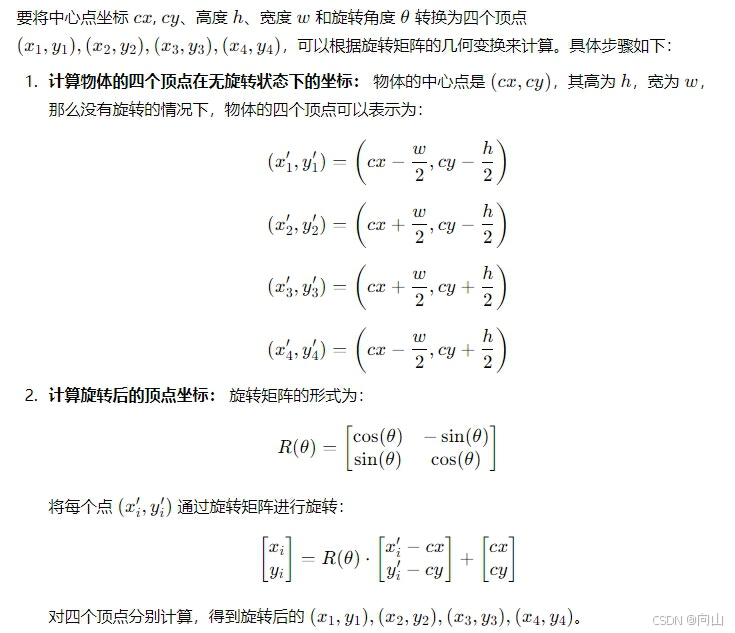
可以从yolov8_obb中的模型中直接返回1)类型的result,然后再根据上图的原理进行转换。然后,我的项目要求包括后续的机械臂抓取,坐标系是这么建立的:垂直线为0,水平线正方向为90度,水平线负方向为-90度,所以输出的角度为[-90,90],大家在得到四个顶点坐标后,可以按需求自己建立坐标系。
from ultralytics import YOLO
import numpy as np
model = YOLO('runs/obb/train2/weights/best.pt')
results = model('C:/ultralytics-main/ultralytics-main/test_image/Image_20240911103601870.bmp', save=True)

def distance(p1, p2):
    return np.sqrt((p1[0] - p2[0])**2 + (p1[1] - p2[1])**2)

for result in results:
    if hasattr(result, 'obb'):
        cx = result.obb.xywhr[0][0].cpu().item()  # 中心点 x
        cy = result.obb.xywhr[0][1].cpu().item()  # 中心点 y
        w = result.obb.xywhr[0][2].cpu().item()  # 宽度
        h = result.obb.xywhr[0][3].cpu().item()  # 高度
        angle = result.obb.xywhr[0][4].cpu().item()  # 旋转角度(弧度)

        print(f"OBB coordinates: {cx}, {cy}, {w}, {h}, {angle}")
        # 计算未旋转的顶点
        # 矩形的四个角相对于中心点的坐标 (无旋转)
        x1_prime = cx - w / 2
        y1_prime = cy - h / 2
        x2_prime = cx + w / 2
        y2_prime = cy - h / 2
        x3_prime = cx + w / 2
        y3_prime = cy + h / 2
        x4_prime = cx - w / 2
        y4_prime = cy + h / 2

        # 旋转角度(弧度),逆时针方向
        cos_theta = np.cos(angle)
        sin_theta = np.sin(angle)


        # 旋转矩阵
        def rotate_point(x_prime, y_prime, cx, cy, cos_theta, sin_theta):
            x_rot = cos_theta * (x_prime - cx) - sin_theta * (y_prime - cy) + cx
            y_rot = sin_theta * (x_prime - cx) + cos_theta * (y_prime - cy) + cy
            return x_rot, y_rot


        # 计算旋转后的四个顶点
        x1, y1 = rotate_point(x1_prime, y1_prime, cx, cy, cos_theta, sin_theta)
        x2, y2 = rotate_point(x2_prime, y2_prime, cx, cy, cos_theta, sin_theta)
        x3, y3 = rotate_point(x3_prime, y3_prime, cx, cy, cos_theta, sin_theta)
        x4, y4 = rotate_point(x4_prime, y4_prime, cx, cy, cos_theta, sin_theta)

        # 打印结果
        print(f"顶点1: ({x1}, {y1})")
        print(f"顶点2: ({x2}, {y2})")
        print(f"顶点3: ({x3}, {y3})")
        print(f"顶点4: ({x4}, {y4})")

        vertices = [(x1, y1), (x2, y2), (x3, y3), (x4, y4)]

# 计算四条边的长度
        edge_lengths = [
            (distance(vertices[0], vertices[1]), (vertices[0], vertices[1])),
            (distance(vertices[1], vertices[2]), (vertices[1], vertices[2])),
            (distance(vertices[2], vertices[3]), (vertices[2], vertices[3])),
            (distance(vertices[3], vertices[0]), (vertices[3], vertices[0]))
        ]

# 找到最长的边(长边)
        longest_edge = max(edge_lengths, key=lambda x: x[0])
        long_side_vertices = longest_edge[1]  # 长边的两个顶点

        # 分别获取长边两端的坐标
        x1, y1 = long_side_vertices[0]
        x2, y2 = long_side_vertices[1]

        # 计算长边与垂直线的夹角(使用 y 轴的变化量和 x 轴的变化量)
        dx = x2 - x1
        dy = y2 - y1

        # 计算夹角的绝对值
        if dx == 0:  # 如果 dx 为 0,说明角度为 0 或 180 度,垂直方向
            angle_degrees = 0
        else:
            angle_radians = np.arctan(abs(dx) / abs(dy))  # 只计算夹角的大小
            angle_degrees = np.degrees(angle_radians)

        # 判断角度正负:通过判断顶点的相对位置
        if (x1 < x2 and y1 < y2) or (x1 > x2 and y1 > y2):  # 左上到右下,或右下到左上
            final_angle = -angle_degrees  # 负角度
        else:
            final_angle = angle_degrees  # 正角度

        # 打印结果
        print(f"长边相对于垂直线的角度为: {final_angle} 度")
魔乐社区(Modelers.cn) 是一个中立、公益的人工智能社区,提供人工智能工具、模型、数据的托管、展示与应用协同服务,为人工智能开发及爱好者搭建开放的学习交流平台。社区通过理事会方式运作,由全产业链共同建设、共同运营、共同享有,推动国产AI生态繁荣发展。
更多推荐


 28
28 0
0- 0


 已为社区贡献2条内容

所有评论(0)