STM32HAL 移植MultiButton小巧简单事件驱动型按键驱动框架(裸机版本)
概述本篇文章介绍如何使用STM32移植 MultiButton开源框架,引用官网简述如下:MultiButton 是一个小巧简单易用的事件驱动型按键驱动模块,可无限量扩展按键,按键事件的回调异步处理方式可以简化你的程序结构,去除冗余的按键处理硬编码,让你的按键业务逻辑更清晰。GitHub:https://github.com/0x1abin/MultiButton硬件:正点原子探索者开发板软件:K
目录
概述
本篇文章介绍如何使用STM32移植 MultiButton开源框架,引用官网简述如下:
MultiButton 是一个小巧简单易用的事件驱动型按键驱动模块,可无限量扩展按键,按键事件的回调异步处理方式可以简化你的程序结构,去除冗余的按键处理硬编码,让你的按键业务逻辑更清晰。
GitHub:https://github.com/0x1abin/MultiButton
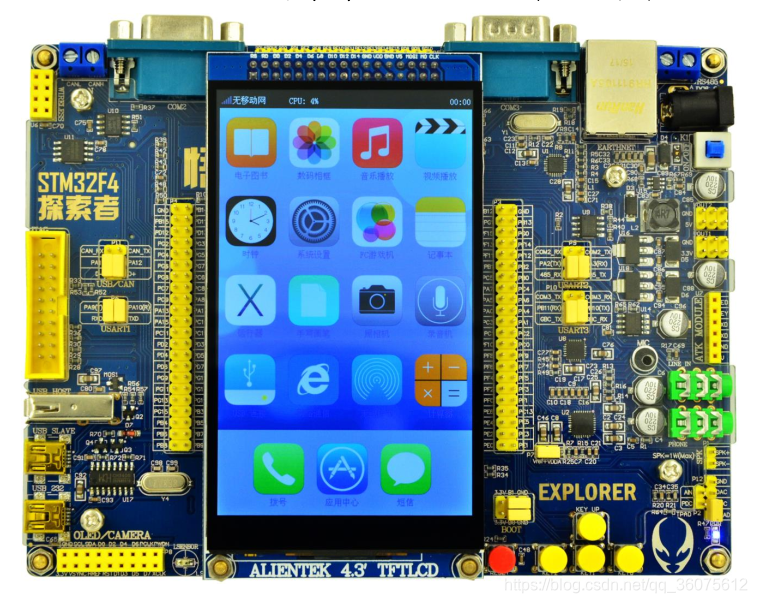
硬件:正点原子探索者开发板
软件:Keil 5.29 + STM32CubeMX6.01
一、使用方法
1.先申请一个按键结构
struct Button button1;2.初始化按键对象,绑定按键的GPIO电平读取接口read_button_pin() ,后一个参数设置有效触发电平
button_init(&button1, read_button_pin, 0);3.注册按键事件
button_attach(&button1, SINGLE_CLICK, Callback_SINGLE_CLICK_Handler);
button_attach(&button1, DOUBLE_CLICK, Callback_DOUBLE_Click_Handler);
...
4.启动按键
button_start(&button1);5.设置一个5ms间隔的定时器循环调用后台处理函数
while(1) {
    ...
    if(timer_ticks == 5) {
        timer_ticks = 0;

        button_ticks();
    }
}
特性
MultiButton 使用C语言实现,基于面向对象方式设计思路,每个按键对象单独用一份数据结构管理:
struct Button {
	uint16_t ticks;
	uint8_t  repeat: 4;
	uint8_t  event : 4;
	uint8_t  state : 3;
	uint8_t  debounce_cnt : 3;
	uint8_t  active_level : 1;
	uint8_t  button_level : 1;
	uint8_t  (*hal_button_Level)(void);
	BtnCallback  cb[number_of_event];
	struct Button* next;
};
这样每个按键使用单向链表相连,依次进入 button_handler(struct Button* handle) 状态机处理,所以每个按键的状态彼此独立。
按键事件
| 事件 | 说明 |
|---|---|
| PRESS_DOWN | 按键按下,每次按下都触发 |
| PRESS_UP | 按键弹起,每次松开都触发 |
| PRESS_REPEAT | 重复按下触发,变量repeat计数连击次数 |
| SINGLE_CLICK | 单击按键事件 |
| DOUBLE_CLICK | 双击按键事件 |
| LONG_PRESS_START | 达到长按时间阈值时触发一次 |
| LONG_PRESS_HOLD | 长按期间一直触发 |
Examples
#include "button.h"

struct Button btn1;

uint8_t read_button1_GPIO()
{
	return HAL_GPIO_ReadPin(B1_GPIO_Port, B1_Pin);
}
void BTN1_PRESS_DOWN_Handler(void* btn)
{
	//do something...
}

void BTN1_PRESS_UP_Handler(void* btn)
{
	//do something...
}

...

int main()
{
    button_init(&btn1, read_button1_GPIO, 0);
    button_attach(&btn1, PRESS_DOWN, BTN1_PRESS_DOWN_Handler);
    button_attach(&btn1, PRESS_UP, BTN1_PRESS_UP_Handler);
    button_attach(&btn1, PRESS_REPEAT, BTN1_PRESS_REPEAT_Handler);
    button_attach(&btn1, SINGLE_CLICK, BTN1_SINGLE_Click_Handler);
    button_attach(&btn1, DOUBLE_CLICK, BTN1_DOUBLE_Click_Handler);
    button_attach(&btn1, LONG_PRESS_START, BTN1_LONG_PRESS_START_Handler);
    button_attach(&btn2, LONG_PRESS_HOLD, BTN1_LONG_PRESS_HOLD_Handler);
    button_start(&btn1);

    //make the timer invoking the button_ticks() interval 5ms.
    //This function is implemented by yourself.
    __timer_start(button_ticks, 0, 5);

    while(1)
    {

    }

}
二、STM32CubeMx配置
1、LED灯GPIO口。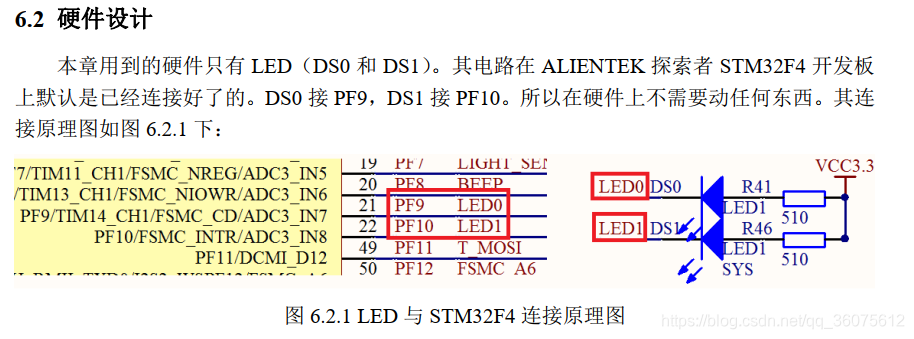
2、按键对应的GPIO口。
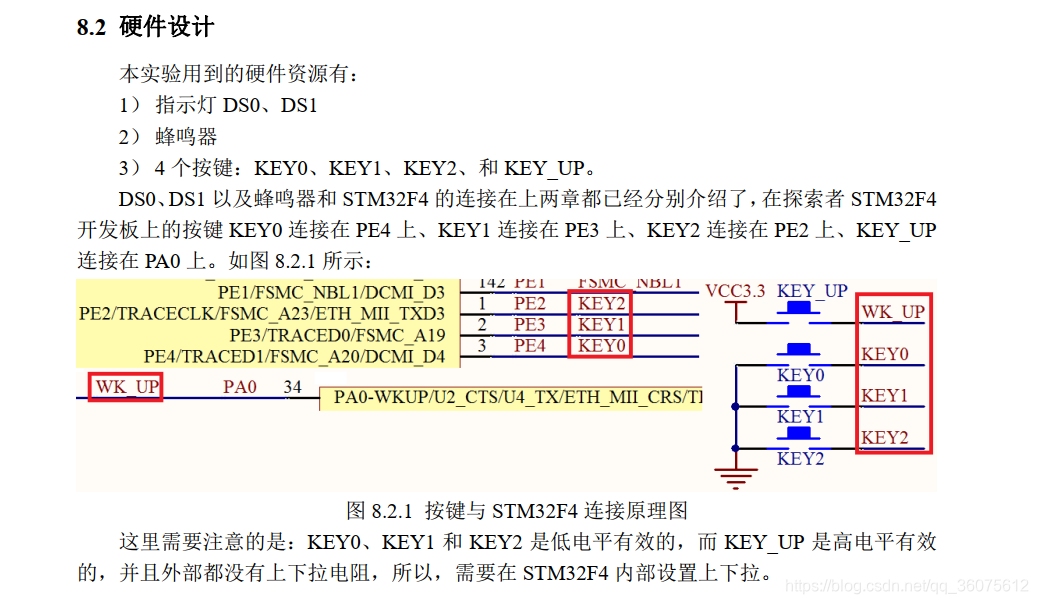
3、串口对应的GPIO口。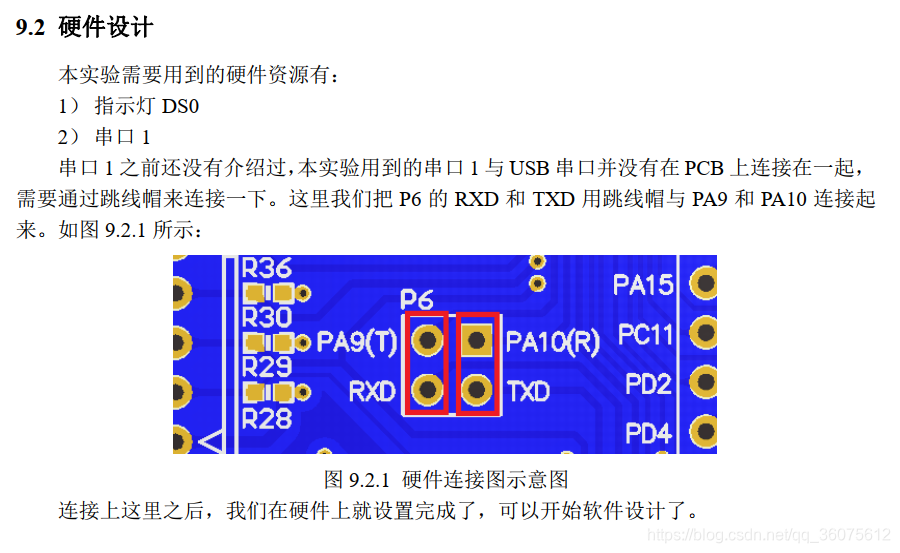
4、STM32CubeMX配置
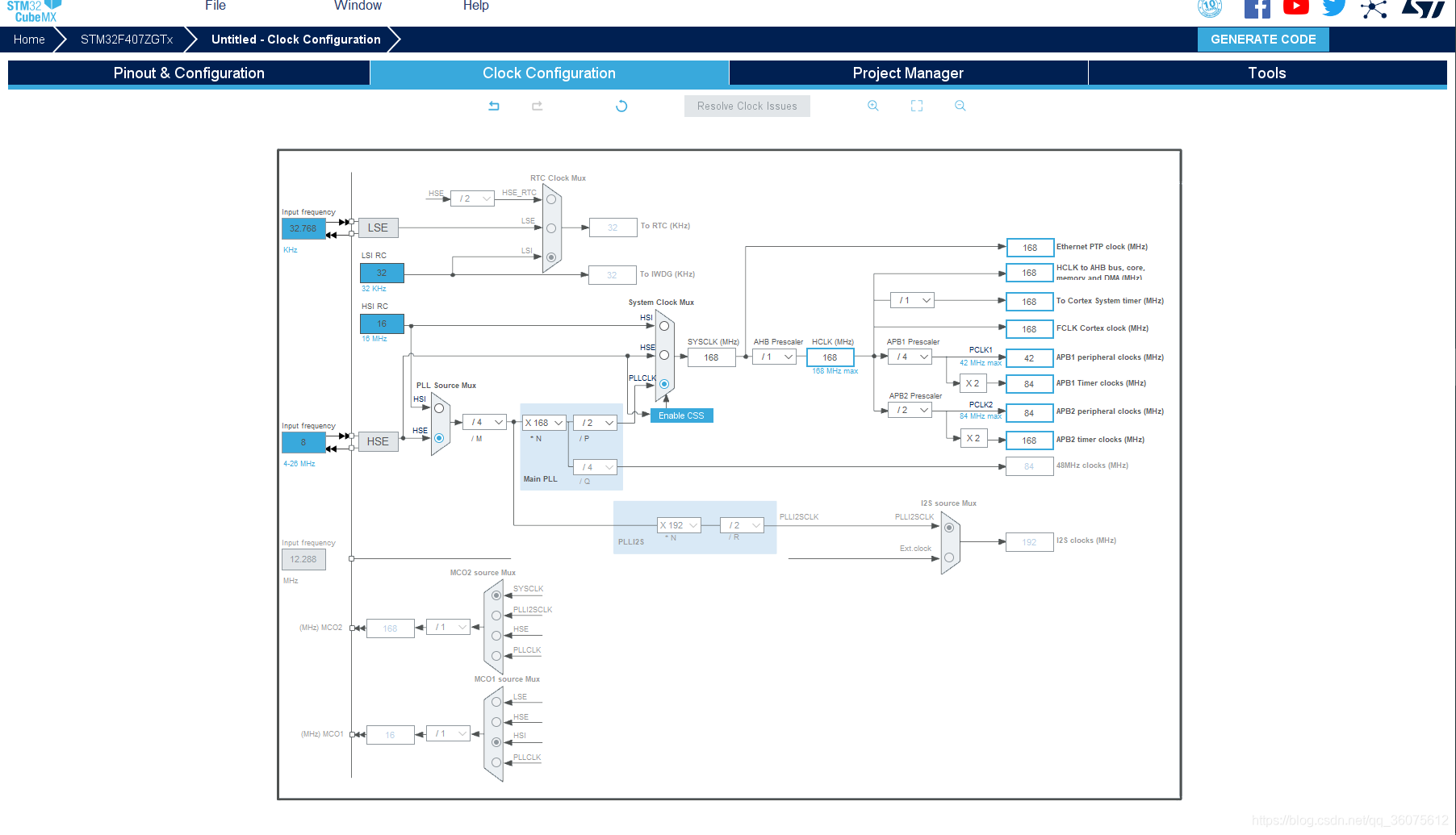
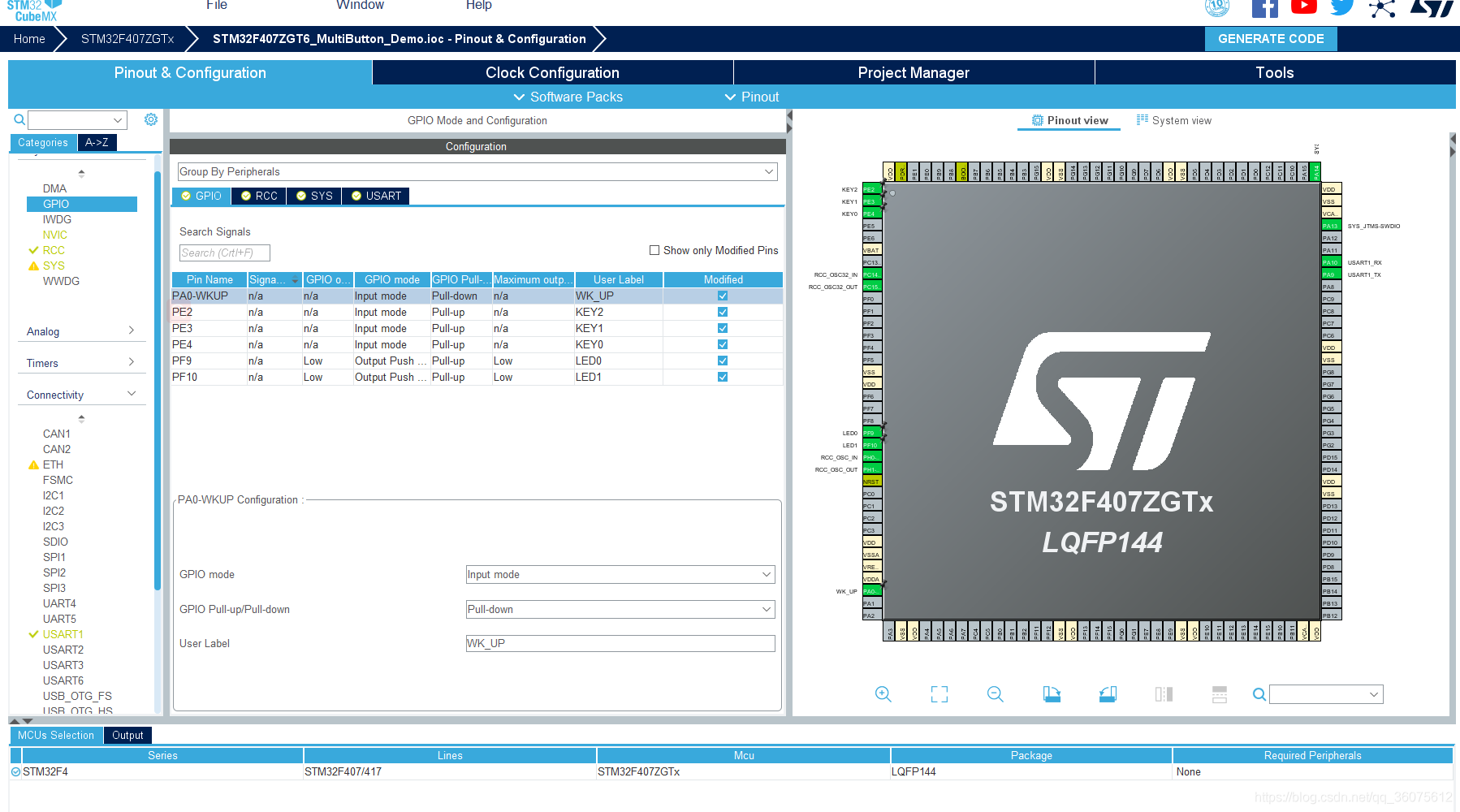
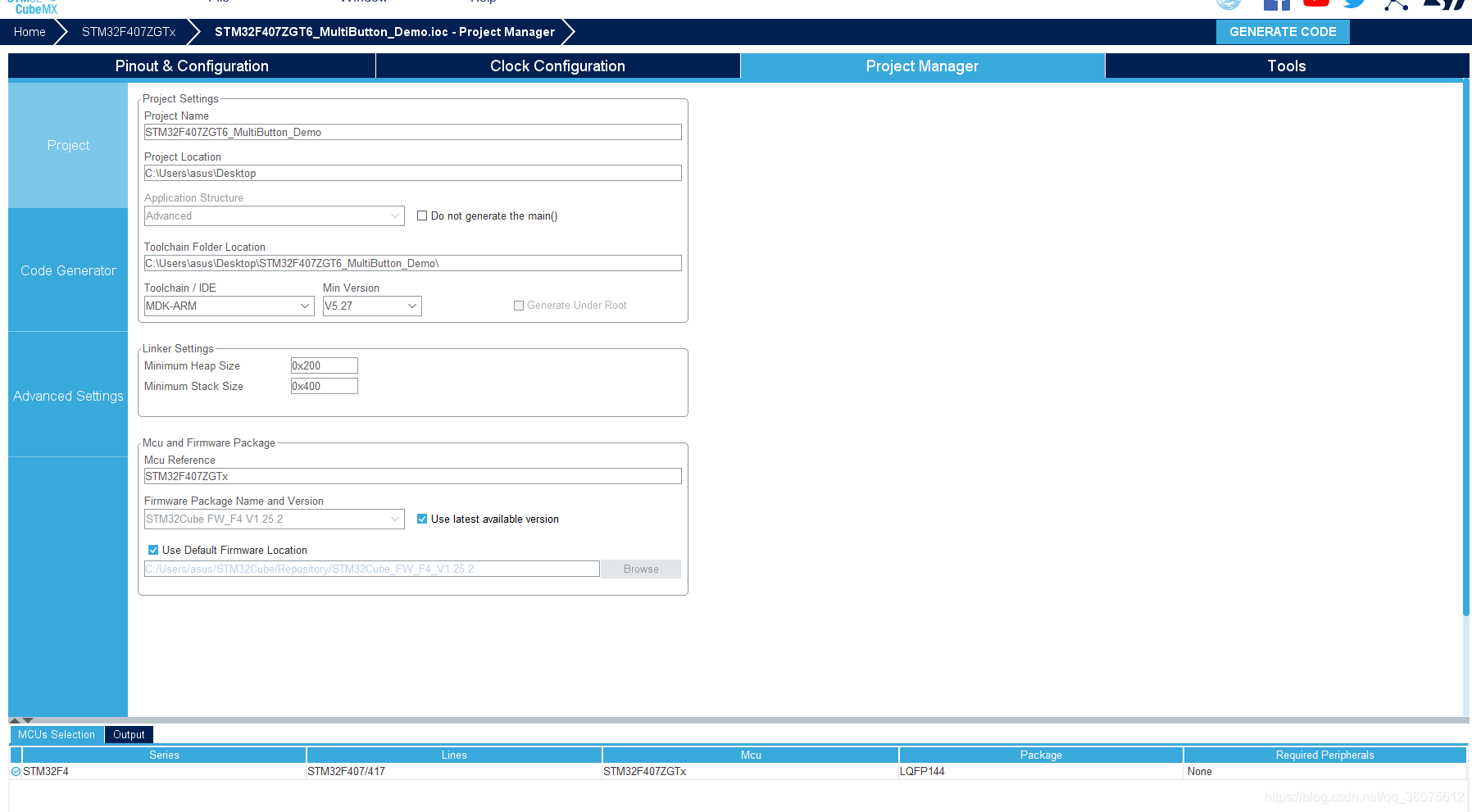
三、Examples
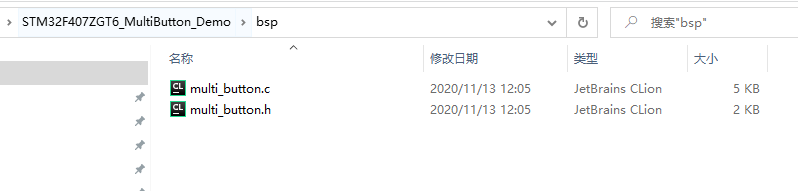
打开STM32CubeMx生成的keil工程,新建bsp文件夹,把代码仓库MultiButton下载下来的代码,添加multi_button.c、multi_button.h 2个文件。example_callback.c、example_poll.c文件是开源库,测试示例。
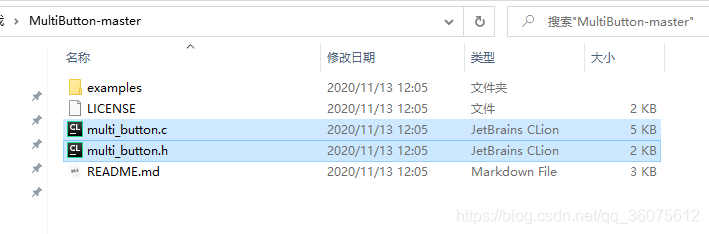
添加到keil中来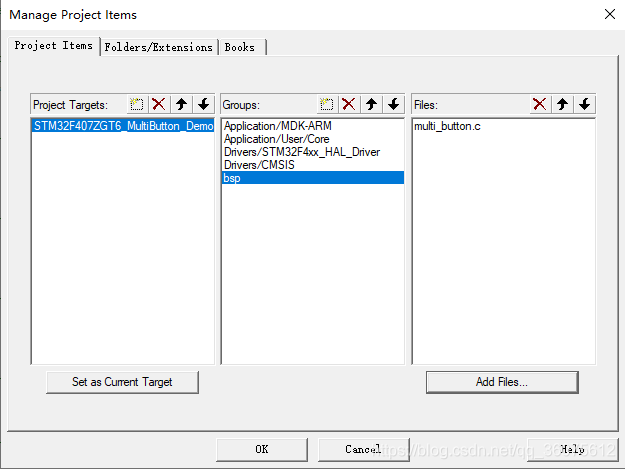
添加头文件路径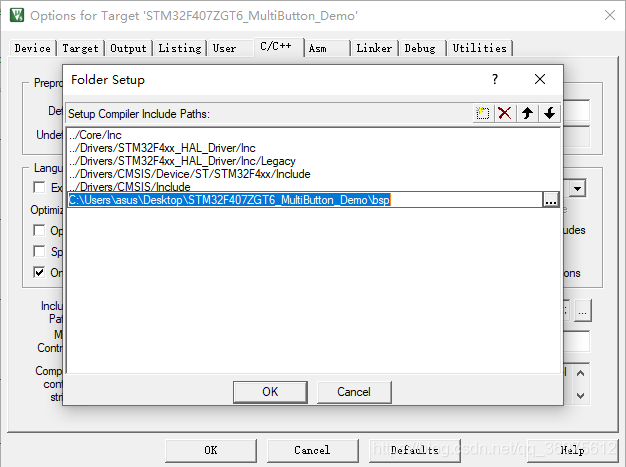
工程编译
1、multi_button.h文件
/*
 * Copyright (c) 2016 Zibin Zheng <znbin@qq.com>
 * All rights reserved
 */

#ifndef _MULTI_BUTTON_H_
#define _MULTI_BUTTON_H_

#include "stdint.h"
#include "string.h"

//According to your need to modify the constants.
#define TICKS_INTERVAL    5	//ms
#define DEBOUNCE_TICKS    3	//MAX 8
#define SHORT_TICKS       (300 /TICKS_INTERVAL)
#define LONG_TICKS        (1000 /TICKS_INTERVAL)


typedef void (*BtnCallback)(void*);

typedef enum {
	PRESS_DOWN = 0,
	PRESS_UP,
	PRESS_REPEAT,
	SINGLE_CLICK,
	DOUBLE_CLICK,
	LONG_PRESS_START,
	LONG_PRESS_HOLD,
	number_of_event,
	NONE_PRESS
}PressEvent;

typedef struct Button {
	uint16_t ticks;
	uint8_t  repeat : 4;
	uint8_t  event : 4;
	uint8_t  state : 3;
	uint8_t  debounce_cnt : 3;
	uint8_t  active_level : 1;
	uint8_t  button_level : 1;
	uint8_t  (*hal_button_Level)(void);
	BtnCallback  cb[number_of_event];
	struct Button* next;
}Button;

#ifdef __cplusplus
extern "C" {
#endif

void button_init(struct Button* handle, uint8_t(*pin_level)(), uint8_t active_level);
void button_attach(struct Button* handle, PressEvent event, BtnCallback cb);
PressEvent get_button_event(struct Button* handle);
int  button_start(struct Button* handle);
void button_stop(struct Button* handle);
void button_ticks(void);

#ifdef __cplusplus
}
#endif

#endif
2、multi_button.c文件
/*
 * Copyright (c) 2016 Zibin Zheng <znbin@qq.com>
 * All rights reserved
 */

#include "multi_button.h"

#define EVENT_CB(ev)   if(handle->cb[ev])handle->cb[ev]((Button*)handle)

//button handle list head.
static struct Button* head_handle = NULL;

/**
  * @brief  Initializes the button struct handle.
  * @param  handle: the button handle strcut.
  * @param  pin_level: read the HAL GPIO of the connet button level.
  * @param  active_level: pressed GPIO level.
  * @retval None
  */
void button_init(struct Button* handle, uint8_t(*pin_level)(), uint8_t active_level)
{
	memset(handle, 0, sizeof(struct Button));
	handle->event = (uint8_t)NONE_PRESS;
	handle->hal_button_Level = pin_level;
	handle->button_level = handle->hal_button_Level();
	handle->active_level = active_level;
}

/**
  * @brief  Attach the button event callback function.
  * @param  handle: the button handle strcut.
  * @param  event: trigger event type.
  * @param  cb: callback function.
  * @retval None
  */
void button_attach(struct Button* handle, PressEvent event, BtnCallback cb)
{
	handle->cb[event] = cb;
}

/**
  * @brief  Inquire the button event happen.
  * @param  handle: the button handle strcut.
  * @retval button event.
  */
PressEvent get_button_event(struct Button* handle)
{
	return (PressEvent)(handle->event);
}

/**
  * @brief  Button driver core function, driver state machine.
  * @param  handle: the button handle strcut.
  * @retval None
  */
void button_handler(struct Button* handle)
{
	uint8_t read_gpio_level = handle->hal_button_Level();

	//ticks counter working..
	if((handle->state) > 0) handle->ticks++;

	/*------------button debounce handle---------------*/
	if(read_gpio_level != handle->button_level) { //not equal to prev one
		//continue read 3 times same new level change
		if(++(handle->debounce_cnt) >= DEBOUNCE_TICKS) {
			handle->button_level = read_gpio_level;
			handle->debounce_cnt = 0;
		}
	} else { //leved not change ,counter reset.
		handle->debounce_cnt = 0;
	}

	/*-----------------State machine-------------------*/
	switch (handle->state) {
	case 0:
		if(handle->button_level == handle->active_level) {	//start press down
			handle->event = (uint8_t)PRESS_DOWN;
			EVENT_CB(PRESS_DOWN);
			handle->ticks = 0;
			handle->repeat = 1;
			handle->state = 1;
		} else {
			handle->event = (uint8_t)NONE_PRESS;
		}
		break;

	case 1:
		if(handle->button_level != handle->active_level) { //released press up
			handle->event = (uint8_t)PRESS_UP;
			EVENT_CB(PRESS_UP);
			handle->ticks = 0;
			handle->state = 2;

		} else if(handle->ticks > LONG_TICKS) {
			handle->event = (uint8_t)LONG_PRESS_START;
			EVENT_CB(LONG_PRESS_START);
			handle->state = 5;
		}
		break;

	case 2:
		if(handle->button_level == handle->active_level) { //press down again
			handle->event = (uint8_t)PRESS_DOWN;
			EVENT_CB(PRESS_DOWN);
			handle->repeat++;
			EVENT_CB(PRESS_REPEAT); // repeat hit
			handle->ticks = 0;
			handle->state = 3;
		} else if(handle->ticks > SHORT_TICKS) { //released timeout
			if(handle->repeat == 1) {
				handle->event = (uint8_t)SINGLE_CLICK;
				EVENT_CB(SINGLE_CLICK);
			} else if(handle->repeat == 2) {
				handle->event = (uint8_t)DOUBLE_CLICK;
				EVENT_CB(DOUBLE_CLICK); // repeat hit
			}
			handle->state = 0;
		}
		break;

	case 3:
		if(handle->button_level != handle->active_level) { //released press up
			handle->event = (uint8_t)PRESS_UP;
			EVENT_CB(PRESS_UP);
			if(handle->ticks < SHORT_TICKS) {
				handle->ticks = 0;
				handle->state = 2; //repeat press
			} else {
				handle->state = 0;
			}
		}
		break;

	case 5:
		if(handle->button_level == handle->active_level) {
			//continue hold trigger
			handle->event = (uint8_t)LONG_PRESS_HOLD;
			EVENT_CB(LONG_PRESS_HOLD);

		} else { //releasd
			handle->event = (uint8_t)PRESS_UP;
			EVENT_CB(PRESS_UP);
			handle->state = 0; //reset
		}
		break;
	}
}

/**
  * @brief  Start the button work, add the handle into work list.
  * @param  handle: target handle strcut.
  * @retval 0: succeed. -1: already exist.
  */
int button_start(struct Button* handle)
{
	struct Button* target = head_handle;
	while(target) {
		if(target == handle) return -1;	//already exist.
		target = target->next;
	}
	handle->next = head_handle;
	head_handle = handle;
	return 0;
}

/**
  * @brief  Stop the button work, remove the handle off work list.
  * @param  handle: target handle strcut.
  * @retval None
  */
void button_stop(struct Button* handle)
{
	struct Button** curr;
	for(curr = &head_handle; *curr; ) {
		struct Button* entry = *curr;
		if (entry == handle) {
			*curr = entry->next;
//			free(entry);
		} else
			curr = &entry->next;
	}
}

/**
  * @brief  background ticks, timer repeat invoking interval 5ms.
  * @param  None.
  * @retval None
  */
void button_ticks()
{
	struct Button* target;
	for(target=head_handle; target; target=target->next) {
		button_handler(target);
	}
}
3、main.c文件
/* USER CODE BEGIN Header */
/**
******************************************************************************
* @file : main.c
* @brief : Main program body
******************************************************************************
* @attention
*
* <h2><center>© Copyright (c) 2021 STMicroelectronics.
* All rights reserved.</center></h2>
*
* This software component is licensed by ST under BSD 3-Clause license,
* the "License"; You may not use this file except in compliance with the
* License. You may obtain a copy of the License at:
* opensource.org/licenses/BSD-3-Clause
*
******************************************************************************
*/
/* USER CODE END Header */
/* Includes ------------------------------------------------------------------*/
#include "main.h"
#include "usart.h"
#include "gpio.h"
/* Private includes ----------------------------------------------------------*/
/* USER CODE BEGIN Includes */
#include "stdio.h"
#include "multi_button.h"//按键驱动
/* USER CODE END Includes */
/* Private typedef -----------------------------------------------------------*/
/* USER CODE BEGIN PTD */
struct Button button0, button1;
/* USER CODE END PTD */
/* Private define ------------------------------------------------------------*/
/* USER CODE BEGIN PD */
/* USER CODE END PD */
/* Private macro -------------------------------------------------------------*/
/* USER CODE BEGIN PM */
/* USER CODE END PM */
/* Private variables ---------------------------------------------------------*/
/* USER CODE BEGIN PV */
/* USER CODE END PV */
/* Private function prototypes -----------------------------------------------*/
void SystemClock_Config(void);
/* USER CODE BEGIN PFP */
/* USER CODE END PFP */
/* Private user code ---------------------------------------------------------*/
/* USER CODE BEGIN 0 */
//按键状态读取接口 按键输入模式 HAL_GPIO_ReadPin
uint8_t read_button0_GPIO(void)
{
return HAL_GPIO_ReadPin(KEY0_GPIO_Port, KEY0_Pin);
}
//按键状态读取接口 按键输入模式 HAL_GPIO_ReadPin
uint8_t read_button1_GPIO(void)
{
return HAL_GPIO_ReadPin(KEY1_GPIO_Port, KEY1_Pin);
}
//按键0按下事件回调函数
void btn0_press_down_Handler(void* btn)
{
printf("---> key0 press down! <---\r\n");
}
//按键0松开事件回调函数
void btn0_press_up_Handler(void* btn)
{
printf("***> key0 press up! <***\r\n");
}
void button_callback(void *button)
{
uint32_t btn_event_val;
btn_event_val = get_button_event((struct Button *)button);
switch(btn_event_val)
{
case PRESS_DOWN:
printf("---> key1 press down! <---\r\n");
break;
case PRESS_UP:
printf("***> key1 press up! <***\r\n");
break;
case PRESS_REPEAT:
printf("---> key1 press repeat! <---\r\n");
break;
case SINGLE_CLICK:
printf("---> key1 single click! <---\r\n");
break;
case DOUBLE_CLICK:
printf("***> key1 double click! <***\r\n");
break;
case LONG_PRESS_START:
printf("---> key1 long press start! <---\r\n");
break;
case LONG_PRESS_HOLD:
printf("***> key1 long press hold! <***\r\n");
break;
}
}
/* USER CODE END 0 */
/**
* @brief The application entry point.
* @retval int
*/
int main(void)
{
/* USER CODE BEGIN 1 */
/* USER CODE END 1 */
/* MCU Configuration--------------------------------------------------------*/
/* Reset of all peripherals, Initializes the Flash interface and the Systick. */
HAL_Init();
/* USER CODE BEGIN Init */
/* USER CODE END Init */
/* Configure the system clock */
SystemClock_Config();
/* USER CODE BEGIN SysInit */
/* USER CODE END SysInit */
/* Initialize all configured peripherals */
MX_GPIO_Init();
MX_USART1_UART_Init();
/* USER CODE BEGIN 2 */
printf("MultiButton Test...\r\n");
//初始化按键对象
button_init(&button0, read_button0_GPIO, 0);
//注册按钮事件回调函数
button_attach(&button0, PRESS_DOWN, btn0_press_down_Handler);
button_attach(&button0, PRESS_UP, btn0_press_up_Handler);
//启动按键
button_start(&button0);
//初始化按键对象
button_init(&button1, read_button1_GPIO, 0);
//注册按钮事件回调函数
button_attach(&button1, PRESS_DOWN, button_callback);
button_attach(&button1, PRESS_UP, button_callback);
button_attach(&button1, PRESS_REPEAT, button_callback);
button_attach(&button1, SINGLE_CLICK, button_callback);
button_attach(&button1, DOUBLE_CLICK, button_callback);
button_attach(&button1, LONG_PRESS_START, button_callback);
button_attach(&button1, LONG_PRESS_HOLD, button_callback);
//启动按键
button_start(&button1);
/* USER CODE END 2 */
/* Infinite loop */
/* USER CODE BEGIN WHILE */
while (1)
{
button_ticks();
HAL_Delay(5);
/* USER CODE END WHILE */
/* USER CODE BEGIN 3 */
}
/* USER CODE END 3 */
}
/**
* @brief System Clock Configuration
* @retval None
*/
void SystemClock_Config(void)
{
RCC_OscInitTypeDef RCC_OscInitStruct = {0};
RCC_ClkInitTypeDef RCC_ClkInitStruct = {0};
/** Configure the main internal regulator output voltage
*/
__HAL_RCC_PWR_CLK_ENABLE();
__HAL_PWR_VOLTAGESCALING_CONFIG(PWR_REGULATOR_VOLTAGE_SCALE1);
/** Initializes the RCC Oscillators according to the specified parameters
* in the RCC_OscInitTypeDef structure.
*/
RCC_OscInitStruct.OscillatorType = RCC_OSCILLATORTYPE_HSE;
RCC_OscInitStruct.HSEState = RCC_HSE_ON;
RCC_OscInitStruct.PLL.PLLState = RCC_PLL_ON;
RCC_OscInitStruct.PLL.PLLSource = RCC_PLLSOURCE_HSE;
RCC_OscInitStruct.PLL.PLLM = 4;
RCC_OscInitStruct.PLL.PLLN = 168;
RCC_OscInitStruct.PLL.PLLP = RCC_PLLP_DIV2;
RCC_OscInitStruct.PLL.PLLQ = 4;
if (HAL_RCC_OscConfig(&RCC_OscInitStruct) != HAL_OK)
{
Error_Handler();
}
/** Initializes the CPU, AHB and APB buses clocks
*/
RCC_ClkInitStruct.ClockType = RCC_CLOCKTYPE_HCLK|RCC_CLOCKTYPE_SYSCLK
|RCC_CLOCKTYPE_PCLK1|RCC_CLOCKTYPE_PCLK2;
RCC_ClkInitStruct.SYSCLKSource = RCC_SYSCLKSOURCE_PLLCLK;
RCC_ClkInitStruct.AHBCLKDivider = RCC_SYSCLK_DIV1;
RCC_ClkInitStruct.APB1CLKDivider = RCC_HCLK_DIV4;
RCC_ClkInitStruct.APB2CLKDivider = RCC_HCLK_DIV2;
if (HAL_RCC_ClockConfig(&RCC_ClkInitStruct, FLASH_LATENCY_5) != HAL_OK)
{
Error_Handler();
}
}
/* USER CODE BEGIN 4 */
#ifdef __GNUC__
/* With GCC/RAISONANCE, small printf (option LD Linker->Libraries->Small printf
set to 'Yes') calls __io_putchar() */
#define PUTCHAR_PROTOTYPE int __io_putchar(int ch)
#else
#define PUTCHAR_PROTOTYPE int fputc(int ch, FILE *f)
#endif /* __GNUC__ */
/**
* @brief Retargets the C library printf function to the USART.
* @param None
* @retval None
*/
PUTCHAR_PROTOTYPE
{
/* Place your implementation of fputc here */
/* e.g. write a character to the EVAL_COM1 and Loop until the end of transmission */
HAL_UART_Transmit(&huart1, (uint8_t *)&ch, 1, 0xFFFF);
return ch;
}
int fgetc(FILE * f)
{
uint8_t ch = 0;
HAL_UART_Receive(&huart1, (uint8_t *)&ch, 1, 0xffff);
return ch;
}
/* USER CODE END 4 */
/**
* @brief This function is executed in case of error occurrence.
* @retval None
*/
void Error_Handler(void)
{
/* USER CODE BEGIN Error_Handler_Debug */
/* User can add his own implementation to report the HAL error return state */
/* USER CODE END Error_Handler_Debug */
}
#ifdef USE_FULL_ASSERT
/**
* @brief Reports the name of the source file and the source line number
* where the assert_param error has occurred.
* @param file: pointer to the source file name
* @param line: assert_param error line source number
* @retval None
*/
void assert_failed(uint8_t *file, uint32_t line)
{
/* USER CODE BEGIN 6 */
/* User can add his own implementation to report the file name and line number,
tex: printf("Wrong parameters value: file %s on line %d\r\n", file, line) */
/* USER CODE END 6 */
}
#endif /* USE_FULL_ASSERT */
/************************ (C) COPYRIGHT STMicroelectronics *****END OF FILE****/
四、运行结果
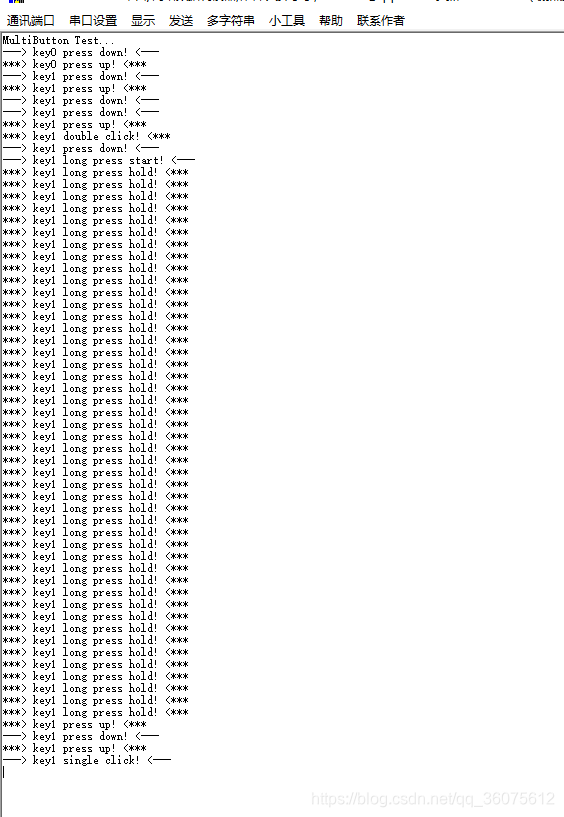
传送门->代码
五、总结
好了,就介绍到此,有了这个神器,解决了多功能按键场景复杂逻辑处理问题,使用它来开发就变得简单很多,特别适合物联网终端设备,同时也比较适合多按键产品使用。

魔乐社区(Modelers.cn) 是一个中立、公益的人工智能社区,提供人工智能工具、模型、数据的托管、展示与应用协同服务,为人工智能开发及爱好者搭建开放的学习交流平台。社区通过理事会方式运作,由全产业链共同建设、共同运营、共同享有,推动国产AI生态繁荣发展。
更多推荐


 4
4 0
0- 0


 已为社区贡献22条内容

所有评论(0)