模型推理性能测试EvalScope
/
/
快速开始
快速开始 $el.setAttribute('data-tooltip', 'Copy link to this element'), 2000)" aria-label="Copy link to this element" class="headerlink" data-tooltip="Copy link to this element" href="https://evalscope.readthedocs.io/zh-cn/latest/user_guides/stress_test/quick_start.html#id1" style="--tw-border-spacing-x: 0; --tw-border-spacing-y: 0; --tw-translate-x: 0; --tw-translate-y: 0; --tw-rotate: 0; --tw-skew-x: 0; --tw-skew-y: 0; --tw-scale-x: 1; --tw-scale-y: 1; --tw-pan-x: ; --tw-pan-y: ; --tw-pinch-zoom: ; --tw-scroll-snap-strictness: proximity; --tw-gradient-from-position: ; --tw-gradient-via-position: ; --tw-gradient-to-position: ; --tw-ordinal: ; --tw-slashed-zero: ; --tw-numeric-figure: ; --tw-numeric-spacing: ; --tw-numeric-fraction: ; --tw-ring-inset: ; --tw-ring-offset-width: 0px; --tw-ring-offset-color: #fff; --tw-ring-color: rgba(59,130,246,.5); --tw-ring-offset-shadow: 0 0 #0000; --tw-ring-shadow: 0 0 #0000; --tw-shadow: 0 0 #0000; --tw-shadow-colored: 0 0 #0000; --tw-blur: ; --tw-brightness: ; --tw-contrast: ; --tw-grayscale: ; --tw-hue-rotate: ; --tw-invert: ; --tw-saturate: ; --tw-sepia: ; --tw-drop-shadow: ; --tw-backdrop-blur: ; --tw-backdrop-brightness: ; --tw-backdrop-contrast: ; --tw-backdrop-grayscale: ; --tw-backdrop-hue-rotate: ; --tw-backdrop-invert: ; --tw-backdrop-opacity: ; --tw-backdrop-saturate: ; --tw-backdrop-sepia: ; --tw-contain-size: ; --tw-contain-layout: ; --tw-contain-paint: ; --tw-contain-style: ; border: 0px solid rgb(229, 231, 235); box-sizing: border-box; color: hsl(var(--primary)); text-decoration-line: underline; text-decoration-thickness: from-font; text-decoration-style: inherit; text-decoration-color: inherit; align-items: center; display: inline-flex; margin-left: 0.25rem; position: relative; vertical-align: middle; font-weight: 500; text-underline-offset: 4px;">
环境准备 $el.setAttribute('data-tooltip', 'Copy link to this element'), 2000)" aria-label="Copy link to this element" class="headerlink" data-tooltip="Copy link to this element" href="https://evalscope.readthedocs.io/zh-cn/latest/user_guides/stress_test/quick_start.html#id2" x-intersect.margin.0%.0%.-70%.0%="activeSection = '#id2'" style="--tw-border-spacing-x: 0; --tw-border-spacing-y: 0; --tw-translate-x: 0; --tw-translate-y: 0; --tw-rotate: 0; --tw-skew-x: 0; --tw-skew-y: 0; --tw-scale-x: 1; --tw-scale-y: 1; --tw-pan-x: ; --tw-pan-y: ; --tw-pinch-zoom: ; --tw-scroll-snap-strictness: proximity; --tw-gradient-from-position: ; --tw-gradient-via-position: ; --tw-gradient-to-position: ; --tw-ordinal: ; --tw-slashed-zero: ; --tw-numeric-figure: ; --tw-numeric-spacing: ; --tw-numeric-fraction: ; --tw-ring-inset: ; --tw-ring-offset-width: 0px; --tw-ring-offset-color: #fff; --tw-ring-color: rgba(59,130,246,.5); --tw-ring-offset-shadow: 0 0 #0000; --tw-ring-shadow: 0 0 #0000; --tw-shadow: 0 0 #0000; --tw-shadow-colored: 0 0 #0000; --tw-blur: ; --tw-brightness: ; --tw-contrast: ; --tw-grayscale: ; --tw-hue-rotate: ; --tw-invert: ; --tw-saturate: ; --tw-sepia: ; --tw-drop-shadow: ; --tw-backdrop-blur: ; --tw-backdrop-brightness: ; --tw-backdrop-contrast: ; --tw-backdrop-grayscale: ; --tw-backdrop-hue-rotate: ; --tw-backdrop-invert: ; --tw-backdrop-opacity: ; --tw-backdrop-saturate: ; --tw-backdrop-sepia: ; --tw-contain-size: ; --tw-contain-layout: ; --tw-contain-paint: ; --tw-contain-style: ; border: 0px solid rgb(229, 231, 235); box-sizing: border-box; color: hsl(var(--primary)); text-decoration-line: underline; text-decoration-thickness: from-font; text-decoration-style: inherit; text-decoration-color: inherit; align-items: center; display: inline-flex; margin-left: 0.25rem; position: relative; vertical-align: middle; font-weight: 500; text-underline-offset: 4px;">
pip安装
# 安装额外依赖
pip install evalscope[perf] -U
Copy code
源码安装
基本使用 $el.setAttribute('data-tooltip', 'Copy link to this element'), 2000)" aria-label="Copy link to this element" class="headerlink" data-tooltip="Copy link to this element" href="https://evalscope.readthedocs.io/zh-cn/latest/user_guides/stress_test/quick_start.html#id3" x-intersect.margin.0%.0%.-70%.0%="activeSection = '#id3'" style="--tw-border-spacing-x: 0; --tw-border-spacing-y: 0; --tw-translate-x: 0; --tw-translate-y: 0; --tw-rotate: 0; --tw-skew-x: 0; --tw-skew-y: 0; --tw-scale-x: 1; --tw-scale-y: 1; --tw-pan-x: ; --tw-pan-y: ; --tw-pinch-zoom: ; --tw-scroll-snap-strictness: proximity; --tw-gradient-from-position: ; --tw-gradient-via-position: ; --tw-gradient-to-position: ; --tw-ordinal: ; --tw-slashed-zero: ; --tw-numeric-figure: ; --tw-numeric-spacing: ; --tw-numeric-fraction: ; --tw-ring-inset: ; --tw-ring-offset-width: 0px; --tw-ring-offset-color: #fff; --tw-ring-color: rgba(59,130,246,.5); --tw-ring-offset-shadow: 0 0 #0000; --tw-ring-shadow: 0 0 #0000; --tw-shadow: 0 0 #0000; --tw-shadow-colored: 0 0 #0000; --tw-blur: ; --tw-brightness: ; --tw-contrast: ; --tw-grayscale: ; --tw-hue-rotate: ; --tw-invert: ; --tw-saturate: ; --tw-sepia: ; --tw-drop-shadow: ; --tw-backdrop-blur: ; --tw-backdrop-brightness: ; --tw-backdrop-contrast: ; --tw-backdrop-grayscale: ; --tw-backdrop-hue-rotate: ; --tw-backdrop-invert: ; --tw-backdrop-opacity: ; --tw-backdrop-saturate: ; --tw-backdrop-sepia: ; --tw-contain-size: ; --tw-contain-layout: ; --tw-contain-paint: ; --tw-contain-style: ; border: 0px solid rgb(229, 231, 235); box-sizing: border-box; color: hsl(var(--primary)); text-decoration-line: underline; text-decoration-thickness: from-font; text-decoration-style: inherit; text-decoration-color: inherit; align-items: center; display: inline-flex; margin-left: 0.25rem; position: relative; vertical-align: middle; font-weight: 500; text-underline-offset: 4px;">
可以使用以下两种方式启动模型推理性能压测工具:
命令行启动
evalscope perf \
    --url "http://127.0.0.1:8000/v1/chat/completions" \
    --parallel 5 \
    --model qwen2.5 \
    --number 20 \
    --api openai \
    --dataset openqa \
    --stream
Copy code
Python脚本启动
参数说明:
-
url: 请求的URL地址 -
parallel: 并行请求的任务数量 -
model: 使用的模型名称 -
number: 请求数量 -
api: 使用的API服务 -
dataset: 数据集名称 -
stream: 是否启用流式处理
重要
要准确统计Time to First Token (TTFT)指标,需要在请求中包含--stream参数,否则TTFT将与Latency相同。
输出结果 $el.setAttribute('data-tooltip', 'Copy link to this element'), 2000)" aria-label="Copy link to this element" class="headerlink" data-tooltip="Copy link to this element" href="https://evalscope.readthedocs.io/zh-cn/latest/user_guides/stress_test/quick_start.html#id4" x-intersect.margin.0%.0%.-70%.0%="activeSection = '#id4'" style="--tw-border-spacing-x: 0; --tw-border-spacing-y: 0; --tw-translate-x: 0; --tw-translate-y: 0; --tw-rotate: 0; --tw-skew-x: 0; --tw-skew-y: 0; --tw-scale-x: 1; --tw-scale-y: 1; --tw-pan-x: ; --tw-pan-y: ; --tw-pinch-zoom: ; --tw-scroll-snap-strictness: proximity; --tw-gradient-from-position: ; --tw-gradient-via-position: ; --tw-gradient-to-position: ; --tw-ordinal: ; --tw-slashed-zero: ; --tw-numeric-figure: ; --tw-numeric-spacing: ; --tw-numeric-fraction: ; --tw-ring-inset: ; --tw-ring-offset-width: 0px; --tw-ring-offset-color: #fff; --tw-ring-color: rgba(59,130,246,.5); --tw-ring-offset-shadow: 0 0 #0000; --tw-ring-shadow: 0 0 #0000; --tw-shadow: 0 0 #0000; --tw-shadow-colored: 0 0 #0000; --tw-blur: ; --tw-brightness: ; --tw-contrast: ; --tw-grayscale: ; --tw-hue-rotate: ; --tw-invert: ; --tw-saturate: ; --tw-sepia: ; --tw-drop-shadow: ; --tw-backdrop-blur: ; --tw-backdrop-brightness: ; --tw-backdrop-contrast: ; --tw-backdrop-grayscale: ; --tw-backdrop-hue-rotate: ; --tw-backdrop-invert: ; --tw-backdrop-opacity: ; --tw-backdrop-saturate: ; --tw-backdrop-sepia: ; --tw-contain-size: ; --tw-contain-layout: ; --tw-contain-paint: ; --tw-contain-style: ; border: 0px solid rgb(229, 231, 235); box-sizing: border-box; color: hsl(var(--primary)); text-decoration-line: underline; text-decoration-thickness: from-font; text-decoration-style: inherit; text-decoration-color: inherit; align-items: center; display: inline-flex; margin-left: 0.25rem; position: relative; vertical-align: middle; font-weight: 500; text-underline-offset: 4px;">
Benchmarking summary:
+-----------------------------------+-----------------------------------------------------------------+
| Key                               | Value                                                           |
+===================================+=================================================================+
| Time taken for tests (s)          | 4.2364                                                          |
+-----------------------------------+-----------------------------------------------------------------+
| Number of concurrency             | 5                                                               |
+-----------------------------------+-----------------------------------------------------------------+
| Total requests                    | 20                                                              |
+-----------------------------------+-----------------------------------------------------------------+
| Succeed requests                  | 20                                                              |
+-----------------------------------+-----------------------------------------------------------------+
| Failed requests                   | 0                                                               |
+-----------------------------------+-----------------------------------------------------------------+
| Output token throughput (tok/s)   | 880.6965                                                        |
+-----------------------------------+-----------------------------------------------------------------+
| Total token throughput (tok/s)    | 1117.9251                                                       |
+-----------------------------------+-----------------------------------------------------------------+
| Request throughput (req/s)        | 4.721                                                           |
+-----------------------------------+-----------------------------------------------------------------+
| Average latency (s)               | 0.9463                                                          |
+-----------------------------------+-----------------------------------------------------------------+
| Average time to first token (s)   | 0.214                                                           |
+-----------------------------------+-----------------------------------------------------------------+
| Average time per output token (s) | 0.0038                                                          |
+-----------------------------------+-----------------------------------------------------------------+
| Average input tokens per request  | 50.25                                                           |
+-----------------------------------+-----------------------------------------------------------------+
| Average output tokens per request | 186.55                                                          |
+-----------------------------------+-----------------------------------------------------------------+
| Average package latency (s)       | 0.0039                                                          |
+-----------------------------------+-----------------------------------------------------------------+
| Average package per request       | 186.35                                                          |
+-----------------------------------+-----------------------------------------------------------------+
| Expected number of requests       | 20                                                              |
+-----------------------------------+-----------------------------------------------------------------+
| Result DB path                    | outputs/20250424_113806/Qwen2.5-0.5B-Instruct/benchmark_data.db |
+-----------------------------------+-----------------------------------------------------------------+
2025-04-24 11:38:12,015 - evalscope - INFO -
Percentile results:
+------------+----------+---------+----------+-------------+--------------+---------------+--------------------------+-------------------------+
| Percentile | TTFT (s) | ITL (s) | TPOT (s) | Latency (s) | Input tokens | Output tokens | Output throughput(tok/s) | Total throughput(tok/s) |
+------------+----------+---------+----------+-------------+--------------+---------------+--------------------------+-------------------------+
|    10%     |  0.0168  |   0.0   |  0.001   |   0.3334    |      42      |      61       |         155.5959         |        198.9264         |
|    25%     |  0.0172  | 0.0042  |  0.0044  |   0.7491    |      47      |      87       |         210.4683         |         253.708         |
|    50%     |  0.0174  | 0.0045  |  0.0045  |    0.999    |      49      |      204      |         215.9736         |        265.5097         |
|    66%     |  0.0269  | 0.0046  |  0.0045  |   1.1166    |      52      |      242      |         216.7906         |        281.8135         |
|    75%     |  0.0329  | 0.0046  |  0.0045  |   1.2857    |      55      |      279      |         217.8717         |        321.8351         |
|    80%     |  0.9821  | 0.0046  |  0.0045  |   1.3452    |      58      |      287      |         219.2701         |        334.9922         |
|    90%     |  0.9952  | 0.0047  |  0.0046  |   1.5973    |      62      |      348      |         220.0688         |        381.5638         |
|    95%     |  0.9995  | 0.0048  |  0.0062  |   1.6652    |      66      |      361      |         220.1942         |        417.4862         |
|    98%     |  0.9995  | 0.0052  |  0.0062  |   1.6652    |      66      |      361      |         220.1942         |        417.4862         |
|    99%     |  0.9995  | 0.0076  |  0.0062  |   1.6652    |      66      |      361      |         220.1942         |        417.4862         |
+------------+----------+---------+----------+-------------+--------------+---------------+--------------------------+-------------------------+
Copy code
指标说明 $el.setAttribute('data-tooltip', 'Copy link to this element'), 2000)" aria-label="Copy link to this element" class="headerlink" data-tooltip="Copy link to this element" href="https://evalscope.readthedocs.io/zh-cn/latest/user_guides/stress_test/quick_start.html#id5" x-intersect.margin.0%.0%.-70%.0%="activeSection = '#id5'" style="--tw-border-spacing-x: 0; --tw-border-spacing-y: 0; --tw-translate-x: 0; --tw-translate-y: 0; --tw-rotate: 0; --tw-skew-x: 0; --tw-skew-y: 0; --tw-scale-x: 1; --tw-scale-y: 1; --tw-pan-x: ; --tw-pan-y: ; --tw-pinch-zoom: ; --tw-scroll-snap-strictness: proximity; --tw-gradient-from-position: ; --tw-gradient-via-position: ; --tw-gradient-to-position: ; --tw-ordinal: ; --tw-slashed-zero: ; --tw-numeric-figure: ; --tw-numeric-spacing: ; --tw-numeric-fraction: ; --tw-ring-inset: ; --tw-ring-offset-width: 0px; --tw-ring-offset-color: #fff; --tw-ring-color: rgba(59,130,246,.5); --tw-ring-offset-shadow: 0 0 #0000; --tw-ring-shadow: 0 0 #0000; --tw-shadow: 0 0 #0000; --tw-shadow-colored: 0 0 #0000; --tw-blur: ; --tw-brightness: ; --tw-contrast: ; --tw-grayscale: ; --tw-hue-rotate: ; --tw-invert: ; --tw-saturate: ; --tw-sepia: ; --tw-drop-shadow: ; --tw-backdrop-blur: ; --tw-backdrop-brightness: ; --tw-backdrop-contrast: ; --tw-backdrop-grayscale: ; --tw-backdrop-hue-rotate: ; --tw-backdrop-invert: ; --tw-backdrop-opacity: ; --tw-backdrop-saturate: ; --tw-backdrop-sepia: ; --tw-contain-size: ; --tw-contain-layout: ; --tw-contain-paint: ; --tw-contain-style: ; border: 0px solid rgb(229, 231, 235); box-sizing: border-box; color: hsl(var(--primary)); text-decoration-line: underline; text-decoration-thickness: from-font; text-decoration-style: inherit; text-decoration-color: inherit; align-items: center; display: inline-flex; margin-left: 0.25rem; position: relative; vertical-align: middle; font-weight: 500; text-underline-offset: 4px;">
| 指标 | 英文名称 | 解释 | 公式 |
|---|---|---|---|
| 测试总时长 | Time taken for tests | 整个测试过程从开始到结束所花费的总时间 | 最后一个请求结束时间 - 第一个请求开始时间 |
| 并发数 | Number of concurrency | 同时发送请求的客户端数量 | 预设值 |
| 总请求数 | Total requests | 在整个测试过程中发送的所有请求的数量 | 成功请求数 + 失败请求数 |
| 成功请求数 | Succeed requests | 成功完成并返回预期结果的请求数量 | 直接统计 |
| 失败请求数 | Failed requests | 由于各种原因未能成功完成的请求数量 | 直接统计 |
| 输出吞吐量 | Output token throughput | 每秒钟处理的平均标记(token)数 | 总输出token数 / 测试总时长 |
| 总吞吐量 | Total token throughput | 每秒钟处理的平均标记(token)数 | 总输入token数 + 总输出token数 / 测试总时长 |
| 请求吞吐量 | Request throughput | 每秒钟成功处理的平均请求数 | 成功请求数 / 测试总时长 |
| 总延迟时间 | Total latency | 所有成功请求的延迟时间总和 | 所有成功请求的延迟时间之和 |
| 平均延迟 | Average latency | 从发送请求到接收完整响应的平均时间 | 总延迟时间 / 成功请求数 |
| 平均首token时间 | Average time to first token | 从发送请求到接收到第一个响应标记的平均时间 | 总首chunk延迟 / 成功请求数 |
| 平均每输出token时间 | Average time per output token | 生成每个输出标记所需的平均时间(不包含首token) | 总每输出token时间 / 成功请求数 |
| 平均输入token数 | Average input tokens per request | 每个请求的平均输入标记数 | 总输入token数 / 成功请求数 |
| 平均输出token数 | Average output tokens per request | 每个请求的平均输出标记数 | 总输出token数 / 成功请求数 |
| 平均数据包延迟 | Average package latency | 接收每个数据包的平均延迟时间 | 总数据包时间 / 总数据包数 |
| 平均每请求数据包数 | Average package per request | 每个请求平均接收的数据包数量 | 总数据包数 / 成功请求数 |
百分位指标 (Percentile)
以单个请求为单位进行统计,数据被分为100个相等部分,第n百分位表示n%的数据点在此值之下。
| 指标 | 英文名称 | 解释 |
|---|---|---|
| 首次生成token时间 | TTFT (Time to First Token) | 从发送请求到生成第一个token的时间(以秒为单位),评估首包延时 |
| 输出token间时延 | ITL (Inter-token Latency) | 生成每个输出token间隔时间(以秒为单位),评估输出是否平稳 |
| 每token延迟 | TPOT (Time per Output Token) | 生成每个输出token所需的时间(不包含首token,以秒为单位),评估解码速度 |
| 端到端延迟时间 | Latency | 从发送请求到接收完整响应的时间(以秒为单位):TTFT + TPOT * Output tokens |
| 输入token数 | Input tokens | 请求中输入的token数量 |
| 输出token数 | Output tokens | 响应中生成的token数量 |
| 输出吞吐量 | Output Throughput | 每秒输出的token数量:输出tokens / 端到端延时 |
| 总吞吐量 | Total throughput | 每秒处理的token数量:(输入tokens + 输出tokens) / 端到端延时 |
可视化测试结果 $el.setAttribute('data-tooltip', 'Copy link to this element'), 2000)" aria-label="Copy link to this element" class="headerlink" data-tooltip="Copy link to this element" href="https://evalscope.readthedocs.io/zh-cn/latest/user_guides/stress_test/quick_start.html#id6" x-intersect.margin.0%.0%.-70%.0%="activeSection = '#id6'" style="--tw-border-spacing-x: 0; --tw-border-spacing-y: 0; --tw-translate-x: 0; --tw-translate-y: 0; --tw-rotate: 0; --tw-skew-x: 0; --tw-skew-y: 0; --tw-scale-x: 1; --tw-scale-y: 1; --tw-pan-x: ; --tw-pan-y: ; --tw-pinch-zoom: ; --tw-scroll-snap-strictness: proximity; --tw-gradient-from-position: ; --tw-gradient-via-position: ; --tw-gradient-to-position: ; --tw-ordinal: ; --tw-slashed-zero: ; --tw-numeric-figure: ; --tw-numeric-spacing: ; --tw-numeric-fraction: ; --tw-ring-inset: ; --tw-ring-offset-width: 0px; --tw-ring-offset-color: #fff; --tw-ring-color: rgba(59,130,246,.5); --tw-ring-offset-shadow: 0 0 #0000; --tw-ring-shadow: 0 0 #0000; --tw-shadow: 0 0 #0000; --tw-shadow-colored: 0 0 #0000; --tw-blur: ; --tw-brightness: ; --tw-contrast: ; --tw-grayscale: ; --tw-hue-rotate: ; --tw-invert: ; --tw-saturate: ; --tw-sepia: ; --tw-drop-shadow: ; --tw-backdrop-blur: ; --tw-backdrop-brightness: ; --tw-backdrop-contrast: ; --tw-backdrop-grayscale: ; --tw-backdrop-hue-rotate: ; --tw-backdrop-invert: ; --tw-backdrop-opacity: ; --tw-backdrop-saturate: ; --tw-backdrop-sepia: ; --tw-contain-size: ; --tw-contain-layout: ; --tw-contain-paint: ; --tw-contain-style: ; border: 0px solid rgb(229, 231, 235); box-sizing: border-box; color: hsl(var(--primary)); text-decoration-line: underline; text-decoration-thickness: from-font; text-decoration-style: inherit; text-decoration-color: inherit; align-items: center; display: inline-flex; margin-left: 0.25rem; position: relative; vertical-align: middle; font-weight: 500; text-underline-offset: 4px;">
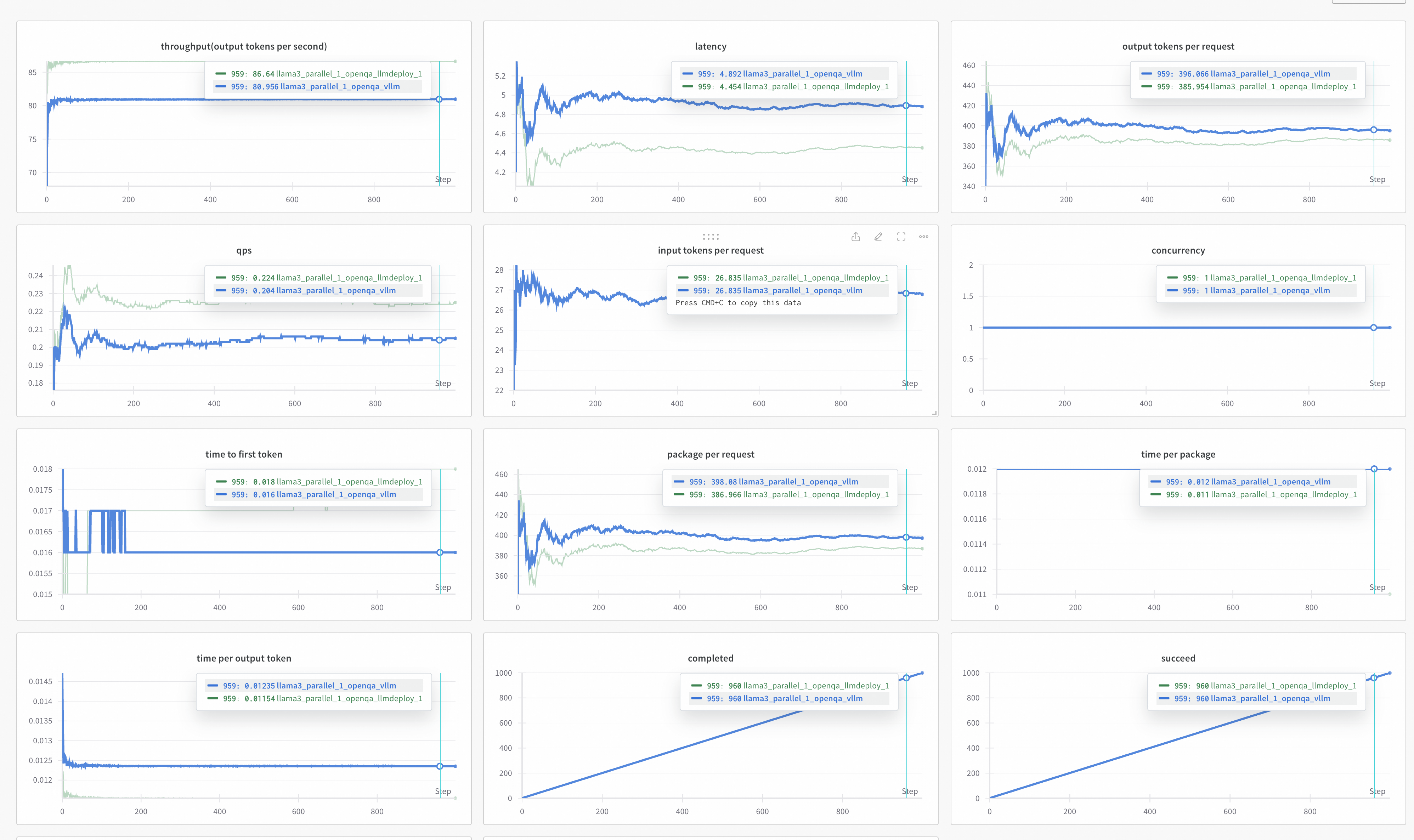
使用WandB进行可视化测试结果 $el.setAttribute('data-tooltip', 'Copy link to this element'), 2000)" aria-label="Copy link to this element" class="headerlink" data-tooltip="Copy link to this element" href="https://evalscope.readthedocs.io/zh-cn/latest/user_guides/stress_test/quick_start.html#wandb" x-intersect.margin.0%.0%.-70%.0%="activeSection = '#wandb'" style="--tw-border-spacing-x: 0; --tw-border-spacing-y: 0; --tw-translate-x: 0; --tw-translate-y: 0; --tw-rotate: 0; --tw-skew-x: 0; --tw-skew-y: 0; --tw-scale-x: 1; --tw-scale-y: 1; --tw-pan-x: ; --tw-pan-y: ; --tw-pinch-zoom: ; --tw-scroll-snap-strictness: proximity; --tw-gradient-from-position: ; --tw-gradient-via-position: ; --tw-gradient-to-position: ; --tw-ordinal: ; --tw-slashed-zero: ; --tw-numeric-figure: ; --tw-numeric-spacing: ; --tw-numeric-fraction: ; --tw-ring-inset: ; --tw-ring-offset-width: 0px; --tw-ring-offset-color: #fff; --tw-ring-color: rgba(59,130,246,.5); --tw-ring-offset-shadow: 0 0 #0000; --tw-ring-shadow: 0 0 #0000; --tw-shadow: 0 0 #0000; --tw-shadow-colored: 0 0 #0000; --tw-blur: ; --tw-brightness: ; --tw-contrast: ; --tw-grayscale: ; --tw-hue-rotate: ; --tw-invert: ; --tw-saturate: ; --tw-sepia: ; --tw-drop-shadow: ; --tw-backdrop-blur: ; --tw-backdrop-brightness: ; --tw-backdrop-contrast: ; --tw-backdrop-grayscale: ; --tw-backdrop-hue-rotate: ; --tw-backdrop-invert: ; --tw-backdrop-opacity: ; --tw-backdrop-saturate: ; --tw-backdrop-sepia: ; --tw-contain-size: ; --tw-contain-layout: ; --tw-contain-paint: ; --tw-contain-style: ; border: 0px solid rgb(229, 231, 235); box-sizing: border-box; color: hsl(var(--primary)); text-decoration-line: underline; text-decoration-thickness: from-font; text-decoration-style: inherit; text-decoration-color: inherit; align-items: center; display: inline-flex; margin-left: 0.25rem; position: relative; vertical-align: middle; font-weight: 500; text-underline-offset: 4px;">
请先安装wandb,并获取对应的API Key:
pip install wandb
Copy code
在评测启动时,额外添加以下参数,即可将测试结果上传wandb server并进行可视化:
# ...
--wandb-api-key 'wandb_api_key'
--name 'name_of_wandb_log'
Copy code
例如:
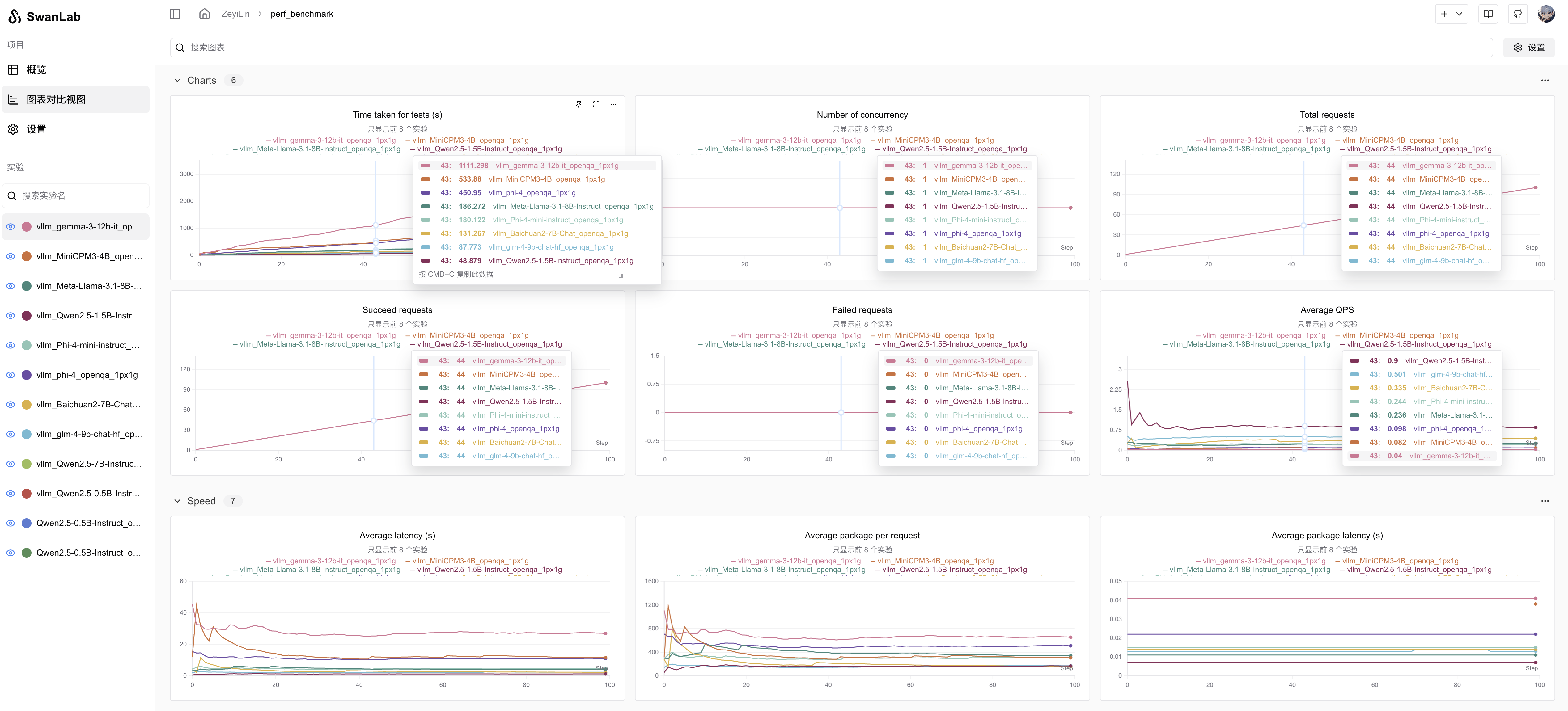
使用SwanLab进行可视化测试结果 $el.setAttribute('data-tooltip', 'Copy link to this element'), 2000)" aria-label="Copy link to this element" class="headerlink" data-tooltip="Copy link to this element" href="https://evalscope.readthedocs.io/zh-cn/latest/user_guides/stress_test/quick_start.html#swanlab" x-intersect.margin.0%.0%.-70%.0%="activeSection = '#swanlab'" style="--tw-border-spacing-x: 0; --tw-border-spacing-y: 0; --tw-translate-x: 0; --tw-translate-y: 0; --tw-rotate: 0; --tw-skew-x: 0; --tw-skew-y: 0; --tw-scale-x: 1; --tw-scale-y: 1; --tw-pan-x: ; --tw-pan-y: ; --tw-pinch-zoom: ; --tw-scroll-snap-strictness: proximity; --tw-gradient-from-position: ; --tw-gradient-via-position: ; --tw-gradient-to-position: ; --tw-ordinal: ; --tw-slashed-zero: ; --tw-numeric-figure: ; --tw-numeric-spacing: ; --tw-numeric-fraction: ; --tw-ring-inset: ; --tw-ring-offset-width: 0px; --tw-ring-offset-color: #fff; --tw-ring-color: rgba(59,130,246,.5); --tw-ring-offset-shadow: 0 0 #0000; --tw-ring-shadow: 0 0 #0000; --tw-shadow: 0 0 #0000; --tw-shadow-colored: 0 0 #0000; --tw-blur: ; --tw-brightness: ; --tw-contrast: ; --tw-grayscale: ; --tw-hue-rotate: ; --tw-invert: ; --tw-saturate: ; --tw-sepia: ; --tw-drop-shadow: ; --tw-backdrop-blur: ; --tw-backdrop-brightness: ; --tw-backdrop-contrast: ; --tw-backdrop-grayscale: ; --tw-backdrop-hue-rotate: ; --tw-backdrop-invert: ; --tw-backdrop-opacity: ; --tw-backdrop-saturate: ; --tw-backdrop-sepia: ; --tw-contain-size: ; --tw-contain-layout: ; --tw-contain-paint: ; --tw-contain-style: ; border: 0px solid rgb(229, 231, 235); box-sizing: border-box; color: hsl(var(--primary)); text-decoration-line: underline; text-decoration-thickness: from-font; text-decoration-style: inherit; text-decoration-color: inherit; align-items: center; display: inline-flex; margin-left: 0.25rem; position: relative; vertical-align: middle; font-weight: 500; text-underline-offset: 4px;">
请先安装SwanLab,并获取对应的API Key
pip install swanlab
Copy code
在评测启动时,额外添加以下参数,即可将测试结果上传swanlab server并进行可视化:
# ...
--swanlab-api-key 'swanlab_api_key'
--name 'name_of_swanlab_log'
Copy code
例如:
如果希望仅使用SwanLab本地看板模式,先安装swanlab离线看板:
pip install 'swanlab[dashboard]'
Copy code
再通过设置如下参数:
--swanlab-api-key local
Copy code并通过swanlab watch <日志路径>打开本地可视化看板。
On this page

魔乐社区(Modelers.cn) 是一个中立、公益的人工智能社区,提供人工智能工具、模型、数据的托管、展示与应用协同服务,为人工智能开发及爱好者搭建开放的学习交流平台。社区通过理事会方式运作,由全产业链共同建设、共同运营、共同享有,推动国产AI生态繁荣发展。
更多推荐


 0
0 0
0- 0


 已为社区贡献47条内容

所有评论(0)