6.examples\01-Micropython-Basics\demo_json.py 加强版-JSON配置管理器
·
上一篇文章demo_json.py介绍了JSON格式文件的基本用法,接下来提升下难度,在基础程序之上,封装成为JSON配置管理器,这样便于项目中快速实现JSON格式配置文件的加载和使用,保存项目相关参数信息就会变的非常容易和简单,做过项目的开发人员应该懂这封装后的JSON配置管理器的含金量。
直接上源代码:
#通用JSON配置参数文件管理程序,包含读取、修改和保存JSON配置文件的功能
#实验名称:文件读写
#版本: WXL v1.0
#平台:01Studio CanMV K230
#默认打开虚拟U盘中的配置文件 '/sdcard/deploy_config.json'
#若文件不存在,则建立新文件,并初始化为默认参数配置

import json
import os
import gc
import sys

#配置参数读写模块--------------------------------------------------
#root_path = '/sdcard/'
#config_file_name='deploy_config.json'
#config_file_path = root_path + config_file_name

class ConfigManager:
    """
    通用JSON配置参数文件管理器
    支持读取、修改、保存JSON配置文件
    """
    def __init__(self, config_file_path='/sdcard/deploy_config.json'):
        """
        初始化配置管理器
        Args:
            config_file_path (str): 配置文件路径,默认为根目录下的/sdcard/deploy_config.json
        """
        self.config_file_path = config_file_path
        self.root_path,self.config_file_name=self.split_file_path_and_name(config_file_path)

        self.config_data = {}
        self.is_loaded = False


    def split_file_path_and_name(self,file_path):#输入完整文件目录名称,分别返回 路径 和 文件名
        """拆分文件路径为目录路径和文件名"""
        # 标准化路径(处理多余的斜杠)
        normalized_path = file_path.replace('//', '/').rstrip('/')
        # 处理根目录情况
        if normalized_path == '/':
            return '/', ''
        # 查找最后一个斜杠
        last_slash_index = normalized_path.rfind('/')
        if last_slash_index == -1:
            # 没有斜杠 - 当前目录
            return '', normalized_path
        elif last_slash_index == 0:
            # 根目录下的文件
            return '/', normalized_path[1:]
        else:
            # 常规路径
            return normalized_path[:last_slash_index]+'/', normalized_path[last_slash_index+1:]

    def load_config(self, default_config=None):
        """
        加载配置文件
            create_if_not_exists (bool): 如果文件不存在是否创建默认配置
            default_config (dict): 默认配置数据,如果为None则使用内置默认配置
        Returns:
            bool: 加载是否成功
        """
        try:
            # 检查文件是否存在, 如果文件不存在则创建默认配置
            if self.config_file_name not in os.listdir('/sdcard'):
                print("配置文件不存在,创建默认配置...")
                # 创建默认配置
                if default_config is None:
                    self.config_data = self._get_default_config()
                else:
                    self.config_data = default_config

                # 保存默认配置
                self.save_config()
                print(f"创建默认配置文件: {self.config_file_path}")
                self.is_loaded = True
                return True

            else:# 如果已经存在配置文件,则直接加载
                with open(self.config_file_path, 'r') as f:
                    content = f.read()
                    if content.strip():#用于移除字符串开头和结尾的空白字符(如空格、换行符、制表符等)
                        self.config_data = json.loads(content)
                    else:
                        self.config_data = {}
                    #print(f"配置文件加载成功: {self.config_file_path}")
                    self.is_loaded = True
                    return True
        except Exception as e:
            print(f"加载配置文件失败: {e}")
            sys.print_exception(e)
            return False

    def save_config(self, backup=True):
        """
        保存配置文件:  参数:backup (bool): 是否创建备份文件
        返回值:
            bool: 保存是否成功
        """
        try:
            # 如果文件不存在则创建默认配置
            if self.config_file_name not in os.listdir('/sdcard'):
                print(f"文件不存在,新建文件...")
                # 保存配置
                with open(self.config_file_path, 'w') as f:
                    json.dump(self.config_data, f)
            else:
                 # 若之前有配置文件,则先创建.backup备份后再保存
                if backup and os.stat(self.config_file_path):
                    backup_path = self.config_file_path + ".backup"
                    with open(self.config_file_path, 'r') as src:
                        with open(backup_path, 'w') as dst:
                            dst.write(src.read())
                    print(f"创建备份文件: {backup_path}")

                # 保存配置
                with open(self.config_file_path, 'w') as f:
                    json.dump(self.config_data, f)

            print(f"配置文件保存成功: {self.config_file_path}")
            return True

        except Exception as e:
            print(f"保存配置文件失败: {e}")
            return False

    def get_value(self, key, default=None):
        """
        获取配置值
            key (str): 配置键,支持点号分隔的嵌套键,如 "database.host"
            default: 默认值
        返回值:
            配置值或默认值
        """
        if not self.is_loaded:
            print("配置未加载,请先调用load_config()")
            return default

        try:
            keys = key.split('.')
            value = self.config_data

            for k in keys:
                if isinstance(value, dict) and k in value:
                    value = value[k]
                else:
                    return default

            return value
        except Exception as e:
            print(f"获取配置值失败 {key}: {e}")
            return default

    def set_value(self, key, value):
        """
        设置配置值
            key (str): 配置键,支持点号分隔的嵌套键,如 "database.host"
            value: 配置值
        返回值:
            bool: 设置是否成功
        """
        if not self.is_loaded:
            print("配置未加载,请先调用load_config()")
            return False

        try:
            keys = key.split('.')
            current = self.config_data

            # 遍历到最后一个键的父级
            for k in keys[:-1]:
                if k not in current:
                    current[k] = {}
                current = current[k]

            # 设置最终值
            current[keys[-1]] = value
            print(f"设置配置值成功: {key} = {value}")
            return True

        except Exception as e:
            print(f"设置配置值失败 {key}: {e}")
            return False

    def delete_key(self, key):
        """
        删除配置键
            key (str): 要删除的配置键
        返回值:
            bool: 删除是否成功
        """
        if not self.is_loaded:
            print("配置未加载,请先调用load_config()")
            return False

        try:
            keys = key.split('.')
            current = self.config_data

            # 遍历到最后一个键的父级
            for k in keys[:-1]:
                if isinstance(current, dict) and k in current:
                    current = current[k]
                else:
                    return False

            # 删除最终键
            if isinstance(current, dict) and keys[-1] in current:
                del current[keys[-1]]
                print(f"删除配置键成功: {key}")
                return True
            else:
                print(f"配置键不存在: {key}")
                return False

        except Exception as e:
            print(f"删除配置键失败 {key}: {e}")
            return False

    def get_all_config(self):
        """
        获取所有配置数据
        返回值:
            dict: 所有配置数据
        """
        if not self.is_loaded:
            print("配置未加载,请先调用load_config()")
            return {}

        return self.config_data.copy()

    def update_config(self, new_config):
        """
        更新配置数据(合并新配置)
            new_config (dict): 新的配置数据

        返回值:
            bool: 更新是否成功
        """
        if not self.is_loaded:
            print("配置未加载,请先调用load_config()")
            return False

        try:
            self._merge_dict(self.config_data, new_config)
            print("配置更新成功")
            return True
        except Exception as e:
            print(f"更新配置失败: {e}")
            return False

    def reset_to_default(self):
        """
        重置为默认配置
        返回值:
            bool: 重置是否成功
        """
        try:
            self.config_data = self._get_default_config()
            self.save_config()
            print("配置已重置为默认值")
            return True
        except Exception as e:
            print(f"重置配置失败: {e}")
            return False

    def validate_config(self):
        """
        验证配置数据的有效性

        返回值:
            bool: 配置是否有效
        """
        if not self.is_loaded:
            print("配置未加载,请先调用load_config()")
            return False

        try:
            # 这里可以添加具体的验证逻辑
            # 例如检查必需的字段、数据类型等
            required_keys = ['version', 'app_name']

            for key in required_keys:
                if key not in self.config_data:
                    print(f"缺少必需的配置项: {key}")
                    return False

            print("配置验证通过")
            return True

        except Exception as e:
            print(f"配置验证失败: {e}")
            return False

    def print_config(self, indent=2):
        """
        打印当前配置
        返回值:
            indent (int): 缩进空格数
        """
        if not self.is_loaded:
            print("配置未加载,请先调用load_config()")
            return

        print("当前配置:")
        print(json.dumps(self.config_data))


    def _get_default_config(self):
        """
        获取默认配置
        返回值:
            dict: 默认配置数据
        """

        return {
            "version": "1.0.0",
            "app_name": "LAB阈值调整器",
            "invert": 0,
            "thresholds": DEFAULT_THRESHOLDS,
            "network": {
                "wifi_ssid": "WXL",
                "wifi_password": "12345678",
                "ip_address": "192.168.1.100",
                "port": 8080
            },
            "userdata1": 0,
            "userdata2": 0,
            "userdata3": 0,
            "userdata4": 0,
        }


    def _merge_dict(self, target, source):
        """
        递归合并字典
            target (dict): 目标字典
            source (dict): 源字典
        """
        for key, value in source.items():
            if key in target and isinstance(target[key], dict) and isinstance(value, dict):
                self._merge_dict(target[key], value)
            else:
                target[key] = value
为了快速应用以上JSON配置管理器,整理的调用示例程序如下:
#阈值默认值
DEFAULT_THRESHOLDS = {
    "L_min": 0, "L_max": 100,
    "A_min": -128, "A_max": 127,
    "B_min": -128, "B_max": 127
}

#JSON配置管理器使用示例
def demo_config_manager():
    """
    配置管理器使用示例
    """
    print("=== JSON配置管理器演示 ===\n")
    root_path = '/sdcard/'
    config_file_name='deploy_config.json'
    config_file_path = root_path + config_file_name
    # 创建配置管理器实例
    config_mgr = ConfigManager(config_file_path)


    default_config = {
        "version": "1.0.0",
        "app_name": "LAB阈值调整器",
        "invert": 0,
        "thresholds": DEFAULT_THRESHOLDS,
        "network": {
            "wifi_ssid": "WXL",
            "wifi_password": "12345678",
            "ip_address": "192.168.1.100",
            "port": 8080
        },
        "userdata1": 0,
        "userdata2": 0,
        "userdata3": 0,
        "userdata4": 0,
    }

    if config_mgr.load_config(default_config=default_config):
        saved_thresholds = config_mgr.get_value("thresholds", DEFAULT_THRESHOLDS)
        invert= config_mgr.get_value("invert", 0)
        #self.thresholds.update(saved_thresholds)
        print("✓ 配置加载成功")
    else:
        print("⚠ 使用默认配置")


    # 1. 加载配置(如果文件不存在会创建默认配置)
    print("1. 加载配置文件...")
    if config_mgr.load_config():
        print("✓ 配置加载成功\n")

    # 2. 打印当前配置
    print("2. 当前配置:")
    config_mgr.print_config()
    print()

    # 3. 获取配置值
    print("3. 获取配置值:")
    app_name = config_mgr.get_value("thresholds",None)
    db_host = config_mgr.get_value("invert", 0)

    print(f"   app_name: {app_name}")
    print(f"   database.host: {db_host}")
    print()

    # 4. 设置配置值
    print("4. 设置配置值:")
    config_mgr.set_value("thresholds",DEFAULT_THRESHOLDS)
    config_mgr.set_value("invert", 0)
    print()

    # 5. 打印更新后的配置
    print("5. 更新后的配置:")
    config_mgr.print_config()
    print()

    # 6. 保存配置
    print("6. 保存配置...")
    if config_mgr.save_config():
        print("✓ 配置保存成功\n")

    # 7. 验证配置
    print("7. 验证配置...")
    if config_mgr.validate_config():
        print("✓ 配置验证通过\n")

    # 8. 删除配置键
    print("8. 删除配置键:")
    config_mgr.delete_key("new_section.new_key")
    print("✓ 删除 new_section.new_key\n")

    # 9. 显示最终配置
    print("9. 最终配置:")
    config_mgr.print_config()
    print()

    # 10. 获取所有配置
    print("10. 获取所有配置:")
    all_config = config_mgr.get_all_config()
    print(f"配置项总数: {len(all_config)}")
    print()

    # 清理内存
    gc.collect()
    print("演示完成!")


# 如果直接运行此文件,执行演示
if __name__ == "__main__":
    demo_config_manager()
实际运行效果如下:
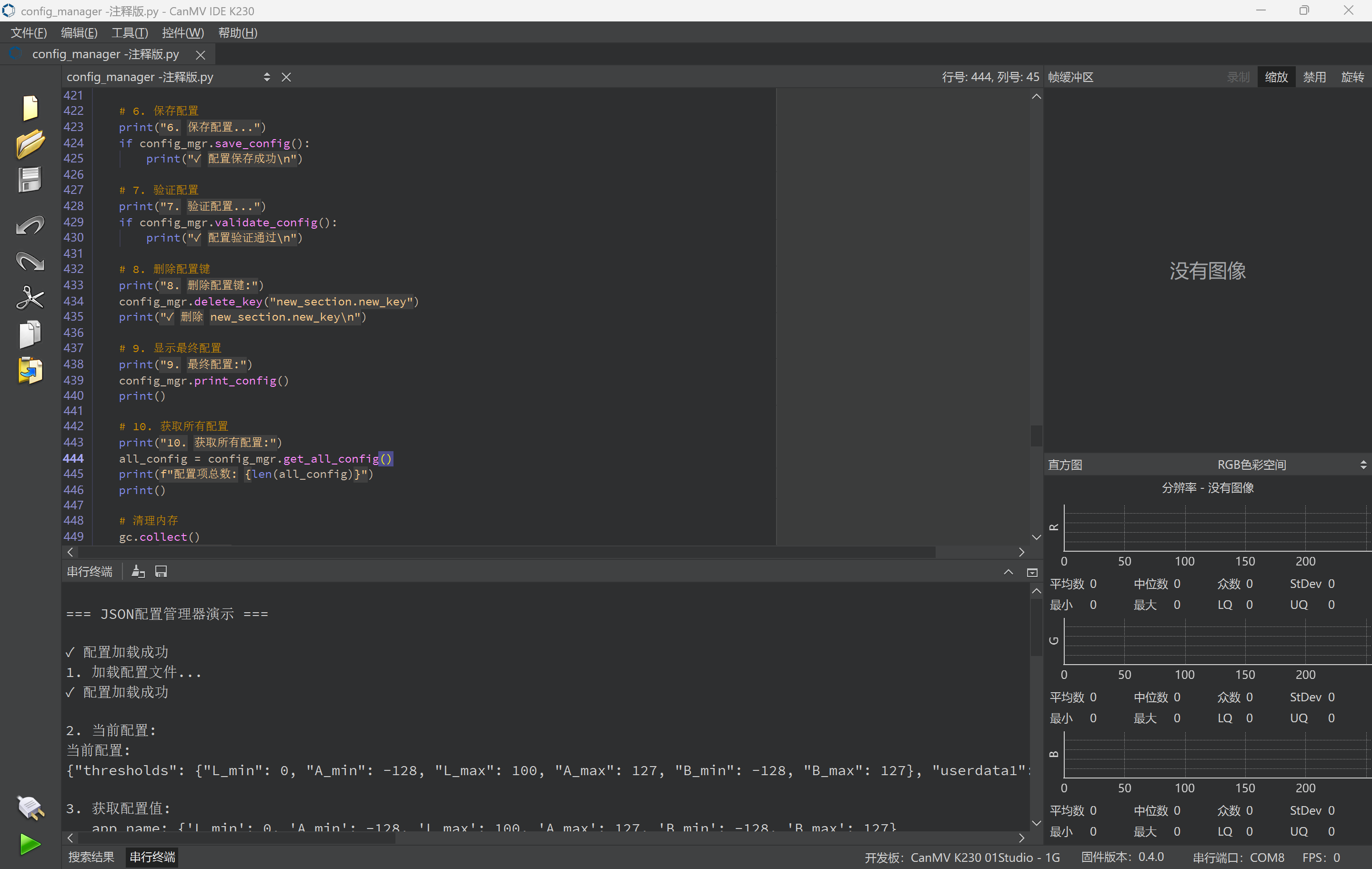
=== JSON配置管理器演示 ===

✓ 配置加载成功
1. 加载配置文件...
✓ 配置加载成功

2. 当前配置:
当前配置:
{"thresholds": {"L_min": 0, "A_min": -128, "L_max": 100, "A_max": 127, "B_min": -128, "B_max": 127}, "userdata1": 0, "invert": 0, "userdata2": 0, "userdata3": 0, "userdata4": 0, "version": "1.0.0", "app_name": "LAB阈值调整器", "network": {"wifi_password": "12345678", "ip_address": "192.168.1.100", "wifi_ssid": "WWW", "port": 8080}}

3. 获取配置值:
   app_name: {'L_min': 0, 'A_min': -128, 'L_max': 100, 'A_max': 127, 'B_min': -128, 'B_max': 127}
   database.host: 0

4. 设置配置值:
设置配置值成功: thresholds = {'L_min': 0, 'A_min': -128, 'L_max': 100, 'A_max': 127, 'B_min': -128, 'B_max': 127}
设置配置值成功: invert = 0

5. 更新后的配置:
当前配置:
{"thresholds": {"L_min": 0, "A_min": -128, "L_max": 100, "A_max": 127, "B_min": -128, "B_max": 127}, "userdata1": 0, "invert": 0, "userdata2": 0, "userdata3": 0, "userdata4": 0, "version": "1.0.0", "app_name": "LAB阈值调整器", "network": {"wifi_password": "12345678", "ip_address": "192.168.1.100", "wifi_ssid": "WWW", "port": 8080}}

6. 保存配置...
创建备份文件: /sdcard/deploy_config.json.backup
配置文件保存成功: /sdcard/deploy_config.json
✓ 配置保存成功

7. 验证配置...
配置验证通过
✓ 配置验证通过

8. 删除配置键:
✓ 删除 new_section.new_key

9. 最终配置:
当前配置:
{"thresholds": {"L_min": 0, "A_min": -128, "L_max": 100, "A_max": 127, "B_min": -128, "B_max": 127}, "userdata1": 0, "invert": 0, "userdata2": 0, "userdata3": 0, "userdata4": 0, "version": "1.0.0", "app_name": "LAB阈值调整器", "network": {"wifi_password": "12345678", "ip_address": "192.168.1.100", "wifi_ssid": "WWW", "port": 8080}}

10. 获取所有配置:
配置项总数: 9

演示完成!
MPY: soft reboot
CanMV v1.3-132-gb19c756(based on Micropython e00a144) on 2025-08-09; k230_canmv_01studio with K230

魔乐社区(Modelers.cn) 是一个中立、公益的人工智能社区,提供人工智能工具、模型、数据的托管、展示与应用协同服务,为人工智能开发及爱好者搭建开放的学习交流平台。社区通过理事会方式运作,由全产业链共同建设、共同运营、共同享有,推动国产AI生态繁荣发展。
更多推荐


 23
23 0
0- 0


 已为社区贡献1条内容

所有评论(0)