VScode如何ssh连接docker(WSL)
"program": "${workspaceFolder}/${fileBasenameNoExtension}",// 你的可执行文件路径。"preLaunchTask": "build",// 调试前先编译。1.vscode下载Remote Development、Dev Containers插件。"-pthread",// 必须加这个,链接线程库。"${file}",// 你的源代码文件名
1.vscode下载Remote Development、Dev Containers插件
2.开启docker容器
3.vscode 连接容器
4.修改task.json和lauch.json
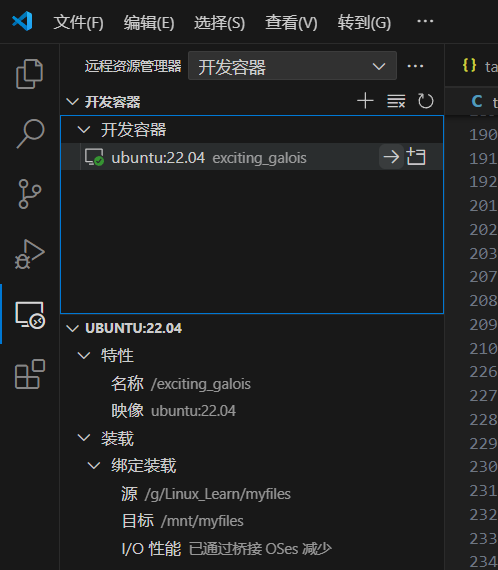
task.
json文件
{
"tasks": [
{
"label": "build",
"type": "shell",
"command": "gcc",
"args": [
"${file}", // 你的源代码文件名
"-o", "${fileDirname}/${fileBasenameNoExtension}",
"-pthread", // 必须加这个,链接线程库
"-g" // 生成调试信息
],
"group": {
"kind": "build",
"isDefault": true
}
}
],
"version": "2.0.0"
}
launch.json
{
"version": "0.2.0",
"configurations": [
{
"name": "C Debug",
"type": "cppdbg",
"request": "launch",
"program": "${workspaceFolder}/${fileBasenameNoExtension}", // 你的可执行文件路径
"args": [],
"stopAtEntry": true, // 程序启动时就暂停,方便一步步调试
"cwd": "${workspaceFolder}",
"environment": [],
"externalConsole": false,
"MIMode": "gdb",
"setupCommands": [
{
"description": "Enable pretty-printing for gdb",
"text": "-enable-pretty-printing",
"ignoreFailures": true
}
],
"preLaunchTask": "build", // 调试前先编译
"miDebuggerPath": "/usr/bin/gdb"
}
]
}
成功在vscode编译运行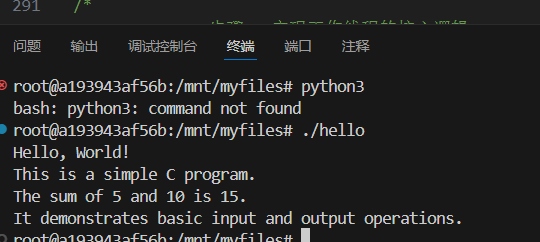

魔乐社区(Modelers.cn) 是一个中立、公益的人工智能社区,提供人工智能工具、模型、数据的托管、展示与应用协同服务,为人工智能开发及爱好者搭建开放的学习交流平台。社区通过理事会方式运作,由全产业链共同建设、共同运营、共同享有,推动国产AI生态繁荣发展。
更多推荐



 4
4 0
0- 0


 已为社区贡献1条内容

所有评论(0)