java 后台服务器实现google登录
·
1.配置开发者账号:java集成google登录(gmail)-CSDN博客
1.1data-login_ur回调方式需要把地址填到重定向URL里面
data-login_uri:里面的路径要和google重定向URL一致
<div id="g_id_onload"
           data-client_id="client_id"
           data-context="signin"
           data-ux_mode="popup"
           data-login_uri="https://test/oauth/callback"
           data-auto_prompt="false">
      </div>
      <div class="g_id_signin"
           data-type="standard"
           data-shape="rectangular"
           data-theme="outline"
           data-text="signin_with"
           data-size="large"
           data-locale="en-US"
           data-logo_alignment="left">
      </div>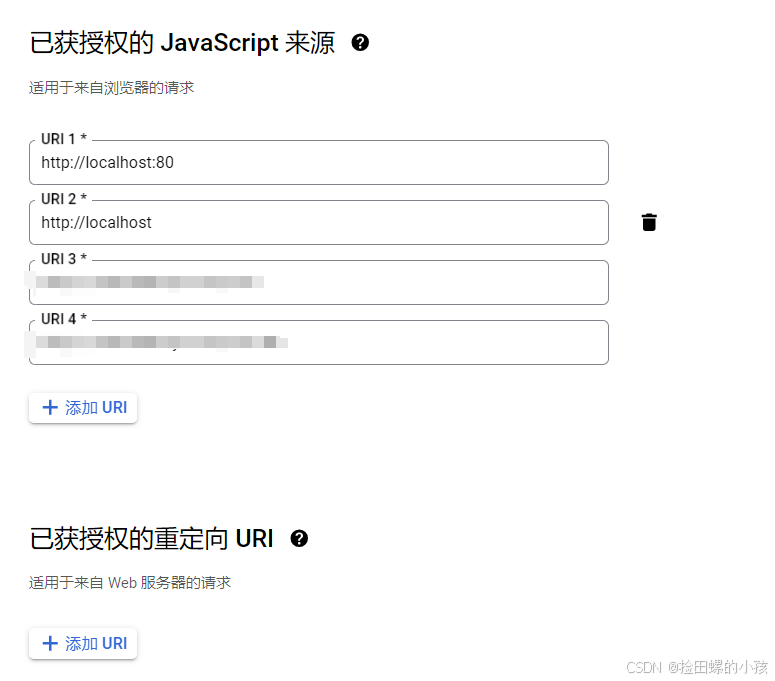
2 创建Request
AuthRequest authRequest = new AuthGoogleRequest(AuthConfig.builder()
                .clientId("Client ID")
                .clientSecret("Client Secret")
                .redirectUri("应用回调地址")
                // 针对国外平台配置代理
                .httpConfig(HttpConfig.builder()
                        .timeout(15000)
                        // host 和 port 请修改为开发环境的参数
                        .proxy(new Proxy(Proxy.Type.HTTP, new InetSocketAddress("127.0.0.1", 10080)))
                        .build())
                .build());
2.1 生成授权地址
可以直接使用以下方式生成第三方平台的授权链接:
String authorizeUrl = authRequest.authorize(AuthStateUtils.createState());
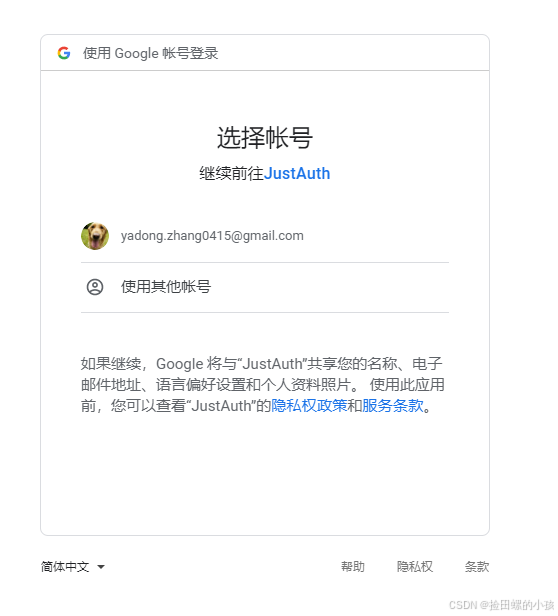
这个链接我们可以直接后台重定向跳转,也可以返回到前端后,前端控制跳转。前端控制的好处就是,可以将第三方的授权页嵌入到iframe中,适配网站设计。
授权链接访问成功后会看到以下页面内容:
2.2 以上完整代码如下
import me.zhyd.oauth.config.AuthConfig;
import me.zhyd.oauth.request.AuthGoogleRequest;
import me.zhyd.oauth.model.AuthCallback;
import me.zhyd.oauth.request.AuthRequest;
import me.zhyd.oauth.utils.AuthStateUtils;
import org.springframework.web.bind.annotation.PathVariable;
import org.springframework.web.bind.annotation.RequestMapping;
import org.springframework.web.bind.annotation.RestController;

import javax.servlet.http.HttpServletResponse;
import java.io.IOException;
import java.net.InetSocketAddress;
import java.net.Proxy;


@RestController
@RequestMapping("/oauth")
public class RestAuthController {

    @RequestMapping("/render")
    public void renderAuth(HttpServletResponse response) throws IOException {
        AuthRequest authRequest = getAuthRequest();
        response.sendRedirect(authRequest.authorize(AuthStateUtils.createState()));
    }

    @RequestMapping("/callback")
    public Object login(AuthCallback callback) {
        AuthRequest authRequest = getAuthRequest();
        return authRequest.login(callback);
    }

    private AuthRequest getAuthRequest() {
        return new AuthGoogleRequest(AuthConfig.builder()
                .clientId("Client ID")
                .clientSecret("Client Secret")
                .redirectUri("回调地址")
                // 针对国外平台配置代理
                .httpConfig(HttpConfig.builder()
                        .timeout(15000)
                        // host 和 port 请修改为开发环境的参数
                        .proxy(new Proxy(Proxy.Type.HTTP, new InetSocketAddress("127.0.0.1", 10080)))
                        .build())
                .build());
    }
}
可以看看JustAuth官网:https://justauth.cn/guide/oauth/google/

魔乐社区(Modelers.cn) 是一个中立、公益的人工智能社区,提供人工智能工具、模型、数据的托管、展示与应用协同服务,为人工智能开发及爱好者搭建开放的学习交流平台。社区通过理事会方式运作,由全产业链共同建设、共同运营、共同享有,推动国产AI生态繁荣发展。
更多推荐


 3
3 0
0- 0


 已为社区贡献1条内容

所有评论(0)