OUC计算机网络-lab2
lab2
Objective:
To find out the bandwidth of your Internet service; understand how a speed test work.
Instruction and tasks
Part I
Use a browser (Chrome or Firefox) to visit www.speedtest.net. In the map that you see on the website, find the nearest server from your computer, and name it server A. Also, pick a distant server (at least 1000 miles away), and name it server B. Then, answer the following questions.
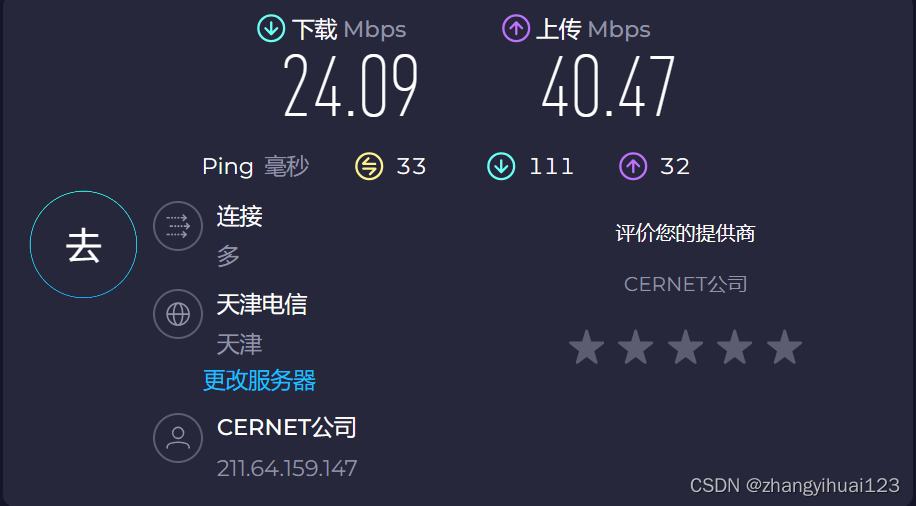
天津
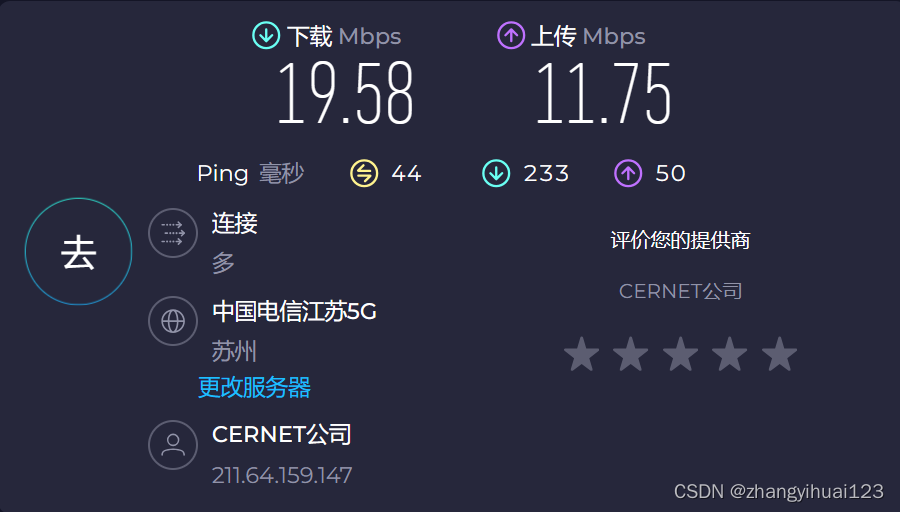
苏州
中国电信
(1) Run a speed test with server A, and record the download bandwidth. How much is the difference between the measured bandwidth and the bandwidth as advertised by your service provider?
-
a的带宽:
24.09Mbps 24.09Mbps 24.09Mbps
-
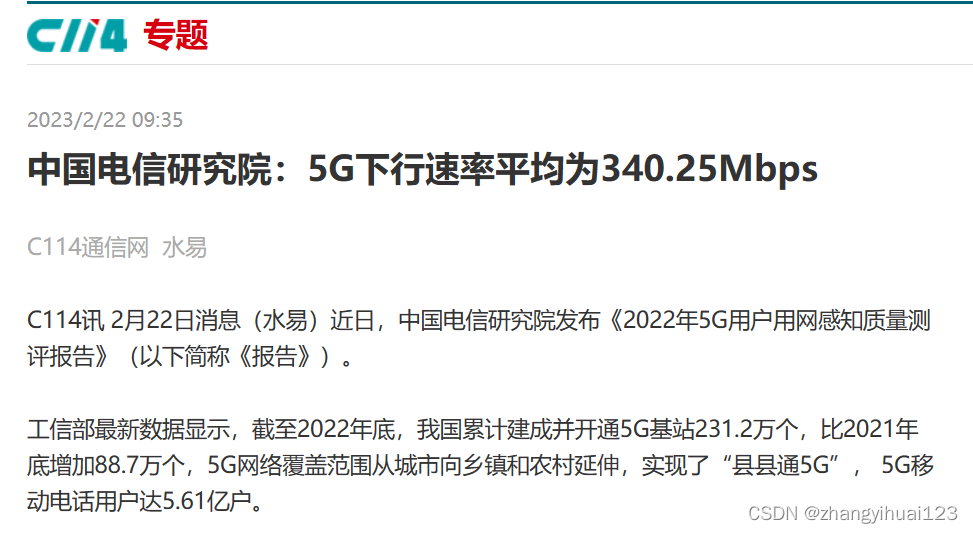
服务商提的带宽:
340.25Mbps 340.25Mbps 340.25Mbps
-
差值大概:
316.2Mbps 316.2Mbps 316.2Mbps
(2)Compute the propagation delays from server A and B to your computer.
(3)Use the measured bandwidth from question 1 to compute the bandwidth-delay product from server A to your computer and the bandwidth-delay product from server B to your computer.
-
a带宽迟延积:
0.0165∗24.09∗106=397485bit 0.0165*24.09*10^6=397485bit 0.0165∗24.09∗106=397485bit
-
b带宽迟延积:
0.022∗19.58∗106=430760bit 0.022*19.58*10^6=430760bit 0.022∗19.58∗106=430760bit
Part II
Read how the speed test work by visiting this website:
https://support.speedtest.net/entries/20862782-How-does-the-test-itself-w ork-How-is-the- result-calculated- and then answer the following questions.
• What do you think are the protocols used by the speed test?
Speedtest.net 使用的是基于 HTTP 和 TCP 的协议进行速度测试。
在测试中,它会下载和上传小文件,然后通过测量传输时间来计算下载速度、上传速度以及延迟等网络性能指标。这种方法通常能够提供对互联网连接性能的相对准确的评估。如果需要更详细的信息,建议查阅 Speedtest.net 的官方文档或支持页面。
• Explain why the bandwidth measurement is more likely to be accurate if you use a nearby server and download small files from it as opposed to using a distant one and downloading large files from it.
使用附近服务器并下载小文件进行带宽测量更可能获得准确结果,而不是使用远程服务器并下载大文件的原因有几点:
- 网络延迟较低: 附近服务器通常距离用户更近,因此数据传输的网络延迟更低。较低的延迟有助于更准确地测量实际的数据传输速度,因为它减少了数据在网络中移动时的等待时间。
- 减少网络拥塞影响: 在较远的服务器上下载大文件可能会受到网络拥塞的影响,因为数据在传输过程中需要经过多个网络节点。有可能导致数据传输速度的波动,使测量结果不够稳定。相比之下,使用附近服务器和小文件减少了这种可能性,提高了测量的准确性。
- 更好地反映实际使用情况: 一些日常互联网活动涉及大量小文件的传输,例如电子邮件发送。通过模拟这种实际使用情况,测量结果更有可能反映用户在日常使用中的体验。
- 更容易排除外部因素: 使用附近服务器可以更容易地排除与网络距离相关的外部因素。这有助于确保测量结果更为精准。
• The speed test calculates the result by averaging the speeds of many downloads. Discuss why the download test files can’t be the same.
原因有以下几点:
- 网络变化: 网络条件可能在不同的时间和环境中发生变化。
- 服务器负载: 测试服务器的负载也可能变化。如果每次测试都使用相同的文件,服务器可能会在测试时受到更大的负载,从而影响下载速度。
- 数据类型: 不同类型的文件可能对网络连接产生不同的影响。一些文件可能是小型的文本文件,而另一些可能是较大的媒体文件。通过使用多种类型的文件,可以确保速度测试更全面地涵盖了各种网络使用场景。
- 应对数据压缩: 有些互联网服务提供商可能会对下载的数据进行压缩,这可能导致相同文件的实际传输速度不同。

魔乐社区(Modelers.cn) 是一个中立、公益的人工智能社区,提供人工智能工具、模型、数据的托管、展示与应用协同服务,为人工智能开发及爱好者搭建开放的学习交流平台。社区通过理事会方式运作,由全产业链共同建设、共同运营、共同享有,推动国产AI生态繁荣发展。
更多推荐


 19
19 0
0- 0


 已为社区贡献2条内容

所有评论(0)