使用python将Excel表格中的数据进行标准化
·
设计原因:作者使用传感器(多个传感器)采集到数据以后,想要通过这些数据进行回归模型预测,但是采集到的原始数据的单位与量级存在显著差异,会导致模型预测偏差过大的问题出现,故需要进行标准化,以此提高收敛速度,让模型更加准确。主要使用python进行标准化。
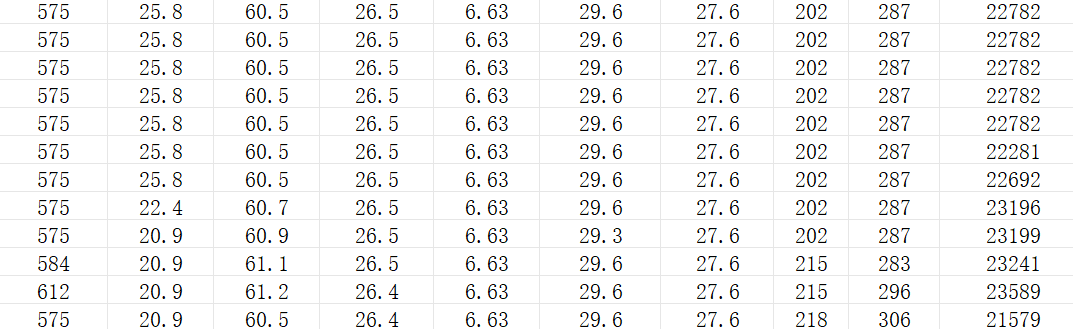
标准化之前的数据如下图所示:
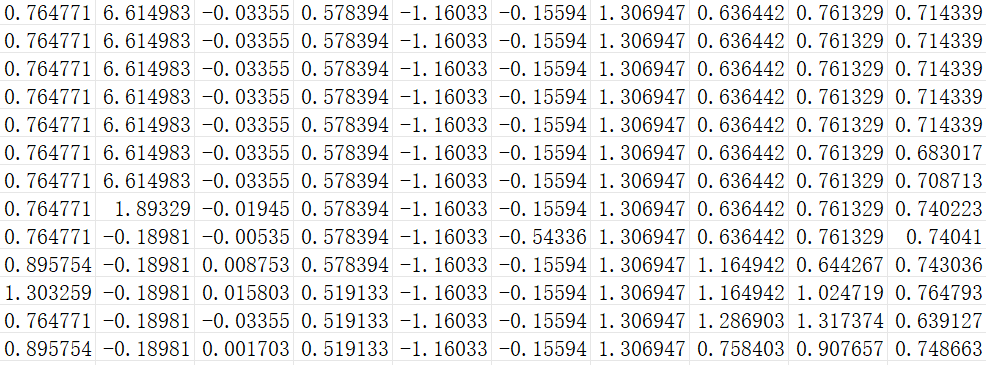
标准化后结果如下如所示:
下面简单介绍一下常用的标准化方法,如下图所示:
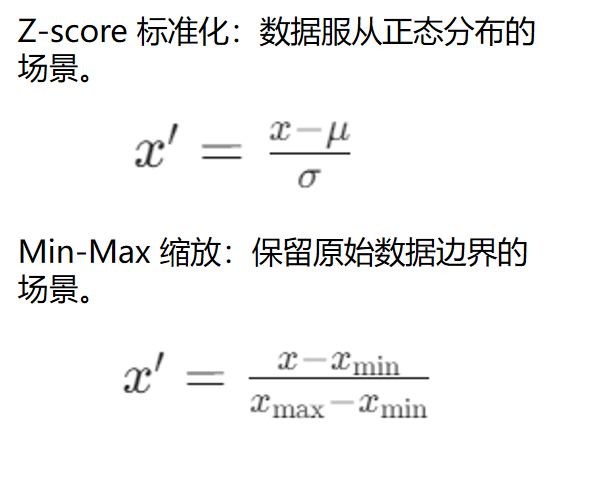
因为所采集到的数据,并不符合高斯分布,并且想要保留原始的边界,故使用的为Min-Max缩放进行标准化。
python实现如下:
import os
import pandas as pd
import numpy as np
from openpyxl import load_workbook
from openpyxl.utils import get_column_letter
from openpyxl.styles import Font
from openpyxl.styles import numbers


def z_score_normalization(column):
    """Z-score标准化:将数据转换为均值为0,标准差为1的分布"""
    mean = np.mean(column)
    std = np.std(column)
    if std == 0:
        return column - mean
    return (column - mean) / std


def min_max_normalization(column):
    """Min-Max标准化:将数据缩放到[0,1]区间"""
    min_val = np.min(column)
    max_val = np.max(column)
    if max_val - min_val == 0:
        return column - min_val
    return (column - min_val) / (max_val - min_val)


def generate_target_column(df, method='linear', feature_weights=None, noise_level=0.1, scale_factor=1000):
    """
    基于现有列生成目标列

    参数:
    df: 输入DataFrame
    method: 生成方法,'linear'(线性组合)或'polynomial'(多项式组合)
    feature_weights: 特征权重字典,例如 {'col1': 2.0, 'col2': 1.5}
    noise_level: 添加的随机噪声强度
    scale_factor: 缩放因子,用于缩小目标列
    """
    # 选择前10个数值列作为特征
    numeric_cols = df.select_dtypes(include=[np.number]).columns.tolist()
    feature_cols = numeric_cols[:10]  # 取前10列

    if not feature_cols:
        raise ValueError("数据中没有数值列可供生成目标列")

    # 如果未指定权重,随机生成0-2之间的权重
    if feature_weights is None:
        np.random.seed(42)  # 设置随机种子,确保结果可重现
        weights = np.random.uniform(0, 2, len(feature_cols))
        feature_weights = {col: weight for col, weight in zip(feature_cols, weights)}

        print("\n随机生成的权重分配:")
        for col, weight in feature_weights.items():
            print(f"  {col}: {weight:.4f}")

    # 确保所有指定的列都存在
    for col in feature_weights.keys():
        if col not in df.columns:
            raise ValueError(f"列 '{col}' 不存在于数据中")

    # 生成目标列
    if method == 'linear':
        # 线性组合: y = w1*x1 + w2*x2 + ... + noise
        target = np.zeros(len(df))
        for col, weight in feature_weights.items():
            target += df[col] * weight

        # 添加随机噪声
        noise = np.random.normal(0, noise_level * np.std(target), len(target))
        target += noise

        # 缩小目标列并保留两位小数
        target = (target / scale_factor).round(2)

        return pd.Series(target, name='generated_target')

    elif method == 'polynomial':
        # 多项式组合: y = w1*x1 + w2*x2^2 + w3*x1*x3 + noise
        target = np.zeros(len(df))

        # 线性项
        for col, weight in feature_weights.items():
            target += df[col] * weight

        # 添加平方项(使用第一个特征的平方)
        first_col = list(feature_weights.keys())[0]
        target += 0.5 * (df[first_col] ** 2)

        # 添加交叉项(如果有至少两列)
        if len(feature_weights) >= 2:
            col1, col2 = list(feature_weights.keys())[:2]
            target += 0.3 * df[col1] * df[col2]

        # 添加随机噪声
        noise = np.random.normal(0, noise_level * np.std(target), len(target))
        target += noise

        # 缩小目标列并保留两位小数
        target = (target / scale_factor).round(2)

        return pd.Series(target, name='generated_target')

    else:
        raise ValueError(f"不支持的生成方法: {method}")


def normalize_excel(input_file, output_file, normalization_method='z_score', target_column=None,
                    generate_target=False, target_gen_method='linear', feature_weights=None, scale_factor=1000):
    """
    对Excel文件中的数值列进行标准化处理,保留原始表头

    参数:
    input_file: 输入Excel文件路径
    output_file: 输出Excel文件路径
    normalization_method: 标准化方法,可选'z_score'、'min_max'或'regression'
    target_column: 目标变量列名(如'y'),若指定则不对该列标准化
    generate_target: 是否基于现有列生成目标列
    target_gen_method: 目标列生成方法,'linear'或'polynomial'
    feature_weights: 特征权重字典,用于生成目标列
    scale_factor: 缩放因子,用于缩小目标列
    """
    # 读取Excel文件
    try:
        df = pd.read_excel(input_file)
        print(f"成功读取文件: {input_file}")
    except Exception as e:
        print(f"错误: 读取文件 {input_file} 时出错 - {str(e)}")
        return

    # 生成目标列(如果需要)
    if generate_target:
        print(f"正在基于现有列生成目标列(将缩小{scale_factor}倍并保留两位小数)...")
        generated_target = generate_target_column(
            df,
            method=target_gen_method,
            feature_weights=feature_weights,
            scale_factor=scale_factor
        )
        df['generated_target'] = generated_target
        target_column = 'generated_target'  # 更新目标列名
        print(f"已生成目标列 '{target_column}' 并置于最后一列")

    # 创建新的工作簿
    wb = load_workbook(input_file)

    # 创建一个新的工作表来保存标准化结果
    sheet_title = f"标准化结果({normalization_method})"
    ws = wb.create_sheet(title=sheet_title[:31])  # 工作表名称不能超过31个字符

    # 设置表头样式
    header_font = Font(bold=True)

    # 写入原始表头
    for col_idx, header in enumerate(df.columns, start=1):
        ws.cell(row=1, column=col_idx).value = header
        ws.cell(row=1, column=col_idx).font = header_font

    # 根据不同的标准化方法处理数据
    if normalization_method == 'z_score':
        norm_function = z_score_normalization
        method_suffix = '(Z-score)'
    elif normalization_method == 'min_max':
        norm_function = min_max_normalization
        method_suffix = '(Min-Max)'
    elif normalization_method == 'regression':
        norm_function = z_score_normalization
        method_suffix = '(Regression)'
    else:
        print(f"错误: 不支持的标准化方法 - {normalization_method}")
        return

    # 对每列数据进行标准化处理
    for col_idx in range(len(df.columns)):
        column_name = df.columns[col_idx]
        column = df.iloc[:, col_idx]

        # 检查是否为数值列
        if pd.api.types.is_numeric_dtype(column):
            # 在线性回归模式下,如果是目标变量则跳过标准化
            if normalization_method == 'regression' and column_name == target_column:
                # 直接复制目标变量数据,并确保保留两位小数
                for row_idx, value in enumerate(column, start=2):
                    cell = ws.cell(row=row_idx, column=col_idx + 1)
                    cell.value = value
                    cell.number_format = '0.00'  # 设置Excel单元格格式为两位小数
                continue

            # 应用标准化
            normalized_column = norm_function(column)

            # 写入标准化后的数据(从第2行开始,保留表头)
            for row_idx, value in enumerate(normalized_column, start=2):
                ws.cell(row=row_idx, column=col_idx + 1).value = value
        else:
            # 非数值列直接复制原始数据
            for row_idx, value in enumerate(column, start=2):
                ws.cell(row=row_idx, column=col_idx + 1).value = value

    # 调整列宽以适应内容
    for col_idx in range(1, len(df.columns) + 1):
        column_letter = get_column_letter(col_idx)
        max_length = max(len(str(cell.value)) for cell in ws[column_letter])
        ws.column_dimensions[column_letter].width = max(max_length + 2, 15)

    # 保存工作簿
    try:
        wb.save(output_file)
        print(f"\n标准化完成!结果已保存至: {output_file}")
    except Exception as e:
        print(f"错误: 保存文件时出错 - {str(e)}")


if __name__ == "__main__":
    # 配置输入和输出文件路径
    input_excel_file = "./处理后的数据/合并结果.xlsx"  # 请修改为实际输入文件路径
    output_excel_file = "./标准化的数据/normalized_data2.xlsx"  # 请修改为实际输出文件路径

    # 选择标准化方法:'z_score'、'min_max' 或 'regression'
    # 'regression' 方法专为线性回归优化,使用Z-score并可排除目标变量
    normalization_method = 'regression'

    # 是否基于现有列生成目标列
    generate_target = True

    # 目标列生成方法:'linear'(线性组合)或'polynomial'(多项式组合)
    target_gen_method = 'linear'

    # 保持feature_weights为None,将自动从前10列随机分配0-2的权重
    feature_weights = None

    # 缩放因子,用于缩小目标列
    scale_factor = 1000

    # 如果不生成目标列,可手动指定现有目标列名
    target_column = 'generated_target' if generate_target else None

    # 确保输入文件存在
    if not os.path.exists(input_excel_file):
        print(f"错误: 指定的输入文件不存在 - {input_excel_file}")
    else:
        normalize_excel(
            input_excel_file,
            output_excel_file,
            normalization_method,
            target_column,
            generate_target,
            target_gen_method,
            feature_weights,
            scale_factor
        )
该代码中提供了两中标准化方法,可按需进行选择。代码中已经使用AI进行详细注释,欢迎讨论交流!!!

魔乐社区(Modelers.cn) 是一个中立、公益的人工智能社区,提供人工智能工具、模型、数据的托管、展示与应用协同服务,为人工智能开发及爱好者搭建开放的学习交流平台。社区通过理事会方式运作,由全产业链共同建设、共同运营、共同享有,推动国产AI生态繁荣发展。
更多推荐


 5
5 0
0- 0


 已为社区贡献1条内容

所有评论(0)