python matplotlib自定义色标
import numpy as npimport matplotlib.pyplot as pltimport matplotlib.colors as mcolorsxi = np.linspace(-5, 5, 500)yi = np.linspace(-5, 5, 500)X,Y=np.meshgrid(xi,yi)Z=(X**2+X*Y-Y**2)#自定义色标clrmap=mcolors.
·
可以用ListedColormap和LinearSegmentedColormap制作色标,其中ListedColormap由给定的颜色列表产生色标时不会自动插值,LinearSegmentedColormap则会在给定的颜色之间插值。
这两个类都属于matplotlib.colors,使用前需要导入import matplotlib.colors as mcolors
实例
import numpy as np
import matplotlib.pyplot as plt
import matplotlib.colors as mcolors

xi = np.linspace(-5, 5, 500)
yi = np.linspace(-5, 5, 500)
X,Y=np.meshgrid(xi,yi)

Z=(X**2+X*Y-Y**2)

#自定义色标
colors=["magenta","blueviolet","royalblue","aqua","springgreen",
"greenyellow","yellow","orangered","red","white"]
clrmap=mcolors.LinearSegmentedColormap.from_list("mycmap",colors)

plt.pcolor(X,Y,Z,cmap=clrmap)
plt.colorbar()
#Set equal scaling (i.e., make circles circular)
#by changing dimensions of the plot box.
plt.axis('scaled')
plt.show()
输出图片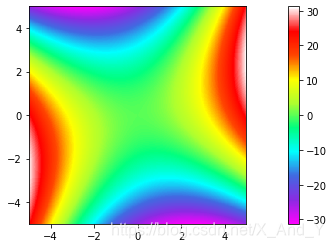
参考文档

魔乐社区(Modelers.cn) 是一个中立、公益的人工智能社区,提供人工智能工具、模型、数据的托管、展示与应用协同服务,为人工智能开发及爱好者搭建开放的学习交流平台。社区通过理事会方式运作,由全产业链共同建设、共同运营、共同享有,推动国产AI生态繁荣发展。
更多推荐



 0
0 0
0- 0


 已为社区贡献1条内容

所有评论(0)