Rocky Linux 在国内安装 Docker 的方法, 并 Docker 安装 mysql
本文介绍了在Rocky Linux系统上安装Docker的完整流程:1. 首先添加Docker官方源,执行命令sudo dnf config-manager --add-repo https://download.docker.com/linux/rhel/docker-ce.repo;2. 配置国内镜像源(如阿里云镜像)以加速下载;3. 安装Docker核心组件包,包括docker-ce、doc
核心步骤参考
https://docs.rockylinux.org/10/gemstones/containers/docker/
第一步
按照docs的知道,命令行
sudo dnf config-manager --add-repo https://download.docker.com/linux/rhel/docker-ce.repo
定义数据包的数据源
信息如下
root@MiWiFi-RD16-srv:/# sudo dnf config-manager --add-repo https://download.docker.com/linux/rhel/docker-ce.repo
Adding repo from: https://download.docker.com/linux/rhel/docker-ce.repo
root@MiWiFi-RD16-srv:/# cat /etc/yum.repos.d/
cat: /etc/yum.repos.d/: Is a directory
root@MiWiFi-RD16-srv:/# cd /etc/yum.repos.d/
root@MiWiFi-RD16-srv:/etc/yum.repos.d# ls
docker-ce.repo  rocky-addons.repo  rocky-devel.repo  rocky-extras.repo  rocky.repo
root@MiWiFi-RD16-srv:/etc/yum.repos.d# cat docker-ce.repo
[docker-ce-stable]
name=Docker CE Stable - $basearch
baseurl=https://download.docker.com/linux/rhel/$releasever/$basearch/stable
enabled=1
gpgcheck=1
gpgkey=https://download.docker.com/linux/rhel/gpg

[docker-ce-stable-source]
name=Docker CE Stable - Sources
baseurl=https://download.docker.com/linux/rhel/$releasever/source/stable
enabled=0
gpgcheck=1
gpgkey=https://download.docker.com/linux/rhel/gpg

[docker-ce-test]
name=Docker CE Test - $basearch
baseurl=https://download.docker.com/linux/rhel/$releasever/$basearch/test
enabled=0
gpgcheck=1
gpgkey=https://download.docker.com/linux/rhel/gpg

[docker-ce-test-source]
name=Docker CE Test - Sources
baseurl=https://download.docker.com/linux/rhel/$releasever/source/test
enabled=0
gpgcheck=1
gpgkey=https://download.docker.com/linux/rhel/gpg
第二步
额外增加的一步,要配置镜像
{
"registry-mirrors": ["https://registry.cn-hangzhou.aliyuncs.com"]
}
当然也会有很多其它的镜像如:
{
"registry-mirrors": [
"https://docker.xuanyuan.me"
]
}
第三步
这才能执行,安装
sudo dnf -y install docker-ce docker-ce-cli containerd.io docker-buildx-plugin docker-compose-plugin
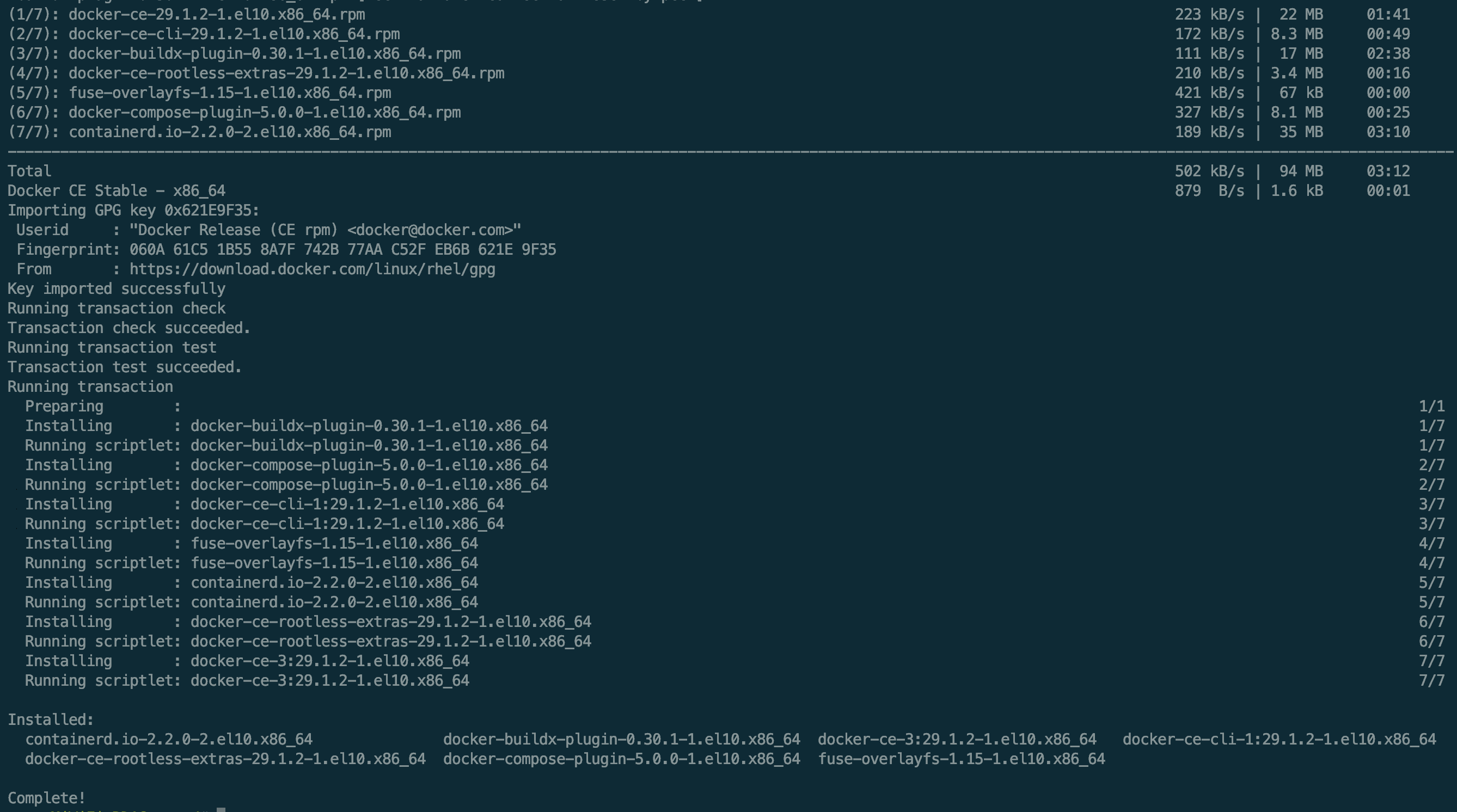
sudo dnf -y install docker-ce docker-ce-cli containerd.io docker-buildx-plugin docker-compose-plugin
Docker CE Stable - x86_64                                                                                                             232  B/s | 7.6 kB     00:33
Last metadata expiration check: 0:00:28 ago on Mon 08 Dec 2025 08:08:44 AM EST.
Dependencies resolved.
======================================================================================================================================================================
 Package                                          Architecture                  Version                                 Repository                               Size
======================================================================================================================================================================
Installing:
 containerd.io                                    x86_64                        2.2.0-2.el10                            docker-ce-stable                         35 M
 docker-buildx-plugin                             x86_64                        0.30.1-1.el10                           docker-ce-stable                         17 M
 docker-ce                                        x86_64                        3:29.1.2-1.el10                         docker-ce-stable                         22 M
 docker-ce-cli                                    x86_64                        1:29.1.2-1.el10                         docker-ce-stable                        8.3 M
 docker-compose-plugin                            x86_64                        5.0.0-1.el10                            docker-ce-stable                        8.1 M
Installing dependencies:
 fuse-overlayfs                                   x86_64                        1.15-1.el10                             appstream                                67 k
Installing weak dependencies:
 docker-ce-rootless-extras                        x86_64                        29.1.2-1.el10                           docker-ce-stable                        3.4 M

Transaction Summary
======================================================================================================================================================================
Install  7 Packages

Total download size: 94 M
Installed size: 366 M
Downloading Packages:
[MIRROR] docker-buildx-plugin-0.30.1-1.el10.x86_64.rpm: Curl error (35): SSL connect error for https://download.docker.com/linux/rhel/10/x86_64/stable/Packages/docker-buildx-plugin-0.30.1-1.el10.x86_64.rpm [Recv failure: Connection reset by peer]
(1/7): docker-ce-29.1.2-1.el10.x86_64.rpm                                                                                             223 kB/s |  22 MB     01:41
(2/7): docker-ce-cli-29.1.2-1.el10.x86_64.rpm                                                                                         172 kB/s | 8.3 MB     00:49
(3/7): docker-buildx-plugin-0.30.1-1.el10.x86_64.rpm                                                                                  111 kB/s |  17 MB     02:38
(4/7): docker-ce-rootless-extras-29.1.2-1.el10.x86_64.rpm                                                                             210 kB/s | 3.4 MB     00:16
(5/7): fuse-overlayfs-1.15-1.el10.x86_64.rpm                                                                                          421 kB/s |  67 kB     00:00
(6/7): docker-compose-plugin-5.0.0-1.el10.x86_64.rpm                                                                                  327 kB/s | 8.1 MB     00:25
(7/7): containerd.io-2.2.0-2.el10.x86_64.rpm                                                                                          189 kB/s |  35 MB     03:10
----------------------------------------------------------------------------------------------------------------------------------------------------------------------
Total                                                                                                                                 502 kB/s |  94 MB     03:12
Docker CE Stable - x86_64                                                                                                             879  B/s | 1.6 kB     00:01
Importing GPG key 0x621E9F35:
 Userid     : "Docker Release (CE rpm) <docker@docker.com>"
 Fingerprint: 060A 61C5 1B55 8A7F 742B 77AA C52F EB6B 621E 9F35
 From       : https://download.docker.com/linux/rhel/gpg
Key imported successfully
Running transaction check
Transaction check succeeded.
Running transaction test
Transaction test succeeded.
Running transaction
  Preparing        :                                                                                                                                              1/1
  Installing       : docker-buildx-plugin-0.30.1-1.el10.x86_64                                                                                                    1/7
  Running scriptlet: docker-buildx-plugin-0.30.1-1.el10.x86_64                                                                                                    1/7
  Installing       : docker-compose-plugin-5.0.0-1.el10.x86_64                                                                                                    2/7
  Running scriptlet: docker-compose-plugin-5.0.0-1.el10.x86_64                                                                                                    2/7
  Installing       : docker-ce-cli-1:29.1.2-1.el10.x86_64                                                                                                         3/7
  Running scriptlet: docker-ce-cli-1:29.1.2-1.el10.x86_64                                                                                                         3/7
  Installing       : fuse-overlayfs-1.15-1.el10.x86_64                                                                                                            4/7
  Running scriptlet: fuse-overlayfs-1.15-1.el10.x86_64                                                                                                            4/7
  Installing       : containerd.io-2.2.0-2.el10.x86_64                                                                                                            5/7
  Running scriptlet: containerd.io-2.2.0-2.el10.x86_64                                                                                                            5/7
  Installing       : docker-ce-rootless-extras-29.1.2-1.el10.x86_64                                                                                               6/7
  Running scriptlet: docker-ce-rootless-extras-29.1.2-1.el10.x86_64                                                                                               6/7
  Installing       : docker-ce-3:29.1.2-1.el10.x86_64                                                                                                             7/7
  Running scriptlet: docker-ce-3:29.1.2-1.el10.x86_64                                                                                                             7/7

Installed:
  containerd.io-2.2.0-2.el10.x86_64               docker-buildx-plugin-0.30.1-1.el10.x86_64  docker-ce-3:29.1.2-1.el10.x86_64   docker-ce-cli-1:29.1.2-1.el10.x86_64
  docker-ce-rootless-extras-29.1.2-1.el10.x86_64  docker-compose-plugin-5.0.0-1.el10.x86_64  fuse-overlayfs-1.15-1.el10.x86_64

Complete!
错误提示
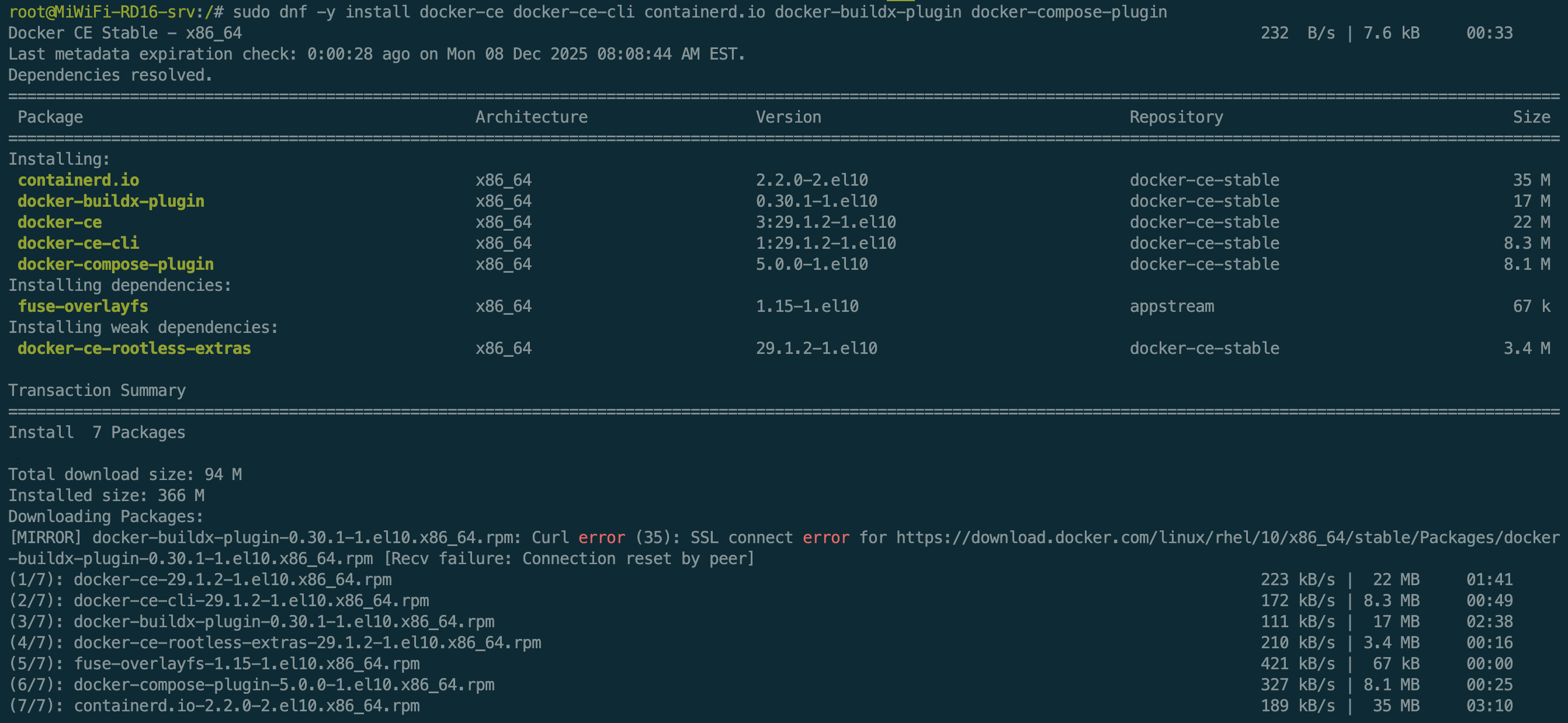
下载地址错误,转向了镜像
Downloading Packages:
[MIRROR] docker-buildx-plugin-0.30.1-1.el10.x86_64.rpm: Curl error (35): SSL connect error for https://download.docker.com/linux/rhel/10/x86_64/stable/Packages/docker-buildx-plugin-0.30.1-1.el10.x86_64.rpm [Recv failure: Connection reset by peer]
最后
启动 Docker
sudo systemctl --now enable docker
sudo systemctl --now enable docker
Created symlink '/etc/systemd/system/multi-user.target.wants/docker.service' → '/usr/lib/systemd/system/docker.service'.
PULL ,mysql
docker pull mysql:latest
latest: Pulling from library/mysql
e4f376e797b1: Download complete
7a5e1e917526: Pulling fs layer
57bd38a2d740: Pulling fs layer
ac5a3aa7003a: Pulling fs layer
55f85a7d691e: Pulling fs layer
f6a972aa365b: Pulling fs layer
ba8d858f8b56: Pulling fs layer
b843491434c1: Pulling fs layer
98d18218e1bb: Pulling fs layer
aff72f8f4e98: Pulling fs layer
a12c35ca5779: Download complete
6cb2348819f8: Download complete
short read: expected 783551 bytes but got 0: unexpected EOF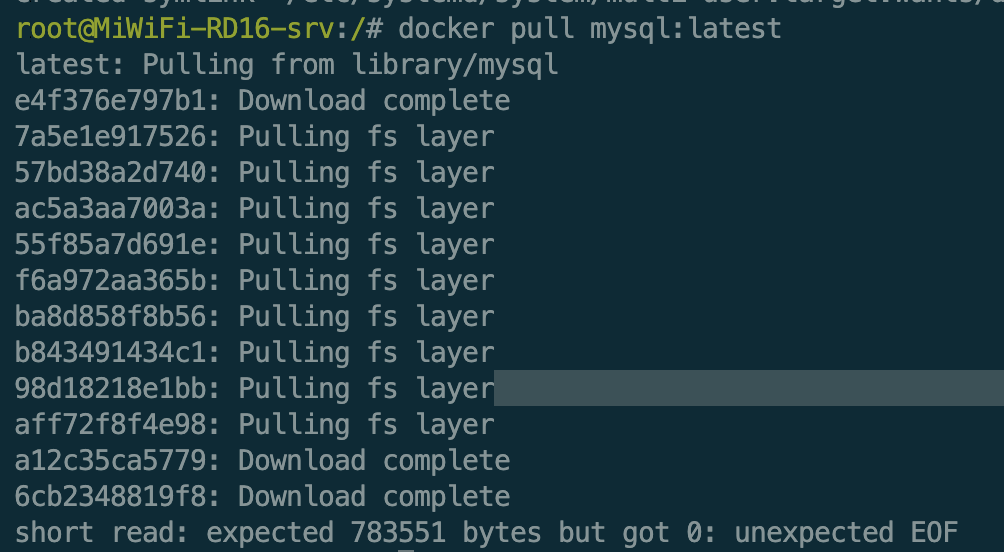

魔乐社区(Modelers.cn) 是一个中立、公益的人工智能社区,提供人工智能工具、模型、数据的托管、展示与应用协同服务,为人工智能开发及爱好者搭建开放的学习交流平台。社区通过理事会方式运作,由全产业链共同建设、共同运营、共同享有,推动国产AI生态繁荣发展。
更多推荐



 9
9 0
0- 0


 已为社区贡献16条内容

所有评论(0)