安装docker desktop失败解决办法
·
背景:我之前安装了docker desktop,发现版本不对,我就卸载了,然而重新安装时,确安装失败了
报错如下:
Docker desktop 3.1.0
Installation failed
Component CommunityInstaller.ServiceAction failed: Failed to start service:
The service did not respond to the start or control request in a timely fashion at CommunityInstaller.Service.Service.<StartAsync>d__29.MoveNext() --- End of stack trace from previous location where exception was thrown ---
at System.Runtime.ExceptionServices.ExceptionDispatchInfo.Throw() at System.Runtime.CompilerServices.TaskAwaiter.HandleNonSuccessAndDebuggerNotification(Task task)
at CommunityInstaller.Service.Manager.<AddServiceAsync>d__23.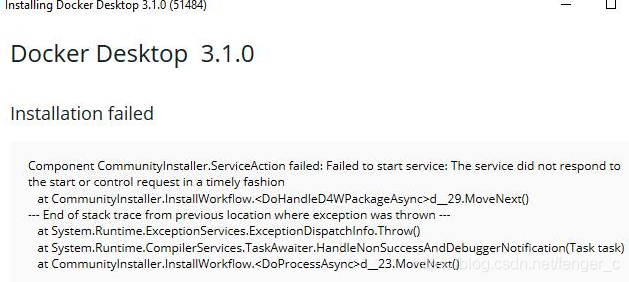
解决办法:
步骤1:删除服务
打开cmd 输入以下命令
sc delete Docker Desktop Service
步骤2:删除有关docker的文件
C:\Program Files\Docker
C:\Users\xxx(自己的账号目录下)\.docker
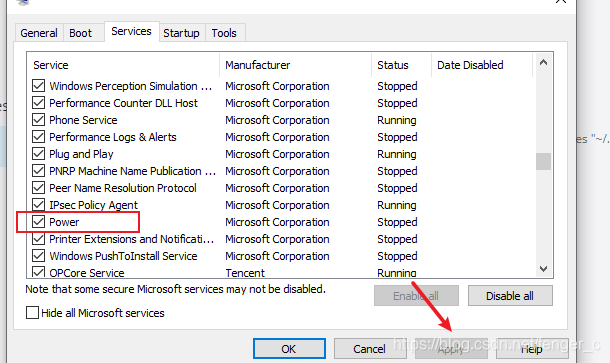
步骤3:禁用power服务
在搜索框输入msconfig.exe打开system configuration
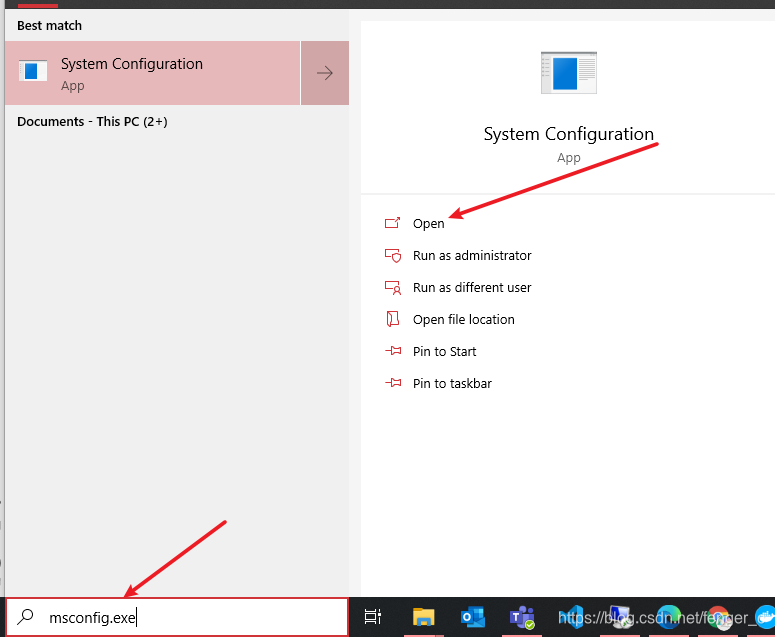
取消勾选power并apply后重启电脑
步骤4:用管理员身份运行安装包

终于成功安装上了,安装完之后再把那个power勾选回来就行

魔乐社区(Modelers.cn) 是一个中立、公益的人工智能社区,提供人工智能工具、模型、数据的托管、展示与应用协同服务,为人工智能开发及爱好者搭建开放的学习交流平台。社区通过理事会方式运作,由全产业链共同建设、共同运营、共同享有,推动国产AI生态繁荣发展。
更多推荐


 4
4 0
0- 0


 已为社区贡献1条内容

所有评论(0)