ubuntu添加用户到组_如何在Ubuntu中将现有用户添加到组中?

ubuntu添加用户到组
Ubuntu is a popular distributions used by a lot of companies as Desktop and Server. As a system administrator one of the most recurring job is changing existing user group. In this tutorial we will look how to accomplish this task and some helper commands about this.
Ubuntu是许多公司用作桌面和服务器的流行发行版。 作为系统管理员,最经常发生的工作之一就是更改现有用户组。 在本教程中,我们将探讨如何完成此任务以及与此有关的一些帮助程序命令。
初级组 (Primary Group)
Primary group specifies the user first group which will be used in file creation and other operations. For example if a user creates a file the group of the file will be set to the user primary group.
主组指定将在文件创建和其他操作中使用的用户第一组。 例如,如果用户创建文件,则该文件的组将被设置为用户主要组。
中学组 (Secondary Group)
Secondary group is generally used for permission related operations. For example if we want to a user to access network sniffing device or features we need to add required group to the user.
次要组通常用于权限相关的操作。 例如,如果我们要用户访问网络嗅探设备或功能,则需要向用户添加所需的组。
打印给定的用户组 (Print Given User Groups)
Before doing any add or remove operation we generally prefer listing given user primary and secondary groups. Group information is stored in file /etc/group and we will filter it with user name ismail like below.
在进行任何添加或删除操作之前,我们通常更喜欢列出给定的用户主要和次要用户组。 组信息存储在文件/etc/group ,我们将使用以下用户名ismail对其进行过滤。
$ grep ismail /etc/group
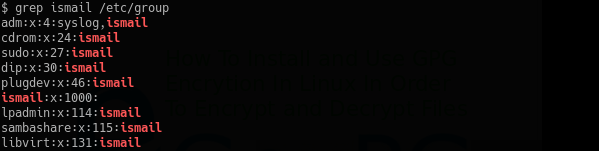
使用id命令列出用户主要组信息(List User Primary Group Information with id Command)
There is id command which can be used to print user related information. This will list userid, group id (guid) and secondary groups of the user.
有id命令可用于打印用户相关信息。 这将列出用户ID,组ID(GUID)和用户的辅助组。
$ id

更改用户主要组(Change User Primary Group)
We can change user primary group with usermod command and -g option. As there is only single primary group for each user. We will change user ismail primary group to the root with the following command.
我们可以使用usermod命令和-g选项更改用户主组。 因为每个用户只有一个主要组。 我们将使用以下命令将用户ismail主组更改为root 。
$ sudo usermod -g root ismail
将用户添加到辅助组 (Add User To The Secondary Group)
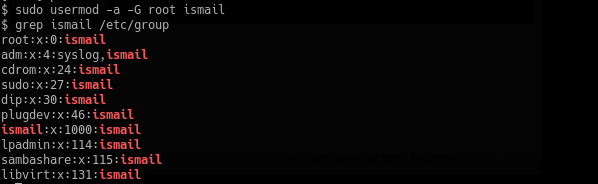
We can change this group with usermod command by using -a option. In this example we will add primary group of user ismail into root group.
我们可以使用-a选项,使用usermod命令更改该组。 在此示例中,我们将用户ismail主要组添加到root组中。
$ sudo usermod -a -G root ismail
ubuntu添加用户到组

魔乐社区(Modelers.cn) 是一个中立、公益的人工智能社区,提供人工智能工具、模型、数据的托管、展示与应用协同服务,为人工智能开发及爱好者搭建开放的学习交流平台。社区通过理事会方式运作,由全产业链共同建设、共同运营、共同享有,推动国产AI生态繁荣发展。
更多推荐


 0
0 0
0- 0


 已为社区贡献10条内容

所有评论(0)