linux修改ssh默认22端口,免密码登录
目录一、修改ssh端口添加ssh端口查看防火墙状态二、免密码登录在A机下生成公钥/私钥对把A机下的id_rsa.pub复制到B机.ssh/authorzied_keys文件里A机登录B机查看系统版本:cat /etc/redhat-release本地显示:服务器显示:Red Hat Enterprise Linux Server release ...
目录
查看系统版本:
cat /etc/redhat-release
本地显示:

服务器显示:
Red Hat Enterprise Linux Server release 6.9 (Santiago)
一、修改ssh端口
添加ssh端口
vi /etc/ssh/sshd_config,去掉默认Port 22前面的#,添加Port 9001
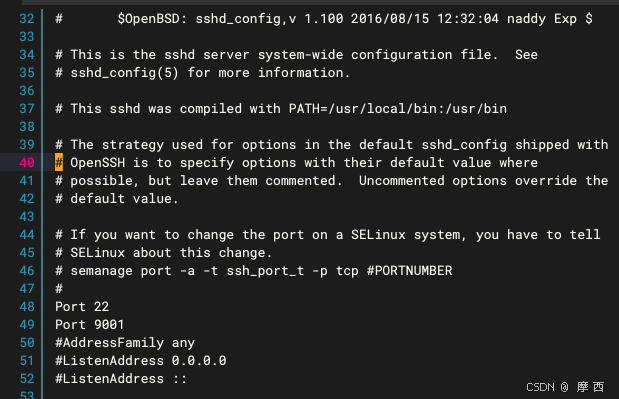
定义端口semanage port -a -t ssh_port_t -p tcp
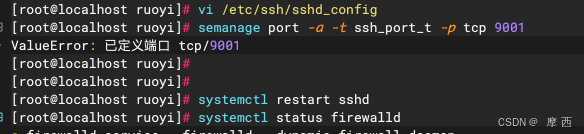
重启ssh服务 systemctl restart sshd
服务器提示 -bash: systemctl : command not found,则使用/etc/rc.d/init.d/sshd restart重启
二、免密码登录
在A机下生成公钥/私钥对
[root@A ~]# ssh-keygen -t rsa -P ''
-P表示密码,-P '' 就表示空密码
把A机下的id_rsa.pub复制到B机.ssh/authorzied_keys文件里
scp -P(大写) 端口
[root@A ~]# scp -P 33 .ssh/id_rsa.pub root@100.16.34.163:/root/id_rsa.pub
[root@B ~]# cat id_rsa.pub >> .ssh/authorized_keys
同理B机生成密匙,id_rsa.pub复制到A机.ssh/authorzied_keys
A机登录B机
ssh -p(小写) 端口
[root@A ~]# ssh -p 33 100.16.34.163
The authenticity of host '100.16.34.163 (100.16.34.163)' can't be established.
RSA key fingerprint is 00:a6:a8:87:eb:c7:40:10:39:cc:a0:eb:50:d9:6a:5b.
Are you sure you want to continue connecting (yes/no)? yes
Warning: Permanently added '192.168.1.181' (RSA) to the list of known hosts.
Last login: Fri Feb 15 09:53:18 2019 from 100.33.32.139
[root@B ~]#

魔乐社区(Modelers.cn) 是一个中立、公益的人工智能社区,提供人工智能工具、模型、数据的托管、展示与应用协同服务,为人工智能开发及爱好者搭建开放的学习交流平台。社区通过理事会方式运作,由全产业链共同建设、共同运营、共同享有,推动国产AI生态繁荣发展。
更多推荐



 3
3 0
0- 0


 已为社区贡献4条内容

所有评论(0)