大模型应用之:MCP最佳实践
MCP 建立了一个通用的「即插即用」协议,允许任何兼容 MCP 的客户端与任何兼容 MCP 的服务器协同工作,大大降低了集成复杂性和开发时间。正如 USB 创建了一个通用接口,允许任何 USB 设备连接到任何 USB 端口——消除了对特定设备连接器的需求——MCP 创建了一种标准化的方式,使 AI 应用程序能够连接各种数据源和工具。然而,有理由保持乐观。MCP 生态系统似乎已经克服了最初的采用障碍
背景
Manus 刷屏后,马上各种 Manus 复刻快速涌现,进而把 MCP (Model Context Protocol ) 这个相对低调的技术带出了圈。
同时,MCP 工具也为测试人员提供了便捷的测试环境构建和无代码自动化测试能力,极大提升了测试效率和灵活性。
MCP 是指 模型上下文协议(Model Context Protocol)
MCP开源项目
虽然 MCP 是由 Anthropic 发明的,但他们将其置于单独的组织下,表明他们致力于将其打造成开放标准而非专有解决方案。 截至撰写时(2025 年 3 月 13 日),工作组目前有五名成员:
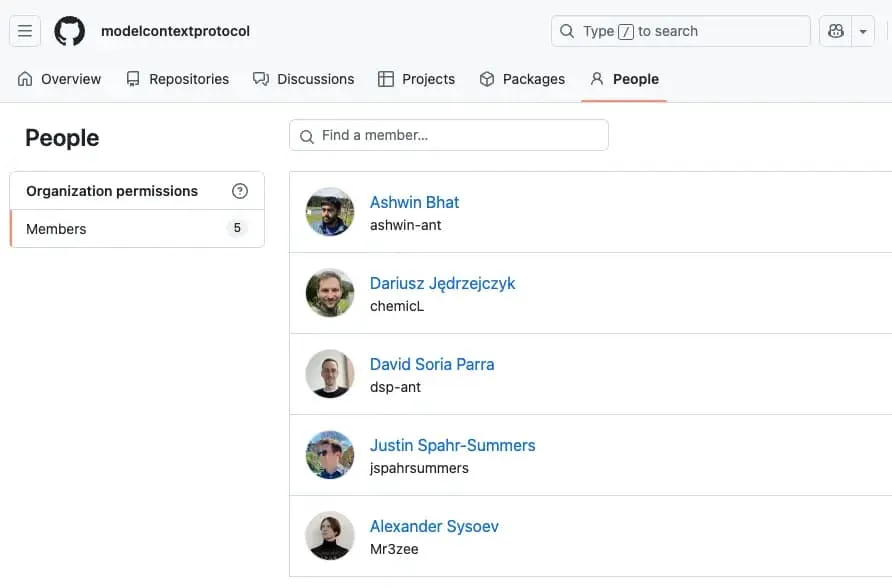
除了来自 JetBrains 的 Alexander Sysoev 外,其他四人都在 Anthropic 工作。这种平衡是可以理解的,因为该项目仍处于早期阶段,而且来自一个组织的核心团队可以在初始开发期间提供明确的方向。
MCP 如何工作
架构
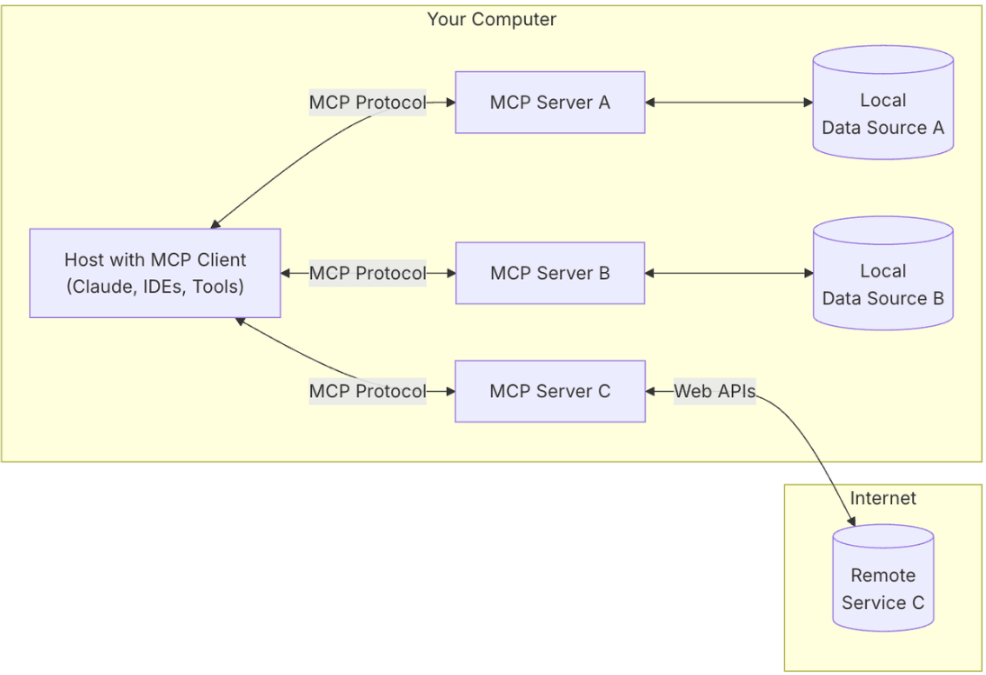
MCP 遵循客户端-服务器架构,有五个主要组件:
-
MCP 主机:想要通过 MCP 访问数据的 AI 工具(聊天客户端、IDE、智能体)。
-
MCP 客户端:与服务器保持 1:1 连接的协议客户端。
-
MCP 服务器:通过标准化的 Model Context Protocol 暴露特定功能的程序。
-
本地数据源:包含信息的本地数据库、文件和服务。
-
远程服务:MCP 服务器可以连接的外部 API 或服务。
与 USB 的类比
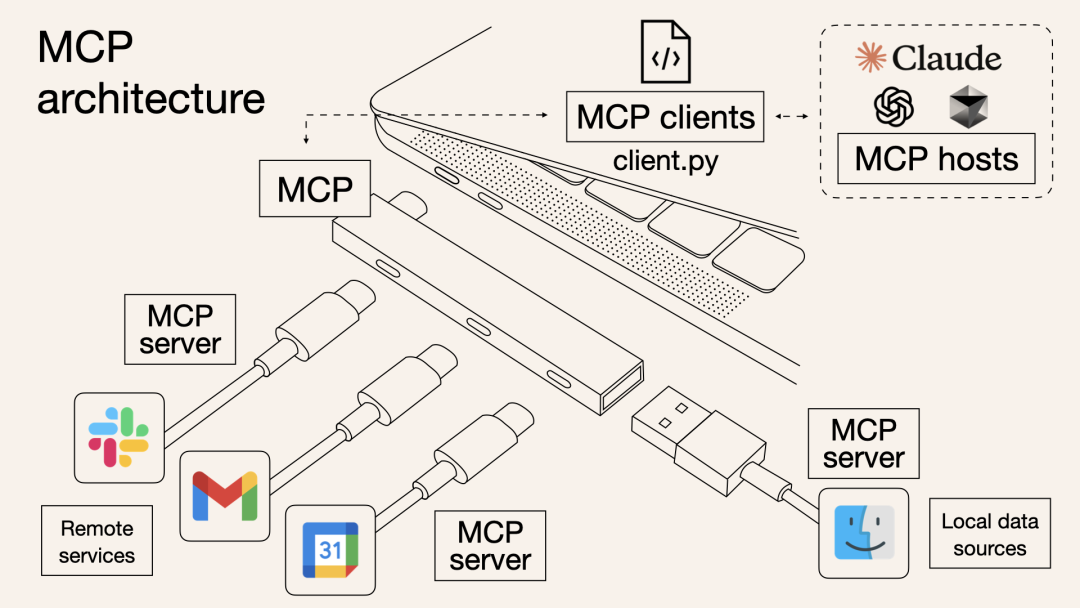
MCP 可以被视为 AI 系统的「USB 标准」。正如 USB 创建了一个通用接口,允许任何 USB 设备连接到任何 USB 端口——消除了对特定设备连接器的需求——MCP 创建了一种标准化的方式,使 AI 应用程序能够连接各种数据源和工具。
在 USB 出现之前,每个设备都需要自己专有的连接器。同样,在 MCP 之前,开发人员必须为每种 AI 应用程序和数据源的组合创建自定义集成。MCP 建立了一个通用的「即插即用」协议,允许任何兼容 MCP 的客户端与任何兼容 MCP 的服务器协同工作,大大降低了集成复杂性和开发时间。
开发案例
案例1:开源天气MCP,让大模型学会自己搜索最新天气预告
本质就是套壳了一个天气网站API(参考:天气网站),然后作为一个外置能力,提供给大模型调用。
将用户查询和工具描述通过function calling发送给LLM
由LLM决定是否使用工具和具体哪些工具。
核心mcp server功能
from typing import Anyimport httpxfrom mcp.server.fastmcp import FastMCP
# Initialize FastMCP servermcp = FastMCP("weather")
# ConstantsNWS_API_BASE = "https://api.weather.gov"USER_AGENT = "weather-app/1.0"
async def make_nws_request(url: str) -> dict[str, Any] | None:    """Make a request to the NWS API with proper error handling."""    headers = {        "User-Agent": USER_AGENT,        "Accept": "application/geo+json"    }    async with httpx.AsyncClient() as client:        try:            response = await client.get(url, headers=headers, timeout=30.0)            response.raise_for_status()            return response.json()        except Exception:            return None
def format_alert(feature: dict) -> str:    """Format an alert feature into a readable string."""    props = feature["properties"]    return f"""            Event: {props.get('event', 'Unknown')}            Area: {props.get('areaDesc', 'Unknown')}            Severity: {props.get('severity', 'Unknown')}            Description: {props.get('description', 'No description available')}            Instructions: {props.get('instruction', 'No specific instructions provided')}            """
@mcp.tool()async def get_alerts(state: str) -> str:    """Get weather alerts for a US state.
    Args:        state: Two-letter US state code (e.g. CA, NY)    """    url = f"{NWS_API_BASE}/alerts/active/area/{state}"    data = await make_nws_request(url)
    if not data or "features" not in data:        return "Unable to fetch alerts or no alerts found."
    if not data["features"]:        return "No active alerts for this state."
    alerts = [format_alert(feature) for feature in data["features"]]    return "\n---\n".join(alerts)
@mcp.tool()async def get_forecast(latitude: float, longitude: float) -> str:    """Get weather forecast for a location.
    Args:        latitude: Latitude of the location        longitude: Longitude of the location    """    # First get the forecast grid endpoint    points_url = f"{NWS_API_BASE}/points/{latitude},{longitude}"    points_data = await make_nws_request(points_url)
    if not points_data:        return "Unable to fetch forecast data for this location."
    # Get the forecast URL from the points response    forecast_url = points_data["properties"]["forecast"]    forecast_data = await make_nws_request(forecast_url)
    if not forecast_data:        return "Unable to fetch detailed forecast."
    # Format the periods into a readable forecast    periods = forecast_data["properties"]["periods"]    forecasts = []    for period in periods[:5]:  # Only show next 5 periods        forecast = f"""                    {period['name']}:                    Temperature: {period['temperature']}°{period['temperatureUnit']}                    Wind: {period['windSpeed']} {period['windDirection']}                    Forecast: {period['detailedForecast']}                    """        forecasts.append(forecast)
    return "\n---\n".join(forecasts)
if __name__ == "__main__":    # Initialize and run the server    mcp.run(transport='stdio')
测试验证
官方调试器验证
使用官方提供的 Inspector 可视化工具来调试我们的服务器。
-
通过 mcp dev 来运行:mcp dev PYTHONFILE
-
通过 npx:
npx -y @modelcontextprotocol/inspector <command> <arg1> <arg2>
idea终端orGitbash终端,运行mcp dev weather.py
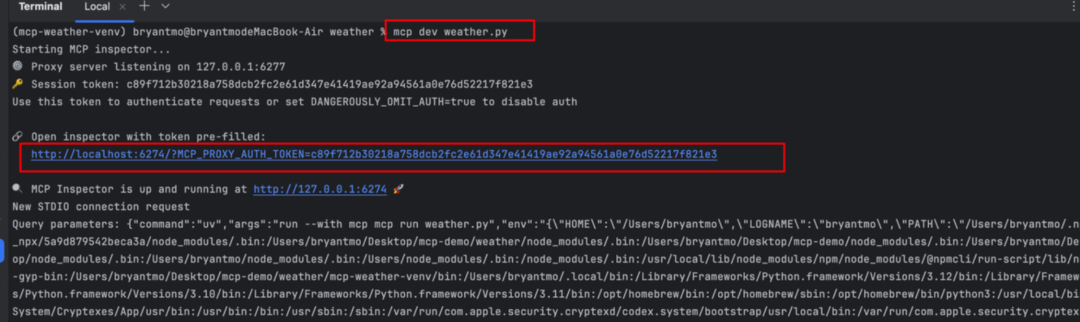
访问:http://localhost:6274/?MCP_PROXY_AUTH_TOKEN=c89f712b30218a758dcb2fc2e61d347e41419ae92a94561a0e76d52217f821e3#tools
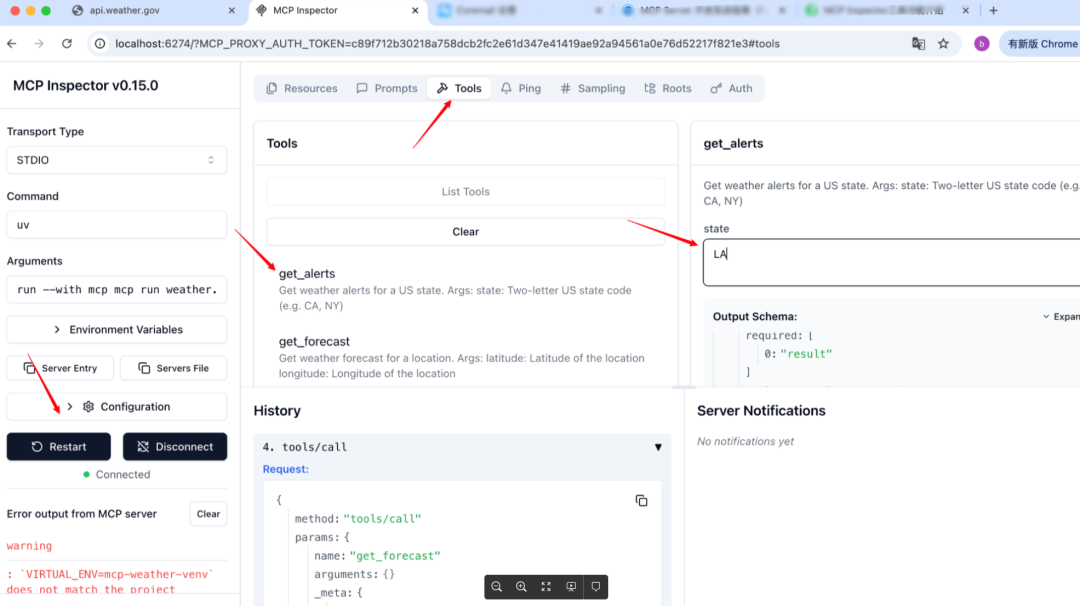
cursor
项目部署:IDE添加MCP-Server:
需要配置mcp-server:
{ "mcpServers": { "weather-mcp" : { "type" : "stdio", "command": "D:\\temp\\mcp-demo\\mcp-demo\\weather\\mcp-weather-venv\\Scripts\\uv.exe", "args": [ "--directory", "D:\\temp\\mcp-demo\\mcp-demo\\weather", "run", "D:\\temp\\mcp-demo\\mcp-demo\\weather\\weather.py"] } }}测试效果:
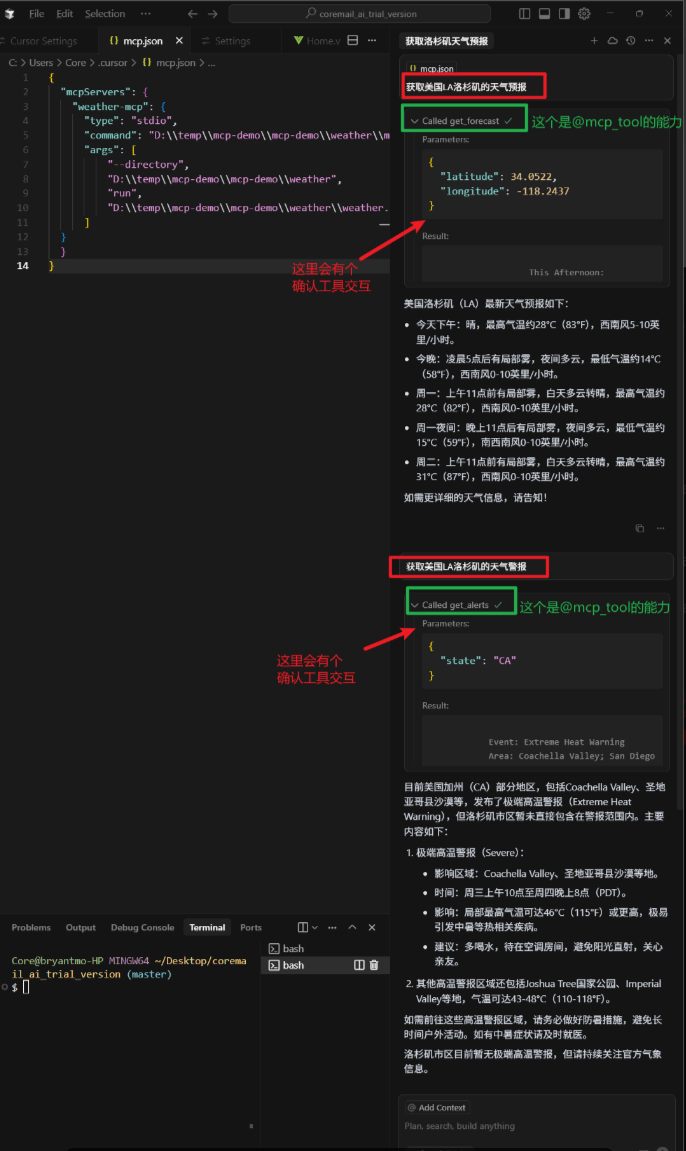
案例2:开源MCP集成,自动操作文件系统
我们也可以使用一些开源MCP,通过本地集成,让大模型装上操作系统的翅膀。
(下面例子,则是通过使用file_system_mcp_server:https://github.com/modelcontextprotocol/servers/tree/main/src/filesystem)
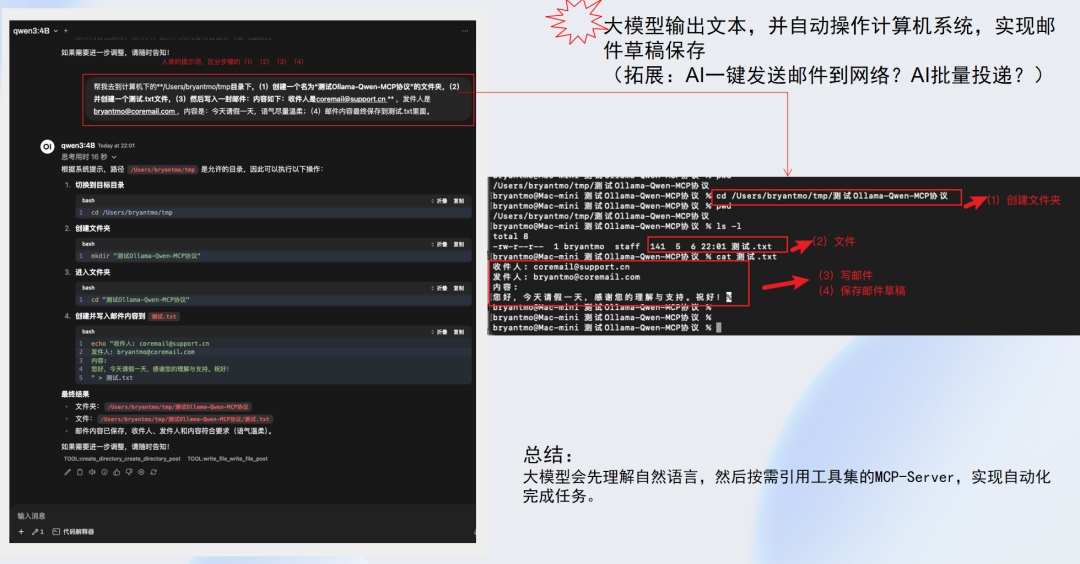
总结
1、大模型是怎么自动完成复杂任务?
大模型集成各类工具,结合自身思考和推理,一边拆解任务,一边按需调用工具。
2、大模型如何集成工具?
MCP(模型上下文协议,Model Context Protocol),是一种开源协议,大模型可以通过它和各类数据库、文件系统、开发工具、Web 和浏览器自动化进行协作。
过去协作模式:AI(给答案)+人工(提示词、执行)
MCP改造协作:AI(给答案+执行)+人工(提示词)
3、MCP的主要优势在哪?
MCP 为 AI 系统开发提供了几个显著优势:
-
减少开发时间:开发人员可以利用预构建的 MCP 服务器完成常见任务,而不是为每个数据源或工具构建自定义集成。
-
增强互操作性:使用 MCP 构建的应用程序可以与任何兼容的工具和数据源无缝协作——创建一个真正可组合的生态系统。
-
模块化:调试、授权、审计和链接等贯穿各处的关注点可以标准化并实现一次,然后在整个生态系统中重复使用。
展望未来
MCP 仍处于早期阶段。创建成功的协议类似于建立市场——你需要供应商和消费者双方才能达到临界质量。
然而,有理由保持乐观。MCP 生态系统似乎已经克服了最初的采用障碍,越来越多的代理(MCP 客户端)出现,每周开发的 MCP 服务器数量也在增加,用于解决特定领域的任务。
从技术角度看,MCP 大体上类似于在编码领域取得巨大成功的 LSP。从长远来看,MCP 可能像 SQL 一样重要,成为 AI 原生时代的通用语言。

魔乐社区(Modelers.cn) 是一个中立、公益的人工智能社区,提供人工智能工具、模型、数据的托管、展示与应用协同服务,为人工智能开发及爱好者搭建开放的学习交流平台。社区通过理事会方式运作,由全产业链共同建设、共同运营、共同享有,推动国产AI生态繁荣发展。
更多推荐



 14
14 0
0- 0


 已为社区贡献3条内容

所有评论(0)