Android音频学习(十一)——audio_policy_configuration.xml解析(2)
上一篇内容分析了音频配置文件中节点对应的具体的类。包括mixPort,devicePort,route。
2. mixPort与devicePort关系
-
创建
AudioRoute对象连接源(source)和汇(sink) -
处理路由类型:
-
mix:软件混音输出 -
device:物理设备直连
-
mixPort是stream,比如"primary_output", devicePort是具体的硬件设备,比如"speaker",通过route节点连接起来,我们可以理解为音频数据流最终输出到哪个设备(输出/播放),或从设备输入到哪种数据流(输入/录音)。
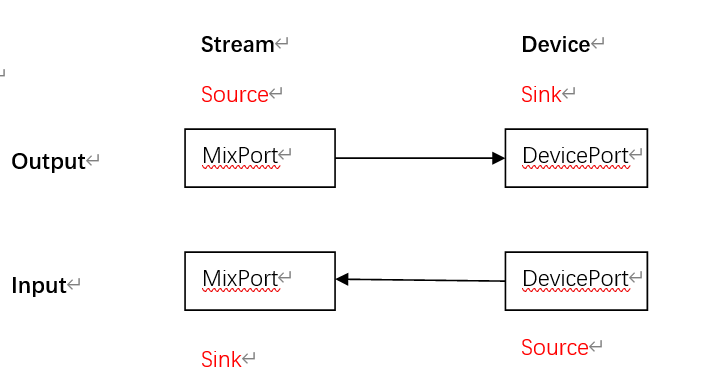
从代码的角度看,一个mixPort对应了一个IOProfile,在IOProfile里面有一个mSupportedDevices成员,它是一个DeviceDescriptor集合类型,意思也就是IOProfile支持的设备集合,这些设备集合可以把音频数据传递给IOProfile或IOProfile可以把数据传给device;那IOProfile是如何找到对应的DeviceDescriptor的?
void HwModule::refreshSupportedDevices()
{
    // Now updating the streams (aka IOProfile until now) supported devices
    for (const auto& stream : mInputProfiles) {
        DeviceVector sourceDevices;
        for (const auto& route : stream->getRoutes()) {
            sp<PolicyAudioPort> sink = route->getSink();
            if (sink == 0 || stream != sink) {
                ALOGE("%s: Invalid route attached to input stream", __FUNCTION__);
                continue;
            }
            DeviceVector sourceDevicesForRoute = getRouteSourceDevices(route);
            if (sourceDevicesForRoute.isEmpty()) {
                ALOGE("%s: invalid source devices for %s", __FUNCTION__, stream->getName().c_str());
                continue;
            }
            sourceDevices.add(sourceDevicesForRoute);
        }
        if (sourceDevices.isEmpty()) {
            ALOGE("%s: invalid source devices for %s", __FUNCTION__, stream->getName().c_str());
            continue;
        }
        stream->setSupportedDevices(sourceDevices);
    }
    for (const auto& stream : mOutputProfiles) {
        DeviceVector sinkDevices;
        for (const auto& route : stream->getRoutes()) {
            sp<PolicyAudioPort> source = findByTagName(route->getSources(), stream->getTagName());
            if (source == 0 || stream != source) {
                ALOGE("%s: Invalid route attached to output stream", __FUNCTION__);
                continue;
            }
            sp<DeviceDescriptor> sinkDevice = getRouteSinkDevice(route);
            if (sinkDevice == 0) {
                ALOGE("%s: invalid sink device for %s", __FUNCTION__, stream->getName().c_str());
                continue;
            }
            sinkDevices.add(sinkDevice);
        }
        stream->setSupportedDevices(sinkDevices);
    }
}
sp<DeviceDescriptor> HwModule::getRouteSinkDevice(const sp<AudioRoute> &route) const
{
sp<DeviceDescriptor> sinkDevice = 0;
if (route->getSink()->asAudioPort()->getType() == AUDIO_PORT_TYPE_DEVICE) {
sinkDevice = mDeclaredDevices.getDeviceFromTagName(route->getSink()->getTagName());
}
return sinkDevice;
}
DeviceVector HwModule::getRouteSourceDevices(const sp<AudioRoute> &route) const
{
DeviceVector sourceDevices;
for (const auto& source : route->getSources()) {
if (source->asAudioPort()->getType() == AUDIO_PORT_TYPE_DEVICE) {
sourceDevices.add(mDeclaredDevices.getDeviceFromTagName(source->getTagName()));
}
}
return sourceDevices;
}
源码的基本原理是:
遍历route,如果是输入流,则mixport作为sink,则需要查找对应有哪些source即设备输入到mixport,在source中过滤出device(source->asAudioPort()->getType() == AUDIO_PORT_TYPE_DEVICE), 即devicesPort标签对应的实体类DeviceDescriptor,并保存在mSupportedDevices。
如果是输出流,则mixport作为source,则需要查找对应有些可以输出的设备即sink,在sink中过滤出device(route->getSink()->asAudioPort()->getType() == AUDIO_PORT_TYPE_DEVICE)。
作为输出流source,mSupportedDevices保存此流可以输出到对应的device,stream -> device
作为输入流sink,mSupportedDevices保存了其他device能输出数据到此流, device -> stream
<routes>
    <route type="mix" sink="Earpiece"
                       sources="primary output,deep_buffer,BT SCO Headset Mic"/>
    <route type="mix" sink="Speaker"
                       sources="primary output,deep_buffer,compressed_offload,BT SCO Headset Mic,Telephony Rx"/>
    <route type="mix" sink="Wired Headset"
                       sources="primary output,deep_buffer,compressed_offload,BT SCO Headset Mic,Telephony Rx"/>
    <route type="mix" sink="Wired Headphones"
                       sources="primary output,deep_buffer,compressed_offload,BT SCO Headset Mic,Telephony Rx"/>
    <route type="mix" sink="primary input"
                       sources="Built-In Mic,Built-In Back Mic,Wired Headset Mic,BT SCO Headset Mic"/>
    <route type="mix" sink="Telephony Tx"
                       sources="Built-In Mic,Built-In Back Mic,Wired Headset Mic,BT SCO Headset Mic, voice_tx"/>
    <route type="mix" sink="voice_rx"
                       sources="Telephony Rx"/>
</routes>
例如:当sink为primary input时,对应sources即device有sources="Built-In Mic,Built-In Back Mic,Wired Headset Mic,BT SCO Headset Mic"。
当source为primary output时,对应的sink即device有Earpiece,speaker,Wired HeadSet, Wired Headphones。
3.多配置文件合并
(1)主配置通过 <xi:include> 引入子配置:
<xi:include href="a2dp_audio_policy_configuration.xml"
(2)解析顺序:
-
先加载
/vendor/etc/audio_policy_configuration.xml -
再合并
/system/etc/audio_policy_volumes.xml(音量配置)
4.调试与验证技巧
(1)配置有效性检查:
adb shell dumpsys media.audio_policy --files
# 输出:Loaded primary: /vendor/etc/audio_policy_configuration.xml
(2)运行时路由状态:
adb shell dumpsys media.audio_policy | grep -A 10 "Devices"
# 输出设备状态:Speaker: available | Bluetooth: unavailable
(3)XSD 架构校验:
<!-- 使用官方Schema校验 -->
<audioPolicyConfiguration xmlns:xi="http://www.w3.org/2001/XInclude"
xsi:noNamespaceSchemaLocation="audio_policy_configuration.xsd">
5.解析流程图解
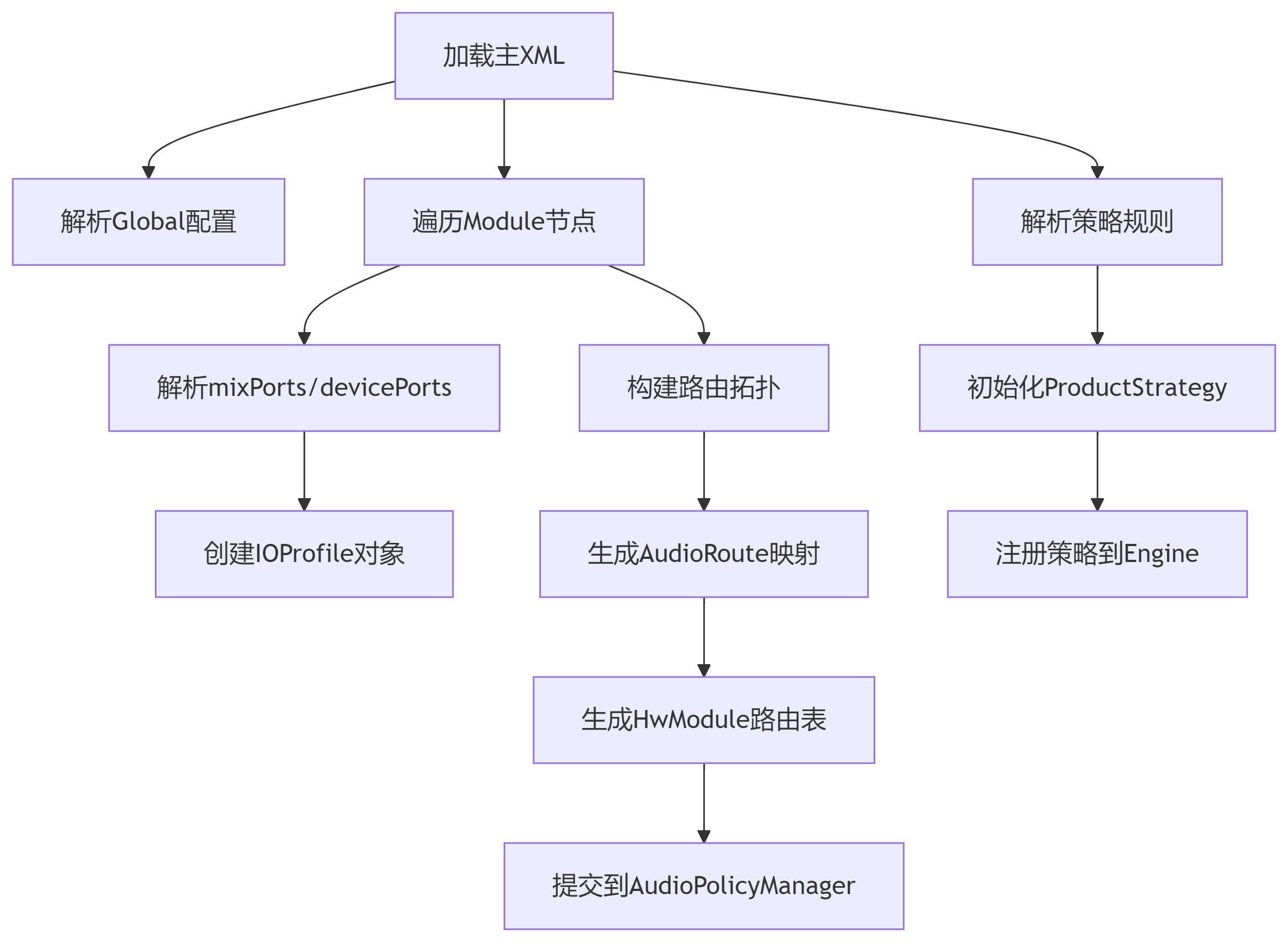
关于策略规则和音量配置,将在后续章节中说明。

魔乐社区(Modelers.cn) 是一个中立、公益的人工智能社区,提供人工智能工具、模型、数据的托管、展示与应用协同服务,为人工智能开发及爱好者搭建开放的学习交流平台。社区通过理事会方式运作,由全产业链共同建设、共同运营、共同享有,推动国产AI生态繁荣发展。
更多推荐


 22
22 0
0- 0


 已为社区贡献10条内容

所有评论(0)