vue3 AI聊天功能,流式接口返回makdown数据处理
·
效果展示
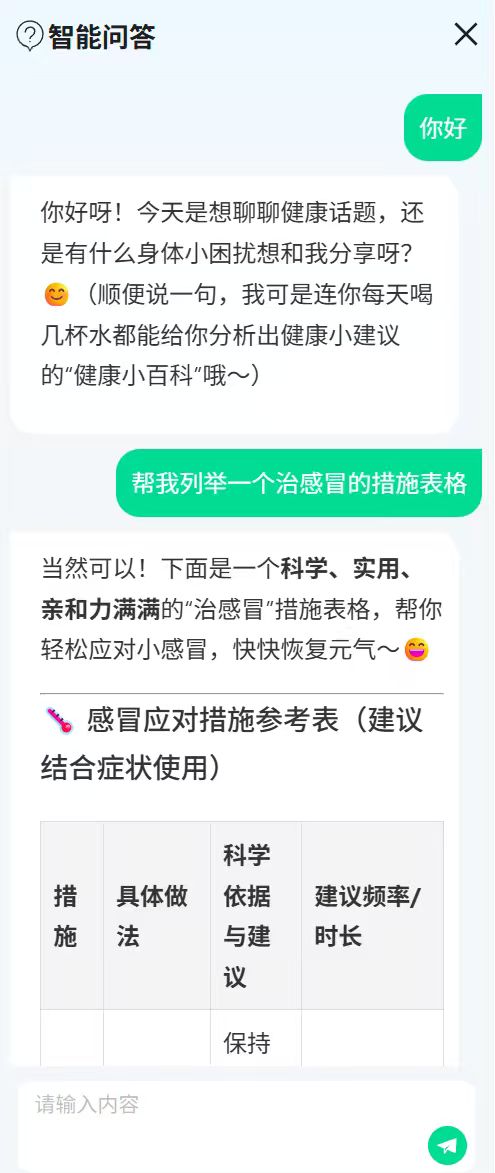
一、下载依赖
npm i markdown-it dompurify highlight.js
二、创建 MarkdownViewer.vue
用于页面引入进行数据解析回显
注意:此文件下的 style 内的样式 是基础 Markdown 样式,自己按需完善
<!-- src/components/MarkdownViewer.vue -->
<template>
  <div class="markdown-body" v-html="safeHtml"></div>
</template>

<script setup>
import { computed } from 'vue'
import MarkdownIt from 'markdown-it'
import DOMPurify from 'dompurify'
import hljs from 'highlight.js'
import 'highlight.js/styles/github.css' // 可换其它主题

const props = defineProps({
  content: { type: String, default: '' }
})

// 创建 markdown-it 实例,开启常用选项与代码高亮
const md = new MarkdownIt({
  html: true,         // 允许内联 HTML(若不需要可设为 false)
  linkify: true,      // 自动识别链接
  breaks: true,       // 换行转 <br>
  highlight(code, lang) {
    if (lang && hljs.getLanguage(lang)) {
      try {
        return `<pre><code class="hljs language-${lang}">` +
          hljs.highlight(code, { language: lang }).value +
          '</code></pre>'
      } catch (e) {}
    }
    // 无法识别语言时,做一次通用转义
    const escaped = md.utils.escapeHtml(code)
    return `<pre><code class="hljs">${escaped}</code></pre>`
  }
})

const safeHtml = computed(() => {
  const html = md.render(props.content || '')
  // 安全处理,避免 XSS
  return DOMPurify.sanitize(html)
})
</script>

<style>
/* 可选:基础 Markdown 样式,自己按需完善 */
.markdown-body {
  line-height: 1.7;
  word-wrap: break-word;
}
.markdown-body pre {
  background: #f6f8fa;
  padding: 12px;
  overflow: auto;
  border-radius: 6px;
}
.markdown-body code {
  font-family: ui-monospace, SFMono-Regular, Menlo, Consolas, "Liberation Mono", monospace;
}
.patient-info {
  font-size: 16px;
  margin-bottom: 20px;
}

.patient-info span {
  font-weight: bold;
}

table {
  width: 100%;
  border-collapse: collapse;
  margin-top: 20px;
}

th,
td {
  border: 1px solid #ddd;
  padding: 8px;
  text-align: left;
}

th {
  background-color: #f4f4f4;
  font-weight: bold;
}

tr:nth-child(even) {
  background-color: #f9f9f9;
}
</style>
二、引入MarkdownViewer.vue 根据需求调整相关逻辑处理
注意:此处绑定的 ref="scrollContainer" 是用于下文中页面渲染时候滚动条滚动到最底部重要参数
<div ref="scrollContainer" @scroll="handleScroll" class="record-list chat-box">
     <div v-for="(item, index) in chatData" :key="index"
        :class="item.type == 1 ? 'right-box' : 'left-box'" class=" jqr-text">
        <div v-if="item.type == 1">{{ item.text }}</div>
         <MarkdownViewer v-else :content="item.text" />
          </div>
          <div v-if="chatData.length == 0"
           style="height:70vh;display: flex;justify-content:center;align-items:center;">
      <a-empty>
         <template #image>
           <!-- <communicateEmpty /> -->
              <div style="font-size: 18px;">
                 {{ "Hi, " + userStore.getActualName }}
                        </div>
                </template>
             <template #description>
           </template>
        </a-empty>
      </div>
 </div>


<div class="input-box">
   <a-textarea :auto-size="{ minRows: 1, maxRows: 3 }" :style="{ resize: 'none' }" class="custom-scroll-textarea"
    v-model:value="inputData" placeholder="请输入内容" @keydown.enter.prevent="handleKeyDown" />
  <div class="send-sty">
   <img style="width: 26px;height: 26px;cursor: pointer" :src="sendSvg" alt="" @click="onSearch">
   </div>
</div>
import MarkdownViewer from './component/MarkdownViewer.vue'

//聊天的集合列表 type:1 发送的内容  2 回复的内容
let chatData = ref([]);
// 获取滚动容器的引用
const scrollContainer = ref(null);
//是否滚动的标识
let isUserScrolling = ref('')
//滚动到底部的方法
const scrollToBottom = () => {
  // 2. 操作前确保 scrollContainer.value 是有效的 DOM 元素
  nextTick(() => {
    if (scrollContainer.value) {
      scrollContainer.value.scrollTop = scrollContainer.value.scrollHeight;
    } else {
      console.error('未找到滚动容器元素');
    }
  })
}

// 滚动事件处理函数
const handleScroll = () => {
  if (!scrollContainer.value) return

  const container = scrollContainer.value
  const scrollTop = container.scrollTop
  const scrollHeight = container.scrollHeight
  const clientHeight = container.clientHeight

  // 计算距离底部的距离
  const distanceToBottom = scrollHeight - (scrollTop + clientHeight)

  // 如果距离底部超过一定阈值(例如 10px),则认为用户在看历史消息
  // 这个阈值可以根据实际情况调整
  if (distanceToBottom > 80) {
    isUserScrolling.value = true
    scrollContainer.value.removeEventListener('scroll', handleScroll)
  } else {
    // 用户滚动到了底部(或非常接近底部),重置状态
    isUserScrolling.value = false
  }
}

//发送的消息内容
const inputData = ref('');
//是否已经输出完标识
const makdowShow = ref(true)
//回车发送消息
function handleKeyDown(event) {
  if (event.key === 'Enter' || event.keyCode === 13) {
    onSearch()
  }
}
//点击发送消息
const onSearch = searchValue => {
  //流式接口调用需要的参数 发送到内容
  setData.query = inputData.value
  if (!inputData.value) {
    message.error('内容不能为空');
    return
  }
  if (makdowShow.value) {
    makdowShow.value = false
  } else {
    message.error('消息回复中,请稍后再试');
    return
  }

  chatData.value.push({
    type: 1,
    text: inputData.value,
  })
  inputData.value = ''

  // ai的对话
  chatData.value.push({
    text: '消息回复中...',
    type: 2,
    isShow: false
  })
  startStream()
};


//流式接口需要的参数
let setData = reactive({
  inputs: '',
  query: "",
  response_mode: "streaming",
  conversation_id: "",
  user: "abc-123",
  files: []
})

const streamData = ref(''); // 存储流式数据
let controller = null; // 用于中止请求

//dify 发送对话消息
const startStream = async () => {
  streamData.value = ''; // 清空旧数据
  controller = new AbortController(); // 创建 AbortController 实例

  try {
    // 1. 发起 Fetch 请求
    const response = await fetch('这里是你的流式接口地址', {
      method: 'POST', // 或 GET,根据接口要求
      headers: {
       //请求头参数根据实际需要配置
        'Content-Type': 'application/json',
        'Authorization': 'Bearer app-VuBKiUeORUG1ychxTIwChey3',
        'Accept': 'text/event-stream', // 根据后端要求设置
        // 其他可能的请求头,如认证信息
        // 'Authorization': 'Bearer your-token'
      },
      body: JSON.stringify(setData),
      signal: controller.signal // 关联中止信号
    });

    // 2. 检查响应是否成功
    if (!response.ok) {
      throw new Error(`网络响应错误: ${response.status}`);
    }

    // 3. 确保响应体存在
    if (!response.body) {
      throw new Error('响应体不存在');
    }
    // console.log(response,'response');
    // 4. 获取可读流的读取器
    const reader = response.body.getReader();
    const decoder = new TextDecoder('utf-8'); // 用于解码二进制数据

    // 5. 循环读取数据流
    try {
      while (true) {
        const { done, value } = await reader.read();

        if (done) {
          //向消息列表中插入数据
          /*          chatData.value.push({
                      type:2,
                      text:streamData.value,
                    })*/
          makdowShow.value = true
          console.log('流式读取完成');
          break;
        }

        // 6. 解码并处理数据块(此处假设为文本)
        const chunk = decoder.decode(value, { stream: true });

        if (chunk.startsWith('data: ')) {
          const jsonString = chunk.substring(6); // 移除 "data: " 前缀
          try {
            const dataMsg = JSON.parse(jsonString);
            // console.log(jsonString,'jsonString');
            //数据的拼接
            if (dataMsg.answer) streamData.value += dataMsg.answer;
          } catch (e) {
            console.error('解析 JSON 失败:', e);
          }
        }
        // console.log(chunk,'chunk');
        // 7. 更新响应式数据,实时展示
        // streamData.value += chunk;

        // console.log(streamData.value,'数据');
        // 如果后端返回的是 NDJSON (每行一个 JSON) 或特定格式,需额外解析
        // 例如:const lines = chunk.split('\n');
        // for (const line of lines) { if (line) { const data = JSON.parse(line); } }
      }
    } finally {
      reader.releaseLock(); // 释放读取器锁
    }
  } catch (error) {
    // 8. 错误处理
    if (error.name === 'AbortError') {
      console.log('请求已被中止');
    } else {
      console.error('流式请求发生错误:', error);
      // 可以设置一个错误状态变量显示给用户
    }
  } finally {
    makdowShow.value = true;
  }
}


//监听ai回复的数据处理
watch(streamData, (newValue, oldValue) => {

  nextTick(() => {
    if (!newValue) {
      chatData.value[chatData.value.length - 1].text = '消息回复中...'
    } else {
      if (!isUserScrolling.value && cardItems.value == 9) {
        scrollToBottom()
      }
      chatData.value[chatData.value.length - 1].text = newValue
    }
  });
})


// 中止请求的函数
const stopStream = () => {
  if (controller) {
    controller.abort();
    controller = null;
  }
};


onUnmounted(() => {
  stopStream()
});
.record-list {
  max-height: 74vh;
  width: 100%;
  overflow-y: auto;

}

.record-list::-webkit-scrollbar {
  display: none;
}

  .left-box {
    padding: 10px 10px 10px 20px;
    border-radius: 0px 16px 16px 16px;
    color: #333333;
    align-self: flex-start;
    /* 对齐到左边 */
    background-color: #FFFFFF;
    /* 背景颜色 */
  }

  .right-box {
    padding: 10px;
    border-radius: 16px 0px 16px 16px;
    color: #FFFFFF;
    align-self: flex-end;
    /* 对齐到右边 */
    background-color: #20C290;
    /* 背景颜色 */
  }

.jqr-text {
  max-width: 95%;

  font-size: 16px;
  //letter-spacing: 4rpx;
  margin-bottom: 10px;
  font-weight: normal;
}

.input-box{
    padding: 10px 12px 0 12px;
    width: 100%;
    position: absolute;
    bottom: 15px;
    left: 0;
    background: #F5F7F9;
  }

  .send-sty{
    width: 100%;
    padding: 0 5px 5px 0;
    background: #ffffff;
    text-align: right;
    border-radius: 0 0 8px 8px;
  }

  .custom-scroll-textarea{
    max-height: 96px;
    padding-right: 0;
    border: none;
    border-radius: 0;
    box-shadow: none !important;
    border-radius: 8px 8px 0 0;
  }

.custom-scroll-textarea::-webkit-scrollbar {
 display:  none;
}

魔乐社区(Modelers.cn) 是一个中立、公益的人工智能社区,提供人工智能工具、模型、数据的托管、展示与应用协同服务,为人工智能开发及爱好者搭建开放的学习交流平台。社区通过理事会方式运作,由全产业链共同建设、共同运营、共同享有,推动国产AI生态繁荣发展。
更多推荐


 3
3 0
0- 0


 已为社区贡献2条内容

所有评论(0)