ELK 开源日志分析平台LEARNING NOTES
Elasticsearch 分布式搜索引擎;Logstash ;Kibana;ELK 开源日志分析平台
Elasticsearch 是个开源分布式搜索引擎,它的特点有:分布式,零配置,自动发现,索引自动分片,索引副本机制,restful 风格接口,多数据源,自动搜索负载等。

Logstash 是一个完全开源的工具,他可以对你的日志进行收集、过滤,并将其存储供以后使用(如,搜索)。

Kibana 也是一个开源和免费的工具,它 Kibana 可以为 Logstash 和 ElasticSearch 提供的日志分析友好的 Web 界面,可以帮助您汇总、分析和搜索重要数据日志。
实验主机与软件环境
rhel6.5 x86_64bit
172.25.5.94 rhel65-lockey4

elasticsearch:2.3.3
logstash:2.3.3
kibana:4.5.1
elasticsearch rpm安装
rpm -ivh elasticsearch-2.3.3.rpm
配置java环境变量
tar -zxvf jdk-7u79-linux-x64.tar.gz -C /usr/local/jdk
vim /etc/profile
export JAVA_HOME=/usr/local/jdk
export CLASSPATH=.:$JAVA_HOME/lib:$JAVA_HOME/jre/lib
export PATH=$PATH:$JAVA_HOME/bin
source /etc/profile
配置文件
[root@rhel65-lockey4 elasticsearch]# grep -v ^# elasticsearch.yml | uniq
cluster.name: my-application
node.name: rhel65-lockey4
path.data: /var/lib/elasticsearch/
path.logs: /var/log/elasticsearch/
bootstrap.mlockall: true
network.host: 172.25.5.94
http.port: 9200
启动服务
/etc/init.d/elasticsearch start
浏览器访问测试:
http://172.25.5.94:9200/
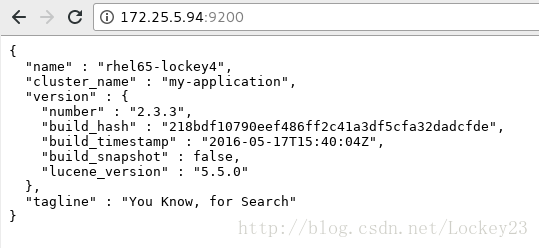
插件安装(以head为例,插件文件可在github进行下载)
/usr/share/elasticsearch/bin/plugin install file:/root/elasticsearch-head-master.zip
增加一个查询然后进行验证:
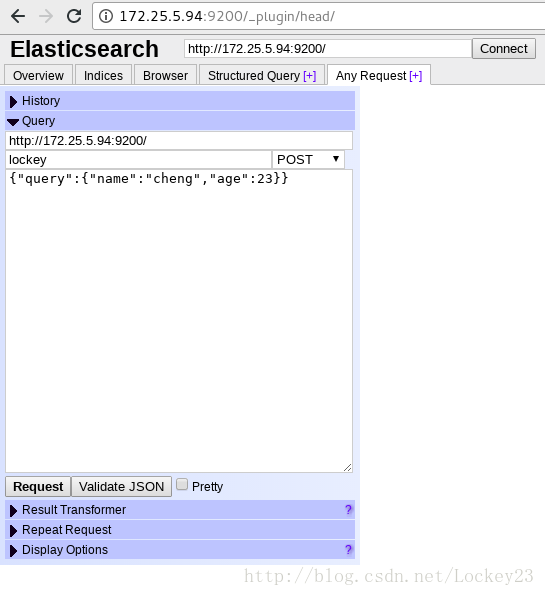
添加好json格式的数据然后点击Request,可以看到如下效果:
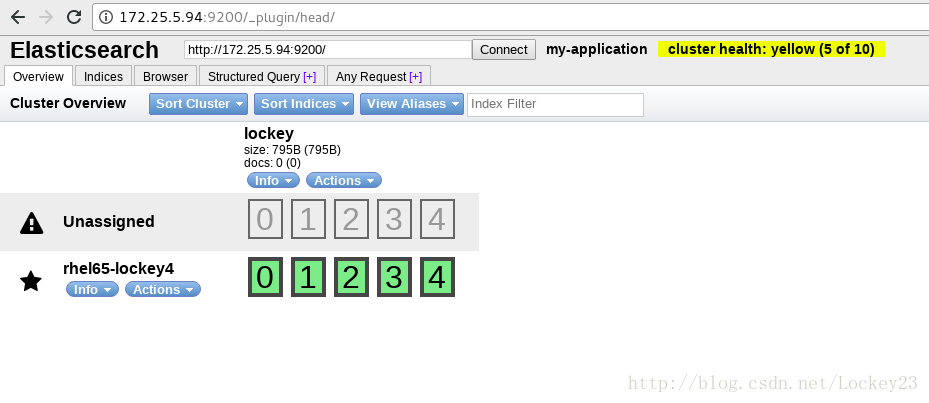
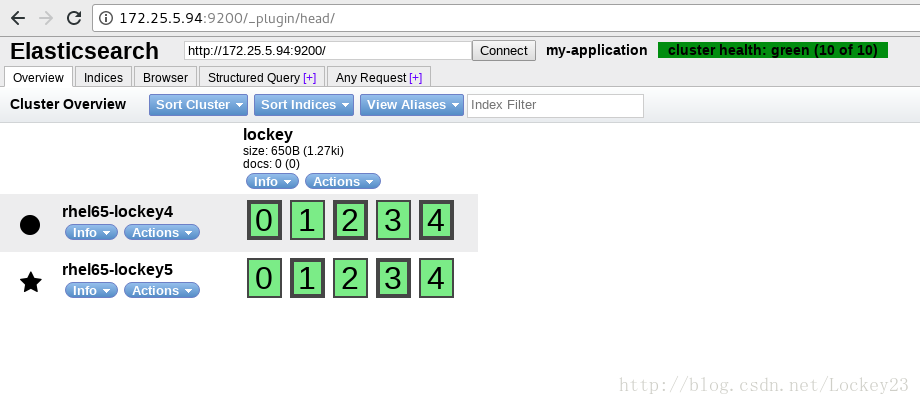
新加一个节点然后设置发现,修改配置文件中的以下内容(集群健康状态为yellow)(rhel65-lockey5为新建节点,配置基本一致):
discovery.zen.ping.unicast.hosts: ["rhel65-lockey4", "rhel65-lockey5"]
重启或者启动两个节点的服务,页面效果如下(集群健康状态变为green):
添加第三个节点rhel65-lockey3进行存储与管理的分离
各节点配置修改为一下内容:
rhel65-lockey4
[root@rhel65-lockey4 elasticsearch]# grep -v ^# elasticsearch.yml | uniq
cluster.name: my-application
node.name: rhel65-lockey4
node.master: true
node.data: false
path.data: /var/lib/elasticsearch/
path.logs: /var/log/elasticsearch/
bootstrap.mlockall: true
network.host: 172.25.5.94
http.port: 9200
discovery.zen.ping.unicast.hosts: ["rhel65-lockey3","rhel65-lockey4", "rhel65-lockey5"]
rhel65-lockey3
[root@rhel65-lockey3 elasticsearch]# grep -v ^# elasticsearch.yml | uniq
cluster.name: my-application
node.name: rhel65-lockey3
node.master: false
node.data: true
path.data: /var/lib/elasticsearch/
path.logs: /var/log/elasticsearch/
bootstrap.mlockall: true
network.host: 172.25.5.93
http.port: 9200
http.enabled: false
discovery.zen.ping.unicast.hosts: ["rhel65-lockey4", "rhel65-lockey5","rhel65-lockey3"]
rhel65-lockey5
[root@rhel65-lockey5 elasticsearch]# grep -v ^# elasticsearch.yml | uniq
cluster.name: my-application
node.name: rhel65-lockey5
node.master: false
node.data: true
path.data: /var/lib/elasticsearch/
path.logs: /var/log/elasticsearch/
bootstrap.mlockall: true
network.host: 172.25.5.95
http.port: 9200
http.enabled: false
discovery.zen.ping.unicast.hosts: ["rhel65-lockey3","rhel65-lockey4", "rhel65-lockey5"]
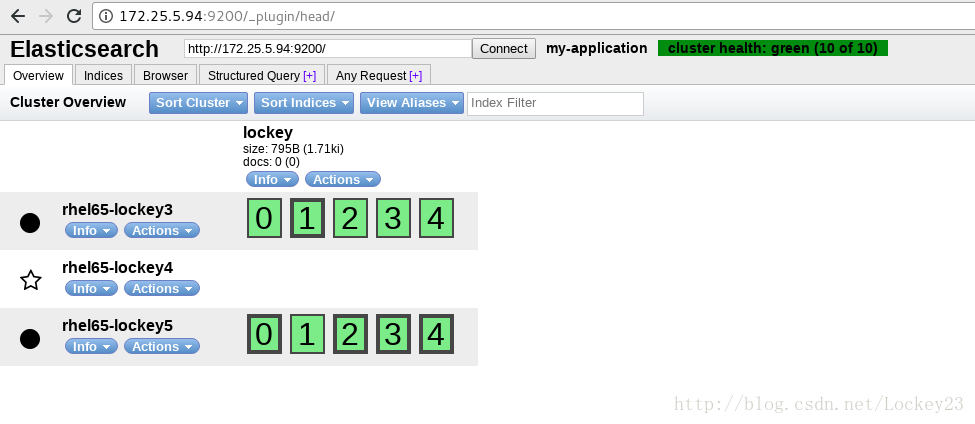
重启动各服务之后结果如下:

魔乐社区(Modelers.cn) 是一个中立、公益的人工智能社区,提供人工智能工具、模型、数据的托管、展示与应用协同服务,为人工智能开发及爱好者搭建开放的学习交流平台。社区通过理事会方式运作,由全产业链共同建设、共同运营、共同享有,推动国产AI生态繁荣发展。
更多推荐


 1
1 0
0- 0


 已为社区贡献2条内容

所有评论(0)