使用AUTODL配置好的DEIM环境训练自己的数据集
我使用的是YOLO格式的数据集,没有使用过DEIM环境的小伙伴们可以往下看。
环境要求:
PyTorch 2.5.1
Python 3.12(ubuntu22.04)
CUDA 12.4
python 3.12
GPU 推荐 >= 32G
所以在选择GPU的时候要注意cuda版本。
我选择的是vGPU-32GB(32GB),现在GPU的cuda版本一般都挺高的。
参考文章:
https://blog.csdn.net/qq_45972324/article/details/154069759
https://blog.51cto.com/u_16213588/14270225
一.数据集分割与转换
整体思路:
- 划分: 先按 8:1:1 划分图片(根据实验要求即可),同步将对应的 XML 标注文件复制到 train/val/test 的目录;
- 转换:对每个子集(train/val/test)执行 XML→COCO JSON 转换,生成符合规范的 JSON 标注文件;
- 检查:保证图片、XML、JSON 三者一一对应,且 JSON 格式严格遵循 COCO 标准(适配 DEIM 的 CocoDetection 接口)。
1.划分
无论原始数据集是哪种格式(如 YOLO 格式),都需要先划分为train(训练集)、val(验证集)、test(测试集)三部分(划分方式可是随机分割,或按提前定义的 txt 文件指定)
import os
import shutil
import random
import json
from pathlib import Path
from typing import List, Dict, Tuple

def check_and_create_dir(dir_path: Path) -> None:
    """检查并创建目录(递归创建父目录)"""
    if not dir_path.exists():
        dir_path.mkdir(parents=True, exist_ok=True)
        print(f"创建目录:{dir_path}")
    else:
        print(f"目录已存在:{dir_path}")

def get_valid_file_triples(
    img_dir: str,
    xml_dir: str,
    label_dir: str
) -> List[Tuple[Path, Path, Path]]:
    """
    获取图片、XML、Label三者一一对应的文件三元组
    返回格式:[(img_file, xml_file, label_file), ...]
    """
    img_path = Path(img_dir)
    xml_path = Path(xml_dir)
    label_path = Path(label_dir)

    # 支持的图片格式
    img_extensions = {".jpg", ".jpeg", ".png", ".bmp", ".tif", ".tiff"}
    valid_triples = []

    # 遍历所有图片文件
    for img_file in img_path.iterdir():
        if not img_file.is_file() or img_file.suffix.lower() not in img_extensions:
            continue

        # 生成对应XML和Label文件路径(按文件名匹配)
        file_stem = img_file.stem
        xml_file = xml_path / f"{file_stem}.xml"
        label_file = label_path / f"{file_stem}.txt"

        # 检查三者是否都存在
        missing = []
        if not xml_file.exists():
            missing.append("XML")
        if not label_file.exists():
            missing.append("Label")

        if missing:
            print(f"警告:图片 {img_file.name} 缺失 {', '.join(missing)} 文件,已跳过")
            continue

        # 加入有效三元组列表
        valid_triples.append((img_file, xml_file, label_file))

    # 校验有效数据量
    if len(valid_triples) == 0:
        raise RuntimeError("未找到任何图片+XML+Label完整匹配的文件!")

    print(f"共找到 {len(valid_triples)} 组完整的图片+XML+Label文件")
    return valid_triples

def split_dataset(
    valid_triples: List[Tuple[Path, Path, Path]],
    target_root: str,
    train_ratio: float = 0.8,
    val_ratio: float = 0.1,
    test_ratio: float = 0.1,
    random_seed: int = 42
) -> None:
    """
    按比例划分数据集,并复制文件到目标目录
    """
    # 校验比例总和
    if abs(train_ratio + val_ratio + test_ratio - 1.0) > 1e-6:
        raise ValueError("训练/验证/测试集比例总和必须为1!")

    # 固定随机种子(保证划分结果可复现)
    random.seed(random_seed)
    random.shuffle(valid_triples)

    # 计算各子集数量
    total_num = len(valid_triples)
    train_num = int(total_num * train_ratio)
    val_num = int(total_num * val_ratio)
    test_num = total_num - train_num - val_num  # 避免浮点精度问题

    # 划分数据集
    train_triples = valid_triples[:train_num]
    val_triples = valid_triples[train_num:train_num+val_num]
    test_triples = valid_triples[train_num+val_num:]

    print(f"\n数据集划分结果:")
    print(f"训练集:{len(train_triples)} 组")
    print(f"验证集:{len(val_triples)} 组")
    print(f"测试集:{len(test_triples)} 组")

    # 定义目标目录结构
    target_root_path = Path(target_root)
    subset_configs = {
        "train": {
            "triples": train_triples,
            "img_dir": target_root_path / "train" / "images",
            "xml_dir": target_root_path / "train" / "xmls",
            "label_dir": target_root_path / "train" / "labels"
        },
        "val": {
            "triples": val_triples,
            "img_dir": target_root_path / "val" / "images",
            "xml_dir": target_root_path / "val" / "xmls",
            "label_dir": target_root_path / "val" / "labels"
        },
        "test": {
            "triples": test_triples,
            "img_dir": target_root_path / "test" / "images",
            "xml_dir": target_root_path / "test" / "xmls",
            "label_dir": target_root_path / "test" / "labels"
        }
    }

    # 批量复制文件函数
    def copy_files(triples: List[Tuple[Path, Path, Path]], img_dst: Path, xml_dst: Path, label_dst: Path, subset_name: str):
        """复制单个子集的所有文件"""
        check_and_create_dir(img_dst)
        check_and_create_dir(xml_dst)
        check_and_create_dir(label_dst)

        print(f"\n开始复制 {subset_name} 集文件...")
        for idx, (img, xml, label) in enumerate(triples, 1):
            try:
                # 复制图片
                shutil.copy2(img, img_dst / img.name)
                # 复制XML
                shutil.copy2(xml, xml_dst / xml.name)
                # 复制Label
                shutil.copy2(label, label_dst / label.name)

                # 每复制50个文件打印进度
                if idx % 50 == 0:
                    print(f"{subset_name} 集已复制 {idx}/{len(triples)} 组文件")
            except Exception as e:
                print(f"复制失败({img.name}):{str(e)}")

        print(f"{subset_name} 集复制完成,共复制 {len(triples)} 组文件")

    # 执行各子集复制
    for subset_name, config in subset_configs.items():
        copy_files(
            triples=config["triples"],
            img_dst=config["img_dir"],
            xml_dst=config["xml_dir"],
            label_dst=config["label_dir"],
            subset_name=subset_name
        )

    # 打印最终目录结构
    print("\n" + "="*50)
    print("数据集划分完成!最终目录结构:")
    print(f"{target_root_path}/")
    print("  ├── train/")
    print("  │   ├── images/  (训练集图片)")
    print("  │   ├── xmls/    (训练集XML标注)")
    print("  │   └── labels/  (训练集YOLO标签)")
    print("  ├── val/")
    print("  │   ├── images/  (验证集图片)")
    print("  │   ├── xmls/    (验证集XML标注)")
    print("  │   └── labels/  (验证集YOLO标签)")
    print("  └── test/")
    print("      ├── images/  (测试集图片)")
    print("      ├── xmls/    (测试集XML标注)")
    print("      └── labels/  (测试集YOLO标签)")

def main():
    # ========== 核心配置(无需修改,已适配你的路径) ==========
    SOURCE_IMG_DIR = "/root/autodl-fs/kitti/images"    # 原始图片路径
    SOURCE_XML_DIR = "/root/autodl-fs/kitti/xmls"      # 原始XML路径
    SOURCE_LABEL_DIR = "/root/autodl-fs/kitti/labels"  # 原始YOLO标签路径
    TARGET_ROOT_DIR = "/root/autodl-fs/dataset"        # 划分后目标根目录
    TRAIN_RATIO = 0.8
    VAL_RATIO = 0.1
    TEST_RATIO = 0.1
    RANDOM_SEED = 42  # 固定种子,保证每次划分结果一致

    # ========== 执行流程 ==========
    try:
        # 1. 获取有效文件三元组(图片+XML+Label)
        valid_triples = get_valid_file_triples(
            img_dir=SOURCE_IMG_DIR,
            xml_dir=SOURCE_XML_DIR,
            label_dir=SOURCE_LABEL_DIR
        )

        # 2. 按比例划分并复制文件
        split_dataset(
            valid_triples=valid_triples,
            target_root=TARGET_ROOT_DIR,
            train_ratio=TRAIN_RATIO,
            val_ratio=VAL_RATIO,
            test_ratio=TEST_RATIO,
            random_seed=RANDOM_SEED
        )

    except Exception as e:
        print(f"\n程序执行出错:{str(e)}")
        exit(1)

if __name__ == "__main__":
    main()
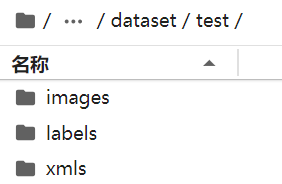
划分后👇
2.转换
参考文章:
https://blog.csdn.net/weixin_40280870/article/details/144904429
首先,你的 YOLO 标签文件(.txt)里,第一列是数字(比如0、1、2),这些数字本身没有语义,classes.txt 就是告诉程序:
0对应什么物体(如 car);1对应什么物体(如 bus);2对应什么物体(如 truck);没有这个文件,程序无法知道数字代表的类别名称,转换 COCO 格式时就会缺失categories字段(DEIM 模型训练时会识别不出类别)。
所以你需要在三个子集下都创建classes.txt 文件才可以运行。be like👇:
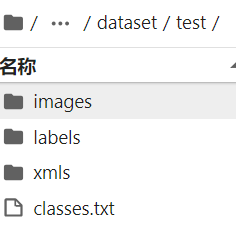
我的classes.txt 内容:
Car
Cyclist
Pedestrian
然后运行代码:
import os
import json
import cv2
from tqdm import tqdm

def yolo_to_coco(yolo_dir, output_json_path):
    """
    将YOLO格式数据集转换为COCO格式。

    :param yolo_dir: YOLO格式数据集的根目录(如train/),包含images、labels文件夹和classes.txt。
    :param output_json_path: 输出的COCO格式JSON文件路径。
    """
    # 路径设置
    images_dir = os.path.join(yolo_dir, 'images')
    labels_dir = os.path.join(yolo_dir, 'labels')
    classes_file = os.path.join(yolo_dir, 'classes.txt')

    # 检查路径是否存在
    if not os.path.exists(images_dir) or not os.path.exists(labels_dir):
        raise FileNotFoundError(f"{yolo_dir} 下的images 或 labels 文件夹不存在!")
    if not os.path.exists(classes_file):
        raise FileNotFoundError(f"{yolo_dir} 下的classes.txt 文件不存在!")

    # 读取类别
    with open(classes_file, 'r') as f:
        categories = [line.strip() for line in f.readlines() if line.strip()]  # 过滤空行
    if not categories:
        raise ValueError(f"{classes_file} 为空,请检查类别文件!")
    categories = [{"id": i + 1, "name": name} for i, name in enumerate(categories)]

    # 初始化COCO数据结构
    coco_data = {
        "images": [],
        "annotations": [],
        "categories": categories
    }

    # 遍历图像(按文件名排序,保证结果可复现)
    image_names = sorted([f for f in os.listdir(images_dir) if f.endswith(('.jpg', '.png', '.jpeg'))])
    image_id = 1
    annotation_id = 1

    for image_name in tqdm(image_names, desc=f"转换 {os.path.basename(yolo_dir)} 集"):
        # 读取图像尺寸
        image_path = os.path.join(images_dir, image_name)
        image = cv2.imread(image_path)
        if image is None:
            print(f"警告:无法读取图片 {image_path},已跳过")
            continue
        height, width, _ = image.shape

        # 添加图像信息
        coco_data["images"].append({
            "id": image_id,
            "file_name": image_name,
            "width": width,
            "height": height
        })

        # 读取对应的标注文件
        label_name = os.path.splitext(image_name)[0] + '.txt'
        label_path = os.path.join(labels_dir, label_name)
        if not os.path.exists(label_path):
            image_id += 1
            continue

        with open(label_path, 'r') as f:
            lines = [l.strip() for l in f.readlines() if l.strip()]

        # 解析标注
        for line in lines:
            parts = line.split()
            if len(parts) != 5:
                print(f"警告:{label_path} 中该行格式错误,已跳过:{line}")
                continue

            try:
                class_id, x_center, y_center, bbox_width, bbox_height = map(float, parts)
                class_id = int(class_id)
            except ValueError:
                print(f"警告:{label_path} 中该行数值错误,已跳过:{line}")
                continue

            # 校验class_id是否在类别范围内
            if class_id < 0 or class_id >= len(categories):
                print(f"警告:{label_path} 中class_id={class_id} 超出类别范围(0~{len(categories)-1}),已跳过")
                continue

            # 将归一化坐标转换为绝对坐标
            x_center *= width
            y_center *= height
            bbox_width *= width
            bbox_height *= height

            # 计算边界框的左上角坐标
            x_min = x_center - (bbox_width / 2)
            y_min = y_center - (bbox_height / 2)

            # 保证坐标非负(避免标注错误导致的负数)
            x_min = max(0, x_min)
            y_min = max(0, y_min)
            bbox_width = max(1, bbox_width)  # 避免宽度/高度为0
            bbox_height = max(1, bbox_height)

            # 计算面积
            area = round(bbox_width * bbox_height, 2)

            # 添加标注信息
            coco_data["annotations"].append({
                "id": annotation_id,
                "image_id": image_id,
                "category_id": class_id + 1,  # YOLO类别从0开始,COCO从1开始
                "bbox": [round(x_min, 2), round(y_min, 2), round(bbox_width, 2), round(bbox_height, 2)],
                "area": area,
                "iscrowd": 0
            })

            annotation_id += 1

        image_id += 1

    # 保存为COCO格式的JSON文件
    os.makedirs(os.path.dirname(output_json_path), exist_ok=True)
    with open(output_json_path, 'w', encoding='utf-8') as f:
        json.dump(coco_data, f, indent=4, ensure_ascii=False)

    print(f"\n{os.path.basename(yolo_dir)} 集转换完成!")
    print(f"  - 图片数量:{len(coco_data['images'])}")
    print(f"  - 标注数量:{len(coco_data['annotations'])}")
    print(f"  - 类别数量:{len(coco_data['categories'])}")
    print(f"  - 输出文件:{output_json_path}\n")

# ========== 适配你的数据集路径 ==========
if __name__ == "__main__":
    # 数据集根目录
    dataset_root = "/root/autodl-fs/dataset"
    # 定义要转换的子集(train/val/test)
    subsets = ["train", "val", "test"]

    for subset in subsets:
        # 每个子集的YOLO目录(包含images/labels/classes.txt)
        yolo_dir = os.path.join(dataset_root, subset)
        # 输出的JSON文件路径(保存在dataset根目录)
        output_json_path = os.path.join(dataset_root, f"{subset}.json")

        # 执行转换
        try:
            yolo_to_coco(yolo_dir, output_json_path)
        except Exception as e:
            print(f"转换 {subset} 集失败:{str(e)}\n")
3.检查
运行完成后,可执行以下代码确认类别映射正确:
import json

# 验证train.json的类别
with open("/root/autodl-fs/dataset/train.json", "r", encoding="utf-8") as f:
    data = json.load(f)

print("类别映射验证:")
for cat in data["categories"]:
    print(f"COCO ID {cat['id']} → {cat['name']}")
二、修改配置数据
参考文章:
https://blog.csdn.net/qq_45972324/article/details/154069759
跟着文章操作的,发生了下面的报错,AI简直越问越偏。
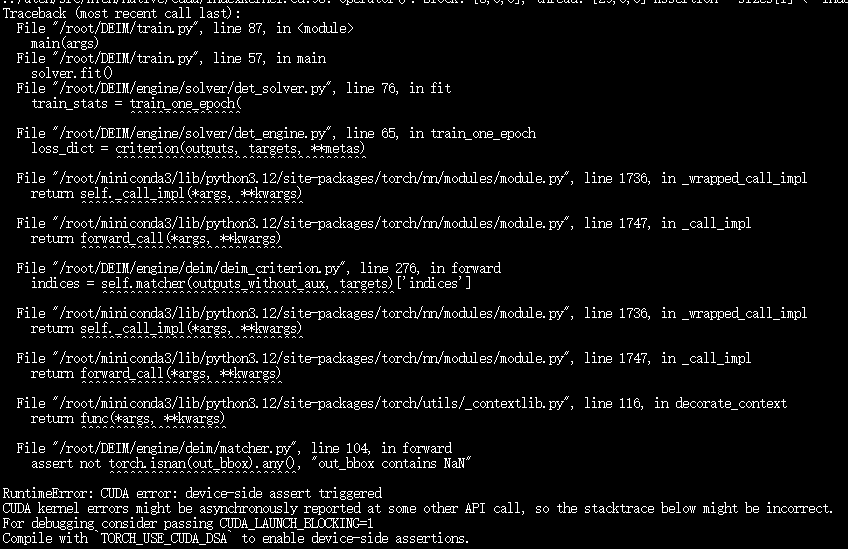
所以,我重置了环境,就修改了路径了数据集路径以及batchsize,运行指令:
CUDA_VISIBLE_DEVICES=0 CUDA_LAUNCH_BLOCKING=1 torchrun --master_port=7777 --nproc_per_node=1 train.py -c configs/deim_dfine/deim_hgnetv2_n_coco.yml --use-amp --seed=0从报错来看,target_ids(标注的类别 ID)超出了模型输出的 out_prob(类别概率张量)的维度范围 → 即标注的类别 ID ≥ 配置中 num_classes,或类别 ID 为负数。
关键验证:配置 vs 标注的类别 ID 不匹配
所以要批量修正标注文件的类别 ID(1→0、2→1、3→2),具体代码可以结合AI意见。
修改后代码就运行成功了!

总结:不要跟着每一步都改,理解大致修改思路后自己的最简化修改,只改必须要改的,再一步一步测试看看,祝大家实验成功!*★,°*:.☆( ̄▽ ̄)/$:*.°★*
感谢豆包和CSDN对本次实验的全力支持😊

魔乐社区(Modelers.cn) 是一个中立、公益的人工智能社区,提供人工智能工具、模型、数据的托管、展示与应用协同服务,为人工智能开发及爱好者搭建开放的学习交流平台。社区通过理事会方式运作,由全产业链共同建设、共同运营、共同享有,推动国产AI生态繁荣发展。
更多推荐


 9
9 0
0- 0


 已为社区贡献8条内容

所有评论(0)