《移动项目实践》实验报告——Android数据存储
·
实验目的
1、熟悉Android五种主要存储方式的用法,包括共享参数SharedPreferences、数据库SQLite、SD卡文件、App的全局内存;
2、熟悉重要组件之一的应用Application的基本概念与常见用法,以及四大组件之一的内容提供器ContentProvider的基本概念与常见用法;
实验内容
“购物车”的设计与实现(参考效果图)
-
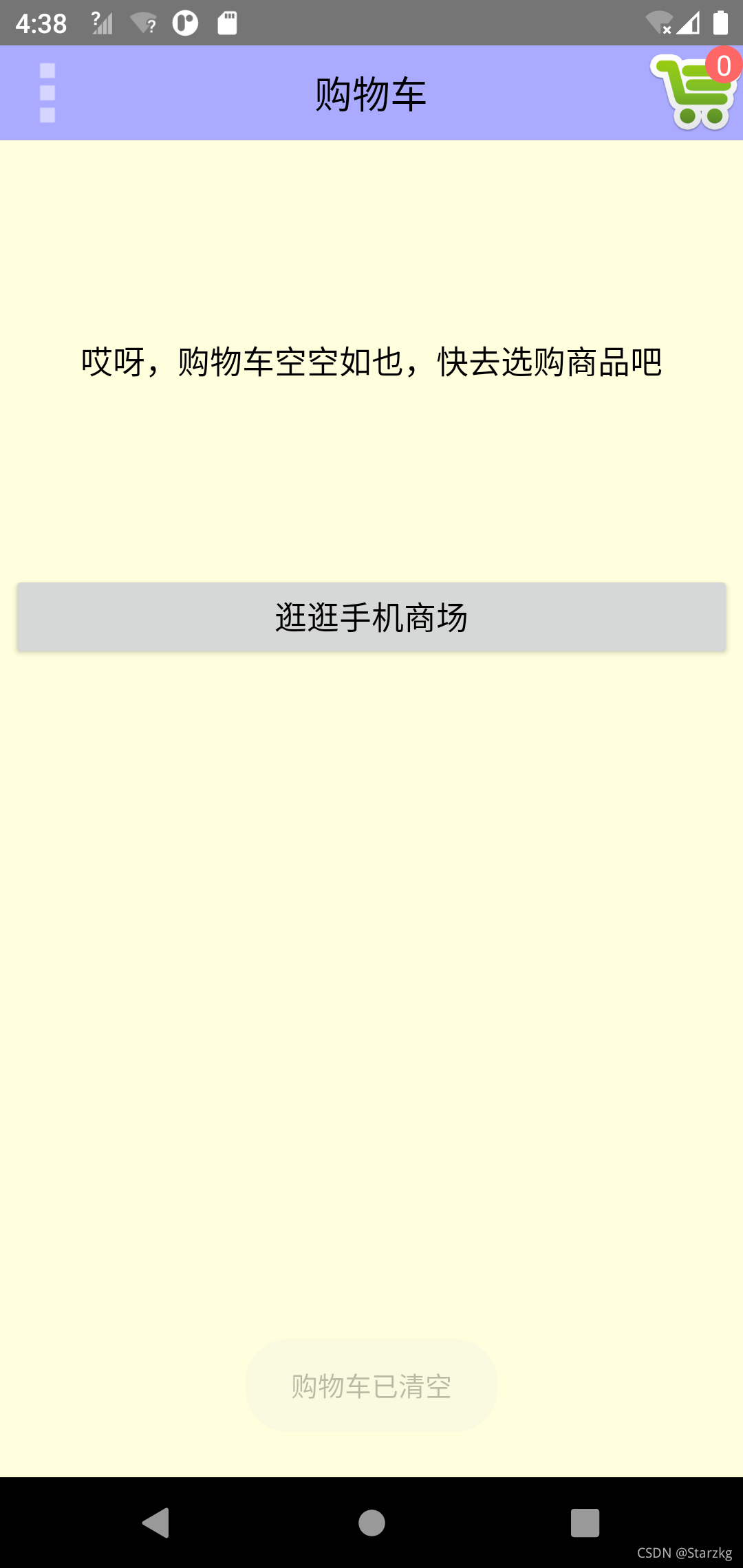
初始效果
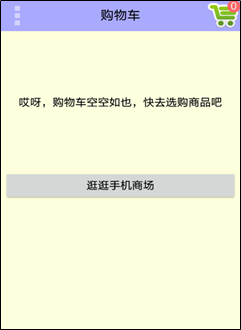
-
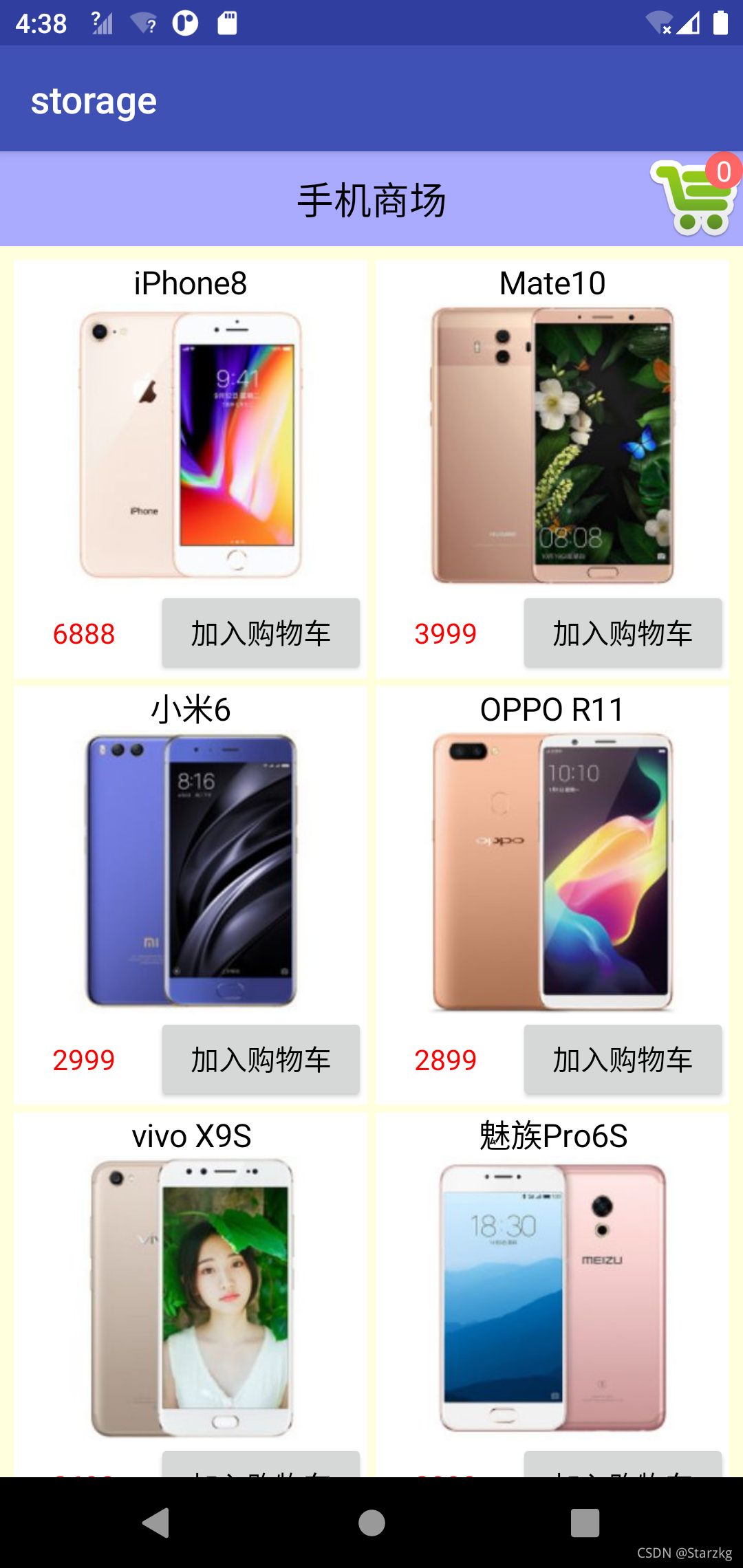
手机商场的商品列表
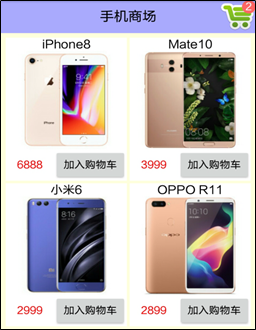
-
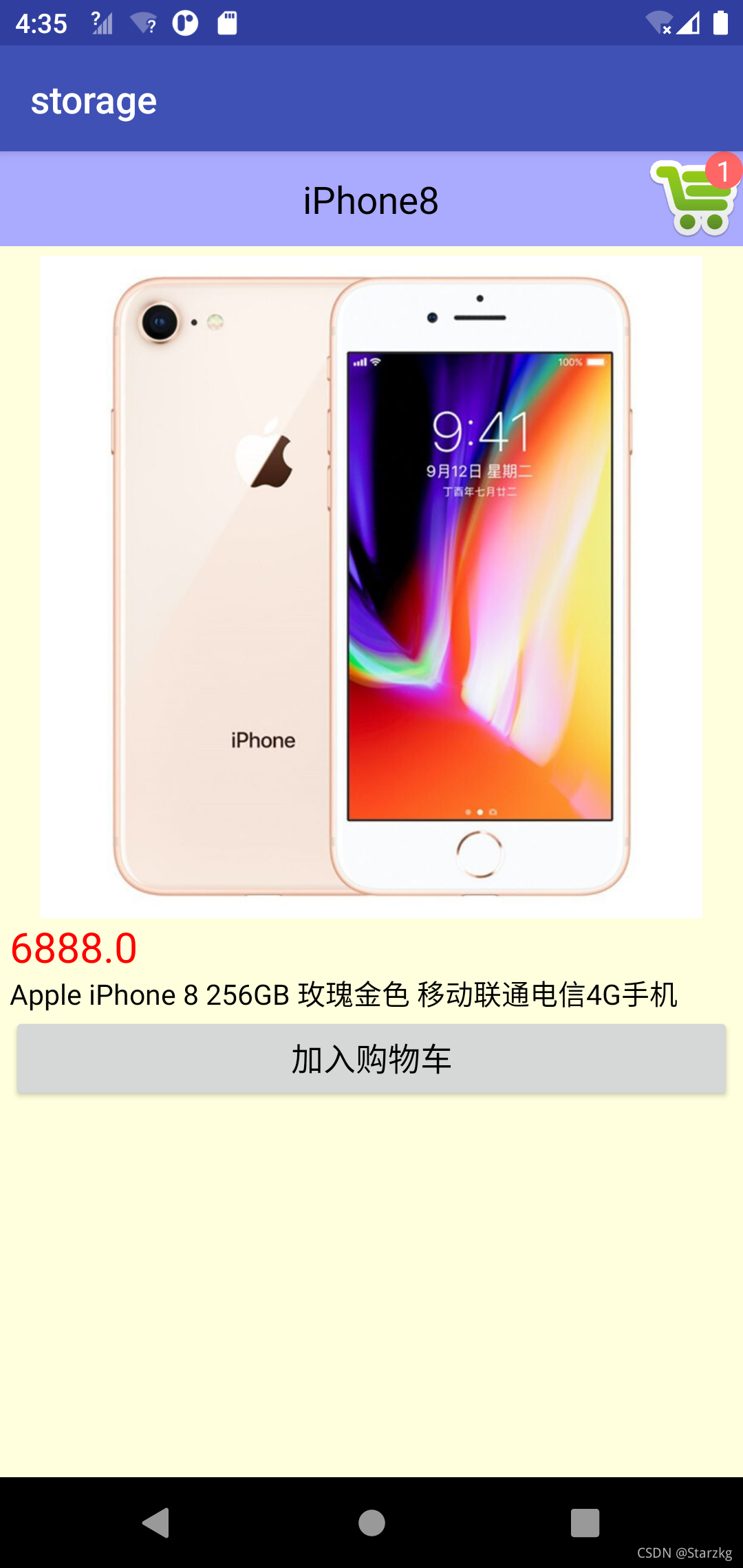
商品详情页面
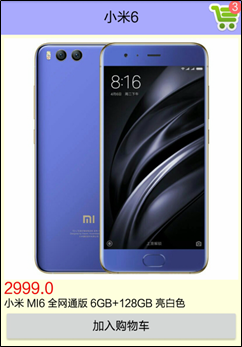
-
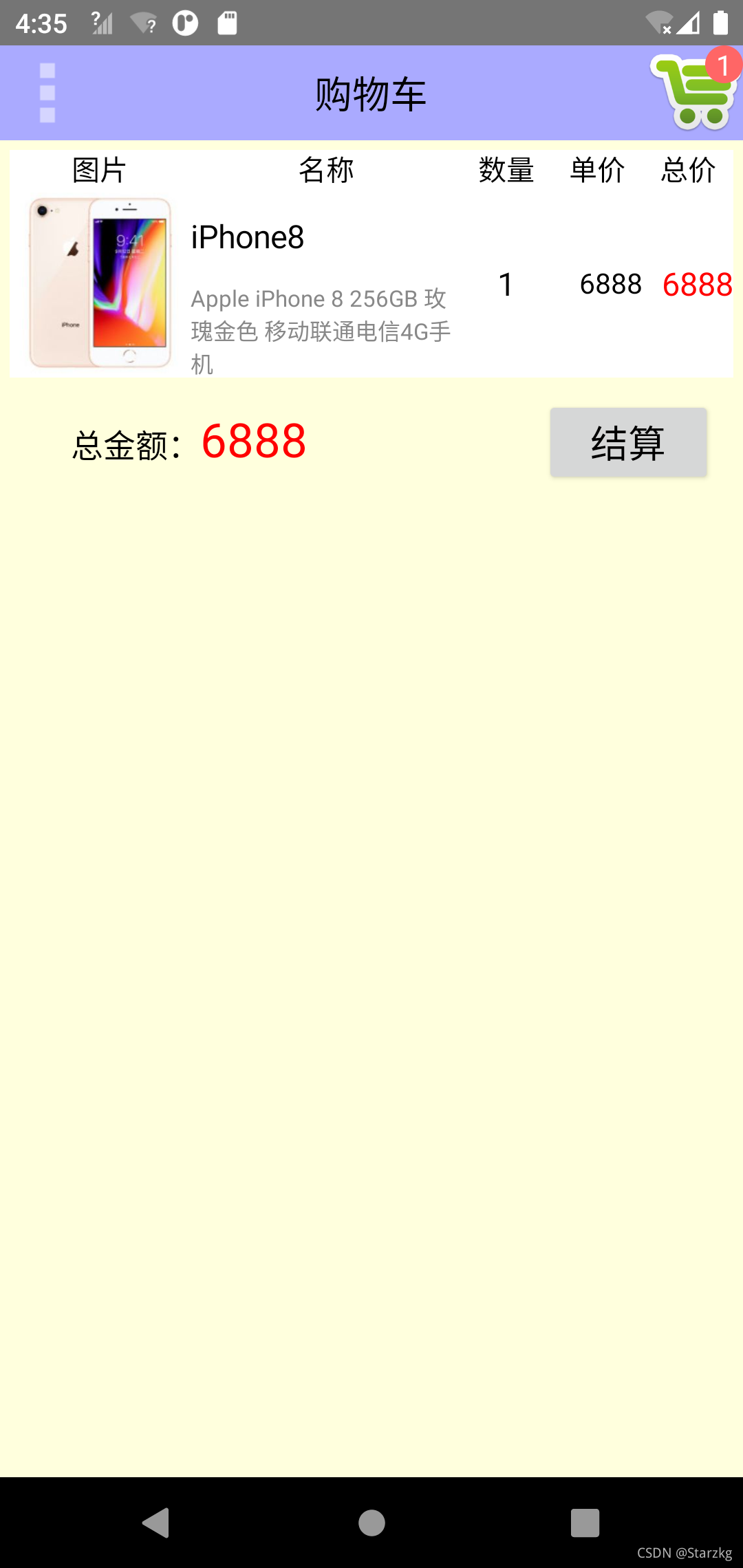
添加商品后的购物车
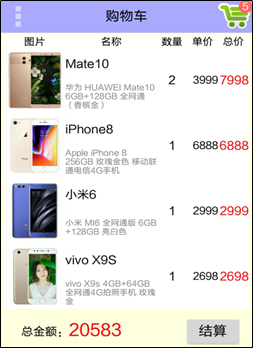
实验过程(实验的设计思路、关键源代码等)
源代码:https://gitee.com/shentuzhigang/mini-project/tree/master/android-shopping
<LinearLayout xmlns:android="http://schemas.android.com/apk/res/android"
    android:layout_width="match_parent"
    android:layout_height="match_parent"
    android:background="#ffffdd"
    android:orientation="vertical" >

    <include layout="@layout/activity_shopping_title" />

    <ScrollView
        android:layout_width="match_parent"
        android:layout_height="wrap_content" >

        <FrameLayout
            android:layout_width="match_parent"
            android:layout_height="wrap_content"
            android:padding="5dp" >

            <LinearLayout
                android:id="@+id/ll_content"
                android:layout_width="match_parent"
                android:layout_height="wrap_content"
                android:orientation="vertical"
                android:visibility="gone" >

                <LinearLayout
                    android:id="@+id/ll_cart"
                    android:layout_width="match_parent"
                    android:layout_height="wrap_content"
                    android:orientation="vertical" >
                </LinearLayout>

                <LinearLayout
                    android:layout_width="match_parent"
                    android:layout_height="wrap_content"
                    android:orientation="horizontal"
                    android:padding="10dp" >

                    <TextView
                        android:layout_width="0dp"
                        android:layout_height="wrap_content"
                        android:layout_weight="1"
                        android:gravity="center|right"
                        android:text="总金额:"
                        android:textColor="@color/black"
                        android:textSize="17sp" />

                    <TextView
                        android:id="@+id/tv_total_price"
                        android:layout_width="0dp"
                        android:layout_height="wrap_content"
                        android:layout_weight="2"
                        android:gravity="center|left"
                        android:textColor="@color/red"
                        android:textSize="25sp" />

                    <Button
                        android:id="@+id/btn_settle"
                        android:layout_width="0dp"
                        android:layout_height="wrap_content"
                        android:layout_weight="1"
                        android:gravity="center"
                        android:text="结算"
                        android:textColor="@color/black"
                        android:textSize="20sp" />
                </LinearLayout>

            </LinearLayout>

            <LinearLayout
                android:id="@+id/ll_empty"
                android:layout_width="match_parent"
                android:layout_height="wrap_content"
                android:orientation="vertical"
                android:visibility="gone" >

                <TextView
                    android:layout_width="match_parent"
                    android:layout_height="wrap_content"
                    android:layout_marginBottom="100dp"
                    android:layout_marginTop="100dp"
                    android:gravity="center"
                    android:text="哎呀,购物车空空如也,快去选购商品吧"
                    android:textColor="@color/black"
                    android:textSize="17sp" />

                <Button
                    android:id="@+id/btn_shopping_channel"
                    android:layout_width="match_parent"
                    android:layout_height="wrap_content"
                    android:gravity="center"
                    android:text="逛逛手机商场"
                    android:textColor="@color/black"
                    android:textSize="17sp" />
            </LinearLayout>
        </FrameLayout>
    </ScrollView>

</LinearLayout>
package io.shentuzhigang.demo.shopping

import android.annotation.SuppressLint
import android.app.Activity
import android.app.AlertDialog
import android.content.Intent
import android.graphics.BitmapFactory
import android.graphics.Color
import android.os.Bundle
import android.os.Environment
import android.util.Log
import android.util.TypedValue
import android.view.*
import android.view.ContextMenu.ContextMenuInfo
import android.widget.ImageView
import android.widget.ImageView.ScaleType
import android.widget.LinearLayout
import android.widget.TextView
import android.widget.Toast
import io.shentuzhigang.demo.shopping.MainApplication
import io.shentuzhigang.demo.shopping.bean.CartInfo
import io.shentuzhigang.demo.shopping.bean.GoodsInfo
import io.shentuzhigang.demo.shopping.database.CartDBHelper
import io.shentuzhigang.demo.shopping.database.GoodsDBHelper
import io.shentuzhigang.demo.shopping.util.FileUtil
import io.shentuzhigang.demo.shopping.util.SharedUtil
import java.util.*

/**
 * Created by ouyangshen on 2017/10/1.
 */
@SuppressLint("SetTextI18n")
class ShoppingCartActivity : Activity(), View.OnClickListener {
    private lateinit var iv_menu: ImageView
    private lateinit var tv_count: TextView
    private lateinit var tv_total_price: TextView
    private lateinit var ll_content: LinearLayout
    private lateinit var ll_cart: LinearLayout
    private lateinit var ll_empty: LinearLayout
    private var mCount // 购物车中的商品数量
            = 0
    private var mGoodsHelper // 声明一个商品数据库的帮助器对象
            : GoodsDBHelper? = null
    private var mCartHelper // 声明一个购物车数据库的帮助器对象
            : CartDBHelper? = null

    override fun onCreate(savedInstanceState: Bundle?) {
        super.onCreate(savedInstanceState)
        requestWindowFeature(Window.FEATURE_NO_TITLE)
        setContentView(R.layout.activity_shopping_cart)
        iv_menu = findViewById(R.id.iv_menu)
        val tv_title = findViewById<TextView>(R.id.tv_title)
        tv_count = findViewById(R.id.tv_count)
        tv_total_price = findViewById(R.id.tv_total_price)
        ll_content = findViewById(R.id.ll_content)
        ll_cart = findViewById(R.id.ll_cart)
        ll_empty = findViewById(R.id.ll_empty)
        iv_menu.setOnClickListener(this)
        findViewById<View>(R.id.btn_shopping_channel).setOnClickListener(this)
        findViewById<View>(R.id.btn_settle).setOnClickListener(this)
        iv_menu.setVisibility(View.VISIBLE)
        tv_title.text = "购物车"
    }

    // 显示购物车图标中的商品数量
    private fun showCount(count: Int) {
        mCount = count
        tv_count!!.text = "" + mCount
        if (mCount == 0) {
            ll_content!!.visibility = View.GONE
            ll_cart!!.removeAllViews()
            ll_empty!!.visibility = View.VISIBLE
        } else {
            ll_content!!.visibility = View.VISIBLE
            ll_empty!!.visibility = View.GONE
        }
    }

    override fun onClick(v: View) {
        if (v.id == R.id.iv_menu) { // 点击了菜单图标
            openOptionsMenu()
        } else if (v.id == R.id.btn_shopping_channel) { // 点击了“商场”按钮
            // 跳转到手机商场页面
            val intent = Intent(this, ShoppingChannelActivity::class.java)
            startActivity(intent)
        } else if (v.id == R.id.btn_settle) { // 点击了“结算”按钮
            val builder = AlertDialog.Builder(this)
            builder.setTitle("结算商品")
            builder.setMessage("客官抱歉,支付功能尚未开通,请下次再来")
            builder.setPositiveButton("我知道了", null)
            builder.create().show()
        }
    }

    override fun onCreateOptionsMenu(menu: Menu): Boolean {
        // 从menu_cart.xml中构建菜单界面布局
        menuInflater.inflate(R.menu.menu_cart, menu)
        return true
    }

    override fun onOptionsItemSelected(item: MenuItem): Boolean {
        val id = item.itemId
        if (id == R.id.menu_shopping) { // 点击了菜单项“去商场购物”
            // 跳转到商场页面
            val intent = Intent(this, ShoppingChannelActivity::class.java)
            startActivity(intent)
        } else if (id == R.id.menu_clear) { // 点击了菜单项“清空购物车”
            // 清空购物车数据库
            mCartHelper!!.deleteAll()
            ll_cart!!.removeAllViews()
            // 把最新的商品数量写入共享参数
            SharedUtil.Companion.getIntance(this)!!.writeShared("count", "0")
            // 显示最新的商品数量
            showCount(0)
            mCartGoods.clear()
            mGoodsMap.clear()
            Toast.makeText(this, "购物车已清空", Toast.LENGTH_SHORT).show()
        } else if (id == R.id.menu_return) { // 点击了菜单项“返回”
            finish()
        }
        return true
    }

    // 声明一个根据视图编号查找商品信息的映射
    private val mCartGoods: HashMap<Int, CartInfo> = HashMap<Int, CartInfo>()

    // 声明一个触发上下文菜单的视图对象
    private var mContextView: View? = null
    override fun onCreateContextMenu(menu: ContextMenu, v: View, menuInfo: ContextMenuInfo) {
        // 保存该商品行的视图,以便删除商品时一块从列表移除该行
        mContextView = v
        // 从menu_goods.xml中构建菜单界面布局
        menuInflater.inflate(R.menu.menu_goods, menu)
    }

    override fun onContextItemSelected(item: MenuItem): Boolean {
        val info: CartInfo? = mCartGoods[mContextView!!.id]
        val id = item.itemId
        if (id == R.id.menu_detail) { // 点击了菜单项“查看商品详情”
            // 跳转到查看商品详情页面
            goDetail(info!!.goods_id)
        } else if (id == R.id.menu_delete) { // 点击了菜单项“从购物车删除”
            val goods_id: Long = info!!.goods_id
            // 从购物车删除商品的数据库操作
            mCartHelper!!.delete("goods_id=$goods_id")
            // 从购物车列表中删除该商品行
            ll_cart!!.removeView(mContextView)
            // 更新购物车中的商品数量
            var left_count: Int = mCount - info!!.count
            for (i in mCartArray!!.indices) {
                if (goods_id == mCartArray!![i].goods_id) {
                    left_count = mCount - mCartArray!![i].count
                    mCartArray!!.removeAt(i)
                    break
                }
            }
            // 把最新的商品数量写入共享参数
            SharedUtil.Companion.getIntance(this)!!.writeShared("count", "" + left_count)
            // 显示最新的商品数量
            showCount(left_count)
            Toast.makeText(this, "已从购物车删除" + mGoodsMap[goods_id]!!.name, Toast.LENGTH_SHORT).show()
            mGoodsMap.remove(goods_id)
            refreshTotalPrice()
        }
        return true
    }

    // 跳转到商品详情页面
    private fun goDetail(rowid: Long) {
        val intent = Intent(this, ShoppingDetailActivity::class.java)
        intent.putExtra("goods_id", rowid)
        startActivity(intent)
    }

    override fun onResume() {
        super.onResume()
        // 获取共享参数保存的购物车中的商品数量
        mCount = SharedUtil.Companion.getIntance(this)!!.readShared("count", "0")!!.toInt()
        showCount(mCount)
        // 获取商品数据库的帮助器对象
        mGoodsHelper = GoodsDBHelper.Companion.getInstance(this, 1)
        // 打开商品数据库的写连接
        mGoodsHelper!!.openWriteLink()
        // 获取购物车数据库的帮助器对象
        mCartHelper = CartDBHelper.Companion.getInstance(this, 1)
        // 打开购物车数据库的写连接
        mCartHelper!!.openWriteLink()
        // 模拟从网络下载商品图片
        downloadGoods()
        // 展示购物车中的商品列表
        showCart()
    }

    override fun onPause() {
        super.onPause()
        // 关闭商品数据库的数据库连接
        mGoodsHelper!!.closeLink()
        // 关闭购物车数据库的数据库连接
        mCartHelper!!.closeLink()
    }

    // 声明一个起始的视图编号
    private val mBeginViewId = 0x7F24FFF0

    // 声明一个购物车中的商品信息队列
    private var mCartArray: ArrayList<CartInfo>? = ArrayList<CartInfo>()

    // 声明一个根据商品编号查找商品信息的映射
    private val mGoodsMap: HashMap<Long, GoodsInfo?> = HashMap<Long, GoodsInfo?>()

    // 展示购物车中的商品列表
    private fun showCart() {
        // 查询购物车数据库中所有的商品记录
        mCartArray = mCartHelper!!.query("1=1")
        Log.d(TAG, "mCartArray.size()=" + mCartArray!!.size)
        if (mCartArray == null || mCartArray!!.size <= 0) {
            return
        }
        // 移除线性视图ll_cart下面的所有子视图
        ll_cart.removeAllViews()
        // 创建一个标题行的线性视图ll_row
        var ll_row = newLinearLayout(LinearLayout.HORIZONTAL, ViewGroup.LayoutParams.WRAP_CONTENT)
        ll_row.addView(newTextView(0, 2f, Gravity.CENTER, "图片", Color.BLACK, 15))
        ll_row.addView(newTextView(0, 3f, Gravity.CENTER, "名称", Color.BLACK, 15))
        ll_row.addView(newTextView(0, 1f, Gravity.CENTER, "数量", Color.BLACK, 15))
        ll_row.addView(newTextView(0, 1f, Gravity.CENTER, "单价", Color.BLACK, 15))
        ll_row.addView(newTextView(0, 1f, Gravity.CENTER, "总价", Color.BLACK, 15))
        // 把标题行添加到购物车列表
        ll_cart.addView(ll_row)
        for (i in mCartArray!!.indices) {
            val info: CartInfo = mCartArray!![i]
            // 根据商品编号查询商品数据库中的商品记录
            val goods: GoodsInfo? = mGoodsHelper!!.queryById(info.goods_id)
            Log.d(TAG, "name=" + goods!!.name + ",price=" + goods.price + ",desc=" + goods.desc)
            mGoodsMap[info.goods_id] = goods
            // 创建该商品行的水平线性视图,从左到右依次为商品小图、商品名称与描述、商品数量、商品单价、商品总价。
            ll_row = newLinearLayout(LinearLayout.HORIZONTAL, ViewGroup.LayoutParams.WRAP_CONTENT)
            // 设置该线性视图的编号
            ll_row.id = mBeginViewId + i
            // 添加商品小图
            val iv_thumb = ImageView(this)
            val iv_params = LinearLayout.LayoutParams(
                0, ViewGroup.LayoutParams.WRAP_CONTENT, 2F
            )
            iv_thumb.layoutParams = iv_params
            iv_thumb.scaleType = ScaleType.FIT_CENTER
            iv_thumb.setImageBitmap(MainApplication.instance?.mIconMap?.get(info.goods_id))
            ll_row.addView(iv_thumb)
            // 添加商品名称与描述
            val ll_name = LinearLayout(this)
            val params = LinearLayout.LayoutParams(
                0, ViewGroup.LayoutParams.MATCH_PARENT, 3F
            )
            ll_name.layoutParams = params
            ll_name.orientation = LinearLayout.VERTICAL
            ll_name.addView(newTextView(-3, 1f, Gravity.LEFT, goods.name, Color.BLACK, 17))
            ll_name.addView(newTextView(-3, 1f, Gravity.LEFT, goods.desc, Color.GRAY, 12))
            ll_row.addView(ll_name)
            // 添加商品数量、单价和总价
            ll_row.addView(newTextView(1, 1f, Gravity.CENTER, "" + info.count, Color.BLACK, 17))
            ll_row.addView(
                newTextView(
                    1,
                    1f,
                    Gravity.RIGHT,
                    "" + goods.price.toInt(),
                    Color.BLACK,
                    15
                )
            )
            ll_row.addView(
                newTextView(
                    1,
                    1f,
                    Gravity.RIGHT,
                    "" + (info.count * goods.price).toInt(),
                    Color.RED,
                    17
                )
            )
            // 给商品行添加点击事件
            ll_row.setOnClickListener { goDetail(info.goods_id) }
            // 给商品行注册上下文菜单,为防止重复注册,这里先注销再注册
            unregisterForContextMenu(ll_row)
            registerForContextMenu(ll_row)
            mCartGoods[ll_row.id] = info
            // 往购物车列表添加该商品行
            ll_cart.addView(ll_row)
        }
        // 重新计算购物车中的商品总金额
        refreshTotalPrice()
    }

    // 重新计算购物车中的商品总金额
    private fun refreshTotalPrice() {
        var total_price = 0
        for (info in mCartArray!!) {
            val goods: GoodsInfo? = mGoodsMap[info.goods_id]
            total_price += (goods!!.price * info.count).toInt()
        }
        tv_total_price.text = "" + total_price
    }

    // 创建一个线性视图的框架
    private fun newLinearLayout(orientation: Int, height: Int): LinearLayout {
        val ll_new = LinearLayout(this)
        val params = LinearLayout.LayoutParams(
            ViewGroup.LayoutParams.MATCH_PARENT, height
        )
        ll_new.layoutParams = params
        ll_new.orientation = orientation
        ll_new.setBackgroundColor(Color.WHITE)
        return ll_new
    }

    // 创建一个文本视图的模板
    private fun newTextView(
        height: Int,
        weight: Float,
        gravity: Int,
        text: String,
        textColor: Int,
        textSize: Int
    ): TextView {
        val tv_new = TextView(this)
        if (height == -3) {  // 垂直排列
            val params = LinearLayout.LayoutParams(
                ViewGroup.LayoutParams.MATCH_PARENT, 0, weight
            )
            tv_new.layoutParams = params
        } else {  // 水平排列
            val params = LinearLayout.LayoutParams(
                0,
                if (height == 0) ViewGroup.LayoutParams.WRAP_CONTENT else ViewGroup.LayoutParams.MATCH_PARENT,
                weight
            )
            tv_new.layoutParams = params
        }
        tv_new.text = text
        tv_new.setTextColor(textColor)
        tv_new.setTextSize(TypedValue.COMPLEX_UNIT_SP, textSize.toFloat())
        tv_new.gravity = Gravity.CENTER or gravity
        return tv_new
    }

    private var mFirst: String? = "true" // 是否首次打开

    // 模拟网络数据,初始化数据库中的商品信息
    private fun downloadGoods() {
        // 获取共享参数保存的是否首次打开参数
        mFirst = SharedUtil.Companion.getIntance(this)!!.readShared("first", "true")
        // 获取当前App的私有存储路径
        val path: String = MainApplication.instance?.getExternalFilesDir(
            Environment.DIRECTORY_DOWNLOADS
        ).toString().toString() + "/"
        if (mFirst == "true") { // 如果是首次打开
            val goodsList: ArrayList<GoodsInfo> = GoodsInfo.defaultList
            for (i in goodsList.indices) {
                val info: GoodsInfo = goodsList[i]
                // 往商品数据库插入一条该商品的记录
                val rowid: Long = mGoodsHelper!!.insert(info)
                info.rowid = rowid
                // 往全局内存写入商品小图
                val thumb = BitmapFactory.decodeResource(resources, info.thumb)
                MainApplication.instance?.mIconMap?.put(rowid, thumb)
                val thumb_path = path + rowid + "_s.jpg"
                FileUtil.saveImage(thumb_path, thumb)
                info.thumb_path = thumb_path
                // 往SD卡保存商品大图
                val pic = BitmapFactory.decodeResource(resources, info.pic)
                val pic_path = "$path$rowid.jpg"
                FileUtil.saveImage(pic_path, pic)
                pic.recycle()
                info.pic_path = pic_path
                // 更新商品数据库中该商品记录的图片路径
                mGoodsHelper!!.update(info)
            }
        } else { // 不是首次打开
            // 查询商品数据库中所有商品记录
            val goodsArray: ArrayList<GoodsInfo> = mGoodsHelper!!.query("1=1")
            for (i in goodsArray.indices) {
                val info: GoodsInfo = goodsArray[i]
                // 从指定路径读取图片文件的位图数据
                val thumb = BitmapFactory.decodeFile(info.thumb_path)
                // 把该位图对象保存到应用实例的全局变量中
                MainApplication.instance?.mIconMap?.put(info.rowid, thumb)
            }
        }
        // 把是否首次打开写入共享参数
        SharedUtil.Companion.getIntance(this)!!.writeShared("first", "false")
    }

    companion object {
        private const val TAG = "ShoppingCartActivity"
    }
}
实验结果(实验最终作品截图说明)
实验心得
1、熟悉Android五种主要存储方式的用法,包括共享参数SharedPreferences、数据库SQLite、SD卡文件、App的全局内存;
2、熟悉重要组件之一的应用Application的基本概念与常见用法,以及四大组件之一的内容提供器ContentProvider的基本概念与常见用法;
参考文章

魔乐社区(Modelers.cn) 是一个中立、公益的人工智能社区,提供人工智能工具、模型、数据的托管、展示与应用协同服务,为人工智能开发及爱好者搭建开放的学习交流平台。社区通过理事会方式运作,由全产业链共同建设、共同运营、共同享有,推动国产AI生态繁荣发展。
更多推荐


 2
2 0
0- 0


 已为社区贡献10条内容

所有评论(0)